Personalization Reset and Re-register Windows Spotlight in Windows 11


Windows_Spotlight-new_header.webp

This tutorial will show you how to reset and re-register Windows Spotlight for your account in Windows 11.

In Windows 11, you can have Windows Spotlight as a theme and display different background images on your desktop and lock screen, and occasionally offers suggestions on the lock screen.

If Windows Spotlights stops working and/or stops changing the background image, you can reset and re-register Windows Spotlight to fix it.

Windows Spotlight will not work while connected to a metered network (ethernet or wireless), or in Battery Saver mode.

Windows Spotlight requires Background Apps to be turned on.

Country or region and Device setup region must be the same for Spotlight to work.
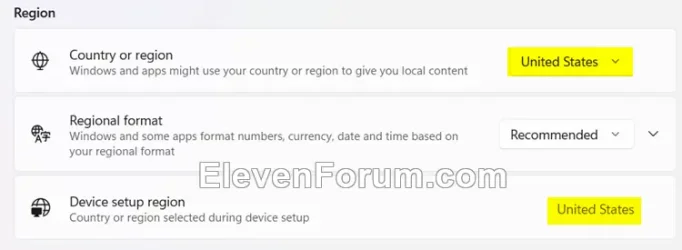
Region.webp


Sometimes it may take 24 to 48 hours after resetting for Windows Spotlight to sync again.


Another option is to use the Windows spotlight, dynamic images theme.

OR:


EXAMPLE: Windows Spotlight on Desktop and Lock screen

Windows_Spotlight_desktop_background.jpg
Windows_Spotlight_lock_screen.jpg


Here's How:

1 Change your desktop background to something other than Windows Spotlight. (see screenshot below)


Windows_Spotlight_desktop_background-1.png

2 Change your lock screen background to something other than Windows Spotlight. (see screenshot below)


Windows_Spotlight_lock_screen_background-1.png

3 Click/tap on the download button below to download the file below.

Reset_and_re-register_Windows_Spotlight.zip​


(Contents of BAT file for reference)
Code:
:: Turn on background apps
reg delete "HKEY_CURRENT_USER\Software\Microsoft\Windows\CurrentVersion\BackgroundAccessApplications" /v GlobalUserDisabled /f
reg delete "HKEY_CURRENT_USER\Software\Microsoft\Windows\CurrentVersion\Search" /v BackgroundAppGlobalToggle /f

:: Reset Windows Spotlight
DEL /F /S /Q /A "%USERPROFILE%/AppData\Local\Packages\MicrosoftWindows.Client.CBS_cw5n1h2txyewy\LocalCache\Microsoft\IrisService"
DEL /F /S /Q /A "%USERPROFILE%/AppData\Local\Packages\Microsoft.Windows.ContentDeliveryManager_cw5n1h2txyewy\LocalCache\Microsoft\IrisService"
DEL /F /S /Q /A "%USERPROFILE%/AppData\Local\Packages\Microsoft.Windows.ContentDeliveryManager_cw5n1h2txyewy\LocalState\Assets"
DEL /F /S /Q /A "%USERPROFILE%/AppData\Local\Packages\Microsoft.Windows.ContentDeliveryManager_cw5n1h2txyewy\Settings"

:: Re-register Windows Spotlight
PowerShell -Command "Get-AppxPackage -AllUsers *Microsoft.Windows.ContentDeliveryManager* | Reset-AppxPackage"
PowerShell -Command "Get-AppxPackage -AllUsers *MicrosoftWindows.Client.CBS* | Reset-AppxPackage"

PowerShell -ExecutionPolicy Unrestricted -Command "& {$manifest = (Get-AppxPackage *ContentDeliveryManager*).InstallLocation + '\AppxManifest.xml' ; Add-AppxPackage -DisableDevelopmentMode -Register $manifest}"
PowerShell -ExecutionPolicy Unrestricted -Command "& {$manifest = (Get-AppxPackage *MicrosoftWindows.Client.CBS*).InstallLocation + '\AppxManifest.xml' ; Add-AppxPackage -DisableDevelopmentMode -Register $manifest}"

4 Save the ZIP file to your desktop.

5 Unblock the ZIP file.

6 Extract the BAT file from the ZIP file.

7 Run the BAT file.

8 Restart the computer to apply.

9 After you sign in, you can change your desktop background back to Windows Spotlight if wanted. (see screenshot below)


Windows_Spotlight_desktop_background-2.png

10 Change your lock screen background back to Windows Spotlight if wanted. (see screenshot below)


Windows_Spotlight_lock_screen_background-2.png


That's it,
Shawn Brink


Attachments

Last edited:
As for me, both Client.CBS and ContentDeliveryManager seem to be borked, the latter one far more thoroughly than the former.
I’ve created 5 user accounts with my latest clean install… 3 using Microsoft credentials. All 5 downloaded new Lock Screen images within 5-15 minutes of the account creation and none downloaded any Desktop Spotlight images. In the past, logging in to a Microsoft would normally cause Desktop Spotlight to update its images. That doesn’t work now either… although, I have had it work on previous installations recently. I’ve not had much trouble with Windows Spotlight in the past and my clean install in late Spring. Anything after late July has been a total mess. And when something didn’t work right, it was normally the Lock Screen that wouldn’t update or had odd behavior.
 

My Computer My Computer

At a glance

Windows 11 ProThreadripper Pro 3945WX32 GB DDR4 3200/EEC HynixNvidia RTX 2070 Super FE
OS
Windows 11 Pro
Computer type
PC/Desktop
Manufacturer/Model
Lenovo P620
CPU
Threadripper Pro 3945WX
Motherboard
Lenovo 1046
Memory
32 GB DDR4 3200/EEC Hynix
Graphics Card(s)
Nvidia RTX 2070 Super FE
Sound Card
N/A
Monitor(s) Displays
Samsung CRG5
Screen Resolution
1920X1080 240mHz
Hard Drives
Samsung PM9A1 1TB NVMe
Samsung 970 EVO Plus 500 GB NVMe
Samsung 850 EVO 1 TB
Samsung 850 PRO 256 GB
PSU
1000 Watt Lenovo 80 plus Platinum
Keyboard
Corsair K95 Platinum XT
Mouse
M65 Pro RGB
Well, color me partially chuffed today.

Desktop!Spotlight finally had a new batch of four wallpapers up and about this afternoon, which was a pleasant surprise, considering that I had convinced myself that all my Powershell tinkering had accidentally broken Client.CBS, too.

Lockscreen!Spotlight is still a blue-faced hospital vegetable, BUT! somehow it DID manage to create, seemingly on its own, two (empty) folders in \LocalState\, namely "Assets" and "ContentManagementSDK"...which should be a reassuring sign of brain activity, but I'm not getting my hopes up as the rest of ContentDeliveryManager remains absolutely barren...no new cookies or tokens, nothing.
 

My Computers My Computers

  • At a glance

    Windows 11 25H2 ProAMD Ryzen 7 9700X32GB Crucial Pro DDR5-6000-CL36 UDIMM OC Gami...ASUS Prime GeForce RTX 4070 Super OC
    OS
    Windows 11 25H2 Pro
    Computer type
    PC/Desktop
    Manufacturer/Model
    Custom
    CPU
    AMD Ryzen 7 9700X
    Motherboard
    Asus ROG Strix X870E-E Gaming Wifi7 NEO
    Memory
    32GB Crucial Pro DDR5-6000-CL36 UDIMM OC Gaming Memory (2 x CP16G60C36U5B), CL36-38-38-80
    Graphics Card(s)
    ASUS Prime GeForce RTX 4070 Super OC
    Monitor(s) Displays
    LG UltraGear 27GS85Q-B/EU 27'' Fast IPS
    Screen Resolution
    2560x1440
    Hard Drives
    1 Kingston Fury Renegade (gen4) 1TB + 1 Kingston Fury Renegade G5 2TB + 1 WD_Black SN850X 1TB + 1 Samsung 870 EVO 1TB + 3 x Western Digital Green 2TB
    PSU
    Be Quiet! Pure Power 12M 850W + Be Quiet! 12V-2X6/12VHPWR 90° Reversed cable
    Case
    Lian Li Lancool III Black
    Cooling
    Thermalright Phantom Spirit 120 SE ARGB
    Keyboard
    Logitech Deluxe 250
    Mouse
    Logitech G502X Black
    Other Info
    Work in progress. Hoping to upgrade to a Zen 7 and 60/70-series GPU in the future...if either scenario ever eventuates.
  • At a glance

    Windows 10 Pro 22H2Intel Core i5-25008GB Kingston HyperX Black DDR3-1600 (KHX16C9B...MSI GeForce GTX970 GAMING 4G
    Operating System
    Windows 10 Pro 22H2
    Computer type
    PC/Desktop
    CPU
    Intel Core i5-2500
    Motherboard
    Asus P8P67LE B3 LGA1155
    Memory
    8GB Kingston HyperX Black DDR3-1600 (KHX16C9B1BK2/8X)
    Graphics card(s)
    MSI GeForce GTX970 GAMING 4G
    Monitor(s) Displays
    ASUS VS238N 24''
    Screen Resolution
    1920x1080px
    Hard Drives
    1 x Samsung 850 Pro 128GB MZ-7KE128 2.5'' SATA SSD
    1 x Western Digital Green 2TB WD20EZRX-00DC0B0 3.5'' SATA HDD
    2 x Western Digital Green 2TB WD20EZRX-00D8PB0 3.5'' SATA HDD
    PSU
    Be Quiet! Pure Power L8-630W 80+ Bronze
    Case
    CoolerMaster Gladiator 600
    Cooling
    CoolerMaster Hyper 212 EVO single-tower CPU air cooler
    Keyboard
    Logitech 250 Deluxe
    Mouse
    Logitech M500
    Other Info
    Bought in summer of 2012. Permanently decommissioned and stripped of its parts in January 2025.
    RIP old boy.
My lock screen was on picture, and it changed however with it changed to windows spotlight it was the basic blue one. My background quit changing for some unknown reason. I did the steps with one additional one. After I did the step the following day I right clicked the Icon Learn about this pick and selected the last picture. The next day the IrisService directory repopulated and without any changes on my part I had a new picture. Finally!

I had tried a lot of different suggestions from a lot of sources with no success. I restored my PC back to before I started to mess around prior to using this fix.
 

My Computer My Computer

At a glance

Windows 11 PROIntel Core i9-9900K Desktop Processor 8 Cores...G.SKILL Trident Z RGB Series (Intel XMP) DDR4...ROG STRIX GTX1060 A6G
OS
Windows 11 PRO
Computer type
PC/Desktop
Manufacturer/Model
Asus
CPU
Intel Core i9-9900K Desktop Processor 8 Cores up to 5.0
Motherboard
ROG MAXIMS XI HERO (WI-FI)
Memory
G.SKILL Trident Z RGB Series (Intel XMP) DDR4 RAM 32GB (2x16GB) 3200
Graphics Card(s)
ROG STRIX GTX1060 A6G
Monitor(s) Displays
LG 34UM88C-P 34-Inch & ViewSonic VP2770-LED 27-Inch
Screen Resolution
3440 X 1440, 2560 X 1440
Hard Drives
Samsung 970 PRO 512GB - NVMe, Samsung 980 PRO 1TB PCIe 4.0 NVME M.2 SSD
& Toshiba Canvio Basics 4TB Portable External Hard Drive USB 3.0,
PSU
Seasonic PRIME 850 Platinum SSR-850PD 850W 80+
Case
Corsair iCUE 4000X RGB Mid-Tower ATX PC Case - Black
Cooling
CORSAIR HYDRO Series H115i PRO RGB AIO
Keyboard
WASD
Mouse
Logitech
Internet Speed
400MB
Browser
Edge
I had tried a lot of different suggestions from a lot of sources with no success. I restored my PC back to before I started to mess around prior to using this fix
I’ve been using a bunch of PowerShell scripts trying to find out in an attempt to fix this problem… basically the Desktop Spotlight isn’t communicating with Microsoft to enable the feature so it can download the images. Could be a command from Microsoft to turn the feature on isn’t happening on or recent updates has broken something. I have one account that’s working and another user account where it isn’t working. Both accounts have Lock Screen Spotlight working perfectly.
 

My Computer My Computer

At a glance

Windows 11 ProThreadripper Pro 3945WX32 GB DDR4 3200/EEC HynixNvidia RTX 2070 Super FE
OS
Windows 11 Pro
Computer type
PC/Desktop
Manufacturer/Model
Lenovo P620
CPU
Threadripper Pro 3945WX
Motherboard
Lenovo 1046
Memory
32 GB DDR4 3200/EEC Hynix
Graphics Card(s)
Nvidia RTX 2070 Super FE
Sound Card
N/A
Monitor(s) Displays
Samsung CRG5
Screen Resolution
1920X1080 240mHz
Hard Drives
Samsung PM9A1 1TB NVMe
Samsung 970 EVO Plus 500 GB NVMe
Samsung 850 EVO 1 TB
Samsung 850 PRO 256 GB
PSU
1000 Watt Lenovo 80 plus Platinum
Keyboard
Corsair K95 Platinum XT
Mouse
M65 Pro RGB
Had a small and tentative breakthrough today while going after orphaned references in my registry.
I discovered that, for some reason,
Code:
Computer\HKEY_LOCAL_MACHINE\SOFTWARE\Microsoft\Windows\CurrentVersion\Authentication\LogonUI\Creative\***SID***
("***SID***" being a placeholder for your user account's SID) was lacking a number of entries, including -but not limited to- LockScreenOptions, RotatingLockScreenEnabled and RotatingLockScreenOverlayEnabled, along with multiple sub-entries that were referencing wallpaper duos otherwise successfully downloaded on temporary user accounts.

Note: if you see multiple SIDs, you can find out your current user account's SID by executing the following command:
Powershell:
Get-LocalUser -Name $env:USERNAME | Select-Object SID

Creative\***SID*** should look something like this:
Code:
Windows Registry Editor Version 5.00

[HKEY_LOCAL_MACHINE\SOFTWARE\Microsoft\Windows\CurrentVersion\Authentication\LogonUI\Creative\THIS_IS_MY_USER_ACCOUNT_SID]
"RotatingLockScreenEnabled"=dword:00000001
"RotatingLockScreenOverlayEnabled"=dword:00000001
"LockImageFlags"=dword:00000003
"LockScreenOptions"=dword:00000000
"CreativeId"=""
"PortraitAssetPath"=""
"LandscapeAssetPath"=""

[HKEY_LOCAL_MACHINE\SOFTWARE\Microsoft\Windows\CurrentVersion\Authentication\LogonUI\Creative\THIS_IS_MY_USER_ACCOUNT_SID\134323083821905779]
"contentId"="0c56892eadc142aebd71377dc2a3c681"
"landscapeImage"="C:\\Users\\MY_USER_ACCOUNT_NAME\\AppData\\Local\\Packages\\Microsoft.Windows.ContentDeliveryManager_cw5n1h2txyewy\\LocalState\\Assets\\d64b8a7b5cd4f5c5653855ae7aea6c55e56f895040ce015bd1b76b08d3757560"
"portraitImage"="C:\\Users\\MY_USER_ACCOUNT_NAME\\AppData\\Local\\Packages\\Microsoft.Windows.ContentDeliveryManager_cw5n1h2txyewy\\LocalState\\Assets\\84547fc0c97e5e0c2a1045e5178546a7b354325eef6a1f7195d5c2fb26d2bf7b"
"showImageOnSecureLock"=dword:00000001

[HKEY_LOCAL_MACHINE\SOFTWARE\Microsoft\Windows\CurrentVersion\Authentication\LogonUI\Creative\THIS_IS_MY_USER_ACCOUNT_SID\134323083822219543]
"contentId"="ca1af4c534b443bf97c6571061f98cac"
"landscapeImage"="C:\\Users\\MY_USER_ACCOUNT_NAME\\AppData\\Local\\Packages\\Microsoft.Windows.ContentDeliveryManager_cw5n1h2txyewy\\LocalState\\Assets\\7f6675fa572feb900631faf25c6c8306853a5e07fcd65953f618cc0a62c00968"
"portraitImage"="C:\\Users\\MY_USER_ACCOUNT_NAME\\AppData\\Local\\Packages\\Microsoft.Windows.ContentDeliveryManager_cw5n1h2txyewy\\LocalState\\Assets\\e7c5f304d39060f466a6d32575733415c835692e9e4fd6535d33c59e119cf4b9"
"showImageOnSecureLock"=dword:00000001

[HKEY_LOCAL_MACHINE\SOFTWARE\Microsoft\Windows\CurrentVersion\Authentication\LogonUI\Creative\THIS_IS_MY_USER_ACCOUNT_SID\134323083822698856]
"contentId"="6ea42ded27cd4f7681b6935984cbec29"
"landscapeImage"="C:\\Users\\MY_USER_ACCOUNT_NAME\\AppData\\Local\\Packages\\Microsoft.Windows.ContentDeliveryManager_cw5n1h2txyewy\\LocalState\\Assets\\0aeb7e0b07c4efe6f993f47ed60deabf21b77e8113c64531ea36950f687c424c"
"portraitImage"="C:\\Users\\MY_USER_ACCOUNT_NAME\\AppData\\Local\\Packages\\Microsoft.Windows.ContentDeliveryManager_cw5n1h2txyewy\\LocalState\\Assets\\031fae3e11515a1baa231df9cdd0bd7793f9215099593d21f6ae89999421130d"
"showImageOnSecureLock"=dword:00000001


I used TeraCopy to replace my main account's malfunctioning %LOCALAPPDATA%\Packages\Microsoft.Windows.ContentDeliveryManager folder with the working one from my temp user account, fixed some URIs in some .xmls (in \LocalState\TargetedContentCache\v3\338387) and then updated the Creative\***SID*** registry entries...and, suddenly, the lock screen was displaying a different wallpaper.

While this is a small victory for me, I will not do the victory dance that comes therewith; I am not convinced what I just did constitutes a lasting fix. I'm not sure I did fix anything, even. If by tomorrow the lock screen hasn't rotated and a new batch of wallpapers hasn't been fetched, it means the problem runs deeper.

Desktop!Spotlight is, on the other hand, still working like a charm.
 

My Computers My Computers

  • At a glance

    Windows 11 25H2 ProAMD Ryzen 7 9700X32GB Crucial Pro DDR5-6000-CL36 UDIMM OC Gami...ASUS Prime GeForce RTX 4070 Super OC
    OS
    Windows 11 25H2 Pro
    Computer type
    PC/Desktop
    Manufacturer/Model
    Custom
    CPU
    AMD Ryzen 7 9700X
    Motherboard
    Asus ROG Strix X870E-E Gaming Wifi7 NEO
    Memory
    32GB Crucial Pro DDR5-6000-CL36 UDIMM OC Gaming Memory (2 x CP16G60C36U5B), CL36-38-38-80
    Graphics Card(s)
    ASUS Prime GeForce RTX 4070 Super OC
    Monitor(s) Displays
    LG UltraGear 27GS85Q-B/EU 27'' Fast IPS
    Screen Resolution
    2560x1440
    Hard Drives
    1 Kingston Fury Renegade (gen4) 1TB + 1 Kingston Fury Renegade G5 2TB + 1 WD_Black SN850X 1TB + 1 Samsung 870 EVO 1TB + 3 x Western Digital Green 2TB
    PSU
    Be Quiet! Pure Power 12M 850W + Be Quiet! 12V-2X6/12VHPWR 90° Reversed cable
    Case
    Lian Li Lancool III Black
    Cooling
    Thermalright Phantom Spirit 120 SE ARGB
    Keyboard
    Logitech Deluxe 250
    Mouse
    Logitech G502X Black
    Other Info
    Work in progress. Hoping to upgrade to a Zen 7 and 60/70-series GPU in the future...if either scenario ever eventuates.
  • At a glance

    Windows 10 Pro 22H2Intel Core i5-25008GB Kingston HyperX Black DDR3-1600 (KHX16C9B...MSI GeForce GTX970 GAMING 4G
    Operating System
    Windows 10 Pro 22H2
    Computer type
    PC/Desktop
    CPU
    Intel Core i5-2500
    Motherboard
    Asus P8P67LE B3 LGA1155
    Memory
    8GB Kingston HyperX Black DDR3-1600 (KHX16C9B1BK2/8X)
    Graphics card(s)
    MSI GeForce GTX970 GAMING 4G
    Monitor(s) Displays
    ASUS VS238N 24''
    Screen Resolution
    1920x1080px
    Hard Drives
    1 x Samsung 850 Pro 128GB MZ-7KE128 2.5'' SATA SSD
    1 x Western Digital Green 2TB WD20EZRX-00DC0B0 3.5'' SATA HDD
    2 x Western Digital Green 2TB WD20EZRX-00D8PB0 3.5'' SATA HDD
    PSU
    Be Quiet! Pure Power L8-630W 80+ Bronze
    Case
    CoolerMaster Gladiator 600
    Cooling
    CoolerMaster Hyper 212 EVO single-tower CPU air cooler
    Keyboard
    Logitech 250 Deluxe
    Mouse
    Logitech M500
    Other Info
    Bought in summer of 2012. Permanently decommissioned and stripped of its parts in January 2025.
    RIP old boy.
So I was right - it fixed nothing. However, I made bigger strides forwards in the last two days that I'd like to share here.

1. I was reluctant to do something so...drastic (compared to what I tried before), but after exhausting my options, I opted for Windows' built-in in-place repair. Go to Windows Update > Advanced options > Recovery > Fix problems using Windows Update, click "Reinstall Now." This will organize a rebuilding of Windows WITHOUT losing any of your data and programs (except maybe a few Start menu icons like Windows Firewall, but that was easily fixed by going to shell:appsfolder and reinstating the missing shortcut) and settings. It took fifteen-twenty minutes and several reboots, but it did give my Windows a bit of an internal glow-up.

THAT method, which I feared was maybe a tad too heavy-handed, appears to have completely rebuilt ContentDeliveryManager, fixed a few missing or untethered things under the hood and I have been pleased to note signs of the folder contents (tokens, etc) being updated dynamically every couple of hours. I'm waiting to see if Client.CBS will behave similarly - sometimes it takes up to 24h for new wallpapers to show up.

2. That said, CDM is struggling to get a proper response from Microsoft servers for Lock screen wallpapers. In %LOCALAPPDATA%\\Packages\Microsoft.Windows.ContentDeliveryManager_cw5n1h2txyewy\LocalState\ContentManagementSDK\Creatives\338387, I get stubs with the following:
Code:
{"batchrsp":{"ver":"1.0","errors":[{"code":2040,"msg":"Demand source returns error (Name: GN_ps, Error: No eligible content.)."}],"refreshtime":"2026-08-29T18:37:50"}}
On the other hand, creating a new, temporary account still results in that account's Lockscreen!Spotlight being able to pull new wallpapers from MS servers. So I think there may be an issue with credentials or tokens.

3. After fiddling a bit, I would now advise against using Powershell reset commands. I think they do break things under the hood and do not renew them thoroughly. I had MUCH better luck with Windows Update repairs than resets, unfortunately.

4. On the subject of temporary user accounts being inexplicably able to retrieve new content, I recall several users on other forums (including Microsoft help threads) mentioning that MS online accounts seem to have a rougher go of it than local accounts with Spotlight updates. I'm a bit reticent to convert my current main account, even temporarily, to a local one to test this hypothesis, though...the last time I did that, it borked my PIN when I tried to revert to online account.
 

My Computers My Computers

  • At a glance

    Windows 11 25H2 ProAMD Ryzen 7 9700X32GB Crucial Pro DDR5-6000-CL36 UDIMM OC Gami...ASUS Prime GeForce RTX 4070 Super OC
    OS
    Windows 11 25H2 Pro
    Computer type
    PC/Desktop
    Manufacturer/Model
    Custom
    CPU
    AMD Ryzen 7 9700X
    Motherboard
    Asus ROG Strix X870E-E Gaming Wifi7 NEO
    Memory
    32GB Crucial Pro DDR5-6000-CL36 UDIMM OC Gaming Memory (2 x CP16G60C36U5B), CL36-38-38-80
    Graphics Card(s)
    ASUS Prime GeForce RTX 4070 Super OC
    Monitor(s) Displays
    LG UltraGear 27GS85Q-B/EU 27'' Fast IPS
    Screen Resolution
    2560x1440
    Hard Drives
    1 Kingston Fury Renegade (gen4) 1TB + 1 Kingston Fury Renegade G5 2TB + 1 WD_Black SN850X 1TB + 1 Samsung 870 EVO 1TB + 3 x Western Digital Green 2TB
    PSU
    Be Quiet! Pure Power 12M 850W + Be Quiet! 12V-2X6/12VHPWR 90° Reversed cable
    Case
    Lian Li Lancool III Black
    Cooling
    Thermalright Phantom Spirit 120 SE ARGB
    Keyboard
    Logitech Deluxe 250
    Mouse
    Logitech G502X Black
    Other Info
    Work in progress. Hoping to upgrade to a Zen 7 and 60/70-series GPU in the future...if either scenario ever eventuates.
  • At a glance

    Windows 10 Pro 22H2Intel Core i5-25008GB Kingston HyperX Black DDR3-1600 (KHX16C9B...MSI GeForce GTX970 GAMING 4G
    Operating System
    Windows 10 Pro 22H2
    Computer type
    PC/Desktop
    CPU
    Intel Core i5-2500
    Motherboard
    Asus P8P67LE B3 LGA1155
    Memory
    8GB Kingston HyperX Black DDR3-1600 (KHX16C9B1BK2/8X)
    Graphics card(s)
    MSI GeForce GTX970 GAMING 4G
    Monitor(s) Displays
    ASUS VS238N 24''
    Screen Resolution
    1920x1080px
    Hard Drives
    1 x Samsung 850 Pro 128GB MZ-7KE128 2.5'' SATA SSD
    1 x Western Digital Green 2TB WD20EZRX-00DC0B0 3.5'' SATA HDD
    2 x Western Digital Green 2TB WD20EZRX-00D8PB0 3.5'' SATA HDD
    PSU
    Be Quiet! Pure Power L8-630W 80+ Bronze
    Case
    CoolerMaster Gladiator 600
    Cooling
    CoolerMaster Hyper 212 EVO single-tower CPU air cooler
    Keyboard
    Logitech 250 Deluxe
    Mouse
    Logitech M500
    Other Info
    Bought in summer of 2012. Permanently decommissioned and stripped of its parts in January 2025.
    RIP old boy.
So I was right - it fixed nothing. However, I made bigger strides forwards in the last two days that I'd like to share here.
Something is definitely not working correctly with Desktop Spotlight. Since it was released with the Windows 10 Fall Creators Update October 17, 2017, it always worked right (at least for me) until recently. Lock Screen has always been a bit buggy and most Spotlight fixes had it in mind. Before Spotlight, I installed theme packs to get Desktop Wallpapers. I guess I’ll return to that for now. Yes there’s apps that do the same thing as Spotlight… even Bing has its own app that works almost the same as Desktop Spotlight, but why? Windows features should work as intended. Running scripts, writing .bat files or playing with the registry isn’t something a Windows user should have to do. Applications should work… especially ones which has been stable for almost 9 years.
 

My Computer My Computer

At a glance

Windows 11 ProThreadripper Pro 3945WX32 GB DDR4 3200/EEC HynixNvidia RTX 2070 Super FE
OS
Windows 11 Pro
Computer type
PC/Desktop
Manufacturer/Model
Lenovo P620
CPU
Threadripper Pro 3945WX
Motherboard
Lenovo 1046
Memory
32 GB DDR4 3200/EEC Hynix
Graphics Card(s)
Nvidia RTX 2070 Super FE
Sound Card
N/A
Monitor(s) Displays
Samsung CRG5
Screen Resolution
1920X1080 240mHz
Hard Drives
Samsung PM9A1 1TB NVMe
Samsung 970 EVO Plus 500 GB NVMe
Samsung 850 EVO 1 TB
Samsung 850 PRO 256 GB
PSU
1000 Watt Lenovo 80 plus Platinum
Keyboard
Corsair K95 Platinum XT
Mouse
M65 Pro RGB
HOLY GUACAMOLE.

Lockscreen!Spotlight FINALLY UPDATED after running the old method (which involves the original script that didn't incorporate Powershell resets and all), rebooting and waiting a bit.
Batch:
reg delete "HKEY_CURRENT_USER\Software\Microsoft\Windows\CurrentVersion\BackgroundAccessApplications" /v GlobalUserDisabled /f
reg delete "HKEY_CURRENT_USER\Software\Microsoft\Windows\CurrentVersion\Search" /v BackgroundAppGlobalToggle /f
DEL /F /S /Q /A "%LOCALAPPDATA%\Packages\MicrosoftWindows.Client.CBS_cw5n1h2txyewy\LocalCache\Microsoft\IrisService"
DEL /F /S /Q /A "%LOCALAPPDATA%\Packages\Microsoft.Windows.ContentDeliveryManager_cw5n1h2txyewy\LocalState\Assets"
DEL /F /S /Q /A "%LOCALAPPDATA%\Packages\Microsoft.Windows.ContentDeliveryManager_cw5n1h2txyewy\Settings"
PowerShell -ExecutionPolicy Unrestricted -Command "& {$manifest = (Get-AppxPackage *Microsoft.Windows.ContentDeliveryManager*).InstallLocation + '\AppxManifest.xml' ; Add-AppxPackage -DisableDevelopmentMode -Register $manifest -Verbose}"
PowerShell -ExecutionPolicy Unrestricted -Command "& {$manifest = (Get-AppxPackage *MicrosoftWindows.Client.CBS*).InstallLocation + '\AppxManifest.xml' ; Add-AppxPackage -DisableDevelopmentMode -Register $manifest -Verbose}"
cd "%LOCALAPPDATA%\Packages\MicrosoftWindows.Client.CBS_cw5n1h2txyewy\LocalCache\"
mkdir "Microsoft\IrisService"


All I had to do was run the "Fix problems with Windows Update" process (which, I can conclusively say now, has decisively fixed the problems that Powershell package re-register commands couldn't resolve) then run the script afterwards after a couple hours. That seemed to have straightened it all out.

Another unexpected windfall is that the above steps ALSO restored the three wallpaper icons (two listing facts and anecdotes and the third one being the "like what you see? yes/no" sub-window) that I've not seen in a LONG time.

Desktop!Spotlight hasn't updated yet (as I said previously, the wallpaper retrieval routine for Client.CBS seems to occur later in the day, around 5PM CEST/GMT+2, rather than within minutes of switching background modes), but I have good a feeling about this one AT LONG LAST. Jesus H Christ, it's been almost a month and a half now since I did my motherboard swap and this has been bugging me...and I'm embarrassed to say I spent waaaayy too much time on this.

This is a most pleasant surprise. Thanks to those who helped.


EDIT: it just occurred to me that another possible factor that may have contributed to the "switch flip" was my changing my regional settings (I'm in Europe, but I use US language in Windows due to English being my mothertongue and several other personal preferences of mine), switching from the country I'm currently in to "United States" (go to Settings > Time & language > Language & region > Country or region). No idea if this has anything to do with the breakthrough or if it's merely a well-timed coincidence.
 
Last edited:

My Computers My Computers

  • At a glance

    Windows 11 25H2 ProAMD Ryzen 7 9700X32GB Crucial Pro DDR5-6000-CL36 UDIMM OC Gami...ASUS Prime GeForce RTX 4070 Super OC
    OS
    Windows 11 25H2 Pro
    Computer type
    PC/Desktop
    Manufacturer/Model
    Custom
    CPU
    AMD Ryzen 7 9700X
    Motherboard
    Asus ROG Strix X870E-E Gaming Wifi7 NEO
    Memory
    32GB Crucial Pro DDR5-6000-CL36 UDIMM OC Gaming Memory (2 x CP16G60C36U5B), CL36-38-38-80
    Graphics Card(s)
    ASUS Prime GeForce RTX 4070 Super OC
    Monitor(s) Displays
    LG UltraGear 27GS85Q-B/EU 27'' Fast IPS
    Screen Resolution
    2560x1440
    Hard Drives
    1 Kingston Fury Renegade (gen4) 1TB + 1 Kingston Fury Renegade G5 2TB + 1 WD_Black SN850X 1TB + 1 Samsung 870 EVO 1TB + 3 x Western Digital Green 2TB
    PSU
    Be Quiet! Pure Power 12M 850W + Be Quiet! 12V-2X6/12VHPWR 90° Reversed cable
    Case
    Lian Li Lancool III Black
    Cooling
    Thermalright Phantom Spirit 120 SE ARGB
    Keyboard
    Logitech Deluxe 250
    Mouse
    Logitech G502X Black
    Other Info
    Work in progress. Hoping to upgrade to a Zen 7 and 60/70-series GPU in the future...if either scenario ever eventuates.
  • At a glance

    Windows 10 Pro 22H2Intel Core i5-25008GB Kingston HyperX Black DDR3-1600 (KHX16C9B...MSI GeForce GTX970 GAMING 4G
    Operating System
    Windows 10 Pro 22H2
    Computer type
    PC/Desktop
    CPU
    Intel Core i5-2500
    Motherboard
    Asus P8P67LE B3 LGA1155
    Memory
    8GB Kingston HyperX Black DDR3-1600 (KHX16C9B1BK2/8X)
    Graphics card(s)
    MSI GeForce GTX970 GAMING 4G
    Monitor(s) Displays
    ASUS VS238N 24''
    Screen Resolution
    1920x1080px
    Hard Drives
    1 x Samsung 850 Pro 128GB MZ-7KE128 2.5'' SATA SSD
    1 x Western Digital Green 2TB WD20EZRX-00DC0B0 3.5'' SATA HDD
    2 x Western Digital Green 2TB WD20EZRX-00D8PB0 3.5'' SATA HDD
    PSU
    Be Quiet! Pure Power L8-630W 80+ Bronze
    Case
    CoolerMaster Gladiator 600
    Cooling
    CoolerMaster Hyper 212 EVO single-tower CPU air cooler
    Keyboard
    Logitech 250 Deluxe
    Mouse
    Logitech M500
    Other Info
    Bought in summer of 2012. Permanently decommissioned and stripped of its parts in January 2025.
    RIP old boy.
Just a few details of note - maybe some other user will find them relevant to their own case.

Spotlight content (and the retrieval thereof) appears dependent on computer location to a certain extent.
Case in point, I've been fiddling with Windows' "country or region" setting and I noticed that Spotlight was a lot more cooperative after switching said country/region to "United States" rather than the European country I live in. I installed the "English (United States)" .iso of Windows 11, so the OS might be a bit grumpy if it encounters a mismatch between its language and the user-defined region/country.

This would also explain why creating temporary users (i.e. new local accounts) would result in accounts seemingly in good standing with the Spotlight servers: those temporary accounts always have their country/region defaulted to "United States" instead of my home country, as was the case with my main (online) account.

I am not sure, at this very moment, whether Location/GPS (Settings > Privacy & security > Location) is of any help or complicates things.

User-defined DNS settings (I use Cloudflare DNS to encrypt my traffic), on the other hand, do NOT seem to have any effect on Spotlight content retrieval, despite online suggestions to the contrary.
 
Last edited:

My Computers My Computers

  • At a glance

    Windows 11 25H2 ProAMD Ryzen 7 9700X32GB Crucial Pro DDR5-6000-CL36 UDIMM OC Gami...ASUS Prime GeForce RTX 4070 Super OC
    OS
    Windows 11 25H2 Pro
    Computer type
    PC/Desktop
    Manufacturer/Model
    Custom
    CPU
    AMD Ryzen 7 9700X
    Motherboard
    Asus ROG Strix X870E-E Gaming Wifi7 NEO
    Memory
    32GB Crucial Pro DDR5-6000-CL36 UDIMM OC Gaming Memory (2 x CP16G60C36U5B), CL36-38-38-80
    Graphics Card(s)
    ASUS Prime GeForce RTX 4070 Super OC
    Monitor(s) Displays
    LG UltraGear 27GS85Q-B/EU 27'' Fast IPS
    Screen Resolution
    2560x1440
    Hard Drives
    1 Kingston Fury Renegade (gen4) 1TB + 1 Kingston Fury Renegade G5 2TB + 1 WD_Black SN850X 1TB + 1 Samsung 870 EVO 1TB + 3 x Western Digital Green 2TB
    PSU
    Be Quiet! Pure Power 12M 850W + Be Quiet! 12V-2X6/12VHPWR 90° Reversed cable
    Case
    Lian Li Lancool III Black
    Cooling
    Thermalright Phantom Spirit 120 SE ARGB
    Keyboard
    Logitech Deluxe 250
    Mouse
    Logitech G502X Black
    Other Info
    Work in progress. Hoping to upgrade to a Zen 7 and 60/70-series GPU in the future...if either scenario ever eventuates.
  • At a glance

    Windows 10 Pro 22H2Intel Core i5-25008GB Kingston HyperX Black DDR3-1600 (KHX16C9B...MSI GeForce GTX970 GAMING 4G
    Operating System
    Windows 10 Pro 22H2
    Computer type
    PC/Desktop
    CPU
    Intel Core i5-2500
    Motherboard
    Asus P8P67LE B3 LGA1155
    Memory
    8GB Kingston HyperX Black DDR3-1600 (KHX16C9B1BK2/8X)
    Graphics card(s)
    MSI GeForce GTX970 GAMING 4G
    Monitor(s) Displays
    ASUS VS238N 24''
    Screen Resolution
    1920x1080px
    Hard Drives
    1 x Samsung 850 Pro 128GB MZ-7KE128 2.5'' SATA SSD
    1 x Western Digital Green 2TB WD20EZRX-00DC0B0 3.5'' SATA HDD
    2 x Western Digital Green 2TB WD20EZRX-00D8PB0 3.5'' SATA HDD
    PSU
    Be Quiet! Pure Power L8-630W 80+ Bronze
    Case
    CoolerMaster Gladiator 600
    Cooling
    CoolerMaster Hyper 212 EVO single-tower CPU air cooler
    Keyboard
    Logitech 250 Deluxe
    Mouse
    Logitech M500
    Other Info
    Bought in summer of 2012. Permanently decommissioned and stripped of its parts in January 2025.
    RIP old boy.
Currently, my Windows 25H2 install and Desktop spotlight is working correctly... except this week when it downloaded the images, one of mine was damaged slightly and has a grey bar at its bottom.

134332672734470595_optimized_250.webp


The original is 3840x2160 in size and it reported as 4mb. This image has been downsized as I couldn't upload the original 4mb file here. If someone has this image in their "%LOCALAPPDATA%\Packages\MicrosoftWindows.Client.CBS_cw5n1h2txyewy\LocalCache\Microsoft\IrisService" and one of the folders which might have this 4K 3840x2160 image, I'd appreciate a copy.
I'd just download it from somewhere else except I can't find it anywhere. Thanks.
 

My Computer My Computer

At a glance

Windows 11 ProThreadripper Pro 3945WX32 GB DDR4 3200/EEC HynixNvidia RTX 2070 Super FE
OS
Windows 11 Pro
Computer type
PC/Desktop
Manufacturer/Model
Lenovo P620
CPU
Threadripper Pro 3945WX
Motherboard
Lenovo 1046
Memory
32 GB DDR4 3200/EEC Hynix
Graphics Card(s)
Nvidia RTX 2070 Super FE
Sound Card
N/A
Monitor(s) Displays
Samsung CRG5
Screen Resolution
1920X1080 240mHz
Hard Drives
Samsung PM9A1 1TB NVMe
Samsung 970 EVO Plus 500 GB NVMe
Samsung 850 EVO 1 TB
Samsung 850 PRO 256 GB
PSU
1000 Watt Lenovo 80 plus Platinum
Keyboard
Corsair K95 Platinum XT
Mouse
M65 Pro RGB
I have about 1000 Spotlight images, but I don't have that one.
I believe Ed Tittel also has a collection of Spotlight images.


I found 1,315 pages of Spotlight images, here... (6,575 images)


There's also this...

 
Last edited:

My Computers My Computers

  • At a glance

    Win 11 Home ♦♦♦26300.9550 ♦♦♦♦♦♦♦26H2AMD Ryzen 7 3700XG.Skill (F4-3200C14D-16GTZKW)EVGA RTX 2070 (08G-P4-2171-KR)
    OS
    Win 11 Home ♦♦♦26300.9550 ♦♦♦♦♦♦♦26H2
    Computer type
    PC/Desktop
    Manufacturer/Model
    Built by Ghot® [May 2020]
    CPU
    AMD Ryzen 7 3700X
    Motherboard
    Asus Pro WS X570-ACE (BIOS 5302)
    Memory
    G.Skill (F4-3200C14D-16GTZKW)
    Graphics Card(s)
    EVGA RTX 2070 (08G-P4-2171-KR)
    Sound Card
    Realtek ALC1220P / ALC S1220A
    Monitor(s) Displays
    Dell U3011 30"
    Screen Resolution
    2560 x 1600
    Hard Drives
    2x Samsung 860 EVO 500GB,
    WD 4TB Black FZBX - SATA III,
    WD 8TB Black FZBX - SATA III,
    DRW-24B1ST CD/DVD Burner
    PSU
    PC Power & Cooling 750W Quad EPS12V
    Case
    Cooler Master ATCS 840 Tower
    Cooling
    CM Hyper 212 EVO (push/pull)
    Keyboard
    Ducky DK9008 Shine II Blue LED
    Mouse
    Logitech Optical M-100
    Internet Speed
    300/300
    Browser
    Firefox (latest)
    Antivirus
    Bitdefender Total Security
    Other Info
    Speakers: Klipsch Pro Media 2.1
  • At a glance

    Windows XP Pro 32bit w/SP3AMD Athlon 64 X2 5000+ (OC'd @ 3.2Ghz)TWIN2X2048-6400C4DHX (2 x 1GB, DDR2 800)EVGA 256-P2-N758-TR GeForce 8600GT SSC
    Operating System
    Windows XP Pro 32bit w/SP3
    Computer type
    PC/Desktop
    Manufacturer/Model
    Built by Ghot® (not in use)
    CPU
    AMD Athlon 64 X2 5000+ (OC'd @ 3.2Ghz)
    Motherboard
    ASUS M2N32-SLI Deluxe Wireless Edition
    Memory
    TWIN2X2048-6400C4DHX (2 x 1GB, DDR2 800)
    Graphics card(s)
    EVGA 256-P2-N758-TR GeForce 8600GT SSC
    Sound Card
    Onboard
    Monitor(s) Displays
    ViewSonic G90FB Black 19" Professional (CRT)
    Screen Resolution
    up to 2048 x 1536
    Hard Drives
    WD 36GB 10,000rpm Raptor SATA
    Seagate 80GB 7200rpm SATA
    Lite-On LTR-52246S CD/RW
    Lite-On LH-18A1P CD/DVD Burner
    PSU
    PC Power & Cooling Silencer 750 Quad EPS12V
    Case
    Generic Beige case, 80mm fans
    Cooling
    ZALMAN 9500A 92mm CPU Cooler
    Keyboard
    Logitech Classic Keybooard 200
    Mouse
    Logitech Optical M-BT96a
    Internet Speed
    300/300
    Browser
    Firefox 3.x ??
    Antivirus
    Symantec (Norton)
    Other Info
    Still assembled, still runs. Haven't turned it on for 15 years?
My Spotlight's still working strong and I'm also happy to note that I have somehow regained the ability to choose widgets on the lock screen. I don't know if that was a side effect of the Windows Update in-place repair or this Patch Tuesday's update to 26200.9445, but I have pretty much gone back to the "pristine" state of my previous, pre-motherboard migration Windows install. My July 9 install has exhibited a surprisingly high number of incongruities that didn't raise red flags with SFC or DISM and are now more or less fixed.

One thing I have noticed on my PC is that desktop!Spotlight wallpapers only rotate at a set time of the day - most likely when you turned Spotlight on in the Personalization mode. If somehow your computer is off or sleeping when that rotation is scheduled to happen, the "old" wallpaper will stay at least another day...or possibly until you keep your PC on and awake till rotation time.

By the way, this below is for those who like to collect the lock screen wallpapers but are only interested in the landscape versions thereof. It's a tweak of my previously-posted batch file, with an extra embedded instruction to discriminate images that are taller than they are wider:

Batch:
xcopy "%LOCALAPPDATA%\Packages\Microsoft.Windows.ContentDeliveryManager_cw5n1h2txyewy\LocalState\Assets\*" "%~dp0" /E /H /K /Y
powershell.exe -NoProfile -ExecutionPolicy Bypass -Command "Add-Type -AssemblyName System.Drawing; Get-ChildItem -File '%~dp0' | Where-Object { $_.Extension -eq '' } | ForEach-Object { $img = [System.Drawing.Image]::FromFile($_.FullName); if ($img.Width -gt $img.Height) { $img.Dispose(); Rename-Item -Path $_.FullName -NewName ($_.Name + '.jpg') } else { $img.Dispose(); Remove-Item -Path $_.FullName } }"

Just name it retrieve_landscape_wallpapers.bat or whatever you want and run it daily.

Previous version, which retrieves both portrait and landscape versions of the lock screen wallpapers:

Batch:
xcopy "%LOCALAPPDATA%\Packages\Microsoft.Windows.ContentDeliveryManager_cw5n1h2txyewy\LocalState\Assets\*" "%~dp0" /E /H /K /Y
powershell.exe -NoProfile -ExecutionPolicy Bypass -Command "Get-ChildItem -File '%~dp0' | Where-Object { $_.Extension -eq '' } | Rename-Item -NewName { $_.Name + '.jpg' }"
 

My Computers My Computers

  • At a glance

    Windows 11 25H2 ProAMD Ryzen 7 9700X32GB Crucial Pro DDR5-6000-CL36 UDIMM OC Gami...ASUS Prime GeForce RTX 4070 Super OC
    OS
    Windows 11 25H2 Pro
    Computer type
    PC/Desktop
    Manufacturer/Model
    Custom
    CPU
    AMD Ryzen 7 9700X
    Motherboard
    Asus ROG Strix X870E-E Gaming Wifi7 NEO
    Memory
    32GB Crucial Pro DDR5-6000-CL36 UDIMM OC Gaming Memory (2 x CP16G60C36U5B), CL36-38-38-80
    Graphics Card(s)
    ASUS Prime GeForce RTX 4070 Super OC
    Monitor(s) Displays
    LG UltraGear 27GS85Q-B/EU 27'' Fast IPS
    Screen Resolution
    2560x1440
    Hard Drives
    1 Kingston Fury Renegade (gen4) 1TB + 1 Kingston Fury Renegade G5 2TB + 1 WD_Black SN850X 1TB + 1 Samsung 870 EVO 1TB + 3 x Western Digital Green 2TB
    PSU
    Be Quiet! Pure Power 12M 850W + Be Quiet! 12V-2X6/12VHPWR 90° Reversed cable
    Case
    Lian Li Lancool III Black
    Cooling
    Thermalright Phantom Spirit 120 SE ARGB
    Keyboard
    Logitech Deluxe 250
    Mouse
    Logitech G502X Black
    Other Info
    Work in progress. Hoping to upgrade to a Zen 7 and 60/70-series GPU in the future...if either scenario ever eventuates.
  • At a glance

    Windows 10 Pro 22H2Intel Core i5-25008GB Kingston HyperX Black DDR3-1600 (KHX16C9B...MSI GeForce GTX970 GAMING 4G
    Operating System
    Windows 10 Pro 22H2
    Computer type
    PC/Desktop
    CPU
    Intel Core i5-2500
    Motherboard
    Asus P8P67LE B3 LGA1155
    Memory
    8GB Kingston HyperX Black DDR3-1600 (KHX16C9B1BK2/8X)
    Graphics card(s)
    MSI GeForce GTX970 GAMING 4G
    Monitor(s) Displays
    ASUS VS238N 24''
    Screen Resolution
    1920x1080px
    Hard Drives
    1 x Samsung 850 Pro 128GB MZ-7KE128 2.5'' SATA SSD
    1 x Western Digital Green 2TB WD20EZRX-00DC0B0 3.5'' SATA HDD
    2 x Western Digital Green 2TB WD20EZRX-00D8PB0 3.5'' SATA HDD
    PSU
    Be Quiet! Pure Power L8-630W 80+ Bronze
    Case
    CoolerMaster Gladiator 600
    Cooling
    CoolerMaster Hyper 212 EVO single-tower CPU air cooler
    Keyboard
    Logitech 250 Deluxe
    Mouse
    Logitech M500
    Other Info
    Bought in summer of 2012. Permanently decommissioned and stripped of its parts in January 2025.
    RIP old boy.
One thing I have noticed on my PC is that desktop!Spotlight wallpapers only rotate at a set time of the day - most likely when you turned Spotlight on in the Personalization mode.
This seems to be its behavior. Mine downloaded a new set of images today around 11:00 am EDT. This batch didn’t have any oddities like my last batch. Just 4 images some images including a horizontal format of itself, and some with 1440 size. Four images of the 3840x2160 4K size.

The last folder downloaded had a lot of oddities… six white images with 1x1 pixel size. Some horizontal format images and the one that didn’t download completely leaving a grey band at the bottom.

I reinstalled Windows 11 25H2 last Friday and since then the Microsoft/IrisService folder has successfully downloaded 3 sets of image folders. The second batch had all the oddities I mentioned above.

My Widget panel is also the new version and I have all the new features I’m interested in. Honestly, at this point since everything with already enabled, why even do 26H2? The only thing that will change is the build number. Unless other features are coming… Idk.
 

My Computer My Computer

At a glance

Windows 11 ProThreadripper Pro 3945WX32 GB DDR4 3200/EEC HynixNvidia RTX 2070 Super FE
OS
Windows 11 Pro
Computer type
PC/Desktop
Manufacturer/Model
Lenovo P620
CPU
Threadripper Pro 3945WX
Motherboard
Lenovo 1046
Memory
32 GB DDR4 3200/EEC Hynix
Graphics Card(s)
Nvidia RTX 2070 Super FE
Sound Card
N/A
Monitor(s) Displays
Samsung CRG5
Screen Resolution
1920X1080 240mHz
Hard Drives
Samsung PM9A1 1TB NVMe
Samsung 970 EVO Plus 500 GB NVMe
Samsung 850 EVO 1 TB
Samsung 850 PRO 256 GB
PSU
1000 Watt Lenovo 80 plus Platinum
Keyboard
Corsair K95 Platinum XT
Mouse
M65 Pro RGB
My rotation time is 22:30 GMT+2, which is a bit unfortunate.
I also had a folder "6025472369475727305" that contained six of these 1x1px images, but the following folder had none of those and neither does my current one. Haven't seen any wallpaper corruption, though.

As for 26H2, it will come as an enablement package, just like 25H2. That means just a puny file whose only purpose is to increment the build number and update the Windows metadata to 26H2. Much of what constitutes the meat of 26H2 has already been delivered through monthly updates (on the second Tuesday of every month) and is only awaiting an activation signal or is still being gradually rolled out.
 

My Computers My Computers

  • At a glance

    Windows 11 25H2 ProAMD Ryzen 7 9700X32GB Crucial Pro DDR5-6000-CL36 UDIMM OC Gami...ASUS Prime GeForce RTX 4070 Super OC
    OS
    Windows 11 25H2 Pro
    Computer type
    PC/Desktop
    Manufacturer/Model
    Custom
    CPU
    AMD Ryzen 7 9700X
    Motherboard
    Asus ROG Strix X870E-E Gaming Wifi7 NEO
    Memory
    32GB Crucial Pro DDR5-6000-CL36 UDIMM OC Gaming Memory (2 x CP16G60C36U5B), CL36-38-38-80
    Graphics Card(s)
    ASUS Prime GeForce RTX 4070 Super OC
    Monitor(s) Displays
    LG UltraGear 27GS85Q-B/EU 27'' Fast IPS
    Screen Resolution
    2560x1440
    Hard Drives
    1 Kingston Fury Renegade (gen4) 1TB + 1 Kingston Fury Renegade G5 2TB + 1 WD_Black SN850X 1TB + 1 Samsung 870 EVO 1TB + 3 x Western Digital Green 2TB
    PSU
    Be Quiet! Pure Power 12M 850W + Be Quiet! 12V-2X6/12VHPWR 90° Reversed cable
    Case
    Lian Li Lancool III Black
    Cooling
    Thermalright Phantom Spirit 120 SE ARGB
    Keyboard
    Logitech Deluxe 250
    Mouse
    Logitech G502X Black
    Other Info
    Work in progress. Hoping to upgrade to a Zen 7 and 60/70-series GPU in the future...if either scenario ever eventuates.
  • At a glance

    Windows 10 Pro 22H2Intel Core i5-25008GB Kingston HyperX Black DDR3-1600 (KHX16C9B...MSI GeForce GTX970 GAMING 4G
    Operating System
    Windows 10 Pro 22H2
    Computer type
    PC/Desktop
    CPU
    Intel Core i5-2500
    Motherboard
    Asus P8P67LE B3 LGA1155
    Memory
    8GB Kingston HyperX Black DDR3-1600 (KHX16C9B1BK2/8X)
    Graphics card(s)
    MSI GeForce GTX970 GAMING 4G
    Monitor(s) Displays
    ASUS VS238N 24''
    Screen Resolution
    1920x1080px
    Hard Drives
    1 x Samsung 850 Pro 128GB MZ-7KE128 2.5'' SATA SSD
    1 x Western Digital Green 2TB WD20EZRX-00DC0B0 3.5'' SATA HDD
    2 x Western Digital Green 2TB WD20EZRX-00D8PB0 3.5'' SATA HDD
    PSU
    Be Quiet! Pure Power L8-630W 80+ Bronze
    Case
    CoolerMaster Gladiator 600
    Cooling
    CoolerMaster Hyper 212 EVO single-tower CPU air cooler
    Keyboard
    Logitech 250 Deluxe
    Mouse
    Logitech M500
    Other Info
    Bought in summer of 2012. Permanently decommissioned and stripped of its parts in January 2025.
    RIP old boy.
Also, I wanted to mention that previously it was enough for me to just put the English language on the first place in Settings to make both Lockscreen and desktop features to work, but they have changed something somewhere this year and now it's not just enough and your OS's UI should be also set to English only together with the region - US and English preferred as I understand.

Osmium, I wonder if you have the English UI package too? As I understand they have left those images descriptions only in English and and this is the reason why it's not working any more with any other language...
 
Last edited:

My Computer My Computer

At a glance

Windows 11 Pro 25H2
OS
Windows 11 Pro 25H2
@dmlev: English (US) has always been my UI language; it has been so for decades, and I have always taken care to install the "English (US)" version of the Windows .iso.

What seemed to frustrate Spotlight updates was "country or region" in Settings > Time & language > Language & region. Once I set it to "United States" instead of my (European) home country as I originally configured it, things just went back to normal. I haven't changed anything related to language.
 

My Computers My Computers

  • At a glance

    Windows 11 25H2 ProAMD Ryzen 7 9700X32GB Crucial Pro DDR5-6000-CL36 UDIMM OC Gami...ASUS Prime GeForce RTX 4070 Super OC
    OS
    Windows 11 25H2 Pro
    Computer type
    PC/Desktop
    Manufacturer/Model
    Custom
    CPU
    AMD Ryzen 7 9700X
    Motherboard
    Asus ROG Strix X870E-E Gaming Wifi7 NEO
    Memory
    32GB Crucial Pro DDR5-6000-CL36 UDIMM OC Gaming Memory (2 x CP16G60C36U5B), CL36-38-38-80
    Graphics Card(s)
    ASUS Prime GeForce RTX 4070 Super OC
    Monitor(s) Displays
    LG UltraGear 27GS85Q-B/EU 27'' Fast IPS
    Screen Resolution
    2560x1440
    Hard Drives
    1 Kingston Fury Renegade (gen4) 1TB + 1 Kingston Fury Renegade G5 2TB + 1 WD_Black SN850X 1TB + 1 Samsung 870 EVO 1TB + 3 x Western Digital Green 2TB
    PSU
    Be Quiet! Pure Power 12M 850W + Be Quiet! 12V-2X6/12VHPWR 90° Reversed cable
    Case
    Lian Li Lancool III Black
    Cooling
    Thermalright Phantom Spirit 120 SE ARGB
    Keyboard
    Logitech Deluxe 250
    Mouse
    Logitech G502X Black
    Other Info
    Work in progress. Hoping to upgrade to a Zen 7 and 60/70-series GPU in the future...if either scenario ever eventuates.
  • At a glance

    Windows 10 Pro 22H2Intel Core i5-25008GB Kingston HyperX Black DDR3-1600 (KHX16C9B...MSI GeForce GTX970 GAMING 4G
    Operating System
    Windows 10 Pro 22H2
    Computer type
    PC/Desktop
    CPU
    Intel Core i5-2500
    Motherboard
    Asus P8P67LE B3 LGA1155
    Memory
    8GB Kingston HyperX Black DDR3-1600 (KHX16C9B1BK2/8X)
    Graphics card(s)
    MSI GeForce GTX970 GAMING 4G
    Monitor(s) Displays
    ASUS VS238N 24''
    Screen Resolution
    1920x1080px
    Hard Drives
    1 x Samsung 850 Pro 128GB MZ-7KE128 2.5'' SATA SSD
    1 x Western Digital Green 2TB WD20EZRX-00DC0B0 3.5'' SATA HDD
    2 x Western Digital Green 2TB WD20EZRX-00D8PB0 3.5'' SATA HDD
    PSU
    Be Quiet! Pure Power L8-630W 80+ Bronze
    Case
    CoolerMaster Gladiator 600
    Cooling
    CoolerMaster Hyper 212 EVO single-tower CPU air cooler
    Keyboard
    Logitech 250 Deluxe
    Mouse
    Logitech M500
    Other Info
    Bought in summer of 2012. Permanently decommissioned and stripped of its parts in January 2025.
    RIP old boy.
@Osmium , thanks for feedback, yeah I've just got the opposite situation for years: my region and preferred language were always US/English but not the UI and it has been working good, lately they have changed something and it stopped working with this setup, only change the UI would work I suppose...
 

My Computer My Computer

At a glance

Windows 11 Pro 25H2
OS
Windows 11 Pro 25H2
Keep in mind that the regional mismatch still allowed for desktop wallpaper updates, just not for lock screen. Once I made the switch to US region, ContentDeliveryManager was only too happy to fetch new images for LS.

There is an easy test you can carry out: open up netplwiz > "Advanced" tab > "Advanced user management" section > click on "Advanced" button. Click on "Users" folder, create a new temporary user account there and log into it. If both Spotlight processes work there (you may have to wait a bit for lock screen to trigger the process and prod it using Win key + L), go to Settings > Time & language > Language & region and see whether the regional settings differ from your main user account's.

That's how I noticed that temporary (local) accounts seemed to update just fine because they used default values e.g. United States and English (US)...whereas my main account was manually set to a different geographical region.
 
Last edited:

My Computers My Computers

  • At a glance

    Windows 11 25H2 ProAMD Ryzen 7 9700X32GB Crucial Pro DDR5-6000-CL36 UDIMM OC Gami...ASUS Prime GeForce RTX 4070 Super OC
    OS
    Windows 11 25H2 Pro
    Computer type
    PC/Desktop
    Manufacturer/Model
    Custom
    CPU
    AMD Ryzen 7 9700X
    Motherboard
    Asus ROG Strix X870E-E Gaming Wifi7 NEO
    Memory
    32GB Crucial Pro DDR5-6000-CL36 UDIMM OC Gaming Memory (2 x CP16G60C36U5B), CL36-38-38-80
    Graphics Card(s)
    ASUS Prime GeForce RTX 4070 Super OC
    Monitor(s) Displays
    LG UltraGear 27GS85Q-B/EU 27'' Fast IPS
    Screen Resolution
    2560x1440
    Hard Drives
    1 Kingston Fury Renegade (gen4) 1TB + 1 Kingston Fury Renegade G5 2TB + 1 WD_Black SN850X 1TB + 1 Samsung 870 EVO 1TB + 3 x Western Digital Green 2TB
    PSU
    Be Quiet! Pure Power 12M 850W + Be Quiet! 12V-2X6/12VHPWR 90° Reversed cable
    Case
    Lian Li Lancool III Black
    Cooling
    Thermalright Phantom Spirit 120 SE ARGB
    Keyboard
    Logitech Deluxe 250
    Mouse
    Logitech G502X Black
    Other Info
    Work in progress. Hoping to upgrade to a Zen 7 and 60/70-series GPU in the future...if either scenario ever eventuates.
  • At a glance

    Windows 10 Pro 22H2Intel Core i5-25008GB Kingston HyperX Black DDR3-1600 (KHX16C9B...MSI GeForce GTX970 GAMING 4G
    Operating System
    Windows 10 Pro 22H2
    Computer type
    PC/Desktop
    CPU
    Intel Core i5-2500
    Motherboard
    Asus P8P67LE B3 LGA1155
    Memory
    8GB Kingston HyperX Black DDR3-1600 (KHX16C9B1BK2/8X)
    Graphics card(s)
    MSI GeForce GTX970 GAMING 4G
    Monitor(s) Displays
    ASUS VS238N 24''
    Screen Resolution
    1920x1080px
    Hard Drives
    1 x Samsung 850 Pro 128GB MZ-7KE128 2.5'' SATA SSD
    1 x Western Digital Green 2TB WD20EZRX-00DC0B0 3.5'' SATA HDD
    2 x Western Digital Green 2TB WD20EZRX-00D8PB0 3.5'' SATA HDD
    PSU
    Be Quiet! Pure Power L8-630W 80+ Bronze
    Case
    CoolerMaster Gladiator 600
    Cooling
    CoolerMaster Hyper 212 EVO single-tower CPU air cooler
    Keyboard
    Logitech 250 Deluxe
    Mouse
    Logitech M500
    Other Info
    Bought in summer of 2012. Permanently decommissioned and stripped of its parts in January 2025.
    RIP old boy.
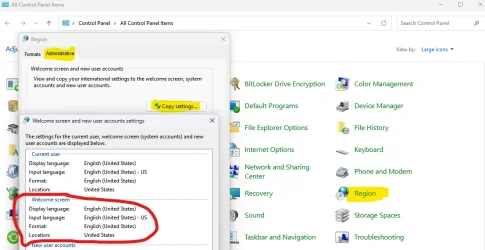
@Osmium , I've just set everything to English including welcome screen settings via old Control Panel and after reregistering with our Script the Lock screen picture loaded in few minutes just as it has been doing for many years before, as for the desktop I'm still waiting for it, suppose it takes up to 24 hours usually. So yes, not only region, format and preferred language should be set to English but the display language also and the same for the lock screen should be copied the settings in order to start working.

P.S. Interesting thing is that after all those settings done the "Learn about this picture" button is still not set to English (and I have no idea how to reset it too) and that's why I think the desktop is not working yet. I created a new user and this button is in English there, so apparently it would work in that new user but I'm still waiting pictures to be fetched to confirm this...


Keep in mind that the regional mismatch still allowed for desktop wallpaper updates, just not for lock screen.
@Osmium , then I don't know what to do else. For me it was always the bigger problem making desktop to work but not the lock screen. Even now my lock screen started working after few minutes of reregistering, but the desktop is still not working... Should it upload new images instantly as you choose it when it's working, or it may be I should wait for a day? And how the processes names so I can check if they are running in the task manager? Thanks!
 

Attachments

  • Screenshot 2026-09-13 191703.webp
    Screenshot 2026-09-13 191703.webp
    65.7 KB · Views: 7
Last edited:

My Computer My Computer

At a glance

Windows 11 Pro 25H2
OS
Windows 11 Pro 25H2
@dmlev wait a day or two. Desktop Spotlight's content retrieval is not an immediate process like the lock screen's and I don't think there is any way to speed it along or stimulate it. Just go about your business as usual and let it update on its own.
I'm not sure it's even possible to modify the rotation time and at this point I don't want to fiddle with stuff that is currently working on my user account (I still have no idea how CDM and Client.CBS got borked in the first place! but "Repair with Windows Update" fixed it right up). Some registry entries (like at Computer\HKEY_CURRENT_USER\Software\Microsoft\Windows\CurrentVersion\DesktopSpotlight) are also merely in place for record-keeping and altering them will not influence those routines.

To save you some bewilderment and frustration: just be aware that the update/rotation time is NOT set in stone and is affected by your interactions with Windows Explorer/shell.
Case in point: a few weeks ago, the rotation often took place at ~16:00, but after I started fiddling around with ContentDeliveryManager and Client.CBS, modifying files, settings and switching wallpaper modes, that scheduling slipped to 19:00 and then to 22:20...after I did yet another wallpaper mode swap.
It will be different for everyone.
 

My Computers My Computers

  • At a glance

    Windows 11 25H2 ProAMD Ryzen 7 9700X32GB Crucial Pro DDR5-6000-CL36 UDIMM OC Gami...ASUS Prime GeForce RTX 4070 Super OC
    OS
    Windows 11 25H2 Pro
    Computer type
    PC/Desktop
    Manufacturer/Model
    Custom
    CPU
    AMD Ryzen 7 9700X
    Motherboard
    Asus ROG Strix X870E-E Gaming Wifi7 NEO
    Memory
    32GB Crucial Pro DDR5-6000-CL36 UDIMM OC Gaming Memory (2 x CP16G60C36U5B), CL36-38-38-80
    Graphics Card(s)
    ASUS Prime GeForce RTX 4070 Super OC
    Monitor(s) Displays
    LG UltraGear 27GS85Q-B/EU 27'' Fast IPS
    Screen Resolution
    2560x1440
    Hard Drives
    1 Kingston Fury Renegade (gen4) 1TB + 1 Kingston Fury Renegade G5 2TB + 1 WD_Black SN850X 1TB + 1 Samsung 870 EVO 1TB + 3 x Western Digital Green 2TB
    PSU
    Be Quiet! Pure Power 12M 850W + Be Quiet! 12V-2X6/12VHPWR 90° Reversed cable
    Case
    Lian Li Lancool III Black
    Cooling
    Thermalright Phantom Spirit 120 SE ARGB
    Keyboard
    Logitech Deluxe 250
    Mouse
    Logitech G502X Black
    Other Info
    Work in progress. Hoping to upgrade to a Zen 7 and 60/70-series GPU in the future...if either scenario ever eventuates.
  • At a glance

    Windows 10 Pro 22H2Intel Core i5-25008GB Kingston HyperX Black DDR3-1600 (KHX16C9B...MSI GeForce GTX970 GAMING 4G
    Operating System
    Windows 10 Pro 22H2
    Computer type
    PC/Desktop
    CPU
    Intel Core i5-2500
    Motherboard
    Asus P8P67LE B3 LGA1155
    Memory
    8GB Kingston HyperX Black DDR3-1600 (KHX16C9B1BK2/8X)
    Graphics card(s)
    MSI GeForce GTX970 GAMING 4G
    Monitor(s) Displays
    ASUS VS238N 24''
    Screen Resolution
    1920x1080px
    Hard Drives
    1 x Samsung 850 Pro 128GB MZ-7KE128 2.5'' SATA SSD
    1 x Western Digital Green 2TB WD20EZRX-00DC0B0 3.5'' SATA HDD
    2 x Western Digital Green 2TB WD20EZRX-00D8PB0 3.5'' SATA HDD
    PSU
    Be Quiet! Pure Power L8-630W 80+ Bronze
    Case
    CoolerMaster Gladiator 600
    Cooling
    CoolerMaster Hyper 212 EVO single-tower CPU air cooler
    Keyboard
    Logitech 250 Deluxe
    Mouse
    Logitech M500
    Other Info
    Bought in summer of 2012. Permanently decommissioned and stripped of its parts in January 2025.
    RIP old boy.
Back
Top Bottom