Solved Reset Windows 11 Registry To Default Values Question


Hi Everyone,
For some reason I'm feeling kind of bad that I posted my question, the more I'm thinking about it I would probably be better off to just leave my desktop computer alone because as it's running the latest windows 11 beta version on a unsupported system that could be the reason I'm having some minor hiccup type of issues. I'd probably be much better off just installing the stable version of windows 11 via the uup dump website.
No need to go the UUPDUMP route, unless you really want to. MS has the latest right on there DL site, Install it and then any WUs that you need.


My Computer

System One

  • OS
    Multi-boot Windows 11 & 10 - RTM, RP, Beta, Dev and Canary
    Computer type
    PC/Desktop
    Manufacturer/Model
    Alienware R12
    CPU
    11th Gen i9-11900KF @ 3.50GHz, 8 cores/16 logical proc.
    Motherboard
    Alienware 07HV66 (U3E1)
    Memory
    32GB
    Graphics Card(s)
    NVIDIA GeForce RTX 3080 w/10GB GDDR5X mem
    Sound Card
    Realtek High Definition Audio
    Monitor(s) Displays
    Samsung 27" Curved C27F591
    Screen Resolution
    1920 x 1080 x 60 hertz
    Hard Drives
    1TB NVMe PM961 NVMe SSD SAMSUNG (Boot),
    2TB Seagate ST2000DM001-1ER164 (SATA),
    1TB Samsung SSD 850 EVO,
    1TB Seagate ST1000DM003-1ER162,
    1TB WD Elements 10A8 USB Device,
    1TB BUFFALO HD-PNTU3 USB Device,
    1TB x4 Seagate BUP Slim SCSI Disk Device
    PSU
    850W PSU Liquid Cooled Chassis - CyberPower 1500 UPS
    Case
    Alienware Mid-Tower (Dell)
    Cooling
    Liquid Cooled - 3 fan - Top exhaust
    Keyboard
    Logitech K800 Wireless
    Mouse
    Logitech MX Master Wireless
    Internet Speed
    1 Gigabit
    Browser
    FF, Chrome, Opera, Edge
    Antivirus
    Defender, MBAM, SuperAntiSpyware
    Other Info
    Blueray R/W Optical,
    Canon MX410 series Printer/Fax/Scanner/Copier,
    Altec 5.1 Speakers L-R, Mid Base Boom,

    Macrium Home Premium, Revo Pro, Screenspresso Pro
I use CCleaner 5.78
I installed it offline, and I blocked it and it's updaters in MY firewall.

View attachment 49864

And... since it was purchased by Avast, I also entered these lines in my HOSTS file...
C:\Windows\System32\drivers\etc\HOSTS

Code:
0.0.0.0 ncc.avast.com
0.0.0.0 ncc.avast.com.edgesuite.net
0.0.0.0 license.piriform.com
0.0.0.0 ipm-provider.ff.avast.com
0.0.0.0 shepherd.ff.avast.com
0.0.0.0 ip-info.ff.avast.com
0.0.0.0 analytics.ff.avast.com


This is where I dowmnloaded version 5.78...

This is it's Virustotal scan...


I've had "zero" issues on Win 10 or Win 11 with this version.


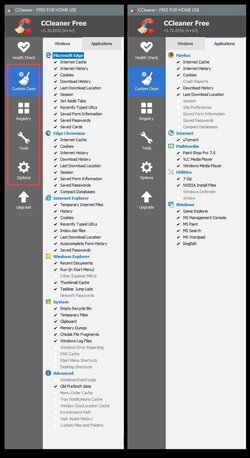
My settings and the only parts (RED box), of CCleaner that I use...

View attachment 49866


For those sites I want to keep the cookies for... like my ElevenForum login... I use the Cookies filter in CCleaner.

I "run" CCleaner which will empty the list on the left. Then login or set preferences on the site I want to keep the cookies for. Then I look to see what items are "now" on the left side. Then I can add those that are necessary to the right side. CCleaner will not clean the cookies on the right side.

There's probably 7-8 sites where I keep the cookies.

View attachment 49873
And this can restore broken registry?
I am getting stopcode 0x0000218 which seems to be specific to broken registry.
I just did an in-place upgrade, then realized it won't restore registry.
I will try this option you mentioned before sucking it up and reinstalling Win 11 fresh.....again
 

My Computer

System One

  • OS
    Win 11 23H2 Enterprise
    Computer type
    PC/Desktop
    Manufacturer/Model
    Self-Built
    CPU
    Ryzen 9800X3D
    Motherboard
    MSI MAG X870 Tomahawk WiFi
    Memory
    G.Skill Trident Z RGB 6200MT CL30
    Graphics Card(s)
    MSI RTX 5090 Suprim SoC
    Sound Card
    Sound Blaster G8
    Monitor(s) Displays
    LG C2 42 Main Desktop, 3x Gigabyte FI32Q in a triple array for gaming simulations
    Screen Resolution
    3840x2160, 2560x1440 (3)
    Hard Drives
    WD SN850X 2TB M.2 NVME (OS Drive), WD SN850X 2TB M.2 NVME, 2x Crucial 2TB SSD, Crucial 1TB SSD, Seagate Barracuda 2TB HDD
    PSU
    NZXT C1200 Gold ATX 3.1-Fully Modular/Low-Noise-1200 Watts-12V-2x6 Connector-Zero Fan Mode-100% Japanese Capacitors
    Case
    NZXT H7
    Cooling
    EK AIO Elite 360mm Elite
    Keyboard
    Razer Huntsman V3 Pro
    Mouse
    Logitech G502X
    Internet Speed
    1GB
    Browser
    Edge Chromium
    Antivirus
    Windows Defender
And this can restore broken registry?
I am getting stopcode 0x0000218 which seems to be specific to broken registry.
I just did an in-place upgrade, then realized it won't restore registry.
I will try this option you mentioned before sucking it up and reinstalling Win 11 fresh.....again


If you got that stop code AFTER doing an In-Place Upgrade, then Windows wasn't the issue.
You must have a problem with 3rd party software or a driver... etc.

The registry, is really just a bunch of switches to turn things on and off, and a little bit of data.
The registry IS Windows.. What you see on your screen is just the GUI (Graphical User Interface).
The GUI is much easier to understand than the registry.

An In-Place upgrade will fix Windows problems, but it won't fix 3rd party things, if you tell it to "save everything".
 
Last edited:

My Computers

System One System Two

  • OS
    Win 11 Home ♦♦♦26200.8457 ♦♦♦♦♦♦♦25H2
    Computer type
    PC/Desktop
    Manufacturer/Model
    Built by Ghot® [May 2020]
    CPU
    AMD Ryzen 7 3700X
    Motherboard
    Asus Pro WS X570-ACE (BIOS 5302)
    Memory
    G.Skill (F4-3200C14D-16GTZKW)
    Graphics Card(s)
    EVGA RTX 2070 (08G-P4-2171-KR)
    Sound Card
    Realtek ALC1220P / ALC S1220A
    Monitor(s) Displays
    Dell U3011 30"
    Screen Resolution
    2560 x 1600
    Hard Drives
    2x Samsung 860 EVO 500GB,
    WD 4TB Black FZBX - SATA III,
    WD 8TB Black FZBX - SATA III,
    DRW-24B1ST CD/DVD Burner
    PSU
    PC Power & Cooling 750W Quad EPS12V
    Case
    Cooler Master ATCS 840 Tower
    Cooling
    CM Hyper 212 EVO (push/pull)
    Keyboard
    Ducky DK9008 Shine II Blue LED
    Mouse
    Logitech Optical M-100
    Internet Speed
    300/300
    Browser
    Firefox (latest)
    Antivirus
    Bitdefender Total Security
    Other Info
    Speakers: Klipsch Pro Media 2.1
  • Operating System
    Windows XP Pro 32bit w/SP3
    Computer type
    PC/Desktop
    Manufacturer/Model
    Built by Ghot® (not in use)
    CPU
    AMD Athlon 64 X2 5000+ (OC'd @ 3.2Ghz)
    Motherboard
    ASUS M2N32-SLI Deluxe Wireless Edition
    Memory
    TWIN2X2048-6400C4DHX (2 x 1GB, DDR2 800)
    Graphics card(s)
    EVGA 256-P2-N758-TR GeForce 8600GT SSC
    Sound Card
    Onboard
    Monitor(s) Displays
    ViewSonic G90FB Black 19" Professional (CRT)
    Screen Resolution
    up to 2048 x 1536
    Hard Drives
    WD 36GB 10,000rpm Raptor SATA
    Seagate 80GB 7200rpm SATA
    Lite-On LTR-52246S CD/RW
    Lite-On LH-18A1P CD/DVD Burner
    PSU
    PC Power & Cooling Silencer 750 Quad EPS12V
    Case
    Generic Beige case, 80mm fans
    Cooling
    ZALMAN 9500A 92mm CPU Cooler
    Keyboard
    Logitech Classic Keybooard 200
    Mouse
    Logitech Optical M-BT96a
    Internet Speed
    300/300
    Browser
    Firefox 3.x ??
    Antivirus
    Symantec (Norton)
    Other Info
    Still assembled, still runs. Haven't turned it on for 15 years?
@Globespy

And no... CCLeaner won't "fix" the registry. It's more like it "cleans" the registry.
And it doesn't even do that very much anymore. Windows 10/11 pretty much take care of the registry all by themselves.
Mainly I just use it to clean the temp files and browser cookies and cache.

I just like that it cleans all this stuff with one click...

Image1.jpg
 
Last edited:

My Computers

System One System Two

  • OS
    Win 11 Home ♦♦♦26200.8457 ♦♦♦♦♦♦♦25H2
    Computer type
    PC/Desktop
    Manufacturer/Model
    Built by Ghot® [May 2020]
    CPU
    AMD Ryzen 7 3700X
    Motherboard
    Asus Pro WS X570-ACE (BIOS 5302)
    Memory
    G.Skill (F4-3200C14D-16GTZKW)
    Graphics Card(s)
    EVGA RTX 2070 (08G-P4-2171-KR)
    Sound Card
    Realtek ALC1220P / ALC S1220A
    Monitor(s) Displays
    Dell U3011 30"
    Screen Resolution
    2560 x 1600
    Hard Drives
    2x Samsung 860 EVO 500GB,
    WD 4TB Black FZBX - SATA III,
    WD 8TB Black FZBX - SATA III,
    DRW-24B1ST CD/DVD Burner
    PSU
    PC Power & Cooling 750W Quad EPS12V
    Case
    Cooler Master ATCS 840 Tower
    Cooling
    CM Hyper 212 EVO (push/pull)
    Keyboard
    Ducky DK9008 Shine II Blue LED
    Mouse
    Logitech Optical M-100
    Internet Speed
    300/300
    Browser
    Firefox (latest)
    Antivirus
    Bitdefender Total Security
    Other Info
    Speakers: Klipsch Pro Media 2.1
  • Operating System
    Windows XP Pro 32bit w/SP3
    Computer type
    PC/Desktop
    Manufacturer/Model
    Built by Ghot® (not in use)
    CPU
    AMD Athlon 64 X2 5000+ (OC'd @ 3.2Ghz)
    Motherboard
    ASUS M2N32-SLI Deluxe Wireless Edition
    Memory
    TWIN2X2048-6400C4DHX (2 x 1GB, DDR2 800)
    Graphics card(s)
    EVGA 256-P2-N758-TR GeForce 8600GT SSC
    Sound Card
    Onboard
    Monitor(s) Displays
    ViewSonic G90FB Black 19" Professional (CRT)
    Screen Resolution
    up to 2048 x 1536
    Hard Drives
    WD 36GB 10,000rpm Raptor SATA
    Seagate 80GB 7200rpm SATA
    Lite-On LTR-52246S CD/RW
    Lite-On LH-18A1P CD/DVD Burner
    PSU
    PC Power & Cooling Silencer 750 Quad EPS12V
    Case
    Generic Beige case, 80mm fans
    Cooling
    ZALMAN 9500A 92mm CPU Cooler
    Keyboard
    Logitech Classic Keybooard 200
    Mouse
    Logitech Optical M-BT96a
    Internet Speed
    300/300
    Browser
    Firefox 3.x ??
    Antivirus
    Symantec (Norton)
    Other Info
    Still assembled, still runs. Haven't turned it on for 15 years?
Ccleaner has a feature called Performance Optimizer designed to stop apps from running in the background. It puts them "to sleep" and can wake them up. So, it is NOT a bug or fault.

Those who have to search the registry for this evil key have probably used Ccleaner Pro's Performance Optimizer but forgotten they had done so!

Forgive my mirth, but anyone who has been derailed by the 'Debuuger' key in their registry must be a fan of Crap Cleaner as 'Performance Optimizer' is not offered in the free version! 😂🤣😊😁
 
Last edited:

My Computers

System One System Two

  • OS
    Windows 11 Pro 25H2 26200.8524
    Computer type
    Laptop
    Manufacturer/Model
    Acemagic LX15PRO
    CPU
    AMD Ryzen 7 5825U with Radeon Graphics
    Memory
    16GB
    Screen Resolution
    1920 x 1080
    Hard Drives
    SSD 2TB
    Internet Speed
    30 Mbps
    Browser
    Brave
    Antivirus
    Webroot Secure Anywhere
    Other Info
    System 3

    Acer Swift SF114-34 laptop
    OS Windows 11 Pro 26200.8524
    CPU Pentium Silver N6000
    RAM 4GB
    SSD Samsung 970 EVO Plus SSD 2TB (an upgrade)
  • Operating System
    Windows 11 Pro 23H2 22631.2506
    Computer type
    Laptop
    Manufacturer/Model
    HP Mini 210-1090NR PC (bought in late 2009!)
    CPU
    Atom N450 1.66GHz
    Memory
    2GB
    Browser
    Brave
    Antivirus
    Webroot
  • Like
Reactions: OAT
Back
Top Bottom