RESTORATION


I have an i7 960K, an i7 960, and two i7 920s. One of them isn't in a PC. The CPUs are cheap now. You can pick them up for a song. I'd recommend a Bloomfield for any novice desiring to build their own PC but are on a tight budget. They run fine with NVIDIA 1050 graphics cards. I haven't looked into the prices of X58 boards recently so that is about the only caveat I can think of regarding building costs. Of course, if you want to run Win 11 on it you will have to do a little bit of surgery to the OS but Rufus makes this easy as pie.

If my daughter could haul her Studio XPS 435T/9000 series with her to U of A she would do it in an heartbeat. Alas, there is only so much room in the dorms. She will have to settle for her lap top. These chips are tough as nails and surprisingly fast given their age. I consider them the flag ship of the domestic end user i7 quad cores. The Bloomfield is indeed a legend in time out of which emerged the families of Sandy Bridge and Ivy Bridge CPUs. I doubt that we shall ever see those days again.
 

My Computer

System One

  • OS
    WIN 11, WIN 10, WIN 8.1, WIN 7 U, WIN 7 PRO, WIN 7 HOME (32 Bit), LINUX MINT
    Computer type
    PC/Desktop
    Manufacturer/Model
    DIY, ASUS, and DELL
    CPU
    Intel i7 6900K and i9-7960X / AMD 3800X (8 core)
    Motherboard
    ASUS X99E-WS USB 3.1 and ASUS X299 SAGE
    Memory
    128 GB CORSAIR DOMINATOR PLATINUM (B DIE)
    Graphics Card(s)
    NVIDIA 1070 and RTX 3070
    Sound Card
    Crystal Sound (onboard)
    Monitor(s) Displays
    single Samsung 30" 4K and 8" aux monitor
    Screen Resolution
    4K and something equally attrocious. I'll be working on this.
    Hard Drives
    A, B, C, D, E, F, G, H, I, J, K, L, M, N, O, P, Q, R, S, T, U, V, W

    Ports X, Y, and Z are reserved for USB access and removable drives.

    Drive types consist of the following: Various mechanical hard drives bearing the brand names, Seagate, Toshiba, and Western Digital. Various NVMe drives bearing the brand names Kingston, Intel, Silicon Power, Crucial, Western Digital, and Team Group. Various SATA SSDs bearing various different brand names.

    RAID arrays included:

    LSI RAID 10 (WD Velociraptors) 1115.72 GB
    LSI RAID 10 (WD SSDS) 463.80 GB

    INTEL RAID 0 (KINGSTON HYPER X) System 447.14 GB
    INTEL RAID 1 TOSHIBA ENTERPRIZE class Data 2794.52 GB
    INTEL RAID 1 SEAGATE HYBRID 931.51 GB
    PSU
    SEVERAL. I prefer my Corsair Platinum HX1000i but I also like EVGA power supplies
    Case
    ThermalTake Level 10 GT (among others)
    Cooling
    Noctua is my favorite and I use it in my main. I also own various other coolers.
    Keyboard
    all kinds.
    Mouse
    all kinds
    Internet Speed
    360 mbps - 1 gbps (depending)
    Browser
    FIREFOX
    Antivirus
    KASPERSKY (no apologies)
    Other Info
    Gave Dell touch screen with Windows 11 to daughter and got me an OTVOC. Being a PC builder I own many desktop PCs as well. I am a father of five providing PCs, laptops, and tablets for all my family, most of which I have modified, rebuilt, or simply built from scratch. I do not own a cell phone, never have, never will.
Yup. I have a 5 pack of Thermalright 120 mm fans as standby at the enormous cost of 25 bucks Canadian (or 5 bucks American :p). It's almost not worth the trouble of cleaning the darned things at that price.
Do they happen to be TL-C12C's? Powerful, but a bit noisy. When fans are this size you only wish you could get a 5 pack for 25 bucks. >> 200 mm case fan
 

My Computer

System One

  • OS
    WIN 11, WIN 10, WIN 8.1, WIN 7 U, WIN 7 PRO, WIN 7 HOME (32 Bit), LINUX MINT
    Computer type
    PC/Desktop
    Manufacturer/Model
    DIY, ASUS, and DELL
    CPU
    Intel i7 6900K and i9-7960X / AMD 3800X (8 core)
    Motherboard
    ASUS X99E-WS USB 3.1 and ASUS X299 SAGE
    Memory
    128 GB CORSAIR DOMINATOR PLATINUM (B DIE)
    Graphics Card(s)
    NVIDIA 1070 and RTX 3070
    Sound Card
    Crystal Sound (onboard)
    Monitor(s) Displays
    single Samsung 30" 4K and 8" aux monitor
    Screen Resolution
    4K and something equally attrocious. I'll be working on this.
    Hard Drives
    A, B, C, D, E, F, G, H, I, J, K, L, M, N, O, P, Q, R, S, T, U, V, W

    Ports X, Y, and Z are reserved for USB access and removable drives.

    Drive types consist of the following: Various mechanical hard drives bearing the brand names, Seagate, Toshiba, and Western Digital. Various NVMe drives bearing the brand names Kingston, Intel, Silicon Power, Crucial, Western Digital, and Team Group. Various SATA SSDs bearing various different brand names.

    RAID arrays included:

    LSI RAID 10 (WD Velociraptors) 1115.72 GB
    LSI RAID 10 (WD SSDS) 463.80 GB

    INTEL RAID 0 (KINGSTON HYPER X) System 447.14 GB
    INTEL RAID 1 TOSHIBA ENTERPRIZE class Data 2794.52 GB
    INTEL RAID 1 SEAGATE HYBRID 931.51 GB
    PSU
    SEVERAL. I prefer my Corsair Platinum HX1000i but I also like EVGA power supplies
    Case
    ThermalTake Level 10 GT (among others)
    Cooling
    Noctua is my favorite and I use it in my main. I also own various other coolers.
    Keyboard
    all kinds.
    Mouse
    all kinds
    Internet Speed
    360 mbps - 1 gbps (depending)
    Browser
    FIREFOX
    Antivirus
    KASPERSKY (no apologies)
    Other Info
    Gave Dell touch screen with Windows 11 to daughter and got me an OTVOC. Being a PC builder I own many desktop PCs as well. I am a father of five providing PCs, laptops, and tablets for all my family, most of which I have modified, rebuilt, or simply built from scratch. I do not own a cell phone, never have, never will.
An old Core-i7 is better than a new Core-i3. So since I cannot afford anything higher than a new Core-i3, I would rather do a thousand workarounds to keep my current 3rd generation Core-i7 as long as possible. We know the upcoming 25H2 has exactly the same system requirements as 24H2 and since we currently run 24H2, our unsupported computers can also run 25H2 and we are covered up to October 2026. Then hopefully there will be some workaround to upgrade to 26H2 and keep going. Besides the performance is much higher than I need, so I see no reason to replace it yet. I would have to replace my legacy PCI cards as well and this increases cost.
 

My Computers

System One System Two

  • OS
    Windows 11 Pro 23H2 (5699), 25H2 (8457)
    Computer type
    Laptop
    Manufacturer/Model
    Acer Extensa 5630EZ
    CPU
    Mobile DualCore Intel Core 2 Duo T7250, 2000 MHz
    Motherboard
    Acer Extensa 5630
    Memory
    4GB
    Graphics Card(s)
    Mobile Intel(R) GMA 4500M (Mobile 4 series)
    Sound Card
    Realtek ALC268 @ Intel 82801IB ICH9 - High Definition Audio Controller
    Monitor(s) Displays
    1
    Screen Resolution
    1280x800
    Hard Drives
    Samsung SSD 850 EVO 250GB SATA Device (250 GB, SATA-III)
    Internet Speed
    VDSL 50 Mbps
    Browser
    MICROSOFT EDGE
    Antivirus
    WINDOWS DEFENDER
    Other Info
    Legacy MBR installation, no TPM, no Secure Boot, no WDDM 2.0 graphics drivers, no SSE4.2, cannot get more unsupported ;) This is only my test laptop. I had installed Windows 11 here before upgrading my main PC. For my main PC I use everyday see my 2nd system specs.
  • Operating System
    Windows 11 Pro v25H2 (build 26200.8457)
    Computer type
    PC/Desktop
    Manufacturer/Model
    Custom-built PC
    CPU
    Intel Core-i7 3770 3.40GHz s1155 (3rd generation)
    Motherboard
    Asus P8H61 s1155 ATX
    Memory
    2x Kingston Hyper-X Blu 8GB DDR3-1600
    Graphics card(s)
    GIGABYTE GeForce RTX 3050 WINDFORCE OC V2 6GB (GV-N3050WF2OCV2-6GD)
    Sound Card
    Realtek HD audio (ALC887)
    Monitor(s) Displays
    Sony Bravia KDL-19L4000 19" LCD TV via VGA
    Screen Resolution
    1440x900 32-bit 60Hz
    Hard Drives
    WD Blue SA510 2.5 1000GB SSD as system disk, Western Digital Caviar Purple 4TB SATA III (WD40PURZ) as second
    PSU
    Thermaltake Litepower RGB 550W Full Wired
    Case
    SUPERCASE MIDI-TOWER
    Cooling
    Deepcool Gamma Archer CPU cooler, 1x 8cm fan at the back
    Keyboard
    Mitsumi 101-key PS/2
    Mouse
    Sunnyline OptiEye PS/2
    Internet Speed
    100Mbps
    Browser
    Microsoft Edge, Mozilla Firefox
    Antivirus
    Microsoft Windows Defender
    Other Info
    Legacy BIOS (MBR) installation, no TPM, no Secure Boot, WDDM 3.0 graphics drivers, WEI score 7.4
I've worked on many newer PCs with i3's and i5's that simply don't hold a candle to my old i7 Bloomfield. There's just something about the older architecture that seems to hold a measure of stability and efficiency that escaped duplication in many of the newer CPUs. I don't know if this is due to die size or the grid layout. The Gen 3 (Ivy Bridge) CPUs used a 22 nm die (less than half the size of the Bloomfield chips) and Panther point technology. They were also backward compatible with Sandy Bridge platforms. These CPUs carry their own legacy, no chiplets, no clutter, just reliable performance. I doubt that Intel will ever make die hard chips like this again. They were built to last.
 

My Computer

System One

  • OS
    WIN 11, WIN 10, WIN 8.1, WIN 7 U, WIN 7 PRO, WIN 7 HOME (32 Bit), LINUX MINT
    Computer type
    PC/Desktop
    Manufacturer/Model
    DIY, ASUS, and DELL
    CPU
    Intel i7 6900K and i9-7960X / AMD 3800X (8 core)
    Motherboard
    ASUS X99E-WS USB 3.1 and ASUS X299 SAGE
    Memory
    128 GB CORSAIR DOMINATOR PLATINUM (B DIE)
    Graphics Card(s)
    NVIDIA 1070 and RTX 3070
    Sound Card
    Crystal Sound (onboard)
    Monitor(s) Displays
    single Samsung 30" 4K and 8" aux monitor
    Screen Resolution
    4K and something equally attrocious. I'll be working on this.
    Hard Drives
    A, B, C, D, E, F, G, H, I, J, K, L, M, N, O, P, Q, R, S, T, U, V, W

    Ports X, Y, and Z are reserved for USB access and removable drives.

    Drive types consist of the following: Various mechanical hard drives bearing the brand names, Seagate, Toshiba, and Western Digital. Various NVMe drives bearing the brand names Kingston, Intel, Silicon Power, Crucial, Western Digital, and Team Group. Various SATA SSDs bearing various different brand names.

    RAID arrays included:

    LSI RAID 10 (WD Velociraptors) 1115.72 GB
    LSI RAID 10 (WD SSDS) 463.80 GB

    INTEL RAID 0 (KINGSTON HYPER X) System 447.14 GB
    INTEL RAID 1 TOSHIBA ENTERPRIZE class Data 2794.52 GB
    INTEL RAID 1 SEAGATE HYBRID 931.51 GB
    PSU
    SEVERAL. I prefer my Corsair Platinum HX1000i but I also like EVGA power supplies
    Case
    ThermalTake Level 10 GT (among others)
    Cooling
    Noctua is my favorite and I use it in my main. I also own various other coolers.
    Keyboard
    all kinds.
    Mouse
    all kinds
    Internet Speed
    360 mbps - 1 gbps (depending)
    Browser
    FIREFOX
    Antivirus
    KASPERSKY (no apologies)
    Other Info
    Gave Dell touch screen with Windows 11 to daughter and got me an OTVOC. Being a PC builder I own many desktop PCs as well. I am a father of five providing PCs, laptops, and tablets for all my family, most of which I have modified, rebuilt, or simply built from scratch. I do not own a cell phone, never have, never will.
I was thinking of upgrading and re-using my NZXT H440 case. Is the airflow good enough for modern hardware? Probably going with 5070ti and 9800X3D.
 

My Computer

System One

  • OS
    Windows 11
    Computer type
    PC/Desktop
    Manufacturer/Model
    Self Build
    Screen Resolution
    1440p
    Mouse
    Glorious Model D- Wired Optical Mouse
    Internet Speed
    1GB Fiber
    Browser
    Microsoft Edge
I've worked on many newer PCs with i3's and i5's that simply don't hold a candle to my old i7 Bloomfield. There's just something about the older architecture that seems to hold a measure of stability and efficiency that escaped duplication in many of the newer CPUs. I don't know if this is due to die size or the grid layout. The Gen 3 (Ivy Bridge) CPUs used a 22 nm die (less than half the size of the Bloomfield chips) and Panther point technology. They were also backward compatible with Sandy Bridge platforms. These CPUs carry their own legacy, no chiplets, no clutter, just reliable performance. I doubt that Intel will ever make die hard chips like this again. They were built to last.
I guess because they are old, they have old stable drivers for the chipset, and hence better stability than new ones with frequently changing drivers and firmware. One driver or firmware might be good and stable until it is replaced by a version that introduces a new feature but loses some stability. This is an advantage of old hardware, just install latest drivers and have peace of mind. No fear that a future update will mess your system.
 

My Computers

System One System Two

  • OS
    Windows 11 Pro 23H2 (5699), 25H2 (8457)
    Computer type
    Laptop
    Manufacturer/Model
    Acer Extensa 5630EZ
    CPU
    Mobile DualCore Intel Core 2 Duo T7250, 2000 MHz
    Motherboard
    Acer Extensa 5630
    Memory
    4GB
    Graphics Card(s)
    Mobile Intel(R) GMA 4500M (Mobile 4 series)
    Sound Card
    Realtek ALC268 @ Intel 82801IB ICH9 - High Definition Audio Controller
    Monitor(s) Displays
    1
    Screen Resolution
    1280x800
    Hard Drives
    Samsung SSD 850 EVO 250GB SATA Device (250 GB, SATA-III)
    Internet Speed
    VDSL 50 Mbps
    Browser
    MICROSOFT EDGE
    Antivirus
    WINDOWS DEFENDER
    Other Info
    Legacy MBR installation, no TPM, no Secure Boot, no WDDM 2.0 graphics drivers, no SSE4.2, cannot get more unsupported ;) This is only my test laptop. I had installed Windows 11 here before upgrading my main PC. For my main PC I use everyday see my 2nd system specs.
  • Operating System
    Windows 11 Pro v25H2 (build 26200.8457)
    Computer type
    PC/Desktop
    Manufacturer/Model
    Custom-built PC
    CPU
    Intel Core-i7 3770 3.40GHz s1155 (3rd generation)
    Motherboard
    Asus P8H61 s1155 ATX
    Memory
    2x Kingston Hyper-X Blu 8GB DDR3-1600
    Graphics card(s)
    GIGABYTE GeForce RTX 3050 WINDFORCE OC V2 6GB (GV-N3050WF2OCV2-6GD)
    Sound Card
    Realtek HD audio (ALC887)
    Monitor(s) Displays
    Sony Bravia KDL-19L4000 19" LCD TV via VGA
    Screen Resolution
    1440x900 32-bit 60Hz
    Hard Drives
    WD Blue SA510 2.5 1000GB SSD as system disk, Western Digital Caviar Purple 4TB SATA III (WD40PURZ) as second
    PSU
    Thermaltake Litepower RGB 550W Full Wired
    Case
    SUPERCASE MIDI-TOWER
    Cooling
    Deepcool Gamma Archer CPU cooler, 1x 8cm fan at the back
    Keyboard
    Mitsumi 101-key PS/2
    Mouse
    Sunnyline OptiEye PS/2
    Internet Speed
    100Mbps
    Browser
    Microsoft Edge, Mozilla Firefox
    Antivirus
    Microsoft Windows Defender
    Other Info
    Legacy BIOS (MBR) installation, no TPM, no Secure Boot, WDDM 3.0 graphics drivers, WEI score 7.4
I guess because they are old, they have old stable drivers for the chipset, and hence better stability than new ones with frequently changing drivers and firmware. One driver or firmware might be good and stable until it is replaced by a version that introduces a new feature but loses some stability. This is an advantage of old hardware, just install latest drivers and have peace of mind. No fear that a future update will mess your system.
Indubitably it is likely a combination of factors. In this world of mass production it's really hard to say. I often wonder if the same care and caution are put into the development of CPUs that R&D put into earlier chips. Likely not. Of course there is a bell curve to think of. These quad cores of old will run circles around the old Pentium chips. Bloomfield gave birth to Sandy Bridge and Ivy Bridge and these were the game changers of Intel CPUs at the domestic end user level. Ironically, I think we also have Xeon to thank for that. But hey, I'm just an old enthusiast. I wouldn't know the first thing about architecture at the microprocessor level. One doesn't have to be a mechanic to drive a car but I'm thinking it can't hurt.
 

My Computer

System One

  • OS
    WIN 11, WIN 10, WIN 8.1, WIN 7 U, WIN 7 PRO, WIN 7 HOME (32 Bit), LINUX MINT
    Computer type
    PC/Desktop
    Manufacturer/Model
    DIY, ASUS, and DELL
    CPU
    Intel i7 6900K and i9-7960X / AMD 3800X (8 core)
    Motherboard
    ASUS X99E-WS USB 3.1 and ASUS X299 SAGE
    Memory
    128 GB CORSAIR DOMINATOR PLATINUM (B DIE)
    Graphics Card(s)
    NVIDIA 1070 and RTX 3070
    Sound Card
    Crystal Sound (onboard)
    Monitor(s) Displays
    single Samsung 30" 4K and 8" aux monitor
    Screen Resolution
    4K and something equally attrocious. I'll be working on this.
    Hard Drives
    A, B, C, D, E, F, G, H, I, J, K, L, M, N, O, P, Q, R, S, T, U, V, W

    Ports X, Y, and Z are reserved for USB access and removable drives.

    Drive types consist of the following: Various mechanical hard drives bearing the brand names, Seagate, Toshiba, and Western Digital. Various NVMe drives bearing the brand names Kingston, Intel, Silicon Power, Crucial, Western Digital, and Team Group. Various SATA SSDs bearing various different brand names.

    RAID arrays included:

    LSI RAID 10 (WD Velociraptors) 1115.72 GB
    LSI RAID 10 (WD SSDS) 463.80 GB

    INTEL RAID 0 (KINGSTON HYPER X) System 447.14 GB
    INTEL RAID 1 TOSHIBA ENTERPRIZE class Data 2794.52 GB
    INTEL RAID 1 SEAGATE HYBRID 931.51 GB
    PSU
    SEVERAL. I prefer my Corsair Platinum HX1000i but I also like EVGA power supplies
    Case
    ThermalTake Level 10 GT (among others)
    Cooling
    Noctua is my favorite and I use it in my main. I also own various other coolers.
    Keyboard
    all kinds.
    Mouse
    all kinds
    Internet Speed
    360 mbps - 1 gbps (depending)
    Browser
    FIREFOX
    Antivirus
    KASPERSKY (no apologies)
    Other Info
    Gave Dell touch screen with Windows 11 to daughter and got me an OTVOC. Being a PC builder I own many desktop PCs as well. I am a father of five providing PCs, laptops, and tablets for all my family, most of which I have modified, rebuilt, or simply built from scratch. I do not own a cell phone, never have, never will.
I still use some old computers at work including Core 2 Quad and Celeron systems. At times they feel too slow that my current system feels like a super computer.
 
Last edited:

My Computers

System One System Two

  • OS
    Windows 11 Pro 23H2 (5699), 25H2 (8457)
    Computer type
    Laptop
    Manufacturer/Model
    Acer Extensa 5630EZ
    CPU
    Mobile DualCore Intel Core 2 Duo T7250, 2000 MHz
    Motherboard
    Acer Extensa 5630
    Memory
    4GB
    Graphics Card(s)
    Mobile Intel(R) GMA 4500M (Mobile 4 series)
    Sound Card
    Realtek ALC268 @ Intel 82801IB ICH9 - High Definition Audio Controller
    Monitor(s) Displays
    1
    Screen Resolution
    1280x800
    Hard Drives
    Samsung SSD 850 EVO 250GB SATA Device (250 GB, SATA-III)
    Internet Speed
    VDSL 50 Mbps
    Browser
    MICROSOFT EDGE
    Antivirus
    WINDOWS DEFENDER
    Other Info
    Legacy MBR installation, no TPM, no Secure Boot, no WDDM 2.0 graphics drivers, no SSE4.2, cannot get more unsupported ;) This is only my test laptop. I had installed Windows 11 here before upgrading my main PC. For my main PC I use everyday see my 2nd system specs.
  • Operating System
    Windows 11 Pro v25H2 (build 26200.8457)
    Computer type
    PC/Desktop
    Manufacturer/Model
    Custom-built PC
    CPU
    Intel Core-i7 3770 3.40GHz s1155 (3rd generation)
    Motherboard
    Asus P8H61 s1155 ATX
    Memory
    2x Kingston Hyper-X Blu 8GB DDR3-1600
    Graphics card(s)
    GIGABYTE GeForce RTX 3050 WINDFORCE OC V2 6GB (GV-N3050WF2OCV2-6GD)
    Sound Card
    Realtek HD audio (ALC887)
    Monitor(s) Displays
    Sony Bravia KDL-19L4000 19" LCD TV via VGA
    Screen Resolution
    1440x900 32-bit 60Hz
    Hard Drives
    WD Blue SA510 2.5 1000GB SSD as system disk, Western Digital Caviar Purple 4TB SATA III (WD40PURZ) as second
    PSU
    Thermaltake Litepower RGB 550W Full Wired
    Case
    SUPERCASE MIDI-TOWER
    Cooling
    Deepcool Gamma Archer CPU cooler, 1x 8cm fan at the back
    Keyboard
    Mitsumi 101-key PS/2
    Mouse
    Sunnyline OptiEye PS/2
    Internet Speed
    100Mbps
    Browser
    Microsoft Edge, Mozilla Firefox
    Antivirus
    Microsoft Windows Defender
    Other Info
    Legacy BIOS (MBR) installation, no TPM, no Secure Boot, WDDM 3.0 graphics drivers, WEI score 7.4
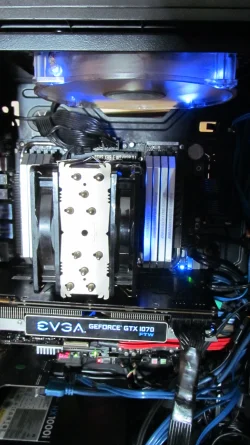
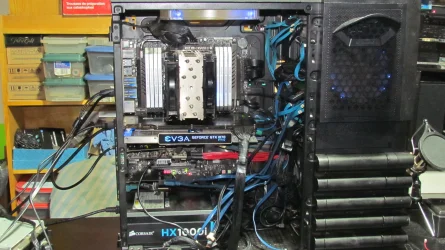
So once again, I am thwarted by design. I can't put the Corsair cooling fans for RAM on the X299 build because the Thermal Right Ninja Killer Assassin (or whatever it is called) towers over the RAM, blocking access to it on the left side. I should have known this would happen since I had to special order a proper cooling fan from Noctua in Austria to get around this issue with my X99 build. So now I'm really hoping that the janky looking thingamabob I ordered from China will do the job coz there's only one place those RAM fans are going to work.

IMG_1479.webp
And that's here... On this monstrosity of a build that has actually served me well. And look at all that RGB! Red, green, and blue lights everywhere! :-)

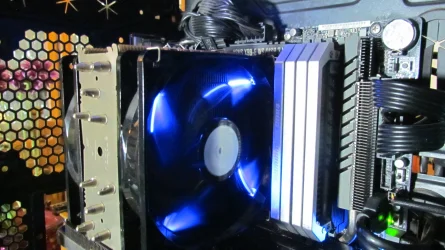
IMG_1478.webp
Admittedly, the Cooler Master Sickle fans do look good on the Noctua tower heat sink. I was surprised to discover that these are the same fans that were used in the Cooler Master ATCS case.


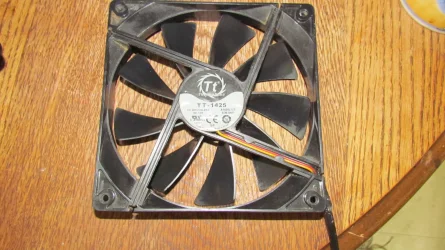
IMG_1467.webp
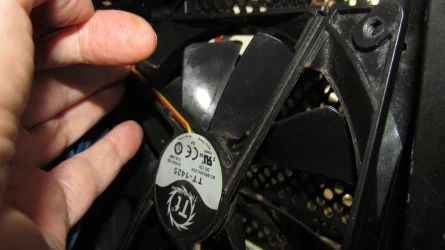
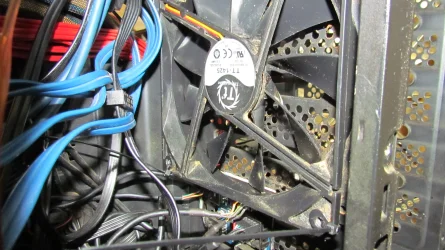
So I decided to re-install my old trusty, rusty, and dusty140 mm Thermal Take fan that I pulled out of the case 6 years ago when I was on a Noctua fan kick. Noctua fans are quieter but they're not always the fastest. This fan is lethal to fingers, not loud, has no RGB but that's not important because it will be running behind my sleds as a makeshift push/pull configuration for the front of the PC. Please allow me to elaborate:

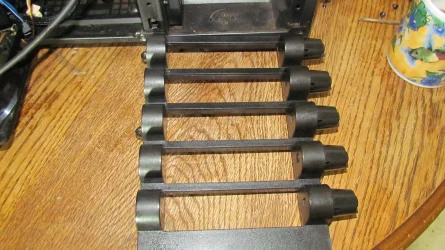
IMG_1468.webp
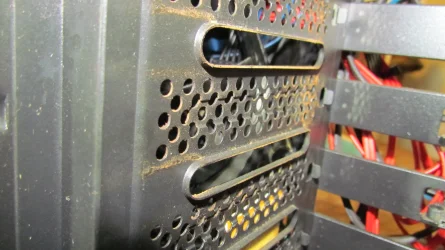
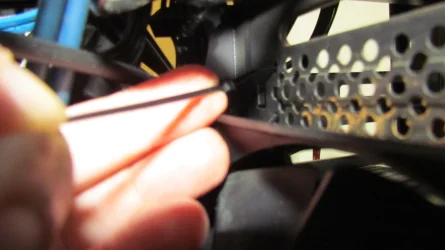
First, I had to pull the side bezel for the sleds off. This thing has about a dozen screws to remove before it can be detached, which is understandable since it was made for a good deal of action, removing and swapping out drives.


And... OMGG!!! Just when a guy thinks he's got the dust control dealt with he finds this! Evidently I have more cleaning to do.


IMG_1469.webp
 
Last edited:

My Computer

System One

  • OS
    WIN 11, WIN 10, WIN 8.1, WIN 7 U, WIN 7 PRO, WIN 7 HOME (32 Bit), LINUX MINT
    Computer type
    PC/Desktop
    Manufacturer/Model
    DIY, ASUS, and DELL
    CPU
    Intel i7 6900K and i9-7960X / AMD 3800X (8 core)
    Motherboard
    ASUS X99E-WS USB 3.1 and ASUS X299 SAGE
    Memory
    128 GB CORSAIR DOMINATOR PLATINUM (B DIE)
    Graphics Card(s)
    NVIDIA 1070 and RTX 3070
    Sound Card
    Crystal Sound (onboard)
    Monitor(s) Displays
    single Samsung 30" 4K and 8" aux monitor
    Screen Resolution
    4K and something equally attrocious. I'll be working on this.
    Hard Drives
    A, B, C, D, E, F, G, H, I, J, K, L, M, N, O, P, Q, R, S, T, U, V, W

    Ports X, Y, and Z are reserved for USB access and removable drives.

    Drive types consist of the following: Various mechanical hard drives bearing the brand names, Seagate, Toshiba, and Western Digital. Various NVMe drives bearing the brand names Kingston, Intel, Silicon Power, Crucial, Western Digital, and Team Group. Various SATA SSDs bearing various different brand names.

    RAID arrays included:

    LSI RAID 10 (WD Velociraptors) 1115.72 GB
    LSI RAID 10 (WD SSDS) 463.80 GB

    INTEL RAID 0 (KINGSTON HYPER X) System 447.14 GB
    INTEL RAID 1 TOSHIBA ENTERPRIZE class Data 2794.52 GB
    INTEL RAID 1 SEAGATE HYBRID 931.51 GB
    PSU
    SEVERAL. I prefer my Corsair Platinum HX1000i but I also like EVGA power supplies
    Case
    ThermalTake Level 10 GT (among others)
    Cooling
    Noctua is my favorite and I use it in my main. I also own various other coolers.
    Keyboard
    all kinds.
    Mouse
    all kinds
    Internet Speed
    360 mbps - 1 gbps (depending)
    Browser
    FIREFOX
    Antivirus
    KASPERSKY (no apologies)
    Other Info
    Gave Dell touch screen with Windows 11 to daughter and got me an OTVOC. Being a PC builder I own many desktop PCs as well. I am a father of five providing PCs, laptops, and tablets for all my family, most of which I have modified, rebuilt, or simply built from scratch. I do not own a cell phone, never have, never will.
Anyway, apart from the dust (which I promise to deal with) I wanted to illustrate an old PC builder's trick with zip ties.

IMG_1474.webp

This a picture of me cinching up the Thermal Take fan where there are no screw holes for fans or rubber mounts or anything of the like. I'm using the tiny grid holes in the sled cage and when this is strategically done the end result is a highly effective frontal push/pull configuration that that draws cool air over the drives in the sleds. In my case it does more than that but I'm jumping ahead of myself.

IMG_1470.webp

Just run each zip tie through where the screw holes on the fans are and then loop them through the grid holes. Once all four are in place cinch each one up a little at a time until you attain a flush and even fit. I see in this picture I'm going to have to break out the isopropyl and the cotton swabs again but it really doesn't matter because none of this will be visible when I'm done. Yet another RAID CAGE sits in front of this fan!

IMG_1477.webp

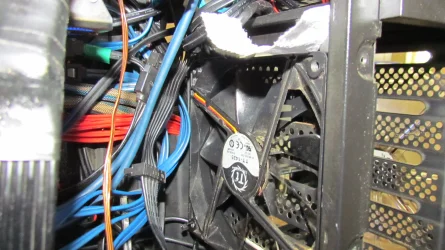
The fan is in place and it looks oglee. I literally blew out this dust with an air compressor and thought I gave the case a good wipe down with methyl hydrate. No worries. I'll go over it again. But nonetheless all of this is going to be covered once I'm done. Dust bothers me. Stains and discoloration is no big deal because it will all be covered. Believe it or not this fan in this picture is running. The piece of white tissue paper that looks like a bird flying is put there temporarily to establish correct wind direction. I've removed it since all is A-OK and I have a good gust going via push pull. You can barely make out the 200mm fan in the front. Notice how the Thermal Take fan fits flush to the lip of the steel frame. A good snug fit makes a huge difference. Only one more zip tie to go here and it will be ready for the next step.

IMG_1476.webp

Ignore that dust. It has already been dealt with. Notice rather the tails on the zip ties. Those MUST be cut flush with side-cutters. You don't want them in your wiring messing about with your cable management. They are there for one thing and one thing alone: Tacking down your fan to the frame. This system works well and if you do it right you will encounter zero vibration. Keep those zip ties tight.

Anyway, that's all I have for now. I have to drive out to the big city where I'll be living in a motel for a couple of nights while I make sure my beloved daughter who is very keen on computer science is all settled into her dorm room at the U of A. I'll be returning home less one daughter.

This is the way.
 

My Computer

System One

  • OS
    WIN 11, WIN 10, WIN 8.1, WIN 7 U, WIN 7 PRO, WIN 7 HOME (32 Bit), LINUX MINT
    Computer type
    PC/Desktop
    Manufacturer/Model
    DIY, ASUS, and DELL
    CPU
    Intel i7 6900K and i9-7960X / AMD 3800X (8 core)
    Motherboard
    ASUS X99E-WS USB 3.1 and ASUS X299 SAGE
    Memory
    128 GB CORSAIR DOMINATOR PLATINUM (B DIE)
    Graphics Card(s)
    NVIDIA 1070 and RTX 3070
    Sound Card
    Crystal Sound (onboard)
    Monitor(s) Displays
    single Samsung 30" 4K and 8" aux monitor
    Screen Resolution
    4K and something equally attrocious. I'll be working on this.
    Hard Drives
    A, B, C, D, E, F, G, H, I, J, K, L, M, N, O, P, Q, R, S, T, U, V, W

    Ports X, Y, and Z are reserved for USB access and removable drives.

    Drive types consist of the following: Various mechanical hard drives bearing the brand names, Seagate, Toshiba, and Western Digital. Various NVMe drives bearing the brand names Kingston, Intel, Silicon Power, Crucial, Western Digital, and Team Group. Various SATA SSDs bearing various different brand names.

    RAID arrays included:

    LSI RAID 10 (WD Velociraptors) 1115.72 GB
    LSI RAID 10 (WD SSDS) 463.80 GB

    INTEL RAID 0 (KINGSTON HYPER X) System 447.14 GB
    INTEL RAID 1 TOSHIBA ENTERPRIZE class Data 2794.52 GB
    INTEL RAID 1 SEAGATE HYBRID 931.51 GB
    PSU
    SEVERAL. I prefer my Corsair Platinum HX1000i but I also like EVGA power supplies
    Case
    ThermalTake Level 10 GT (among others)
    Cooling
    Noctua is my favorite and I use it in my main. I also own various other coolers.
    Keyboard
    all kinds.
    Mouse
    all kinds
    Internet Speed
    360 mbps - 1 gbps (depending)
    Browser
    FIREFOX
    Antivirus
    KASPERSKY (no apologies)
    Other Info
    Gave Dell touch screen with Windows 11 to daughter and got me an OTVOC. Being a PC builder I own many desktop PCs as well. I am a father of five providing PCs, laptops, and tablets for all my family, most of which I have modified, rebuilt, or simply built from scratch. I do not own a cell phone, never have, never will.
Using zip ties to secure components is a well known trick when you cannot use screws. Remember the old Intel socket 478 coolers? You placed them in place making sure all four plastic hooks were inside the respective holes on the plastic base and then closed the levels to secure the fan. Once I accidentally broke one of the plastic holes and I used zip ties to hold the cooler as close to the plastic base as possible in this side. It worked and temperature was kept in normal values.
 

My Computers

System One System Two

  • OS
    Windows 11 Pro 23H2 (5699), 25H2 (8457)
    Computer type
    Laptop
    Manufacturer/Model
    Acer Extensa 5630EZ
    CPU
    Mobile DualCore Intel Core 2 Duo T7250, 2000 MHz
    Motherboard
    Acer Extensa 5630
    Memory
    4GB
    Graphics Card(s)
    Mobile Intel(R) GMA 4500M (Mobile 4 series)
    Sound Card
    Realtek ALC268 @ Intel 82801IB ICH9 - High Definition Audio Controller
    Monitor(s) Displays
    1
    Screen Resolution
    1280x800
    Hard Drives
    Samsung SSD 850 EVO 250GB SATA Device (250 GB, SATA-III)
    Internet Speed
    VDSL 50 Mbps
    Browser
    MICROSOFT EDGE
    Antivirus
    WINDOWS DEFENDER
    Other Info
    Legacy MBR installation, no TPM, no Secure Boot, no WDDM 2.0 graphics drivers, no SSE4.2, cannot get more unsupported ;) This is only my test laptop. I had installed Windows 11 here before upgrading my main PC. For my main PC I use everyday see my 2nd system specs.
  • Operating System
    Windows 11 Pro v25H2 (build 26200.8457)
    Computer type
    PC/Desktop
    Manufacturer/Model
    Custom-built PC
    CPU
    Intel Core-i7 3770 3.40GHz s1155 (3rd generation)
    Motherboard
    Asus P8H61 s1155 ATX
    Memory
    2x Kingston Hyper-X Blu 8GB DDR3-1600
    Graphics card(s)
    GIGABYTE GeForce RTX 3050 WINDFORCE OC V2 6GB (GV-N3050WF2OCV2-6GD)
    Sound Card
    Realtek HD audio (ALC887)
    Monitor(s) Displays
    Sony Bravia KDL-19L4000 19" LCD TV via VGA
    Screen Resolution
    1440x900 32-bit 60Hz
    Hard Drives
    WD Blue SA510 2.5 1000GB SSD as system disk, Western Digital Caviar Purple 4TB SATA III (WD40PURZ) as second
    PSU
    Thermaltake Litepower RGB 550W Full Wired
    Case
    SUPERCASE MIDI-TOWER
    Cooling
    Deepcool Gamma Archer CPU cooler, 1x 8cm fan at the back
    Keyboard
    Mitsumi 101-key PS/2
    Mouse
    Sunnyline OptiEye PS/2
    Internet Speed
    100Mbps
    Browser
    Microsoft Edge, Mozilla Firefox
    Antivirus
    Microsoft Windows Defender
    Other Info
    Legacy BIOS (MBR) installation, no TPM, no Secure Boot, WDDM 3.0 graphics drivers, WEI score 7.4
Using zip ties to secure components is a well known trick when you cannot use screws.
For seasoned builders and rebuilders yes. I remember being short on one of the wire retention fan clips when I wanted to give a client better cooling on an old Sandy Bridge platform. They didn't want to shell out the extra cash for a Noctua cooler (which I recommended) and the Cooler Master four pipe cooler (which was very popular at the time) was one third the cost of a Noctua BUT... It only came with one fan. I managed to remedy this with some zip ties on an additional fan and his temps dropped significantly. He was quite happy with the results and because this wasn't a windowed case none was the wiser to what I did.
 

My Computer

System One

  • OS
    WIN 11, WIN 10, WIN 8.1, WIN 7 U, WIN 7 PRO, WIN 7 HOME (32 Bit), LINUX MINT
    Computer type
    PC/Desktop
    Manufacturer/Model
    DIY, ASUS, and DELL
    CPU
    Intel i7 6900K and i9-7960X / AMD 3800X (8 core)
    Motherboard
    ASUS X99E-WS USB 3.1 and ASUS X299 SAGE
    Memory
    128 GB CORSAIR DOMINATOR PLATINUM (B DIE)
    Graphics Card(s)
    NVIDIA 1070 and RTX 3070
    Sound Card
    Crystal Sound (onboard)
    Monitor(s) Displays
    single Samsung 30" 4K and 8" aux monitor
    Screen Resolution
    4K and something equally attrocious. I'll be working on this.
    Hard Drives
    A, B, C, D, E, F, G, H, I, J, K, L, M, N, O, P, Q, R, S, T, U, V, W

    Ports X, Y, and Z are reserved for USB access and removable drives.

    Drive types consist of the following: Various mechanical hard drives bearing the brand names, Seagate, Toshiba, and Western Digital. Various NVMe drives bearing the brand names Kingston, Intel, Silicon Power, Crucial, Western Digital, and Team Group. Various SATA SSDs bearing various different brand names.

    RAID arrays included:

    LSI RAID 10 (WD Velociraptors) 1115.72 GB
    LSI RAID 10 (WD SSDS) 463.80 GB

    INTEL RAID 0 (KINGSTON HYPER X) System 447.14 GB
    INTEL RAID 1 TOSHIBA ENTERPRIZE class Data 2794.52 GB
    INTEL RAID 1 SEAGATE HYBRID 931.51 GB
    PSU
    SEVERAL. I prefer my Corsair Platinum HX1000i but I also like EVGA power supplies
    Case
    ThermalTake Level 10 GT (among others)
    Cooling
    Noctua is my favorite and I use it in my main. I also own various other coolers.
    Keyboard
    all kinds.
    Mouse
    all kinds
    Internet Speed
    360 mbps - 1 gbps (depending)
    Browser
    FIREFOX
    Antivirus
    KASPERSKY (no apologies)
    Other Info
    Gave Dell touch screen with Windows 11 to daughter and got me an OTVOC. Being a PC builder I own many desktop PCs as well. I am a father of five providing PCs, laptops, and tablets for all my family, most of which I have modified, rebuilt, or simply built from scratch. I do not own a cell phone, never have, never will.
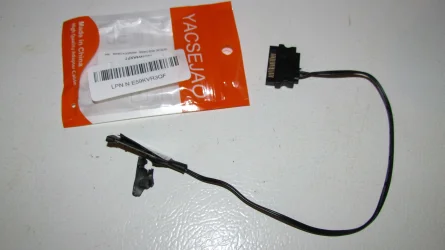
Well, it's good to be back home after getting daughter all settled in at her dormitory. Certainly not without mishaps along the way. Apart from a blow out on the highway and my laptop getting destroyed I was greeted with a package on my doorstep when I finally returned home. I opened the package and this is what I found:


IMG_1480.webp
A broken controller with parts missing. Looks like it's going to be a while before I can get those RAM fans up and running again. Not only that but I discovered that I can't switch them to the X299 build because the memory on one of the banks is already covered under the CPU cooler. So, if I use them at all they will have to go on the X99 build. Further investigation revealed that this was a pre-opened package so some shady bizznizz took place here. Gonna call up Amazon and see what they plan to do about it.
 

My Computer

System One

  • OS
    WIN 11, WIN 10, WIN 8.1, WIN 7 U, WIN 7 PRO, WIN 7 HOME (32 Bit), LINUX MINT
    Computer type
    PC/Desktop
    Manufacturer/Model
    DIY, ASUS, and DELL
    CPU
    Intel i7 6900K and i9-7960X / AMD 3800X (8 core)
    Motherboard
    ASUS X99E-WS USB 3.1 and ASUS X299 SAGE
    Memory
    128 GB CORSAIR DOMINATOR PLATINUM (B DIE)
    Graphics Card(s)
    NVIDIA 1070 and RTX 3070
    Sound Card
    Crystal Sound (onboard)
    Monitor(s) Displays
    single Samsung 30" 4K and 8" aux monitor
    Screen Resolution
    4K and something equally attrocious. I'll be working on this.
    Hard Drives
    A, B, C, D, E, F, G, H, I, J, K, L, M, N, O, P, Q, R, S, T, U, V, W

    Ports X, Y, and Z are reserved for USB access and removable drives.

    Drive types consist of the following: Various mechanical hard drives bearing the brand names, Seagate, Toshiba, and Western Digital. Various NVMe drives bearing the brand names Kingston, Intel, Silicon Power, Crucial, Western Digital, and Team Group. Various SATA SSDs bearing various different brand names.

    RAID arrays included:

    LSI RAID 10 (WD Velociraptors) 1115.72 GB
    LSI RAID 10 (WD SSDS) 463.80 GB

    INTEL RAID 0 (KINGSTON HYPER X) System 447.14 GB
    INTEL RAID 1 TOSHIBA ENTERPRIZE class Data 2794.52 GB
    INTEL RAID 1 SEAGATE HYBRID 931.51 GB
    PSU
    SEVERAL. I prefer my Corsair Platinum HX1000i but I also like EVGA power supplies
    Case
    ThermalTake Level 10 GT (among others)
    Cooling
    Noctua is my favorite and I use it in my main. I also own various other coolers.
    Keyboard
    all kinds.
    Mouse
    all kinds
    Internet Speed
    360 mbps - 1 gbps (depending)
    Browser
    FIREFOX
    Antivirus
    KASPERSKY (no apologies)
    Other Info
    Gave Dell touch screen with Windows 11 to daughter and got me an OTVOC. Being a PC builder I own many desktop PCs as well. I am a father of five providing PCs, laptops, and tablets for all my family, most of which I have modified, rebuilt, or simply built from scratch. I do not own a cell phone, never have, never will.
It would seem that the only company that makes these is out of China. I opted for the molex version this time. If it works I will have a solution to the Corsair over priced Commander series to offer others who find themselves in the same predicament.


I would very much like to get this effect back again as I cannot run these fans with a Peerless Assassin CPU cooler on the x299.


My Computer

System One

  • OS
    WIN 11, WIN 10, WIN 8.1, WIN 7 U, WIN 7 PRO, WIN 7 HOME (32 Bit), LINUX MINT
    Computer type
    PC/Desktop
    Manufacturer/Model
    DIY, ASUS, and DELL
    CPU
    Intel i7 6900K and i9-7960X / AMD 3800X (8 core)
    Motherboard
    ASUS X99E-WS USB 3.1 and ASUS X299 SAGE
    Memory
    128 GB CORSAIR DOMINATOR PLATINUM (B DIE)
    Graphics Card(s)
    NVIDIA 1070 and RTX 3070
    Sound Card
    Crystal Sound (onboard)
    Monitor(s) Displays
    single Samsung 30" 4K and 8" aux monitor
    Screen Resolution
    4K and something equally attrocious. I'll be working on this.
    Hard Drives
    A, B, C, D, E, F, G, H, I, J, K, L, M, N, O, P, Q, R, S, T, U, V, W

    Ports X, Y, and Z are reserved for USB access and removable drives.

    Drive types consist of the following: Various mechanical hard drives bearing the brand names, Seagate, Toshiba, and Western Digital. Various NVMe drives bearing the brand names Kingston, Intel, Silicon Power, Crucial, Western Digital, and Team Group. Various SATA SSDs bearing various different brand names.

    RAID arrays included:

    LSI RAID 10 (WD Velociraptors) 1115.72 GB
    LSI RAID 10 (WD SSDS) 463.80 GB

    INTEL RAID 0 (KINGSTON HYPER X) System 447.14 GB
    INTEL RAID 1 TOSHIBA ENTERPRIZE class Data 2794.52 GB
    INTEL RAID 1 SEAGATE HYBRID 931.51 GB
    PSU
    SEVERAL. I prefer my Corsair Platinum HX1000i but I also like EVGA power supplies
    Case
    ThermalTake Level 10 GT (among others)
    Cooling
    Noctua is my favorite and I use it in my main. I also own various other coolers.
    Keyboard
    all kinds.
    Mouse
    all kinds
    Internet Speed
    360 mbps - 1 gbps (depending)
    Browser
    FIREFOX
    Antivirus
    KASPERSKY (no apologies)
    Other Info
    Gave Dell touch screen with Windows 11 to daughter and got me an OTVOC. Being a PC builder I own many desktop PCs as well. I am a father of five providing PCs, laptops, and tablets for all my family, most of which I have modified, rebuilt, or simply built from scratch. I do not own a cell phone, never have, never will.
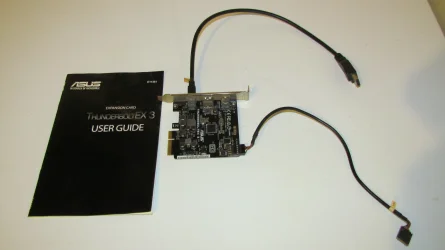
So Thunderbolt 3 will give me 40 Gbps on Thunderbolt devices but only 10 Gbps on USB 3.1 devices. As my daddy used to say, "Good enough for the girls I go out with." Sadly, I can't seem to get it to function correctly on the X299 platform so it's going back into the X99 where it works just fine. Perhaps I'll opt for a TB4 card for the CoolerMaster build later.

IMG_1481.webp

Once I have this in I'll lug the monstrosity back down into the computer room as I no longer have the upper body strength to carry this beast back downstairs with the mechanical hard drives in it without risking injury to recent surgery. That will be ten more drives, all of which are large capacity mechanical hard drives, some of them 10 and 12 TB. So that sets the total at 28 drives (29 if you count the Blue Ray) and still more SATA and NVMe to spare. More on this later.
 

My Computer

System One

  • OS
    WIN 11, WIN 10, WIN 8.1, WIN 7 U, WIN 7 PRO, WIN 7 HOME (32 Bit), LINUX MINT
    Computer type
    PC/Desktop
    Manufacturer/Model
    DIY, ASUS, and DELL
    CPU
    Intel i7 6900K and i9-7960X / AMD 3800X (8 core)
    Motherboard
    ASUS X99E-WS USB 3.1 and ASUS X299 SAGE
    Memory
    128 GB CORSAIR DOMINATOR PLATINUM (B DIE)
    Graphics Card(s)
    NVIDIA 1070 and RTX 3070
    Sound Card
    Crystal Sound (onboard)
    Monitor(s) Displays
    single Samsung 30" 4K and 8" aux monitor
    Screen Resolution
    4K and something equally attrocious. I'll be working on this.
    Hard Drives
    A, B, C, D, E, F, G, H, I, J, K, L, M, N, O, P, Q, R, S, T, U, V, W

    Ports X, Y, and Z are reserved for USB access and removable drives.

    Drive types consist of the following: Various mechanical hard drives bearing the brand names, Seagate, Toshiba, and Western Digital. Various NVMe drives bearing the brand names Kingston, Intel, Silicon Power, Crucial, Western Digital, and Team Group. Various SATA SSDs bearing various different brand names.

    RAID arrays included:

    LSI RAID 10 (WD Velociraptors) 1115.72 GB
    LSI RAID 10 (WD SSDS) 463.80 GB

    INTEL RAID 0 (KINGSTON HYPER X) System 447.14 GB
    INTEL RAID 1 TOSHIBA ENTERPRIZE class Data 2794.52 GB
    INTEL RAID 1 SEAGATE HYBRID 931.51 GB
    PSU
    SEVERAL. I prefer my Corsair Platinum HX1000i but I also like EVGA power supplies
    Case
    ThermalTake Level 10 GT (among others)
    Cooling
    Noctua is my favorite and I use it in my main. I also own various other coolers.
    Keyboard
    all kinds.
    Mouse
    all kinds
    Internet Speed
    360 mbps - 1 gbps (depending)
    Browser
    FIREFOX
    Antivirus
    KASPERSKY (no apologies)
    Other Info
    Gave Dell touch screen with Windows 11 to daughter and got me an OTVOC. Being a PC builder I own many desktop PCs as well. I am a father of five providing PCs, laptops, and tablets for all my family, most of which I have modified, rebuilt, or simply built from scratch. I do not own a cell phone, never have, never will.
Don't carry that alone! Ask for help.
 

My Computers

System One System Two

  • OS
    Windows 11 Pro 23H2 (5699), 25H2 (8457)
    Computer type
    Laptop
    Manufacturer/Model
    Acer Extensa 5630EZ
    CPU
    Mobile DualCore Intel Core 2 Duo T7250, 2000 MHz
    Motherboard
    Acer Extensa 5630
    Memory
    4GB
    Graphics Card(s)
    Mobile Intel(R) GMA 4500M (Mobile 4 series)
    Sound Card
    Realtek ALC268 @ Intel 82801IB ICH9 - High Definition Audio Controller
    Monitor(s) Displays
    1
    Screen Resolution
    1280x800
    Hard Drives
    Samsung SSD 850 EVO 250GB SATA Device (250 GB, SATA-III)
    Internet Speed
    VDSL 50 Mbps
    Browser
    MICROSOFT EDGE
    Antivirus
    WINDOWS DEFENDER
    Other Info
    Legacy MBR installation, no TPM, no Secure Boot, no WDDM 2.0 graphics drivers, no SSE4.2, cannot get more unsupported ;) This is only my test laptop. I had installed Windows 11 here before upgrading my main PC. For my main PC I use everyday see my 2nd system specs.
  • Operating System
    Windows 11 Pro v25H2 (build 26200.8457)
    Computer type
    PC/Desktop
    Manufacturer/Model
    Custom-built PC
    CPU
    Intel Core-i7 3770 3.40GHz s1155 (3rd generation)
    Motherboard
    Asus P8H61 s1155 ATX
    Memory
    2x Kingston Hyper-X Blu 8GB DDR3-1600
    Graphics card(s)
    GIGABYTE GeForce RTX 3050 WINDFORCE OC V2 6GB (GV-N3050WF2OCV2-6GD)
    Sound Card
    Realtek HD audio (ALC887)
    Monitor(s) Displays
    Sony Bravia KDL-19L4000 19" LCD TV via VGA
    Screen Resolution
    1440x900 32-bit 60Hz
    Hard Drives
    WD Blue SA510 2.5 1000GB SSD as system disk, Western Digital Caviar Purple 4TB SATA III (WD40PURZ) as second
    PSU
    Thermaltake Litepower RGB 550W Full Wired
    Case
    SUPERCASE MIDI-TOWER
    Cooling
    Deepcool Gamma Archer CPU cooler, 1x 8cm fan at the back
    Keyboard
    Mitsumi 101-key PS/2
    Mouse
    Sunnyline OptiEye PS/2
    Internet Speed
    100Mbps
    Browser
    Microsoft Edge, Mozilla Firefox
    Antivirus
    Microsoft Windows Defender
    Other Info
    Legacy BIOS (MBR) installation, no TPM, no Secure Boot, WDDM 3.0 graphics drivers, WEI score 7.4
Don't carry that alone! Ask for help.
Ty for the advice. I got it down the stairs myself, one step at a time, without incident. Took me about ten minutes from the top of the stairs on down. I've got it on the 18 year old's dusty desk now. My basement is horrendously dusty and that's very disappointing because this is where the computer room is. The computer room is huge. It looks like a PC work shop with six desks all bearing at least one desk top and a good deal more.


IMG_1483.webp
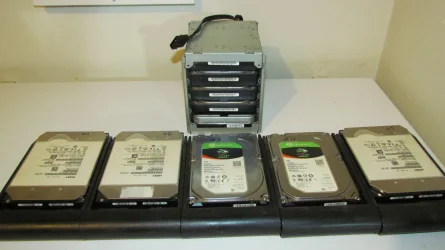
Here's the other ten drives that go into the case. Five are in sleds and another five are in a cage I'm thinking of swapping out the Seagate Hybrid drives with more Helium filled drives but this isn't really a priority. The hybrids will work fine for now.

IMG_1484.webp
Anyway, there it sits, guts and all. Evidently I forgot to wipe down the sleds. The cage just fits in between the PSU and the sleds.It's a good thing all the mess is hidden once I get the door back on or my OCD would drive me batty. Obviously I have some more SATA lines to connect. The dimmer on the Silverstone fan controller was all the way down when I took this picture. You can see the tiny blue LEDs on the fan mod I did. The case does not normally have a fan there but it serves well for a secondary intake considering all the drives this case houses.
 

My Computer

System One

  • OS
    WIN 11, WIN 10, WIN 8.1, WIN 7 U, WIN 7 PRO, WIN 7 HOME (32 Bit), LINUX MINT
    Computer type
    PC/Desktop
    Manufacturer/Model
    DIY, ASUS, and DELL
    CPU
    Intel i7 6900K and i9-7960X / AMD 3800X (8 core)
    Motherboard
    ASUS X99E-WS USB 3.1 and ASUS X299 SAGE
    Memory
    128 GB CORSAIR DOMINATOR PLATINUM (B DIE)
    Graphics Card(s)
    NVIDIA 1070 and RTX 3070
    Sound Card
    Crystal Sound (onboard)
    Monitor(s) Displays
    single Samsung 30" 4K and 8" aux monitor
    Screen Resolution
    4K and something equally attrocious. I'll be working on this.
    Hard Drives
    A, B, C, D, E, F, G, H, I, J, K, L, M, N, O, P, Q, R, S, T, U, V, W

    Ports X, Y, and Z are reserved for USB access and removable drives.

    Drive types consist of the following: Various mechanical hard drives bearing the brand names, Seagate, Toshiba, and Western Digital. Various NVMe drives bearing the brand names Kingston, Intel, Silicon Power, Crucial, Western Digital, and Team Group. Various SATA SSDs bearing various different brand names.

    RAID arrays included:

    LSI RAID 10 (WD Velociraptors) 1115.72 GB
    LSI RAID 10 (WD SSDS) 463.80 GB

    INTEL RAID 0 (KINGSTON HYPER X) System 447.14 GB
    INTEL RAID 1 TOSHIBA ENTERPRIZE class Data 2794.52 GB
    INTEL RAID 1 SEAGATE HYBRID 931.51 GB
    PSU
    SEVERAL. I prefer my Corsair Platinum HX1000i but I also like EVGA power supplies
    Case
    ThermalTake Level 10 GT (among others)
    Cooling
    Noctua is my favorite and I use it in my main. I also own various other coolers.
    Keyboard
    all kinds.
    Mouse
    all kinds
    Internet Speed
    360 mbps - 1 gbps (depending)
    Browser
    FIREFOX
    Antivirus
    KASPERSKY (no apologies)
    Other Info
    Gave Dell touch screen with Windows 11 to daughter and got me an OTVOC. Being a PC builder I own many desktop PCs as well. I am a father of five providing PCs, laptops, and tablets for all my family, most of which I have modified, rebuilt, or simply built from scratch. I do not own a cell phone, never have, never will.
Lucky you, when buying my own 3rd generation Core-i3 (later upgraded to Core-i7), I wanted a motherboard with as many as possible legacy PCI slots to connect my old expansion cards. So I got only 4 SATA II ports and 2 DDR3 RAM slots. Other models had more SATA II ports and even SATA III ports with 4 RAM slots, but I would sacrifice backwards compatibility. Recently I replaced my USB 3.0 PCIe card with a combo USB 3.0 and SATA III PCIe card, so I got 2 SATA III ports! Hurray! If I need more disks I will have to use USB hard disks. This of course risks losing your data if the power fails and the USB hard disk starts clicking... Been there, done that, unfortunately.
 

My Computers

System One System Two

  • OS
    Windows 11 Pro 23H2 (5699), 25H2 (8457)
    Computer type
    Laptop
    Manufacturer/Model
    Acer Extensa 5630EZ
    CPU
    Mobile DualCore Intel Core 2 Duo T7250, 2000 MHz
    Motherboard
    Acer Extensa 5630
    Memory
    4GB
    Graphics Card(s)
    Mobile Intel(R) GMA 4500M (Mobile 4 series)
    Sound Card
    Realtek ALC268 @ Intel 82801IB ICH9 - High Definition Audio Controller
    Monitor(s) Displays
    1
    Screen Resolution
    1280x800
    Hard Drives
    Samsung SSD 850 EVO 250GB SATA Device (250 GB, SATA-III)
    Internet Speed
    VDSL 50 Mbps
    Browser
    MICROSOFT EDGE
    Antivirus
    WINDOWS DEFENDER
    Other Info
    Legacy MBR installation, no TPM, no Secure Boot, no WDDM 2.0 graphics drivers, no SSE4.2, cannot get more unsupported ;) This is only my test laptop. I had installed Windows 11 here before upgrading my main PC. For my main PC I use everyday see my 2nd system specs.
  • Operating System
    Windows 11 Pro v25H2 (build 26200.8457)
    Computer type
    PC/Desktop
    Manufacturer/Model
    Custom-built PC
    CPU
    Intel Core-i7 3770 3.40GHz s1155 (3rd generation)
    Motherboard
    Asus P8H61 s1155 ATX
    Memory
    2x Kingston Hyper-X Blu 8GB DDR3-1600
    Graphics card(s)
    GIGABYTE GeForce RTX 3050 WINDFORCE OC V2 6GB (GV-N3050WF2OCV2-6GD)
    Sound Card
    Realtek HD audio (ALC887)
    Monitor(s) Displays
    Sony Bravia KDL-19L4000 19" LCD TV via VGA
    Screen Resolution
    1440x900 32-bit 60Hz
    Hard Drives
    WD Blue SA510 2.5 1000GB SSD as system disk, Western Digital Caviar Purple 4TB SATA III (WD40PURZ) as second
    PSU
    Thermaltake Litepower RGB 550W Full Wired
    Case
    SUPERCASE MIDI-TOWER
    Cooling
    Deepcool Gamma Archer CPU cooler, 1x 8cm fan at the back
    Keyboard
    Mitsumi 101-key PS/2
    Mouse
    Sunnyline OptiEye PS/2
    Internet Speed
    100Mbps
    Browser
    Microsoft Edge, Mozilla Firefox
    Antivirus
    Microsoft Windows Defender
    Other Info
    Legacy BIOS (MBR) installation, no TPM, no Secure Boot, WDDM 3.0 graphics drivers, WEI score 7.4
Lucky you, when buying my own 3rd generation Core-i3 (later upgraded to Core-i7), I wanted a motherboard with as many as possible legacy PCI slots to connect my old expansion cards. So I got only 4 SATA II ports and 2 DDR3 RAM slots. Other models had more SATA II ports and even SATA III ports with 4 RAM slots, but I would sacrifice backwards compatibility. Recently I replaced my USB 3.0 PCIe card with a combo USB 3.0 and SATA III PCIe card, so I got 2 SATA III ports! Hurray! If I need more disks I will have to use USB hard disks. This of course risks losing your data if the power fails and the USB hard disk starts clicking... Been there, done that, unfortunately.
You should be okay if you use a UPS. I can't imagine running a main PC without one. Surge protection is okay, but depending on the level of protection it's still a gamble on data. I recently had the opportunity to instruct my 14 year old on what to do when there was a power outage. She was baffled why she was sitting in the dark but her PC was still running. I explained that this was the time to close all her apps and things.. programs, yeah, that's what we used to call them... and shut down her PC safely. After she did this I explained to her why her PC was set up like that. Five minutes later the power went back on and she had to reset her UPS. She said, "Dad, this is annoying." I asked her what she would prefer, resetting her UPS or fixing her PC because it lost files. Suddenly she decided a UPS was a good thing to have. 😄
 

My Computer

System One

  • OS
    WIN 11, WIN 10, WIN 8.1, WIN 7 U, WIN 7 PRO, WIN 7 HOME (32 Bit), LINUX MINT
    Computer type
    PC/Desktop
    Manufacturer/Model
    DIY, ASUS, and DELL
    CPU
    Intel i7 6900K and i9-7960X / AMD 3800X (8 core)
    Motherboard
    ASUS X99E-WS USB 3.1 and ASUS X299 SAGE
    Memory
    128 GB CORSAIR DOMINATOR PLATINUM (B DIE)
    Graphics Card(s)
    NVIDIA 1070 and RTX 3070
    Sound Card
    Crystal Sound (onboard)
    Monitor(s) Displays
    single Samsung 30" 4K and 8" aux monitor
    Screen Resolution
    4K and something equally attrocious. I'll be working on this.
    Hard Drives
    A, B, C, D, E, F, G, H, I, J, K, L, M, N, O, P, Q, R, S, T, U, V, W

    Ports X, Y, and Z are reserved for USB access and removable drives.

    Drive types consist of the following: Various mechanical hard drives bearing the brand names, Seagate, Toshiba, and Western Digital. Various NVMe drives bearing the brand names Kingston, Intel, Silicon Power, Crucial, Western Digital, and Team Group. Various SATA SSDs bearing various different brand names.

    RAID arrays included:

    LSI RAID 10 (WD Velociraptors) 1115.72 GB
    LSI RAID 10 (WD SSDS) 463.80 GB

    INTEL RAID 0 (KINGSTON HYPER X) System 447.14 GB
    INTEL RAID 1 TOSHIBA ENTERPRIZE class Data 2794.52 GB
    INTEL RAID 1 SEAGATE HYBRID 931.51 GB
    PSU
    SEVERAL. I prefer my Corsair Platinum HX1000i but I also like EVGA power supplies
    Case
    ThermalTake Level 10 GT (among others)
    Cooling
    Noctua is my favorite and I use it in my main. I also own various other coolers.
    Keyboard
    all kinds.
    Mouse
    all kinds
    Internet Speed
    360 mbps - 1 gbps (depending)
    Browser
    FIREFOX
    Antivirus
    KASPERSKY (no apologies)
    Other Info
    Gave Dell touch screen with Windows 11 to daughter and got me an OTVOC. Being a PC builder I own many desktop PCs as well. I am a father of five providing PCs, laptops, and tablets for all my family, most of which I have modified, rebuilt, or simply built from scratch. I do not own a cell phone, never have, never will.
Just curious, what's the purpose of all the mechanical drives?
 

My Computers

System One System Two

  • OS
    Win 11 Pro 25H2, Build 26200.8524
    Computer type
    PC/Desktop
    Manufacturer/Model
    Home Brew
    CPU
    Intel Core i5 14500
    Motherboard
    Gigabyte B760M G P WIFI
    Memory
    64GB DDR4
    Graphics Card(s)
    GeForce RTX 4060
    Sound Card
    Chipset Realtek
    Monitor(s) Displays
    LG 45" Ultragear, Acer 24" 1080p
    Screen Resolution
    5120x1440, 1920x1080
    Hard Drives
    Crucial P310 2TB 2280 PCIe Gen4 3D NAND NVMe M.2 SSD (O/S)
    Silicon Power 2TB US75 NVMe PCIe Gen4 M.2 2280 SSD (backup)
    Crucial BX500 2TB 3D NAND (2nd backup)
    Seagate 4TB Ironwolf, rotating HDD archive files
    External off-line backup Drives: 2 NVMe 4TB drives in external enclosures
    PSU
    Thermaltake Toughpower GF3 750W
    Case
    LIAN LI LANCOOL 216 E-ATX PC Case
    Cooling
    Lots of fans!
    Keyboard
    Microsoft Comfort Curve 2000
    Mouse
    Logitech G305
    Internet Speed
    Verizon FiOS 1GB
    Browser
    Firefox
    Antivirus
    Malware Bytes & Windows Defender Security
  • Operating System
    Win 11 Pro 25H2, Build 26200.8524
    Computer type
    PC/Desktop
    Manufacturer/Model
    Home Brew
    CPU
    Intel Core i5 14400
    Motherboard
    Gigabyte B760M DS3H AX
    Memory
    32GB DDR5
    Graphics card(s)
    Intel 700 Embedded GPU
    Sound Card
    Realtek Embedded
    Monitor(s) Displays
    27" HP 1080p
    Screen Resolution
    1920x1080
    Hard Drives
    Crucial P310 2TB 2280 PCIe Gen4 eD NAND PCIe SSD
    Samsung EVO 990 2TB NVMe Gen4 SSD
    Samsung 2TB SATA SSD
    PSU
    Thermaltake Smart BM3 650W
    Case
    Okinos Micro ATX Case
    Cooling
    Fans
    Keyboard
    Microsoft Comfort Curve 2000
    Mouse
    Logitech G305
    Internet Speed
    Verizon FiOS 1GB
    Browser
    Firefox
    Antivirus
    Malware Bytes & Windows Defender Security

Latest Support Threads

Back
Top Bottom