RESTORATION


One thing that makes me feel somewhat sheepish is that I don't own an ultrasonic cleaner and they're really not that expensive anymore.

Perhaps I should look into getting one.
Holy-moly, they certainly have dropped considerably in price. I just might have to pick one up...
 

My Computers

System One System Two

  • OS
    Win 11 Pro
    Computer type
    PC/Desktop
    Manufacturer/Model
    ABS (Newegg)
    CPU
    Intel(R) Core(TM) i5-10400F CPU @ 2.90GHz
    Motherboard
    ASUSTeK COMPUTER INC. PRIME B560M-A AC Rev 1.xx
    Memory
    Corsair VENGEANCE® LPX 32GB (2 x 16GB) DDR4 DRAM 3600MHz
    Graphics Card(s)
    MSI NVIDIA GeForce RTX 3060 Ti
    Sound Card
    Realtek Digital Output (Realtek(R) Audio)
    Monitor(s) Displays
    Viewsonic VS 2725 -2k 27"
    Screen Resolution
    2560x1440 100hz
    Hard Drives
    T-FORCE TM8FP800 1TB + a couple SATA SSDs
    PSU
    Gigabyte P650E
    Case
    DeepCool Matrexx 50 mid-tower
    Cooling
    Assassin X 120 Refined SE and 5 Thermalright TL-C12C case fans
    Keyboard
    Redragon K655 or K720
    Mouse
    CoolerMaster MM711 or Redragon M612
    Internet Speed
    Starlink: speed varies
    Browser
    Brave (default), Chrome (for ATG), Edge (for ATMS)
    Antivirus
    Windows Defender
    Other Info
    An assortment of "land fill, obsolete" computers all running Linux Mint 22 (at the moment).
  • Operating System
    Linux Mint 22.2 Cinnamon
    Computer type
    PC/Desktop
    Manufacturer/Model
    Hewlett-Packard HP ProDesk 600 G1 SFF
    CPU
    i5 4590
    Motherboard
    HP
    Memory
    16 GB
    Graphics card(s)
    Intel(R) HD Graphics 4600
    Sound Card
    Realtek High Definition Audio
    Monitor(s) Displays
    Generic 24"
    Hard Drives
    Samsung SSD 860 EVO 500GB
    Hitachi HUA722010CLA330
    WDC WD40EZAZ-19SF3B0
    PSU
    Factory 240 watt
    Case
    Low Profile Desktop
    Cooling
    Factory cooling
    Keyboard
    HP
    Mouse
    HP
    Internet Speed
    Starlink
    Browser
    Brave
    Antivirus
    ?
    Other Info
    This is my media server
Much faster than my DDR3-1600
Maybe so but your DDR3 probably didn't cost $2K and it likely serves you well regardless. I have more DDR3 running in this house than anything else. Only my OTVOC laptop runs DDR5 and that stupid thing only lets me run one stick of NVMe. Everything is a trade off. Speaking of Corsair not being what they used to be: Just discovered that the fan controller for my RAM fans is burnt. I bought that thing separately, directly from Corsair, despite the salesman on the phone telling me I didn't want it. Stupid thing was a pain from day one. I'm half glad it died because the software for it was a nightmare. Alas, now if I want my pretty blue RAM fans I have to get another controller. The Corsair Commander is garbage.
 

My Computer

System One

  • OS
    WIN 11, WIN 10, WIN 8.1, WIN 7 U, WIN 7 PRO, WIN 7 HOME (32 Bit), LINUX MINT
    Computer type
    PC/Desktop
    Manufacturer/Model
    DIY, ASUS, and DELL
    CPU
    Intel i7 6900K and i9-7960X / AMD 3800X (8 core)
    Motherboard
    ASUS X99E-WS USB 3.1 and ASUS X299 SAGE
    Memory
    128 GB CORSAIR DOMINATOR PLATINUM (B DIE)
    Graphics Card(s)
    NVIDIA 1070 and RTX 3070
    Sound Card
    Crystal Sound (onboard)
    Monitor(s) Displays
    single Samsung 30" 4K and 8" aux monitor
    Screen Resolution
    4K and something equally attrocious. I'll be working on this.
    Hard Drives
    A, B, C, D, E, F, G, H, I, J, K, L, M, N, O, P, Q, R, S, T, U, V, W

    Ports X, Y, and Z are reserved for USB access and removable drives.

    Drive types consist of the following: Various mechanical hard drives bearing the brand names, Seagate, Toshiba, and Western Digital. Various NVMe drives bearing the brand names Kingston, Intel, Silicon Power, Crucial, Western Digital, and Team Group. Various SATA SSDs bearing various different brand names.

    RAID arrays included:

    LSI RAID 10 (WD Velociraptors) 1115.72 GB
    LSI RAID 10 (WD SSDS) 463.80 GB

    INTEL RAID 0 (KINGSTON HYPER X) System 447.14 GB
    INTEL RAID 1 TOSHIBA ENTERPRIZE class Data 2794.52 GB
    INTEL RAID 1 SEAGATE HYBRID 931.51 GB
    PSU
    SEVERAL. I prefer my Corsair Platinum HX1000i but I also like EVGA power supplies
    Case
    ThermalTake Level 10 GT (among others)
    Cooling
    Noctua is my favorite and I use it in my main. I also own various other coolers.
    Keyboard
    all kinds.
    Mouse
    all kinds
    Internet Speed
    360 mbps - 1 gbps (depending)
    Browser
    FIREFOX
    Antivirus
    KASPERSKY (no apologies)
    Other Info
    Gave Dell touch screen with Windows 11 to daughter and got me an OTVOC. Being a PC builder I own many desktop PCs as well. I am a father of five providing PCs, laptops, and tablets for all my family, most of which I have modified, rebuilt, or simply built from scratch. I do not own a cell phone, never have, never will.
Hahaha... Nice pics. At first it looked like someone throwed a bunch off stuff inside a PC. (As a homebuilder I try to keep things tidy for a reason. You can have a bunch of fans inside your case but the airflow inside the case (when closed) must not be a problem. Otherwise your asking for hotspots.)

Yes cleaning old stuff can be a pain in the ass. Stuff is old. Plastic are getting colorized. White is contagious color. I avoid this color. I go for black. Cleaning them with Isopropanol is a good way to clean it's surface. (blowing off the main part of dust with air and then brushing them first that is) It's also non conductive so you can clean some components on your motherboard and cards when needed. It evaporate quickly (As the familiair smell already notified you) All fans has brushless motors inside them. WD40 is a cleaner. I would not use it if I would be you. A drop of oil may be enough to oil them if needed. I have never had to do that. If a fan is making noise I just replace it. (Never had a fan that did)

It would be wise to take more care of the cable management. (Air flow purposes) A couple of tyraps will help things to organize. Maybe replacing the CPU cooler block would be a good idea. You only have a cooler block sitting on top of the CPU. Replacing it by the same kind but with a push and pull fan on both sides things can get cooler. (or use tyraps to make one) It's not that much of an investment. When replacing; I would also replace the paste between the CPU and the cooler. After some 5 years the paste is getting dried out and does not perform as well as new paste would. Drying out means also higher temperatures for your CPU. It's basically a "normal routine" to replace the paste once every 2 years of so. (Is there anyone that replacing their paste after each 2 years? I sure don't)

One thing I have learned during all my builds; don't buy a cheap and to smaller case. I had one for my new system, but I replaced it by a bigger one (had trouble to getting my short RTX 3060Ti card out each time) that had space for cable management on the other side of the motherboard. Some 90% of all cables went in this small compartment. (Approx. 3,5 cm) If I open my case now I just see my motherboard and it's cards. All cables are coming from the other side into this compartment. In my old computer I can not hide all cables to the other side. The sideplate of the case and the mounting plate for the motherboard leaves no room for that. So I have no choice then to tyrap the cables and pushing them aside into the empty spaces arround the motherboard. For airflow purposes; I have 1 pull fan on the back. 1 push fan onto the CPU cooler block (in my old PC; 2 on each side of the CPU cooler block, one push and one pull both directed to the back of the PC) 1 pull fan on the bottom inside my PSU directed towards the inside. 1 pull fan on top blowing air from the outside into my system. Any extra air can get outside the back, the top, the bottom and the front. Both my old and new PC's make no noises what so ever. I have to look to confirm that they are switched on.
 

My Computer

System One

  • OS
    Win 11 Pro "25H2" Build 26200.8524, Zorin OS Pro
    Computer type
    PC/Desktop
    Manufacturer/Model
    Self built
    CPU
    Intel® Core™ i7-12700KF 12th Gen.
    Motherboard
    ASUS Prime Z690-A, BIOS v4505
    Memory
    32GB DDR5 5600-36 Vengeance
    Graphics Card(s)
    PCIe4.0 Asus NVIDIA RTX3060Ti
    Sound Card
    Onboard; Realtek
    Monitor(s) Displays
    34" LG 34UC79G-B Curved 21:9 144Hz
    Screen Resolution
    2560x1080 (No HDR)
    Hard Drives
    250Gb Samsung 870PRO NVMe (Win 11 Pro)
    1Tb Samsung 980PRO NVMe
    1Tb Samsung 970EVO NVMe
    2Tb Samsung 990PRO NVMe with heatsink.
    4Tb WDC WD40EZRZ Blue SATA (Int.)
    4Tb WDC WD40EZRZ Blue SATA (Int.)
    3Tb WDC WD30EFRZ Red SATA (Int.)
    256Gb Samsung 840PRO SSD (RHEL 9,5)
    256Gb Samsung 850PRO SSD (Zorin OS Pro 18)
    PSU
    Coolermaster 850W V2 Gold with internal 12cm exaust fan
    Case
    Be-Quiet Pure Base 600.
    Cooling
    3x Be-Quiet! 12/14cm "Silent Wings 4" casefans, 1x Arctic Freezer i35 CPU towerblock with fan.
    Keyboard
    Steelseries APEX 7 keyboard.
    Mouse
    Logitech G-502 Hero
    Internet Speed
    1Gb
    Browser
    Brave
    Antivirus
    F-Secure
    Other Info
    No Noise system.
    256Gb Kingston Travler USB 3.0 drive.
    64Gb Sandisk USB 3.2 drive. (Ventoy)
    8Gb Philips USB 3.0 drive. (Win. Inst.)
    8Gb Philips USB 3.0 drive. (Rescue disk)
    2Tb WD USB 3.0 Passport drive.
    USB Ext. 500Gb WD SATA drive.
    External USB 3.0 C.A. CD/DVD* burner.
I suggested WD-40 to remove dried dust from the fan, not to lubricate it. Of course if it is noisy just replace it. Not worth your effort trying to make it quiet just to last a few months more.
 

My Computers

System One System Two

  • OS
    Windows 11 Pro 23H2 (5699), 25H2 (8457)
    Computer type
    Laptop
    Manufacturer/Model
    Acer Extensa 5630EZ
    CPU
    Mobile DualCore Intel Core 2 Duo T7250, 2000 MHz
    Motherboard
    Acer Extensa 5630
    Memory
    4GB
    Graphics Card(s)
    Mobile Intel(R) GMA 4500M (Mobile 4 series)
    Sound Card
    Realtek ALC268 @ Intel 82801IB ICH9 - High Definition Audio Controller
    Monitor(s) Displays
    1
    Screen Resolution
    1280x800
    Hard Drives
    Samsung SSD 850 EVO 250GB SATA Device (250 GB, SATA-III)
    Internet Speed
    VDSL 50 Mbps
    Browser
    MICROSOFT EDGE
    Antivirus
    WINDOWS DEFENDER
    Other Info
    Legacy MBR installation, no TPM, no Secure Boot, no WDDM 2.0 graphics drivers, no SSE4.2, cannot get more unsupported ;) This is only my test laptop. I had installed Windows 11 here before upgrading my main PC. For my main PC I use everyday see my 2nd system specs.
  • Operating System
    Windows 11 Pro v25H2 (build 26200.8457)
    Computer type
    PC/Desktop
    Manufacturer/Model
    Custom-built PC
    CPU
    Intel Core-i7 3770 3.40GHz s1155 (3rd generation)
    Motherboard
    Asus P8H61 s1155 ATX
    Memory
    2x Kingston Hyper-X Blu 8GB DDR3-1600
    Graphics card(s)
    GIGABYTE GeForce RTX 3050 WINDFORCE OC V2 6GB (GV-N3050WF2OCV2-6GD)
    Sound Card
    Realtek HD audio (ALC887)
    Monitor(s) Displays
    Sony Bravia KDL-19L4000 19" LCD TV via VGA
    Screen Resolution
    1440x900 32-bit 60Hz
    Hard Drives
    WD Blue SA510 2.5 1000GB SSD as system disk, Western Digital Caviar Purple 4TB SATA III (WD40PURZ) as second
    PSU
    Thermaltake Litepower RGB 550W Full Wired
    Case
    SUPERCASE MIDI-TOWER
    Cooling
    Deepcool Gamma Archer CPU cooler, 1x 8cm fan at the back
    Keyboard
    Mitsumi 101-key PS/2
    Mouse
    Sunnyline OptiEye PS/2
    Internet Speed
    100Mbps
    Browser
    Microsoft Edge, Mozilla Firefox
    Antivirus
    Microsoft Windows Defender
    Other Info
    Legacy BIOS (MBR) installation, no TPM, no Secure Boot, WDDM 3.0 graphics drivers, WEI score 7.4
One trick I learned is to remove the cooler from the CPU and then spray it a few times with WD40. Give it some time and the dust will dissolve and you can clean it. This works even for dust stuck at the fan plastics. You could try it in the case covers and other surfaces. Not directly on electronics of course.
They make a WD-40 contact cleaner for electronics. Here's a little trivia about WD-40 that some may not know. The name stand for water displacement formula number 40.
 

My Computers

System One System Two

  • OS
    Windows 11 Pro 25H2
    Computer type
    PC/Desktop
    Manufacturer/Model
    PowerSpec B746
    CPU
    Intel Core i7-10700K
    Motherboard
    ASRock Z490 Phantom Gaming 4/ax
    Memory
    16GB (8GB PC4-19200 DDR4 SDRAM x2)
    Graphics Card(s)
    NVIDIA GeForce GTX 1050 TI
    Sound Card
    Realtek Audio
    Monitor(s) Displays
    #1. LG ULTRAWIDE 34" #2. AOC Q32G2WG3 32"
    Screen Resolution
    #1. 3440 X 1440 #2. 1920 x 1080
    Hard Drives
    NVMe WDC WDS100T2B0C-00PXH0 1TB
    Samsung SSD 860 EVO 1TB
    PSU
    750 Watts (62.5A)
    Case
    PowerSpec/Lian Li ATX 205
    Keyboard
    Logitech K270
    Mouse
    Logitech M185
    Browser
    Microsoft Edge and Firefox
    Antivirus
    Webroot SecureAnywhere CE 26.1
  • Operating System
    Windows 11 Canary Channel
    Computer type
    PC/Desktop
    Manufacturer/Model
    PowerSpec G156
    CPU
    Intel Core i5-8400 CPU @ 2.80GHz
    Motherboard
    AsusTeK Prime B360M-A
    Memory
    16 MB DDR 4-2666
    Monitor(s) Displays
    23" Speptre HDMI 75Hz
    Screen Resolution
    1920x1080
    Hard Drives
    Samsung 970 EVO 500GB NVMe
    Keyboard
    Logitek K270
    Mouse
    Logitek M185
    Browser
    Firefox, Edge and Edge Canary
    Antivirus
    Windows Defender
WD-40 is a lousy cleaner and even a poorer lubricant. I happen to collect old pistols, and I've received a number that were "protected" with WD-40. It dries to a hard gummy mess over time, and heat will accelerate that process. What you're left with it a lousy glue, but certainly not protection and not lubricant! If you're using WD-40 on anything, it's best to flush it off using a real solvent.
 

My Computers

System One System Two

  • OS
    Win 11 Pro 25H2, Build 26200.8524
    Computer type
    PC/Desktop
    Manufacturer/Model
    Home Brew
    CPU
    Intel Core i5 14500
    Motherboard
    Gigabyte B760M G P WIFI
    Memory
    64GB DDR4
    Graphics Card(s)
    GeForce RTX 4060
    Sound Card
    Chipset Realtek
    Monitor(s) Displays
    LG 45" Ultragear, Acer 24" 1080p
    Screen Resolution
    5120x1440, 1920x1080
    Hard Drives
    Crucial P310 2TB 2280 PCIe Gen4 3D NAND NVMe M.2 SSD (O/S)
    Silicon Power 2TB US75 NVMe PCIe Gen4 M.2 2280 SSD (backup)
    Crucial BX500 2TB 3D NAND (2nd backup)
    Seagate 4TB Ironwolf, rotating HDD archive files
    External off-line backup Drives: 2 NVMe 4TB drives in external enclosures
    PSU
    Thermaltake Toughpower GF3 750W
    Case
    LIAN LI LANCOOL 216 E-ATX PC Case
    Cooling
    Lots of fans!
    Keyboard
    Microsoft Comfort Curve 2000
    Mouse
    Logitech G305
    Internet Speed
    Verizon FiOS 1GB
    Browser
    Firefox
    Antivirus
    Malware Bytes & Windows Defender Security
  • Operating System
    Win 11 Pro 25H2, Build 26200.8524
    Computer type
    PC/Desktop
    Manufacturer/Model
    Home Brew
    CPU
    Intel Core i5 14400
    Motherboard
    Gigabyte B760M DS3H AX
    Memory
    32GB DDR5
    Graphics card(s)
    Intel 700 Embedded GPU
    Sound Card
    Realtek Embedded
    Monitor(s) Displays
    27" HP 1080p
    Screen Resolution
    1920x1080
    Hard Drives
    Crucial P310 2TB 2280 PCIe Gen4 eD NAND PCIe SSD
    Samsung EVO 990 2TB NVMe Gen4 SSD
    Samsung 2TB SATA SSD
    PSU
    Thermaltake Smart BM3 650W
    Case
    Okinos Micro ATX Case
    Cooling
    Fans
    Keyboard
    Microsoft Comfort Curve 2000
    Mouse
    Logitech G305
    Internet Speed
    Verizon FiOS 1GB
    Browser
    Firefox
    Antivirus
    Malware Bytes & Windows Defender Security
WD-40 is a lousy cleaner and even a poorer lubricant.
It's not designed to be either, i'm surprised it's so popular. My choice of light lubricant these day's is GT85.
 

My Computers

System One System Two

  • OS
    Windows 11 Enterprise 25H2 26200 7462
    Computer type
    PC/Desktop
    Manufacturer/Model
    Custom Build
    CPU
    Intel XEON E5-2699 v3
    Motherboard
    ASUS X99-A
    Memory
    64GB Teamgroup UD4-3600
    Graphics Card(s)
    NVIDIA GeForce GTX 1080 Ti
    Sound Card
    Integrated
    Monitor(s) Displays
    ACER X34 Predator
    Screen Resolution
    3440 x 1440
    Hard Drives
    Crucial CT1000P 3P SSD8 1TB
    Crucial CT1000 BX500 SSD 1TB
    PSU
    GameMax Pro
    Case
    Fractal Design
    Cooling
    Corsair H110iGT + 6 140mm Fans
    Keyboard
    Corsair K4
    Mouse
    G-Skill G502
    Internet Speed
    300MBs
    Browser
    Chrome
    Antivirus
    OEM
    Other Info
    ASUS RT-AC87U Router
  • Operating System
    25H2 26200.5074
    Computer type
    Laptop
    Manufacturer/Model
    ASUS X555LA
    Memory
    8GB
    Browser
    Chrome
    Antivirus
    OEM
Hahaha... Nice pics. At first it looked like someone throwed a bunch off stuff inside a PC. (As a homebuilder I try to keep things tidy for a reason. You can have a bunch of fans inside your case but the airflow inside the case (when closed) must not be a problem. Otherwise your asking for hotspots.)

Yes cleaning old stuff can be a pain in the ass. Stuff is old. Plastic are getting colorized. White is contagious color. I avoid this color. I go for black. Cleaning them with Isopropanol is a good way to clean it's surface. (blowing off the main part of dust with air and then brushing them first that is) It's also non conductive so you can clean some components on your motherboard and cards when needed. It evaporate quickly (As the familiair smell already notified you) All fans has brushless motors inside them. WD40 is a cleaner. I would not use it if I would be you. A drop of oil may be enough to oil them if needed. I have never had to do that. If a fan is making noise I just replace it. (Never had a fan that did)

It would be wise to take more care of the cable management. (Air flow purposes) A couple of tyraps will help things to organize. Maybe replacing the CPU cooler block would be a good idea. You only have a cooler block sitting on top of the CPU. Replacing it by the same kind but with a push and pull fan on both sides things can get cooler. (or use tyraps to make one) It's not that much of an investment. When replacing; I would also replace the paste between the CPU and the cooler. After some 5 years the paste is getting dried out and does not perform as well as new paste would. Drying out means also higher temperatures for your CPU. It's basically a "normal routine" to replace the paste once every 2 years of so. (Is there anyone that replacing their paste after each 2 years? I sure don't)

One thing I have learned during all my builds; don't buy a cheap and to smaller case. I had one for my new system, but I replaced it by a bigger one (had trouble to getting my short RTX 3060Ti card out each time) that had space for cable management on the other side of the motherboard. Some 90% of all cables went in this small compartment. (Approx. 3,5 cm) If I open my case now I just see my motherboard and it's cards. All cables are coming from the other side into this compartment. In my old computer I can not hide all cables to the other side. The sideplate of the case and the mounting plate for the motherboard leaves no room for that. So I have no choice then to tyrap the cables and pushing them aside into the empty spaces arround the motherboard. For airflow purposes; I have 1 pull fan on the back. 1 push fan onto the CPU cooler block (in my old PC; 2 on each side of the CPU cooler block, one push and one pull both directed to the back of the PC) 1 pull fan on the bottom inside my PSU directed towards the inside. 1 pull fan on top blowing air from the outside into my system. Any extra air can get outside the back, the top, the bottom and the front. Both my old and new PC's make no noises what so ever. I have to look to confirm that they are switched on.
:::Grins::: I thought the original picture would make for a nice photo effect. Kind of like a PC junkie's bad hair day. Trust me when I say that everything has its place and when running correctly the inside of the box feels like I'm running an air conditioner inside the unit. It could second as a wine cooler. Temps have never been a problem with this build. Once it's all trussed up, zipped up, and bundled up it looks pretty nifty. BUT... There's only one way to do a thorough cleaning. Those fans have to come off. Those ties have to be cut. Ya gotta let it all hang out!

Simply put this build is complex. I never much cared for white as a choice for PCs. White isn't a color. Some might argue that black isn't either. Fair enough. I prefer black. RGB wasn't a thing with me until I bought this case because I liked the design of the case and it just came with standard RGB fans. Yup. Now I'm paying for it. All I want is the static blue to match with all the rest of the lighting. Stupid Corsair glitz has me on a leash and I'm not going to pay for a new Corsair Commander because the software is horrendous. Still, I would very much like to use the RAM fans because they really do keep the memory cool and that deep blue looks great in the case. (More on this later, I promise.) Oh, the agony! Oh, the vanity! All because of two stupid little RAM fans that want to glow red now instead of blue. If I connect the Commander it's Disco City and I can't stand flashing lights. For me, a flashing lights mean 'DANGER, WILL ROBINSON'. Yeah, now I'm really dating myself. So very annoying. Worse than fan noise.

You have great advice so I can see that this isn't your first rodeo. Ironically, I'm doing most of what you have already suggested. The ties are currently cut. All the guts are hangin'. Everything is gonna be cleaned up and tied back up. Push/Pull configuration is a must on this unit. If I could use an NH-D15 here I would, but the 8 banks of RAM won't allow for it. I had to special order that Noctua block you see in the picture. It came directly from Austria because USA didn't have any at the time. Alas, it isn't quite as good as the NH-D15 but it works in a pinch. I'm not replacing this cooler. The MX-4 thermal paste I used is guaranteed for 8 years and I rather believe it because I haven't seen more than a two degree difference in temps since the unit got clogged up with dust. I replaced the original Noctua fans with Cooler Master sickle fans that run at a higher rpm but those fans belong to the block you mentioned and despite the RAM fans partly blocking them on each side of the heat sink they make for a fairly good push/pull set up.

I'm a big fan of large cases. We used to call them towers back in the day but that's really a misnomer. A real tower stands about 3 to 6 feet and sits on the ground like a mini-main frame. Fortunately, the "tower" cases today are not nearly that big. The case in this project houses an E-ATX board. I won't be doing much in the way of rendering and it isn't really a gaming PC so I'm sticking with my old NVIDIA 1070 for the time present. My X299 SAGE build will be housing an RX3070. For the time being I've shelved that project until I finish completing this one. The case that the X299 is going into is at least as huge as my Thermal Take Level 10 GT. Yup. I like big cases. I cannot lie.
 

My Computer

System One

  • OS
    WIN 11, WIN 10, WIN 8.1, WIN 7 U, WIN 7 PRO, WIN 7 HOME (32 Bit), LINUX MINT
    Computer type
    PC/Desktop
    Manufacturer/Model
    DIY, ASUS, and DELL
    CPU
    Intel i7 6900K and i9-7960X / AMD 3800X (8 core)
    Motherboard
    ASUS X99E-WS USB 3.1 and ASUS X299 SAGE
    Memory
    128 GB CORSAIR DOMINATOR PLATINUM (B DIE)
    Graphics Card(s)
    NVIDIA 1070 and RTX 3070
    Sound Card
    Crystal Sound (onboard)
    Monitor(s) Displays
    single Samsung 30" 4K and 8" aux monitor
    Screen Resolution
    4K and something equally attrocious. I'll be working on this.
    Hard Drives
    A, B, C, D, E, F, G, H, I, J, K, L, M, N, O, P, Q, R, S, T, U, V, W

    Ports X, Y, and Z are reserved for USB access and removable drives.

    Drive types consist of the following: Various mechanical hard drives bearing the brand names, Seagate, Toshiba, and Western Digital. Various NVMe drives bearing the brand names Kingston, Intel, Silicon Power, Crucial, Western Digital, and Team Group. Various SATA SSDs bearing various different brand names.

    RAID arrays included:

    LSI RAID 10 (WD Velociraptors) 1115.72 GB
    LSI RAID 10 (WD SSDS) 463.80 GB

    INTEL RAID 0 (KINGSTON HYPER X) System 447.14 GB
    INTEL RAID 1 TOSHIBA ENTERPRIZE class Data 2794.52 GB
    INTEL RAID 1 SEAGATE HYBRID 931.51 GB
    PSU
    SEVERAL. I prefer my Corsair Platinum HX1000i but I also like EVGA power supplies
    Case
    ThermalTake Level 10 GT (among others)
    Cooling
    Noctua is my favorite and I use it in my main. I also own various other coolers.
    Keyboard
    all kinds.
    Mouse
    all kinds
    Internet Speed
    360 mbps - 1 gbps (depending)
    Browser
    FIREFOX
    Antivirus
    KASPERSKY (no apologies)
    Other Info
    Gave Dell touch screen with Windows 11 to daughter and got me an OTVOC. Being a PC builder I own many desktop PCs as well. I am a father of five providing PCs, laptops, and tablets for all my family, most of which I have modified, rebuilt, or simply built from scratch. I do not own a cell phone, never have, never will.
how is the other beastie coming along.

best of luck, Steve ..
 

My Computers

System One System Two

  • OS
    Debian Trixie KDE Windows 11 Home
    Computer type
    PC/Desktop
    Manufacturer/Model
    HP 24" AiO
    CPU
    Ryzen 7 5825u
    Motherboard
    HP
    Memory
    64GB DDR4 3200
    Graphics Card(s)
    Ryzen 7 5825u
    Sound Card
    RealTek
    Monitor(s) Displays
    24" HP AiO
    Screen Resolution
    1920 x 1080 @60 Hz
    Hard Drives
    1TB WD Blue SN580 M2 SSD Partitioned.
    2x 1TB USB HDD External Backup/Storage.
    PSU
    90W external power brick
    Case
    24" All in One
    Cooling
    Default Air Cooling
    Keyboard
    HP WiFi UK extended
    Mouse
    HP WiFi 3 Button
    Internet Speed
    1GB full fibre
    Browser
    Edge & Firefox
    Antivirus
    AVG Internet Security/Windows Defender
    Other Info
    Mainly Open Source Software
  • Operating System
    Ubuntu 22.04.5 LTS
    Computer type
    Laptop
    Manufacturer/Model
    Dell 13" Latitude 2017
    CPU
    i5 7200u
    Motherboard
    Dell
    Memory
    16GB DDR4
    Graphics card(s)
    Intel
    Sound Card
    Intel
    Monitor(s) Displays
    13" Dell Laptop
    Hard Drives
    250GB Crucial 2.5" SSD
    Mouse
    Generic WiFi 3 button
    Internet Speed
    WiFi only
    Browser
    Firefox
    Antivirus
    ClamAV TK
    Other Info
    Mainly Open Source Software
how is the other beastie coming along.

best of luck, Steve ..
Steve, it is on hold for the time being until I can get old faithful up and running again here. I hope to be going back to that Cooler Master case some time after I get my daughter all nestled into university. The big city is sure going to be an adventure for her. I need to tend to these other PCs while the weather is still good some days. I do the compressor thing out doors.

As it currently stands I'm typing to you on a gaming PC while updating my hardly ever used OTVOC laptop. I really miss my work station.

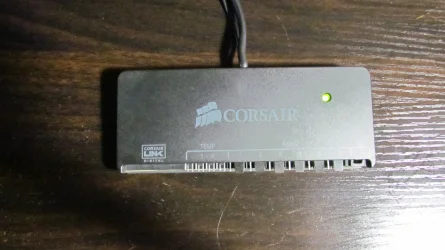
So. . . This is the culprit I've been lamenting. If I run the RAM fans direct without it I get solid red fans. If I use the controller I get flashing blue. I cannot seem to make the flashing stop and no great wonder there because Corsair software generally leaves much to be desired.

IMG_1422.webp
This device keeps flashing green and amber in synch with the blue flashing RAM fans. Originally I thought the flicker I was getting in one of the fans was due to the dust old Betsy accumulated over time. After cleaning everything up and hooking it back up I got PRESTO! Instant Disco. So I did some reading on this and there seems to be a glimmer of hope on the horizon for the issue involving a firmware upgrade. Apparently some are saying that HWinInfo is causing this problem. We will see if that happens to be the case but I rather have my doubts. The device is very warm on the left "DIGITAL" side (which I never use). Yes, I know I'm obsessing but there it is.

This is annoying.


Looks like I'm going to need to get that graphics card in to deal with the issue. I still have a sneaky feeling no amount of software is going to fix this. I plugged it into the gaming rig just for kicks and it's still flashing green and amber. I think it's toast.


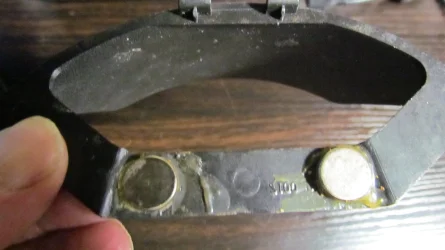
On a lighter note I remembered I was going to explain what I did with the headphone rack to properly secure it to the side of the PC.

IMG_1423.webp
These are neodymium magnets hot glued to the back of the headphone rack. They hold it in place very firmly so that there is little chance of disturbing anything when the headphones are removed. One more piece that can use a good cleaning. Of course, the glue side isn't visible. Once it is in place it looks fine.
 

My Computer

System One

  • OS
    WIN 11, WIN 10, WIN 8.1, WIN 7 U, WIN 7 PRO, WIN 7 HOME (32 Bit), LINUX MINT
    Computer type
    PC/Desktop
    Manufacturer/Model
    DIY, ASUS, and DELL
    CPU
    Intel i7 6900K and i9-7960X / AMD 3800X (8 core)
    Motherboard
    ASUS X99E-WS USB 3.1 and ASUS X299 SAGE
    Memory
    128 GB CORSAIR DOMINATOR PLATINUM (B DIE)
    Graphics Card(s)
    NVIDIA 1070 and RTX 3070
    Sound Card
    Crystal Sound (onboard)
    Monitor(s) Displays
    single Samsung 30" 4K and 8" aux monitor
    Screen Resolution
    4K and something equally attrocious. I'll be working on this.
    Hard Drives
    A, B, C, D, E, F, G, H, I, J, K, L, M, N, O, P, Q, R, S, T, U, V, W

    Ports X, Y, and Z are reserved for USB access and removable drives.

    Drive types consist of the following: Various mechanical hard drives bearing the brand names, Seagate, Toshiba, and Western Digital. Various NVMe drives bearing the brand names Kingston, Intel, Silicon Power, Crucial, Western Digital, and Team Group. Various SATA SSDs bearing various different brand names.

    RAID arrays included:

    LSI RAID 10 (WD Velociraptors) 1115.72 GB
    LSI RAID 10 (WD SSDS) 463.80 GB

    INTEL RAID 0 (KINGSTON HYPER X) System 447.14 GB
    INTEL RAID 1 TOSHIBA ENTERPRIZE class Data 2794.52 GB
    INTEL RAID 1 SEAGATE HYBRID 931.51 GB
    PSU
    SEVERAL. I prefer my Corsair Platinum HX1000i but I also like EVGA power supplies
    Case
    ThermalTake Level 10 GT (among others)
    Cooling
    Noctua is my favorite and I use it in my main. I also own various other coolers.
    Keyboard
    all kinds.
    Mouse
    all kinds
    Internet Speed
    360 mbps - 1 gbps (depending)
    Browser
    FIREFOX
    Antivirus
    KASPERSKY (no apologies)
    Other Info
    Gave Dell touch screen with Windows 11 to daughter and got me an OTVOC. Being a PC builder I own many desktop PCs as well. I am a father of five providing PCs, laptops, and tablets for all my family, most of which I have modified, rebuilt, or simply built from scratch. I do not own a cell phone, never have, never will.
:::Grins::: I thought the original picture would make for a nice photo effect.
Yes! I see you.... Our mindset (if there is one) are the same!!! Stop telling me story's I recognize so really. :LOL::LOL::LOL: You tell me a story. I tell you a story. Must say. Yes I agree. Lets agree one something; We are old guys. :LOL: Your thoughts are the same as mine!! How awkward. Never mind that. Like you I don't give a ratass on younger opinions. They live in a other age. They will throw my old i7 into the garbage while there is no good argument for that! I am a real nerd. If something goes defective? I still have the knowledge to replace the component that caused the problem. Take that younger generation!. Too be honest? I repaired PC's until the years 80. With SMD and the drive to put much stuff into one chip I loose interest. DMA Chip anyone or IRQ chip??? I could program them all one a basic level. The first 8080's are not so different than the modern day CPU's. They got an real overhaul during the time; much more faster, efficient and capable. Hey they all integrated like IRQ and DMA stuff into one big megachip. The old stuf still exist despite it is being packaged in new bags. Old stuff. Old knowledge. I was there when they introduced the first IBM XT. Later the AT. I repaired them all..... Still today. The basics are still there....

Never mind that. I agree. I also like going for blue in this time and age. Nothing fancy. Just hints. My programable Mouse and Mouse prefers blue. (how so :zany:) How awkward 😵‍💫😂😂..... Even my system and keyboard agrees with that.:LOL::LOL::LOL: Yes I am an old guy I must admit at some "wants" I agree. I did laugh at the fact that your RAM blinked red. A real no-go for an old bull like me. 😆 I admire your honesty. You are a person that can not lie. We can shake hands on that. We are basically the same with same interests and goals. I must admit. A clean system is something to look forward for with some modern hints. That will be enough. No fancy open system for me with all colors of the rainbow to impress? Me? Or my family or friends? Nope! It must just function to my likings with some features I like. I am the person that watch it each day and have to deal with it. I have one demand; be as speedy and quite as possible!... This is my demand for a new system and also for my older system which I use not every day. Despite it is an older system. One system with a future in mind. That old 3rd gen i7 still performs. Also true for my old GTX 1080Ti. I can throw anything at them. They still perform! I must admit the requirements are getting heavy. My new system with a modern day 12th gen i7 and a modern GPU RTX 3060Ti just meet those modern day demands. Anything above is just a fancy way to say "I Have money, Eat your hart out....." People nowadays have no clue what they really want. "Must have...." What exactly? Ha If I install some software to track what they are doing with they would be surprised of it's outcome. 90% off all people do have a system that in real time is to much. Only the 10% is demanding and challenging the specs of their systems. I am old school. I am only buying if the software says "you are to slow. Can't help you with that...."

I assume you do have a modern system and want your old system to be revived to getting ready for the next 10 years. It took you so much time to getting it in order to meet your demands at that time that it is hard to just discard it. A new purpose. You have some time to do so. And recording it. Otherwise this would be a short story. One pic showing your old system into a bin.... 😳 I have also an old system. The leap made them outdated. Still have their motherboards. But they are from an other age. (AMD and Intel ones. I don't give a ratass which brand it should be....I am not a AMD or Intel fanboy. I just buy what I presume who are leading. ) Times where Win 3.11, XP, 7 was ordinary. Times have changed. My old system does not meet the demands of Win11. I am stuck at 23H2. Newer versions like 24H2 or 25H2 does not like those old systems. Are they capable without the demands to perform? Yes they do! It it just as silly that an older CPU or no TPM demands you to switch over to a newer and expensive system? Nope! My old system ran 23H2 as fast as Win10 did. So these requirements are BS. [/offtopic]

Yes we are likeminded. I did laugh at some stuff you just have said. So recognizable. I love to see the final result when you are done, Agreed? Yes we are!! (y)(y) I can't give you any advise further because you also have your mind set on targets I would also take. You know your stuff also!!! Like me. Say no more hush hush... Referring to old school comedy... Wink. wink... Yes you know exactly who I mean.

Your fascination for a X299 case. Says it all basically, I have had many cases in the past also. Brand does not matter in the end. Does it meet your demands at that time? Yes. So you and I bought it. We are both not real experts on things. So we go online to view other opinions. It's one valuable thing that the internet has to offer. Would you buy stuff who has a negative score? No? I also agree on that one. The looks of the case is an important one. There are many cases to suit any wishes and demands. At the present day my eye fell for the BeQuite design. Nerds building casing for Nerds.... That concept is unique in days of today. They are nerds themselves and come up with cases of which I would say as a nerd; Yes to it threw are cases to fulfill every bemand. . (and their demands. Mo money) Just a thought. You are hooked on the X299 design. I respect everybody choises and I am not implicant saying; No to it's design.

 

My Computer

System One

  • OS
    Win 11 Pro "25H2" Build 26200.8524, Zorin OS Pro
    Computer type
    PC/Desktop
    Manufacturer/Model
    Self built
    CPU
    Intel® Core™ i7-12700KF 12th Gen.
    Motherboard
    ASUS Prime Z690-A, BIOS v4505
    Memory
    32GB DDR5 5600-36 Vengeance
    Graphics Card(s)
    PCIe4.0 Asus NVIDIA RTX3060Ti
    Sound Card
    Onboard; Realtek
    Monitor(s) Displays
    34" LG 34UC79G-B Curved 21:9 144Hz
    Screen Resolution
    2560x1080 (No HDR)
    Hard Drives
    250Gb Samsung 870PRO NVMe (Win 11 Pro)
    1Tb Samsung 980PRO NVMe
    1Tb Samsung 970EVO NVMe
    2Tb Samsung 990PRO NVMe with heatsink.
    4Tb WDC WD40EZRZ Blue SATA (Int.)
    4Tb WDC WD40EZRZ Blue SATA (Int.)
    3Tb WDC WD30EFRZ Red SATA (Int.)
    256Gb Samsung 840PRO SSD (RHEL 9,5)
    256Gb Samsung 850PRO SSD (Zorin OS Pro 18)
    PSU
    Coolermaster 850W V2 Gold with internal 12cm exaust fan
    Case
    Be-Quiet Pure Base 600.
    Cooling
    3x Be-Quiet! 12/14cm "Silent Wings 4" casefans, 1x Arctic Freezer i35 CPU towerblock with fan.
    Keyboard
    Steelseries APEX 7 keyboard.
    Mouse
    Logitech G-502 Hero
    Internet Speed
    1Gb
    Browser
    Brave
    Antivirus
    F-Secure
    Other Info
    No Noise system.
    256Gb Kingston Travler USB 3.0 drive.
    64Gb Sandisk USB 3.2 drive. (Ventoy)
    8Gb Philips USB 3.0 drive. (Win. Inst.)
    8Gb Philips USB 3.0 drive. (Rescue disk)
    2Tb WD USB 3.0 Passport drive.
    USB Ext. 500Gb WD SATA drive.
    External USB 3.0 C.A. CD/DVD* burner.
Haha.. Keep them coming. Those pics. Why on earth did you choose that Corsair flashing stick? Looks alien to me. Get rid of it! RAM stuff is Important. It's meant to be fast as possible! DDR 3. 4 and 5. I have 5. Their design (Corsair) has some cooling effect on things. But flashing in color to me inside a closed case? Flash away I would say. Nobody will notice that.... You are mine. My precious.... :devilish:..... 🤯..... 🤬 Harhar harhar.....
 

My Computer

System One

  • OS
    Win 11 Pro "25H2" Build 26200.8524, Zorin OS Pro
    Computer type
    PC/Desktop
    Manufacturer/Model
    Self built
    CPU
    Intel® Core™ i7-12700KF 12th Gen.
    Motherboard
    ASUS Prime Z690-A, BIOS v4505
    Memory
    32GB DDR5 5600-36 Vengeance
    Graphics Card(s)
    PCIe4.0 Asus NVIDIA RTX3060Ti
    Sound Card
    Onboard; Realtek
    Monitor(s) Displays
    34" LG 34UC79G-B Curved 21:9 144Hz
    Screen Resolution
    2560x1080 (No HDR)
    Hard Drives
    250Gb Samsung 870PRO NVMe (Win 11 Pro)
    1Tb Samsung 980PRO NVMe
    1Tb Samsung 970EVO NVMe
    2Tb Samsung 990PRO NVMe with heatsink.
    4Tb WDC WD40EZRZ Blue SATA (Int.)
    4Tb WDC WD40EZRZ Blue SATA (Int.)
    3Tb WDC WD30EFRZ Red SATA (Int.)
    256Gb Samsung 840PRO SSD (RHEL 9,5)
    256Gb Samsung 850PRO SSD (Zorin OS Pro 18)
    PSU
    Coolermaster 850W V2 Gold with internal 12cm exaust fan
    Case
    Be-Quiet Pure Base 600.
    Cooling
    3x Be-Quiet! 12/14cm "Silent Wings 4" casefans, 1x Arctic Freezer i35 CPU towerblock with fan.
    Keyboard
    Steelseries APEX 7 keyboard.
    Mouse
    Logitech G-502 Hero
    Internet Speed
    1Gb
    Browser
    Brave
    Antivirus
    F-Secure
    Other Info
    No Noise system.
    256Gb Kingston Travler USB 3.0 drive.
    64Gb Sandisk USB 3.2 drive. (Ventoy)
    8Gb Philips USB 3.0 drive. (Win. Inst.)
    8Gb Philips USB 3.0 drive. (Rescue disk)
    2Tb WD USB 3.0 Passport drive.
    USB Ext. 500Gb WD SATA drive.
    External USB 3.0 C.A. CD/DVD* burner.
I will be brief. You nailed it. We are definitely resonating on the same frequency here. My parents kept me humble by reminding me that an expert was only a drip under pressure. Believe it or not two of my daughters are still running i7 Bloomfield Quad cores and they won't let me upgrade them! They game their blessed little heads out on those builds and they refuse to have it any other way. The youngest is a brat and she's very proud of her 4790K. I'm typing this on an AMD build because I like options. Mama also wants to keep her Haswell platform because it does everything she wants to do with it. So there it is.

Now I have to say to move those RAM fans to the Cooler Master case is a thought that didn't occur to me. I'll keep that one on the list since the Cooler Master is a closed case. Still, I have to say I'll miss those blue RAM fans. I have more than one trick up my sleeve. Why did I buy that abomination you ask? A: Because I needed something to make those RAM fans run right. At the time I bought it I made the grievous error of thinking Corsair was the same Corsair of yesteryear when they made good, solid products. Silly me. Corsair is still expensive but apparently they deal in expensive garbage. Methinks they should stick to selling computer cases and power supplies.

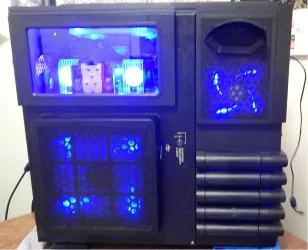
The case I'm working on right now looks like this:


BLUE BEAUTY (2017_06_02 08_05_11 UTC).webp

So if I pull those RAM fans it will look naked. I know it looks bright in the picture but actually it's a nice deep blue. I can live with blue. NO FLASHING! It throws my concentration. We will see what happens. 😎 Take care, my passionate friend.
 

My Computer

System One

  • OS
    WIN 11, WIN 10, WIN 8.1, WIN 7 U, WIN 7 PRO, WIN 7 HOME (32 Bit), LINUX MINT
    Computer type
    PC/Desktop
    Manufacturer/Model
    DIY, ASUS, and DELL
    CPU
    Intel i7 6900K and i9-7960X / AMD 3800X (8 core)
    Motherboard
    ASUS X99E-WS USB 3.1 and ASUS X299 SAGE
    Memory
    128 GB CORSAIR DOMINATOR PLATINUM (B DIE)
    Graphics Card(s)
    NVIDIA 1070 and RTX 3070
    Sound Card
    Crystal Sound (onboard)
    Monitor(s) Displays
    single Samsung 30" 4K and 8" aux monitor
    Screen Resolution
    4K and something equally attrocious. I'll be working on this.
    Hard Drives
    A, B, C, D, E, F, G, H, I, J, K, L, M, N, O, P, Q, R, S, T, U, V, W

    Ports X, Y, and Z are reserved for USB access and removable drives.

    Drive types consist of the following: Various mechanical hard drives bearing the brand names, Seagate, Toshiba, and Western Digital. Various NVMe drives bearing the brand names Kingston, Intel, Silicon Power, Crucial, Western Digital, and Team Group. Various SATA SSDs bearing various different brand names.

    RAID arrays included:

    LSI RAID 10 (WD Velociraptors) 1115.72 GB
    LSI RAID 10 (WD SSDS) 463.80 GB

    INTEL RAID 0 (KINGSTON HYPER X) System 447.14 GB
    INTEL RAID 1 TOSHIBA ENTERPRIZE class Data 2794.52 GB
    INTEL RAID 1 SEAGATE HYBRID 931.51 GB
    PSU
    SEVERAL. I prefer my Corsair Platinum HX1000i but I also like EVGA power supplies
    Case
    ThermalTake Level 10 GT (among others)
    Cooling
    Noctua is my favorite and I use it in my main. I also own various other coolers.
    Keyboard
    all kinds.
    Mouse
    all kinds
    Internet Speed
    360 mbps - 1 gbps (depending)
    Browser
    FIREFOX
    Antivirus
    KASPERSKY (no apologies)
    Other Info
    Gave Dell touch screen with Windows 11 to daughter and got me an OTVOC. Being a PC builder I own many desktop PCs as well. I am a father of five providing PCs, laptops, and tablets for all my family, most of which I have modified, rebuilt, or simply built from scratch. I do not own a cell phone, never have, never will.
Old unsupported systems are still very capable. My main PC (2nd system specs) with a 3rd generation Intel Core-i7 and nVidia RTX 3050 is very fast for my needs. Using NVEnc HEVC codec I get close to 1000 frames per second rendering standard definition videos. How much faster?
 

My Computers

System One System Two

  • OS
    Windows 11 Pro 23H2 (5699), 25H2 (8457)
    Computer type
    Laptop
    Manufacturer/Model
    Acer Extensa 5630EZ
    CPU
    Mobile DualCore Intel Core 2 Duo T7250, 2000 MHz
    Motherboard
    Acer Extensa 5630
    Memory
    4GB
    Graphics Card(s)
    Mobile Intel(R) GMA 4500M (Mobile 4 series)
    Sound Card
    Realtek ALC268 @ Intel 82801IB ICH9 - High Definition Audio Controller
    Monitor(s) Displays
    1
    Screen Resolution
    1280x800
    Hard Drives
    Samsung SSD 850 EVO 250GB SATA Device (250 GB, SATA-III)
    Internet Speed
    VDSL 50 Mbps
    Browser
    MICROSOFT EDGE
    Antivirus
    WINDOWS DEFENDER
    Other Info
    Legacy MBR installation, no TPM, no Secure Boot, no WDDM 2.0 graphics drivers, no SSE4.2, cannot get more unsupported ;) This is only my test laptop. I had installed Windows 11 here before upgrading my main PC. For my main PC I use everyday see my 2nd system specs.
  • Operating System
    Windows 11 Pro v25H2 (build 26200.8457)
    Computer type
    PC/Desktop
    Manufacturer/Model
    Custom-built PC
    CPU
    Intel Core-i7 3770 3.40GHz s1155 (3rd generation)
    Motherboard
    Asus P8H61 s1155 ATX
    Memory
    2x Kingston Hyper-X Blu 8GB DDR3-1600
    Graphics card(s)
    GIGABYTE GeForce RTX 3050 WINDFORCE OC V2 6GB (GV-N3050WF2OCV2-6GD)
    Sound Card
    Realtek HD audio (ALC887)
    Monitor(s) Displays
    Sony Bravia KDL-19L4000 19" LCD TV via VGA
    Screen Resolution
    1440x900 32-bit 60Hz
    Hard Drives
    WD Blue SA510 2.5 1000GB SSD as system disk, Western Digital Caviar Purple 4TB SATA III (WD40PURZ) as second
    PSU
    Thermaltake Litepower RGB 550W Full Wired
    Case
    SUPERCASE MIDI-TOWER
    Cooling
    Deepcool Gamma Archer CPU cooler, 1x 8cm fan at the back
    Keyboard
    Mitsumi 101-key PS/2
    Mouse
    Sunnyline OptiEye PS/2
    Internet Speed
    100Mbps
    Browser
    Microsoft Edge, Mozilla Firefox
    Antivirus
    Microsoft Windows Defender
    Other Info
    Legacy BIOS (MBR) installation, no TPM, no Secure Boot, WDDM 3.0 graphics drivers, WEI score 7.4
The need for speed has consistently dominated the enthusiast community. Nothing wrong with that. Meanwhile, many of us older Jonesers embraced our ancient hot rods and kept on using them. Intel practically revolutionized the market with their Gen 1 Bloomfield design. I still have children running these chips with smiles on their faces. An SSD and a good graphics card can put these i7 Chips back in the race quite easily and there are still X58 cults out there that wouldn't let you pry their Gen 1 i7 chips from their cold, dead fingers. Hey, I'm not 70 yet and I still recognize a good thing when I see it. Indeed, how fast does one really need their PC to be?

Ye olde Bloomfield led to the Sandy Bridge/Ivy Bridge era and many people are still running these chips as well. Yes, they are old but if they can do the tasks for which they were designed why should it matter? Some might consider marrying an RTX 3050 with a 3rd gen Intel platform over the top. Not me. That's why I'm coupling an RTX 3070 with a gen 7 chip on a SAGE X299 platform. For my purposes it is suffice. Ten years from now I'll be pushing 80. I don't think it will make much difference what I'll be using then.

Anyway, this old girl still has plenty of life in her yet. Alas, I must take my family camping today. One of the advantages of living in the middle of a forest. Tomorrow's chapter will cover my attempt at solving the blinking Corsair issue which will require me to put back the graphics card in this unit and :::shudders::: download Corsair's firmware for the fix. I rather have my doubts it will work but I can try.
 

My Computer

System One

  • OS
    WIN 11, WIN 10, WIN 8.1, WIN 7 U, WIN 7 PRO, WIN 7 HOME (32 Bit), LINUX MINT
    Computer type
    PC/Desktop
    Manufacturer/Model
    DIY, ASUS, and DELL
    CPU
    Intel i7 6900K and i9-7960X / AMD 3800X (8 core)
    Motherboard
    ASUS X99E-WS USB 3.1 and ASUS X299 SAGE
    Memory
    128 GB CORSAIR DOMINATOR PLATINUM (B DIE)
    Graphics Card(s)
    NVIDIA 1070 and RTX 3070
    Sound Card
    Crystal Sound (onboard)
    Monitor(s) Displays
    single Samsung 30" 4K and 8" aux monitor
    Screen Resolution
    4K and something equally attrocious. I'll be working on this.
    Hard Drives
    A, B, C, D, E, F, G, H, I, J, K, L, M, N, O, P, Q, R, S, T, U, V, W

    Ports X, Y, and Z are reserved for USB access and removable drives.

    Drive types consist of the following: Various mechanical hard drives bearing the brand names, Seagate, Toshiba, and Western Digital. Various NVMe drives bearing the brand names Kingston, Intel, Silicon Power, Crucial, Western Digital, and Team Group. Various SATA SSDs bearing various different brand names.

    RAID arrays included:

    LSI RAID 10 (WD Velociraptors) 1115.72 GB
    LSI RAID 10 (WD SSDS) 463.80 GB

    INTEL RAID 0 (KINGSTON HYPER X) System 447.14 GB
    INTEL RAID 1 TOSHIBA ENTERPRIZE class Data 2794.52 GB
    INTEL RAID 1 SEAGATE HYBRID 931.51 GB
    PSU
    SEVERAL. I prefer my Corsair Platinum HX1000i but I also like EVGA power supplies
    Case
    ThermalTake Level 10 GT (among others)
    Cooling
    Noctua is my favorite and I use it in my main. I also own various other coolers.
    Keyboard
    all kinds.
    Mouse
    all kinds
    Internet Speed
    360 mbps - 1 gbps (depending)
    Browser
    FIREFOX
    Antivirus
    KASPERSKY (no apologies)
    Other Info
    Gave Dell touch screen with Windows 11 to daughter and got me an OTVOC. Being a PC builder I own many desktop PCs as well. I am a father of five providing PCs, laptops, and tablets for all my family, most of which I have modified, rebuilt, or simply built from scratch. I do not own a cell phone, never have, never will.
When I upgraded my GTX 1050 Ti to RTX 3050 I hadn't gaming in mind, just faster video rendering. Being able to play some games now and then is a welcome bonus. Certainly not a "gaming" computer by today's standards, but 60fps in Fire Strike (3D Mark) is no bad at all.
 

My Computers

System One System Two

  • OS
    Windows 11 Pro 23H2 (5699), 25H2 (8457)
    Computer type
    Laptop
    Manufacturer/Model
    Acer Extensa 5630EZ
    CPU
    Mobile DualCore Intel Core 2 Duo T7250, 2000 MHz
    Motherboard
    Acer Extensa 5630
    Memory
    4GB
    Graphics Card(s)
    Mobile Intel(R) GMA 4500M (Mobile 4 series)
    Sound Card
    Realtek ALC268 @ Intel 82801IB ICH9 - High Definition Audio Controller
    Monitor(s) Displays
    1
    Screen Resolution
    1280x800
    Hard Drives
    Samsung SSD 850 EVO 250GB SATA Device (250 GB, SATA-III)
    Internet Speed
    VDSL 50 Mbps
    Browser
    MICROSOFT EDGE
    Antivirus
    WINDOWS DEFENDER
    Other Info
    Legacy MBR installation, no TPM, no Secure Boot, no WDDM 2.0 graphics drivers, no SSE4.2, cannot get more unsupported ;) This is only my test laptop. I had installed Windows 11 here before upgrading my main PC. For my main PC I use everyday see my 2nd system specs.
  • Operating System
    Windows 11 Pro v25H2 (build 26200.8457)
    Computer type
    PC/Desktop
    Manufacturer/Model
    Custom-built PC
    CPU
    Intel Core-i7 3770 3.40GHz s1155 (3rd generation)
    Motherboard
    Asus P8H61 s1155 ATX
    Memory
    2x Kingston Hyper-X Blu 8GB DDR3-1600
    Graphics card(s)
    GIGABYTE GeForce RTX 3050 WINDFORCE OC V2 6GB (GV-N3050WF2OCV2-6GD)
    Sound Card
    Realtek HD audio (ALC887)
    Monitor(s) Displays
    Sony Bravia KDL-19L4000 19" LCD TV via VGA
    Screen Resolution
    1440x900 32-bit 60Hz
    Hard Drives
    WD Blue SA510 2.5 1000GB SSD as system disk, Western Digital Caviar Purple 4TB SATA III (WD40PURZ) as second
    PSU
    Thermaltake Litepower RGB 550W Full Wired
    Case
    SUPERCASE MIDI-TOWER
    Cooling
    Deepcool Gamma Archer CPU cooler, 1x 8cm fan at the back
    Keyboard
    Mitsumi 101-key PS/2
    Mouse
    Sunnyline OptiEye PS/2
    Internet Speed
    100Mbps
    Browser
    Microsoft Edge, Mozilla Firefox
    Antivirus
    Microsoft Windows Defender
    Other Info
    Legacy BIOS (MBR) installation, no TPM, no Secure Boot, WDDM 3.0 graphics drivers, WEI score 7.4
1080 p yes? Hey, I really have to run. lol 😄 Cheers!
 

My Computer

System One

  • OS
    WIN 11, WIN 10, WIN 8.1, WIN 7 U, WIN 7 PRO, WIN 7 HOME (32 Bit), LINUX MINT
    Computer type
    PC/Desktop
    Manufacturer/Model
    DIY, ASUS, and DELL
    CPU
    Intel i7 6900K and i9-7960X / AMD 3800X (8 core)
    Motherboard
    ASUS X99E-WS USB 3.1 and ASUS X299 SAGE
    Memory
    128 GB CORSAIR DOMINATOR PLATINUM (B DIE)
    Graphics Card(s)
    NVIDIA 1070 and RTX 3070
    Sound Card
    Crystal Sound (onboard)
    Monitor(s) Displays
    single Samsung 30" 4K and 8" aux monitor
    Screen Resolution
    4K and something equally attrocious. I'll be working on this.
    Hard Drives
    A, B, C, D, E, F, G, H, I, J, K, L, M, N, O, P, Q, R, S, T, U, V, W

    Ports X, Y, and Z are reserved for USB access and removable drives.

    Drive types consist of the following: Various mechanical hard drives bearing the brand names, Seagate, Toshiba, and Western Digital. Various NVMe drives bearing the brand names Kingston, Intel, Silicon Power, Crucial, Western Digital, and Team Group. Various SATA SSDs bearing various different brand names.

    RAID arrays included:

    LSI RAID 10 (WD Velociraptors) 1115.72 GB
    LSI RAID 10 (WD SSDS) 463.80 GB

    INTEL RAID 0 (KINGSTON HYPER X) System 447.14 GB
    INTEL RAID 1 TOSHIBA ENTERPRIZE class Data 2794.52 GB
    INTEL RAID 1 SEAGATE HYBRID 931.51 GB
    PSU
    SEVERAL. I prefer my Corsair Platinum HX1000i but I also like EVGA power supplies
    Case
    ThermalTake Level 10 GT (among others)
    Cooling
    Noctua is my favorite and I use it in my main. I also own various other coolers.
    Keyboard
    all kinds.
    Mouse
    all kinds
    Internet Speed
    360 mbps - 1 gbps (depending)
    Browser
    FIREFOX
    Antivirus
    KASPERSKY (no apologies)
    Other Info
    Gave Dell touch screen with Windows 11 to daughter and got me an OTVOC. Being a PC builder I own many desktop PCs as well. I am a father of five providing PCs, laptops, and tablets for all my family, most of which I have modified, rebuilt, or simply built from scratch. I do not own a cell phone, never have, never will.
1080 p yes? Hey, I really have to run. lol 😄 Cheers!
My monitor is 1440x900 so it makes little sense to run the 4K test. I did and minimum frame rate was 25fps, much playable if it was a real game. Also I can at last do 3840x2160 @ 60fps at my LG smart TV. My GTX 1050 Ti needed a 2m or shorter HDMI cable for 4K meaning I had to put the PC next to the TV. Anything longer and would drop to 1080p. Now I did it with a 3m cable and didn't complain. I set scaling to the GPU (default is the display) and even old 320x240 videos look good filling the 50" TV screen. 720x576 videos look perfect, almost like HD.
 

My Computers

System One System Two

  • OS
    Windows 11 Pro 23H2 (5699), 25H2 (8457)
    Computer type
    Laptop
    Manufacturer/Model
    Acer Extensa 5630EZ
    CPU
    Mobile DualCore Intel Core 2 Duo T7250, 2000 MHz
    Motherboard
    Acer Extensa 5630
    Memory
    4GB
    Graphics Card(s)
    Mobile Intel(R) GMA 4500M (Mobile 4 series)
    Sound Card
    Realtek ALC268 @ Intel 82801IB ICH9 - High Definition Audio Controller
    Monitor(s) Displays
    1
    Screen Resolution
    1280x800
    Hard Drives
    Samsung SSD 850 EVO 250GB SATA Device (250 GB, SATA-III)
    Internet Speed
    VDSL 50 Mbps
    Browser
    MICROSOFT EDGE
    Antivirus
    WINDOWS DEFENDER
    Other Info
    Legacy MBR installation, no TPM, no Secure Boot, no WDDM 2.0 graphics drivers, no SSE4.2, cannot get more unsupported ;) This is only my test laptop. I had installed Windows 11 here before upgrading my main PC. For my main PC I use everyday see my 2nd system specs.
  • Operating System
    Windows 11 Pro v25H2 (build 26200.8457)
    Computer type
    PC/Desktop
    Manufacturer/Model
    Custom-built PC
    CPU
    Intel Core-i7 3770 3.40GHz s1155 (3rd generation)
    Motherboard
    Asus P8H61 s1155 ATX
    Memory
    2x Kingston Hyper-X Blu 8GB DDR3-1600
    Graphics card(s)
    GIGABYTE GeForce RTX 3050 WINDFORCE OC V2 6GB (GV-N3050WF2OCV2-6GD)
    Sound Card
    Realtek HD audio (ALC887)
    Monitor(s) Displays
    Sony Bravia KDL-19L4000 19" LCD TV via VGA
    Screen Resolution
    1440x900 32-bit 60Hz
    Hard Drives
    WD Blue SA510 2.5 1000GB SSD as system disk, Western Digital Caviar Purple 4TB SATA III (WD40PURZ) as second
    PSU
    Thermaltake Litepower RGB 550W Full Wired
    Case
    SUPERCASE MIDI-TOWER
    Cooling
    Deepcool Gamma Archer CPU cooler, 1x 8cm fan at the back
    Keyboard
    Mitsumi 101-key PS/2
    Mouse
    Sunnyline OptiEye PS/2
    Internet Speed
    100Mbps
    Browser
    Microsoft Edge, Mozilla Firefox
    Antivirus
    Microsoft Windows Defender
    Other Info
    Legacy BIOS (MBR) installation, no TPM, no Secure Boot, WDDM 3.0 graphics drivers, WEI score 7.4
I will be brief. You nailed it.
I will be short also. Your latest pic looks cool!!! If you where wondering about it. I also have a passion for a blue streak in a non noticeable way. I notice it and that is enough. Your case is not everybody's choice but despite of that it has it charms. Ik can see a bit of the inside though that small window. I see... tidiness. No cables clogging and no fans in weird places. You even have a push and pull fans arround your CPU cooler block. Nice!!! I must say! Your main theme blue. Yes I like it also. No fans which can turn into every color of the rainbow.

I just bought a keyboard where every key can be programmed with every color of the rainbow. I don't use that feature. It has a story about that. I did had a logitech keyboard of the past. Quite expensive and new at that time. It even had a LCD full color display on it where it showed me to my taste I had only one (of many) setting; Show me the CPU usage and my RAM usage all the time!!!.... The color behind each key was.. Blue... But that G19 Keyboard became old also and during that time the old leds that produce the color blue also died and became dimmer and dimmer. There was a point of which I said replacement! I looked online and searched the whole internet for a replacement. None. Zip, Zero. No LCD display attach anywhere. This wasn't the people taste anymore. Found some look a likes but they all missed the mark and where so expansive that I thought; "WTF How much? No way!!!"

So I dropped the LCD requirement. I went for a Steelseries keyboard. A strange manufacturer in Sweden of odd places to say the least. But they had a cool product that could produce a blue color all over the keyboard. It is capable to do that under any key (they found that one... 😆 😆 Old school remark....) As a nice touch it did have an OLED little screen on it which is programmable. I am looking at it right now and I see a person in the dark that is animated in such a way i see always an animated smile of someone that is smiling al the time with a dark grin on his face. No colors. Just an "old" plain black and white OLED display. At that price they could not bring out a color version of that? Beside that. The blue color under each key is shining like never seen before. So bright, I had to dim the settings a bit. Keyboard itself is impressive. Tough steel as a basis, shining keys which has a real good feel about it when I press any key. Keyboard manufactures has forgotten those old IBM times when stuff was real. Pressing a key. You feel it under your fingertips. Nowadays? Rubber and plastic all the way. Steelseries is a bit of a nerd company. Their products are solid as hell but their software and service is crappy as hell I must say. Typing is a serious business every day. You are using it each day when you spend time on your PC. They understand that like non company does. Logitech? Big company. They lost their touch which it did had in the past. Strong in mouses. Not that much in keyboards anymore. Old school switches under every key that will last for ever? Never heard of it... Steelsieries did...

Amazing stuff. In my walk arround I did find a setting that is called "disco setting" Tried it once. Literally every key on the keyboard lite up in every color off the rainbow and switched to an other random color in such a fast way that I thought "Turn it off please.... Turn it off, Turn it off!!" No one can type on such a keyboard. You must be blind to find the right keys. I even tried to type.... All wrong. To much distraction. It was a fun setting I know. It was a setting of which the company showed their showcase what is possible with their keyboard. Did not need that. I switched to Blue after that....

So I have something with the color blue. Even my RGB mousepad has this color arround it. It is also capable to produce any color of the rainbow in a fast way like my keyboard also is capable in doing so...... Madness has to stop. Blue all the time is a mental good color.... Relaxing....(y):giggle:Otherwise? :scream:Hahahahaha....
 

My Computer

System One

  • OS
    Win 11 Pro "25H2" Build 26200.8524, Zorin OS Pro
    Computer type
    PC/Desktop
    Manufacturer/Model
    Self built
    CPU
    Intel® Core™ i7-12700KF 12th Gen.
    Motherboard
    ASUS Prime Z690-A, BIOS v4505
    Memory
    32GB DDR5 5600-36 Vengeance
    Graphics Card(s)
    PCIe4.0 Asus NVIDIA RTX3060Ti
    Sound Card
    Onboard; Realtek
    Monitor(s) Displays
    34" LG 34UC79G-B Curved 21:9 144Hz
    Screen Resolution
    2560x1080 (No HDR)
    Hard Drives
    250Gb Samsung 870PRO NVMe (Win 11 Pro)
    1Tb Samsung 980PRO NVMe
    1Tb Samsung 970EVO NVMe
    2Tb Samsung 990PRO NVMe with heatsink.
    4Tb WDC WD40EZRZ Blue SATA (Int.)
    4Tb WDC WD40EZRZ Blue SATA (Int.)
    3Tb WDC WD30EFRZ Red SATA (Int.)
    256Gb Samsung 840PRO SSD (RHEL 9,5)
    256Gb Samsung 850PRO SSD (Zorin OS Pro 18)
    PSU
    Coolermaster 850W V2 Gold with internal 12cm exaust fan
    Case
    Be-Quiet Pure Base 600.
    Cooling
    3x Be-Quiet! 12/14cm "Silent Wings 4" casefans, 1x Arctic Freezer i35 CPU towerblock with fan.
    Keyboard
    Steelseries APEX 7 keyboard.
    Mouse
    Logitech G-502 Hero
    Internet Speed
    1Gb
    Browser
    Brave
    Antivirus
    F-Secure
    Other Info
    No Noise system.
    256Gb Kingston Travler USB 3.0 drive.
    64Gb Sandisk USB 3.2 drive. (Ventoy)
    8Gb Philips USB 3.0 drive. (Win. Inst.)
    8Gb Philips USB 3.0 drive. (Rescue disk)
    2Tb WD USB 3.0 Passport drive.
    USB Ext. 500Gb WD SATA drive.
    External USB 3.0 C.A. CD/DVD* burner.
Back from a relaxing day at camp.

I have heard of the Steel Series keyboards before. The keyboard I'm using right now has a nice mechanical tactile feel to it, a bit like Cherry MX but slightly softer. Yes, it goes clickety-clack but I like that sound and I've had this keyboard for years now. The switches on it never seem to burn out so I'm rather impressed with this Chinese knock off. Admittedly it does have LED color but no flashing. NO DISCO! I'm a touch typist so I rarely notice this and my standard configuration is that my number key group is violet and the standard keys are blue. My lovely red headed daughter thinks its boring but even she likes her PC to be all one color when it comes to lighting. When she was little it was RAINBOW UNICORN CITY RAINING TACOS. I had to wear sunglasses before I could step into the computer room or risk having an epileptic seizure. *Whew* I'm glad my daughters grew out of that phase.

I used to be a big fan of Logitech. Then they started to call themselves LOGI. Then their software started getting too invasive. Then the Prodigy keyboard and mouse started acting up. Then they found the recycling bin. I warn people about Logitech now. Much like Corsair they are more into data mining and looking out for themselves than actually caring about their customer or manufacturing quality products. These companies are sell outs. Whoever owns them now only owns the name. The original companies died years ago. This is why it never pays to be a brand name fan boi. This old man has learned is lesson. So once again I see we are on the same page, Hadermeister. You know, I'm thinking that I might have owned that G19 keyboard too, come to think of it. Keys were too soft but it was pretty. Please show me a picture of that Steel Series keyboard you're using so I have some idea of what to look at when this one finally dies.

I just realized the reason my Big Blue Beast doesn't bother me much is because of the way it sits on my L shaped desk. The little side window faces toward the wall on the long end of an inverted "L". I literally have to spin on my chair to look at it and the part that is most visible is the face of the unit. Easy access to my blue ray drive. Easy access to the sleds. Not so easy to open the hinged door however. I have to clear the table in order to open it up. The ruddy thing weighs around 80 lbs when fully loaded. Okay, maybe I exaggerate a little. Probably closer to 60 pounds. I'm old. It feels like 100. All those spinners add up fast. (More on this later.) Yes, the madness must stop. Time for a cool soothing blue. It's good to be back home.
 

My Computer

System One

  • OS
    WIN 11, WIN 10, WIN 8.1, WIN 7 U, WIN 7 PRO, WIN 7 HOME (32 Bit), LINUX MINT
    Computer type
    PC/Desktop
    Manufacturer/Model
    DIY, ASUS, and DELL
    CPU
    Intel i7 6900K and i9-7960X / AMD 3800X (8 core)
    Motherboard
    ASUS X99E-WS USB 3.1 and ASUS X299 SAGE
    Memory
    128 GB CORSAIR DOMINATOR PLATINUM (B DIE)
    Graphics Card(s)
    NVIDIA 1070 and RTX 3070
    Sound Card
    Crystal Sound (onboard)
    Monitor(s) Displays
    single Samsung 30" 4K and 8" aux monitor
    Screen Resolution
    4K and something equally attrocious. I'll be working on this.
    Hard Drives
    A, B, C, D, E, F, G, H, I, J, K, L, M, N, O, P, Q, R, S, T, U, V, W

    Ports X, Y, and Z are reserved for USB access and removable drives.

    Drive types consist of the following: Various mechanical hard drives bearing the brand names, Seagate, Toshiba, and Western Digital. Various NVMe drives bearing the brand names Kingston, Intel, Silicon Power, Crucial, Western Digital, and Team Group. Various SATA SSDs bearing various different brand names.

    RAID arrays included:

    LSI RAID 10 (WD Velociraptors) 1115.72 GB
    LSI RAID 10 (WD SSDS) 463.80 GB

    INTEL RAID 0 (KINGSTON HYPER X) System 447.14 GB
    INTEL RAID 1 TOSHIBA ENTERPRIZE class Data 2794.52 GB
    INTEL RAID 1 SEAGATE HYBRID 931.51 GB
    PSU
    SEVERAL. I prefer my Corsair Platinum HX1000i but I also like EVGA power supplies
    Case
    ThermalTake Level 10 GT (among others)
    Cooling
    Noctua is my favorite and I use it in my main. I also own various other coolers.
    Keyboard
    all kinds.
    Mouse
    all kinds
    Internet Speed
    360 mbps - 1 gbps (depending)
    Browser
    FIREFOX
    Antivirus
    KASPERSKY (no apologies)
    Other Info
    Gave Dell touch screen with Windows 11 to daughter and got me an OTVOC. Being a PC builder I own many desktop PCs as well. I am a father of five providing PCs, laptops, and tablets for all my family, most of which I have modified, rebuilt, or simply built from scratch. I do not own a cell phone, never have, never will.

Latest Support Threads

Back
Top Bottom