Restorehealth Error 800F0915


Sir_George

Well-known member
Power User
VIP
Local time
5:26 PM
Posts
363
Location
Denver, CO
OS
Windows 11 Professional
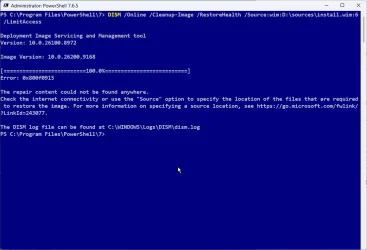
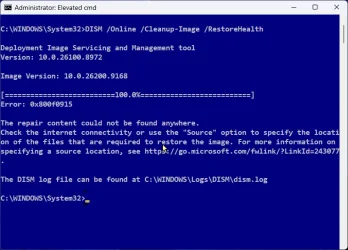
I am sending a screenshot of the error mentioned in the title of this post.

1. Is this a serious problem (as in, could Windows become unstable, for example)?
2. Is there a way to fix it? I have attempted to resolve this using ChatGPT without success.
Thanks for any help you can provide.2026-09-03_10-53-04.webp
 

My Computer My Computer

At a glance

Windows 11 ProfessionalIntel Core i5-940032GBIntegrated Intel UHD Graphics 630
OS
Windows 11 Professional
Computer type
PC/Desktop
Manufacturer/Model
Microcenter B677
CPU
Intel Core i5-9400
Motherboard
ASRock H310CM-HDV/M.2
Memory
32GB
Graphics Card(s)
Integrated Intel UHD Graphics 630
Sound Card
Intel Kaby Lake - High Definition Audio / cAVS (Audio, Voice, Speech) [A0]
Monitor(s) Displays
LG Model: GSM59F1
Screen Resolution
2560x1080
Case
Lian Li 205M
Antivirus
Kaspersky AV
To fix the "source files could not be found" DISM error, you need to provide the command with a working repair source, such as a mounted Windows installation ISO file.

Download the official Windows ISO file matching your exact operating system version.

Right-click the downloaded ISO file in File Explorer and select Mount.

Note the new drive letter assigned to the mounted drive.


Open Command Prompt or PowerShell as an administrator.

Run this command to see the available image indexes, replacing X with your mounted drive letter:

Batch:
dism /get-imageinfo /imagefile:X:\sources\install.wim

Note the index number (#) that matches your specific edition of Windows (such as Windows 10 Pro or Windows 11 Home).

Run the repair command with your custom source and limit access to Windows Update, replacing X with the drive letter and # with your index number:

Batch:
DISM /Online /Cleanup-Image /RestoreHealth /Source:wim:X:\sources\install.wim:# /LimitAccess

After DISM completes successfully, type the following command and press Enter:

Code:
sfc /scannow

Restart your computer once the scan finished.
 

My Computer My Computer

At a glance

Windows 11AMD Ryzen 7 5700GMicron Technology DDR4-3200 16GBNVIDIA GeForce RTX 3060
OS
Windows 11
Computer type
PC/Desktop
Manufacturer/Model
HP Pavilion
CPU
AMD Ryzen 7 5700G
Motherboard
Erica6
Memory
Micron Technology DDR4-3200 16GB
Graphics Card(s)
NVIDIA GeForce RTX 3060
Sound Card
Realtek ALC671
Monitor(s) Displays
Samsung SyncMaster U28E590
Screen Resolution
3840 x 2160
Hard Drives
SAMSUNG MZVLQ1T0HALB-000H1
Welcome to the club. My advice is not to bother trying to fix this particular error right now. I worked on this one as some length, but clearly it's something that got screwed up about three releases ago. Apparently Microsoft has been apprised of this issue and I suspect someday they'll finally fix it. I did all of the suggested fixes and more, none of them eliminated this error.
 

My Computers My Computers

  • At a glance

    Win 11 Pro 25H2, Build 26200.9278Intel Core i5 14500, 14th Generation64GB DDR4GeForce RTX 4060
    OS
    Win 11 Pro 25H2, Build 26200.9278
    Computer type
    PC/Desktop
    Manufacturer/Model
    Home Brew
    CPU
    Intel Core i5 14500, 14th Generation
    Motherboard
    Gigabyte B760M G P WIFI
    Memory
    64GB DDR4
    Graphics Card(s)
    GeForce RTX 4060
    Sound Card
    Chipset Realtek
    Monitor(s) Displays
    LG 45" Ultragear & Acer 24" 1080p
    Screen Resolution
    5120x1440 & 1920x1080
    Hard Drives
    Crucial P310 2TB 2280 PCIe Gen4 3D NAND NVMe M.2 SSD (O/S)
    Silicon Power 2TB US75 NVMe PCIe Gen4 M.2 2280 SSD (backup)
    Crucial BX500 2TB 3D NAND (2nd backup)
    Seagate 4TB Ironwolf, rotating HDD secondary backup
    External off-line backup Drives: 2 NVMe 4TB drives in external enclosures
    PSU
    Thermaltake Toughpower GF3 750W
    Case
    LIAN LI LANCOOL 216 E-ATX PC Case
    Cooling
    Lots of fans!
    Keyboard
    Microsoft Comfort Curve 2000
    Mouse
    Logitech G305
    Internet Speed
    Verizon FiOS 1GB
    Browser
    Firefox
    Antivirus
    Malware Bytes & Windows Defender Security
  • At a glance

    Win 11 Pro 25H2, Build 26200.9168Intel Core i5 1440032GB DDR5Intel 700 Embedded GPU
    Operating System
    Win 11 Pro 25H2, Build 26200.9168
    Computer type
    PC/Desktop
    Manufacturer/Model
    Home Brew
    CPU
    Intel Core i5 14400
    Motherboard
    Gigabyte B760M DS3H AX
    Memory
    32GB DDR5
    Graphics card(s)
    Intel 700 Embedded GPU
    Sound Card
    Realtek Embedded
    Monitor(s) Displays
    27" HP 1080p
    Screen Resolution
    1920x1080
    Hard Drives
    Crucial P310 2TB NVMe Gen4 SSD
    Samsung EVO 990 2TB NVMe Gen4 SSD
    Samsung 2TB SATA SSD
    Seagate 4TB Ironwolf, rotating HDD secondary backup
    PSU
    Thermaltake Smart BM3 650W
    Case
    Okinos Micro ATX Case
    Cooling
    Fans
    Keyboard
    Microsoft Comfort Curve 2000
    Mouse
    Logitech G305
    Internet Speed
    Verizon FiOS 1GB
    Browser
    Firefox
    Antivirus
    Malware Bytes & Windows Defender Security
  • Nimo N171 17" Laptop, (Intel i3-1215U, 16GB RAM, 2TB NVMe, Win11 Pro)
    Acemagic Vista Mini PC V1 (Intel N150, 16GB RAM, 1TB NVMe, Win11 Pro)
    HP ENVY h8-1540t, (24GB RAM, 2TB SSD, 2TB HDD, Win11 Pro)
This is known bug. If you run DISM /Online /Cleanup-Image /CheckHealth and it reports "No component store corruption detected." then don't worry. Using an ISO as source will give the same error.
 

My Computers My Computers

  • At a glance

    Windows 11 Pro 25H2 26200.9278AMD Ryzen 7 5825U with Radeon Graphics16GB
    OS
    Windows 11 Pro 25H2 26200.9278
    Computer type
    Laptop
    Manufacturer/Model
    Acemagic LX15PRO
    CPU
    AMD Ryzen 7 5825U with Radeon Graphics
    Motherboard
    BIOS CT_BI_AMI_LX15PRO_AB8139_A-004
    Memory
    16GB
    Screen Resolution
    1920 x 1080
    Hard Drives
    SSD 2TB
    Internet Speed
    30 Mbps
    Browser
    Brave
    Antivirus
    Webroot SecureAnywhere Complete beta
  • At a glance

    Windows 11 Pro 23H2 22631.2506Atom N450 1.66GHz2GB
    Operating System
    Windows 11 Pro 23H2 22631.2506
    Computer type
    Laptop
    Manufacturer/Model
    HP Mini 210-1090NR PC (bought in late 2009!)
    CPU
    Atom N450 1.66GHz
    Memory
    2GB
    Browser
    Brave
    Antivirus
    Webroot
  • Acer Swift SF114-34 laptop
    OS Windows 11 Pro 26200.8894
    CPU Pentium Silver N6000
    RAM 4GB
    BIOS v1.17
    SSD Samsung 970 EVO Plus SSD 2TB (an upgrade)
What issue are you experiencing that you need to run dism in the first place?
 

My Computers My Computers

  • At a glance

    Windows 11 Pro 25H2 26200.9168i9-10900 10 core 20 threads32 gbnone-Intel UHD Graphics 630
    OS
    Windows 11 Pro 25H2 26200.9168
    Computer type
    PC/Desktop
    Manufacturer/Model
    Dell Optiplex 7080
    CPU
    i9-10900 10 core 20 threads
    Motherboard
    DELL 0J37VM
    Memory
    32 gb
    Graphics Card(s)
    none-Intel UHD Graphics 630
    Sound Card
    Integrated Realtek
    Monitor(s) Displays
    Benq 27
    Screen Resolution
    2560x1440
    Hard Drives
    2x1tb Solidigm m.2 nvme /External drives 512gb Samsung m.2 sata+2tb Kingston m2.nvme
    PSU
    500w
    Case
    MT
    Cooling
    Dell Premium
    Keyboard
    Logitech wired
    Mouse
    Logitech wireless
    Internet Speed
    so slow I'm too embarrassed to tell
    Browser
    #1 Edge #2 Firefox
    Antivirus
    Defender+MWB Premium
  • At a glance

    Windows 11 Pro 24H2 26200.9168AMD Ryzen 7 6800U32 gbintegrated
    Operating System
    Windows 11 Pro 24H2 26200.9168
    Computer type
    PC/Desktop
    Manufacturer/Model
    Beelink Mini PC SER5
    CPU
    AMD Ryzen 7 6800U
    Memory
    32 gb
    Graphics card(s)
    integrated
    Sound Card
    integrated
    Monitor(s) Displays
    Benq 27
    Screen Resolution
    2560x1440
    Hard Drives
    1TB Crucial nvme
    Keyboard
    Logitech wired
    Mouse
    Logitech wireless
    Internet Speed
    still too embarrassed to tell
    Browser
    Firefox
    Antivirus
    Defender
  • System 3 is non compliant Dell 9020 i7-4770/24gb ram Win11 PRO 26200.9168
If you run DISM /Online /Cleanup-Image /CheckHealth and it reports "No component store corruption detected."

Actually it should be scanhealth if you want to check the component store files.

Checkhealth just looks for pre-existing flags of corruption marked by a process in the registry and does not scan the actual files.

If checkhealth does not find anything flagged in the registry then it will report "no component store corruption detected" even though there may be corrupted files in the component store.

Scanhealth scans the entire Windows component store file by file.
 

My Computer My Computer

At a glance

Windows 11 Pro
OS
Windows 11 Pro
And I'll add that for many with this now widespread issue on multiple Windows builds the ISO repairs will no longer fix this bug.
 

My Computers My Computers

  • At a glance

    Windows 11 25H2Intel Core Ultra 9 275HX (24-Core)64GB DDR5 6400MT/sNVIDIA GeForce RTX 5080 and Intel UHD Graphics
    OS
    Windows 11 25H2
    Computer type
    Laptop
    Manufacturer/Model
    Alienware 18 Area-51
    CPU
    Intel Core Ultra 9 275HX (24-Core)
    Motherboard
    Alienware
    Memory
    64GB DDR5 6400MT/s
    Graphics Card(s)
    NVIDIA GeForce RTX 5080 and Intel UHD Graphics
    Sound Card
    Onboard, Realtek high-performance Audio chips (ALC3329 & ALC1708))
    Monitor(s) Displays
    300HZ 18-inch QHD 500 nit Comfort View+
    Screen Resolution
    2560 x 1600
    Hard Drives
    2TB NVMe M.2 PCIe Gen 5 SSD
    Case
    Magnesium Alloy
    Cooling
    Advanced Cryo-Tech Quad-Fan Cooling system & large vapor chamber
    Keyboard
    Cherry MX ultra low profile mechanical keyboard with per key AlienFX RGB lighting
    Mouse
    Logitech MX Master 4
    Browser
    Vivaldi (main), Firefox, Chrome, Edge
    Antivirus
    MS Defender and Malwarebytes Free
  • At a glance

    Windows 11 26H2Qualcomm Snapdragon X Elite (12 Core) ARM bas...16GB LPDDR5Qualcomm Adreno X1-85
    Operating System
    Windows 11 26H2
    Computer type
    Laptop
    Manufacturer/Model
    Microsoft Surface Laptop 7
    CPU
    Qualcomm Snapdragon X Elite (12 Core) ARM based CPU
    Motherboard
    Microsoft Corp.
    Memory
    16GB LPDDR5
    Graphics card(s)
    Qualcomm Adreno X1-85
    Sound Card
    Omnisonic speakers with Dolby Atmos spatial sound
    Monitor(s) Displays
    120 Hz 13.8-inch 600 nit PixelSense Flow touchscreen
    Screen Resolution
    2304x1536
    Hard Drives
    1TB NVMe Gen 4 SSD
    Case
    Anodized Aluminum
    Cooling
    Traditional active cooling fan system
    Keyboard
    Mechanical QWERTY, backlit when in use
    Mouse
    Logitech MX Master 4 and Surface Arc Mouse
    Browser
    Vivaldi (main), Firefox, Chrome, Edge
    Antivirus
    MS Defender and Malwarebytes Free
Hello Everyone,
In such case, Recovery Drive, if already prepared while windows in good condition, is very helpful to replace corrupt system files without deleting personal files, folders, and data.
Boot from Recovery Drive, Select US, TROUBLESHOOT, Command Prompt and then run following commands.

1. x:\windows\system32>wmic logicaldisk get caption, volumename, size
OR
2. x:\windows\system32 >wmic logicaldisk get deviceid, volumename, size
OR
3. x:\windows\system32>diskpart
Diskpart\>list volume
Note drive letter of windows which is offline now from WinPE ENVIRONMENT as well as drive letter of Recovery Drive.
Assuming E is windows drive letter offline, and I is Recovery Drive letter in WinPE ENVIRONMENT.
Now run these commands
x:\windows\system32 > I:
I:\> md Scratch
I:\>x:
x:\windows\system32 > CHKDSK E: /f /r /x

x:\windows\system32 > sfc /scannow /offbootdir=E:\ /offwindir=E:\Windows

x:\windows\system32 > dism /image:E:\ /cleanup-image /restorehealth /source:I:\sources\Reconstruct.WIM /limitaccess /ScratchDir:I:\Scratch

x:\windows\system32 > dism /image:E:\ /cleanup-image /restorehealth /source:I:\sources\Reconstruct.WIM2 /limitaccess /ScratchDir:I:\Scratch

(Please note, Reconstruct.WIM and Reconstruct.WIM2 are in sources folder in Recovery Drive I:)

Again run following command to verify no integrity violations.
x:\windows\system32 > sfc /scannow /offbootdir=E:\ /offwindir=E:\Windows

I prepared Recovery Drive for WTG having Windows 11 v25H2 OS Build 26200.8037 (Drive letter is K: for WTG and L: for Recovery Drive in disk management in Live OS.)
So from live os Windows 11 v25H2 OS Build 26200.9168 on internal ssd on laptop , K is offline image to be repaired from Recovery Drive L: So command will be

C:\Windows\System32>dism /image:K:\ /cleanup-image /restorehealth /source:L:\sources\Reconstruct.WIM /limitaccess

Deployment Image Servicing and Management tool
Version: 10.0.26100.8972

Image Version: 10.0.26200.8037
[==========================100.0%==========================] The restore operation completed successfully.
The operation completed successfully.

C:\Windows\System32>dism /image:K:\ /cleanup-image /restorehealth /source:L:\sources\Reconstruct.WIM2 /limitaccess

Deployment Image Servicing and Management tool
Version: 10.0.26100.1

Image Version: 10.0.26200.8037

[==========================100.0%==========================] The restore operation completed successfully.
The operation completed successfully.
Thanks.
 
Last edited:

My Computer My Computer

At a glance

Window 11 v24H2 Build 26100.2033Intel(R) Core(TM) i3-2100 CPU @ 3.10GHz 3.10 GHz4.00 GB (3.89 GB usable)Onboard
OS
Window 11 v24H2 Build 26100.2033
Computer type
PC/Desktop
Manufacturer/Model
ASSEMMBLED
CPU
Intel(R) Core(TM) i3-2100 CPU @ 3.10GHz 3.10 GHz
Motherboard
ZEBRONICS
Memory
4.00 GB (3.89 GB usable)
Graphics Card(s)
Onboard
Sound Card
Onboard
Monitor(s) Displays
LG
Screen Resolution
1366x768
Hard Drives
Toshiba HDD 1 TB
Keyboard
Mechanical
Mouse
Mechanical
Internet Speed
700 kb/s
Browser
Microsoft EDGE, CHROME
Antivirus
Microsoft Defender
Hello Everyone,
In such case, Recovery Drive, if already prepared while windows in good condition, is very helpful to replace corrupt system files without deleting personal files, folders, and data.
Boot from Recovery Drive, Select US, TROUBLESHOOT, Command Prompt and then run following commands.
1. x:\windows\system32>wmic logicaldisk get caption, volumename, size
OR
2. x:\windows\system32 >wmic logicaldisk get deviceid, volumename, size
OR
3. x:\windows\system32>diskpart
Diskpart\>list volume
Note drive letter of windows which is offline now from WinPE ENVIRONMENT as well as drive letter of Recovery Drive.
Assuming E is windows drive letter offline, and I is Recovery Drive letter in WinPE ENVIRONMENT.
Now run these commands
x:\windows\system32 > I:
I:\> md Scratch
I:\>x:
x:\windows\system32 > CHKDSK E: /f /r /x

x:\windows\system32 > sfc /scannow /offbootdir=E:\ /offwindir=E:\Windows

x:\windows\system32 > dism /image:E:\ /cleanup-image /restorehealth /source:I:\sources\Reconstruct.WIM /limitaccess /ScratchDir:I:\Scratch

x:\windows\system32 > dism /image:E:\ /cleanup-image /restorehealth /source:I:\sources\Reconstruct.WIM2 /limitaccess /ScratchDir:I:\Scratch

(Please note, Reconstruct.WIM and Reconstruct.WIM2 are in sources folder in Recovery Drive I:)

Again run following command to verify no integrity violations.
x:\windows\system32 > sfc /scannow /offbootdir=E:\ /offwindir=E:\Windows

Thanks.
Doesn't work for this one. I tried a repair install from both WU sources and a local ISO source, neither were able to correct the issue. There is some data that apparently even a repair install doesn't touch and is the cause of the error.

FWIW, I believe the component store and Windows running files are fine, my feeling is that the checking process is at fault. I'm hoping Microsoft gets enough flack that they finally address the issue!
 

My Computers My Computers

  • At a glance

    Win 11 Pro 25H2, Build 26200.9278Intel Core i5 14500, 14th Generation64GB DDR4GeForce RTX 4060
    OS
    Win 11 Pro 25H2, Build 26200.9278
    Computer type
    PC/Desktop
    Manufacturer/Model
    Home Brew
    CPU
    Intel Core i5 14500, 14th Generation
    Motherboard
    Gigabyte B760M G P WIFI
    Memory
    64GB DDR4
    Graphics Card(s)
    GeForce RTX 4060
    Sound Card
    Chipset Realtek
    Monitor(s) Displays
    LG 45" Ultragear & Acer 24" 1080p
    Screen Resolution
    5120x1440 & 1920x1080
    Hard Drives
    Crucial P310 2TB 2280 PCIe Gen4 3D NAND NVMe M.2 SSD (O/S)
    Silicon Power 2TB US75 NVMe PCIe Gen4 M.2 2280 SSD (backup)
    Crucial BX500 2TB 3D NAND (2nd backup)
    Seagate 4TB Ironwolf, rotating HDD secondary backup
    External off-line backup Drives: 2 NVMe 4TB drives in external enclosures
    PSU
    Thermaltake Toughpower GF3 750W
    Case
    LIAN LI LANCOOL 216 E-ATX PC Case
    Cooling
    Lots of fans!
    Keyboard
    Microsoft Comfort Curve 2000
    Mouse
    Logitech G305
    Internet Speed
    Verizon FiOS 1GB
    Browser
    Firefox
    Antivirus
    Malware Bytes & Windows Defender Security
  • At a glance

    Win 11 Pro 25H2, Build 26200.9168Intel Core i5 1440032GB DDR5Intel 700 Embedded GPU
    Operating System
    Win 11 Pro 25H2, Build 26200.9168
    Computer type
    PC/Desktop
    Manufacturer/Model
    Home Brew
    CPU
    Intel Core i5 14400
    Motherboard
    Gigabyte B760M DS3H AX
    Memory
    32GB DDR5
    Graphics card(s)
    Intel 700 Embedded GPU
    Sound Card
    Realtek Embedded
    Monitor(s) Displays
    27" HP 1080p
    Screen Resolution
    1920x1080
    Hard Drives
    Crucial P310 2TB NVMe Gen4 SSD
    Samsung EVO 990 2TB NVMe Gen4 SSD
    Samsung 2TB SATA SSD
    Seagate 4TB Ironwolf, rotating HDD secondary backup
    PSU
    Thermaltake Smart BM3 650W
    Case
    Okinos Micro ATX Case
    Cooling
    Fans
    Keyboard
    Microsoft Comfort Curve 2000
    Mouse
    Logitech G305
    Internet Speed
    Verizon FiOS 1GB
    Browser
    Firefox
    Antivirus
    Malware Bytes & Windows Defender Security
  • Nimo N171 17" Laptop, (Intel i3-1215U, 16GB RAM, 2TB NVMe, Win11 Pro)
    Acemagic Vista Mini PC V1 (Intel N150, 16GB RAM, 1TB NVMe, Win11 Pro)
    HP ENVY h8-1540t, (24GB RAM, 2TB SSD, 2TB HDD, Win11 Pro)

My Computer My Computer

At a glance

Window 11 v24H2 Build 26100.2033Intel(R) Core(TM) i3-2100 CPU @ 3.10GHz 3.10 GHz4.00 GB (3.89 GB usable)Onboard
OS
Window 11 v24H2 Build 26100.2033
Computer type
PC/Desktop
Manufacturer/Model
ASSEMMBLED
CPU
Intel(R) Core(TM) i3-2100 CPU @ 3.10GHz 3.10 GHz
Motherboard
ZEBRONICS
Memory
4.00 GB (3.89 GB usable)
Graphics Card(s)
Onboard
Sound Card
Onboard
Monitor(s) Displays
LG
Screen Resolution
1366x768
Hard Drives
Toshiba HDD 1 TB
Keyboard
Mechanical
Mouse
Mechanical
Internet Speed
700 kb/s
Browser
Microsoft EDGE, CHROME
Antivirus
Microsoft Defender

My Computers My Computers

  • At a glance

    Win 11 Pro 25H2, Build 26200.9278Intel Core i5 14500, 14th Generation64GB DDR4GeForce RTX 4060
    OS
    Win 11 Pro 25H2, Build 26200.9278
    Computer type
    PC/Desktop
    Manufacturer/Model
    Home Brew
    CPU
    Intel Core i5 14500, 14th Generation
    Motherboard
    Gigabyte B760M G P WIFI
    Memory
    64GB DDR4
    Graphics Card(s)
    GeForce RTX 4060
    Sound Card
    Chipset Realtek
    Monitor(s) Displays
    LG 45" Ultragear & Acer 24" 1080p
    Screen Resolution
    5120x1440 & 1920x1080
    Hard Drives
    Crucial P310 2TB 2280 PCIe Gen4 3D NAND NVMe M.2 SSD (O/S)
    Silicon Power 2TB US75 NVMe PCIe Gen4 M.2 2280 SSD (backup)
    Crucial BX500 2TB 3D NAND (2nd backup)
    Seagate 4TB Ironwolf, rotating HDD secondary backup
    External off-line backup Drives: 2 NVMe 4TB drives in external enclosures
    PSU
    Thermaltake Toughpower GF3 750W
    Case
    LIAN LI LANCOOL 216 E-ATX PC Case
    Cooling
    Lots of fans!
    Keyboard
    Microsoft Comfort Curve 2000
    Mouse
    Logitech G305
    Internet Speed
    Verizon FiOS 1GB
    Browser
    Firefox
    Antivirus
    Malware Bytes & Windows Defender Security
  • At a glance

    Win 11 Pro 25H2, Build 26200.9168Intel Core i5 1440032GB DDR5Intel 700 Embedded GPU
    Operating System
    Win 11 Pro 25H2, Build 26200.9168
    Computer type
    PC/Desktop
    Manufacturer/Model
    Home Brew
    CPU
    Intel Core i5 14400
    Motherboard
    Gigabyte B760M DS3H AX
    Memory
    32GB DDR5
    Graphics card(s)
    Intel 700 Embedded GPU
    Sound Card
    Realtek Embedded
    Monitor(s) Displays
    27" HP 1080p
    Screen Resolution
    1920x1080
    Hard Drives
    Crucial P310 2TB NVMe Gen4 SSD
    Samsung EVO 990 2TB NVMe Gen4 SSD
    Samsung 2TB SATA SSD
    Seagate 4TB Ironwolf, rotating HDD secondary backup
    PSU
    Thermaltake Smart BM3 650W
    Case
    Okinos Micro ATX Case
    Cooling
    Fans
    Keyboard
    Microsoft Comfort Curve 2000
    Mouse
    Logitech G305
    Internet Speed
    Verizon FiOS 1GB
    Browser
    Firefox
    Antivirus
    Malware Bytes & Windows Defender Security
  • Nimo N171 17" Laptop, (Intel i3-1215U, 16GB RAM, 2TB NVMe, Win11 Pro)
    Acemagic Vista Mini PC V1 (Intel N150, 16GB RAM, 1TB NVMe, Win11 Pro)
    HP ENVY h8-1540t, (24GB RAM, 2TB SSD, 2TB HDD, Win11 Pro)
A Windows Recovery is a (presumably) an earlier copy of your own component store (WinSxS).

It's not any more special than using a MCT or UUP dump ISO of the same build number, as the source image.
 

My Computer My Computer

At a glance

Windows 7
OS
Windows 7
Thanks everyone.
WIM files in sources folder of Recovery Drive work 100% when used as source by DISM.
 

My Computer My Computer

At a glance

Window 11 v24H2 Build 26100.2033Intel(R) Core(TM) i3-2100 CPU @ 3.10GHz 3.10 GHz4.00 GB (3.89 GB usable)Onboard
OS
Window 11 v24H2 Build 26100.2033
Computer type
PC/Desktop
Manufacturer/Model
ASSEMMBLED
CPU
Intel(R) Core(TM) i3-2100 CPU @ 3.10GHz 3.10 GHz
Motherboard
ZEBRONICS
Memory
4.00 GB (3.89 GB usable)
Graphics Card(s)
Onboard
Sound Card
Onboard
Monitor(s) Displays
LG
Screen Resolution
1366x768
Hard Drives
Toshiba HDD 1 TB
Keyboard
Mechanical
Mouse
Mechanical
Internet Speed
700 kb/s
Browser
Microsoft EDGE, CHROME
Antivirus
Microsoft Defender
The Recovery drive is a backup of your system's WinSxS. So you're running a DISM check against an earlier copy of your own WinSxS.

The point is to run a DISM check against an external (and non-corrupted) source, because your own DISM can't figure out how to repair itself. Which is either caused by a DISM or Servicing Stack bug, or since your WinSxS is already corrupted.

Obviously comparing a copy of yourself against yourself will return no errors...
 

My Computer My Computer

At a glance

Windows 7
OS
Windows 7
wmic logicaldisk get caption, volumename, size

WMIC was deprecated and is now removed from Win 11.

Poweshell alternative

Code:
Get-Volume | Select-Object DriveLetter, FileSystemLabel, Size
 

My Computer My Computer

At a glance

Windows 11 Pro
OS
Windows 11 Pro
Thanks @garlin.
I think two ways to verify image health if restored or not.
1.If first run of sfc / scanow shows integrity violations, and dism /restorehealth completes 100% and again run sfc /scannow....
This time it should show no integrity violations.
2. bcdboot E:\Windows /s S /f UEFI
This should repair corrupt boot loader.
 

My Computer My Computer

At a glance

Window 11 v24H2 Build 26100.2033Intel(R) Core(TM) i3-2100 CPU @ 3.10GHz 3.10 GHz4.00 GB (3.89 GB usable)Onboard
OS
Window 11 v24H2 Build 26100.2033
Computer type
PC/Desktop
Manufacturer/Model
ASSEMMBLED
CPU
Intel(R) Core(TM) i3-2100 CPU @ 3.10GHz 3.10 GHz
Motherboard
ZEBRONICS
Memory
4.00 GB (3.89 GB usable)
Graphics Card(s)
Onboard
Sound Card
Onboard
Monitor(s) Displays
LG
Screen Resolution
1366x768
Hard Drives
Toshiba HDD 1 TB
Keyboard
Mechanical
Mouse
Mechanical
Internet Speed
700 kb/s
Browser
Microsoft EDGE, CHROME
Antivirus
Microsoft Defender
WMIC was deprecated and is now removed from Win 11.

Poweshell alternative

Code:
Get-Volume | Select-Object DriveLetter, FileSystemLabel, Size
wmic runs from Recovery Drive in WinPE environment.
 

My Computer My Computer

At a glance

Window 11 v24H2 Build 26100.2033Intel(R) Core(TM) i3-2100 CPU @ 3.10GHz 3.10 GHz4.00 GB (3.89 GB usable)Onboard
OS
Window 11 v24H2 Build 26100.2033
Computer type
PC/Desktop
Manufacturer/Model
ASSEMMBLED
CPU
Intel(R) Core(TM) i3-2100 CPU @ 3.10GHz 3.10 GHz
Motherboard
ZEBRONICS
Memory
4.00 GB (3.89 GB usable)
Graphics Card(s)
Onboard
Sound Card
Onboard
Monitor(s) Displays
LG
Screen Resolution
1366x768
Hard Drives
Toshiba HDD 1 TB
Keyboard
Mechanical
Mouse
Mechanical
Internet Speed
700 kb/s
Browser
Microsoft EDGE, CHROME
Antivirus
Microsoft Defender
To fix the "source files could not be found" DISM error, you need to provide the command with a working repair source, such as a mounted Windows installation ISO file.

Download the official Windows ISO file matching your exact operating system version.

Right-click the downloaded ISO file in File Explorer and select Mount.

Note the new drive letter assigned to the mounted drive.


Open Command Prompt or PowerShell as an administrator.

Run this command to see the available image indexes, replacing X with your mounted drive letter:

Batch:
dism /get-imageinfo /imagefile:X:\sources\install.wim

Note the index number (#) that matches your specific edition of Windows (such as Windows 10 Pro or Windows 11 Home).

Run the repair command with your custom source and limit access to Windows Update, replacing X with the drive letter and # with your index number:

Batch:
DISM /Online /Cleanup-Image /RestoreHealth /Source:wim:X:\sources\install.wim:# /LimitAccess

After DISM completes successfully, type the following command and press Enter:

Code:
sfc /scannow

Restart your computer once the scan finished.
I did the above and it didn't work. See attachment.
2026-09-03_14-35-55.webp
 

My Computer My Computer

At a glance

Windows 11 ProfessionalIntel Core i5-940032GBIntegrated Intel UHD Graphics 630
OS
Windows 11 Professional
Computer type
PC/Desktop
Manufacturer/Model
Microcenter B677
CPU
Intel Core i5-9400
Motherboard
ASRock H310CM-HDV/M.2
Memory
32GB
Graphics Card(s)
Integrated Intel UHD Graphics 630
Sound Card
Intel Kaby Lake - High Definition Audio / cAVS (Audio, Voice, Speech) [A0]
Monitor(s) Displays
LG Model: GSM59F1
Screen Resolution
2560x1080
Case
Lian Li 205M
Antivirus
Kaspersky AV
I did the above and it didn't work. See attachment.
Documented in other threads as well...

In the meantime, you might look into a couple of tools from Sysnative for diagnosing and fixing potential corruption...

ComponentsScanner

SFCFix

As others have mentioned, the /RestoreHealth issue will likely require a Microsoft fix.

The irony is a fix for this issue was pushed out in the June 2026 cumulative update for 24H2 (see Improvements section)...


Still is not showing in known issues on the Windows Release Health page for 25H2...

 
Last edited:

My Computer My Computer

At a glance

Windows 11 Pro 25H2
OS
Windows 11 Pro 25H2
Computer type
Laptop
Manufacturer/Model
Toshiba
Welcome to the club. My advice is not to bother trying to fix this particular error right now. I worked on this one as some length, but clearly it's something that got screwed up about three releases ago. Apparently Microsoft has been apprised of this issue and I suspect someday they'll finally fix it. I did all of the suggested fixes and more, none of them eliminated this error.
I have been trying to correct this for a few hours using ChatGPT and nothing has worked. Outside of trying to fix the problem, I was concerned it may cause some problem if left in the current state. Do you know of any issues it may cause?
 

My Computer My Computer

At a glance

Windows 11 ProfessionalIntel Core i5-940032GBIntegrated Intel UHD Graphics 630
OS
Windows 11 Professional
Computer type
PC/Desktop
Manufacturer/Model
Microcenter B677
CPU
Intel Core i5-9400
Motherboard
ASRock H310CM-HDV/M.2
Memory
32GB
Graphics Card(s)
Integrated Intel UHD Graphics 630
Sound Card
Intel Kaby Lake - High Definition Audio / cAVS (Audio, Voice, Speech) [A0]
Monitor(s) Displays
LG Model: GSM59F1
Screen Resolution
2560x1080
Case
Lian Li 205M
Antivirus
Kaspersky AV
Back
Top Bottom