Riva Tuner Statistics Server /MSI AfterBurner Problem


PvtJohnTowle

Well-known member
Member
Local time
12:04 AM
Posts
287
Location
Sydney Australia
OS
Windows 11 Pro 25H2 26200.7627
I use these in combo for overlay on my games to show system information, like GPU temp CPU Temp , FPS , GPU Core, GPU Memory and so on at the top left hand corner of the game I am playing (e.g Battlefield 1 or Battlefield 2042)

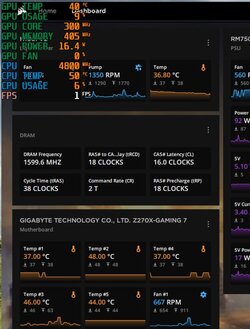
However , the display also appears on ICUE (Corsair Software) window in the same position on my second monitor (#1 below) I really don't want it to appear on any other program apart from my games I am currently playing.

How do I restrict this from displaying just on the game? I have dual monitors my gaming monitor is the ROG below # 2

Screen #1
ASUS VE278 (ACI27F6)
Screen #1 Spec
27.2 inches (69.1 cm) / 1920 x 1080 pixels @ 50-85 Hz
Screen #2
ROG PG279Q (ACI27EC)
Screen #2 Spec
27.2 inches (69.1 cm) / 2560 x 1440 pixels @ 30-165 Hz
 
Windows Build/Version
21H2

My Computers

System One System Two

  • OS
    Windows 11 Pro 25H2 26200.7627
    Computer type
    PC/Desktop
    Manufacturer/Model
    Gigababyte X870E Aorus Pro Rev 1.1
    CPU
    Ryzen 7 9800X3D
    Motherboard
    Gigababyte X870E Aorus Pro Rev 1.1
    Memory
    G.Skill Trident Z5 RGB DDR5-6000 32GB (2×16GB) CL30 2 x 16gb
    Graphics Card(s)
    RTX 5080 Palit Gaming Pro
    Sound Card
    Steel Series Arctis 1 Gaming Head phones
    Monitor(s) Displays
    Asus ROG Strix 27″ QHD OLED XG27AQDMG & Phillips 272V8
    Screen Resolution
    2560 X1440 27 Inch 240 HZ Asus
    PSU
    Corsair RM1000X
    Case
    Corsair CC750D (CC-9011078) Obsidian 750D Airflow Edition Black Full Tower ATX Case
    Cooling
    Corsair iCUE LINK TITAN 360 RX RGB
    Keyboard
    Razer BlackWidow V4 X Razer™ Yellow Mechanical Switches
    Mouse
    Logitech G502X Plus
    Internet Speed
    HFC 2000/100
    Browser
    Opera GX
    Antivirus
    Kaspersky Plus
  • Operating System
    Windows 11 23H2 22631.2715
    Computer type
    Laptop
    Manufacturer/Model
    Dell XPS EVO 13.3" RNX9305C01AUSB
    CPU
    Intel i5-1135G7
    Motherboard
    Dell
    Memory
    8 GB
    Graphics card(s)
    Intel Iris Xe Graphics
    Monitor(s) Displays
    LED
    Screen Resolution
    1920 x 1080
    Hard Drives
    256GB SSD
    Other Info
    https://www.thegoodguys.com.au/dell-xps-evo-133-inches-win-11-laptop-rnx9305c01ausb
How do I restrict this from displaying just on the game? I have dual monitors my gaming monitor is the ROG below # 2

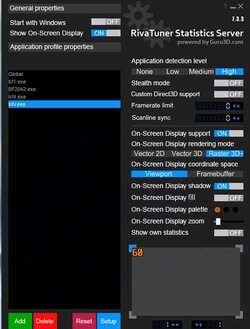
I also use MSI Afterburner and RivaTuner. Open the RivaTuner app and click Add. Browse to your game executable, i.e bf2.exe (yes I still play Battlefield 2, lol) and click Open. If playing on Steam, your bf1.exe will be located in

SteamLibrary\steamapps\common\Battlefield 1

Make sure to toggle Show On-Screen Display at the top.

Also, its possible to move the display to anywhere you want on the screen by changing the numbers at the bottom.

1679728058646.png

The first number is left/right, the second number is up/down. Once you change a number you need to press Enter for it to take effect.

I play Battlefield 2 at 2560x1440 and the numbers shown put my display toward the bottom right corner.

1679728620106.png
 

My Computers

System One System Two

  • OS
    Win 11 Pro 25H2 26200.8655
    Computer type
    PC/Desktop
    Manufacturer/Model
    Self Built
    CPU
    Intel® Core™ i7-14700K
    Motherboard
    ASUS TUF Z690-PLUS WIFI BIOS 4505 11/29/25
    Memory
    G.SKILL Ripjaws S5 Series 64GB (2 x 32GB) DDR5
    Graphics Card(s)
    ASUS GeForce RTX 4070 Super 12GB
    Sound Card
    Sound Blaster AE-5 Plus
    Monitor(s) Displays
    ASUS TUF Gaming 27" 2K HDR Gaming
    Screen Resolution
    2560 x 1440
    Hard Drives
    Samsung 990 Pro 1TB NVMe (Win 11 25H2)
    SK hynix P41 500GB NVMe 25H2 DEV/Games
    SK hynix P41 2TB NVMe (x3)
    Crucial P3 Plus 4TB
    PSU
    Corsair RM850x Shift
    Case
    Antec Dark Phantom DP502 FLUX
    Cooling
    Corsair Nautilus 360 RS AIO
    Keyboard
    Logitech MK 320
    Mouse
    Razer Basilisk V3
    Internet Speed
    350Mbs
    Browser
    Firefox
    Antivirus
    Winows Security
    Other Info
    MR 8.1 Home

    System 3 Specs
    Win 11 Pro 25H2 26200.8655
    ASUS PRIME Z370-P II BIOS 3004 7/12/21
    Intel Core i7-8700 CPU @ 3.20GHz
    32GB DDR4 RAM (4x8)
    iGPU Intel UHD Graphics 630
  • Operating System
    Win 11 Pro 25H2 26200.8655
    Computer type
    PC/Desktop
    Manufacturer/Model
    Self Built
    CPU
    Intel Core i7-11700F
    Motherboard
    Asus TUF Gaming Z590 Plus WiFi (BIOS 2803)
    Memory
    64 GB DDR4
    Graphics card(s)
    MSI GeForce RTX 3060 Ventus 2X 12GB
    Sound Card
    SoundBlaster Audigy Fx V2
    Monitor(s) Displays
    Samsung F27T350
    Screen Resolution
    1920x1080
    Hard Drives
    Samsung 980 Pro 1TB
    Samsung 970 EVO Plus 2TB
    Samsung 870 EVO 500GB SSD
    PSU
    Corsair HX750
    Case
    Cougar MX330-G Window
    Cooling
    Thermalright Frozen Edge 240 Black AIO
    Internet Speed
    350Mbps
    Browser
    Firefox
    Antivirus
    Windows Security
I also use MSI Afterburner and RivaTuner. Open the RivaTuner app and click Add. Browse to your game executable, i.e bf2.exe (yes I still play Battlefield 2, lol) and click Open. If playing on Steam, your bf1.exe will be located in

SteamLibrary\steamapps\common\Battlefield 1

Make sure to toggle Show On-Screen Display at the top.

Also, its possible to move the display to anywhere you want on the screen by changing the numbers at the bottom.

View attachment 56317

The first number is left/right, the second number is up/down. Once you change a number you need to press Enter for it to take effect.

I play Battlefield 2 at 2560x1440 and the numbers shown put my display toward the bottom right corner.

View attachment 56318
That's not really my issue but thanks for trying . I had this already set up as your instructions. It's also appearing on my Corsair ICUE program , see screenshot.

I just
 

Attachments

  • bandicam 2023-03-25 20-10-45-566.jpg
    bandicam 2023-03-25 20-10-45-566.jpg
    40.8 KB · Views: 2
  • bandicam 2023-03-25 20-12-51-401.jpg
    bandicam 2023-03-25 20-12-51-401.jpg
    53.4 KB · Views: 2

My Computers

System One System Two

  • OS
    Windows 11 Pro 25H2 26200.7627
    Computer type
    PC/Desktop
    Manufacturer/Model
    Gigababyte X870E Aorus Pro Rev 1.1
    CPU
    Ryzen 7 9800X3D
    Motherboard
    Gigababyte X870E Aorus Pro Rev 1.1
    Memory
    G.Skill Trident Z5 RGB DDR5-6000 32GB (2×16GB) CL30 2 x 16gb
    Graphics Card(s)
    RTX 5080 Palit Gaming Pro
    Sound Card
    Steel Series Arctis 1 Gaming Head phones
    Monitor(s) Displays
    Asus ROG Strix 27″ QHD OLED XG27AQDMG & Phillips 272V8
    Screen Resolution
    2560 X1440 27 Inch 240 HZ Asus
    PSU
    Corsair RM1000X
    Case
    Corsair CC750D (CC-9011078) Obsidian 750D Airflow Edition Black Full Tower ATX Case
    Cooling
    Corsair iCUE LINK TITAN 360 RX RGB
    Keyboard
    Razer BlackWidow V4 X Razer™ Yellow Mechanical Switches
    Mouse
    Logitech G502X Plus
    Internet Speed
    HFC 2000/100
    Browser
    Opera GX
    Antivirus
    Kaspersky Plus
  • Operating System
    Windows 11 23H2 22631.2715
    Computer type
    Laptop
    Manufacturer/Model
    Dell XPS EVO 13.3" RNX9305C01AUSB
    CPU
    Intel i5-1135G7
    Motherboard
    Dell
    Memory
    8 GB
    Graphics card(s)
    Intel Iris Xe Graphics
    Monitor(s) Displays
    LED
    Screen Resolution
    1920 x 1080
    Hard Drives
    256GB SSD
    Other Info
    https://www.thegoodguys.com.au/dell-xps-evo-133-inches-win-11-laptop-rnx9305c01ausb
When you click add in RivaTuner press and hold your shift key, it will open a window with all 3d apps running. select and click "ok".

1679736778338.png
 

My Computer

System One

  • OS
    Win10 Pro, Win10 Pro N, Win10 Home, Windows 8.1 Pro, Ubuntu
    Computer type
    PC/Desktop
    Manufacturer/Model
    ۞ΞЖ†ԘΜΞ۞
    CPU
    Intel Core i9 9900K
    Motherboard
    ASUS ROG Maximus X Hero
    Memory
    32 GB Quad Kit, G.Skill Trident Z RGB Series schwarz, DDR4-3866, 18-19-19-39-2T
    Graphics Card(s)
    ASUS GeForce RTX 3090 ROG Strix O24G, 24576 MB GDDR6X
    Sound Card
    (1) HD Webcam C270 (2) NVIDIA High Definition Audio (3) Realtek High Definition Audio
    Monitor(s) Displays
    BenQ BL2711U(4K) and a hp 27vx(1080p)
    Hard Drives
    C: Samsung 960 EVO NVMe M.2 SSD
    E: & O: Libraries & OneDrive-> Samsung 850 EVO 1TB
    D: Hyper-V VM's -> Samsung PM951 Client M.2 512Gb SSD
    G: System Images -> Samsung 860 Pro 2TB
    PSU
    Corsair HX1000i High Performance ATX Power Supply 80+ Platinum
    Case
    Phanteks Enthoo Pro TG
    Cooling
    Thermaltake Floe Riing RGB TT Premium-Edition 360mm and 2x120 Phantek& Halo front, and 1x140 Phanteks
    Keyboard
    Trust GTX THURA
    Mouse
    Trust GTX 148
    Internet Speed
    25+/5+ (+usually faster)
    Browser
    Edge; Chrome;
    Antivirus
    Windows Defender of course & Malwarebytes Anti-Exploit as an added layer between browser & OS
    Other Info
    Router: FRITZ!Box 7590 AX V2
    Sound system: SHARP HT-SBW460 Dolby Atmos Soundbar
    Webcam: Logitech BRIO ULTRA HD PRO WEBCAM 4K webcam with HDR
Disable osd support from the top of the list where it says "global"
 

My Computer

System One

  • OS
    Windows 11
    Computer type
    PC/Desktop
    CPU
    Ryzen 7 5700X
    Motherboard
    ASUS Crosshair VII Hero
    Memory
    32GB 3600MHZ CL16
    Graphics Card(s)
    RTX3070TI
    Monitor(s) Displays
    LG27GP850-B
    Screen Resolution
    2560x1440
    PSU
    Corsair RM750x
    Case
    Fractal Design Meshify 2
    Cooling
    Noctua NH-D15s
    Keyboard
    ASUS Strix Flare
    Mouse
    Glorious Model D- Wireless
    Browser
    MS Edge

My Computers

System One System Two

  • OS
    Windows 11 Pro 25H2 26200.7627
    Computer type
    PC/Desktop
    Manufacturer/Model
    Gigababyte X870E Aorus Pro Rev 1.1
    CPU
    Ryzen 7 9800X3D
    Motherboard
    Gigababyte X870E Aorus Pro Rev 1.1
    Memory
    G.Skill Trident Z5 RGB DDR5-6000 32GB (2×16GB) CL30 2 x 16gb
    Graphics Card(s)
    RTX 5080 Palit Gaming Pro
    Sound Card
    Steel Series Arctis 1 Gaming Head phones
    Monitor(s) Displays
    Asus ROG Strix 27″ QHD OLED XG27AQDMG & Phillips 272V8
    Screen Resolution
    2560 X1440 27 Inch 240 HZ Asus
    PSU
    Corsair RM1000X
    Case
    Corsair CC750D (CC-9011078) Obsidian 750D Airflow Edition Black Full Tower ATX Case
    Cooling
    Corsair iCUE LINK TITAN 360 RX RGB
    Keyboard
    Razer BlackWidow V4 X Razer™ Yellow Mechanical Switches
    Mouse
    Logitech G502X Plus
    Internet Speed
    HFC 2000/100
    Browser
    Opera GX
    Antivirus
    Kaspersky Plus
  • Operating System
    Windows 11 23H2 22631.2715
    Computer type
    Laptop
    Manufacturer/Model
    Dell XPS EVO 13.3" RNX9305C01AUSB
    CPU
    Intel i5-1135G7
    Motherboard
    Dell
    Memory
    8 GB
    Graphics card(s)
    Intel Iris Xe Graphics
    Monitor(s) Displays
    LED
    Screen Resolution
    1920 x 1080
    Hard Drives
    256GB SSD
    Other Info
    https://www.thegoodguys.com.au/dell-xps-evo-133-inches-win-11-laptop-rnx9305c01ausb
Back
Top Bottom