Rufus problems with 26H2


Tweakfiend

Well-known member
Member
Local time
8:50 PM
Posts
158
Location
S/East England
OS
Windows 11 Pro 26 H2 / Windows 3.11 Emulator
I now cannot run Rufus to create a 26H2 boot disk ( since 26H2 update ) and have spent 3 hours to no avail
previously used Rufus no problem for about 8 -10 years

After formatting drives and trying to start boot drive process the Rufus error " this device is used by another process" keeps appearing with a red cross.

I have used about 15 - 20 A1 suggestions to no avail , including Anti virus isolation , Process explorer to determine problem etc etc

. Basically this error appears with all USB sticks and in any usb socket of which I have 20 +

It would be useful to know if others have Rufus working normally , as a comparison
 

My Computers My Computers

  • At a glance

    Windows 11 Pro 26 H2 / Windows 3.11 EmulatorPentium I9 14900K64 GB Corsair Dominator DDR5Sapphire Radeon Pure RX 9060 XT , 16 GB , ARG...
    OS
    Windows 11 Pro 26 H2 / Windows 3.11 Emulator
    Computer type
    PC/Desktop
    Manufacturer/Model
    Self build Dec 2023
    CPU
    Pentium I9 14900K
    Motherboard
    Asus Rog Z790 E Wifi 7
    Memory
    64 GB Corsair Dominator DDR5
    Graphics Card(s)
    Sapphire Radeon Pure RX 9060 XT , 16 GB , ARGB Lighting ,.
    Sound Card
    Realtek Codec ALC 4080 internal + Creative Soundblaster X3 External , when former sometimes a problem
    Monitor(s) Displays
    32" Toshiba PC / TV , Corsair Xeneon Edge 14.5" screen Res : 2560 x 720
    Screen Resolution
    2560 x 1440
    Hard Drives
    4 x Corsair MP 600 Pro 500GB M2 drives ( Main ), + Samsung M2 USB 500GB +Corsair M2 1TB Ext USB+ Hitachi Sata Drive 1TB , 2 x DVD-RW
    PSU
    Corsair 1000 w
    Case
    NZXT Phantom 240 , 5 fans built in system
    Cooling
    Silentium PC Spartan 5 Max
    Keyboard
    Seenda Luminous
    Mouse
    1) Aston Martin DB9 Car , 2) McLaren Yellow P2 car , 3) Seenda Wireless luminous
    Internet Speed
    950 mbps
    Browser
    , Norton Private ,Edge , Opera , Firefox , Brave, .
    Antivirus
    Norton 360 , 10 User + Norton Anti Track , Norton Identity ( latter 2 giveaways )
    Other Info
    Asus GT BE 98 Wifi 7 Router
    Wifi Q Antenna : large non standard 6.5 ft extender aerial
    Pertelian X2040 ,
    Echo Show 8"
    Logitech Z906 5.1 speakers
    Aura Sync various LED's Internal case lighting
    Corsair Icue Xeneon multi CPU/Mem/GPU/Drive temps and music displays
  • At a glance

    Windows 11 25H28GB
    Operating System
    Windows 11 25H2
    Computer type
    Laptop
    Manufacturer/Model
    Microsoft Surface Go
    Memory
    8GB
    Hard Drives
    128 GB and 256 GB Micro SD
    Internet Speed
    950 mbps
I just used it to reinstall Windows on a friend's laptop about a week and a half ago.
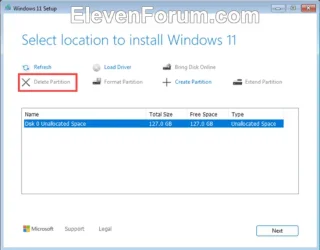
By the way, you shouldn't have to pre-format the drives.

You can just delete the partitions with the Windows installer.

Image1.webp

I haven't had to reinstall Windows very often, but I've found it works best if you just leave the whole disk you're installing to... unallocated.
 

My Computers My Computers

  • At a glance

    Win 11 Home 26H2 26300.9818AMD Ryzen 7 3700XG.Skill (F4-3200C14D-16GTZKW)EVGA RTX 2070 (08G-P4-2171-KR)
    OS
    Win 11 Home 26H2 26300.9818
    Computer type
    PC/Desktop
    Manufacturer/Model
    Built by Ghot® [May 2020]
    CPU
    AMD Ryzen 7 3700X
    Motherboard
    Asus Pro WS X570-ACE (BIOS 5302)
    Memory
    G.Skill (F4-3200C14D-16GTZKW)
    Graphics Card(s)
    EVGA RTX 2070 (08G-P4-2171-KR)
    Sound Card
    Realtek ALC1220P / ALC S1220A
    Monitor(s) Displays
    Dell U3011 30"
    Screen Resolution
    2560 x 1600
    Hard Drives
    2x Samsung 860 EVO 500GB,
    WD 4TB Black FZBX - SATA III,
    WD 8TB Black FZBX - SATA III,
    DRW-24B1ST CD/DVD Burner
    PSU
    PC Power & Cooling 750W Quad EPS12V
    Case
    Cooler Master ATCS 840 Tower
    Cooling
    CM Hyper 212 EVO (push/pull)
    Keyboard
    Ducky DK9008 Shine II Blue LED
    Mouse
    Logitech Optical M-100
    Internet Speed
    300/300
    Browser
    Firefox (latest)
    Antivirus
    Bitdefender Total Security
    Other Info
    Speakers: Klipsch Pro Media 2.1
  • At a glance

    Windows XP Pro 32bit w/SP3AMD Athlon 64 X2 5000+ (OC'd @ 3.2Ghz)TWIN2X2048-6400C4DHX (2 x 1GB, DDR2 800)EVGA 256-P2-N758-TR GeForce 8600GT SSC
    Operating System
    Windows XP Pro 32bit w/SP3
    Computer type
    PC/Desktop
    Manufacturer/Model
    Built by Ghot® (not in use)
    CPU
    AMD Athlon 64 X2 5000+ (OC'd @ 3.2Ghz)
    Motherboard
    ASUS M2N32-SLI Deluxe Wireless Edition
    Memory
    TWIN2X2048-6400C4DHX (2 x 1GB, DDR2 800)
    Graphics card(s)
    EVGA 256-P2-N758-TR GeForce 8600GT SSC
    Sound Card
    Onboard
    Monitor(s) Displays
    ViewSonic G90FB Black 19" Professional (CRT)
    Screen Resolution
    up to 2048 x 1536
    Hard Drives
    WD 36GB 10,000rpm Raptor SATA
    Seagate 80GB 7200rpm SATA
    Lite-On LTR-52246S CD/RW
    Lite-On LH-18A1P CD/DVD Burner
    PSU
    PC Power & Cooling Silencer 750 Quad EPS12V
    Case
    Generic Beige case, 80mm fans
    Cooling
    ZALMAN 9500A 92mm CPU Cooler
    Keyboard
    Logitech Classic Keybooard 200
    Mouse
    Logitech Optical M-BT96a
    Internet Speed
    300/300
    Browser
    Firefox 3.x ??
    Antivirus
    Symantec (Norton)
    Other Info
    Still assembled, still runs. Haven't turned it on for 15 years?
I had no issues using Rufus. Easily created bootable USB on 26H2 versions 9457 and 9711. Both usb sticks booted normally.
 

My Computers My Computers

  • At a glance

    Windows 11 Pro 26H2AMD Ryzen 9 7940HS32 GBRadeon 780M Graphics
    OS
    Windows 11 Pro 26H2
    Computer type
    PC/Desktop
    Manufacturer/Model
    Geekom AX7 Pro
    CPU
    AMD Ryzen 9 7940HS
    Memory
    32 GB
    Graphics Card(s)
    Radeon 780M Graphics
    Monitor(s) Displays
    Dell S2425H 24"
    Screen Resolution
    1920 x 1080
    Hard Drives
    2 TB NVMe SSD
    Internet Speed
    100 Mbs
    Browser
    Microsoft Edge / Firefox
    Antivirus
    F-Secure Security Suite
    Other Info
    All secure boot certificates updated to CA 2023
    Windows Production PCA 2011 certificate has been revoked.
  • At a glance

    Windows 11 Pro 26H212th Gen Intel Core i7-12700 processor (12-Co...16 GBIntel(R) UHD Graphics 770 with shared graphic...
    Operating System
    Windows 11 Pro 26H2
    Computer type
    PC/Desktop
    Manufacturer/Model
    Dell Inspiron 3910
    CPU
    12th Gen Intel Core i7-12700 processor (12-Core, 25M Cache, 2.1GHz to 4.8GHz)
    Motherboard
    Dell 0KHP4K
    Memory
    16 GB
    Graphics card(s)
    Intel(R) UHD Graphics 770 with shared graphics memory
    Monitor(s) Displays
    Dell 27" Monitor S2721DS,
    Screen Resolution
    QHD 2560 x 1440 @ 75 Hz
    Hard Drives
    1TB M.2, PCIe NVMe, SSD
    Internet Speed
    100 Mbps
    Browser
    Edge
    Antivirus
    F-Secure Security Suite
    Other Info
    All secure boot certificates updated to CA 2023
    Windows Production PCA 2011 certificate has been revoked.
  • HP Laptop 15-fd0xxx
    OS: Windows 11 Home 26H2
    Processor: 13th Gen Intel(R) Core(TM) i7-1355U (1.70 GHz), 10 Cores, 12 Logical Processors
    BIOS Version: AMI F.26 4/22/2026
    RAM: 16 GB
    SSD: 1 TB
    Screen Resolution: 1920 x 1080
    All secure boot certificates updated to CA 2023 by factory.
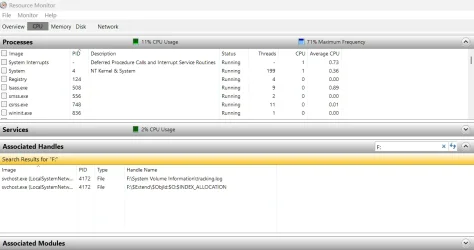
From the Run prompt, enter resmon

Click on the CPU tab, and scroll to the Associated Handles section.

In the search box on the far right, enter the drive letter (include the colon)

Should look something like this...

Screenshot 2026-10-18 161117.webp
 

My Computer My Computer

At a glance

Windows 11 Pro 26H2
OS
Windows 11 Pro 26H2
Computer type
Laptop
Manufacturer/Model
Toshiba
Antivirus
Defender
I now cannot run Rufus to create a 26H2 boot disk ( since 26H2 update ) and have spent 3 hours to no avail
previously used Rufus no problem for about 8 -10 years

After formatting drives and trying to start boot drive process the Rufus error " this device is used by another process" keeps appearing with a red cross.

I have used about 15 - 20 A1 suggestions to no avail , including Anti virus isolation , Process explorer to determine problem etc etc

. Basically this error appears with all USB sticks and in any usb socket of which I have 20 +

It would be useful to know if others have Rufus working normally , as a comparis
Just out of curiosity have you tried installing the OS without the help of Rufus?
 

My Computer My Computer

At a glance

WIN 11, WIN 10, WIN 8.1, WIN 7 U, WIN 7 PRO, ...Intel i7 6900K and i9-7960X / AMD 3800X (8 core)128 GB CORSAIR DOMINATOR PLATINUM (B DIE)NVIDIA 1070 and RTX 3070
OS
WIN 11, WIN 10, WIN 8.1, WIN 7 U, WIN 7 PRO, WIN 7 HOME (32 Bit), LINUX MINT
Computer type
PC/Desktop
Manufacturer/Model
DIY, ASUS, and DELL
CPU
Intel i7 6900K and i9-7960X / AMD 3800X (8 core)
Motherboard
ASUS X99E-WS USB 3.1 and ASUS X299 SAGE
Memory
128 GB CORSAIR DOMINATOR PLATINUM (B DIE)
Graphics Card(s)
NVIDIA 1070 and RTX 3070
Sound Card
Crystal Sound (onboard)
Monitor(s) Displays
single Samsung 30" 4K and 8" aux monitor
Screen Resolution
4K and something equally attrocious. I'll be working on this.
Hard Drives
A, B, C, D, E, F, G, H, I, J, K, L, M, N, O, P, Q, R, S, T, U, V, W

Ports X, Y, and Z are reserved for USB access and removable drives.

Drive types consist of the following: Various mechanical hard drives bearing the brand names, Seagate, Toshiba, and Western Digital. Various NVMe drives bearing the brand names Kingston, Intel, Silicon Power, Crucial, Western Digital, and Team Group. Various SATA SSDs bearing various different brand names.

RAID arrays included:

LSI RAID 10 (WD Velociraptors) 1115.72 GB
LSI RAID 10 (WD SSDS) 463.80 GB

INTEL RAID 0 (KINGSTON HYPER X) System 447.14 GB
INTEL RAID 1 TOSHIBA ENTERPRIZE class Data 2794.52 GB
INTEL RAID 1 SEAGATE HYBRID 931.51 GB
PSU
SEVERAL. I prefer my Corsair Platinum HX1000i but I also like EVGA power supplies
Case
ThermalTake Level 10 GT (among others)
Cooling
Noctua is my favorite and I use it in my main. I also own various other coolers.
Keyboard
all kinds.
Mouse
all kinds
Internet Speed
360 mbps - 1 gbps (depending)
Browser
FIREFOX
Antivirus
KASPERSKY (no apologies)
Other Info
Gave Dell touch screen with Windows 11 to daughter and got me an OTVOC. Being a PC builder I own many desktop PCs as well. I am a father of five providing PCs, laptops, and tablets for all my family, most of which I have modified, rebuilt, or simply built from scratch. I do not own a cell phone, never have, never will.
No problems here, done 3 clean installs since 26H2 came out.

including Anti virus isolation , Process explorer to determine problem etc etc
If the drive is formatted, how come these options still exist?
It would be useful to know if others have Rufus working normally , as a comparison
What options did you tick when creating the new 26H2 Rufus boot drive? Have you tried re-creating with a new Rufus download?
 

My Computers My Computers

  • At a glance

    Windows 11 2xH2 (latest update ... forever anal)Intel i5-124008GBNVIDIA GeForce GT730
    OS
    Windows 11 2xH2 (latest update ... forever anal)
    Computer type
    PC/Desktop
    Manufacturer/Model
    HP Slim S01
    CPU
    Intel i5-12400
    Memory
    8GB
    Graphics Card(s)
    NVIDIA GeForce GT730
    Sound Card
    OOBE
    Monitor(s) Displays
    Acer 32"
    Screen Resolution
    1920x1080
    Hard Drives
    512GB KIOXIA NVMe
    1TB SATA SSD
    PSU
    OOBE
    Case
    OOBE
    Cooling
    OOBE
    Keyboard
    BT
    Mouse
    BT
    Browser
    Brave FFox Chrome Opera
    Antivirus
    KIS
  • At a glance

    Windows 11 Pro 2xH2 (latest update ... 4ever ...i7-1165G7 @ 2.80GHzIntel Iris Xe Graphics
    Operating System
    Windows 11 Pro 2xH2 (latest update ... 4ever anal)
    Computer type
    Laptop
    Manufacturer/Model
    HP Pavillion 15
    CPU
    i7-1165G7 @ 2.80GHz
    Graphics card(s)
    Intel Iris Xe Graphics
    Hard Drives
    Samsung NVMe 512GB
    + numerous/multiple SSD Type C USB enclosures
    Internet Speed
    NBN FTTN 50
    Browser
    Brave
    Antivirus
    KIS
"ChatGPT can make mistakes. Check important info."

There are a couple of specific Rufus workarounds worth trying that are more promising than repeatedly formatting USB sticks or disabling antivirus software.

Since Rufus works for you with Windows 11 26H2, and the OP experiences the same error with every USB stick and port, I would suspect a problem with the Windows environment on the OP's PC rather than the USB hardware or the 26H2 ISO itself.

1. Try Rufus's alternative formatting method

This is the first thing I would recommend.
  1. Launch Rufus.
  2. Select the USB drive.
  3. Press Alt + V while the Rufus window is active.
  4. This enables Rufus's alternative VDS (Virtual Disk Service) partitioning and formatting method.
  5. Try creating the bootable USB again.
This is an experimental feature, but the Rufus developer specifically recommended it for this exact type of formatting error.


2. Try Rufus's built-in drive reset

If the first method fails:
  1. Select the correct USB device in Rufus.
  2. Press Alt + Z to start zeroing the device.
  3. Let it run for approximately one minute, then cancel.
  4. Unplug and reconnect the USB drive.
  5. Retry the normal Rufus operation.
Warning: This is destructive and will erase existing USB data. Double-check the selected device.

The Rufus developer recommended this technique in a December 2025 report involving the same error, specifically because Windows can have trouble handling EFI System Partitions.


3. If neither works, inspect the Rufus log

Have the OP use the latest official Rufus 4.15 and press Ctrl + L after the failure.

Look especially for Volume is in use, Formatting to NTFS (using IFS), or an error when requesting disk access. These distinguish a formatting failure from an earlier device-locking problem.

One particularly relevant Rufus GitHub report also found that unplugging and reconnecting the USB after formatting prevented the error from recurring.

If the problem persists on every USB device, I would try a Windows clean boot to isolate a conflicting startup service, rather than continue formatting drives.

Bottom line: I would recommend Alt + V first, then Alt + Z if necessary. Both are documented Rufus features, and both have been suggested by the developer for this type of problem. However, neither is a guaranteed fix for the OP's particular machine.

The most useful next piece of information would be the OP's complete Rufus log, not another round of generic troubleshooting suggestions.
 

My Computers My Computers

  • At a glance

    Windows 11 ProAMD Ryzen 9 9950X3DKingston FURY Beast 64GB (2x32GB) DDR5 6000MT/sASUS TUF Gaming Radeon RX 9070 OC Edition 16G...
    OS
    Windows 11 Pro
    Computer type
    PC/Desktop
    CPU
    AMD Ryzen 9 9950X3D
    Motherboard
    ASRock B650E Taichi Lite
    Memory
    Kingston FURY Beast 64GB (2x32GB) DDR5 6000MT/s
    Graphics Card(s)
    ASUS TUF Gaming Radeon RX 9070 OC Edition 16GB GDDR6
    Hard Drives
    Solidigm P44 Pro 2TB M.2 NVMe SSD
  • At a glance

    Windows 11 HomeIntel Core Ultra 9 275HX64GB (2x 32GB) DDR5-6400NVIDIA GeForce RTX 5080 16GB GDDR7 Laptop GPU
    Operating System
    Windows 11 Home
    Computer type
    Laptop
    Manufacturer/Model
    Lenovo Legion Pro 7i Gen 10 16"
    CPU
    Intel Core Ultra 9 275HX
    Memory
    64GB (2x 32GB) DDR5-6400
    Graphics card(s)
    NVIDIA GeForce RTX 5080 16GB GDDR7 Laptop GPU
    Hard Drives
    2x 1TB M.2 NVMe SSD (SK Hynix)
From the Run prompt, enter resmon

Click on the CPU tab, and scroll to the Associated Handles section.

In the search box on the far right, enter the drive letter (include the colon)

Should look something like this...

View attachment 187184
Used same idea with "Process Monitor and USB drive letter
 

My Computers My Computers

  • At a glance

    Windows 11 Pro 26 H2 / Windows 3.11 EmulatorPentium I9 14900K64 GB Corsair Dominator DDR5Sapphire Radeon Pure RX 9060 XT , 16 GB , ARG...
    OS
    Windows 11 Pro 26 H2 / Windows 3.11 Emulator
    Computer type
    PC/Desktop
    Manufacturer/Model
    Self build Dec 2023
    CPU
    Pentium I9 14900K
    Motherboard
    Asus Rog Z790 E Wifi 7
    Memory
    64 GB Corsair Dominator DDR5
    Graphics Card(s)
    Sapphire Radeon Pure RX 9060 XT , 16 GB , ARGB Lighting ,.
    Sound Card
    Realtek Codec ALC 4080 internal + Creative Soundblaster X3 External , when former sometimes a problem
    Monitor(s) Displays
    32" Toshiba PC / TV , Corsair Xeneon Edge 14.5" screen Res : 2560 x 720
    Screen Resolution
    2560 x 1440
    Hard Drives
    4 x Corsair MP 600 Pro 500GB M2 drives ( Main ), + Samsung M2 USB 500GB +Corsair M2 1TB Ext USB+ Hitachi Sata Drive 1TB , 2 x DVD-RW
    PSU
    Corsair 1000 w
    Case
    NZXT Phantom 240 , 5 fans built in system
    Cooling
    Silentium PC Spartan 5 Max
    Keyboard
    Seenda Luminous
    Mouse
    1) Aston Martin DB9 Car , 2) McLaren Yellow P2 car , 3) Seenda Wireless luminous
    Internet Speed
    950 mbps
    Browser
    , Norton Private ,Edge , Opera , Firefox , Brave, .
    Antivirus
    Norton 360 , 10 User + Norton Anti Track , Norton Identity ( latter 2 giveaways )
    Other Info
    Asus GT BE 98 Wifi 7 Router
    Wifi Q Antenna : large non standard 6.5 ft extender aerial
    Pertelian X2040 ,
    Echo Show 8"
    Logitech Z906 5.1 speakers
    Aura Sync various LED's Internal case lighting
    Corsair Icue Xeneon multi CPU/Mem/GPU/Drive temps and music displays
  • At a glance

    Windows 11 25H28GB
    Operating System
    Windows 11 25H2
    Computer type
    Laptop
    Manufacturer/Model
    Microsoft Surface Go
    Memory
    8GB
    Hard Drives
    128 GB and 256 GB Micro SD
    Internet Speed
    950 mbps
I now cannot run Rufus to create a 26H2 boot disk ( since 26H2 update ) and have spent 3 hours to no avail
previously used Rufus no problem for about 8 -10 years

After formatting drives and trying to start boot drive process the Rufus error " this device is used by another process" keeps appearing with a red cross.

I have used about 15 - 20 A1 suggestions to no avail , including Anti virus isolation , Process explorer to determine problem etc etc

. Basically this error appears with all USB sticks and in any usb socket of which I have 20 +

It would be useful to know if others have Rufus working normally , as a comparison

have the same problem with Rufus unable to burn 26H2 to USB pen drive
this is on two separate computers, Rufus failed on both systems..

yet the MS creation tool can burn the same 26H2 ISO on the same USB port to the same USB pen drive
on both systems. i will have to get my Windows 10 test rig out and try burning 26H2 with Rufus on that

best of luck Steve ..
 

My Computers My Computers

  • At a glance

    Ubuntu 24.04 LTS.. Win10 & Win11 HomeRyzen 7 5825u64GB DDR4 3200Ryzen 7 5825u
    OS
    Ubuntu 24.04 LTS.. Win10 & Win11 Home
    Computer type
    PC/Desktop
    Manufacturer/Model
    HP 24" AiO
    CPU
    Ryzen 7 5825u
    Motherboard
    HP
    Memory
    64GB DDR4 3200
    Graphics Card(s)
    Ryzen 7 5825u
    Sound Card
    Realtek External 5w speaker bar.
    Monitor(s) Displays
    24" HP AiO
    Screen Resolution
    1920 x 1080 @60 Hz
    Hard Drives
    1TB WD Blue SN580 M2 SSD Partitioned C:/D: drives.
    2x 1TB USB HDD External Backup/Storage.
    all VeraCrypt encrypted.
    PSU
    90W external power brick
    Case
    24" All in One
    Cooling
    Default Air Cooling
    Keyboard
    Dell WiFi UK extended
    Mouse
    Dell WiFi 3 Button
    Internet Speed
    1GB full fibre
    Browser
    Vivaldi Browser/Email/Calendar
    Antivirus
    AVG Internet Security/Windows Defender
    Other Info
    Mainly Open Source Software
  • At a glance

    Ubuntu 22.04.5 LTSi5 7200u16GB DDR4Intel
    Operating System
    Ubuntu 22.04.5 LTS
    Computer type
    Laptop
    Manufacturer/Model
    Dell 13" Latitude 2017
    CPU
    i5 7200u
    Motherboard
    Dell
    Memory
    16GB DDR4
    Graphics card(s)
    Intel
    Sound Card
    Intel
    Monitor(s) Displays
    13" Dell Laptop
    Hard Drives
    250GB Crucial 2.5" SSD
    Mouse
    Generic WiFi 3 button
    Internet Speed
    WiFi only
    Browser
    Firefox
    Antivirus
    ClamAV TK
    Other Info
    Mainly Open Source Software
No problems here, done 3 clean installs since 26H2 came out.


If the drive is formatted, how come these options still exist?

What options did you tick when creating the new 26H2 Rufus boot drive? Have you tried re-creating with a new Rufus download?
Yes tried different download / version of Rufus and only select Bitlocker disable function
 

My Computers My Computers

  • At a glance

    Windows 11 Pro 26 H2 / Windows 3.11 EmulatorPentium I9 14900K64 GB Corsair Dominator DDR5Sapphire Radeon Pure RX 9060 XT , 16 GB , ARG...
    OS
    Windows 11 Pro 26 H2 / Windows 3.11 Emulator
    Computer type
    PC/Desktop
    Manufacturer/Model
    Self build Dec 2023
    CPU
    Pentium I9 14900K
    Motherboard
    Asus Rog Z790 E Wifi 7
    Memory
    64 GB Corsair Dominator DDR5
    Graphics Card(s)
    Sapphire Radeon Pure RX 9060 XT , 16 GB , ARGB Lighting ,.
    Sound Card
    Realtek Codec ALC 4080 internal + Creative Soundblaster X3 External , when former sometimes a problem
    Monitor(s) Displays
    32" Toshiba PC / TV , Corsair Xeneon Edge 14.5" screen Res : 2560 x 720
    Screen Resolution
    2560 x 1440
    Hard Drives
    4 x Corsair MP 600 Pro 500GB M2 drives ( Main ), + Samsung M2 USB 500GB +Corsair M2 1TB Ext USB+ Hitachi Sata Drive 1TB , 2 x DVD-RW
    PSU
    Corsair 1000 w
    Case
    NZXT Phantom 240 , 5 fans built in system
    Cooling
    Silentium PC Spartan 5 Max
    Keyboard
    Seenda Luminous
    Mouse
    1) Aston Martin DB9 Car , 2) McLaren Yellow P2 car , 3) Seenda Wireless luminous
    Internet Speed
    950 mbps
    Browser
    , Norton Private ,Edge , Opera , Firefox , Brave, .
    Antivirus
    Norton 360 , 10 User + Norton Anti Track , Norton Identity ( latter 2 giveaways )
    Other Info
    Asus GT BE 98 Wifi 7 Router
    Wifi Q Antenna : large non standard 6.5 ft extender aerial
    Pertelian X2040 ,
    Echo Show 8"
    Logitech Z906 5.1 speakers
    Aura Sync various LED's Internal case lighting
    Corsair Icue Xeneon multi CPU/Mem/GPU/Drive temps and music displays
  • At a glance

    Windows 11 25H28GB
    Operating System
    Windows 11 25H2
    Computer type
    Laptop
    Manufacturer/Model
    Microsoft Surface Go
    Memory
    8GB
    Hard Drives
    128 GB and 256 GB Micro SD
    Internet Speed
    950 mbps
have the same problem with Rufus unable to burn 26H2 to USB pen drive
this is on two separate computers, Rufus failed on both systems..

yet the MS creation tool can burn the same 26H2 ISO on the same USB port to the same USB pen drive
on both systems. i will have to get my Windows 10 test rig out and try burning 26H2 with Rufus on that

best of luck Steve ..
Yes as you say the MS Creation tool can be used , BUT I also use NT Lite to remove windows 11 excess dross and so use the NT Lite adjusted iso on Rufus.

More importantly NT Lite incorporates all updates and user drivers to save time looking at Windows Update after reinstall !

But I also tried a vanilla Microsoft ISO , but had same problem .
 
Last edited:

My Computers My Computers

  • At a glance

    Windows 11 Pro 26 H2 / Windows 3.11 EmulatorPentium I9 14900K64 GB Corsair Dominator DDR5Sapphire Radeon Pure RX 9060 XT , 16 GB , ARG...
    OS
    Windows 11 Pro 26 H2 / Windows 3.11 Emulator
    Computer type
    PC/Desktop
    Manufacturer/Model
    Self build Dec 2023
    CPU
    Pentium I9 14900K
    Motherboard
    Asus Rog Z790 E Wifi 7
    Memory
    64 GB Corsair Dominator DDR5
    Graphics Card(s)
    Sapphire Radeon Pure RX 9060 XT , 16 GB , ARGB Lighting ,.
    Sound Card
    Realtek Codec ALC 4080 internal + Creative Soundblaster X3 External , when former sometimes a problem
    Monitor(s) Displays
    32" Toshiba PC / TV , Corsair Xeneon Edge 14.5" screen Res : 2560 x 720
    Screen Resolution
    2560 x 1440
    Hard Drives
    4 x Corsair MP 600 Pro 500GB M2 drives ( Main ), + Samsung M2 USB 500GB +Corsair M2 1TB Ext USB+ Hitachi Sata Drive 1TB , 2 x DVD-RW
    PSU
    Corsair 1000 w
    Case
    NZXT Phantom 240 , 5 fans built in system
    Cooling
    Silentium PC Spartan 5 Max
    Keyboard
    Seenda Luminous
    Mouse
    1) Aston Martin DB9 Car , 2) McLaren Yellow P2 car , 3) Seenda Wireless luminous
    Internet Speed
    950 mbps
    Browser
    , Norton Private ,Edge , Opera , Firefox , Brave, .
    Antivirus
    Norton 360 , 10 User + Norton Anti Track , Norton Identity ( latter 2 giveaways )
    Other Info
    Asus GT BE 98 Wifi 7 Router
    Wifi Q Antenna : large non standard 6.5 ft extender aerial
    Pertelian X2040 ,
    Echo Show 8"
    Logitech Z906 5.1 speakers
    Aura Sync various LED's Internal case lighting
    Corsair Icue Xeneon multi CPU/Mem/GPU/Drive temps and music displays
  • At a glance

    Windows 11 25H28GB
    Operating System
    Windows 11 25H2
    Computer type
    Laptop
    Manufacturer/Model
    Microsoft Surface Go
    Memory
    8GB
    Hard Drives
    128 GB and 256 GB Micro SD
    Internet Speed
    950 mbps
Probably some setting on computer like secure boot enabled, device encryption, bitlocker etc. I've no problems on using rufus on W11 pro 26H2 experimental release. Also check the medium you want to create the target iso image on too.

why people want or need any of that stuff on HOME laptops especially if they don't travel with them regularly is beyond me. Just keep your laptop simple with standard windows settings and it all works perfectly. Unless you really know what you are doing Windows these days is far better at optimising systems and running decently than any amount of tinkering -- OK if you've got older essentially non supported hardware but with any sort of sensible laptop just leave all those encryption, secure boot and other stuff off.

cheers
jimbo
 

My Computer My Computer

At a glance

Windows XP,11 Linux Fedora Rawhide pre-releas...2 X Intel i7
OS
Windows XP,11 Linux Fedora Rawhide pre-release 46
Computer type
PC/Desktop
CPU
2 X Intel i7
Screen Resolution
4KUHD X 2
Probably some setting on computer like secure boot enabled, device encryption, bitlocker etc. I've no problems on using rufus on W11 pro 26H2 experimental release. Also check the medium you want to create the target iso image on too.

why people want or need any of that stuff on HOME laptops especially if they don't travel with them regularly is beyond me. Just keep your laptop simple with standard windows settings and it all works perfectly. Unless you really know what you are doing Windows these days is far better at optimising systems and running decently than any amount of tinkering -- OK if you've got older essentially non supported hardware but with any sort of sensible laptop just leave all those encryption, secure boot and other stuff off.

cheers
jimbo
That wouldn't be any fun at all.
 

My Computers My Computers

  • At a glance

    Windows 11 Pro 26H2 26300.9818AMD Ryzen 7 5825U with Radeon Graphics16GB
    OS
    Windows 11 Pro 26H2 26300.9818
    Computer type
    Laptop
    Manufacturer/Model
    Acemagic LX15PRO
    CPU
    AMD Ryzen 7 5825U with Radeon Graphics
    Motherboard
    BIOS CT_BI_AMI_LX15PRO_AB8139_A-004
    Memory
    16GB
    Screen Resolution
    1920 x 1080
    Hard Drives
    SSD 2TB
    Internet Speed
    30 Mbps
    Browser
    Brave
    Antivirus
    Webroot SecureAnywhere Complete beta
  • At a glance

    Windows 11 Pro 23H2 22631.2506Atom N450 1.66GHz2GB
    Operating System
    Windows 11 Pro 23H2 22631.2506
    Computer type
    Laptop
    Manufacturer/Model
    HP Mini 210-1090NR PC (bought in late 2009!)
    CPU
    Atom N450 1.66GHz
    Memory
    2GB
    Browser
    Brave
    Antivirus
    Webroot
  • Acer Swift SF114-34 laptop
    OS Windows 11 Pro 26200.8894
    CPU Pentium Silver N6000
    RAM 4GB
    BIOS v1.17
    SSD Samsung 970 EVO Plus SSD 2TB (an upgrade)
Thanks for your input , even analysing running processes etc did not help , but I have created the Rufus boot disk using a laptop , so can use on main PC when required
 

My Computers My Computers

  • At a glance

    Windows 11 Pro 26 H2 / Windows 3.11 EmulatorPentium I9 14900K64 GB Corsair Dominator DDR5Sapphire Radeon Pure RX 9060 XT , 16 GB , ARG...
    OS
    Windows 11 Pro 26 H2 / Windows 3.11 Emulator
    Computer type
    PC/Desktop
    Manufacturer/Model
    Self build Dec 2023
    CPU
    Pentium I9 14900K
    Motherboard
    Asus Rog Z790 E Wifi 7
    Memory
    64 GB Corsair Dominator DDR5
    Graphics Card(s)
    Sapphire Radeon Pure RX 9060 XT , 16 GB , ARGB Lighting ,.
    Sound Card
    Realtek Codec ALC 4080 internal + Creative Soundblaster X3 External , when former sometimes a problem
    Monitor(s) Displays
    32" Toshiba PC / TV , Corsair Xeneon Edge 14.5" screen Res : 2560 x 720
    Screen Resolution
    2560 x 1440
    Hard Drives
    4 x Corsair MP 600 Pro 500GB M2 drives ( Main ), + Samsung M2 USB 500GB +Corsair M2 1TB Ext USB+ Hitachi Sata Drive 1TB , 2 x DVD-RW
    PSU
    Corsair 1000 w
    Case
    NZXT Phantom 240 , 5 fans built in system
    Cooling
    Silentium PC Spartan 5 Max
    Keyboard
    Seenda Luminous
    Mouse
    1) Aston Martin DB9 Car , 2) McLaren Yellow P2 car , 3) Seenda Wireless luminous
    Internet Speed
    950 mbps
    Browser
    , Norton Private ,Edge , Opera , Firefox , Brave, .
    Antivirus
    Norton 360 , 10 User + Norton Anti Track , Norton Identity ( latter 2 giveaways )
    Other Info
    Asus GT BE 98 Wifi 7 Router
    Wifi Q Antenna : large non standard 6.5 ft extender aerial
    Pertelian X2040 ,
    Echo Show 8"
    Logitech Z906 5.1 speakers
    Aura Sync various LED's Internal case lighting
    Corsair Icue Xeneon multi CPU/Mem/GPU/Drive temps and music displays
  • At a glance

    Windows 11 25H28GB
    Operating System
    Windows 11 25H2
    Computer type
    Laptop
    Manufacturer/Model
    Microsoft Surface Go
    Memory
    8GB
    Hard Drives
    128 GB and 256 GB Micro SD
    Internet Speed
    950 mbps
That wouldn't be any fun at all.
Secure Boot was not an issue ( supported by Rufus ) , or Encryption ( dont use )

Thanks anyway
 

My Computers My Computers

  • At a glance

    Windows 11 Pro 26 H2 / Windows 3.11 EmulatorPentium I9 14900K64 GB Corsair Dominator DDR5Sapphire Radeon Pure RX 9060 XT , 16 GB , ARG...
    OS
    Windows 11 Pro 26 H2 / Windows 3.11 Emulator
    Computer type
    PC/Desktop
    Manufacturer/Model
    Self build Dec 2023
    CPU
    Pentium I9 14900K
    Motherboard
    Asus Rog Z790 E Wifi 7
    Memory
    64 GB Corsair Dominator DDR5
    Graphics Card(s)
    Sapphire Radeon Pure RX 9060 XT , 16 GB , ARGB Lighting ,.
    Sound Card
    Realtek Codec ALC 4080 internal + Creative Soundblaster X3 External , when former sometimes a problem
    Monitor(s) Displays
    32" Toshiba PC / TV , Corsair Xeneon Edge 14.5" screen Res : 2560 x 720
    Screen Resolution
    2560 x 1440
    Hard Drives
    4 x Corsair MP 600 Pro 500GB M2 drives ( Main ), + Samsung M2 USB 500GB +Corsair M2 1TB Ext USB+ Hitachi Sata Drive 1TB , 2 x DVD-RW
    PSU
    Corsair 1000 w
    Case
    NZXT Phantom 240 , 5 fans built in system
    Cooling
    Silentium PC Spartan 5 Max
    Keyboard
    Seenda Luminous
    Mouse
    1) Aston Martin DB9 Car , 2) McLaren Yellow P2 car , 3) Seenda Wireless luminous
    Internet Speed
    950 mbps
    Browser
    , Norton Private ,Edge , Opera , Firefox , Brave, .
    Antivirus
    Norton 360 , 10 User + Norton Anti Track , Norton Identity ( latter 2 giveaways )
    Other Info
    Asus GT BE 98 Wifi 7 Router
    Wifi Q Antenna : large non standard 6.5 ft extender aerial
    Pertelian X2040 ,
    Echo Show 8"
    Logitech Z906 5.1 speakers
    Aura Sync various LED's Internal case lighting
    Corsair Icue Xeneon multi CPU/Mem/GPU/Drive temps and music displays
  • At a glance

    Windows 11 25H28GB
    Operating System
    Windows 11 25H2
    Computer type
    Laptop
    Manufacturer/Model
    Microsoft Surface Go
    Memory
    8GB
    Hard Drives
    128 GB and 256 GB Micro SD
    Internet Speed
    950 mbps
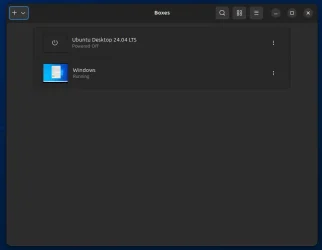
i am now able to use Rufus in Windows but its Windows 10 22H2 in a Virtual medium
i installed Ubuntu 24.04 LTS and then installed Windows 10 in Gnome boxes with QEMU/KVM.

1793090507766.webp1793090583692.webp

an external 1TB SSD formatted NTFS holds the Windows ISO's and i am now able to burn bootable USB pen drives
from within Gnome boxes using Rufus on Windows 10 22H2 to an external USB pen drive without any problems.

i am now configuring Gnome boxes to accept an install of Windows 26H2 directly from ISO
best of luck Steve ..
 

My Computers My Computers

  • At a glance

    Ubuntu 24.04 LTS.. Win10 & Win11 HomeRyzen 7 5825u64GB DDR4 3200Ryzen 7 5825u
    OS
    Ubuntu 24.04 LTS.. Win10 & Win11 Home
    Computer type
    PC/Desktop
    Manufacturer/Model
    HP 24" AiO
    CPU
    Ryzen 7 5825u
    Motherboard
    HP
    Memory
    64GB DDR4 3200
    Graphics Card(s)
    Ryzen 7 5825u
    Sound Card
    Realtek External 5w speaker bar.
    Monitor(s) Displays
    24" HP AiO
    Screen Resolution
    1920 x 1080 @60 Hz
    Hard Drives
    1TB WD Blue SN580 M2 SSD Partitioned C:/D: drives.
    2x 1TB USB HDD External Backup/Storage.
    all VeraCrypt encrypted.
    PSU
    90W external power brick
    Case
    24" All in One
    Cooling
    Default Air Cooling
    Keyboard
    Dell WiFi UK extended
    Mouse
    Dell WiFi 3 Button
    Internet Speed
    1GB full fibre
    Browser
    Vivaldi Browser/Email/Calendar
    Antivirus
    AVG Internet Security/Windows Defender
    Other Info
    Mainly Open Source Software
  • At a glance

    Ubuntu 22.04.5 LTSi5 7200u16GB DDR4Intel
    Operating System
    Ubuntu 22.04.5 LTS
    Computer type
    Laptop
    Manufacturer/Model
    Dell 13" Latitude 2017
    CPU
    i5 7200u
    Motherboard
    Dell
    Memory
    16GB DDR4
    Graphics card(s)
    Intel
    Sound Card
    Intel
    Monitor(s) Displays
    13" Dell Laptop
    Hard Drives
    250GB Crucial 2.5" SSD
    Mouse
    Generic WiFi 3 button
    Internet Speed
    WiFi only
    Browser
    Firefox
    Antivirus
    ClamAV TK
    Other Info
    Mainly Open Source Software
Back
Top Bottom