Running Windows File Explorer As Administrator


As long as you keep the driver blocked from being installed you shouldn't run into any problems using the Memory Integrity setting.
I'm not at all sure how to go about blocking it. Don't know what WUMT is or
As long as you keep the driver blocked from being installed you shouldn't run into any problems using the Memory Integrity setting.
I don't know how to do that. I don't know what WUMT is or what Wushowhide.diagcab is or how to use them.
 

My Computer My Computer

At a glance

Windows 11 Pro ver. 24H212th Grn. Intel i7-12700K 3600 Mhz 12 Cores64 GB DDR5NVIDIA GeForce GTX 1650
OS
Windows 11 Pro ver. 24H2
Computer type
PC/Desktop
Manufacturer/Model
ACPI x64-based PC
CPU
12th Grn. Intel i7-12700K 3600 Mhz 12 Cores
Motherboard
ASUSTeK - Prime Z690-P WIFI
Memory
64 GB DDR5
Graphics Card(s)
NVIDIA GeForce GTX 1650
Sound Card
NVIDIA High Definition Audio
Monitor(s) Displays
ViewSonic
Screen Resolution
1920 x 1080
Hard Drives
HDS72252 5VLAT80 2 Tb ssd Hard drive
PSU
850 Watt Power Supply
Case
19" high desktop
Cooling
A lot of fans
Keyboard
Logitech
Mouse
Logitech
Internet Speed
500 Mg
Browser
FF
Antivirus
Windows Defendor & Malwarebytes
Other Info
2 Asus Blu-Ray burners - BW - 16D1HT
I don't know what WUMT is or what Wushowhide.diagcab is or how to use them.
Wushowhide.diagcab is a very old tool from Microsoft, first released for the initial version of W10. Still works in 11. It's a very simple tool that just allows you to block one or more updates that Windows Update would otherwise deliver. It's very simple to use.


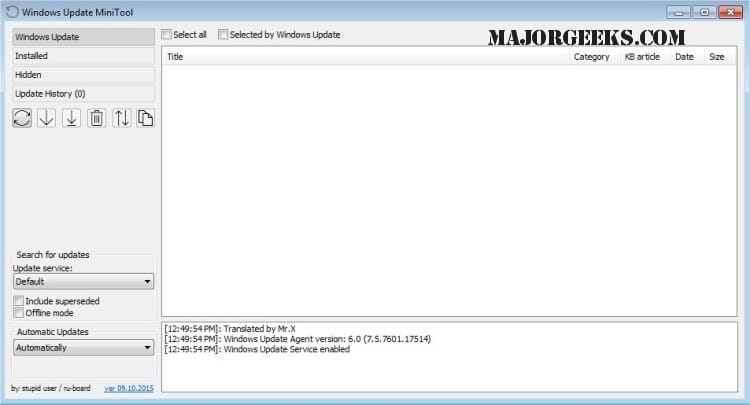
WUMT is a third party app that manges all your updates. It give you full control over which, if any, updates you wish to install. As such, it's more complex to use, but more powerful.


My Computers My Computers

  • At a glance

    Windows 11 HomeAMD Athlon Silver 3050U8GBRadeon Graphics
    OS
    Windows 11 Home
    Computer type
    Laptop
    Manufacturer/Model
    Acer Aspire 3 A315-23-R9VY
    CPU
    AMD Athlon Silver 3050U
    Memory
    8GB
    Graphics Card(s)
    Radeon Graphics
    Monitor(s) Displays
    laptop screen
    Screen Resolution
    1366x768 native resolution, up to 2560x1440 with Radeon Virtual Super Resolution
    Hard Drives
    1TB Samsung EVO 870 SSD (from April 2026: 250GB EVO 850)
    Internet Speed
    150 Mbps
    Browser
    Edge, Firefox
    Antivirus
    Defender
    Other Info
    fully 'Windows 11 ready' laptop. Windows 10 C: partition migrated from my old unsupported 'main machine' then upgraded to 11. A test migration ran Insider builds for 2 months. When 11 was released on 5th October 2021 it was re-imaged back to 10 and was offered the upgrade in Windows Update on 20th October. Windows Update offered the 22H2 Feature Update on 20th September 2022. It got the 23H2 Feature Update on 4th November 2023 through Windows Update, 24H2 on 3rd October 2024 through Windows Update by setting the Target Release Version for 24H2, and 25H2 on 30th September 2025 through Windows Update by setting the Target Release Version for 25H2.

    UPDATE - 11 April 2026: due to mechanical deterioration this PC has been retired from active duty. The OS with all software and files has been migrated to my System Seven in 'Other systems' to carry on as my general purpose 'main machine'.
  • At a glance

    Windows 11 ProIntel® Core™ i5-520M8GB(integrated graphics) Intel HD Graphics
    Operating System
    Windows 11 Pro
    Computer type
    Laptop
    Manufacturer/Model
    Dell Latitude E4310
    CPU
    Intel® Core™ i5-520M
    Motherboard
    0T6M8G
    Memory
    8GB
    Graphics card(s)
    (integrated graphics) Intel HD Graphics
    Screen Resolution
    1366x768
    Hard Drives
    500GB Crucial MX500 SSD
    Browser
    Firefox, Edge
    Antivirus
    Defender
    Other Info
    unsupported machine: Legacy bios, MBR, TPM 1.2, upgraded from W10 to W11 using W10/W11 hybrid install media workaround.

    In-place upgrade to 22H2 using ISO and a workaround.
    Feature Update to 23H2 by manually installing the Enablement Package.
    In-place upgrade to 24H2 using hybrid 23H2/24H2 install media.
    Upgraded to 25H2 by Enablement Package.

    Also running Insider Dev, and Canary builds and Windows 10 as native boot .vhdx.
  • My SYSTEM THREE is a Dell Latitude 5410, i7-10610U, 32GB RAM, 512GB NVMe ssd, supported device running Windows 11 Pro.

    My SYSTEM FOUR is a 2-in-1 convertible Lenovo Yoga 11e 20DA, Celeron N2930, 8GB RAM, 256GB ssd. Unsupported device: currently running Win10 Pro, plus Win11 Pro RTM and Insider Dev, Beta, and RP 24H2 as native boot vhdx.

    My SYSTEM FIVE is a Dell Latitude 3190 2-in-1, Pentium Silver N5030, 8GB RAM, 1TB NVMe ssd, supported device running Windows 11 Pro, plus Insider Beta, Dev, and Canary builds (and a few others) as a native boot .vhdx.

    My SYSTEM SIX is a Dell Latitude 5550, Core Ultra 7 165H, 64GB RAM, 1TB NVMe SSD, supported device, Windows 11 Pro 24H2, Hyper-V host machine. Updated to 25H2 on 30th September 2025.

    My SYSTEM SEVEN is a Lenovo Thinkpad T580, Intel Core i7-8650U, 16GB RAM, 512GB NVMe SSD + 2nd 512GB NVMe SSD, a supported device for Windows 11. This is my current general purpose 'main machine'. The installed Windows 11 Home from my System One has been migrated to this machine.
  • Like
Reactions: HDL
Thank you. I will look into both of them.

I seem to remember in Win 10 or possibly Win 7 individual updates could be blocked at the Windows Update site. I haven't seen that option available lately.
 

My Computer My Computer

At a glance

Windows 11 Pro ver. 24H212th Grn. Intel i7-12700K 3600 Mhz 12 Cores64 GB DDR5NVIDIA GeForce GTX 1650
OS
Windows 11 Pro ver. 24H2
Computer type
PC/Desktop
Manufacturer/Model
ACPI x64-based PC
CPU
12th Grn. Intel i7-12700K 3600 Mhz 12 Cores
Motherboard
ASUSTeK - Prime Z690-P WIFI
Memory
64 GB DDR5
Graphics Card(s)
NVIDIA GeForce GTX 1650
Sound Card
NVIDIA High Definition Audio
Monitor(s) Displays
ViewSonic
Screen Resolution
1920 x 1080
Hard Drives
HDS72252 5VLAT80 2 Tb ssd Hard drive
PSU
850 Watt Power Supply
Case
19" high desktop
Cooling
A lot of fans
Keyboard
Logitech
Mouse
Logitech
Internet Speed
500 Mg
Browser
FF
Antivirus
Windows Defendor & Malwarebytes
Other Info
2 Asus Blu-Ray burners - BW - 16D1HT
I seem to remember in Win 10 or possibly Win 7 individual updates could be blocked at the Windows Update site.
In Windows 7 you could configure Window Update to let you pick and choose which updates to install, and to let you hide those you didn't want.

In the initial release of Windows 10 there was no choice, Home automatically installed updates and Pro only let you pause all updates, but not choose which to install when you resumed. Microsoft very quickly realised there were a few rare cases where a particular update (usually a driver) had to be blocked and released wushowhide.diagcab.
 

My Computers My Computers

  • At a glance

    Windows 11 HomeAMD Athlon Silver 3050U8GBRadeon Graphics
    OS
    Windows 11 Home
    Computer type
    Laptop
    Manufacturer/Model
    Acer Aspire 3 A315-23-R9VY
    CPU
    AMD Athlon Silver 3050U
    Memory
    8GB
    Graphics Card(s)
    Radeon Graphics
    Monitor(s) Displays
    laptop screen
    Screen Resolution
    1366x768 native resolution, up to 2560x1440 with Radeon Virtual Super Resolution
    Hard Drives
    1TB Samsung EVO 870 SSD (from April 2026: 250GB EVO 850)
    Internet Speed
    150 Mbps
    Browser
    Edge, Firefox
    Antivirus
    Defender
    Other Info
    fully 'Windows 11 ready' laptop. Windows 10 C: partition migrated from my old unsupported 'main machine' then upgraded to 11. A test migration ran Insider builds for 2 months. When 11 was released on 5th October 2021 it was re-imaged back to 10 and was offered the upgrade in Windows Update on 20th October. Windows Update offered the 22H2 Feature Update on 20th September 2022. It got the 23H2 Feature Update on 4th November 2023 through Windows Update, 24H2 on 3rd October 2024 through Windows Update by setting the Target Release Version for 24H2, and 25H2 on 30th September 2025 through Windows Update by setting the Target Release Version for 25H2.

    UPDATE - 11 April 2026: due to mechanical deterioration this PC has been retired from active duty. The OS with all software and files has been migrated to my System Seven in 'Other systems' to carry on as my general purpose 'main machine'.
  • At a glance

    Windows 11 ProIntel® Core™ i5-520M8GB(integrated graphics) Intel HD Graphics
    Operating System
    Windows 11 Pro
    Computer type
    Laptop
    Manufacturer/Model
    Dell Latitude E4310
    CPU
    Intel® Core™ i5-520M
    Motherboard
    0T6M8G
    Memory
    8GB
    Graphics card(s)
    (integrated graphics) Intel HD Graphics
    Screen Resolution
    1366x768
    Hard Drives
    500GB Crucial MX500 SSD
    Browser
    Firefox, Edge
    Antivirus
    Defender
    Other Info
    unsupported machine: Legacy bios, MBR, TPM 1.2, upgraded from W10 to W11 using W10/W11 hybrid install media workaround.

    In-place upgrade to 22H2 using ISO and a workaround.
    Feature Update to 23H2 by manually installing the Enablement Package.
    In-place upgrade to 24H2 using hybrid 23H2/24H2 install media.
    Upgraded to 25H2 by Enablement Package.

    Also running Insider Dev, and Canary builds and Windows 10 as native boot .vhdx.
  • My SYSTEM THREE is a Dell Latitude 5410, i7-10610U, 32GB RAM, 512GB NVMe ssd, supported device running Windows 11 Pro.

    My SYSTEM FOUR is a 2-in-1 convertible Lenovo Yoga 11e 20DA, Celeron N2930, 8GB RAM, 256GB ssd. Unsupported device: currently running Win10 Pro, plus Win11 Pro RTM and Insider Dev, Beta, and RP 24H2 as native boot vhdx.

    My SYSTEM FIVE is a Dell Latitude 3190 2-in-1, Pentium Silver N5030, 8GB RAM, 1TB NVMe ssd, supported device running Windows 11 Pro, plus Insider Beta, Dev, and Canary builds (and a few others) as a native boot .vhdx.

    My SYSTEM SIX is a Dell Latitude 5550, Core Ultra 7 165H, 64GB RAM, 1TB NVMe SSD, supported device, Windows 11 Pro 24H2, Hyper-V host machine. Updated to 25H2 on 30th September 2025.

    My SYSTEM SEVEN is a Lenovo Thinkpad T580, Intel Core i7-8650U, 16GB RAM, 512GB NVMe SSD + 2nd 512GB NVMe SSD, a supported device for Windows 11. This is my current general purpose 'main machine'. The installed Windows 11 Home from my System One has been migrated to this machine.
(usually a driver) had to be blocked and released wushowhide.diagcab
I downloaded it yesterday from MS and had to give it permission to download.
 

My Computers My Computers

  • At a glance

    Windows 11 Pro 25H2Intel Core i7-10700K16GB (8GB PC4-19200 DDR4 SDRAM x2)NVIDIA GeForce GTX 1050 TI
    OS
    Windows 11 Pro 25H2
    Computer type
    PC/Desktop
    Manufacturer/Model
    PowerSpec B746
    CPU
    Intel Core i7-10700K
    Motherboard
    ASRock Z490 Phantom Gaming 4/ax
    Memory
    16GB (8GB PC4-19200 DDR4 SDRAM x2)
    Graphics Card(s)
    NVIDIA GeForce GTX 1050 TI
    Sound Card
    Realtek Audio
    Monitor(s) Displays
    #1. LG ULTRAWIDE 34" #2. AOC Q32G2WG3 32"
    Screen Resolution
    #1. 3440 X 1440 #2. 1920 x 1080
    Hard Drives
    NVMe WDC WDS100T2B0C-00PXH0 1TB
    Samsung SSD 860 EVO 1TB
    PSU
    750 Watts (62.5A)
    Case
    PowerSpec/Lian Li ATX 205
    Keyboard
    Logitech K270
    Mouse
    Logitech M185
    Browser
    Microsoft Edge and Firefox
    Antivirus
    Webroot SecureAnywhere CE 26.1
  • At a glance

    Windows 11 Canary ChannelIntel Core i5-8400 CPU @ 2.80GHz16 MB DDR 4-2666
    Operating System
    Windows 11 Canary Channel
    Computer type
    PC/Desktop
    Manufacturer/Model
    PowerSpec G156
    CPU
    Intel Core i5-8400 CPU @ 2.80GHz
    Motherboard
    AsusTeK Prime B360M-A
    Memory
    16 MB DDR 4-2666
    Monitor(s) Displays
    23" Speptre HDMI 75Hz
    Screen Resolution
    1920x1080
    Hard Drives
    Samsung 970 EVO 500GB NVMe
    Keyboard
    Logitek K270
    Mouse
    Logitek M185
    Browser
    Firefox, Edge and Edge Canary
    Antivirus
    Windows Defender
I downloaded it yesterday from MS and had to give it permission to download.
Yes, it's on one of their http servers. Browser now won't download from insecure sites unless you jump through a few hoops. That used to be the case for all downloads from the update catalog too, but those MS have now switched to https servers.
 

My Computers My Computers

  • At a glance

    Windows 11 HomeAMD Athlon Silver 3050U8GBRadeon Graphics
    OS
    Windows 11 Home
    Computer type
    Laptop
    Manufacturer/Model
    Acer Aspire 3 A315-23-R9VY
    CPU
    AMD Athlon Silver 3050U
    Memory
    8GB
    Graphics Card(s)
    Radeon Graphics
    Monitor(s) Displays
    laptop screen
    Screen Resolution
    1366x768 native resolution, up to 2560x1440 with Radeon Virtual Super Resolution
    Hard Drives
    1TB Samsung EVO 870 SSD (from April 2026: 250GB EVO 850)
    Internet Speed
    150 Mbps
    Browser
    Edge, Firefox
    Antivirus
    Defender
    Other Info
    fully 'Windows 11 ready' laptop. Windows 10 C: partition migrated from my old unsupported 'main machine' then upgraded to 11. A test migration ran Insider builds for 2 months. When 11 was released on 5th October 2021 it was re-imaged back to 10 and was offered the upgrade in Windows Update on 20th October. Windows Update offered the 22H2 Feature Update on 20th September 2022. It got the 23H2 Feature Update on 4th November 2023 through Windows Update, 24H2 on 3rd October 2024 through Windows Update by setting the Target Release Version for 24H2, and 25H2 on 30th September 2025 through Windows Update by setting the Target Release Version for 25H2.

    UPDATE - 11 April 2026: due to mechanical deterioration this PC has been retired from active duty. The OS with all software and files has been migrated to my System Seven in 'Other systems' to carry on as my general purpose 'main machine'.
  • At a glance

    Windows 11 ProIntel® Core™ i5-520M8GB(integrated graphics) Intel HD Graphics
    Operating System
    Windows 11 Pro
    Computer type
    Laptop
    Manufacturer/Model
    Dell Latitude E4310
    CPU
    Intel® Core™ i5-520M
    Motherboard
    0T6M8G
    Memory
    8GB
    Graphics card(s)
    (integrated graphics) Intel HD Graphics
    Screen Resolution
    1366x768
    Hard Drives
    500GB Crucial MX500 SSD
    Browser
    Firefox, Edge
    Antivirus
    Defender
    Other Info
    unsupported machine: Legacy bios, MBR, TPM 1.2, upgraded from W10 to W11 using W10/W11 hybrid install media workaround.

    In-place upgrade to 22H2 using ISO and a workaround.
    Feature Update to 23H2 by manually installing the Enablement Package.
    In-place upgrade to 24H2 using hybrid 23H2/24H2 install media.
    Upgraded to 25H2 by Enablement Package.

    Also running Insider Dev, and Canary builds and Windows 10 as native boot .vhdx.
  • My SYSTEM THREE is a Dell Latitude 5410, i7-10610U, 32GB RAM, 512GB NVMe ssd, supported device running Windows 11 Pro.

    My SYSTEM FOUR is a 2-in-1 convertible Lenovo Yoga 11e 20DA, Celeron N2930, 8GB RAM, 256GB ssd. Unsupported device: currently running Win10 Pro, plus Win11 Pro RTM and Insider Dev, Beta, and RP 24H2 as native boot vhdx.

    My SYSTEM FIVE is a Dell Latitude 3190 2-in-1, Pentium Silver N5030, 8GB RAM, 1TB NVMe ssd, supported device running Windows 11 Pro, plus Insider Beta, Dev, and Canary builds (and a few others) as a native boot .vhdx.

    My SYSTEM SIX is a Dell Latitude 5550, Core Ultra 7 165H, 64GB RAM, 1TB NVMe SSD, supported device, Windows 11 Pro 24H2, Hyper-V host machine. Updated to 25H2 on 30th September 2025.

    My SYSTEM SEVEN is a Lenovo Thinkpad T580, Intel Core i7-8650U, 16GB RAM, 512GB NVMe SSD + 2nd 512GB NVMe SSD, a supported device for Windows 11. This is my current general purpose 'main machine'. The installed Windows 11 Home from my System One has been migrated to this machine.
When I right click on File Explorer in the Start menu and try to run it as the Administrator, I get a dialog box with the error message you can see in the attachment. Does anyone know how to fix this?

By the way, there is only 1 account, mine, on this computer and I am already supposed to have administrator privileges but often times when using the Command Prompt I still have to Right click and choose Run As Administrator for it to have those privileges.

View attachment 36844
You very rarely need to. Key point is just because you are a member of the Adminstrator's group certainly does not mean what you are running are running with Admin. The first thing that starts is your desktop. You start everything from there. It does NOT run with Admin no matter who you are (this is good - you shouldn't be running with Admin unless you need it). If it is an old/cheap pgm that needs Admin (1) if its an old pgm, it may assume it is running with Admin and fail; (2) If it is an old/cheap pgm it will check and tell you to re-run it with Admin; (3) It will check, realize it is running w/o Admin and re-execute itself via the Windows Consent pgm. Consent is what darkens your screen and asks permission. If you say yes, Windows launches the requested pgm with Admin and the original execution ends. Now back to your original question - it ain't easy. (1) Start Task Manager; (2) Terminate all instances of EXPLORER.EXE; (3) From Task Manager's menu bar, File/Run New Task, "explorer /nouaccheck" (w/o the quotes). I'd suggest you do what you need to do then terminate Explorer and start it again w/o the /nouaccheck. Note that you must not have checked "Launch Folder Windows in a Separate Process". MS has taken great pains to prevent this and it is VERY rarely needed.
 

My Computer My Computer

At a glance

V21H2
OS
V21H2
Note that you must not have checked "Launch Folder Windows in a Separate Process". MS has taken great pains to prevent this and it is VERY rarely needed.
Thank you for all that information. I, since starting this thread, found another way to solve my problem.
 

My Computer My Computer

At a glance

Windows 11 Pro ver. 24H212th Grn. Intel i7-12700K 3600 Mhz 12 Cores64 GB DDR5NVIDIA GeForce GTX 1650
OS
Windows 11 Pro ver. 24H2
Computer type
PC/Desktop
Manufacturer/Model
ACPI x64-based PC
CPU
12th Grn. Intel i7-12700K 3600 Mhz 12 Cores
Motherboard
ASUSTeK - Prime Z690-P WIFI
Memory
64 GB DDR5
Graphics Card(s)
NVIDIA GeForce GTX 1650
Sound Card
NVIDIA High Definition Audio
Monitor(s) Displays
ViewSonic
Screen Resolution
1920 x 1080
Hard Drives
HDS72252 5VLAT80 2 Tb ssd Hard drive
PSU
850 Watt Power Supply
Case
19" high desktop
Cooling
A lot of fans
Keyboard
Logitech
Mouse
Logitech
Internet Speed
500 Mg
Browser
FF
Antivirus
Windows Defendor & Malwarebytes
Other Info
2 Asus Blu-Ray burners - BW - 16D1HT
Please share with us what you ended up doing to solve your problem so others may learn
 

My Computer My Computer

At a glance

Windows 11 Pro Insider 64 bit 25H2 26200.5742Intel Core i7 9700K 3.6016 GBnVidia GEForce RTX 2060 Super
OS
Windows 11 Pro Insider 64 bit 25H2 26200.5742
Computer type
PC/Desktop
Manufacturer/Model
Gigabyte Z390 UD
CPU
Intel Core i7 9700K 3.60
Motherboard
Gigabyte Z390 UD
Memory
16 GB
Graphics Card(s)
nVidia GEForce RTX 2060 Super
Sound Card
onboard
Monitor(s) Displays
Two 27" Dell 4K monitors
Screen Resolution
3840 x 2160
Hard Drives
M.2 NVME SSD, 500 GB; Two 2TB Mechanical HDD's
PSU
850w PSU
Case
Cyberpower PC
Cooling
Water cooled
Keyboard
Backlit Cyberpower gaming keyboard
Mouse
Backlit Cyberpower gaming mouse
Internet Speed
1 GB mbps
Browser
Brave
Antivirus
Windows Security
Please share with us what you ended up doing to solve your problem so others may learn
Sorry I thought I had posted the solution. I did post it but it was in another thread I started. Anyway here it is for this thread.

Not sure why I hadn't thought of this before but it worked and I didn't need to run anything with Admin privileges. I used a program I already had installed called iObit Unlocker and deleted those 2 files once I located them using a search program called "Everything."
 

My Computer My Computer

At a glance

Windows 11 Pro ver. 24H212th Grn. Intel i7-12700K 3600 Mhz 12 Cores64 GB DDR5NVIDIA GeForce GTX 1650
OS
Windows 11 Pro ver. 24H2
Computer type
PC/Desktop
Manufacturer/Model
ACPI x64-based PC
CPU
12th Grn. Intel i7-12700K 3600 Mhz 12 Cores
Motherboard
ASUSTeK - Prime Z690-P WIFI
Memory
64 GB DDR5
Graphics Card(s)
NVIDIA GeForce GTX 1650
Sound Card
NVIDIA High Definition Audio
Monitor(s) Displays
ViewSonic
Screen Resolution
1920 x 1080
Hard Drives
HDS72252 5VLAT80 2 Tb ssd Hard drive
PSU
850 Watt Power Supply
Case
19" high desktop
Cooling
A lot of fans
Keyboard
Logitech
Mouse
Logitech
Internet Speed
500 Mg
Browser
FF
Antivirus
Windows Defendor & Malwarebytes
Other Info
2 Asus Blu-Ray burners - BW - 16D1HT
Please share with us what you ended up doing to solve your problem so others may learn
Thinking back, I believe I should have given you a little more information. At the time I posted this thread I was trying to delete two files that were keeping me from enabling Memory Integrity. They were rcblan.sys and wdcsam64_prewin8.sys. I thought by running File Explorer with admin privileges I would be able to do that. With all the cautions I was reading about doing that, I found the other way which I posted for you in my above post. The confusion for me in thinking I had already posted it was I had another thread going at the same time here: Reinstalling Windows 11 and it kind of morphed into trying to solve the problem of deleting those 2 files. I did post the solution I used in that thread and now it is posted in this thread, as well. I hope that helps.
 

My Computer My Computer

At a glance

Windows 11 Pro ver. 24H212th Grn. Intel i7-12700K 3600 Mhz 12 Cores64 GB DDR5NVIDIA GeForce GTX 1650
OS
Windows 11 Pro ver. 24H2
Computer type
PC/Desktop
Manufacturer/Model
ACPI x64-based PC
CPU
12th Grn. Intel i7-12700K 3600 Mhz 12 Cores
Motherboard
ASUSTeK - Prime Z690-P WIFI
Memory
64 GB DDR5
Graphics Card(s)
NVIDIA GeForce GTX 1650
Sound Card
NVIDIA High Definition Audio
Monitor(s) Displays
ViewSonic
Screen Resolution
1920 x 1080
Hard Drives
HDS72252 5VLAT80 2 Tb ssd Hard drive
PSU
850 Watt Power Supply
Case
19" high desktop
Cooling
A lot of fans
Keyboard
Logitech
Mouse
Logitech
Internet Speed
500 Mg
Browser
FF
Antivirus
Windows Defendor & Malwarebytes
Other Info
2 Asus Blu-Ray burners - BW - 16D1HT
Back
Top Bottom