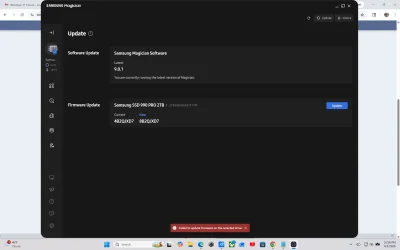
Samsung SSD 990 Pro 2TB won't update Firmware in Samsung Magician software


james_uk

Well-known member
Member
Local time
1:50 PM
Posts
86
OS
Windows 11
Hi, I have a Asus ProArt StudioBook 16 laptop.
I swapped the SSD myself to a Samsung 990 Pro and the Magician software for it is telling me there is a firmware update.
When I try to update it I get a message that says failed to update fw on selected drive.

Does anyone know how I can fix this?

Thanks
James
 

My Computer My Computer

At a glance

Windows 11Intel i9 13980HX32GBNVidia Geforce 4070
OS
Windows 11
Computer type
Laptop
Manufacturer/Model
Asus ProArt Studiobook 16 OLED (H7604JI)
CPU
Intel i9 13980HX
Motherboard
Unknown
Memory
32GB
Graphics Card(s)
NVidia Geforce 4070
Monitor(s) Displays
16" Oled
Hard Drives
1TB
Latest Samsung 990 Pro firmware

I'm convinced my drive is defective in some way and it should be replaced with one with the new firmware. It may also be the ISO they released.
 

My Computer My Computer

At a glance

windows 11 64i7-12700T32 GBNvidia GeForce 1650 / Intel 770
OS
windows 11 64
Computer type
PC/Desktop
Manufacturer/Model
HP
CPU
i7-12700T
Memory
32 GB
Graphics Card(s)
Nvidia GeForce 1650 / Intel 770
Screen Resolution
1920 / 1080
Hard Drives
Samsubg 990 Pro 1TB
Case
All in One
Keyboard
USB
Mouse
USB
Internet Speed
600 MBS
Browser
Chrome
Antivirus
MS
Samsung 990 Pro 2T and the Magician software for it is telling me there is a firmware update.
When I try to update it I get a message that says failed to update fw on selected drive.
Computer: Laptop Asus ROG STRIX SCAR 16 running Windows 11 pro 64 bit RUNNIN SAMSUNG MAGICIAN 9.0.1
1775444581958.webp
 

My Computer My Computer

At a glance

WINDOWS 11 PRO
OS
WINDOWS 11 PRO
Computer type
Laptop
Manufacturer/Model
ASUS ROG STRIX SCAR 16
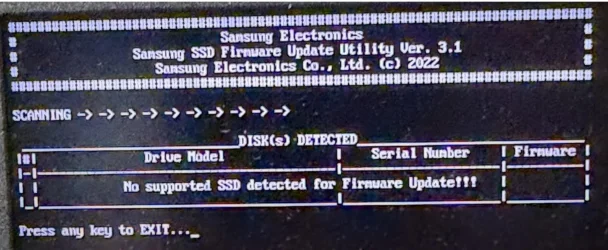
went into bios turned off security made boot usb with samsung bios iso using rufus

still no firmware update
 

Attachments

  • 1775445122129.webp
    1775445122129.webp
    154.3 KB · Views: 1

My Computer My Computer

At a glance

WINDOWS 11 PRO
OS
WINDOWS 11 PRO
Computer type
Laptop
Manufacturer/Model
ASUS ROG STRIX SCAR 16
nope read it all in your link , tried it all and no success in firmware update I'm stuck in 4B2QJXD7 MAGICIAN SAY 8B2QJXD7 UPDATE IS AVAILABLE BUT NOT SUCCESS IN LOADING SEE MY PREVIOUS POSTS ....
 

My Computer My Computer

At a glance

WINDOWS 11 PRO
OS
WINDOWS 11 PRO
Computer type
Laptop
Manufacturer/Model
ASUS ROG STRIX SCAR 16
Hi, it only worked for me when I turned both secure boot and VMD off, it then worked.
 

My Computer My Computer

At a glance

Windows 11Intel i9 13980HX32GBNVidia Geforce 4070
OS
Windows 11
Computer type
Laptop
Manufacturer/Model
Asus ProArt Studiobook 16 OLED (H7604JI)
CPU
Intel i9 13980HX
Motherboard
Unknown
Memory
32GB
Graphics Card(s)
NVidia Geforce 4070
Monitor(s) Displays
16" Oled
Hard Drives
1TB
Makes sense. Secure Boot might prevent any writes to certain sectors of the drive while VMD is a newer communication protocol not compatible with the "legacy" AHCI, so Firmware updater might fail to communicate with the drive.
 

My Computers My Computers

  • At a glance

    Windows 11 Pro 23H2 (5699), 25H2 (8737)Mobile DualCore Intel Core 2 Duo T7250, 2000 MHz4GBMobile Intel(R) GMA 4500M (Mobile 4 series)
    OS
    Windows 11 Pro 23H2 (5699), 25H2 (8737)
    Computer type
    Laptop
    Manufacturer/Model
    Acer Extensa 5630EZ
    CPU
    Mobile DualCore Intel Core 2 Duo T7250, 2000 MHz
    Motherboard
    Acer Extensa 5630
    Memory
    4GB
    Graphics Card(s)
    Mobile Intel(R) GMA 4500M (Mobile 4 series)
    Sound Card
    Realtek ALC268 @ Intel 82801IB ICH9 - High Definition Audio Controller
    Monitor(s) Displays
    1
    Screen Resolution
    1280x800
    Hard Drives
    Samsung SSD 850 EVO 250GB SATA Device (250 GB, SATA-III)
    Internet Speed
    VDSL 50 Mbps
    Browser
    MICROSOFT EDGE
    Antivirus
    WINDOWS DEFENDER
    Other Info
    Legacy MBR installation, no TPM, no Secure Boot, no WDDM 2.0 graphics drivers, no SSE4.2, cannot get more unsupported ;) This is only my test laptop. I had installed Windows 11 here before upgrading my main PC. For my main PC I use everyday see my 2nd system specs.
  • At a glance

    Windows 11 Pro v25H2 (build 26200.8737)Intel Core-i7 3770 3.40GHz s1155 (3rd generat...2x Kingston Hyper-X Blu 8GB DDR3-1600GIGABYTE GeForce RTX 3050 WINDFORCE OC V2 6GB...
    Operating System
    Windows 11 Pro v25H2 (build 26200.8737)
    Computer type
    PC/Desktop
    Manufacturer/Model
    Custom-built PC
    CPU
    Intel Core-i7 3770 3.40GHz s1155 (3rd generation)
    Motherboard
    Asus P8H61 s1155 ATX
    Memory
    2x Kingston Hyper-X Blu 8GB DDR3-1600
    Graphics card(s)
    GIGABYTE GeForce RTX 3050 WINDFORCE OC V2 6GB (GV-N3050WF2OCV2-6GD)
    Sound Card
    Realtek HD audio (ALC887)
    Monitor(s) Displays
    Sony Bravia KDL-19L4000 19" LCD TV via VGA
    Screen Resolution
    1440x900 32-bit 60Hz
    Hard Drives
    WD Blue SA510 2.5 1000GB SSD as system disk, Western Digital Caviar Purple 4TB SATA III (WD40PURZ) as second
    PSU
    Thermaltake Litepower RGB 550W Full Wired
    Case
    SUPERCASE MIDI-TOWER
    Cooling
    Deepcool Gamma Archer CPU cooler, 1x 8cm fan at the back
    Keyboard
    Mitsumi 101-key PS/2
    Mouse
    Sunnyline OptiEye PS/2
    Internet Speed
    100Mbps
    Browser
    Microsoft Edge, Mozilla Firefox
    Antivirus
    Microsoft Windows Defender
    Other Info
    Legacy BIOS (MBR) installation, no TPM, no Secure Boot, WDDM 3.0 graphics drivers, WEI score 7.4
I have a very common Intel RST controller and no combinaiton of anthing suggested by Samsung will work. I'm stuck at 5B2QJXD7 unless I want to wipe the drive and send it back to Samsung for them to flash it. No thanks. Essentiually what they are telling me is that I need to have a back up drive to use this PC so I can swap because they cant get their firmware software straight.
 

My Computer My Computer

At a glance

windows 11 64i7-12700T32 GBNvidia GeForce 1650 / Intel 770
OS
windows 11 64
Computer type
PC/Desktop
Manufacturer/Model
HP
CPU
i7-12700T
Memory
32 GB
Graphics Card(s)
Nvidia GeForce 1650 / Intel 770
Screen Resolution
1920 / 1080
Hard Drives
Samsubg 990 Pro 1TB
Case
All in One
Keyboard
USB
Mouse
USB
Internet Speed
600 MBS
Browser
Chrome
Antivirus
MS
If you cannot do it from inside Windows, I would change the storage setting to AHCI, disable Secure Boot and maybe TPM, and then boot with the Samsugn Magician USB to do it from there. As a last resort you can temporarily connect your drive to another computer or on a M.2 to USB adapter to do it via USB.

From Google AI:

To update a stuck Samsung SSD 990 Pro, primarily
use Samsung Magician software as an administrator. If it fails, disable Intel VMD/RAID mode in BIOS, switching to AHCI, or use a bootable USB with the Samsung ISO firmware and Rufus.
Key Troubleshooting Steps:
  • Update Samsung Magician: Ensure you are using the latest version of the Magician software.
  • Run as Administrator: Right-click Samsung Magician and select "Run as administrator".
  • Check Intel VMD/RAID Settings: If your system is set to Intel RST (RAID mode), Samsung Magician may fail to update. Change your BIOS settings to AHCI.
    • Note: Changing this may require safe mode to prevent blue screens.
  • Use Bootable USB/ISO Method: If software fails, download the ISO file from Samsung and use a tool like Rufus to create a bootable USB drive to update the firmware outside of Windows.
  • Ensure Proper Connections: Ensure the drive is seated correctly or try a different M.2 slot.
  • Disable Secure Boot: Temporarily disable Secure Boot in the BIOS to allow the USB to boot.
Common Reasons for Failure:
  • Intel VMD driver: The system is using Intel VMD, which causes detection issues.
  • Drive in use: Firmware updates cannot run if the drive is heavily active.
Always ensure your computer is powered on and connected throughout the process. Back up your data before updating.
 

My Computers My Computers

  • At a glance

    Windows 11 Pro 23H2 (5699), 25H2 (8737)Mobile DualCore Intel Core 2 Duo T7250, 2000 MHz4GBMobile Intel(R) GMA 4500M (Mobile 4 series)
    OS
    Windows 11 Pro 23H2 (5699), 25H2 (8737)
    Computer type
    Laptop
    Manufacturer/Model
    Acer Extensa 5630EZ
    CPU
    Mobile DualCore Intel Core 2 Duo T7250, 2000 MHz
    Motherboard
    Acer Extensa 5630
    Memory
    4GB
    Graphics Card(s)
    Mobile Intel(R) GMA 4500M (Mobile 4 series)
    Sound Card
    Realtek ALC268 @ Intel 82801IB ICH9 - High Definition Audio Controller
    Monitor(s) Displays
    1
    Screen Resolution
    1280x800
    Hard Drives
    Samsung SSD 850 EVO 250GB SATA Device (250 GB, SATA-III)
    Internet Speed
    VDSL 50 Mbps
    Browser
    MICROSOFT EDGE
    Antivirus
    WINDOWS DEFENDER
    Other Info
    Legacy MBR installation, no TPM, no Secure Boot, no WDDM 2.0 graphics drivers, no SSE4.2, cannot get more unsupported ;) This is only my test laptop. I had installed Windows 11 here before upgrading my main PC. For my main PC I use everyday see my 2nd system specs.
  • At a glance

    Windows 11 Pro v25H2 (build 26200.8737)Intel Core-i7 3770 3.40GHz s1155 (3rd generat...2x Kingston Hyper-X Blu 8GB DDR3-1600GIGABYTE GeForce RTX 3050 WINDFORCE OC V2 6GB...
    Operating System
    Windows 11 Pro v25H2 (build 26200.8737)
    Computer type
    PC/Desktop
    Manufacturer/Model
    Custom-built PC
    CPU
    Intel Core-i7 3770 3.40GHz s1155 (3rd generation)
    Motherboard
    Asus P8H61 s1155 ATX
    Memory
    2x Kingston Hyper-X Blu 8GB DDR3-1600
    Graphics card(s)
    GIGABYTE GeForce RTX 3050 WINDFORCE OC V2 6GB (GV-N3050WF2OCV2-6GD)
    Sound Card
    Realtek HD audio (ALC887)
    Monitor(s) Displays
    Sony Bravia KDL-19L4000 19" LCD TV via VGA
    Screen Resolution
    1440x900 32-bit 60Hz
    Hard Drives
    WD Blue SA510 2.5 1000GB SSD as system disk, Western Digital Caviar Purple 4TB SATA III (WD40PURZ) as second
    PSU
    Thermaltake Litepower RGB 550W Full Wired
    Case
    SUPERCASE MIDI-TOWER
    Cooling
    Deepcool Gamma Archer CPU cooler, 1x 8cm fan at the back
    Keyboard
    Mitsumi 101-key PS/2
    Mouse
    Sunnyline OptiEye PS/2
    Internet Speed
    100Mbps
    Browser
    Microsoft Edge, Mozilla Firefox
    Antivirus
    Microsoft Windows Defender
    Other Info
    Legacy BIOS (MBR) installation, no TPM, no Secure Boot, WDDM 3.0 graphics drivers, WEI score 7.4
If you cannot do it from inside Windows, I would change the storage setting to AHCI, disable Secure Boot and maybe TPM, and then boot with the Samsugn Magician USB to do it from there. As a last resort you can temporarily connect your drive to another computer or on a M.2 to USB adapter to do it via USB.

From Google AI:

To update a stuck Samsung SSD 990 Pro, primarily
use Samsung Magician software as an administrator. If it fails, disable Intel VMD/RAID mode in BIOS, switching to AHCI, or use a bootable USB with the Samsung ISO firmware and Rufus.
Key Troubleshooting Steps:
  • Update Samsung Magician: Ensure you are using the latest version of the Magician software.
  • Run as Administrator: Right-click Samsung Magician and select "Run as administrator".
  • Check Intel VMD/RAID Settings: If your system is set to Intel RST (RAID mode), Samsung Magician may fail to update. Change your BIOS settings to AHCI.
    • Note: Changing this may require safe mode to prevent blue screens.
  • Use Bootable USB/ISO Method: If software fails, download the ISO file from Samsung and use a tool like Rufus to create a bootable USB drive to update the firmware outside of Windows.
  • Ensure Proper Connections: Ensure the drive is seated correctly or try a different M.2 slot.
  • Disable Secure Boot: Temporarily disable Secure Boot in the BIOS to allow the USB to boot.
Common Reasons for Failure:
  • Intel VMD driver: The system is using Intel VMD, which causes detection issues.
  • Drive in use: Firmware updates cannot run if the drive is heavily active.
Always ensure your computer is powered on and connected throughout the process. Back up your data before updating.


Thank you for this research. I have a year old HP Pavillion AIO and from what I can tell they almost exclusively use the Intel controller. My updated bios does not allow me to make any changes to AHCI so I am stuck. This is a $250 USB drive and for that kind of price it only seems appropriate to expect the manufacturer to do better. Right now I am 3 firmware versions behind and counting.

By contrast WD doesnt have this issue an din fact does not even offer any ISO files. They do all their firmware updates within their software. I'm going to switch and put this very lightly used drive of mine on eBay.
 

My Computer My Computer

At a glance

windows 11 64i7-12700T32 GBNvidia GeForce 1650 / Intel 770
OS
windows 11 64
Computer type
PC/Desktop
Manufacturer/Model
HP
CPU
i7-12700T
Memory
32 GB
Graphics Card(s)
Nvidia GeForce 1650 / Intel 770
Screen Resolution
1920 / 1080
Hard Drives
Samsubg 990 Pro 1TB
Case
All in One
Keyboard
USB
Mouse
USB
Internet Speed
600 MBS
Browser
Chrome
Antivirus
MS
I did the recent update, but I removed it with Revo, and went back to an earlier version, because It at times would throw up and error flag.
 

My Computer My Computer

At a glance

Windows XP (Stable, iconic) 7/8.1/10/ Tiny11 ...Intel i7 4790K32GB DDR3 1600 MHzATI Radeon HD 7770 2GB GDDR5
OS
Windows XP (Stable, iconic) 7/8.1/10/ Tiny11 25H2
Computer type
PC/Desktop
Manufacturer/Model
Alienware PC
CPU
Intel i7 4790K
Motherboard
ASROCK Z97 EXTREME4
Memory
32GB DDR3 1600 MHz
Graphics Card(s)
ATI Radeon HD 7770 2GB GDDR5
Sound Card
Onboard
Monitor(s) Displays
SAMSUNG UE57 Series 28-Inch 4K UHD
Hard Drives
SAMSUNG 860 EVO 250 gigabyte SSD
PSU
EVGA 850 watt
Case
Alienware Area 51 Black Tower Case
Keyboard
HyperX - Alloy Elite 2 Mechanical Gaming Keyboard.
Mouse
Microsoft Wireless
Internet Speed
1.2 GHz
Browser
Chrome..Edge..Firefox
I was talking about an M.2 to USB adapter to put your disk inside and upgrade the firmware using the adapter controller since the motherboard controller fails. Not buying a disk to clone your data.


My Computers My Computers

  • At a glance

    Windows 11 Pro 23H2 (5699), 25H2 (8737)Mobile DualCore Intel Core 2 Duo T7250, 2000 MHz4GBMobile Intel(R) GMA 4500M (Mobile 4 series)
    OS
    Windows 11 Pro 23H2 (5699), 25H2 (8737)
    Computer type
    Laptop
    Manufacturer/Model
    Acer Extensa 5630EZ
    CPU
    Mobile DualCore Intel Core 2 Duo T7250, 2000 MHz
    Motherboard
    Acer Extensa 5630
    Memory
    4GB
    Graphics Card(s)
    Mobile Intel(R) GMA 4500M (Mobile 4 series)
    Sound Card
    Realtek ALC268 @ Intel 82801IB ICH9 - High Definition Audio Controller
    Monitor(s) Displays
    1
    Screen Resolution
    1280x800
    Hard Drives
    Samsung SSD 850 EVO 250GB SATA Device (250 GB, SATA-III)
    Internet Speed
    VDSL 50 Mbps
    Browser
    MICROSOFT EDGE
    Antivirus
    WINDOWS DEFENDER
    Other Info
    Legacy MBR installation, no TPM, no Secure Boot, no WDDM 2.0 graphics drivers, no SSE4.2, cannot get more unsupported ;) This is only my test laptop. I had installed Windows 11 here before upgrading my main PC. For my main PC I use everyday see my 2nd system specs.
  • At a glance

    Windows 11 Pro v25H2 (build 26200.8737)Intel Core-i7 3770 3.40GHz s1155 (3rd generat...2x Kingston Hyper-X Blu 8GB DDR3-1600GIGABYTE GeForce RTX 3050 WINDFORCE OC V2 6GB...
    Operating System
    Windows 11 Pro v25H2 (build 26200.8737)
    Computer type
    PC/Desktop
    Manufacturer/Model
    Custom-built PC
    CPU
    Intel Core-i7 3770 3.40GHz s1155 (3rd generation)
    Motherboard
    Asus P8H61 s1155 ATX
    Memory
    2x Kingston Hyper-X Blu 8GB DDR3-1600
    Graphics card(s)
    GIGABYTE GeForce RTX 3050 WINDFORCE OC V2 6GB (GV-N3050WF2OCV2-6GD)
    Sound Card
    Realtek HD audio (ALC887)
    Monitor(s) Displays
    Sony Bravia KDL-19L4000 19" LCD TV via VGA
    Screen Resolution
    1440x900 32-bit 60Hz
    Hard Drives
    WD Blue SA510 2.5 1000GB SSD as system disk, Western Digital Caviar Purple 4TB SATA III (WD40PURZ) as second
    PSU
    Thermaltake Litepower RGB 550W Full Wired
    Case
    SUPERCASE MIDI-TOWER
    Cooling
    Deepcool Gamma Archer CPU cooler, 1x 8cm fan at the back
    Keyboard
    Mitsumi 101-key PS/2
    Mouse
    Sunnyline OptiEye PS/2
    Internet Speed
    100Mbps
    Browser
    Microsoft Edge, Mozilla Firefox
    Antivirus
    Microsoft Windows Defender
    Other Info
    Legacy BIOS (MBR) installation, no TPM, no Secure Boot, WDDM 3.0 graphics drivers, WEI score 7.4
I was talking about an M.2 to USB adapter to put your disk inside and upgrade the firmware using the adapter controller since the motherboard controller fails. Not buying a disk to clone your data.


Hadnt thought of doing it that way. I have one of those that I use to make system images. Getting into an HP AIO is a real pain and then I'd need to find a machine that doesnt use the Intel controller. Then reassemble. Unfortunately if the Samsung drive comes out its not going back in. Its a great stable drive but its requiring too much effort just to keep the firmware up to date.
 

My Computer My Computer

At a glance

windows 11 64i7-12700T32 GBNvidia GeForce 1650 / Intel 770
OS
windows 11 64
Computer type
PC/Desktop
Manufacturer/Model
HP
CPU
i7-12700T
Memory
32 GB
Graphics Card(s)
Nvidia GeForce 1650 / Intel 770
Screen Resolution
1920 / 1080
Hard Drives
Samsubg 990 Pro 1TB
Case
All in One
Keyboard
USB
Mouse
USB
Internet Speed
600 MBS
Browser
Chrome
Antivirus
MS
Just try to disable Secure Boot, TPM and switch to single drive (AHCI) instead of VDM (RAID). Then boot with Samsung Magician USB to upgrade the firmware. This is easier than disassemble an AiO. Since Windows 11 might have issues switching from VDM to AHCI, use the USB to upgrade the firmware and then restore these settings before booting back to Windows 11.
 

My Computers My Computers

  • At a glance

    Windows 11 Pro 23H2 (5699), 25H2 (8737)Mobile DualCore Intel Core 2 Duo T7250, 2000 MHz4GBMobile Intel(R) GMA 4500M (Mobile 4 series)
    OS
    Windows 11 Pro 23H2 (5699), 25H2 (8737)
    Computer type
    Laptop
    Manufacturer/Model
    Acer Extensa 5630EZ
    CPU
    Mobile DualCore Intel Core 2 Duo T7250, 2000 MHz
    Motherboard
    Acer Extensa 5630
    Memory
    4GB
    Graphics Card(s)
    Mobile Intel(R) GMA 4500M (Mobile 4 series)
    Sound Card
    Realtek ALC268 @ Intel 82801IB ICH9 - High Definition Audio Controller
    Monitor(s) Displays
    1
    Screen Resolution
    1280x800
    Hard Drives
    Samsung SSD 850 EVO 250GB SATA Device (250 GB, SATA-III)
    Internet Speed
    VDSL 50 Mbps
    Browser
    MICROSOFT EDGE
    Antivirus
    WINDOWS DEFENDER
    Other Info
    Legacy MBR installation, no TPM, no Secure Boot, no WDDM 2.0 graphics drivers, no SSE4.2, cannot get more unsupported ;) This is only my test laptop. I had installed Windows 11 here before upgrading my main PC. For my main PC I use everyday see my 2nd system specs.
  • At a glance

    Windows 11 Pro v25H2 (build 26200.8737)Intel Core-i7 3770 3.40GHz s1155 (3rd generat...2x Kingston Hyper-X Blu 8GB DDR3-1600GIGABYTE GeForce RTX 3050 WINDFORCE OC V2 6GB...
    Operating System
    Windows 11 Pro v25H2 (build 26200.8737)
    Computer type
    PC/Desktop
    Manufacturer/Model
    Custom-built PC
    CPU
    Intel Core-i7 3770 3.40GHz s1155 (3rd generation)
    Motherboard
    Asus P8H61 s1155 ATX
    Memory
    2x Kingston Hyper-X Blu 8GB DDR3-1600
    Graphics card(s)
    GIGABYTE GeForce RTX 3050 WINDFORCE OC V2 6GB (GV-N3050WF2OCV2-6GD)
    Sound Card
    Realtek HD audio (ALC887)
    Monitor(s) Displays
    Sony Bravia KDL-19L4000 19" LCD TV via VGA
    Screen Resolution
    1440x900 32-bit 60Hz
    Hard Drives
    WD Blue SA510 2.5 1000GB SSD as system disk, Western Digital Caviar Purple 4TB SATA III (WD40PURZ) as second
    PSU
    Thermaltake Litepower RGB 550W Full Wired
    Case
    SUPERCASE MIDI-TOWER
    Cooling
    Deepcool Gamma Archer CPU cooler, 1x 8cm fan at the back
    Keyboard
    Mitsumi 101-key PS/2
    Mouse
    Sunnyline OptiEye PS/2
    Internet Speed
    100Mbps
    Browser
    Microsoft Edge, Mozilla Firefox
    Antivirus
    Microsoft Windows Defender
    Other Info
    Legacy BIOS (MBR) installation, no TPM, no Secure Boot, WDDM 3.0 graphics drivers, WEI score 7.4
Just try to disable Secure Boot, TPM and switch to single drive (AHCI) instead of VDM (RAID). Then boot with Samsung Magician USB to upgrade the firmware. This is easier than disassemble an AiO.
I disabled Secure Boot and TPM. I cant make any alterations to AHCI. The bios only shows the Intel RST and doesnt allow any changes. I appreciate your help. I am not alone in this predicament. Its too bad - its a great drive.
 

My Computer My Computer

At a glance

windows 11 64i7-12700T32 GBNvidia GeForce 1650 / Intel 770
OS
windows 11 64
Computer type
PC/Desktop
Manufacturer/Model
HP
CPU
i7-12700T
Memory
32 GB
Graphics Card(s)
Nvidia GeForce 1650 / Intel 770
Screen Resolution
1920 / 1080
Hard Drives
Samsubg 990 Pro 1TB
Case
All in One
Keyboard
USB
Mouse
USB
Internet Speed
600 MBS
Browser
Chrome
Antivirus
MS
Just try to disable Secure Boot, TPM and switch to single drive (AHCI) instead of VDM (RAID). Then boot with Samsung Magician USB to upgrade the firmware. This is easier than disassemble an AiO. Since Windows 11 might have issues switching from VDM to AHCI, use the USB to upgrade the firmware and then restore these settings before booting back to Windows 11.
For some reason there are no storage drivers on the USB so it does not see any drives. I've tried it that way a few times, always the same. Also no luck with Magician. I gave up awhile back and accepted that it's fine for me. I have no problems with my 3 M2 nvme's, two 990's and one 980.
 

My Computers My Computers

  • At a glance

    Windows 11 Pro 25H2 (26200.8737)Intel® Core™ i9-13900KS 3.20GHz128GB DDR5-5200 Kingston Fury Beast RGBZotac Trinity NVIDIA® GeForce® RTX 4090 24GB ...
    OS
    Windows 11 Pro 25H2 (26200.8737)
    Computer type
    PC/Desktop
    Manufacturer/Model
    CLX Intel Battlebox Ultimate (RA)
    CPU
    Intel® Core™ i9-13900KS 3.20GHz
    Motherboard
    ASUS ROG Maximus Z790 Hero WIFI - ATX
    Memory
    128GB DDR5-5200 Kingston Fury Beast RGB
    Graphics Card(s)
    Zotac Trinity NVIDIA® GeForce® RTX 4090 24GB GDDR6X
    Sound Card
    Realtek USB Audio
    Monitor(s) Displays
    Dell G3223Q 32" 4K Ultra HD
    Screen Resolution
    3840x2160 @144hz
    Hard Drives
    2TB x 2 Samsung 990 Pro 2280 NVMe M.2 SSD's
    2TB x 1 Samsung 980 Pro 2280 NVMe M.2 SSD
    4 TB x 1 My Passport Ultra External USB
    PSU
    1200W Corsair HX Ser HX1200 80+ Platinum
    Case
    Lian Li / Der Bauer 011DXL ROG
    Cooling
    Phanteks Glacier One 360 RGB AIO LC
    Keyboard
    Logitech K330 Wireless
    Mouse
    Logitech M310 Wireless
    Internet Speed
    1GB Fiber : 945/57
    Browser
    Brave
    Antivirus
    Defender - HitmanPro.Alert
    Other Info
    Macrium Reflect X
  • At a glance

    iPad Air
    Operating System
    iPad Air
    Computer type
    Tablet
    Manufacturer/Model
    Apple
Hi, it only worked for me when I turned both secure boot and VMD off, it then worked.
My machine won't boot when I turn off VMD.
 

My Computers My Computers

  • At a glance

    Windows 11 Pro 25H2 (26200.8737)Intel® Core™ i9-13900KS 3.20GHz128GB DDR5-5200 Kingston Fury Beast RGBZotac Trinity NVIDIA® GeForce® RTX 4090 24GB ...
    OS
    Windows 11 Pro 25H2 (26200.8737)
    Computer type
    PC/Desktop
    Manufacturer/Model
    CLX Intel Battlebox Ultimate (RA)
    CPU
    Intel® Core™ i9-13900KS 3.20GHz
    Motherboard
    ASUS ROG Maximus Z790 Hero WIFI - ATX
    Memory
    128GB DDR5-5200 Kingston Fury Beast RGB
    Graphics Card(s)
    Zotac Trinity NVIDIA® GeForce® RTX 4090 24GB GDDR6X
    Sound Card
    Realtek USB Audio
    Monitor(s) Displays
    Dell G3223Q 32" 4K Ultra HD
    Screen Resolution
    3840x2160 @144hz
    Hard Drives
    2TB x 2 Samsung 990 Pro 2280 NVMe M.2 SSD's
    2TB x 1 Samsung 980 Pro 2280 NVMe M.2 SSD
    4 TB x 1 My Passport Ultra External USB
    PSU
    1200W Corsair HX Ser HX1200 80+ Platinum
    Case
    Lian Li / Der Bauer 011DXL ROG
    Cooling
    Phanteks Glacier One 360 RGB AIO LC
    Keyboard
    Logitech K330 Wireless
    Mouse
    Logitech M310 Wireless
    Internet Speed
    1GB Fiber : 945/57
    Browser
    Brave
    Antivirus
    Defender - HitmanPro.Alert
    Other Info
    Macrium Reflect X
  • At a glance

    iPad Air
    Operating System
    iPad Air
    Computer type
    Tablet
    Manufacturer/Model
    Apple
Last edited:

My Computer My Computer

At a glance

Windows 11Intel i9 13980HX32GBNVidia Geforce 4070
OS
Windows 11
Computer type
Laptop
Manufacturer/Model
Asus ProArt Studiobook 16 OLED (H7604JI)
CPU
Intel i9 13980HX
Motherboard
Unknown
Memory
32GB
Graphics Card(s)
NVidia Geforce 4070
Monitor(s) Displays
16" Oled
Hard Drives
1TB
This happened to me earlier with my Samsung 990 Pro 1TB I had to install a older version of Samsung Magician Software which the firmware upgraded fine I think it was version 8.3.0.810 maybe give it a go. Once done you can upgrade back to the latest Samsung Magician Software


My Computer My Computer

At a glance

Windows 11 ProIntel Core i9 12900KFCorsair 64GB DDR5 Vengeance C40 5200MhzASUS GeForce RTX 3090 ROG Strix OC 24GB
OS
Windows 11 Pro
Computer type
PC/Desktop
Manufacturer/Model
Custom Build
CPU
Intel Core i9 12900KF
Motherboard
ASUS ROG Maximus Z690 Hero
Memory
Corsair 64GB DDR5 Vengeance C40 5200Mhz
Graphics Card(s)
ASUS GeForce RTX 3090 ROG Strix OC 24GB
Sound Card
OnBoard
Monitor(s) Displays
Acer Predator XB323UGP 32" QHD G-SYNC-C 144Hz 1MS IPS LED
Screen Resolution
2560 x 1440
Hard Drives
1x Samsung 980 Pro Series Gen4 250GB M.2 NVMe
1x Samsung 980 Pro Series Gen4 500GB M.2 NVMe
2x Samsung 980 Pro Series Gen4 2TB M.2 NVMe
PSU
Corsair AX1200i 1200W 80PLUS Titanium Modular
Case
Corsair 4000D Black Case w/ Tempered Glass Side Panel
Cooling
Noctua NH-U12A Chromax Black CPU Cooler, 4x Noctua 120mm Fans
Keyboard
Logitech MK545
Mouse
Logitech MX Master 3
Internet Speed
Fixed Wireless 150mbps/75mbps
Browser
Firefox
Antivirus
Kaspersky
Other Info
Thrustmaster TS-PC RACER
Fanatec CSL Elite Pedals with the Load Cell Kit
Yamaha Amp with Bose Speakers
Back
Top Bottom