Seeking Help with Frequent Crashing and Freezing Issues on Gaming PC


Diffused5638

Member
Local time
4:17 AM
Posts
12
OS
Windows 11
I've had an issue with my gaming PC for the past couple of years and it has finally gotten to the point where it's annoying enough to try and seek help. I haven't been able to solve this on my own, but I, admittedly, am not very good with these kinds of issues.

This PC has a history of crashing and freezing. Both BSOD and just straight up locking up. However, this only seems to only occur when I'm playing video games. The BSODs have decreased in frequency since I wiped/re-installed Windows, but they still occasionally occur. The freezes though, they're killing me. There is no way to recover except to hold down the power button and restart. I've done some very basic troubleshooting: checking memory, looking in Event Viewer, updating drivers, etc. But I've gotten no closer to resolving this problem.

The only errors I see in Event Viewer are event IDs 41 and 6008 relating to rebooting/shutting down unexpectedly.

Any help would be greatly appreciated!
 
Windows Build/Version
Windows 11

My Computer My Computer

At a glance

Windows 11Intel i7-1170032 (4x8) GB Gold Key Technology Co Ltd NMUD48...GIGABYTE GeForce RTX 3080 Ti VISION OC 12G
OS
Windows 11
Computer type
PC/Desktop
CPU
Intel i7-11700
Motherboard
ASUS PRIME Z590-P
Memory
32 (4x8) GB Gold Key Technology Co Ltd NMUD480E85-3200E
Graphics Card(s)
GIGABYTE GeForce RTX 3080 Ti VISION OC 12G
Monitor(s) Displays
Samsung Odyssey G9
Screen Resolution
5120x1440
Hard Drives
Samsung 980 PRO 1 TB
Kingston OM8PCP31024F-A01 1 TB
Toshiba DT01ACA100 1 TB
PSU
Corsair CX750F

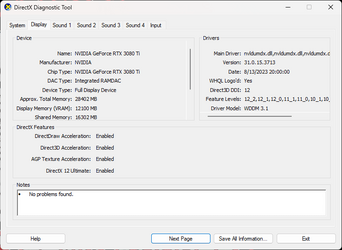
Start by checking your Graphics Card. Run dxdiag from the Search box, and select the Display tab when it is ready. Are there any errors reported?

Also, does the problem persist on multiple games? On only new or older games?
 

My Computers My Computers

  • At a glance

    Windows 11AMD Ryzen 5 560016 GBSapphire Radeon RX 6500XT (8 GB version)
    OS
    Windows 11
    Computer type
    PC/Desktop
    CPU
    AMD Ryzen 5 5600
    Motherboard
    MSI B550-A Pro
    Memory
    16 GB
    Graphics Card(s)
    Sapphire Radeon RX 6500XT (8 GB version)
    Monitor(s) Displays
    BenQ Mobuiz EX2710Q QHD, Iiyama ProLite X23377HDS
    Hard Drives
    MSI Spatium M461 4TB
  • At a glance

    Windows 11Intel Celeron N4020
    Operating System
    Windows 11
    Computer type
    Laptop
    Manufacturer/Model
    Acer A114
    CPU
    Intel Celeron N4020
There are no errors in dxdiag:
1693836097317.png

The problem occurs in almost every game I play. They all have been released in the past several years. I haven't kept track of which games I play that have crashed - I should start doing that - but it's been everything from Frostpunk to Starfield.
 

My Computer My Computer

At a glance

Windows 11Intel i7-1170032 (4x8) GB Gold Key Technology Co Ltd NMUD48...GIGABYTE GeForce RTX 3080 Ti VISION OC 12G
OS
Windows 11
Computer type
PC/Desktop
CPU
Intel i7-11700
Motherboard
ASUS PRIME Z590-P
Memory
32 (4x8) GB Gold Key Technology Co Ltd NMUD480E85-3200E
Graphics Card(s)
GIGABYTE GeForce RTX 3080 Ti VISION OC 12G
Monitor(s) Displays
Samsung Odyssey G9
Screen Resolution
5120x1440
Hard Drives
Samsung 980 PRO 1 TB
Kingston OM8PCP31024F-A01 1 TB
Toshiba DT01ACA100 1 TB
PSU
Corsair CX750F

Have you looked at the power supply? How old is it?

I had an issue where my PC would constantly crash while gaming. I tried everything and at one time was convinced it that the GPU. I even dissembled the GPU to re-pad and re-paste. Still the issues persisted. I finally decided to look at voltages and noticed they were a little low. Replacing the power supply solved my issue, and all has been good since.

Testing a power supply takes skill and know-how, and I wouldn't recommend it for a novice. That said, you could check that all connections to the board and hardware is secure and tight. If all is good, if you have a spare power supply as I did, you could try swapping it.

Point though is do not discount the power supply.
 

My Computers My Computers

  • At a glance

    Windows 11 Pro 24H2 (Build 26100.4770)Intel Core 9 Ultra 285K64G (4x16) DDR5 Corsair RGB Dominator Platinu...Radeon (XFX Mercury) RX 9070XT OC (with Magne...
    OS
    Windows 11 Pro 24H2 (Build 26100.4770)
    Computer type
    PC/Desktop
    Manufacturer/Model
    Custom built
    CPU
    Intel Core 9 Ultra 285K
    Motherboard
    Gigabyte Aorus Z890 Xtreme AI Top
    Memory
    64G (4x16) DDR5 Corsair RGB Dominator Platinum (6400Mhz)
    Graphics Card(s)
    Radeon (XFX Mercury) RX 9070XT OC (with Magnetic Fans)
    Sound Card
    Onboard (DTS:X® Ultra Audio: ESS ES9280A DAC)
    Monitor(s) Displays
    27-inch Eizo Color Edge - CG2700X
    Screen Resolution
    3840 x 2160
    Hard Drives
    4 Samsung NVM 990 Pro drives: 1TB (OS), 2TB, 2 X 4TB.
    PSU
    Seasonic TX-1300 (1300 Watts)
    Case
    Cooler Master H500M
    Cooling
    Corsair Link Titan 280 RX RGB
    Keyboard
    Logitech Craft
    Mouse
    Logitech MX Master 3S
    Internet Speed
    1TB Download. 512mb Upload
    Browser
    Microsoft Edge Chromium
    Antivirus
    Windows Security
    Other Info
    System used for gaming, photography, music, school.
  • At a glance

    Windows 11 Pro 24H2 (Build 26100.4061)Intel Core i9-9900K32gig (4 x 8) Corsair Dominator Platinum DDR4...Radeon XFX Merc 7900XT (20gig)
    Operating System
    Windows 11 Pro 24H2 (Build 26100.4061)
    Computer type
    PC/Desktop
    Manufacturer/Model
    Custom built
    CPU
    Intel Core i9-9900K
    Motherboard
    Gigabyte Z390 Aorus Xtreme
    Memory
    32gig (4 x 8) Corsair Dominator Platinum DDR4 3600Mhz (B-Die)
    Graphics card(s)
    Radeon XFX Merc 7900XT (20gig)
    Sound Card
    Onboard
    Monitor(s) Displays
    24-Inch NEC PA242W
    Screen Resolution
    2880 x 1800
    Hard Drives
    2 X NVME, 1 X SATA SSD
    PSU
    EVGA Super Nova 1000 P2 (1000 Watt)
    Case
    Phantek Enthoo Luxe
    Cooling
    Corsair H115i Elite AIO Cooler
    Keyboard
    Logitech Keys
    Mouse
    Logitech MX Master 3
    Internet Speed
    1TB Download. 512mb Upload
    Browser
    Microsoft Edge Chromium
    Antivirus
    Windows Security
    Other Info
    Backup System
I have not looked at the power supply itself. I have checked all connections and they are good. I bought the power supply a little less than 2 years ago. It's a Corsair CX750F. Unfortunately, I don't have another one to swap it out with to check, but if that is the next step, I can go buy one and give it a try.

Coincidentally, I just got a BSOD this morning after not getting one for about a week. I opened up the minidump with WinDbg and this is what is showed:

*******************************************************************************
* *
* Bugcheck Analysis *
* *
*******************************************************************************

SYSTEM_SERVICE_EXCEPTION (3b)
An exception happened while executing a system service routine.
Arguments:
Arg1: 00000000c0000005, Exception code that caused the BugCheck
Arg2: fffff80016c47e27, Address of the instruction which caused the BugCheck
Arg3: ffffcc0432ae64b0, Address of the context record for the exception that caused the BugCheck
Arg4: 0000000000000000, zero.

Debugging Details:
------------------


KEY_VALUES_STRING: 1

Key : Analysis.CPU.mSec
Value: 2187

Key : Analysis.Elapsed.mSec
Value: 3010

Key : Analysis.IO.Other.Mb
Value: 0

Key : Analysis.IO.Read.Mb
Value: 0

Key : Analysis.IO.Write.Mb
Value: 0

Key : Analysis.Init.CPU.mSec
Value: 171

Key : Analysis.Init.Elapsed.mSec
Value: 16958

Key : Analysis.Memory.CommitPeak.Mb
Value: 103

Key : Bugcheck.Code.LegacyAPI
Value: 0x3b

Key : Dump.Attributes.AsUlong
Value: 1808

Key : Dump.Attributes.DiagDataWrittenToHeader
Value: 1

Key : Dump.Attributes.ErrorCode
Value: 0

Key : Dump.Attributes.KernelGeneratedTriageDump
Value: 1

Key : Dump.Attributes.LastLine
Value: Dump completed successfully.

Key : Dump.Attributes.ProgressPercentage
Value: 0

Key : Failure.Bucket
Value: AV_FLTMGR!FltpPassThrough

Key : Failure.Hash
Value: {3e861cc0-bdd4-b16d-2520-96048e630c24}

Key : Hypervisor.Enlightenments.ValueHex
Value: 1417df84

Key : Hypervisor.Flags.AnyHypervisorPresent
Value: 1

Key : Hypervisor.Flags.ApicEnlightened
Value: 0

Key : Hypervisor.Flags.ApicVirtualizationAvailable
Value: 1

Key : Hypervisor.Flags.AsyncMemoryHint
Value: 0

Key : Hypervisor.Flags.CoreSchedulerRequested
Value: 0

Key : Hypervisor.Flags.CpuManager
Value: 1

Key : Hypervisor.Flags.DeprecateAutoEoi
Value: 1

Key : Hypervisor.Flags.DynamicCpuDisabled
Value: 1

Key : Hypervisor.Flags.Epf
Value: 0

Key : Hypervisor.Flags.ExtendedProcessorMasks
Value: 1

Key : Hypervisor.Flags.HardwareMbecAvailable
Value: 1

Key : Hypervisor.Flags.MaxBankNumber
Value: 0

Key : Hypervisor.Flags.MemoryZeroingControl
Value: 0

Key : Hypervisor.Flags.NoExtendedRangeFlush
Value: 0

Key : Hypervisor.Flags.NoNonArchCoreSharing
Value: 1

Key : Hypervisor.Flags.Phase0InitDone
Value: 1

Key : Hypervisor.Flags.PowerSchedulerQos
Value: 0

Key : Hypervisor.Flags.RootScheduler
Value: 0

Key : Hypervisor.Flags.SynicAvailable
Value: 1

Key : Hypervisor.Flags.UseQpcBias
Value: 0

Key : Hypervisor.Flags.Value
Value: 21631230

Key : Hypervisor.Flags.ValueHex
Value: 14a10fe

Key : Hypervisor.Flags.VpAssistPage
Value: 1

Key : Hypervisor.Flags.VsmAvailable
Value: 1

Key : Hypervisor.RootFlags.AccessStats
Value: 1

Key : Hypervisor.RootFlags.CrashdumpEnlightened
Value: 1

Key : Hypervisor.RootFlags.CreateVirtualProcessor
Value: 1

Key : Hypervisor.RootFlags.DisableHyperthreading
Value: 0

Key : Hypervisor.RootFlags.HostTimelineSync
Value: 1

Key : Hypervisor.RootFlags.HypervisorDebuggingEnabled
Value: 0

Key : Hypervisor.RootFlags.IsHyperV
Value: 1

Key : Hypervisor.RootFlags.LivedumpEnlightened
Value: 1

Key : Hypervisor.RootFlags.MapDeviceInterrupt
Value: 1

Key : Hypervisor.RootFlags.MceEnlightened
Value: 1

Key : Hypervisor.RootFlags.Nested
Value: 0

Key : Hypervisor.RootFlags.StartLogicalProcessor
Value: 1

Key : Hypervisor.RootFlags.Value
Value: 1015

Key : Hypervisor.RootFlags.ValueHex
Value: 3f7


BUGCHECK_CODE: 3b

BUGCHECK_P1: c0000005

BUGCHECK_P2: fffff80016c47e27

BUGCHECK_P3: ffffcc0432ae64b0

BUGCHECK_P4: 0

FILE_IN_CAB: 090423-9000-01.dmp

TAG_NOT_DEFINED_202b: *** Unknown TAG in analysis list 202b


DUMP_FILE_ATTRIBUTES: 0x1808
Kernel Generated Triage Dump

CONTEXT: ffffcc0432ae64b0 -- (.cxr 0xffffcc0432ae64b0)
rax=fffff80016c5e4a0 rbx=00000000906fae32 rcx=0000000000000023
rdx=000000000000000d rsi=0000000000060870 rdi=ffffa60cccc95a60
rip=fffff80016c47e27 rsp=ffffcc0432ae6ed0 rbp=ffffa60cca020c80
r8=0000000000000000 r9=0000000000000000 r10=fffff8001a923910
r11=ffffa60cb9925010 r12=ffffa60cccc95b78 r13=0000000000000001
r14=0000000000000001 r15=0000000000000000
iopl=0 nv up ei ng nz na po cy
cs=0010 ss=0018 ds=002b es=002b fs=0053 gs=002b efl=00050287
FLTMGR!FltpPassThrough+0x1f7:
fffff800`16c47e27 d303 rol dword ptr [rbx],cl ds:002b:00000000`906fae32=????????
Resetting default scope

BLACKBOXBSD: 1 (!blackboxbsd)


BLACKBOXNTFS: 1 (!blackboxntfs)


BLACKBOXPNP: 1 (!blackboxpnp)


BLACKBOXWINLOGON: 1

CUSTOMER_CRASH_COUNT: 1

PROCESS_NAME: Starfield.exe

DEVICE_OBJECT: ffffa60cccc95a60

STACK_TEXT:
ffffcc04`32ae6ed0 fffff800`16c7d813 : ffffcc04`32ae6f68 00000000`00000000 00000000`00000000 00000000`00000001 : FLTMGR!FltpPassThrough+0x1f7
ffffcc04`32ae6f70 fffff800`1a8e8d35 : 00000000`00000002 ffffa60c`ccc95a60 ffffcc04`32ae7071 00000000`00000000 : FLTMGR!FltpFsControl+0xd3
ffffcc04`32ae6fd0 fffff800`1ad272d0 : ffffa60c`ccc95a60 ffffcc04`32ae7071 ffffa60c`ca020c80 ffffa60c`ca020c80 : nt!IofCallDriver+0x55
ffffcc04`32ae7010 fffff800`1ad25317 : ffffa60c`ccc95a60 00000000`00000000 ffffcc04`32ae7405 ffffa60c`ca020c80 : nt!IopSynchronousServiceTail+0x1d0
ffffcc04`32ae70c0 fffff800`1adac176 : 00000000`00000000 ffffcc04`32ae7420 00000000`00000000 00000000`00000000 : nt!IopXxxControlFile+0x707
ffffcc04`32ae72c0 fffff800`1aa40de5 : ffffa60c`c61a4080 0000002e`5dd0f528 ffffcc04`32ae7348 0000002e`5dd0f638 : nt!NtFsControlFile+0x56
ffffcc04`32ae7330 00007ffb`8354f374 : 00000000`00000000 00000000`00000000 00000000`00000000 00000000`00000000 : nt!KiSystemServiceCopyEnd+0x25
0000002e`5dd0f508 00000000`00000000 : 00000000`00000000 00000000`00000000 00000000`00000000 00000000`00000000 : 0x00007ffb`8354f374


SYMBOL_NAME: FLTMGR!FltpPassThrough+1f7

MODULE_NAME: FLTMGR

IMAGE_NAME: FLTMGR.SYS

IMAGE_VERSION: 10.0.22621.1690

STACK_COMMAND: .cxr 0xffffcc0432ae64b0 ; kb

BUCKET_ID_FUNC_OFFSET: 1f7

FAILURE_BUCKET_ID: AV_FLTMGR!FltpPassThrough

OSPLATFORM_TYPE: x64

OSNAME: Windows 10

FAILURE_ID_HASH: {3e861cc0-bdd4-b16d-2520-96048e630c24}

Followup: MachineOwner
---------
 

My Computer My Computer

At a glance

Windows 11Intel i7-1170032 (4x8) GB Gold Key Technology Co Ltd NMUD48...GIGABYTE GeForce RTX 3080 Ti VISION OC 12G
OS
Windows 11
Computer type
PC/Desktop
CPU
Intel i7-11700
Motherboard
ASUS PRIME Z590-P
Memory
32 (4x8) GB Gold Key Technology Co Ltd NMUD480E85-3200E
Graphics Card(s)
GIGABYTE GeForce RTX 3080 Ti VISION OC 12G
Monitor(s) Displays
Samsung Odyssey G9
Screen Resolution
5120x1440
Hard Drives
Samsung 980 PRO 1 TB
Kingston OM8PCP31024F-A01 1 TB
Toshiba DT01ACA100 1 TB
PSU
Corsair CX750F
Please run the V2 log collector and post a share link into this thread using one drive, drop box, or google drive.


My Computer My Computer

At a glance

Windows 10Intel(R) Core(TM) i7-4800MQ CPU @ 2.70GHz16 GB Total: Manufacturer : Samsung MemoryTyp...NVIDIA Quadro K3100M; Intel(R) HD Graphics 4600
OS
Windows 10
Computer type
Laptop
Manufacturer/Model
HP
CPU
Intel(R) Core(TM) i7-4800MQ CPU @ 2.70GHz
Motherboard
Product : 190A Version : KBC Version 94.56
Memory
16 GB Total: Manufacturer : Samsung MemoryType : DDR3 FormFactor : SODIMM Capacity : 8GB Speed : 1600
Graphics Card(s)
NVIDIA Quadro K3100M; Intel(R) HD Graphics 4600
Sound Card
IDT High Definition Audio CODEC; PNP Device ID HDAUDIO\FUNC_01&VEN_111D&DEV_76E0
Hard Drives
Model Hitachi HTS727575A9E364
Antivirus
Microsoft Defender
Other Info
Mobile Workstation

My Computer My Computer

At a glance

Windows 11Intel i7-1170032 (4x8) GB Gold Key Technology Co Ltd NMUD48...GIGABYTE GeForce RTX 3080 Ti VISION OC 12G
OS
Windows 11
Computer type
PC/Desktop
CPU
Intel i7-11700
Motherboard
ASUS PRIME Z590-P
Memory
32 (4x8) GB Gold Key Technology Co Ltd NMUD480E85-3200E
Graphics Card(s)
GIGABYTE GeForce RTX 3080 Ti VISION OC 12G
Monitor(s) Displays
Samsung Odyssey G9
Screen Resolution
5120x1440
Hard Drives
Samsung 980 PRO 1 TB
Kingston OM8PCP31024F-A01 1 TB
Toshiba DT01ACA100 1 TB
PSU
Corsair CX750F
Coincidentally, I just got a BSOD this morning after not getting one for about a week. I opened up the minidump with WinDbg and this is what is showed:....
Diagnosing dump files is not my forte, that would be in zbook's lane.

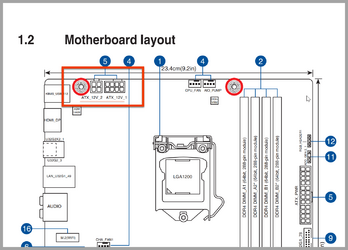
That said, before deep diving into zbook's task (which I don't disagree) you might also want to make sure both EPS power connectors are connected to the board as shown in the red box. There should be a 4-pin and 8-pin cable connected there from the power supply. If one is missing, that may also cause your issue as the board is short of power.

4-8 pin power connector.png

This is from your owners manual here (PDF File)

Let us know.
 

My Computers My Computers

  • At a glance

    Windows 11 Pro 24H2 (Build 26100.4770)Intel Core 9 Ultra 285K64G (4x16) DDR5 Corsair RGB Dominator Platinu...Radeon (XFX Mercury) RX 9070XT OC (with Magne...
    OS
    Windows 11 Pro 24H2 (Build 26100.4770)
    Computer type
    PC/Desktop
    Manufacturer/Model
    Custom built
    CPU
    Intel Core 9 Ultra 285K
    Motherboard
    Gigabyte Aorus Z890 Xtreme AI Top
    Memory
    64G (4x16) DDR5 Corsair RGB Dominator Platinum (6400Mhz)
    Graphics Card(s)
    Radeon (XFX Mercury) RX 9070XT OC (with Magnetic Fans)
    Sound Card
    Onboard (DTS:X® Ultra Audio: ESS ES9280A DAC)
    Monitor(s) Displays
    27-inch Eizo Color Edge - CG2700X
    Screen Resolution
    3840 x 2160
    Hard Drives
    4 Samsung NVM 990 Pro drives: 1TB (OS), 2TB, 2 X 4TB.
    PSU
    Seasonic TX-1300 (1300 Watts)
    Case
    Cooler Master H500M
    Cooling
    Corsair Link Titan 280 RX RGB
    Keyboard
    Logitech Craft
    Mouse
    Logitech MX Master 3S
    Internet Speed
    1TB Download. 512mb Upload
    Browser
    Microsoft Edge Chromium
    Antivirus
    Windows Security
    Other Info
    System used for gaming, photography, music, school.
  • At a glance

    Windows 11 Pro 24H2 (Build 26100.4061)Intel Core i9-9900K32gig (4 x 8) Corsair Dominator Platinum DDR4...Radeon XFX Merc 7900XT (20gig)
    Operating System
    Windows 11 Pro 24H2 (Build 26100.4061)
    Computer type
    PC/Desktop
    Manufacturer/Model
    Custom built
    CPU
    Intel Core i9-9900K
    Motherboard
    Gigabyte Z390 Aorus Xtreme
    Memory
    32gig (4 x 8) Corsair Dominator Platinum DDR4 3600Mhz (B-Die)
    Graphics card(s)
    Radeon XFX Merc 7900XT (20gig)
    Sound Card
    Onboard
    Monitor(s) Displays
    24-Inch NEC PA242W
    Screen Resolution
    2880 x 1800
    Hard Drives
    2 X NVME, 1 X SATA SSD
    PSU
    EVGA Super Nova 1000 P2 (1000 Watt)
    Case
    Phantek Enthoo Luxe
    Cooling
    Corsair H115i Elite AIO Cooler
    Keyboard
    Logitech Keys
    Mouse
    Logitech MX Master 3
    Internet Speed
    1TB Download. 512mb Upload
    Browser
    Microsoft Edge Chromium
    Antivirus
    Windows Security
    Other Info
    Backup System
@Dru2 Thanks. I checked the connections and there is no 4-pin. Went through my mobo and PSU boxes and not in there either. Double-checked the manual, it does say you can connect only the 8-pin or both the 8-pin and 4-pin. I'll have to buy a 4-pin cable and hook it up. Worth a shot!
 

My Computer My Computer

At a glance

Windows 11Intel i7-1170032 (4x8) GB Gold Key Technology Co Ltd NMUD48...GIGABYTE GeForce RTX 3080 Ti VISION OC 12G
OS
Windows 11
Computer type
PC/Desktop
CPU
Intel i7-11700
Motherboard
ASUS PRIME Z590-P
Memory
32 (4x8) GB Gold Key Technology Co Ltd NMUD480E85-3200E
Graphics Card(s)
GIGABYTE GeForce RTX 3080 Ti VISION OC 12G
Monitor(s) Displays
Samsung Odyssey G9
Screen Resolution
5120x1440
Hard Drives
Samsung 980 PRO 1 TB
Kingston OM8PCP31024F-A01 1 TB
Toshiba DT01ACA100 1 TB
PSU
Corsair CX750F
@Dru2 Thanks. I checked the connections and there is no 4-pin. Went through my mobo and PSU boxes and not in there either. Double-checked the manual, it does say you can connect only the 8-pin or both the 8-pin and 4-pin. I'll have to buy a 4-pin cable and hook it up. Worth a shot!
Make sure you buy the 4-pin cable that's designed for your PSU. Don't use a different one.
 

My Computer My Computer

At a glance

Windows 11 Pro 25H2 (RP channel)AMD Ryzen 7 9800X3D 8-core64GB Corsair Titanium 6000/CL30MSI Suprim 5080 SOC
OS
Windows 11 Pro 25H2 (RP channel)
Computer type
PC/Desktop
Manufacturer/Model
MSI
CPU
AMD Ryzen 7 9800X3D 8-core
Motherboard
MEG X870E Godlike
Memory
64GB Corsair Titanium 6000/CL30
Graphics Card(s)
MSI Suprim 5080 SOC
Sound Card
Soundblaster AE-9
Monitor(s) Displays
ASUS TUF Gaming VG289Q
Screen Resolution
3840x2160
Hard Drives
Samsung 9100 Pro 4TB (gen 5 x4, system drive/games)
Samsung 990 Pro 2TB
Samsung 980 Pro 2TB
Samsung 870 Evo 4TB
Samsung 870 Evo 2TB
Samsung T9 4TB
PSU
Seasonic PX-2200
Case
Bequiet! Dark Base Pro 901
Cooling
Noctua NH-D15S Chromax black
Keyboard
Logitech G915 X (wired)
Mouse
Logitech G903 with PowerPlay charger
Internet Speed
900Mb/sec
Browser
Microsoft Edge
Antivirus
Windows Defender
@Dru2 Thanks. I checked the connections and there is no 4-pin. Went through my mobo and PSU boxes and not in there either. Double-checked the manual, it does say you can connect only the 8-pin or both the 8-pin and 4-pin. I'll have to buy a 4-pin cable and hook it up. Worth a shot!
If your PSU came with a second 8 pin EPS cable, you should be able to split apart the end that plugs into the motherboard into 2 4 pin connectors, most EPS cables work like this.
 

My Computer My Computer

At a glance

Windows 11Intel I5 13600kCorsair Vengeance DDR5 5600 32GBAsus TUF Gaming Nvidia Geforce RTX 3070ti
OS
Windows 11
Computer type
PC/Desktop
CPU
Intel I5 13600k
Motherboard
MSI MAG Z790 Tomahawk Wifi DDR5
Memory
Corsair Vengeance DDR5 5600 32GB
Graphics Card(s)
Asus TUF Gaming Nvidia Geforce RTX 3070ti
Hard Drives
WD_Black SN770 NVMe 1TB
PSU
Corsair RM850X Shift
Case
NZXT H7 Flow
Cooling
CPU Cooler - DeepCool LT520 240mm AIO

My Computer My Computer

At a glance

Windows 11 ProIntel Core i7 10700KF 3.8 MHzG.Skill Trident RGB Series 64GB DDR4-3600MHzASUS ROG Strix GeForce RTX 3060 Ti OC Edition
OS
Windows 11 Pro
Computer type
PC/Desktop
Manufacturer/Model
jds63 /self built
CPU
Intel Core i7 10700KF 3.8 MHz
Motherboard
ASUS ROG Strix Z490-E Gaming
Memory
G.Skill Trident RGB Series 64GB DDR4-3600MHz
Graphics Card(s)
ASUS ROG Strix GeForce RTX 3060 Ti OC Edition
Sound Card
Creative Sound BlasterX AE-5 Plus
Monitor(s) Displays
ASUS VG28UQL1A 28" 144 Mhz 4K Monitor
Screen Resolution
3840 X 2160p HDR
Hard Drives
Samsung 970 EVO Plus NVMe 500GB M.2 Drive, (2) Samsung 870 EVO 1TB SATA III Internal SSD, (2) Samsung 860 EVO 1TB SATA III Internal SSD & Seagate Barracuda 2TB
PSU
ASUS ROG Thor 850 80+ Platinum 850W Fully Modular RGB Power Supply
Case
Lian Li Lancool II Mesh Performance
Cooling
Noctua NH-U12A CPU Cooler, (5) Noctua NF-A12x15 chromax.black.swap 120mm, (3) Lepa BOL.Quiet PWM LED 120mm
Keyboard
Logitech MX Keys
Mouse
Logitech MX Ergo Trackball
Internet Speed
325Mbps/ 20Mbps
Browser
Mozilla Firefox 64-bit, Microsoft Edge
Antivirus
Kaspersky Plus 2023
Other Info
Pioneer Blu-Ray/DVD Burner 209DBK, Logitech Z906 5.1 Speakers and Epson XP7100 All-in-One Printer
There were many fatal WHEA errors most often seen with malfunctioning hardware.

There were some misbehaving drivers.


Please perform the following steps in sequence:


1) Run: Tuneup plus > post a share link into this thread using one drive, drop box, or google drive.


2) Uninstall Norton AV using the applicable uninstall tool:


3) Make sure that Microsoft defender is on


4) Uninstall Nvidia GPU drivers using DDU > reinstall using the Nvidia website


5) The BIOS Version/Date American Megatrends Inc. 1601, 5/7/2022

Upgrade the BIOS: 1601 > 1801


6) Run: Memtest86 (free version) for two tests of 4 passes (total eight passes)


Testing can run overnight while sleeping.

Just 1 error is a test fail and testing can be aborted.

Take pictures > post images or share links into this thread using one drive, drop box, or google drive.


7) Run: Furmark for 30 minutes


Make note of the warning to abort testing.

Record the continuous test duration and the highest temperature.

Post images or share links into this thread using one drive, drop box, or google drive.


7F
A
3B
1A
119
141
117
124


Code:
Name    NVIDIA GeForce RTX 3080 Ti
PNP Device ID    PCI\VEN_10DE&DEV_2208&SUBSYS_40871458&REV_A1\4&39FDDC03&0&0008
Adapter Type    NVIDIA GeForce RTX 3080 Ti, NVIDIA compatible
Adapter Description    NVIDIA GeForce RTX 3080 Ti
Adapter RAM    (1,048,576) bytes
Installed Drivers    C:\WINDOWS\System32\DriverStore\FileRepository\nv_dispi.inf_amd64_d3828c822366e497\nvldumdx.dll,C:\WINDOWS\System32\DriverStore\FileRepository\nv_dispi.inf_amd64_d3828c822366e497\nvldumdx.dll,C:\WINDOWS\System32\DriverStore\FileRepository\nv_dispi.inf_amd64_d3828c822366e497\nvldumdx.dll,C:\WINDOWS\System32\DriverStore\FileRepository\nv_dispi.inf_amd64_d3828c822366e497\nvldumdx.dll
Driver Version    31.0.15.3713
INF File    oem52.inf (Section139 section)
Driver    C:\WINDOWS\SYSTEM32\DRIVERSTORE\FILEREPOSITORY\NV_DISPI.INF_AMD64_D3828C822366E497\NVLDDMKM.SYS (31.0.15.3713, 56.42 MB (59,157,536 bytes), 8/23/2023 10:53 AM)
 
Last edited:

My Computer My Computer

At a glance

Windows 10Intel(R) Core(TM) i7-4800MQ CPU @ 2.70GHz16 GB Total: Manufacturer : Samsung MemoryTyp...NVIDIA Quadro K3100M; Intel(R) HD Graphics 4600
OS
Windows 10
Computer type
Laptop
Manufacturer/Model
HP
CPU
Intel(R) Core(TM) i7-4800MQ CPU @ 2.70GHz
Motherboard
Product : 190A Version : KBC Version 94.56
Memory
16 GB Total: Manufacturer : Samsung MemoryType : DDR3 FormFactor : SODIMM Capacity : 8GB Speed : 1600
Graphics Card(s)
NVIDIA Quadro K3100M; Intel(R) HD Graphics 4600
Sound Card
IDT High Definition Audio CODEC; PNP Device ID HDAUDIO\FUNC_01&VEN_111D&DEV_76E0
Hard Drives
Model Hitachi HTS727575A9E364
Antivirus
Microsoft Defender
Other Info
Mobile Workstation

My Computer My Computer

At a glance

Windows 11
OS
Windows 11
Computer type
PC/Desktop
Manufacturer/Model
MSI
As I use it every day, there's another thing that will be helpful to you.

Honestly the last thing the OP needs to be doing is adding a third-party game booster when they're having constant crashing / BSOD issues.

Let's figure out the crashing issues before thinking about installing a third-party game booster.
 

My Computers My Computers

  • At a glance

    Windows 11 Pro 24H2 (Build 26100.4770)Intel Core 9 Ultra 285K64G (4x16) DDR5 Corsair RGB Dominator Platinu...Radeon (XFX Mercury) RX 9070XT OC (with Magne...
    OS
    Windows 11 Pro 24H2 (Build 26100.4770)
    Computer type
    PC/Desktop
    Manufacturer/Model
    Custom built
    CPU
    Intel Core 9 Ultra 285K
    Motherboard
    Gigabyte Aorus Z890 Xtreme AI Top
    Memory
    64G (4x16) DDR5 Corsair RGB Dominator Platinum (6400Mhz)
    Graphics Card(s)
    Radeon (XFX Mercury) RX 9070XT OC (with Magnetic Fans)
    Sound Card
    Onboard (DTS:X® Ultra Audio: ESS ES9280A DAC)
    Monitor(s) Displays
    27-inch Eizo Color Edge - CG2700X
    Screen Resolution
    3840 x 2160
    Hard Drives
    4 Samsung NVM 990 Pro drives: 1TB (OS), 2TB, 2 X 4TB.
    PSU
    Seasonic TX-1300 (1300 Watts)
    Case
    Cooler Master H500M
    Cooling
    Corsair Link Titan 280 RX RGB
    Keyboard
    Logitech Craft
    Mouse
    Logitech MX Master 3S
    Internet Speed
    1TB Download. 512mb Upload
    Browser
    Microsoft Edge Chromium
    Antivirus
    Windows Security
    Other Info
    System used for gaming, photography, music, school.
  • At a glance

    Windows 11 Pro 24H2 (Build 26100.4061)Intel Core i9-9900K32gig (4 x 8) Corsair Dominator Platinum DDR4...Radeon XFX Merc 7900XT (20gig)
    Operating System
    Windows 11 Pro 24H2 (Build 26100.4061)
    Computer type
    PC/Desktop
    Manufacturer/Model
    Custom built
    CPU
    Intel Core i9-9900K
    Motherboard
    Gigabyte Z390 Aorus Xtreme
    Memory
    32gig (4 x 8) Corsair Dominator Platinum DDR4 3600Mhz (B-Die)
    Graphics card(s)
    Radeon XFX Merc 7900XT (20gig)
    Sound Card
    Onboard
    Monitor(s) Displays
    24-Inch NEC PA242W
    Screen Resolution
    2880 x 1800
    Hard Drives
    2 X NVME, 1 X SATA SSD
    PSU
    EVGA Super Nova 1000 P2 (1000 Watt)
    Case
    Phantek Enthoo Luxe
    Cooling
    Corsair H115i Elite AIO Cooler
    Keyboard
    Logitech Keys
    Mouse
    Logitech MX Master 3
    Internet Speed
    1TB Download. 512mb Upload
    Browser
    Microsoft Edge Chromium
    Antivirus
    Windows Security
    Other Info
    Backup System
@Dru2 Thanks. I checked the connections and there is no 4-pin. Went through my mobo and PSU boxes and not in there either. Double-checked the manual, it does say you can connect only the 8-pin or both the 8-pin and 4-pin. I'll have to buy a 4-pin cable and hook it up. Worth a shot!
Yes, some boards advertise you only need one, but depending on power demands, you may need both. I always connect both to eliminate any power issues. My current board has two 8-pin connectors, and both are connected.

And the board wouldn't supply that connector. That would come from the power supply.
 

My Computers My Computers

  • At a glance

    Windows 11 Pro 24H2 (Build 26100.4770)Intel Core 9 Ultra 285K64G (4x16) DDR5 Corsair RGB Dominator Platinu...Radeon (XFX Mercury) RX 9070XT OC (with Magne...
    OS
    Windows 11 Pro 24H2 (Build 26100.4770)
    Computer type
    PC/Desktop
    Manufacturer/Model
    Custom built
    CPU
    Intel Core 9 Ultra 285K
    Motherboard
    Gigabyte Aorus Z890 Xtreme AI Top
    Memory
    64G (4x16) DDR5 Corsair RGB Dominator Platinum (6400Mhz)
    Graphics Card(s)
    Radeon (XFX Mercury) RX 9070XT OC (with Magnetic Fans)
    Sound Card
    Onboard (DTS:X® Ultra Audio: ESS ES9280A DAC)
    Monitor(s) Displays
    27-inch Eizo Color Edge - CG2700X
    Screen Resolution
    3840 x 2160
    Hard Drives
    4 Samsung NVM 990 Pro drives: 1TB (OS), 2TB, 2 X 4TB.
    PSU
    Seasonic TX-1300 (1300 Watts)
    Case
    Cooler Master H500M
    Cooling
    Corsair Link Titan 280 RX RGB
    Keyboard
    Logitech Craft
    Mouse
    Logitech MX Master 3S
    Internet Speed
    1TB Download. 512mb Upload
    Browser
    Microsoft Edge Chromium
    Antivirus
    Windows Security
    Other Info
    System used for gaming, photography, music, school.
  • At a glance

    Windows 11 Pro 24H2 (Build 26100.4061)Intel Core i9-9900K32gig (4 x 8) Corsair Dominator Platinum DDR4...Radeon XFX Merc 7900XT (20gig)
    Operating System
    Windows 11 Pro 24H2 (Build 26100.4061)
    Computer type
    PC/Desktop
    Manufacturer/Model
    Custom built
    CPU
    Intel Core i9-9900K
    Motherboard
    Gigabyte Z390 Aorus Xtreme
    Memory
    32gig (4 x 8) Corsair Dominator Platinum DDR4 3600Mhz (B-Die)
    Graphics card(s)
    Radeon XFX Merc 7900XT (20gig)
    Sound Card
    Onboard
    Monitor(s) Displays
    24-Inch NEC PA242W
    Screen Resolution
    2880 x 1800
    Hard Drives
    2 X NVME, 1 X SATA SSD
    PSU
    EVGA Super Nova 1000 P2 (1000 Watt)
    Case
    Phantek Enthoo Luxe
    Cooling
    Corsair H115i Elite AIO Cooler
    Keyboard
    Logitech Keys
    Mouse
    Logitech MX Master 3
    Internet Speed
    1TB Download. 512mb Upload
    Browser
    Microsoft Edge Chromium
    Antivirus
    Windows Security
    Other Info
    Backup System
Honestly the last thing the OP needs to be doing is adding a third-party game booster when they're having constant crashing / BSOD issues.

Let's figure out the crashing issues before thinking about installing a third-party game booster.
The app is excellent because it prevents many annoying activities from running in the background.
 

My Computer My Computer

At a glance

Windows 11
OS
Windows 11
Computer type
PC/Desktop
Manufacturer/Model
MSI
The app is excellent because it prevents many annoying activities from running in the background.
Again... no need to install third party booter apps when you're trying to troubleshoot crashes and BSODs. That's counter-intuitive ;-)

It's like overclocking a PC when it's already crashing all the time.
 

My Computers My Computers

  • At a glance

    Windows 11 Pro 24H2 (Build 26100.4770)Intel Core 9 Ultra 285K64G (4x16) DDR5 Corsair RGB Dominator Platinu...Radeon (XFX Mercury) RX 9070XT OC (with Magne...
    OS
    Windows 11 Pro 24H2 (Build 26100.4770)
    Computer type
    PC/Desktop
    Manufacturer/Model
    Custom built
    CPU
    Intel Core 9 Ultra 285K
    Motherboard
    Gigabyte Aorus Z890 Xtreme AI Top
    Memory
    64G (4x16) DDR5 Corsair RGB Dominator Platinum (6400Mhz)
    Graphics Card(s)
    Radeon (XFX Mercury) RX 9070XT OC (with Magnetic Fans)
    Sound Card
    Onboard (DTS:X® Ultra Audio: ESS ES9280A DAC)
    Monitor(s) Displays
    27-inch Eizo Color Edge - CG2700X
    Screen Resolution
    3840 x 2160
    Hard Drives
    4 Samsung NVM 990 Pro drives: 1TB (OS), 2TB, 2 X 4TB.
    PSU
    Seasonic TX-1300 (1300 Watts)
    Case
    Cooler Master H500M
    Cooling
    Corsair Link Titan 280 RX RGB
    Keyboard
    Logitech Craft
    Mouse
    Logitech MX Master 3S
    Internet Speed
    1TB Download. 512mb Upload
    Browser
    Microsoft Edge Chromium
    Antivirus
    Windows Security
    Other Info
    System used for gaming, photography, music, school.
  • At a glance

    Windows 11 Pro 24H2 (Build 26100.4061)Intel Core i9-9900K32gig (4 x 8) Corsair Dominator Platinum DDR4...Radeon XFX Merc 7900XT (20gig)
    Operating System
    Windows 11 Pro 24H2 (Build 26100.4061)
    Computer type
    PC/Desktop
    Manufacturer/Model
    Custom built
    CPU
    Intel Core i9-9900K
    Motherboard
    Gigabyte Z390 Aorus Xtreme
    Memory
    32gig (4 x 8) Corsair Dominator Platinum DDR4 3600Mhz (B-Die)
    Graphics card(s)
    Radeon XFX Merc 7900XT (20gig)
    Sound Card
    Onboard
    Monitor(s) Displays
    24-Inch NEC PA242W
    Screen Resolution
    2880 x 1800
    Hard Drives
    2 X NVME, 1 X SATA SSD
    PSU
    EVGA Super Nova 1000 P2 (1000 Watt)
    Case
    Phantek Enthoo Luxe
    Cooling
    Corsair H115i Elite AIO Cooler
    Keyboard
    Logitech Keys
    Mouse
    Logitech MX Master 3
    Internet Speed
    1TB Download. 512mb Upload
    Browser
    Microsoft Edge Chromium
    Antivirus
    Windows Security
    Other Info
    Backup System
If your PSU came with a second 8 pin EPS cable, you should be able to split apart the end that plugs into the motherboard into 2 4 pin connectors, most EPS cables work like this.
LOL. I feel like an idiot. I triple checked all the cables I had and missed this. I have one that splits into 2 4 pins so got it hooked up. Will report if I see any change while I work through the steps posted by @zbook in parallel.
 

My Computer My Computer

At a glance

Windows 11Intel i7-1170032 (4x8) GB Gold Key Technology Co Ltd NMUD48...GIGABYTE GeForce RTX 3080 Ti VISION OC 12G
OS
Windows 11
Computer type
PC/Desktop
CPU
Intel i7-11700
Motherboard
ASUS PRIME Z590-P
Memory
32 (4x8) GB Gold Key Technology Co Ltd NMUD480E85-3200E
Graphics Card(s)
GIGABYTE GeForce RTX 3080 Ti VISION OC 12G
Monitor(s) Displays
Samsung Odyssey G9
Screen Resolution
5120x1440
Hard Drives
Samsung 980 PRO 1 TB
Kingston OM8PCP31024F-A01 1 TB
Toshiba DT01ACA100 1 TB
PSU
Corsair CX750F
Again... no need to install third party booter apps when you're trying to troubleshoot crashes and BSODs. That's counter-intuitive ;-)

It's like overclocking a PC when it's already crashing all the time.
ok(y)
 

My Computer My Computer

At a glance

Windows 11
OS
Windows 11
Computer type
PC/Desktop
Manufacturer/Model
MSI
Back
Top Bottom