Services W11 Pro?


Alexey2912

Well-known member
Member
VIP
Local time
4:39 AM
Posts
2,144
Location
Aiea, Honolulu HI
OS
Windows 11 Pro 25H2 (26200.8457).
Hi there,

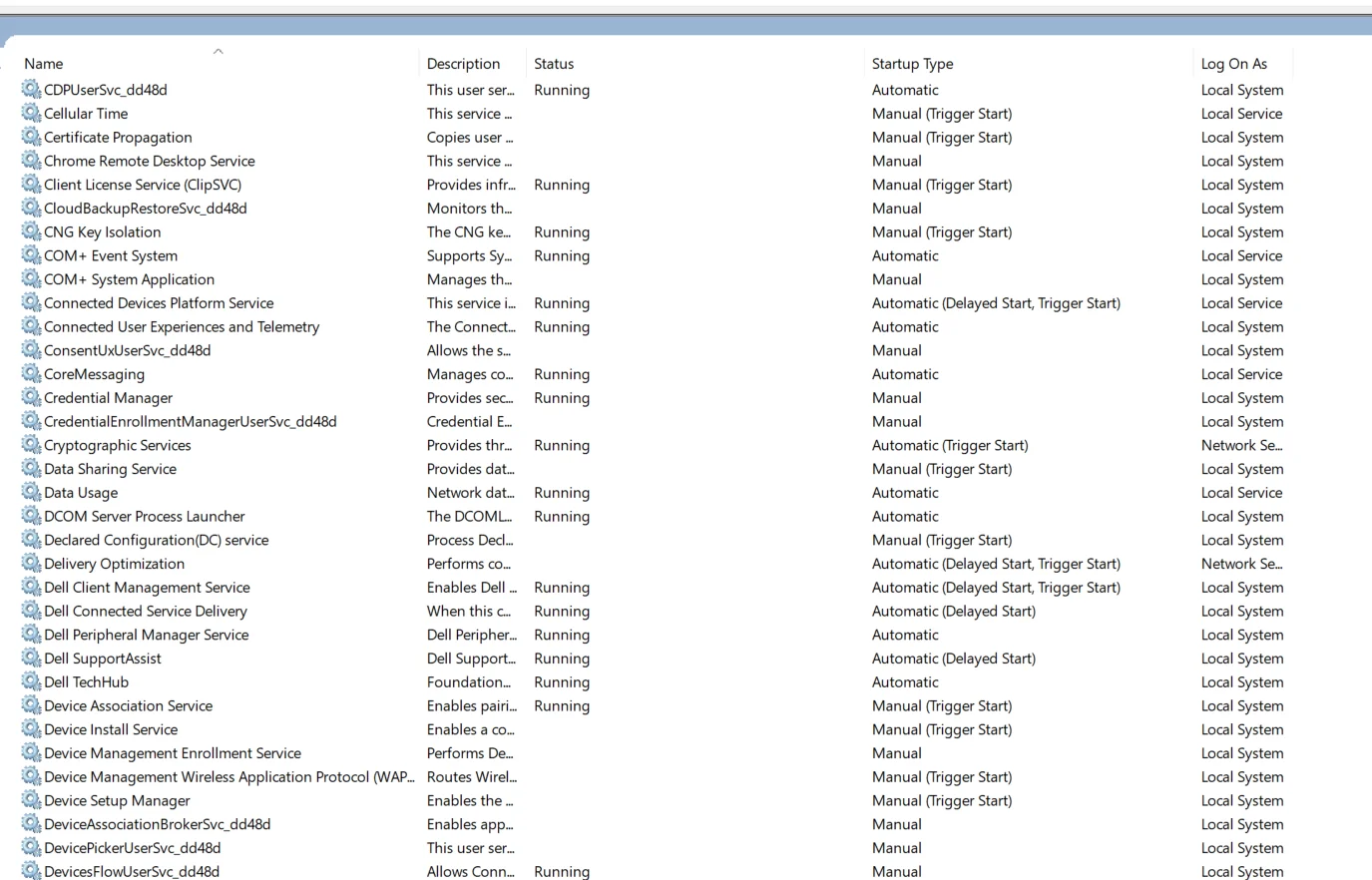
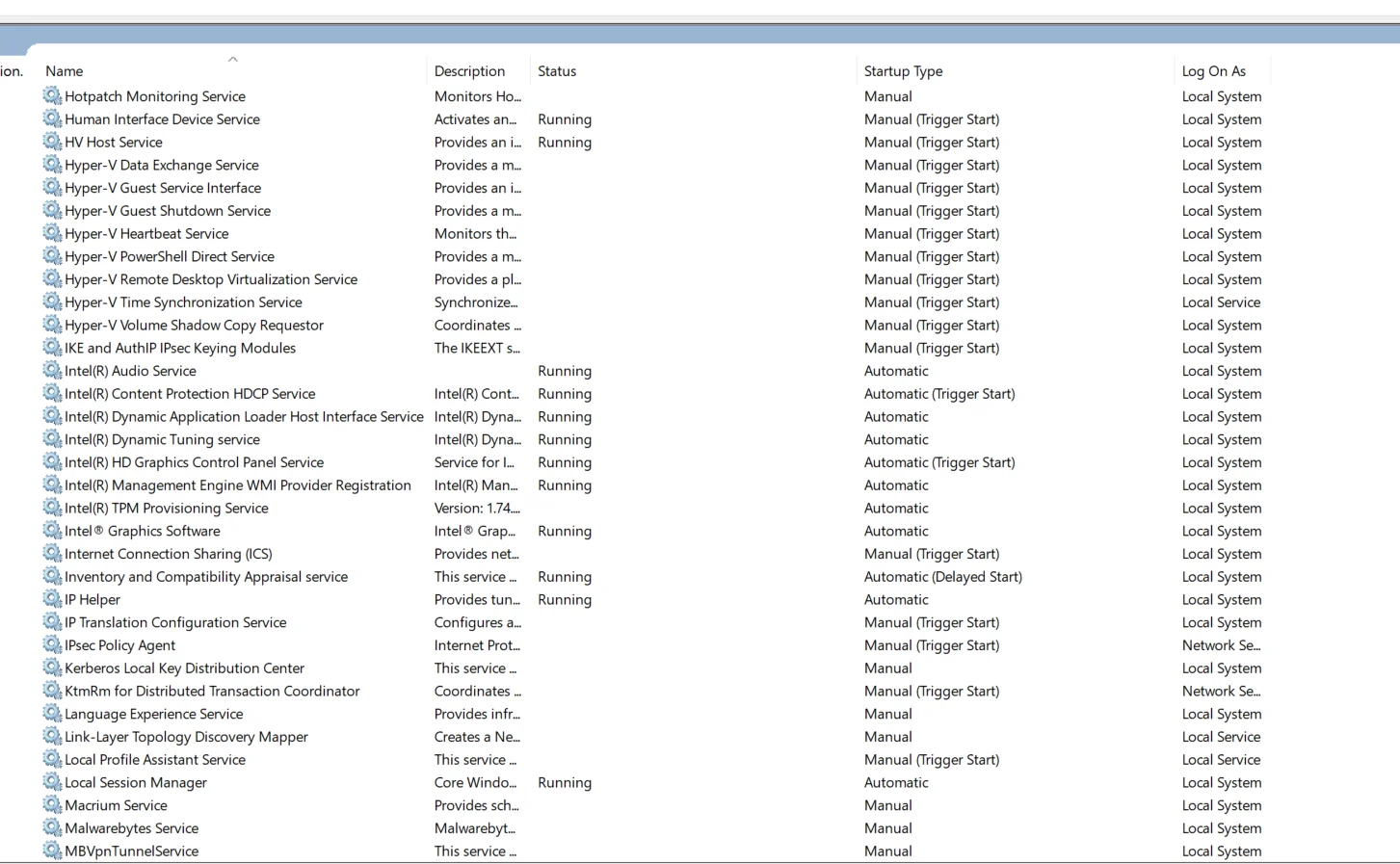
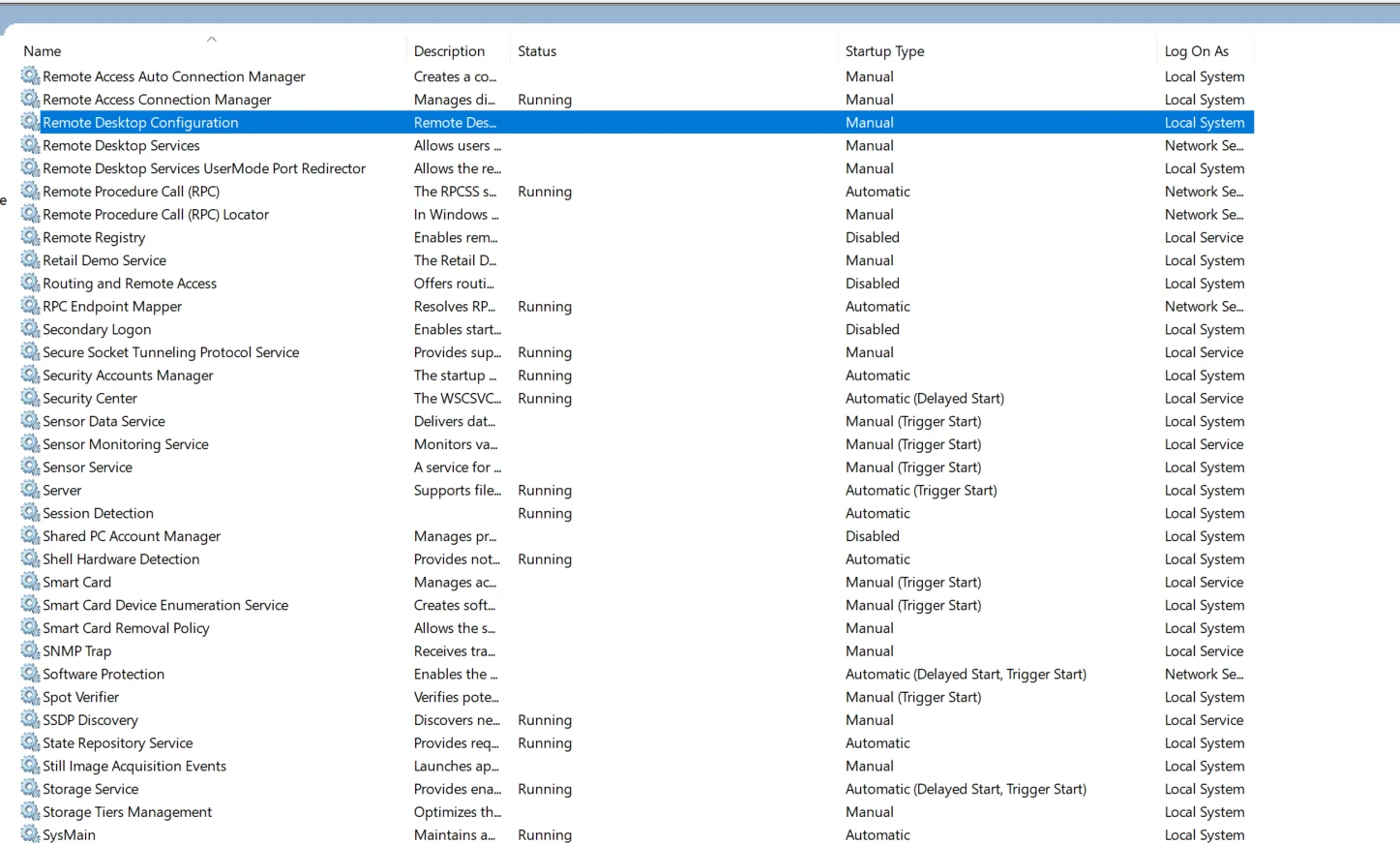
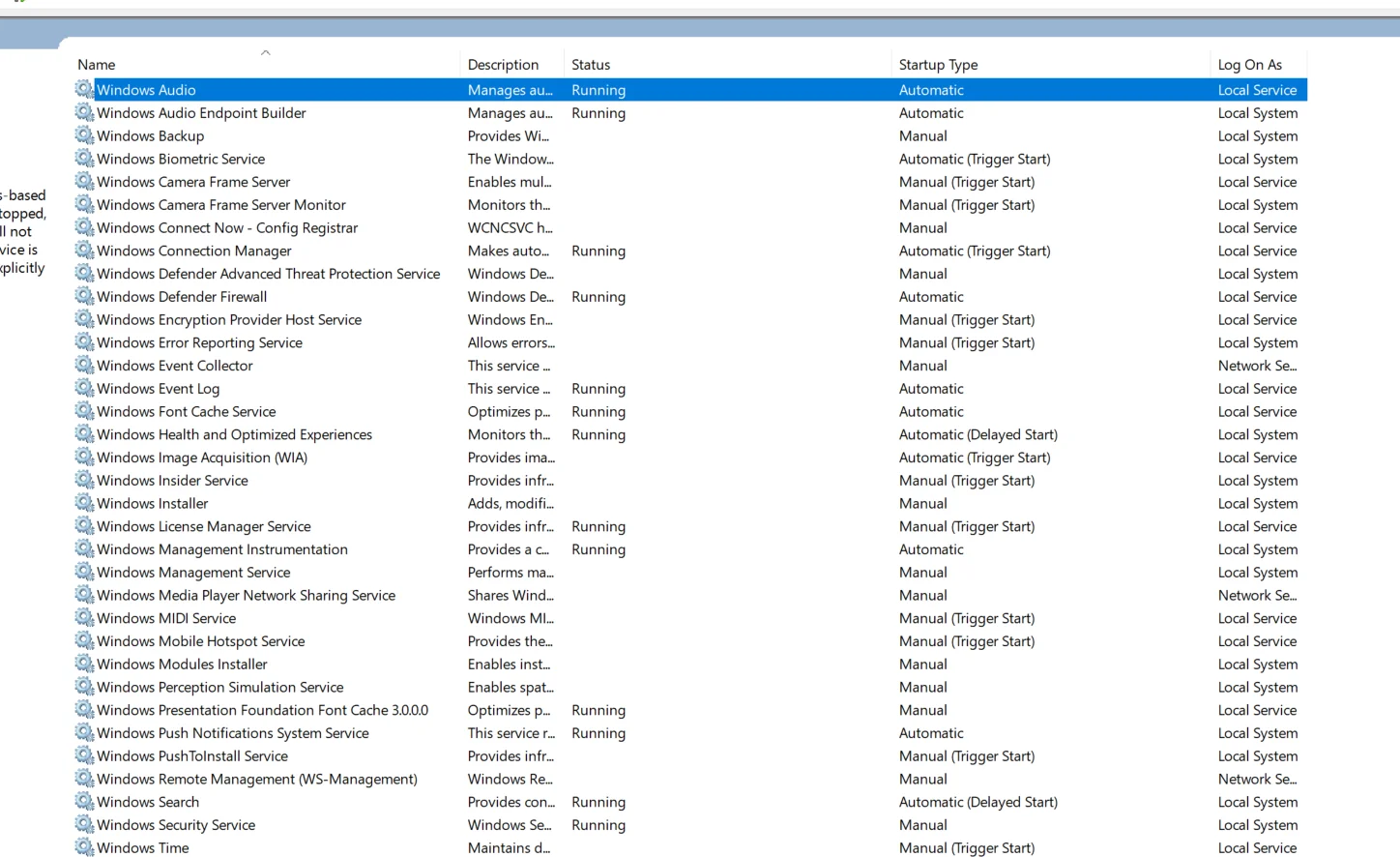
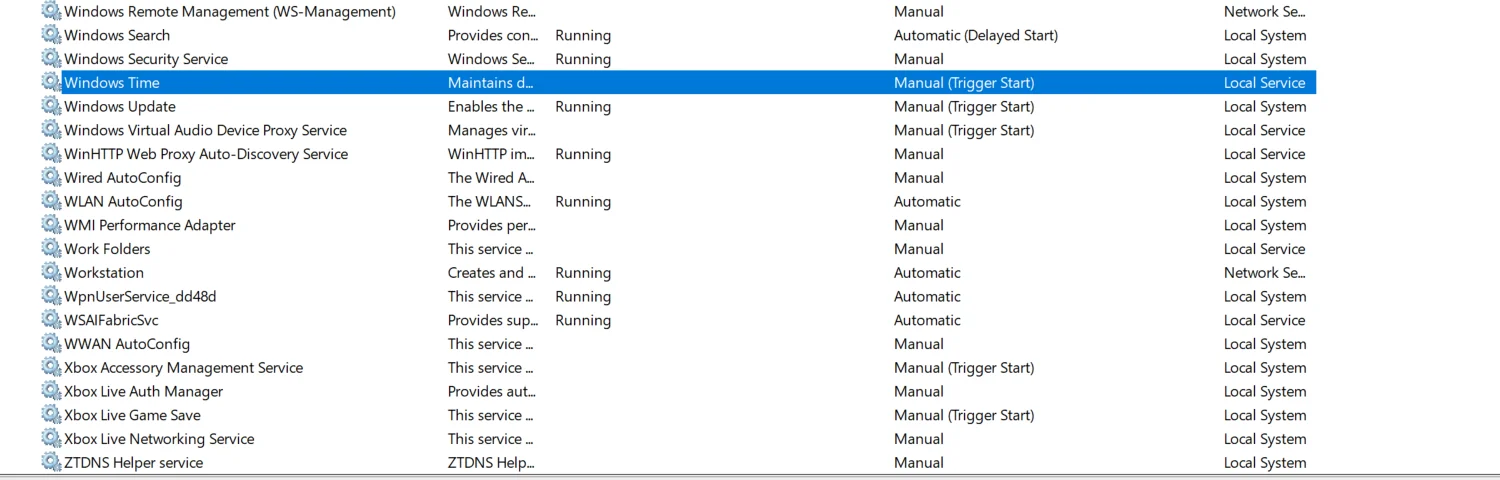
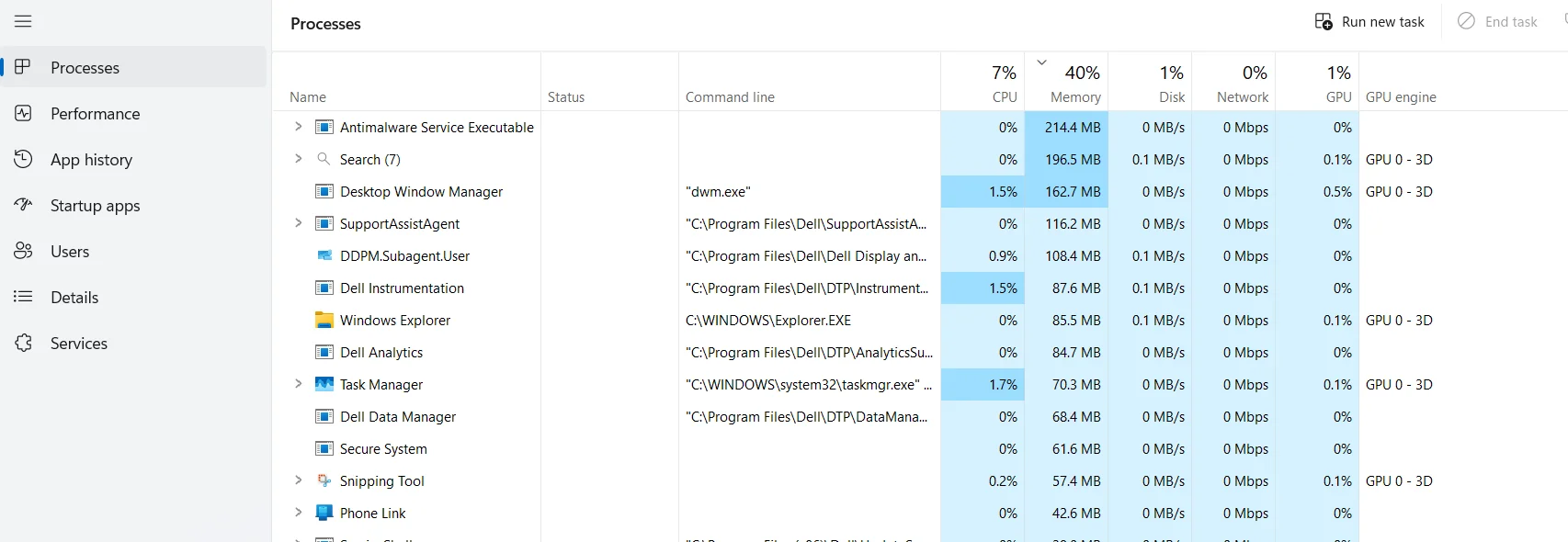
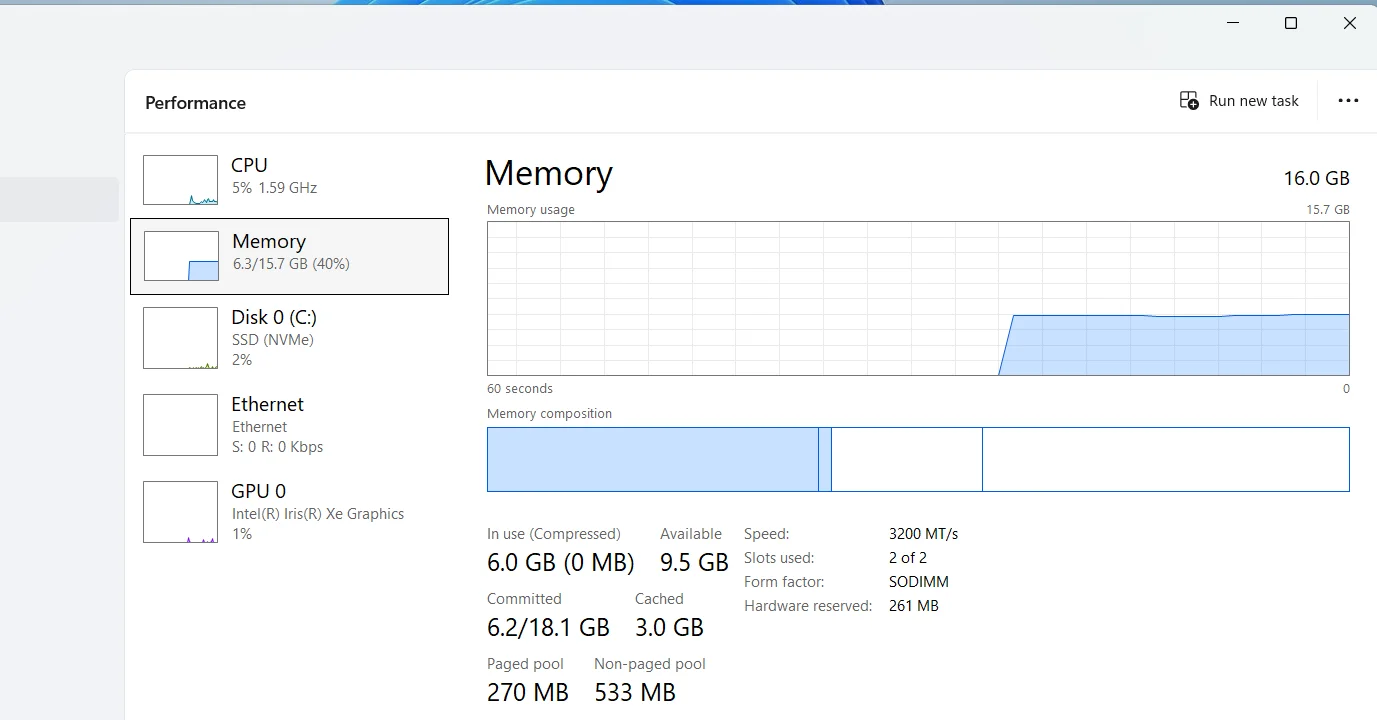
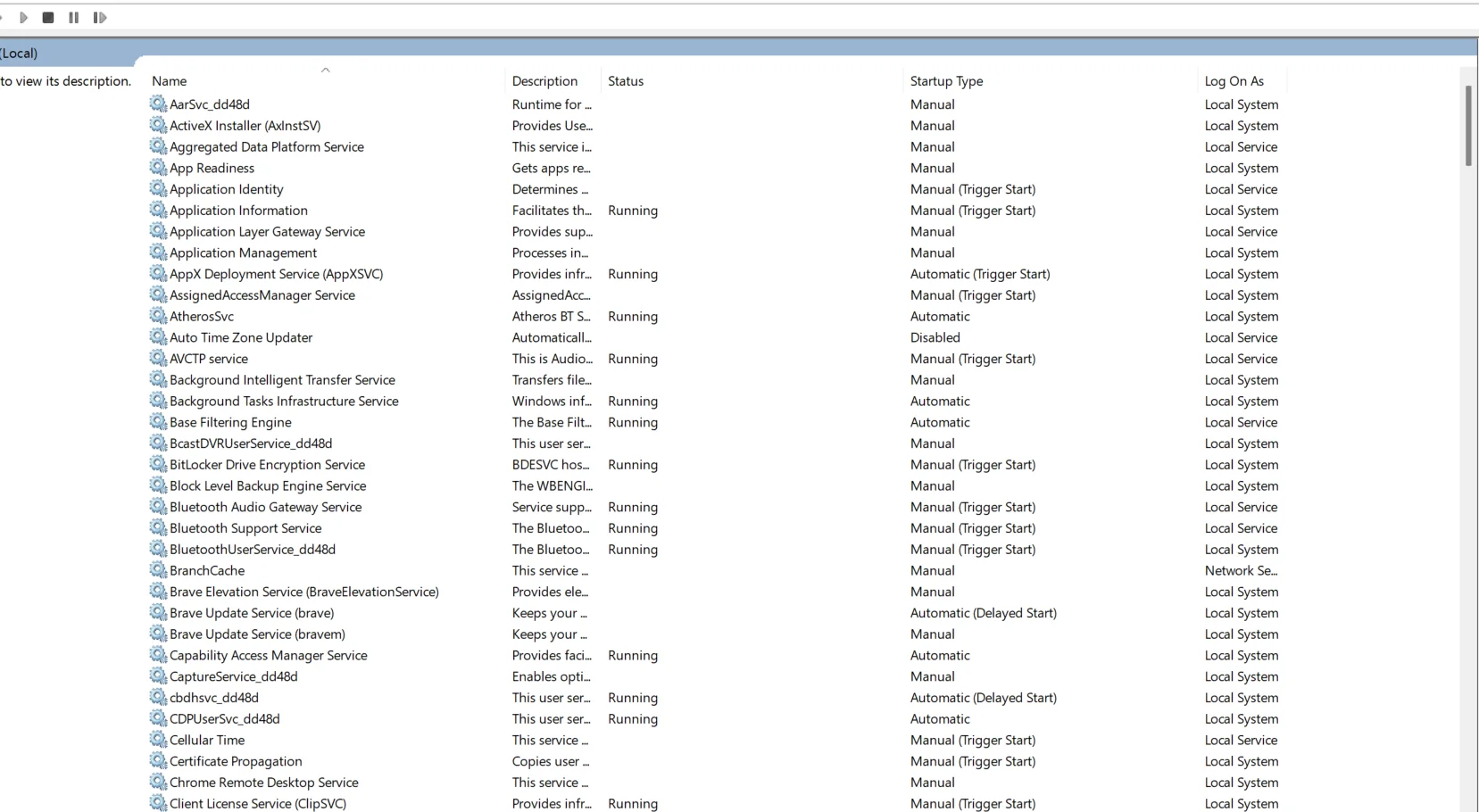
The moment I reboot without using any app my laptop is using approx. 6 GB of ram of 16. On opening email on Brave browser I see 10 browser opened....that looks a bit strange to me. Uploading screen captures of and of services that might be running and are of none use to me as a end user, care to have your expert look and advice. No issue with the OS just confused what is hogging the resources and are of none use to me as an end user.

Thanks.
Startup.webpServices.webpServices1.webpServices2.webpServices3.webpServices4.webpServices5.webpServices6.webpServices7.webpServices7.webpServices8.webpServices9.webpBrowser.webpStartup 1.webp
 
Windows Build/Version
25H2 (26000.7922)

My Computers

System One System Two

  • OS
    Windows 11 Pro 25H2 (26200.8457).
    Computer type
    Laptop
    Manufacturer/Model
    Dell Inspiron i5 5510
    CPU
    core i7 11th gen
    Memory
    16 GB DDR4 @3200 MHz
    Hard Drives
    1 TB SSD M.2 NVMe
    Keyboard
    Dell Premier Multi-Device Wireless Keyboard and Mouse – KM7321W
    Browser
    Brave.
    Other Info
    Edifier speakers. (Thanks to @Edwin).
  • Operating System
    W11 25H2 (26200.7840)
    Computer type
    PC/Desktop
    Manufacturer/Model
    XPS Special Edition
    CPU
    11th Gen Intel® Core i7-11700 processor
    Memory
    32 GB, 2 x 16 GB, DDR4, 2933 MHz, dual channel
    Graphics card(s)
    NVIDIA GeForce RTX 3060 12GB GDDR6
    Hard Drives
    2TB M.2 PCIe NVMe SSD
Yes I do have IDM integrated in Brave as extension, missed a symptom.
 

My Computers

System One System Two

  • OS
    Windows 11 Pro 25H2 (26200.8457).
    Computer type
    Laptop
    Manufacturer/Model
    Dell Inspiron i5 5510
    CPU
    core i7 11th gen
    Memory
    16 GB DDR4 @3200 MHz
    Hard Drives
    1 TB SSD M.2 NVMe
    Keyboard
    Dell Premier Multi-Device Wireless Keyboard and Mouse – KM7321W
    Browser
    Brave.
    Other Info
    Edifier speakers. (Thanks to @Edwin).
  • Operating System
    W11 25H2 (26200.7840)
    Computer type
    PC/Desktop
    Manufacturer/Model
    XPS Special Edition
    CPU
    11th Gen Intel® Core i7-11700 processor
    Memory
    32 GB, 2 x 16 GB, DDR4, 2933 MHz, dual channel
    Graphics card(s)
    NVIDIA GeForce RTX 3060 12GB GDDR6
    Hard Drives
    2TB M.2 PCIe NVMe SSD
Tbh I have none issue with the laptop since +3 yrs, it all started with when should I reboot thread. It works smooth and does all my jobs, just curious wafter the reboot thread. Max it would consume during my work is 10 GB with compressed + 1 GB., than I feel it need a reboot. 2 changes I made, MR to stop running and manual and disabled print spooler.

Should i just leave it and keep using as I was since 3 yrs? @Brink , your expert advice would be appreciated as always.

Thought Id post since had time off before next rounds.
 

My Computers

System One System Two

  • OS
    Windows 11 Pro 25H2 (26200.8457).
    Computer type
    Laptop
    Manufacturer/Model
    Dell Inspiron i5 5510
    CPU
    core i7 11th gen
    Memory
    16 GB DDR4 @3200 MHz
    Hard Drives
    1 TB SSD M.2 NVMe
    Keyboard
    Dell Premier Multi-Device Wireless Keyboard and Mouse – KM7321W
    Browser
    Brave.
    Other Info
    Edifier speakers. (Thanks to @Edwin).
  • Operating System
    W11 25H2 (26200.7840)
    Computer type
    PC/Desktop
    Manufacturer/Model
    XPS Special Edition
    CPU
    11th Gen Intel® Core i7-11700 processor
    Memory
    32 GB, 2 x 16 GB, DDR4, 2933 MHz, dual channel
    Graphics card(s)
    NVIDIA GeForce RTX 3060 12GB GDDR6
    Hard Drives
    2TB M.2 PCIe NVMe SSD
Well for starts ram being used up is ok, that's what it's for. You really only may start to have performance issues when it's staying around 95% used.

As for browsers, pretty much all of the modern ones will exhibit this behavior and that is due to sandboxing. Browsers do this to isolate each tab and extensions so they can't access memory of another tab or it's running extensions. Memory related vulnerabilities have always been one of the largest areas of risk in browsers.
 

My Computer

System One

  • OS
    Linux Mint
    Computer type
    Laptop
    Manufacturer/Model
    System76 Lemur Pro
Well for starts ram being used up is ok, that's what it's for. You really only may start to have performance issues when it's staying around 95% used.

As for browsers, pretty much all of the modern ones will exhibit this behavior and that is due to sandboxing. Browsers do this to isolate each tab and extensions so they can't access memory of another tab or it's running extensions. Memory related vulnerabilities have always been one of the largest areas of risk in browsers.

Thanks appreciate your expert input. Any thoughts about services or just leave them? Coz some expert users on W11 Home with multiple tabs only have 5.9/6 GB of memory being utilized.
 

My Computers

System One System Two

  • OS
    Windows 11 Pro 25H2 (26200.8457).
    Computer type
    Laptop
    Manufacturer/Model
    Dell Inspiron i5 5510
    CPU
    core i7 11th gen
    Memory
    16 GB DDR4 @3200 MHz
    Hard Drives
    1 TB SSD M.2 NVMe
    Keyboard
    Dell Premier Multi-Device Wireless Keyboard and Mouse – KM7321W
    Browser
    Brave.
    Other Info
    Edifier speakers. (Thanks to @Edwin).
  • Operating System
    W11 25H2 (26200.7840)
    Computer type
    PC/Desktop
    Manufacturer/Model
    XPS Special Edition
    CPU
    11th Gen Intel® Core i7-11700 processor
    Memory
    32 GB, 2 x 16 GB, DDR4, 2933 MHz, dual channel
    Graphics card(s)
    NVIDIA GeForce RTX 3060 12GB GDDR6
    Hard Drives
    2TB M.2 PCIe NVMe SSD
Where's Black Viper when you need him LOL
 
Last edited:

My Computer

System One

  • OS
    W11
    Computer type
    PC/Desktop
    Manufacturer/Model
    2 HP Desktops, 1 Dell Desktop, 2 Dell XPS Laptops, 1 HP Laptop
    Keyboard
    Logitech
    Mouse
    Logitech MX Master 4 & 3
    Internet Speed
    500 mps
    Browser
    Firefox
    Antivirus
    Bitdefender
Disabling services also improves security, they are constantly vulnerable and repeatedly being patched.
I prefer to use RAM for something useful, like apps and games (no pagefile). No background activity.

capture_03112026_110927.webp
 

My Computer

System One

  • OS
    Home26H2Can
    Computer type
    PC/Desktop
    CPU
    AMD Ryzen 5 8600G (07/24)
    Motherboard
    ASROCK B650M-HDV/M.2 (07/24) BIOS 4.21 AGESA ComboAM5 1.3.0.1 (04/26)
    Memory
    2x32GB Kingston FURY DDR5 5600 MHz CL36 @5200 CL36 (07/24)
    Graphics Card(s)
    ASROCK Radeon RX 6600 Challenger D 8G @48FPS (08/24)
    Sound Card
    Creative Sound BlasterX AE-5 Plus (05/24)
    Monitor(s) Displays
    24" Philips 24M1N3200ZS/00 (05/24)
    Screen Resolution
    1920×1080@165Hz via DP1.4
    Hard Drives
    Kingston KC3000 NVMe 2TB (05/24)
    ADATA XPG GAMMIX S11 Pro 512GB (07/19)
    PSU
    Seasonic Core GM 550 Gold (04/24)
    Case
    Fractal Design Define 7 Mini with 3x Noctua NF-P14s/12@555rpm (04/24)
    Cooling
    Noctua NH-U12S with Noctua NF-P12 (04/24)
    Keyboard
    HP Pavilion Wired Keyboard 300 (07/24) + Rabalux 76017 Parker (01/24)
    Mouse
    Logitech M330 Silent Plus (01/26)
    Internet Speed
    500/100 Mbps via RouterOS (05/21) & TCP Optimizer
    Browser
    Edge, Brave for YouTube, LibreWolf for FB
    Antivirus
    NextDNS blocking 1/3 Traffic
    Other Info
    Phone: Motorola Moto G86 (02/26)
    Backup: Hasleo Backup Suite (PreOS)
    Headphones: Sennheiser RS170 (09/10)
    Chair: Huzaro Force 4.4 Grey Mesh (05/24)
    Notifier: Xiaomi Mi Band 9 Milanese (10/24)
    FlexCore USB-C 3.2 Gen 1 (M) to LAN (F) (08/25)
fcajCX.png

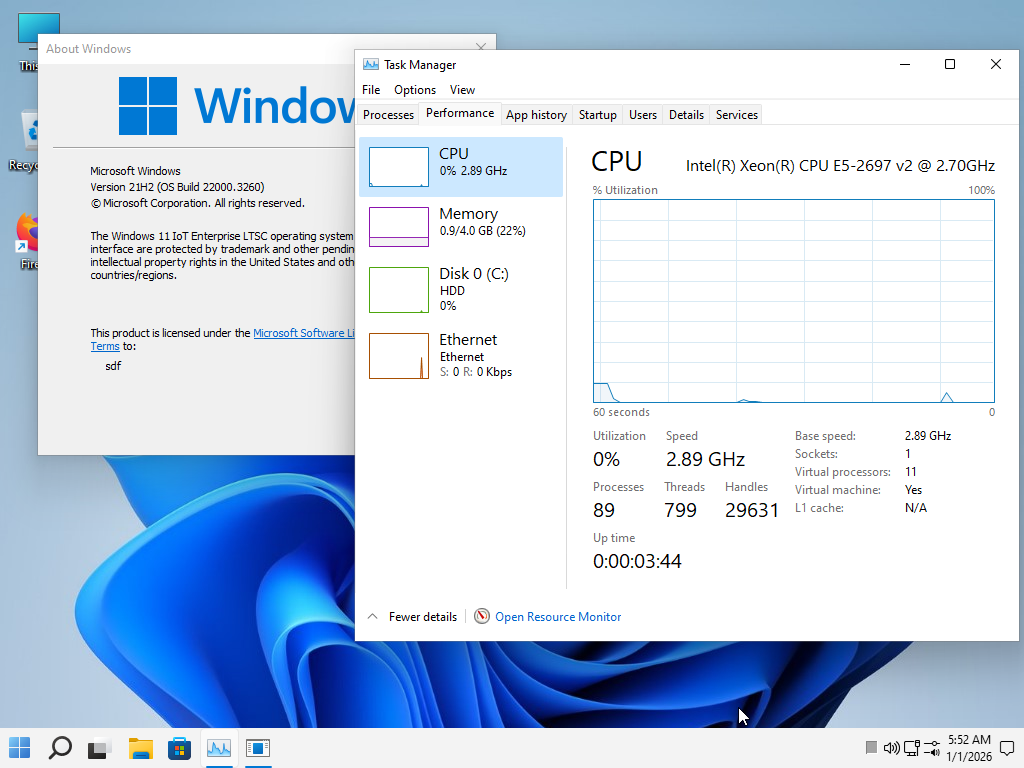
I like using this older version of 11.21h2; it's lighter, faster, and my PC performs better.
I can open Firefox with 300 tabs and the system remains stable and fast.
I'm making this version, which I created as an ISO image, available in my signature for anyone who wants to test it.


Hi there,

The moment I reboot without using any app my laptop is using approx. 6 GB of ram of 16. On opening email on Brave browser I see 10 browser opened....that looks a bit strange to me. Uploading screen captures of and of services that might be running and are of none use to me as a end user, care to have your expert look and advice. No issue with the OS just confused what is hogging the resources and are of none use to me as an end user.

Thanks.
View attachment 165390View attachment 165388View attachment 165387View attachment 165386View attachment 165385View attachment 165384View attachment 165383View attachment 165382View attachment 165381View attachment 165381View attachment 165380View attachment 165379View attachment 165378View attachment 165389

test my version custon w11 21h2 to see if your PC gets better. Tip: After installation is complete, run the command "sfc /scannow" to resolve a minor bug.
 
Last edited:

My Computer

System One

  • OS
    Windows 11 Iot Enterprise 21h2 22000.3260
    Computer type
    PC/Desktop
    Manufacturer/Model
    Asus
    CPU
    xeon E5-2697v2
    Motherboard
    rampage iv extreme
    Memory
    32gb 8x4gb ddr3 1333 mhz
    Graphics Card(s)
    gtx 570 poit of view
    Sound Card
    realtek HD (ALC898)
    Monitor(s) Displays
    samsung b2030
    Screen Resolution
    1600x900
    Hard Drives
    2tb hd 5400 rpm
    3tb hd 5400 rpm
    1tb nvme pcie 3.0
    PSU
    hx850w
    Keyboard
    mtek
    Internet Speed
    500/250 gpon
    Browser
    r3dfox 146.0
    Antivirus
    none
Disabling services also improves security, they are constantly vulnerable and repeatedly being patched.
I prefer to use RAM for something useful, like apps and games (no pagefile). No background activity.

View attachment 165539

Indeed, orgs following best practices and hardening guides such as CIS include quite a few services to disable. Knowing which service is going to impact your computer usage is the tricky part.
 

My Computer

System One

  • OS
    Linux Mint
    Computer type
    Laptop
    Manufacturer/Model
    System76 Lemur Pro
 

My Computer

System One

  • OS
    W11
    Computer type
    PC/Desktop
    Manufacturer/Model
    2 HP Desktops, 1 Dell Desktop, 2 Dell XPS Laptops, 1 HP Laptop
    Keyboard
    Logitech
    Mouse
    Logitech MX Master 4 & 3
    Internet Speed
    500 mps
    Browser
    Firefox
    Antivirus
    Bitdefender
I don't suggest messing with them. Most are the way they should be for normal operation.
There's some YouTube videos that will show what is 100% safe to disable.
 

My Computers

System One System Two

  • OS
    Windows 11 Pro x64 24H2 v26200.5074
    Computer type
    PC/Desktop
    Manufacturer/Model
    Built Myself in 2025
    CPU
    AMD Ryzen 9 3600X 12-Core @ 3.80GHz
    Motherboard
    MSI X570 Gaming Plus
    Memory
    Corsair 32GB DDR4
    Graphics Card(s)
    EVGA GeForce gtx 1660 Super
    Sound Card
    On Board
    Monitor(s) Displays
    2 X AOC 27" , Dell 27"
    Screen Resolution
    1920 X 1080
    Hard Drives
    ~~~~~~~~~~~~~~~~~~~~~~~~~~
    ~ P34A60 512GB NVMe PCIe Gen3x4 M.2
    ~ 6TB Toshiba HDD
    ~ 6TB HDD (Backup)
    ~ SanDisk 250GB SSD
    ~ 2 X 1TB HDD
    ~~~~~~~~~~
    PSU
    eVGA 750w G+
    Case
    GAMDIAS White ATX Mid Tower Gaming Computer PC Case w/Tempered Glass
    Cooling
    AMD Wraith Prism
    Keyboard
    Nulea RT05 Wireless Ergonomic
    Mouse
    Nulea MD280 Wireless Vertical Mouse
    Internet Speed
    761Mbps (Download) / 692Mbps (Upload)
    Browser
    Firefox
    Antivirus
    Malwarebytes
    Other Info
    *This is my Main Computer That I use*
  • Operating System
    Windows 11 Pro x64 24H2 v26100.2894
    Computer type
    PC/Desktop
    CPU
    AMD Ryzen 7 1800X @ 3.60Ghz
    Motherboard
    Asus Crosshair VI Hero
    Memory
    16GB
    Graphics card(s)
    AMD RX580
    Sound Card
    onBoard
    Monitor(s) Displays
    LG 27UK650-W 27", eMachine 22"
    Screen Resolution
    1920 X 1080
    Hard Drives
    250GB SSD
    PSU
    CORSAIR RM850
    Case
    GAMDIAS Black ATX Mid Tower Gaming Computer PC Case w/Tempered Glass
    Cooling
    Liquid
    Keyboard
    Nulea RT05 Wireless Ergonomic
    Mouse
    Nulea MD280 Wireless Vertical Mouse
    Internet Speed
    752Mbps (Download) / 537Mbps (Upload)
    Browser
    Firefox
    Antivirus
    Malwarebytes
    Other Info
    I use this computer for photo/video editing and to track severe weather
It's not a matter of safety but rather functionality. Each service provides functionality, disabling obviously disables that functionality. If it's part of your workflow and you don't understand what you disabled it's going to create a big headache to troubleshoot if you lack the understanding. In orgs that's where we consider these as 'risk acceptance' cases. We rely on said functionality and we are accepting the risk (if there is one)
 

My Computer

System One

  • OS
    Linux Mint
    Computer type
    Laptop
    Manufacturer/Model
    System76 Lemur Pro
It's not a matter of safety but rather functionality. Each service provides functionality, disabling obviously disables that functionality. If it's part of your workflow and you don't understand what you disabled it's going to create a big headache to troubleshoot if you lack the understanding. In orgs that's where we consider these as 'risk acceptance' cases. We rely on said functionality and we are accepting the risk (if there is one)
Yeah I should have said "If you don't know what it is, or what it does, leave it alone" lol
 

My Computers

System One System Two

  • OS
    Windows 11 Pro x64 24H2 v26200.5074
    Computer type
    PC/Desktop
    Manufacturer/Model
    Built Myself in 2025
    CPU
    AMD Ryzen 9 3600X 12-Core @ 3.80GHz
    Motherboard
    MSI X570 Gaming Plus
    Memory
    Corsair 32GB DDR4
    Graphics Card(s)
    EVGA GeForce gtx 1660 Super
    Sound Card
    On Board
    Monitor(s) Displays
    2 X AOC 27" , Dell 27"
    Screen Resolution
    1920 X 1080
    Hard Drives
    ~~~~~~~~~~~~~~~~~~~~~~~~~~
    ~ P34A60 512GB NVMe PCIe Gen3x4 M.2
    ~ 6TB Toshiba HDD
    ~ 6TB HDD (Backup)
    ~ SanDisk 250GB SSD
    ~ 2 X 1TB HDD
    ~~~~~~~~~~
    PSU
    eVGA 750w G+
    Case
    GAMDIAS White ATX Mid Tower Gaming Computer PC Case w/Tempered Glass
    Cooling
    AMD Wraith Prism
    Keyboard
    Nulea RT05 Wireless Ergonomic
    Mouse
    Nulea MD280 Wireless Vertical Mouse
    Internet Speed
    761Mbps (Download) / 692Mbps (Upload)
    Browser
    Firefox
    Antivirus
    Malwarebytes
    Other Info
    *This is my Main Computer That I use*
  • Operating System
    Windows 11 Pro x64 24H2 v26100.2894
    Computer type
    PC/Desktop
    CPU
    AMD Ryzen 7 1800X @ 3.60Ghz
    Motherboard
    Asus Crosshair VI Hero
    Memory
    16GB
    Graphics card(s)
    AMD RX580
    Sound Card
    onBoard
    Monitor(s) Displays
    LG 27UK650-W 27", eMachine 22"
    Screen Resolution
    1920 X 1080
    Hard Drives
    250GB SSD
    PSU
    CORSAIR RM850
    Case
    GAMDIAS Black ATX Mid Tower Gaming Computer PC Case w/Tempered Glass
    Cooling
    Liquid
    Keyboard
    Nulea RT05 Wireless Ergonomic
    Mouse
    Nulea MD280 Wireless Vertical Mouse
    Internet Speed
    752Mbps (Download) / 537Mbps (Upload)
    Browser
    Firefox
    Antivirus
    Malwarebytes
    Other Info
    I use this computer for photo/video editing and to track severe weather
@Alexey2912 I don't want to offend you but I do want to be honest. If my post does offend you let me know and I'll delete it right away. IMHO, I think you should stop worrying about fixing your perfectly working good laptop and spend more time concentrating on your patients.

Edit: for anyone reading my post please don't quote my post. I want to be able to delete it if needed.
 

My Computers

System One System Two

  • OS
    Windows 11 Pro 25H2
    Computer type
    PC/Desktop
    Manufacturer/Model
    PowerSpec B746
    CPU
    Intel Core i7-10700K
    Motherboard
    ASRock Z490 Phantom Gaming 4/ax
    Memory
    16GB (8GB PC4-19200 DDR4 SDRAM x2)
    Graphics Card(s)
    NVIDIA GeForce GTX 1050 TI
    Sound Card
    Realtek Audio
    Monitor(s) Displays
    #1. LG ULTRAWIDE 34" #2. AOC Q32G2WG3 32"
    Screen Resolution
    #1. 3440 X 1440 #2. 1920 x 1080
    Hard Drives
    NVMe WDC WDS100T2B0C-00PXH0 1TB
    Samsung SSD 860 EVO 1TB
    PSU
    750 Watts (62.5A)
    Case
    PowerSpec/Lian Li ATX 205
    Keyboard
    Logitech K270
    Mouse
    Logitech M185
    Browser
    Microsoft Edge and Firefox
    Antivirus
    Webroot SecureAnywhere CE 26.1
  • Operating System
    Windows 11 Canary Channel
    Computer type
    PC/Desktop
    Manufacturer/Model
    PowerSpec G156
    CPU
    Intel Core i5-8400 CPU @ 2.80GHz
    Motherboard
    AsusTeK Prime B360M-A
    Memory
    16 MB DDR 4-2666
    Monitor(s) Displays
    23" Speptre HDMI 75Hz
    Screen Resolution
    1920x1080
    Hard Drives
    Samsung 970 EVO 500GB NVMe
    Keyboard
    Logitek K270
    Mouse
    Logitek M185
    Browser
    Firefox, Edge and Edge Canary
    Antivirus
    Windows Defender

Latest Support Threads

Back
Top Bottom