System Set Priority Notifications for Do Not Disturb in Windows 11


Do_not_disturb_banner.webp

This tutorial will show you how to set priority notifications while do not disturb is on for your account in Windows 11.

Notifications are alerts from apps, system, and other senders.

Starting with Windows 11 build 22557, Microsoft reimagined focus assist experiences on Windows. Do not disturb makes it easy to silence notifications. Focus is a new experience that enables everyone to stay in the moment and minimize distractions on their PC. To help you stay on track, focus integrates with the Clock app for other focus tools, such as a focus timer and calming music.

It’s now easier than ever to silence notification banners with do not disturb. When you are ready to see the notifications that you may have missed, you can find them in Notification Center (Win+N).

You are always in control of your notifications. You can set up rules to automatically turn on do not disturb. For example, you could set do not disturb to automatically turn on outside of your work hours. Additionally, you can set priority notifications to control whether calls, reminders, and specific apps break through when do not disturb is on.

Set priority notifications allows you to choose which notifications are allowed while do not disturb is on, all others will remain in the Notification Center (Win+N). Alarms and important app notifications are not affected by Set priority notifications settings.

Starting with Windows 11 version 22H2 KB5030310 Build 22621.2361, urgent or important notifications that break through when do not disturb is turned on while using apps at full screen will now display a “view notification” button to view the content of the notification for privacy.

View_notification.png


Reference:


Contents

  • Option One: Set Priority Notifications for "Calls and reminders" in Settings
  • Option Two: Add Apps to Set Priority Notifications in Settings
  • Option Three: Remove Apps from Set Priority Notifications in Settings


Option One

Set Priority Notifications for "Calls and reminders" in Settings


1 Open Settings (Win+I).

2 Click/tap on System on the left side, and click/tap on Notifications on the right side. (see screenshot below)


Do_not_disturb_priority_Settings-1.png

3 Click/tap on Set priority notifications. (see screenshot below)

Do_not_disturb_priority_Settings-2.png

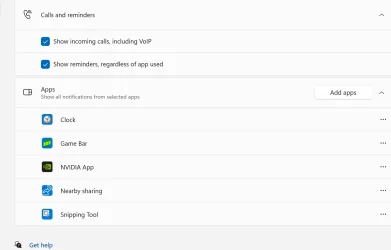
4 Under Calls and reminders, check (on - default) or uncheck (off) Show incoming calls, including VoIP and Show reminders, regardless of app used for what you want. (see screenshot below)

Do_not_disturb_priority_Settings-3.png

5 You can now close Settings if you like.


Option Two

Add Apps to Set Priority Notifications in Settings


1 Open Settings (Win+I).

2 Click/tap on System on the left side, and click/tap on Notifications on the right side. (see screenshot below)


Do_not_disturb_priority_Settings-1.png

3 Click/tap on Set priority notifications. (see screenshot below)

Do_not_disturb_priority_Settings-2.png

4 Under Apps, click/tap on the Add apps button, and select an app you want to add. (see screenshot below)

Do_not_disturb_priority_Settings-4.png

5 When finished adding apps, you can close Settings if you like.


Option Three

Remove Apps from Set Priority Notifications in Settings


1 Open Settings (Win+I).

2 Click/tap on System on the left side, and click/tap on Notifications on the right side. (see screenshot below)


Do_not_disturb_priority_Settings-1.png

3 Click/tap on Set priority notifications. (see screenshot below)

Do_not_disturb_priority_Settings-2.png

4 Under Apps, click/tap on the More options (3 dots) button for the app you want to remove, and click/tap on Remove. (see screenshot below)

Do_not_disturb_priority_Settings-5.png

5 When finished removing apps, you can close Settings if you like.


That's it,
Shawn Brink


Last edited:
Hi,
I'm waiting for the no notifications for hell or high water option to be added :cool:
 

My Computer My Computer

At a glance

Win-7-10-11Pro's10900k & 9940x & 5930kTrident-Z Royal 4000c16 2x16gb & Trident-Z 36...Titan Xp & 1080ti FTW3 & evga 980ti gaming
OS
Win-7-10-11Pro's
Computer type
PC/Desktop
Manufacturer/Model
Acer 17" Nitro 7840sn/ 2x16gb 5600c40/ 4060/ stock 1tb-os/ 4tb sn850x
CPU
10900k & 9940x & 5930k
Motherboard
z490-Apex & x299-Apex & x99-Sabertooth
Memory
Trident-Z Royal 4000c16 2x16gb & Trident-Z 3600c16 4x8gb & 3200c14 4x8gb
Graphics Card(s)
Titan Xp & 1080ti FTW3 & evga 980ti gaming
Sound Card
Onboard Realtek x3
Monitor(s) Displays
1-AOC G2460PG 24"G-Sync 144Hz/ 2nd 1-ASUS VG248QE 24"/ 3rd LG 43" series
Screen Resolution
1920-1080 not sure what the t.v is besides 43" class scales from 1920-1080 perfectly
Hard Drives
2-WD-sn850x 4tb/ 970evo+500gb/ 980 pro 2tb.
PSU
1000p2 & 1200p2 & 850p2
Case
D450 x2 & 1 Test bench in cherry Entertainment center
Cooling
Custom water loops x3 with 2x mora 360mm rads only 980ti gaming air cooled
Keyboard
G710+x3
Mouse
Redragon x3
Internet Speed
xfinity gigabyte
Browser
Firefox
Antivirus
mbam pro
Hi,
I'm waiting for the no notifications for hell or high water option to be added :cool:
You could test turning off notifications completely. ;)


My Computers My Computers

  • At a glance

    Windows 11 Pro for WorkstationsIntel i7-8700K 5 GHz64 GB (4x16GB) G.SKILL TridentZ RGB DDR4 3600...ASUS ROG-STRIX-GTX1080TI-O11G-GAMING (11GB GD...
    OS
    Windows 11 Pro for Workstations
    Computer type
    PC/Desktop
    Manufacturer/Model
    Custom self build
    CPU
    Intel i7-8700K 5 GHz
    Motherboard
    ASUS ROG Maximus XI Formula Z390
    Memory
    64 GB (4x16GB) G.SKILL TridentZ RGB DDR4 3600 MHz (F4-3600C18D-32GTZR)
    Graphics Card(s)
    ASUS ROG-STRIX-GTX1080TI-O11G-GAMING (11GB GDDR5X)
    Sound Card
    Integrated Digital Audio (S/PDIF)
    Monitor(s) Displays
    2 x Samsung Odyssey G75 27"
    Screen Resolution
    2560x1440
    Hard Drives
    1TB Samsung 990 PRO M.2,
    4TB Samsung 990 PRO M.2,
    TerraMaster F8 SSD Plus NAS
    PSU
    Seasonic Prime Titanium 850W
    Case
    Thermaltake Core P3 wall mounted
    Cooling
    Corsair Hydro H115i
    Keyboard
    Amazon Basics Wired Full Keyboard MD005
    Mouse
    Logitech MX Master 4
    Internet Speed
    2 Gbps Download and 100 Mbps Upload
    Browser
    Chrome and Edge
    Antivirus
    Microsoft Defender
    Other Info
    Logitech Z625 speaker system,
    Logitech BRIO 4K Pro webcam,
    HP Color LaserJet Pro MFP M477fdn,
    CyberPower CP1500PFCLCD
    Galaxy S23 Plus phone
  • At a glance

    Windows 11 ProSnapdragon X Elite (12 core) 3.42 GHz16 GB LPDDR5x-7467 MHz
    Operating System
    Windows 11 Pro
    Computer type
    Laptop
    Manufacturer/Model
    Surface Laptop 7 Copilot+ PC
    CPU
    Snapdragon X Elite (12 core) 3.42 GHz
    Memory
    16 GB LPDDR5x-7467 MHz
    Monitor(s) Displays
    15" HDR
    Screen Resolution
    2496 x 1664
    Hard Drives
    1 TB SSD
    Internet Speed
    Wi-Fi 7 and Bluetooth 5.4
    Browser
    Chrome and Edge
    Antivirus
    Microsoft Defender
You could test turning off notifications completely. ;)

Hi,
A new one can't believe I missed it :doh:

I don't get any ms messages only get them from mbam alerts for blocking malvertising which I'm already adding the site to ublock my filters section by them so yeah a little late in the blocking process lol
 

My Computer My Computer

At a glance

Win-7-10-11Pro's10900k & 9940x & 5930kTrident-Z Royal 4000c16 2x16gb & Trident-Z 36...Titan Xp & 1080ti FTW3 & evga 980ti gaming
OS
Win-7-10-11Pro's
Computer type
PC/Desktop
Manufacturer/Model
Acer 17" Nitro 7840sn/ 2x16gb 5600c40/ 4060/ stock 1tb-os/ 4tb sn850x
CPU
10900k & 9940x & 5930k
Motherboard
z490-Apex & x299-Apex & x99-Sabertooth
Memory
Trident-Z Royal 4000c16 2x16gb & Trident-Z 3600c16 4x8gb & 3200c14 4x8gb
Graphics Card(s)
Titan Xp & 1080ti FTW3 & evga 980ti gaming
Sound Card
Onboard Realtek x3
Monitor(s) Displays
1-AOC G2460PG 24"G-Sync 144Hz/ 2nd 1-ASUS VG248QE 24"/ 3rd LG 43" series
Screen Resolution
1920-1080 not sure what the t.v is besides 43" class scales from 1920-1080 perfectly
Hard Drives
2-WD-sn850x 4tb/ 970evo+500gb/ 980 pro 2tb.
PSU
1000p2 & 1200p2 & 850p2
Case
D450 x2 & 1 Test bench in cherry Entertainment center
Cooling
Custom water loops x3 with 2x mora 360mm rads only 980ti gaming air cooled
Keyboard
G710+x3
Mouse
Redragon x3
Internet Speed
xfinity gigabyte
Browser
Firefox
Antivirus
mbam pro
Hello! I know this is an old post but I wanted to ask about microsoft xbox app...after removing it from set priority notifications, I cannot add it back as it is not shown in the add apps option (it wasn't also shown before removing it in add apps)...how to revert it back so as to be shown again in priority notifications? Reinstalling xbox did not fix it... There is not also microsoft xbox app folder in C/ProgramFiles (however there is a folder named ms xbox app in C/users/appdata)....In addition there in no xbox app in windows settings notification so as to toggle it on/off or change its settings to high priority...what kind of bug is it? Should I ignore this bug?
 

Attachments

  • 2025-12-24_23-31.webp
    2025-12-24_23-31.webp
    20.3 KB · Views: 23

My Computer My Computer

At a glance

win 11 pro 25 h2
OS
win 11 pro 25 h2
Computer type
PC/Desktop
Hello! I know this is an old post but I wanted to ask about microsoft xbox app...after removing it from set priority notifications, I cannot add it back as it is not shown in the add apps option (it wasn't also shown before removing it in add apps)...how to revert it back so as to be shown again in priority notifications? Reinstalling xbox did not fix it... There is not also microsoft xbox app folder in C/ProgramFiles (however there is a folder named ms xbox app in C/users/appdata)....In addition there in no xbox app in windows settings notification so as to toggle it on/off or change its settings to high priority...what kind of bug is it? Should I ignore this bug?

Hello, :alien:

I tested on a few systems and VMs with different builds and Insider channels, and they all don't have the Xbox app available to add again.

Looks like we have no choice but to ignore this bug for now.
 

My Computers My Computers

  • At a glance

    Windows 11 Pro for WorkstationsIntel i7-8700K 5 GHz64 GB (4x16GB) G.SKILL TridentZ RGB DDR4 3600...ASUS ROG-STRIX-GTX1080TI-O11G-GAMING (11GB GD...
    OS
    Windows 11 Pro for Workstations
    Computer type
    PC/Desktop
    Manufacturer/Model
    Custom self build
    CPU
    Intel i7-8700K 5 GHz
    Motherboard
    ASUS ROG Maximus XI Formula Z390
    Memory
    64 GB (4x16GB) G.SKILL TridentZ RGB DDR4 3600 MHz (F4-3600C18D-32GTZR)
    Graphics Card(s)
    ASUS ROG-STRIX-GTX1080TI-O11G-GAMING (11GB GDDR5X)
    Sound Card
    Integrated Digital Audio (S/PDIF)
    Monitor(s) Displays
    2 x Samsung Odyssey G75 27"
    Screen Resolution
    2560x1440
    Hard Drives
    1TB Samsung 990 PRO M.2,
    4TB Samsung 990 PRO M.2,
    TerraMaster F8 SSD Plus NAS
    PSU
    Seasonic Prime Titanium 850W
    Case
    Thermaltake Core P3 wall mounted
    Cooling
    Corsair Hydro H115i
    Keyboard
    Amazon Basics Wired Full Keyboard MD005
    Mouse
    Logitech MX Master 4
    Internet Speed
    2 Gbps Download and 100 Mbps Upload
    Browser
    Chrome and Edge
    Antivirus
    Microsoft Defender
    Other Info
    Logitech Z625 speaker system,
    Logitech BRIO 4K Pro webcam,
    HP Color LaserJet Pro MFP M477fdn,
    CyberPower CP1500PFCLCD
    Galaxy S23 Plus phone
  • At a glance

    Windows 11 ProSnapdragon X Elite (12 core) 3.42 GHz16 GB LPDDR5x-7467 MHz
    Operating System
    Windows 11 Pro
    Computer type
    Laptop
    Manufacturer/Model
    Surface Laptop 7 Copilot+ PC
    CPU
    Snapdragon X Elite (12 core) 3.42 GHz
    Memory
    16 GB LPDDR5x-7467 MHz
    Monitor(s) Displays
    15" HDR
    Screen Resolution
    2496 x 1664
    Hard Drives
    1 TB SSD
    Internet Speed
    Wi-Fi 7 and Bluetooth 5.4
    Browser
    Chrome and Edge
    Antivirus
    Microsoft Defender
Hello, :alien:

I tested on a few systems and VMs with different builds and Insider channels, and they all don't have the Xbox app available to add again.

Looks like we have no choice but to ignore this bug for now.
Thank you!! What can you say??? Simple answer: just another Microsoft stupid bug!!! I will ignore it!! Have a nice day!! And merry Christmas!!!
 

My Computer My Computer

At a glance

win 11 pro 25 h2
OS
win 11 pro 25 h2
Computer type
PC/Desktop
Thank you!! What can you say??? Simple answer: just another Microsoft stupid bug!!! I will ignore it!! Have a nice day!! And merry Christmas!!!

I hope the rest of your Christmas is merry. :shawn:
 

My Computers My Computers

  • At a glance

    Windows 11 Pro for WorkstationsIntel i7-8700K 5 GHz64 GB (4x16GB) G.SKILL TridentZ RGB DDR4 3600...ASUS ROG-STRIX-GTX1080TI-O11G-GAMING (11GB GD...
    OS
    Windows 11 Pro for Workstations
    Computer type
    PC/Desktop
    Manufacturer/Model
    Custom self build
    CPU
    Intel i7-8700K 5 GHz
    Motherboard
    ASUS ROG Maximus XI Formula Z390
    Memory
    64 GB (4x16GB) G.SKILL TridentZ RGB DDR4 3600 MHz (F4-3600C18D-32GTZR)
    Graphics Card(s)
    ASUS ROG-STRIX-GTX1080TI-O11G-GAMING (11GB GDDR5X)
    Sound Card
    Integrated Digital Audio (S/PDIF)
    Monitor(s) Displays
    2 x Samsung Odyssey G75 27"
    Screen Resolution
    2560x1440
    Hard Drives
    1TB Samsung 990 PRO M.2,
    4TB Samsung 990 PRO M.2,
    TerraMaster F8 SSD Plus NAS
    PSU
    Seasonic Prime Titanium 850W
    Case
    Thermaltake Core P3 wall mounted
    Cooling
    Corsair Hydro H115i
    Keyboard
    Amazon Basics Wired Full Keyboard MD005
    Mouse
    Logitech MX Master 4
    Internet Speed
    2 Gbps Download and 100 Mbps Upload
    Browser
    Chrome and Edge
    Antivirus
    Microsoft Defender
    Other Info
    Logitech Z625 speaker system,
    Logitech BRIO 4K Pro webcam,
    HP Color LaserJet Pro MFP M477fdn,
    CyberPower CP1500PFCLCD
    Galaxy S23 Plus phone
  • At a glance

    Windows 11 ProSnapdragon X Elite (12 core) 3.42 GHz16 GB LPDDR5x-7467 MHz
    Operating System
    Windows 11 Pro
    Computer type
    Laptop
    Manufacturer/Model
    Surface Laptop 7 Copilot+ PC
    CPU
    Snapdragon X Elite (12 core) 3.42 GHz
    Memory
    16 GB LPDDR5x-7467 MHz
    Monitor(s) Displays
    15" HDR
    Screen Resolution
    2496 x 1664
    Hard Drives
    1 TB SSD
    Internet Speed
    Wi-Fi 7 and Bluetooth 5.4
    Browser
    Chrome and Edge
    Antivirus
    Microsoft Defender

Latest Support Threads

Back
Top Bottom