setting up new PC - why so many Dell components?


hershey4

Active member
Local time
1:12 PM
Posts
40
OS
Windows 11 Pro
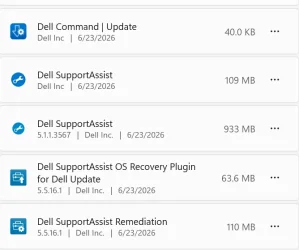
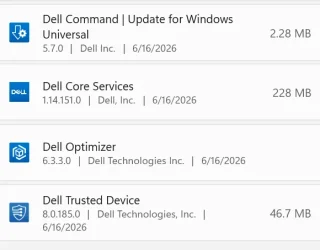
9 apps? Really? I doubt I need them all. I am a strong believer in Less is More. I've seen the domino affect way too many times. How many updates have inadvertently broken something subtle way down the line. Give me clean and lean all day long. I don't want all this protection/hand-holding. Very cynical of software competency these days. I was going to uninstall DellSupportAssist but ran into this article which slowed me down.


even that uninstall has caveats. Why do these hardware manufacturers have to make stuff so complicated? Just let Windows do Windows. Its good enough.
Or give me the choice at startup before your crap is installed and explain what it does and why I need/want it (in plain speak not marketing speak) and what it depends on, if anything. I miss my W7 waaaaaaaaah. :-(

Any words of advice on this topic in general and these particular services?
1783804115989.webp
1783804151365.webp
 

My Computers My Computers

  • At a glance

    Windows 11 ProIntel Ultra 516GB
    OS
    Windows 11 Pro
    Computer type
    PC/Desktop
    Manufacturer/Model
    Dell Pro Slim QCS1250
    CPU
    Intel Ultra 5
    Memory
    16GB
  • At a glance

    Windows 7I78GB
    Operating System
    Windows 7
    Computer type
    PC/Desktop
    Manufacturer/Model
    Dell XPS Studio
    CPU
    I7
    Memory
    8GB
  • Windows 10 Dell Inspiron laptop
I had the same issue , just be careful of what you remove from The Dell software. Some things if you remove them will break your system. In 11/2025 I was advised that the only way to rid yourself would be to perform a Clean Install of Windows. That could be an issue with your Dell Support Warranty. I did not do that as I did not see it as that big of an issue. Just be careful going forward and that would mean restore points and image backups before any action.
 

My Computers My Computers

  • At a glance

    Windows11 Pro 26200.8894Intel Core i9 14900F (24 -Core, 68 MB Total C...32GB DDR5RTX 4080 Super w/610.74
    OS
    Windows11 Pro 26200.8894
    Computer type
    PC/Desktop
    Manufacturer/Model
    Dell Alienware Aurora R16
    CPU
    Intel Core i9 14900F (24 -Core, 68 MB Total Cache)
    Motherboard
    Dell Alienware
    Memory
    32GB DDR5
    Graphics Card(s)
    RTX 4080 Super w/610.74
    Sound Card
    Realtec
    Monitor(s) Displays
    Corsair XENEON 32QHD165
    Screen Resolution
    2560 X 1440
    Hard Drives
    1-2TB Samsung 990 Pro PCIe NVMe M2 SSD
    1-4TB Samsung 990 Pro PCIe NVMe M2 SSD
    PSU
    1000 Watt Platinum Dell
    Case
    Alienware
    Cooling
    Liquid Closed Loop
    Keyboard
    Corsair Strafe RGB
    Mouse
    Logitech MK270 Wireless
    Internet Speed
    100Gb's Down-20 Up
    Browser
    Firefox 152.0.6
    Antivirus
    Defender
    Other Info
    Very Quiet And Fast
    CyberPower UPS CP1500PFCLCD
  • At a glance

    PClinuxOS Mate (2025.7)13th Gen Inter(R) Core(TM) i3-1315U64 GB DDR4 @3200 MHz.Internal
    Operating System
    PClinuxOS Mate (2025.7)
    Computer type
    PC/Desktop
    Manufacturer/Model
    Intel
    CPU
    13th Gen Inter(R) Core(TM) i3-1315U
    Motherboard
    Intel
    Memory
    64 GB DDR4 @3200 MHz.
    Graphics card(s)
    Internal
    Sound Card
    None
    Monitor(s) Displays
    Dell 2419HGCF
    Screen Resolution
    1920 X 1080
    Hard Drives
    SAMSUNG 980 PRO SSD 2TB, PCIe 4.0 M.2 2280
    PSU
    Chicony 30 Watt
    Case
    Small
    Keyboard
    Dell
    Mouse
    Razor
    Internet Speed
    1GB
    Browser
    Slimjet

My Computers My Computers

  • At a glance

    Windows 11 Pro 25H2 build: (26200.7623)32GB
    OS
    Windows 11 Pro 25H2 build: (26200.7623)
    Computer type
    Laptop
    Manufacturer/Model
    Microsoft Surface Pro
    Memory
    32GB
  • At a glance

    Microsoft 25H2 ProIntel Core Ultra 764GBIntel Integrated Graphics
    Operating System
    Microsoft 25H2 Pro
    Computer type
    Laptop
    Manufacturer/Model
    Dell Pro 14 - PC14250
    CPU
    Intel Core Ultra 7
    Memory
    64GB
    Graphics card(s)
    Intel Integrated Graphics
    Hard Drives
    Micron 1TB SSD

My Computers My Computers

  • At a glance

    Windows11 Pro 26200.8894Intel Core i9 14900F (24 -Core, 68 MB Total C...32GB DDR5RTX 4080 Super w/610.74
    OS
    Windows11 Pro 26200.8894
    Computer type
    PC/Desktop
    Manufacturer/Model
    Dell Alienware Aurora R16
    CPU
    Intel Core i9 14900F (24 -Core, 68 MB Total Cache)
    Motherboard
    Dell Alienware
    Memory
    32GB DDR5
    Graphics Card(s)
    RTX 4080 Super w/610.74
    Sound Card
    Realtec
    Monitor(s) Displays
    Corsair XENEON 32QHD165
    Screen Resolution
    2560 X 1440
    Hard Drives
    1-2TB Samsung 990 Pro PCIe NVMe M2 SSD
    1-4TB Samsung 990 Pro PCIe NVMe M2 SSD
    PSU
    1000 Watt Platinum Dell
    Case
    Alienware
    Cooling
    Liquid Closed Loop
    Keyboard
    Corsair Strafe RGB
    Mouse
    Logitech MK270 Wireless
    Internet Speed
    100Gb's Down-20 Up
    Browser
    Firefox 152.0.6
    Antivirus
    Defender
    Other Info
    Very Quiet And Fast
    CyberPower UPS CP1500PFCLCD
  • At a glance

    PClinuxOS Mate (2025.7)13th Gen Inter(R) Core(TM) i3-1315U64 GB DDR4 @3200 MHz.Internal
    Operating System
    PClinuxOS Mate (2025.7)
    Computer type
    PC/Desktop
    Manufacturer/Model
    Intel
    CPU
    13th Gen Inter(R) Core(TM) i3-1315U
    Motherboard
    Intel
    Memory
    64 GB DDR4 @3200 MHz.
    Graphics card(s)
    Internal
    Sound Card
    None
    Monitor(s) Displays
    Dell 2419HGCF
    Screen Resolution
    1920 X 1080
    Hard Drives
    SAMSUNG 980 PRO SSD 2TB, PCIe 4.0 M.2 2280
    PSU
    Chicony 30 Watt
    Case
    Small
    Keyboard
    Dell
    Mouse
    Razor
    Internet Speed
    1GB
    Browser
    Slimjet
That could be an issue with your Dell Support Warranty
Why on earth would that cause an issue with your warranty? I always, always, always do a clean install on every single machine I ever get. That has never affected my warranty. I've had warranty work done several times on systems that in no way had anywhere near a factory installation.

Besides, if that is a concern, make an image backup first.

My procedure with every machine I ever get: Make an image, "just in case". Do a clean install. Install every single driver and piece of software one by one, note what each one does to determine what I need and what I don't. Develop a plan including the exact order in which to load every driver and piece of software. Now I have a step-by-step plan in case I ever need to reinstall again. That's the simplified procedure. There is actually more to it than that, but the point is that I develop a plan for each machine individually so that I can easily do a clean install in the future.

Once I have a plan, I can generally perform a bear metal installation including all drivers and software for a system in under 15 minutes.
 

My Computers My Computers

  • At a glance

    Win11 Pro 25H2 (RTM+)Intel i7-14650HX32 GBNo GPU - Built-in Intel Graphics
    OS
    Win11 Pro 25H2 (RTM+)
    Computer type
    PC/Desktop
    Manufacturer/Model
    Acemagic
    CPU
    Intel i7-14650HX
    Memory
    32 GB
    Graphics Card(s)
    No GPU - Built-in Intel Graphics
    Sound Card
    Integrated
    Monitor(s) Displays
    Varies as machine will often be moved to locations with different monitors
    Screen Resolution
    Varies
    Hard Drives
    1 x 1TB Gen 4 NVMe SSD
    PSU
    120W Power Brick
    Keyboard
    Corsair K70 Max RGB Magnetic Keyboard
    Mouse
    Logitech MX Master 3
    Internet Speed
    1Gb Up / 1 Gb Down
    Browser
    Edge
    Antivirus
    Windows Defender
  • At a glance

    Win11 Pro 25H2 (RTM+)Intel i7-1255U16 GBIntel Iris Xe Graphics
    Operating System
    Win11 Pro 25H2 (RTM+)
    Computer type
    Laptop
    Manufacturer/Model
    Lenovo ThinkBook 13x Gen 2
    CPU
    Intel i7-1255U
    Memory
    16 GB
    Graphics card(s)
    Intel Iris Xe Graphics
    Sound Card
    Realtek® ALC3306-CG codec
    Monitor(s) Displays
    13.3-inch IPS Display
    Screen Resolution
    WQXGA (2560 x 1600)
    Hard Drives
    2 TB 4 x 4 NVMe SSD
    PSU
    USB-C / Thunderbolt 4 Power / Charging
    Keyboard
    Backlit, spill resistant keyboard
    Mouse
    Buttonless Glass Precision Touchpad
    Internet Speed
    1Gb Up / 1Gb Down
    Browser
    Edge
    Antivirus
    Windows Defender
    Other Info
    WiFi 6e / Bluetooth 5.1 / Facial Recognition / Fingerprint Sensor / ToF (Time of Flight) Human Presence Sensor
Why on earth would that cause an issue with your warranty? I always, always, always do a clean install on every single machine I ever get. That has never affected my warranty. I've had warranty work done several times on systems that in no way had anywhere near a factory installation.

Besides, if that is a concern, make an image backup first.

My procedure with every machine I ever get: Make an image, "just in case". Do a clean install. Install every single driver and piece of software one by one, note what each one does to determine what I need and what I don't. Develop a plan including the exact order in which to load every driver and piece of software. Now I have a step-by-step plan in case I ever need to reinstall again. That's the simplified procedure. There is actually more to it than that, but the point is that I develop a plan for each machine individually so that I can easily do a clean install in the future.

Once I have a plan, I can generally perform a bear metal installation including all drivers and software for a system in under 15 minutes.
Ask Dell, not the warranty their support. I posted to the OP to make a backup image and restore points.🤷‍♂️
 

My Computers My Computers

  • At a glance

    Windows11 Pro 26200.8894Intel Core i9 14900F (24 -Core, 68 MB Total C...32GB DDR5RTX 4080 Super w/610.74
    OS
    Windows11 Pro 26200.8894
    Computer type
    PC/Desktop
    Manufacturer/Model
    Dell Alienware Aurora R16
    CPU
    Intel Core i9 14900F (24 -Core, 68 MB Total Cache)
    Motherboard
    Dell Alienware
    Memory
    32GB DDR5
    Graphics Card(s)
    RTX 4080 Super w/610.74
    Sound Card
    Realtec
    Monitor(s) Displays
    Corsair XENEON 32QHD165
    Screen Resolution
    2560 X 1440
    Hard Drives
    1-2TB Samsung 990 Pro PCIe NVMe M2 SSD
    1-4TB Samsung 990 Pro PCIe NVMe M2 SSD
    PSU
    1000 Watt Platinum Dell
    Case
    Alienware
    Cooling
    Liquid Closed Loop
    Keyboard
    Corsair Strafe RGB
    Mouse
    Logitech MK270 Wireless
    Internet Speed
    100Gb's Down-20 Up
    Browser
    Firefox 152.0.6
    Antivirus
    Defender
    Other Info
    Very Quiet And Fast
    CyberPower UPS CP1500PFCLCD
  • At a glance

    PClinuxOS Mate (2025.7)13th Gen Inter(R) Core(TM) i3-1315U64 GB DDR4 @3200 MHz.Internal
    Operating System
    PClinuxOS Mate (2025.7)
    Computer type
    PC/Desktop
    Manufacturer/Model
    Intel
    CPU
    13th Gen Inter(R) Core(TM) i3-1315U
    Motherboard
    Intel
    Memory
    64 GB DDR4 @3200 MHz.
    Graphics card(s)
    Internal
    Sound Card
    None
    Monitor(s) Displays
    Dell 2419HGCF
    Screen Resolution
    1920 X 1080
    Hard Drives
    SAMSUNG 980 PRO SSD 2TB, PCIe 4.0 M.2 2280
    PSU
    Chicony 30 Watt
    Case
    Small
    Keyboard
    Dell
    Mouse
    Razor
    Internet Speed
    1GB
    Browser
    Slimjet
Ask Dell, not the warranty their support.
That's interesting. I do have to admit that it has been years since I dealt with Dell, ever since I had to blacklist them :-). But even back then, service or support was never denied to me even though I had my own clean install on the system.

But I do know that they like you to put back on a factory installation sometimes to see if a particular problem is resolved with their "known good" configuration. I'm always willing to indulge tests like that because I can always do a clean install again later.
 

My Computers My Computers

  • At a glance

    Win11 Pro 25H2 (RTM+)Intel i7-14650HX32 GBNo GPU - Built-in Intel Graphics
    OS
    Win11 Pro 25H2 (RTM+)
    Computer type
    PC/Desktop
    Manufacturer/Model
    Acemagic
    CPU
    Intel i7-14650HX
    Memory
    32 GB
    Graphics Card(s)
    No GPU - Built-in Intel Graphics
    Sound Card
    Integrated
    Monitor(s) Displays
    Varies as machine will often be moved to locations with different monitors
    Screen Resolution
    Varies
    Hard Drives
    1 x 1TB Gen 4 NVMe SSD
    PSU
    120W Power Brick
    Keyboard
    Corsair K70 Max RGB Magnetic Keyboard
    Mouse
    Logitech MX Master 3
    Internet Speed
    1Gb Up / 1 Gb Down
    Browser
    Edge
    Antivirus
    Windows Defender
  • At a glance

    Win11 Pro 25H2 (RTM+)Intel i7-1255U16 GBIntel Iris Xe Graphics
    Operating System
    Win11 Pro 25H2 (RTM+)
    Computer type
    Laptop
    Manufacturer/Model
    Lenovo ThinkBook 13x Gen 2
    CPU
    Intel i7-1255U
    Memory
    16 GB
    Graphics card(s)
    Intel Iris Xe Graphics
    Sound Card
    Realtek® ALC3306-CG codec
    Monitor(s) Displays
    13.3-inch IPS Display
    Screen Resolution
    WQXGA (2560 x 1600)
    Hard Drives
    2 TB 4 x 4 NVMe SSD
    PSU
    USB-C / Thunderbolt 4 Power / Charging
    Keyboard
    Backlit, spill resistant keyboard
    Mouse
    Buttonless Glass Precision Touchpad
    Internet Speed
    1Gb Up / 1Gb Down
    Browser
    Edge
    Antivirus
    Windows Defender
    Other Info
    WiFi 6e / Bluetooth 5.1 / Facial Recognition / Fingerprint Sensor / ToF (Time of Flight) Human Presence Sensor
So sounds like it's all or nothing to be safe. I know how to make a restore point but not proficient in the least with image stuff and recovery.

I went to Dell to look up one of them to see what it says.
it does provide some explanation of its mission (includes data collection. of course that stood out to me!). But the website has a button to see if this article applies to your product so I engaged and it came back with
1783810903553.webp

Then why the heck is it running on my Dell Pro Slim QCS1250? Does that imply I can uninstall it? Not unusual for OEMs to bundle everything together whether you need it or not. What do they care if they junk up your system that you paid premium dollars for. They can do brainless software packaging. argggggghhhhhhhhhhhhhhh
 

My Computers My Computers

  • At a glance

    Windows 11 ProIntel Ultra 516GB
    OS
    Windows 11 Pro
    Computer type
    PC/Desktop
    Manufacturer/Model
    Dell Pro Slim QCS1250
    CPU
    Intel Ultra 5
    Memory
    16GB
  • At a glance

    Windows 7I78GB
    Operating System
    Windows 7
    Computer type
    PC/Desktop
    Manufacturer/Model
    Dell XPS Studio
    CPU
    I7
    Memory
    8GB
  • Windows 10 Dell Inspiron laptop
You can use an app called Hasleo to make a backup. A link is below to their site. It is rather straight Forward and easy to use. Just back up to an external Drive.

Hasleo
 

My Computers My Computers

  • At a glance

    Windows11 Pro 26200.8894Intel Core i9 14900F (24 -Core, 68 MB Total C...32GB DDR5RTX 4080 Super w/610.74
    OS
    Windows11 Pro 26200.8894
    Computer type
    PC/Desktop
    Manufacturer/Model
    Dell Alienware Aurora R16
    CPU
    Intel Core i9 14900F (24 -Core, 68 MB Total Cache)
    Motherboard
    Dell Alienware
    Memory
    32GB DDR5
    Graphics Card(s)
    RTX 4080 Super w/610.74
    Sound Card
    Realtec
    Monitor(s) Displays
    Corsair XENEON 32QHD165
    Screen Resolution
    2560 X 1440
    Hard Drives
    1-2TB Samsung 990 Pro PCIe NVMe M2 SSD
    1-4TB Samsung 990 Pro PCIe NVMe M2 SSD
    PSU
    1000 Watt Platinum Dell
    Case
    Alienware
    Cooling
    Liquid Closed Loop
    Keyboard
    Corsair Strafe RGB
    Mouse
    Logitech MK270 Wireless
    Internet Speed
    100Gb's Down-20 Up
    Browser
    Firefox 152.0.6
    Antivirus
    Defender
    Other Info
    Very Quiet And Fast
    CyberPower UPS CP1500PFCLCD
  • At a glance

    PClinuxOS Mate (2025.7)13th Gen Inter(R) Core(TM) i3-1315U64 GB DDR4 @3200 MHz.Internal
    Operating System
    PClinuxOS Mate (2025.7)
    Computer type
    PC/Desktop
    Manufacturer/Model
    Intel
    CPU
    13th Gen Inter(R) Core(TM) i3-1315U
    Motherboard
    Intel
    Memory
    64 GB DDR4 @3200 MHz.
    Graphics card(s)
    Internal
    Sound Card
    None
    Monitor(s) Displays
    Dell 2419HGCF
    Screen Resolution
    1920 X 1080
    Hard Drives
    SAMSUNG 980 PRO SSD 2TB, PCIe 4.0 M.2 2280
    PSU
    Chicony 30 Watt
    Case
    Small
    Keyboard
    Dell
    Mouse
    Razor
    Internet Speed
    1GB
    Browser
    Slimjet
I own 3 Dells. The following uses of these apps may help you choose what you want to uninstall.

Dell Optimizer - Dell Optimizer is an artificial intelligence (AI) and machine learning (ML) software application built exclusively for select Dell computers. It automatically analyzes your specific usage patterns and tailors system settings to improve application performance, battery life, audio quality, and network connectivity.

Dell Support Assist - a pre-installed software application on Dell computers that automatically monitors your PC's health, optimizes performance, and manages system updates. It features automated driver and BIOS updates, hardware diagnostic scans, and AI-driven predictive issue detection.

Dell Core Services - a pre-installed software package that acts as a foundational framework for Dell applications, providing foundational system management. It supports and unifies various Dell background tools and agents, ensuring they work together to maintain your system.

Dell Trusted Device - a security software and telemetry application that protects computers below the operating system. Formerly known as Dell BIOS Verification, it helps IT administrators secure hardware, detect BIOS tampering, and monitor for indicators of attack.

Dell Command Update- Dell Command | Update is a standalone application that automatically downloads and installs critical updates—such as BIOS revisions, firmware, drivers, and application updates—specifically for Dell commercial client hardware. It simplifies maintenance and ensures your hardware runs optimally and securely. I do use this application. It will not run if you uninstall Dell Core Services. I also have disabled Dell Command Update from running at startup and use it only on demand to update my drivers and UEFI bios. Dell releases A LOT of bios updates.
 

My Computers My Computers

  • At a glance

    Windows 11 Pro 25H2 26200.8875i9-10900 10 core 20 threads32 gbnone-Intel UHD Graphics 630
    OS
    Windows 11 Pro 25H2 26200.8875
    Computer type
    PC/Desktop
    Manufacturer/Model
    Dell Optiplex 7080
    CPU
    i9-10900 10 core 20 threads
    Motherboard
    DELL 0J37VM
    Memory
    32 gb
    Graphics Card(s)
    none-Intel UHD Graphics 630
    Sound Card
    Integrated Realtek
    Monitor(s) Displays
    Benq 27
    Screen Resolution
    2560x1440
    Hard Drives
    2x1tb Solidigm m.2 nvme /External drives 512gb Samsung m.2 sata+2tb Kingston m2.nvme
    PSU
    500w
    Case
    MT
    Cooling
    Dell Premium
    Keyboard
    Logitech wired
    Mouse
    Logitech wireless
    Internet Speed
    so slow I'm too embarrassed to tell
    Browser
    #1 Edge #2 Firefox
    Antivirus
    Defender+MWB Premium
  • At a glance

    Windows 11 Pro 24H2 26200.8875AMD Ryzen 7 6800U32 gbintegrated
    Operating System
    Windows 11 Pro 24H2 26200.8875
    Computer type
    PC/Desktop
    Manufacturer/Model
    Beelink Mini PC SER5
    CPU
    AMD Ryzen 7 6800U
    Memory
    32 gb
    Graphics card(s)
    integrated
    Sound Card
    integrated
    Monitor(s) Displays
    Benq 27
    Screen Resolution
    2560x1440
    Hard Drives
    1TB Crucial nvme
    Keyboard
    Logitech wired
    Mouse
    Logitech wireless
    Internet Speed
    still too embarrassed to tell
    Browser
    Firefox
    Antivirus
    Defender
    Other Info
    System 3 is non compliant Dell 9020 i7-4770/24gb ram Win11 PRO 26200.8875
Are any of the programmes in Task Manager>Startup Apps?
If so then disable one of them,power off shutdown then restart and see if that has any effect.
Continue in that method which may be safer than uninstalling.
 

My Computer My Computer

At a glance

win 10amd ryzen 5-2600ng skill sniper x 16gbnvidea gtx 1050
OS
win 10
Computer type
PC/Desktop
Manufacturer/Model
home built
CPU
amd ryzen 5-2600
Motherboard
gigabyte b450m-ds3h
Memory
ng skill sniper x 16gb
Graphics Card(s)
nvidea gtx 1050
Monitor(s) Displays
benq fp 92
Hard Drives
samsung 860 evo 500gb m2 ssd
PSU
antec ea550g
Case
nzxt noctis 450
Browser
edge
My System One is a new Dell XPS 16 DA16260.

I set it up on May 1 with a clean install and then downloaded the Dell Command | Update app from Dell. I run it every morning for BIOS and driver updates before I run Windows Update. Its run totally problem free for almost 3 months now. Click on My Computers below for the specs.
 

My Computers My Computers

  • At a glance

    Windows 11 ProIntel Series 3 Core Ultra X9 388H64GB LPDDR5x 9600 MT/sIntel Arc graphics B390 Panther Lake
    OS
    Windows 11 Pro
    Computer type
    Laptop
    Manufacturer/Model
    Dell XPS 16 DA16260
    CPU
    Intel Series 3 Core Ultra X9 388H
    Memory
    64GB LPDDR5x 9600 MT/s
    Graphics Card(s)
    Intel Arc graphics B390 Panther Lake
    Monitor(s) Displays
    16" 3.2K Tandem OLED Infinity Edge
    Screen Resolution
    3200 x 2000 16:10 236 PPI
    Hard Drives
    1 Terabyte M.2 PCIe NVMe SSD
    Case
    Black Anodized Aluminum
    Cooling
    Vapor Chamber Cooling
    Mouse
    None
    Internet Speed
    942 Mbps Netgear Mesh + 2 Satellites
    Browser
    Microsoft Edge (Chromium)
    Antivirus
    Windows Security (Defender)
    Other Info
    NPU delivering 67 TOPS
    Microsoft 365 subscription
    Microsoft Office 365
    Microsoft OneDrive 1TB Cloud
    Microsoft Visual Studio
    Microsoft Visual Studio Code
    Microsoft Sysinternals Suite
    Microsoft BitLocker
    Microsoft Copilot
    Dell Support Assist
    Dell Command | Update
    Macrium Reflect X subscription
    1Password Password Manager
    Amazon Kindle for PC
    Lightroom/Photoshop subscription
    Interactive Brokers Trader Workstation
  • At a glance

    Windows 11 ProSnapdragon® X Elite (12 Core) with Hexagon NP...32GB LPDDR5x 8448 MT/sIntegrated Adreno GPU
    Operating System
    Windows 11 Pro
    Computer type
    Laptop
    Manufacturer/Model
    Microsoft Surface Laptop 7
    CPU
    Snapdragon® X Elite (12 Core) with Hexagon NPU delivering 45 TOPS
    Memory
    32GB LPDDR5x 8448 MT/s
    Graphics card(s)
    Integrated Adreno GPU
    Sound Card
    Omnisonic speakers with Dolby Atmos spatial sound
    Monitor(s) Displays
    13.8″ PixelSense Flow touchscreen 120 Hz 600 NIT
    Screen Resolution
    2304 × 1536 (201 PPI), 3:2 aspect ratio
    Hard Drives
    1 TB PCIe NVMe Gen 4 SSD
    Case
    Black Anodized Aluminum
    Cooling
    Vapor Chamber Cooling
    Mouse
    None
    Internet Speed
    942 Mbps Netgear Mesh + 2 Satellites
    Browser
    Microsoft Edge (Chromium)
    Antivirus
    Windows Security (Defender)
    Other Info
    Microsoft 365 subscription (Office)
    Microsoft Office 365
    Microsoft OneDrive 1TB Cloud
    Microsoft Visual Studio 2026
    Microsoft Visual Studio Code
    Interactive Brokers Trader Workstation
    Lightroom/Photoshop subscription
    1Password Password Manager
    Microsoft Sysinternals
    Amazon Kindle for PC
    Microsoft BitLocker
    Microsoft Copilot
Most Dell bloatware isn't needed apart from some utilities needed for PC control e.g. screen brightness buttons. Dell Support Assist in particular is poorly designed and caused BSODs on a friend's laptop I fixed and similar issues have been reported here by others.
 
Last edited:

My Computer My Computer

At a glance

Windows 11 ProCore i7-13700K64 GB Kingston Fury Beast DDR5Gigabyte GeForce RTX 2060 Super Gaming OC 8G
OS
Windows 11 Pro
Computer type
PC/Desktop
Manufacturer/Model
Self build
CPU
Core i7-13700K
Motherboard
Asus TUF Gaming Plus WiFi Z790
Memory
64 GB Kingston Fury Beast DDR5
Graphics Card(s)
Gigabyte GeForce RTX 2060 Super Gaming OC 8G
Sound Card
Realtek S1200A
Monitor(s) Displays
Viewsonic VP2770 & Dell (secondary)
Screen Resolution
2560 x 1440
Hard Drives
Kingston KC3000 2TB NVME SSD & SATA HDDs & SSD
PSU
EVGA SuperNova G2 850W
Case
Nanoxia Deep Silence 1
Cooling
Noctua NH-D14
Keyboard
Microsoft Digital Media Pro
Mouse
Logitech Wireless
Internet Speed
80 Mb / s
Browser
Chrome
Antivirus
Defender, Malwarebytes Free & AdwCleaner
I uninstalled Dell Remediation and Supportassist due to the previous update which caused BSOD. I've no wish to reinstall them as both have been problematic over the years. I use Dell Update to check for drivers which is fine for me. Yesterday, when I ran Dell Update I was offered the Dell OS Recovery Tools update which I assume is Dell Remediation again which I haven't installed. I only uninstalled Remediation and the Plugin (which was reinstalled by DU). Is there anything else I should have uninstalled to stop Remediation being offered again? Thanks.
 

My Computer My Computer

At a glance

Windows 11 Home
OS
Windows 11 Home
@hershey4 You can uninstall any of these things you want. The Pro Slim is a business class machine, and the notion that removing this software affects your warranty or support is absurd.

I have hundreds of this same model running without most of the software you listed, and Dell never complains. We do use Dell Command | Update, but that’s it.
 

My Computer My Computer

At a glance

Windows 11 Enterprise 25H2 [rev. 8893]
OS
Windows 11 Enterprise 25H2 [rev. 8893]
Is there anything else I should have uninstalled to stop Remediation being offered again? Thanks.
Mitch, The only Dell apps I have installed are Dell Core Services and Dell Command Update.

When using Dell Command Update I have found no way to permanently exclude anything that DCU offers. If there is a way, someone please let me know.

I converted from RAID to AHCI a long time ago and uninstalled Intel Rapid Storage Controller (IRST) driver but DCU offers it every time. When I run DCU, I just uncheck it and go on knowing I willl see the driver offered again the next time I run DCU. Same goes for Support Assist Remediation. If it is offered, I uncheck it.
This is why I have stopped DCU from automatically running at start up. I do not want to take a chance that the app or the driver gets automatically installed.
Unlike @TraderGary I have no set schedule in running DCU. Usually once a month or so, whenever I think about running it.
----------------------------
My machine is 4 years old. I have had 32 UEfI bios updates during this time, all managed by DCU. This is why I strongly recommend any Dell user to use DCU, whether it be automatic or manually, dependent on your skill level.

And to anyone who thinks uninstalling Dell apps affects his warranty, I can confidently say that is untrue. If you have a warranty issue, Dell may ask you to temporarily reinstall Support Assist while they remotely work on your machine, but that it it. I know because early on I worked with Dell Support many times before this PC was straightened out.

Also to anyone who runs across this thread, dependent on whether your Dell is a business class or consumer class machine, the number of Dell apps you see installed are different.
 

My Computers My Computers

  • At a glance

    Windows 11 Pro 25H2 26200.8875i9-10900 10 core 20 threads32 gbnone-Intel UHD Graphics 630
    OS
    Windows 11 Pro 25H2 26200.8875
    Computer type
    PC/Desktop
    Manufacturer/Model
    Dell Optiplex 7080
    CPU
    i9-10900 10 core 20 threads
    Motherboard
    DELL 0J37VM
    Memory
    32 gb
    Graphics Card(s)
    none-Intel UHD Graphics 630
    Sound Card
    Integrated Realtek
    Monitor(s) Displays
    Benq 27
    Screen Resolution
    2560x1440
    Hard Drives
    2x1tb Solidigm m.2 nvme /External drives 512gb Samsung m.2 sata+2tb Kingston m2.nvme
    PSU
    500w
    Case
    MT
    Cooling
    Dell Premium
    Keyboard
    Logitech wired
    Mouse
    Logitech wireless
    Internet Speed
    so slow I'm too embarrassed to tell
    Browser
    #1 Edge #2 Firefox
    Antivirus
    Defender+MWB Premium
  • At a glance

    Windows 11 Pro 24H2 26200.8875AMD Ryzen 7 6800U32 gbintegrated
    Operating System
    Windows 11 Pro 24H2 26200.8875
    Computer type
    PC/Desktop
    Manufacturer/Model
    Beelink Mini PC SER5
    CPU
    AMD Ryzen 7 6800U
    Memory
    32 gb
    Graphics card(s)
    integrated
    Sound Card
    integrated
    Monitor(s) Displays
    Benq 27
    Screen Resolution
    2560x1440
    Hard Drives
    1TB Crucial nvme
    Keyboard
    Logitech wired
    Mouse
    Logitech wireless
    Internet Speed
    still too embarrassed to tell
    Browser
    Firefox
    Antivirus
    Defender
    Other Info
    System 3 is non compliant Dell 9020 i7-4770/24gb ram Win11 PRO 26200.8875
@hershey4 You can uninstall any of these things you want. The Pro Slim is a business class machine, and the notion that removing this software affects your warranty or support is absurd.
FWIW the Pro had a steep sale discount over the Home version and a little more customization available, but mostly I thought the 3 year warranty was worth the extra ~$50 the discounted Pro cost. (even though I never get extended warranties when offered... somehow this seemed different)
 

My Computers My Computers

  • At a glance

    Windows 11 ProIntel Ultra 516GB
    OS
    Windows 11 Pro
    Computer type
    PC/Desktop
    Manufacturer/Model
    Dell Pro Slim QCS1250
    CPU
    Intel Ultra 5
    Memory
    16GB
  • At a glance

    Windows 7I78GB
    Operating System
    Windows 7
    Computer type
    PC/Desktop
    Manufacturer/Model
    Dell XPS Studio
    CPU
    I7
    Memory
    8GB
  • Windows 10 Dell Inspiron laptop
Are any of the programmes in Task Manager>Startup Apps?
If so then disable one of them,power off shutdown then restart and see if that has any effect.
Continue in that method which may be safer than uninstalling.
Good idea!! Thanks.
 

My Computers My Computers

  • At a glance

    Windows 11 ProIntel Ultra 516GB
    OS
    Windows 11 Pro
    Computer type
    PC/Desktop
    Manufacturer/Model
    Dell Pro Slim QCS1250
    CPU
    Intel Ultra 5
    Memory
    16GB
  • At a glance

    Windows 7I78GB
    Operating System
    Windows 7
    Computer type
    PC/Desktop
    Manufacturer/Model
    Dell XPS Studio
    CPU
    I7
    Memory
    8GB
  • Windows 10 Dell Inspiron laptop
My machine is 4 years old. I have had 32 UEfI bios updates during this time, all managed by DCU.

My W7 PC is17 years old still running and had no bios updates during that time. And no Windows or Dell updates in the past 10 (?) years. And no driver updates afaik. Everything works fine. Chrome has not had updates in the past 3-4 years and now occasionally showing its age.

Why are so many updates needed?

If the answer is security, why have I never had a malware incident? (been computing since 90s). I suspect W7 stopped being in malware radar some time ago. My usage is admittedly very low risk. I would like the option to control the severity of hand-holding. Similar to the UAC lever. I'm willing to risk running my own PC!

sure software is more complex now and maybe more vulnerable... but WIndows maturity should offset those risks

sorry... soapbox gene kicked in...

Dell may ask you to temporarily reinstall Support Assist while they remotely work on your machine, but that it it. I know because early on I worked with Dell Support many times before this PC was straightened out.
Me too. I had a problem with a new Dell laptop several years ago and I recall they did install stuff to diagnose/repair too. (battery wouldn't take a charge... new MOBO needed. Even had a house call. It was great service!! )

Also to anyone who runs across this thread, dependent on whether your Dell is a business class or consumer class machine, the number of Dell apps you see installed are different.

Ah! as I was making my PRO/CON list during purchase, that would have been a CON! But probably not enough to sway the choice. The business model had a super great sale price going.
 

My Computers My Computers

  • At a glance

    Windows 11 ProIntel Ultra 516GB
    OS
    Windows 11 Pro
    Computer type
    PC/Desktop
    Manufacturer/Model
    Dell Pro Slim QCS1250
    CPU
    Intel Ultra 5
    Memory
    16GB
  • At a glance

    Windows 7I78GB
    Operating System
    Windows 7
    Computer type
    PC/Desktop
    Manufacturer/Model
    Dell XPS Studio
    CPU
    I7
    Memory
    8GB
  • Windows 10 Dell Inspiron laptop
I own 3 Dells. The following uses of these apps may help you choose what you want to uninstall.
Exactly what I was looking for!! Thank you Thank you!
 

My Computers My Computers

  • At a glance

    Windows 11 ProIntel Ultra 516GB
    OS
    Windows 11 Pro
    Computer type
    PC/Desktop
    Manufacturer/Model
    Dell Pro Slim QCS1250
    CPU
    Intel Ultra 5
    Memory
    16GB
  • At a glance

    Windows 7I78GB
    Operating System
    Windows 7
    Computer type
    PC/Desktop
    Manufacturer/Model
    Dell XPS Studio
    CPU
    I7
    Memory
    8GB
  • Windows 10 Dell Inspiron laptop
Back
Top Bottom