Severe Windows 11 Corruption on ASUS Vivobook K513EQ: In-Place Upgrade Fails, and Storage Invisible


Seeker

New member
Local time
10:33 PM
Posts
5
OS
Windows 11
System Specs:
  • Laptop: ASUS Vivobook K513EQ
  • CPU: Intel Core i5-1135G7
  • OS: Windows 11

Problem
My system has become deeply unstable and corrupted after running Windows Update a few weeks ago (the machine had not been updated for about half a year). The updates completed, but the OS is now exhibiting severe stability and UI issues.

Symptoms
  • Shutdown Crash: Shutting down or disabling Windows via the Start Menu triggers a memory writing error: "The instruction at 0x... referenced memory at 0x... The memory could not be written". Note that the RAM has been fully stress-tested and returned no errors.
  • Severe UI Glitches: In file removal/confirmation dialog boxes, the "Apply to all" checkbox and the borders/frames of buttons are completely invisible. Only the raw text shows, though the invisible checkboxes are still clickable if you blind-click them.
  • Task Manager Bug: Task Manager fails to launch on the first attempt, throwing a DLL error in the Event Viewer history. It only successfully opens on the second attempt.
  • Broken Recovery Environment (WinRE): The built-in recovery options just crash/restart the Settings process. Booting into the built-in Recovery Environment fails to connect to Wi-Fi, claiming the password is incorrect (it isn't).

What I tried
  1. SFC & DISM (Online): Running sfc /scannow and dism completes successfully without real result.
  2. In-Place Upgrades: Attempted to run an In-Place Upgrade/Repair using official Windows ISOs (tried both 24H2 and 25H2 builds). Both threw errors and failed to complete.
  3. Windows Media Creation Tool (USB): Created a bootable installation USB. When launching the recovery options from it, it just restarted the loop.
  4. The Storage Roadblock: Dropped into Command Prompt via the USB installer (Shift + F10) to try offline DISM, but running diskpart -> list volume only displayed the USB drive itself (ESD-USB). The internal storage drive is not detected in this environment.

Extra details
I need to find a way to resolve this corruption and get the system stable again without wiping my drive. What should my next troubleshooting steps be given that offline recovery tools cannot see the internal drive and online repair tools freeze or fail?
 
Windows Build/Version
24H2 (build 26100.8655)
Last edited:

My Computer My Computer

At a glance

Windows 11Intel Core i5-1135G7Nvidia MX350
OS
Windows 11
Computer type
Laptop
Manufacturer/Model
Asus K513EQ
CPU
Intel Core i5-1135G7
Graphics Card(s)
Nvidia MX350
offline recovery tools cannot see the internal drive
This seems odd.. on the one hand the O/S appears to be booting - at least in some fashion, but on the other you say the drive can't be seen.. do you mean the entire drive, or one partition on the drive?

Have you done the obvious basic check- test the physical disk by one means or another using
- Crystal Diskinfo (free) (portable version available)
or perhaps if you can't manage that

If those pass run
chkdsk c: /scan
from an admin command prompt - result on screen, look at end to see result.

Note that the June update has been widely reported as causing significant issues for many users.
e.g. see

And I'm wondering why you're on 24H2...

Of course, routine recovery would be possible if you have been using 3rd party disk imaging as is strongly recomended, and have an appropriate recent image. Do you?

Thanks.
 

My Computer My Computer

At a glance

Windows 11 Proi7-8650U16GBIntel UHD 620
OS
Windows 11 Pro
Computer type
Laptop
Manufacturer/Model
Lenovo t480s
CPU
i7-8650U
Memory
16GB
Graphics Card(s)
Intel UHD 620
Screen Resolution
1920x1080
Hard Drives
C SN810 SDCPNRY-512G-1006
Browser
Edge, Firefox
Antivirus
Defender
CrystalDiskInfo: The drive health is at 82%
chkdisk scan completed with zero errors found.
Unfortunately, I don't have a recent 3rd-party disk image to roll back to.
 

My Computer My Computer

At a glance

Windows 11Intel Core i5-1135G7Nvidia MX350
OS
Windows 11
Computer type
Laptop
Manufacturer/Model
Asus K513EQ
CPU
Intel Core i5-1135G7
Graphics Card(s)
Nvidia MX350
Key question: does it report 'Good' - usually in blue.

If it's a SSD (so many people omit the drive(s) from their specs) health 82% is not significant. Provided it reports Good.

My system has become deeply unstable and corrupted after running Windows Update a few weeks ago
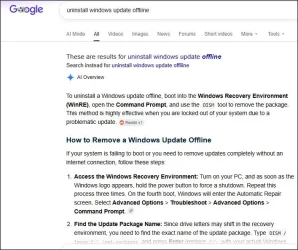
At least try uninstalling the June update as a starting point and eliminate that as a possible cause.

(Unlikely you'll have a relevant restore point)

And after having run Windows updates- are you really still on 24H2?

In-Place Upgrades: Attempted to run an In-Place Upgrade/Repair using official Windows ISOs (tried both 24H2 and 25H2 builds). Both threw errors and failed to complete.

Ok, give us a clue- exactly what was the error?

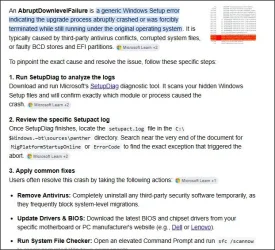
Try running setupdiag.exe (free from MS) - attempts to analyse upgrade logs.
 

My Computer My Computer

At a glance

Windows 11 Proi7-8650U16GBIntel UHD 620
OS
Windows 11 Pro
Computer type
Laptop
Manufacturer/Model
Lenovo t480s
CPU
i7-8650U
Memory
16GB
Graphics Card(s)
Intel UHD 620
Screen Resolution
1920x1080
Hard Drives
C SN810 SDCPNRY-512G-1006
Browser
Edge, Firefox
Antivirus
Defender
Yes, CrystalDiskInfo it reports 'Good'.
I can’t uninstall the June update because I ran the DISM components clean up.
Yes i'm on 24H2.

Matching Profile found: FindAbruptDownlevelFailure - 55882B1A-DA3E-408A-9076-23B22A0472BD
SetupDiag version: 1.7.0.0
System Information:
Machine Name = ASUS
Manufacturer = ASUSTeK COMPUTER INC.
Model = VivoBook_ASUSLaptop X513EQ_K513EQ
HostOSArchitecture = x64
FirmwareType = UEFI
BiosReleaseDate = 20230509000000.000000+000
BiosVendor = X513EQ.318
BiosVersion = X513EQ.318
HostOSVersion = 10.0.26100
HostOSBuildString = 26100.1.amd64fre.ge_release.240331-1435
TargetOSBuildString = 10.0.26100.7019 (ge_release_svc_prod3.251023-1855)
HostOSLanguageId = 1049
HostOSEdition = Professional
RegisteredAV = Windows Defender
FilterDrivers =
UpgradeStartTime = 28.06.2026 19:35:22
UpgradeEndTime = 28.06.2026 20:06:10
UpgradeElapsedTime = 00:30:48


Error: SetupDiag reports abrupt down-level failure.
Last Operation:
Error: 0x80070003 - 0xA001B
LogEntry: 2026-06-28 20:05:47, Error MOUPG CDlpActionLayoutUsb::CopyFileList(1161): Result = 0x80070003[gle=0x00000003]

Refer to "Tutorial - Debug system error codes - Win32 apps" for error information.
 

Attachments

My Computer My Computer

At a glance

Windows 11Intel Core i5-1135G7Nvidia MX350
OS
Windows 11
Computer type
Laptop
Manufacturer/Model
Asus K513EQ
CPU
Intel Core i5-1135G7
Graphics Card(s)
Nvidia MX350
That's something you should only run on a perfectly running stable system to consolidate the status.

No disk image, can't uninstall updates, no restore points, in-place upgrade repair fails - you've backed yourself into a corner.

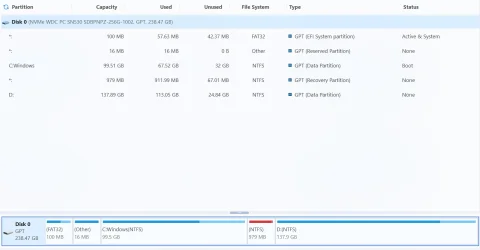
Please post a screenshot of partitions on all disks (don't know how many...) using Minitool Partition Wizard (not Disk Management) to see if there's anything obvious there.

1.webp


Now the error isn't specific, and you might get a further clue from setupact.log

I assume Control Panel, Programs and Features, View Installed Updates is pretty much blank?

I don't know if an offline uninstall using DISM works in this circumstance- I'd guess not.
1.webp


Unless @zbook can help you... and be prepared to spend a LOT of time collecting and uploading logs etc (see similar threads).. you're in for a clean install.

After which- as soon as you possibly can- start a routine of using 3rd party disk imaging.
 

My Computer My Computer

At a glance

Windows 11 Proi7-8650U16GBIntel UHD 620
OS
Windows 11 Pro
Computer type
Laptop
Manufacturer/Model
Lenovo t480s
CPU
i7-8650U
Memory
16GB
Graphics Card(s)
Intel UHD 620
Screen Resolution
1920x1080
Hard Drives
C SN810 SDCPNRY-512G-1006
Browser
Edge, Firefox
Antivirus
Defender
This occurs in setuperr.log:

1.webp

Then the 80070003 error is related to a copying files problem:
Error 0x80070003 typically means "The system cannot find the path specified". When copying the C:\$Windows.~WS\Sources\Windows folder, this usually happens because the source directory is incomplete, corrupted, or locked by the active Windows Upgrade process

Basic question: is there at least 30GB free on C: ?
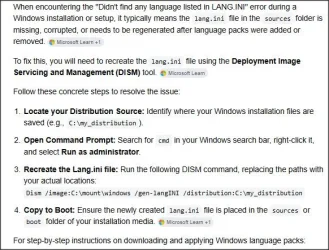
You can try this:


- starting from the DISM commands about 2 min in.
 
Last edited:

My Computer My Computer

At a glance

Windows 11 Proi7-8650U16GBIntel UHD 620
OS
Windows 11 Pro
Computer type
Laptop
Manufacturer/Model
Lenovo t480s
CPU
i7-8650U
Memory
16GB
Graphics Card(s)
Intel UHD 620
Screen Resolution
1920x1080
Hard Drives
C SN810 SDCPNRY-512G-1006
Browser
Edge, Firefox
Antivirus
Defender
1) Please run the V2 log collector > post a share link


2) Run upgrade_failure_info.bat > post a share link


3) Run Tuneup plus > post a share link

https://www.tenforums.com/attachmen...-files-use-bsod-debugging-tuneup_plus_log.bat

Batch files for use in BSOD debugging - Windows 10 Help Forums


4) Open administrative command prompt and copy and paste:

fltmc

dism /online /get-drivers /format:table >c:\drivers.txt

Post share links. (the second command creates a desktop file)
 

My Computer My Computer

At a glance

Windows 10Intel(R) Core(TM) i7-4800MQ CPU @ 2.70GHz16 GB Total: Manufacturer : Samsung MemoryTyp...NVIDIA Quadro K3100M; Intel(R) HD Graphics 4600
OS
Windows 10
Computer type
Laptop
Manufacturer/Model
HP
CPU
Intel(R) Core(TM) i7-4800MQ CPU @ 2.70GHz
Motherboard
Product : 190A Version : KBC Version 94.56
Memory
16 GB Total: Manufacturer : Samsung MemoryType : DDR3 FormFactor : SODIMM Capacity : 8GB Speed : 1600
Graphics Card(s)
NVIDIA Quadro K3100M; Intel(R) HD Graphics 4600
Sound Card
IDT High Definition Audio CODEC; PNP Device ID HDAUDIO\FUNC_01&VEN_111D&DEV_76E0
Hard Drives
Model Hitachi HTS727575A9E364
Antivirus
Microsoft Defender
Other Info
Mobile Workstation
Here's everything you asked for
 

Attachments

My Computer My Computer

At a glance

Windows 11Intel Core i5-1135G7Nvidia MX350
OS
Windows 11
Computer type
Laptop
Manufacturer/Model
Asus K513EQ
CPU
Intel Core i5-1135G7
Graphics Card(s)
Nvidia MX350
And a screenshot of partitions? And free space on C: ?
 

My Computer My Computer

At a glance

Windows 11 Proi7-8650U16GBIntel UHD 620
OS
Windows 11 Pro
Computer type
Laptop
Manufacturer/Model
Lenovo t480s
CPU
i7-8650U
Memory
16GB
Graphics Card(s)
Intel UHD 620
Screen Resolution
1920x1080
Hard Drives
C SN810 SDCPNRY-512G-1006
Browser
Edge, Firefox
Antivirus
Defender
1783528813128.webp
And there is 29.6 GBs free on C:
 

My Computer My Computer

At a glance

Windows 11Intel Core i5-1135G7Nvidia MX350
OS
Windows 11
Computer type
Laptop
Manufacturer/Model
Asus K513EQ
CPU
Intel Core i5-1135G7
Graphics Card(s)
Nvidia MX350
Back
Top Bottom