Sign in problems


mikie19598

Member
Member
Local time
8:40 AM
Posts
9
OS
Windows 11 25H2
Hello everybody I am new to the forum, and I keep having the same issue on every computer that has Windows 11 on it I get a message in the side bar stating Microsoft Account Problem
Select Here to sign in to your Microsoft account, Now the is after I have already logged into my pc and it booted up does anybody have an idea what is causing this and what can to either stop this or disable this to keep it from happening and when I sign out and then back in it's fine I don't get that message. Any help would be very appreciated
 
Windows Build/Version
Windows 11 25H2 (OS Build 26200.6725)

My Computer

System One

  • OS
    Windows 11 25H2
    Computer type
    PC/Desktop
    Manufacturer/Model
    MSI
    CPU
    Ryzen 9 3900XT
    Motherboard
    MSI B450 Tomahawk Max II
    Memory
    Kingston HyperX Fury 32 GB
    Graphics Card(s)
    Asus GTX 750TI
    Sound Card
    Creative SoundBlaster Audigy FX
    Monitor(s) Displays
    Acer H233H / HPLV2311
    Screen Resolution
    1920 x 1080
    Hard Drives
    PNY NVME PNY SSD / WD HDD
    PSU
    Antec 650
    Case
    Unbranded
    Cooling
    Coolermaster
    Keyboard
    Logitech G910
    Mouse
    Logitech G602
    Internet Speed
    Download 665.44 MBPS / Upload 534.28
    Browser
    Microsoft Edge
    Antivirus
    Microsoft defender
    Other Info
    Logitech Surround sound 5.1
Hello everybody I am new to the forum, and I keep having the same issue on every computer that has Windows 11 on it I get a message in the side bar stating Microsoft Account Problem
Select Here to sign in to your Microsoft account, Now the is after I have already logged into my pc and it booted up does anybody have an idea what is causing this and what can to either stop this or disable this to keep it from happening and when I sign out and then back in it's fine I don't get that message. Any help would be very appreciated


Hello, and welcome to ElevenForum. :-)


I use a LOCAL account so I can't help with MS account issues, but I can give you ten points for filling out your computer specs.
That makes things a lot easier for us, when you post a problem. :-)
 

My Computers

System One System Two

  • OS
    Win 11 Home ♦♦♦26200.8655 ♦♦♦♦♦♦♦25H2
    Computer type
    PC/Desktop
    Manufacturer/Model
    Built by Ghot® [May 2020]
    CPU
    AMD Ryzen 7 3700X
    Motherboard
    Asus Pro WS X570-ACE (BIOS 5302)
    Memory
    G.Skill (F4-3200C14D-16GTZKW)
    Graphics Card(s)
    EVGA RTX 2070 (08G-P4-2171-KR)
    Sound Card
    Realtek ALC1220P / ALC S1220A
    Monitor(s) Displays
    Dell U3011 30"
    Screen Resolution
    2560 x 1600
    Hard Drives
    2x Samsung 860 EVO 500GB,
    WD 4TB Black FZBX - SATA III,
    WD 8TB Black FZBX - SATA III,
    DRW-24B1ST CD/DVD Burner
    PSU
    PC Power & Cooling 750W Quad EPS12V
    Case
    Cooler Master ATCS 840 Tower
    Cooling
    CM Hyper 212 EVO (push/pull)
    Keyboard
    Ducky DK9008 Shine II Blue LED
    Mouse
    Logitech Optical M-100
    Internet Speed
    300/300
    Browser
    Firefox (latest)
    Antivirus
    Bitdefender Total Security
    Other Info
    Speakers: Klipsch Pro Media 2.1
  • Operating System
    Windows XP Pro 32bit w/SP3
    Computer type
    PC/Desktop
    Manufacturer/Model
    Built by Ghot® (not in use)
    CPU
    AMD Athlon 64 X2 5000+ (OC'd @ 3.2Ghz)
    Motherboard
    ASUS M2N32-SLI Deluxe Wireless Edition
    Memory
    TWIN2X2048-6400C4DHX (2 x 1GB, DDR2 800)
    Graphics card(s)
    EVGA 256-P2-N758-TR GeForce 8600GT SSC
    Sound Card
    Onboard
    Monitor(s) Displays
    ViewSonic G90FB Black 19" Professional (CRT)
    Screen Resolution
    up to 2048 x 1536
    Hard Drives
    WD 36GB 10,000rpm Raptor SATA
    Seagate 80GB 7200rpm SATA
    Lite-On LTR-52246S CD/RW
    Lite-On LH-18A1P CD/DVD Burner
    PSU
    PC Power & Cooling Silencer 750 Quad EPS12V
    Case
    Generic Beige case, 80mm fans
    Cooling
    ZALMAN 9500A 92mm CPU Cooler
    Keyboard
    Logitech Classic Keybooard 200
    Mouse
    Logitech Optical M-BT96a
    Internet Speed
    300/300
    Browser
    Firefox 3.x ??
    Antivirus
    Symantec (Norton)
    Other Info
    Still assembled, still runs. Haven't turned it on for 15 years?
I don't like to use a local account you don't get the updates like you do with a Microsoft account. But hopefully somebody will have an answer this is just very annoying. Toi have to sign out and then back in right after you have signed in and the pc booted up
 

My Computer

System One

  • OS
    Windows 11 25H2
    Computer type
    PC/Desktop
    Manufacturer/Model
    MSI
    CPU
    Ryzen 9 3900XT
    Motherboard
    MSI B450 Tomahawk Max II
    Memory
    Kingston HyperX Fury 32 GB
    Graphics Card(s)
    Asus GTX 750TI
    Sound Card
    Creative SoundBlaster Audigy FX
    Monitor(s) Displays
    Acer H233H / HPLV2311
    Screen Resolution
    1920 x 1080
    Hard Drives
    PNY NVME PNY SSD / WD HDD
    PSU
    Antec 650
    Case
    Unbranded
    Cooling
    Coolermaster
    Keyboard
    Logitech G910
    Mouse
    Logitech G602
    Internet Speed
    Download 665.44 MBPS / Upload 534.28
    Browser
    Microsoft Edge
    Antivirus
    Microsoft defender
    Other Info
    Logitech Surround sound 5.1
Hello everybody I am new to the forum, and I keep having the same issue on every computer that has Windows 11 on it I get a message in the side bar stating Microsoft Account Problem
Select Here to sign in to your Microsoft account, Now the is after I have already logged into my pc and it booted up does anybody have an idea what is causing this and what can to either stop this or disable this to keep it from happening and when I sign out and then back in it's fine I don't get that message. Any help would be very appreciated
You have an app that is attempting to log in that differs from the one originally logged in to the OS.
Is OneDrive on the same account as the log in user's?
Is the MS Store on on the same account as the log in user's?
What else starts at log on?
It's also possible that there is a delay in making a connection to the internet, so when you log on, you are not yet connected to the internet.
You are logged in to the OS but the MS account has not been able to log in yet resulting in the error.
Is it possible to you?
 

My Computers

System One System Two

  • OS
    All Branches but Release
    Computer type
    Laptop
    Manufacturer/Model
    Acer Nitro ANV15-51
    CPU
    AMD Ryzen 7 7735HS 3200-4500 Mhz 8 cores x 2
    Motherboard
    Sportage_RBH
    Memory
    32 GB DDR5
    Graphics Card(s)
    Radeon Graphic / NVIDIA GeForce RTX 4060 8 GB GDDR6
    Sound Card
    AMD/Realtek(R) Audio
    Monitor(s) Displays
    Integrated Monitor (15.3"vis)
    Screen Resolution
    FHD 1920X1080 16:9 144Hz
    Hard Drives
    KINGSTON OM8SEP4512Q-AA 1TB
    Western Digital 256GB
    PSU
    19V DC 6.32 A 120 W
    Cooling
    Dual Fans
    Mouse
    MS Bluetooth
    Internet Speed
    Fiber 1GB Cox -us & 1GB Orange-fr
    Browser
    Edge Canary- Firefox Nightly-Chrome Dev-Chrome Dev
    Antivirus
    Windows Defender
  • Operating System
    Windows 11 Beta
    Computer type
    Laptop
    Manufacturer/Model
    Asus X751BP
    CPU
    AMD A9-9420
    Memory
    8 GB of DDR4
    Graphics card(s)
    AMD Radeon R5
    Screen Resolution
    1600x900
    Hard Drives
    Seagate 1 TB
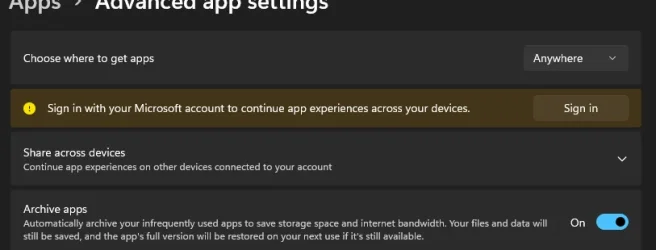
Check Settings > Apps > Advanced App Settings

more than likely its Store or OneDrive if you use your Microsoft account for your user account..
 

My Computer

System One

  • OS
    Windows 11 Pro
Do you see anything interesting if you go to settings/accounts?
 

My Computers

System One System Two

  • OS
    Windows 11 26200.8728
    Computer type
    PC/Desktop
    Manufacturer/Model
    homebuilt
    CPU
    Amd Threadripper 7970X
    Motherboard
    Gigabyte TRX50 Aero D Rev. 1.0
    Memory
    128GB (4 X 32) G.Skill DDR5 6400 (RDIMM)
    Graphics Card(s)
    Gigabyte RTX 4090 OC
    Sound Card
    none (USB to speakers), Realtek
    Monitor(s) Displays
    Innocn 32" OLED
    Screen Resolution
    3840 X 2160 @ 60Hz
    Hard Drives
    Crucial T700 2TB M.2 NVME SSD
    WD 4TB Blue SATA SSD
    Seagate 18TB IronWolf Pro
    PSU
    BeQuiet! Straight Power 12 1500W
    Case
    Lian Li 011 Dynamic Evo XL
    Cooling
    SilverStone Technology XE360-TR5, with 3 Phanteks T30 fans
    Keyboard
    Cherry KC 500 MX LP (mechanical)
    Mouse
    Logitech M500s (wired)
    Internet Speed
    2000/250 Mbps (down/up)
    Other Info
    xFinity gateway
  • Operating System
    windows 11 26200.8728
    Computer type
    PC/Desktop
    Manufacturer/Model
    homebuilt
    CPU
    Intel I9-13900K
    Motherboard
    Asus RoG Strix Z690-E
    Memory
    64GB G.Skill DDR5-6000
    Graphics card(s)
    Gigabyte RTX 3090 ti
    Sound Card
    built in Realtek
    Monitor(s) Displays
    Philips 27E1N8900 27" OLED
    Screen Resolution
    3840 X 2160 @60Hz
    Hard Drives
    WDC SN850 1TB
    8TB Seagate Ironwolf
    4TB Seagate Ironwolf
    PSU
    eVGA SuperNOVA 1300 GT
    Case
    Lian Li 011 Dynamic Evo
    Cooling
    Corsair iCUE H150i ELITE CAPELLIX Liquid CPU Cooler
    Keyboard
    Cherry Streaming (wired)
    Mouse
    Logitech M500s (wired)
please try
settings > accounts > Email and accounts

in this window check to see if 'your' account is there.
if its not use 'add account' and add 'your' account

then see if that gives any improvement on reboot/sign on
best of luck, Steve ..
 

My Computers

System One System Two

  • OS
    Debian 13 KDE .. Windows 11 Home
    Computer type
    PC/Desktop
    Manufacturer/Model
    HP 24" AiO
    CPU
    Ryzen 7 5825u
    Motherboard
    HP
    Memory
    64GB DDR4 3200
    Graphics Card(s)
    Ryzen 7 5825u
    Sound Card
    RealTek
    Monitor(s) Displays
    24" HP AiO
    Screen Resolution
    1920 x 1080 @60 Hz
    Hard Drives
    1TB WD Blue SN580 M2 SSD Partitioned.
    2x 1TB USB HDD External Backup/Storage.
    PSU
    90W external power brick
    Case
    24" All in One
    Cooling
    Default Air Cooling
    Keyboard
    HP WiFi UK extended
    Mouse
    HP WiFi 3 Button
    Internet Speed
    1GB full fibre
    Browser
    Edge & Firefox
    Antivirus
    AVG Internet Security/Windows Defender
    Other Info
    Mainly Open Source Software
  • Operating System
    Ubuntu 22.04.5 LTS
    Computer type
    Laptop
    Manufacturer/Model
    Dell 13" Latitude 2017
    CPU
    i5 7200u
    Motherboard
    Dell
    Memory
    16GB DDR4
    Graphics card(s)
    Intel
    Sound Card
    Intel
    Monitor(s) Displays
    13" Dell Laptop
    Hard Drives
    250GB Crucial 2.5" SSD
    Mouse
    Generic WiFi 3 button
    Internet Speed
    WiFi only
    Browser
    Firefox
    Antivirus
    ClamAV TK
    Other Info
    Mainly Open Source Software
I did check after you sent me this and it looks like Outlook is the on lt account so i have added my Microsoft account and we will see what happens and Thank you for your help much appreciated
 

My Computer

System One

  • OS
    Windows 11 25H2
    Computer type
    PC/Desktop
    Manufacturer/Model
    MSI
    CPU
    Ryzen 9 3900XT
    Motherboard
    MSI B450 Tomahawk Max II
    Memory
    Kingston HyperX Fury 32 GB
    Graphics Card(s)
    Asus GTX 750TI
    Sound Card
    Creative SoundBlaster Audigy FX
    Monitor(s) Displays
    Acer H233H / HPLV2311
    Screen Resolution
    1920 x 1080
    Hard Drives
    PNY NVME PNY SSD / WD HDD
    PSU
    Antec 650
    Case
    Unbranded
    Cooling
    Coolermaster
    Keyboard
    Logitech G910
    Mouse
    Logitech G602
    Internet Speed
    Download 665.44 MBPS / Upload 534.28
    Browser
    Microsoft Edge
    Antivirus
    Microsoft defender
    Other Info
    Logitech Surround sound 5.1
You can also open your browser and type in the address bar accounts.microsoft.com.
Login with your Microsoft account to see if there are any issues.
 

My Computer

System One

  • OS
    Windows 11 Pro Insider 64 bit 25H2 26200.5742
    Computer type
    PC/Desktop
    Manufacturer/Model
    Gigabyte Z390 UD
    CPU
    Intel Core i7 9700K 3.60
    Motherboard
    Gigabyte Z390 UD
    Memory
    16 GB
    Graphics Card(s)
    nVidia GEForce RTX 2060 Super
    Sound Card
    onboard
    Monitor(s) Displays
    Two 27" Dell 4K monitors
    Screen Resolution
    3840 x 2160
    Hard Drives
    M.2 NVME SSD, 500 GB; Two 2TB Mechanical HDD's
    PSU
    850w PSU
    Case
    Cyberpower PC
    Cooling
    Water cooled
    Keyboard
    Backlit Cyberpower gaming keyboard
    Mouse
    Backlit Cyberpower gaming mouse
    Internet Speed
    1 GB mbps
    Browser
    Brave
    Antivirus
    Windows Security
Well, I think what you told me to do just fix it because easy after I turn my computer off for the night when I go to bed and I get out the next day and turn it on that usually when it does it, I just turned it on this morning and it has not done it yet so I think what you told me to do has fixed the issue Thank you for your help. I appreciate it..
 

My Computer

System One

  • OS
    Windows 11 25H2
    Computer type
    PC/Desktop
    Manufacturer/Model
    MSI
    CPU
    Ryzen 9 3900XT
    Motherboard
    MSI B450 Tomahawk Max II
    Memory
    Kingston HyperX Fury 32 GB
    Graphics Card(s)
    Asus GTX 750TI
    Sound Card
    Creative SoundBlaster Audigy FX
    Monitor(s) Displays
    Acer H233H / HPLV2311
    Screen Resolution
    1920 x 1080
    Hard Drives
    PNY NVME PNY SSD / WD HDD
    PSU
    Antec 650
    Case
    Unbranded
    Cooling
    Coolermaster
    Keyboard
    Logitech G910
    Mouse
    Logitech G602
    Internet Speed
    Download 665.44 MBPS / Upload 534.28
    Browser
    Microsoft Edge
    Antivirus
    Microsoft defender
    Other Info
    Logitech Surround sound 5.1

well unfortunately this did not fix the problem it still does this a few minutes after I turn on my pc and log in.
 

My Computer

System One

  • OS
    Windows 11 25H2
    Computer type
    PC/Desktop
    Manufacturer/Model
    MSI
    CPU
    Ryzen 9 3900XT
    Motherboard
    MSI B450 Tomahawk Max II
    Memory
    Kingston HyperX Fury 32 GB
    Graphics Card(s)
    Asus GTX 750TI
    Sound Card
    Creative SoundBlaster Audigy FX
    Monitor(s) Displays
    Acer H233H / HPLV2311
    Screen Resolution
    1920 x 1080
    Hard Drives
    PNY NVME PNY SSD / WD HDD
    PSU
    Antec 650
    Case
    Unbranded
    Cooling
    Coolermaster
    Keyboard
    Logitech G910
    Mouse
    Logitech G602
    Internet Speed
    Download 665.44 MBPS / Upload 534.28
    Browser
    Microsoft Edge
    Antivirus
    Microsoft defender
    Other Info
    Logitech Surround sound 5.1

This is what I see when I go into App Advanced options
 

Attachments

  • Screenshot 2025-10-22 060749.webp
    Screenshot 2025-10-22 060749.webp
    18.8 KB · Views: 2

My Computer

System One

  • OS
    Windows 11 25H2
    Computer type
    PC/Desktop
    Manufacturer/Model
    MSI
    CPU
    Ryzen 9 3900XT
    Motherboard
    MSI B450 Tomahawk Max II
    Memory
    Kingston HyperX Fury 32 GB
    Graphics Card(s)
    Asus GTX 750TI
    Sound Card
    Creative SoundBlaster Audigy FX
    Monitor(s) Displays
    Acer H233H / HPLV2311
    Screen Resolution
    1920 x 1080
    Hard Drives
    PNY NVME PNY SSD / WD HDD
    PSU
    Antec 650
    Case
    Unbranded
    Cooling
    Coolermaster
    Keyboard
    Logitech G910
    Mouse
    Logitech G602
    Internet Speed
    Download 665.44 MBPS / Upload 534.28
    Browser
    Microsoft Edge
    Antivirus
    Microsoft defender
    Other Info
    Logitech Surround sound 5.1

OAT I do not even have OneDrive I always uninstall it I don't use it.
 

My Computer

System One

  • OS
    Windows 11 25H2
    Computer type
    PC/Desktop
    Manufacturer/Model
    MSI
    CPU
    Ryzen 9 3900XT
    Motherboard
    MSI B450 Tomahawk Max II
    Memory
    Kingston HyperX Fury 32 GB
    Graphics Card(s)
    Asus GTX 750TI
    Sound Card
    Creative SoundBlaster Audigy FX
    Monitor(s) Displays
    Acer H233H / HPLV2311
    Screen Resolution
    1920 x 1080
    Hard Drives
    PNY NVME PNY SSD / WD HDD
    PSU
    Antec 650
    Case
    Unbranded
    Cooling
    Coolermaster
    Keyboard
    Logitech G910
    Mouse
    Logitech G602
    Internet Speed
    Download 665.44 MBPS / Upload 534.28
    Browser
    Microsoft Edge
    Antivirus
    Microsoft defender
    Other Info
    Logitech Surround sound 5.1

Confirm your Microsoft Account again on the Microsoft link in post #9
 

My Computer

System One

  • OS
    Windows 11 Pro Insider 64 bit 25H2 26200.5742
    Computer type
    PC/Desktop
    Manufacturer/Model
    Gigabyte Z390 UD
    CPU
    Intel Core i7 9700K 3.60
    Motherboard
    Gigabyte Z390 UD
    Memory
    16 GB
    Graphics Card(s)
    nVidia GEForce RTX 2060 Super
    Sound Card
    onboard
    Monitor(s) Displays
    Two 27" Dell 4K monitors
    Screen Resolution
    3840 x 2160
    Hard Drives
    M.2 NVME SSD, 500 GB; Two 2TB Mechanical HDD's
    PSU
    850w PSU
    Case
    Cyberpower PC
    Cooling
    Water cooled
    Keyboard
    Backlit Cyberpower gaming keyboard
    Mouse
    Backlit Cyberpower gaming mouse
    Internet Speed
    1 GB mbps
    Browser
    Brave
    Antivirus
    Windows Security
Well i think the latest update fixed the issue I had ware windows kept telling me wasn't signed in .
 

My Computer

System One

  • OS
    Windows 11 25H2
    Computer type
    PC/Desktop
    Manufacturer/Model
    MSI
    CPU
    Ryzen 9 3900XT
    Motherboard
    MSI B450 Tomahawk Max II
    Memory
    Kingston HyperX Fury 32 GB
    Graphics Card(s)
    Asus GTX 750TI
    Sound Card
    Creative SoundBlaster Audigy FX
    Monitor(s) Displays
    Acer H233H / HPLV2311
    Screen Resolution
    1920 x 1080
    Hard Drives
    PNY NVME PNY SSD / WD HDD
    PSU
    Antec 650
    Case
    Unbranded
    Cooling
    Coolermaster
    Keyboard
    Logitech G910
    Mouse
    Logitech G602
    Internet Speed
    Download 665.44 MBPS / Upload 534.28
    Browser
    Microsoft Edge
    Antivirus
    Microsoft defender
    Other Info
    Logitech Surround sound 5.1

Ok everybody I have tried everything I have been told to do to fix this nothing seems to work. I thought the latest update fixed it, but it did not.
 

My Computer

System One

  • OS
    Windows 11 25H2
    Computer type
    PC/Desktop
    Manufacturer/Model
    MSI
    CPU
    Ryzen 9 3900XT
    Motherboard
    MSI B450 Tomahawk Max II
    Memory
    Kingston HyperX Fury 32 GB
    Graphics Card(s)
    Asus GTX 750TI
    Sound Card
    Creative SoundBlaster Audigy FX
    Monitor(s) Displays
    Acer H233H / HPLV2311
    Screen Resolution
    1920 x 1080
    Hard Drives
    PNY NVME PNY SSD / WD HDD
    PSU
    Antec 650
    Case
    Unbranded
    Cooling
    Coolermaster
    Keyboard
    Logitech G910
    Mouse
    Logitech G602
    Internet Speed
    Download 665.44 MBPS / Upload 534.28
    Browser
    Microsoft Edge
    Antivirus
    Microsoft defender
    Other Info
    Logitech Surround sound 5.1
Hello everybody I am new to the forum, and I keep having the same issue on every computer that has Windows 11 on it I get a message in the side bar stating Microsoft Account Problem
There's an old bug where this randomly happens on reboot. I think it happened on 10 and 11.
I had to dismiss the notification, because it was an incorrect error message being repeated.

In my case, I was still logged in and was getting spammed with that message in the notification bar section.

I don't see this as often now. It happened to me the most when I was still on 10, before 11 came out, IIRC.
 

My Computers

System One System Two

  • OS
    Windows 11 Pro x64 24H2
    Computer type
    PC/Desktop
    CPU
    Ryzen 9 5900X
    Motherboard
    ASRock B550 PG Velocita (UEFI-BIOS 3.90)
    Memory
    64 GB G.Skill RipJaws V F4-3200C16D-64GVK
    Graphics Card(s)
    ASRock Steel Legend Arc B580 12 GB
    Monitor(s) Displays
    Alienware AW3423DWF OLED ultrawide
    Hard Drives
    Samsung 990 Pro 1 TB NVMe SSD
    PSU
    eVGA Supernova 750 G3
    Case
    Corsair 275R
    Internet Speed
    VTel FTTH 1 Gb down and 1 Gb up
  • Operating System
    Windows 11 Home x64 25H2
    Computer type
    PC/Desktop
    CPU
    Ryzen 7 5800X3D
    Motherboard
    Asus ROG Strix B550-F Gaming (UEFI-BIOS version 3636)
    Memory
    32 GB (2x16 GB G.Skill TridentZ Neo)
    Graphics card(s)
    Sapphire Nitro+ Radeon RX 6750 XT
    Hard Drives
    Samsung 970 Pro 512 GB NVMe SSD
    PSU
    Corsair RM850x
    Case
    Fractal Focus G

My Computer

System One

  • OS
    Windows 11 Pro Insider 64 bit 25H2 26200.5742
    Computer type
    PC/Desktop
    Manufacturer/Model
    Gigabyte Z390 UD
    CPU
    Intel Core i7 9700K 3.60
    Motherboard
    Gigabyte Z390 UD
    Memory
    16 GB
    Graphics Card(s)
    nVidia GEForce RTX 2060 Super
    Sound Card
    onboard
    Monitor(s) Displays
    Two 27" Dell 4K monitors
    Screen Resolution
    3840 x 2160
    Hard Drives
    M.2 NVME SSD, 500 GB; Two 2TB Mechanical HDD's
    PSU
    850w PSU
    Case
    Cyberpower PC
    Cooling
    Water cooled
    Keyboard
    Backlit Cyberpower gaming keyboard
    Mouse
    Backlit Cyberpower gaming mouse
    Internet Speed
    1 GB mbps
    Browser
    Brave
    Antivirus
    Windows Security
Back
Top Bottom