Solved Signing in using MS Account using Web Browser via MS Auth App with No Internet on Phone?


win11freak

Well-known member
Member
Local time
9:58 PM
Posts
211
OS
Windows 11 Pro 22H2
I just setup 2FA using the MS authenticator app with Send Notification Approve Sign In method.

But when I am not at home, I do not have Internet access or cellular data on my phone.

How could I select the "Use Verification Codes Instead" within the MS Authenticator app?

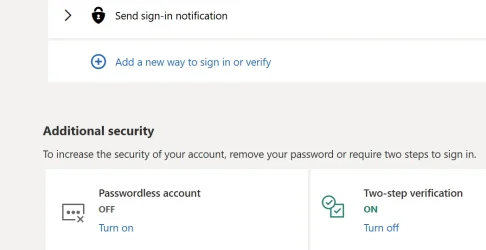
As you can see here from the screen shot, this is the way I have it setup.

In the near future, I may even setup Password less.
But like mentioned, when I am on the go, my phone does not have Internet connection.

So how and where do I get to see the option to use or revert using the OTP Verification Codes?
 

Attachments
  • Screenshot 2025-07-31 073856.webp
    Screenshot 2025-07-31 073856.webp
    26.5 KB · Views: 1

My Computer My Computer

At a glance

Windows 11 Pro 22H2
OS
Windows 11 Pro 22H2
I just setup 2FA using the MS authenticator app with Send Notification Approve Sign In method.

But when I am not at home, I do not have Internet access or cellular data on my phone.

How could I select the "Use Verification Codes Instead" within the MS Authenticator app?

As you can see here from the screen shot, this is the way I have it setup.

In the near future, I may even setup Password less.
But like mentioned, when I am on the go, my phone does not have Internet connection.

So how and where do I get to see the option to use or revert using the OTP Verification Codes?
If you have Internet on phone at home why can't you have it at a free public wifi spot. -- Problem then solved.
Cheers
jimbo
 

My Computer My Computer

At a glance

Windows XP,11 Linux Fedora Rawhide pre-releas...2 X Intel i7
OS
Windows XP,11 Linux Fedora Rawhide pre-release 45
Computer type
PC/Desktop
CPU
2 X Intel i7
Screen Resolution
4KUHD X 2
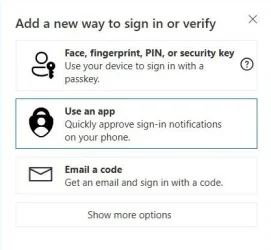
1. Select Use an app
capture_07312025_090355.webp
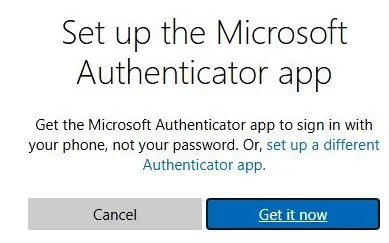
2. Select "set up a different Authenticator app"
capture_07312025_090543.webp

3. Scan QR code with MS Authenticator

DONE

capture_07312025_090041.webp

In the near future, I may even setup Password less.
You do not have to do it, passwordless works automatically, even when you use a password. Password can be used as 2FA.

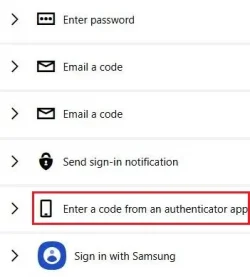
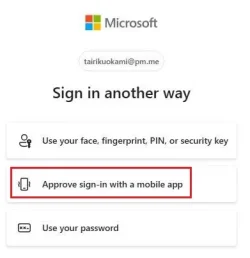
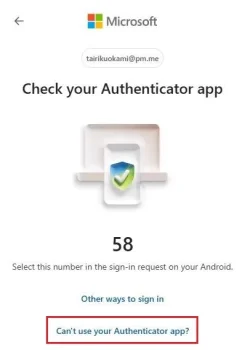
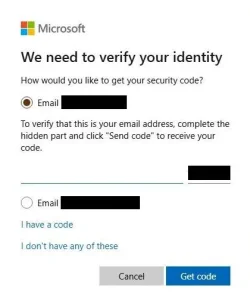
EDIT: But it seems that even when you have OTP code, there is no way to use it, MS will not allow it as an option anymore.

capture_07312025_091249.webp capture_07312025_093855.webp capture_07312025_091350.webp


The only way is probably to use passkey saved in an offline password manager.
 
Last edited:

My Computer My Computer

At a glance

Home26H2CanAMD Ryzen 5 8600G (07/24)2x32GB Kingston FURY DDR5 5600 MHz CL36 @5200...ASROCK Radeon RX 6600 Challenger D 8G @48FPS ...
OS
Home26H2Can
Computer type
PC/Desktop
CPU
AMD Ryzen 5 8600G (07/24)
Motherboard
ASROCK B650M-HDV/M.2 (07/24) BIOS 4.21 AGESA ComboAM5 1.3.0.1 (04/26)
Memory
2x32GB Kingston FURY DDR5 5600 MHz CL36 @5200 CL36 (07/24)
Graphics Card(s)
ASROCK Radeon RX 6600 Challenger D 8G @48FPS (08/24)
Sound Card
Creative Sound BlasterX AE-5 Plus (05/24)
Monitor(s) Displays
24" Philips 24M1N3200ZS/00 (05/24)
Screen Resolution
1920×1080@165Hz via DP1.4
Hard Drives
Kingston KC3000 NVMe 2TB (05/24)
ADATA XPG GAMMIX S11 Pro 512GB (07/19)
PSU
Seasonic Core GM 550 Gold (04/24)
Case
Fractal Design Define 7 Mini with 3x Noctua NF-P14s/12@555rpm (04/24)
Cooling
Noctua NH-U12S with Noctua NF-P12 (04/24)
Keyboard
HP Pavilion Wired Keyboard 300 (07/24) + Rabalux 76017 Parker (01/24)
Mouse
Logitech M330 Silent Plus (01/26)
Internet Speed
500/100 Mbps via RouterOS (05/21) & TCP Optimizer
Browser
Edge, Brave for YouTube, LibreWolf for FB
Antivirus
NextDNS blocking 1/3 Traffic
Other Info
Phone: Motorola Moto G86 (02/26)
Backup: Hasleo Backup Suite (PreOS)
Headphones: Sennheiser RS170 (09/10)
Chair: Huzaro Force 4.4 Grey Mesh (05/24)
Notifier: Xiaomi Mi Band 9 Milanese (10/24)
FlexCore USB-C 3.2 Gen 1 (M) to LAN (F) (08/25)
1. Select Use an app
View attachment 140944
2. Select "set up a different Authenticator app"
View attachment 140945

3. Scan QR code with MS Authenticator

DONE

View attachment 140943


You do not have to do it, passwordless works automatically, even when you use a password. Password can be used as 2FA.

EDIT: But it seems that even when you have OTP code, there is no way to use it, MS will not allow it as an option anymore.

View attachment 140950 View attachment 140951 View attachment 140947


The only way is probably to use passkey saved in an offline password manager.
Thank you VERY VERY much for this.

For Passkeys, I have one already setup and created on my YubiKey.
Also have Windows Hello setup as well.

But all I need to do now is set up the MS Auth app as posted from your screen shots.
 

My Computer My Computer

At a glance

Windows 11 Pro 22H2
OS
Windows 11 Pro 22H2
Back
Top Bottom