SirCleaner Released - New Powerful Junk File Cleaner


My Computer My Computer

At a glance

Windows 11 Pro 24H2Intel Ultra 7 165u @ 4.9ghz turbo, 12 core16gb DDR6 RAMIntel® Arc™ Graphics
OS
Windows 11 Pro 24H2
Computer type
Tablet
Manufacturer/Model
Microsoft Surface Pro 10 For Business
CPU
Intel Ultra 7 165u @ 4.9ghz turbo, 12 core
Motherboard
-
Memory
16gb DDR6 RAM
Graphics Card(s)
Intel® Arc™ Graphics
Sound Card
Intel Omni Enhanced Sound
Monitor(s) Displays
13” Led
Screen Resolution
2880 x 1920
Hard Drives
1tb M2 SSD
PSU
39W
Case
Aluminium/Gorilla Glass
Cooling
Passive
Keyboard
Onboard Touch or MS Case illuminated Keyboard/Cover
Mouse
Touch screen or MS Case illuminated Keyboard/Cover with glass trackpad
Internet Speed
Ultra high speed WI-Fi 6
Browser
Edge
Antivirus
Windows Defender & Malwarebytes
Other Info
Copilot AI built-in
Slim Pen 2 stylus.
The PendingFileRenameOperations value is created by SirClean and removed in a reboot. So it is the case that SirClean does not alter any existing registry entries.
 

My Computers My Computers

  • At a glance

    Windows 11 Pro 25H2 26200.8894AMD Ryzen 7 5825U with Radeon Graphics16GB
    OS
    Windows 11 Pro 25H2 26200.8894
    Computer type
    Laptop
    Manufacturer/Model
    Acemagic LX15PRO
    CPU
    AMD Ryzen 7 5825U with Radeon Graphics
    Motherboard
    BIOS CT_BI_AMI_LX15PRO_AB8139_A-004
    Memory
    16GB
    Screen Resolution
    1920 x 1080
    Hard Drives
    SSD 2TB
    Internet Speed
    30 Mbps
    Browser
    Brave
    Antivirus
    Webroot SecureAnywhere Complete beta
  • At a glance

    Windows 11 Pro 23H2 22631.2506Atom N450 1.66GHz2GB
    Operating System
    Windows 11 Pro 23H2 22631.2506
    Computer type
    Laptop
    Manufacturer/Model
    HP Mini 210-1090NR PC (bought in late 2009!)
    CPU
    Atom N450 1.66GHz
    Memory
    2GB
    Browser
    Brave
    Antivirus
    Webroot
  • Acer Swift SF114-34 laptop
    OS Windows 11 Pro 26200.8894
    CPU Pentium Silver N6000
    RAM 4GB
    BIOS v1.17
    SSD Samsung 970 EVO Plus SSD 2TB (an upgrade)
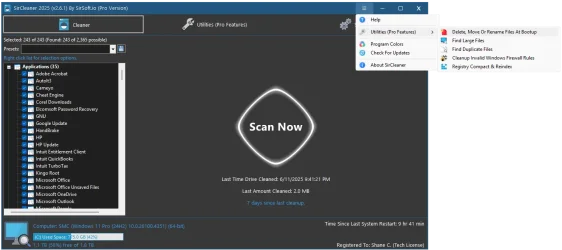
So I have been working on a big update. I am redoing the title bar, finally able to pull system theme colors like dark or light in the colors section, Adding Windows PE support and also scanning other Windows drives not just C:.

But after I finished the new coloring pulling, I kind of like the new colors that got pulled from my system.
What do you guys think about me making this the default colors instead of the current ones.

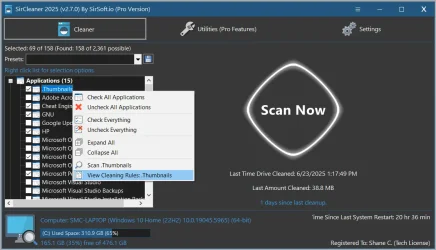
First pic is the new colors and showing the new options on the program colors screen, the 2nd pic is showing the new title menu I've added. Your also notice the title bar buttons are now like Windows 10 / 11 vs how they are now, which I think does look a ton better.
 

Attachments

  • newcolors.webp
    newcolors.webp
    94.3 KB · Views: 3
  • titlebar_menu.webp
    titlebar_menu.webp
    61 KB · Views: 4

My Computer My Computer

At a glance

Windows 11
OS
Windows 11
Computer type
PC/Desktop
@SirShane ,

You asked. I prefer the new system colors. I never did like the default orange colors that were used as the default, but SirCleaner is so "granular" that I gave up trying to redo the colors to my preference. There was just too many items to modify.

I am looking forward to the update. Great work, Shane!

Have a great day.

Regards,
Phil
 

My Computers My Computers

  • At a glance

    Windows 11 Pro Version 25H2 (Build 26200.8894Intel i7-9700K 4700 MHz32 GB (4 x 8GB SK Hynix DDR4 @1333 MHz) (2666...NVIDIA GeForce RTX 2060 (6 GB) GDDR6 300 MHz
    OS
    Windows 11 Pro Version 25H2 (Build 26200.8894
    Computer type
    PC/Desktop
    Manufacturer/Model
    Dell XPS8930 SE
    CPU
    Intel i7-9700K 4700 MHz
    Motherboard
    Dell XPS 8930
    Memory
    32 GB (4 x 8GB SK Hynix DDR4 @1333 MHz) (2666 MHz)
    Graphics Card(s)
    NVIDIA GeForce RTX 2060 (6 GB) GDDR6 300 MHz
    Sound Card
    None
    Monitor(s) Displays
    Dell UltraSharp U2518D 25"
    Screen Resolution
    2560 x 1440
    Hard Drives
    NVMe Intel 1024 TB
    Seagate 2 TB, SATA-III
    Western Digital Black 4TB
    PSU
    850 W Gold Standard
    Case
    Dell XPS 8930 Base (Special Edition)
    Cooling
    Air
    Keyboard
    Dell 0G4D2W
    Mouse
    Dell MOCZUL
    Internet Speed
    Download 553 Mbps, Upload 686 Mbps
    Browser
    Google Chrome
    Antivirus
    ESET Smart Security Premium, plus Malwarebytes Premium
    Other Info
    BIOS Version 1.1.31
  • At a glance

    Windows 11 Pro Version 25H2 (Build 26200.8894)i7-9750H 4.5 GHz16 GB (2 x 8GB @ 1333 MHz) DDR4-2666 MHzNVIDIA GeForce 1650 4 GB GDDR5
    Operating System
    Windows 11 Pro Version 25H2 (Build 26200.8894)
    Computer type
    Laptop
    Manufacturer/Model
    Dell XPS 15 7590
    CPU
    i7-9750H 4.5 GHz
    Motherboard
    Dell XPS 15 7590
    Memory
    16 GB (2 x 8GB @ 1333 MHz) DDR4-2666 MHz
    Graphics card(s)
    NVIDIA GeForce 1650 4 GB GDDR5
    Sound Card
    None
    Monitor(s) Displays
    Dell XPS 15 7590, 15.6" InfinityEdge Anti-Glare, Non-Touch
    Screen Resolution
    1920 x 1080
    Hard Drives
    512 GB M.2 PCle NVMe SK Hynix
    PSU
    130W Power Adapter
    Case
    Dell XPS 15 7590
    Cooling
    Air
    Keyboard
    Laptop
    Mouse
    Logitech M510
    Internet Speed
    Download: 400 Mbps, Upload: 203 Mbps
    Browser
    Google Chrome
    Antivirus
    ESET Smart Security Premium, plus Malwarebytes Premium
    Other Info
    BIOS Version 1.35.0
@SirShane ,

You asked. I prefer the new system colors. I never did like the default orange colors that were used as the default, but SirCleaner is so "granular" that I gave up trying to redo the colors to my preference. There was just too many items to modify.

I am looking forward to the update. Great work, Shane!

Have a great day.

Regards,
Phil
Awesome, I will most likely make those the new colors.
Also why I worked hard on pulling the light and dark theme colors from windows making it a one button click for users.
 

My Computer My Computer

At a glance

Windows 11
OS
Windows 11
Computer type
PC/Desktop
@SirShane

When can I test the new version with Windows PE support?
 

My Computers My Computers

  • At a glance

    Windows 11 Pro 25H2 26200.8894AMD Ryzen 7 5825U with Radeon Graphics16GB
    OS
    Windows 11 Pro 25H2 26200.8894
    Computer type
    Laptop
    Manufacturer/Model
    Acemagic LX15PRO
    CPU
    AMD Ryzen 7 5825U with Radeon Graphics
    Motherboard
    BIOS CT_BI_AMI_LX15PRO_AB8139_A-004
    Memory
    16GB
    Screen Resolution
    1920 x 1080
    Hard Drives
    SSD 2TB
    Internet Speed
    30 Mbps
    Browser
    Brave
    Antivirus
    Webroot SecureAnywhere Complete beta
  • At a glance

    Windows 11 Pro 23H2 22631.2506Atom N450 1.66GHz2GB
    Operating System
    Windows 11 Pro 23H2 22631.2506
    Computer type
    Laptop
    Manufacturer/Model
    HP Mini 210-1090NR PC (bought in late 2009!)
    CPU
    Atom N450 1.66GHz
    Memory
    2GB
    Browser
    Brave
    Antivirus
    Webroot
  • Acer Swift SF114-34 laptop
    OS Windows 11 Pro 26200.8894
    CPU Pentium Silver N6000
    RAM 4GB
    BIOS v1.17
    SSD Samsung 970 EVO Plus SSD 2TB (an upgrade)
@SirShane

When can I test the new version with Windows PE support?
Soon, pro version will be needed as the other user profile options has to be on.
I also need to write a how to for it.
There will be a new setting where you can tell the program what drive to treat as the windows drive.
Also have to have the check box ticked on show all list items (for now) because some of the detection rules read from the registry to see if the program is installed or not.
Im going to be changing all the detection rules to be file based instead, which will be great for cleaning up programs that got uninstalled. Out of the 2300 programs there is around 900 I have to change, thats going to take a while as I have to do each one manually.
Once the detection rules are updated having that check box enabled wont be needed.
Also since the ability to change the drive letter to work in PE it also means it can be ran outside PE to scan other windows drives , such as plugging in a drive external.
I have been working like mad on this update, still a ton to do. So im hoping in a week or so, hopefully sooner. I also want a help file done with it.
 

My Computer My Computer

At a glance

Windows 11
OS
Windows 11
Computer type
PC/Desktop
@SirShane ,

Thank you for your positive feedback to my suggestion. These are still early days for SirCleaner, so I am certain that you are running in many directions simultaneously, trying to respond to all of the user feedback, and prioritizing suggestions from users, and your own priority enhancements.

It is so great for ordinary users to be able to communicate directly with the programmer/owner. I commend you for your eagerness to incorporate all worthy suggestions into SirCleaner. I eagerly anticipate the next big update, but please, Shane, don't kill yourself doing it. You do have a family and your own work/life balance to consider . . .

Thank you, and have a great day.

Regards,
Phil
 

My Computers My Computers

  • At a glance

    Windows 11 Pro Version 25H2 (Build 26200.8894Intel i7-9700K 4700 MHz32 GB (4 x 8GB SK Hynix DDR4 @1333 MHz) (2666...NVIDIA GeForce RTX 2060 (6 GB) GDDR6 300 MHz
    OS
    Windows 11 Pro Version 25H2 (Build 26200.8894
    Computer type
    PC/Desktop
    Manufacturer/Model
    Dell XPS8930 SE
    CPU
    Intel i7-9700K 4700 MHz
    Motherboard
    Dell XPS 8930
    Memory
    32 GB (4 x 8GB SK Hynix DDR4 @1333 MHz) (2666 MHz)
    Graphics Card(s)
    NVIDIA GeForce RTX 2060 (6 GB) GDDR6 300 MHz
    Sound Card
    None
    Monitor(s) Displays
    Dell UltraSharp U2518D 25"
    Screen Resolution
    2560 x 1440
    Hard Drives
    NVMe Intel 1024 TB
    Seagate 2 TB, SATA-III
    Western Digital Black 4TB
    PSU
    850 W Gold Standard
    Case
    Dell XPS 8930 Base (Special Edition)
    Cooling
    Air
    Keyboard
    Dell 0G4D2W
    Mouse
    Dell MOCZUL
    Internet Speed
    Download 553 Mbps, Upload 686 Mbps
    Browser
    Google Chrome
    Antivirus
    ESET Smart Security Premium, plus Malwarebytes Premium
    Other Info
    BIOS Version 1.1.31
  • At a glance

    Windows 11 Pro Version 25H2 (Build 26200.8894)i7-9750H 4.5 GHz16 GB (2 x 8GB @ 1333 MHz) DDR4-2666 MHzNVIDIA GeForce 1650 4 GB GDDR5
    Operating System
    Windows 11 Pro Version 25H2 (Build 26200.8894)
    Computer type
    Laptop
    Manufacturer/Model
    Dell XPS 15 7590
    CPU
    i7-9750H 4.5 GHz
    Motherboard
    Dell XPS 15 7590
    Memory
    16 GB (2 x 8GB @ 1333 MHz) DDR4-2666 MHz
    Graphics card(s)
    NVIDIA GeForce 1650 4 GB GDDR5
    Sound Card
    None
    Monitor(s) Displays
    Dell XPS 15 7590, 15.6" InfinityEdge Anti-Glare, Non-Touch
    Screen Resolution
    1920 x 1080
    Hard Drives
    512 GB M.2 PCle NVMe SK Hynix
    PSU
    130W Power Adapter
    Case
    Dell XPS 15 7590
    Cooling
    Air
    Keyboard
    Laptop
    Mouse
    Logitech M510
    Internet Speed
    Download: 400 Mbps, Upload: 203 Mbps
    Browser
    Google Chrome
    Antivirus
    ESET Smart Security Premium, plus Malwarebytes Premium
    Other Info
    BIOS Version 1.35.0
@SirShane ,

I have a question for you: Lacking a Help file that is going to tell me what SirCleaner (SC) will target as junk files, I have not checked everything, as can be seen in the attached screenshot. System Ninja (SN) is still finding junk files after I run SirCleaner, with my current saved (SC) cleaning "preset," if I run it second after SN.

That said, if I run SN first, then after that SN cleaning, run SC it finds junk files that SN did not.

It is not a fair comparison because I have left much more unchecked in SirCleaner because I am uncertain of what SC will remove. SirCleaner gives the user such granular control of what to check or leave unchecked . . .

With my former junk cleaner program (SN), the options are limited, the scanning, in particular, is MUCH slower, and cleaning is a bit slower than SC.

For SN, I have all of their dozen or so options selected for cleaning, except for "Recent Files" and certain cookies that I wish to keep as exceptions, that I also have configured in SirCleaner (SC).

For instance, SC lists "Utilities", "Multimedia", and "Windows", among other categories. I have not checked all of those items, because I don't know what SirCleaner will remove . . . ?

I wanted to attach a copy of my "Routine Cleaning" SirCleaner preset, but the Forum won't allow it. If you contact me, I can send it to you via email.

The lack of a Help file is a serious issue for me.


Finally, I have noted from other Forums that I visit that some are worried that SirCleaner is just another "snake oil" registry cleaner, but I see no options to clean my registry, not that I want to, but the SirCleaner website should make that clear: it does not clean registries. That has been discussed in this topic, but I think it should be prominent on the SC website.

There is no rush to reply, but I suspect other users who might have tried SC might have the same questions.

Have a great day.

Regards,
Phil

 

Attachments

  • SirCleaner.webp
    SirCleaner.webp
    91 KB · Views: 2

My Computers My Computers

  • At a glance

    Windows 11 Pro Version 25H2 (Build 26200.8894Intel i7-9700K 4700 MHz32 GB (4 x 8GB SK Hynix DDR4 @1333 MHz) (2666...NVIDIA GeForce RTX 2060 (6 GB) GDDR6 300 MHz
    OS
    Windows 11 Pro Version 25H2 (Build 26200.8894
    Computer type
    PC/Desktop
    Manufacturer/Model
    Dell XPS8930 SE
    CPU
    Intel i7-9700K 4700 MHz
    Motherboard
    Dell XPS 8930
    Memory
    32 GB (4 x 8GB SK Hynix DDR4 @1333 MHz) (2666 MHz)
    Graphics Card(s)
    NVIDIA GeForce RTX 2060 (6 GB) GDDR6 300 MHz
    Sound Card
    None
    Monitor(s) Displays
    Dell UltraSharp U2518D 25"
    Screen Resolution
    2560 x 1440
    Hard Drives
    NVMe Intel 1024 TB
    Seagate 2 TB, SATA-III
    Western Digital Black 4TB
    PSU
    850 W Gold Standard
    Case
    Dell XPS 8930 Base (Special Edition)
    Cooling
    Air
    Keyboard
    Dell 0G4D2W
    Mouse
    Dell MOCZUL
    Internet Speed
    Download 553 Mbps, Upload 686 Mbps
    Browser
    Google Chrome
    Antivirus
    ESET Smart Security Premium, plus Malwarebytes Premium
    Other Info
    BIOS Version 1.1.31
  • At a glance

    Windows 11 Pro Version 25H2 (Build 26200.8894)i7-9750H 4.5 GHz16 GB (2 x 8GB @ 1333 MHz) DDR4-2666 MHzNVIDIA GeForce 1650 4 GB GDDR5
    Operating System
    Windows 11 Pro Version 25H2 (Build 26200.8894)
    Computer type
    Laptop
    Manufacturer/Model
    Dell XPS 15 7590
    CPU
    i7-9750H 4.5 GHz
    Motherboard
    Dell XPS 15 7590
    Memory
    16 GB (2 x 8GB @ 1333 MHz) DDR4-2666 MHz
    Graphics card(s)
    NVIDIA GeForce 1650 4 GB GDDR5
    Sound Card
    None
    Monitor(s) Displays
    Dell XPS 15 7590, 15.6" InfinityEdge Anti-Glare, Non-Touch
    Screen Resolution
    1920 x 1080
    Hard Drives
    512 GB M.2 PCle NVMe SK Hynix
    PSU
    130W Power Adapter
    Case
    Dell XPS 15 7590
    Cooling
    Air
    Keyboard
    Laptop
    Mouse
    Logitech M510
    Internet Speed
    Download: 400 Mbps, Upload: 203 Mbps
    Browser
    Google Chrome
    Antivirus
    ESET Smart Security Premium, plus Malwarebytes Premium
    Other Info
    BIOS Version 1.35.0
"Registry cleaners are normally pointless, this is no registry cleaner!"


My Computer My Computer

At a glance

Windows 11 Enterprise 25H2 [rev. 8893]
OS
Windows 11 Enterprise 25H2 [rev. 8893]
I have used SirCleaner for a few weeks. I select everything except cookies and site data in Edge and Brave. So it cleans 79 out of 81 possible. It has never broken anything. Remember that Windows will create a lot of files on each boot and it might appear that SirCleaner missed them; it didn't.
 

My Computers My Computers

  • At a glance

    Windows 11 Pro 25H2 26200.8894AMD Ryzen 7 5825U with Radeon Graphics16GB
    OS
    Windows 11 Pro 25H2 26200.8894
    Computer type
    Laptop
    Manufacturer/Model
    Acemagic LX15PRO
    CPU
    AMD Ryzen 7 5825U with Radeon Graphics
    Motherboard
    BIOS CT_BI_AMI_LX15PRO_AB8139_A-004
    Memory
    16GB
    Screen Resolution
    1920 x 1080
    Hard Drives
    SSD 2TB
    Internet Speed
    30 Mbps
    Browser
    Brave
    Antivirus
    Webroot SecureAnywhere Complete beta
  • At a glance

    Windows 11 Pro 23H2 22631.2506Atom N450 1.66GHz2GB
    Operating System
    Windows 11 Pro 23H2 22631.2506
    Computer type
    Laptop
    Manufacturer/Model
    HP Mini 210-1090NR PC (bought in late 2009!)
    CPU
    Atom N450 1.66GHz
    Memory
    2GB
    Browser
    Brave
    Antivirus
    Webroot
  • Acer Swift SF114-34 laptop
    OS Windows 11 Pro 26200.8894
    CPU Pentium Silver N6000
    RAM 4GB
    BIOS v1.17
    SSD Samsung 970 EVO Plus SSD 2TB (an upgrade)
If you want to know what it cleans you will have to be patient. The author is working on help files as said in this thread. But as there up to 2,370 and counting filters the help would be very long. Your best bet is to make animage backup, then run SirClean with most filters selected.
If Windows or apps don't work, just restore your image.

Read post #44! In fact you really ought to read the whole thread.
 

My Computers My Computers

  • At a glance

    Windows 11 Pro 25H2 26200.8894AMD Ryzen 7 5825U with Radeon Graphics16GB
    OS
    Windows 11 Pro 25H2 26200.8894
    Computer type
    Laptop
    Manufacturer/Model
    Acemagic LX15PRO
    CPU
    AMD Ryzen 7 5825U with Radeon Graphics
    Motherboard
    BIOS CT_BI_AMI_LX15PRO_AB8139_A-004
    Memory
    16GB
    Screen Resolution
    1920 x 1080
    Hard Drives
    SSD 2TB
    Internet Speed
    30 Mbps
    Browser
    Brave
    Antivirus
    Webroot SecureAnywhere Complete beta
  • At a glance

    Windows 11 Pro 23H2 22631.2506Atom N450 1.66GHz2GB
    Operating System
    Windows 11 Pro 23H2 22631.2506
    Computer type
    Laptop
    Manufacturer/Model
    HP Mini 210-1090NR PC (bought in late 2009!)
    CPU
    Atom N450 1.66GHz
    Memory
    2GB
    Browser
    Brave
    Antivirus
    Webroot
  • Acer Swift SF114-34 laptop
    OS Windows 11 Pro 26200.8894
    CPU Pentium Silver N6000
    RAM 4GB
    BIOS v1.17
    SSD Samsung 970 EVO Plus SSD 2TB (an upgrade)
Read post #44! In fact you really ought to read the whole thread.
I have read the entire topic: I started it. I am aware that @SirShane is working on a Help file, which will be a very important addition to SirCleaner.

But as there up to 2,370 and counting filters the help would be very long.
That is precisely my point. The degree of control that a user has can be overwhelming.

I would prefer to know what I am selecting and what it does. I have weekly full system images, but I don't care to experiment with a computer program when I don't comprehend what it is going to clean.

That is my personal choice. I did not intend to insult either @kelper or @SirShane. I support SirCleaner. I purchased the Pro version on 2025-05-27. I just want to understand what junk files it will target for cleaning when selecting various items for cleaning.

Finally, may I respectfully request that we keep this topic civil and respectful. Others might share my concerns.

Thank you, and have a great day.

Regards,
Phil
 
Last edited:

My Computers My Computers

  • At a glance

    Windows 11 Pro Version 25H2 (Build 26200.8894Intel i7-9700K 4700 MHz32 GB (4 x 8GB SK Hynix DDR4 @1333 MHz) (2666...NVIDIA GeForce RTX 2060 (6 GB) GDDR6 300 MHz
    OS
    Windows 11 Pro Version 25H2 (Build 26200.8894
    Computer type
    PC/Desktop
    Manufacturer/Model
    Dell XPS8930 SE
    CPU
    Intel i7-9700K 4700 MHz
    Motherboard
    Dell XPS 8930
    Memory
    32 GB (4 x 8GB SK Hynix DDR4 @1333 MHz) (2666 MHz)
    Graphics Card(s)
    NVIDIA GeForce RTX 2060 (6 GB) GDDR6 300 MHz
    Sound Card
    None
    Monitor(s) Displays
    Dell UltraSharp U2518D 25"
    Screen Resolution
    2560 x 1440
    Hard Drives
    NVMe Intel 1024 TB
    Seagate 2 TB, SATA-III
    Western Digital Black 4TB
    PSU
    850 W Gold Standard
    Case
    Dell XPS 8930 Base (Special Edition)
    Cooling
    Air
    Keyboard
    Dell 0G4D2W
    Mouse
    Dell MOCZUL
    Internet Speed
    Download 553 Mbps, Upload 686 Mbps
    Browser
    Google Chrome
    Antivirus
    ESET Smart Security Premium, plus Malwarebytes Premium
    Other Info
    BIOS Version 1.1.31
  • At a glance

    Windows 11 Pro Version 25H2 (Build 26200.8894)i7-9750H 4.5 GHz16 GB (2 x 8GB @ 1333 MHz) DDR4-2666 MHzNVIDIA GeForce 1650 4 GB GDDR5
    Operating System
    Windows 11 Pro Version 25H2 (Build 26200.8894)
    Computer type
    Laptop
    Manufacturer/Model
    Dell XPS 15 7590
    CPU
    i7-9750H 4.5 GHz
    Motherboard
    Dell XPS 15 7590
    Memory
    16 GB (2 x 8GB @ 1333 MHz) DDR4-2666 MHz
    Graphics card(s)
    NVIDIA GeForce 1650 4 GB GDDR5
    Sound Card
    None
    Monitor(s) Displays
    Dell XPS 15 7590, 15.6" InfinityEdge Anti-Glare, Non-Touch
    Screen Resolution
    1920 x 1080
    Hard Drives
    512 GB M.2 PCle NVMe SK Hynix
    PSU
    130W Power Adapter
    Case
    Dell XPS 15 7590
    Cooling
    Air
    Keyboard
    Laptop
    Mouse
    Logitech M510
    Internet Speed
    Download: 400 Mbps, Upload: 203 Mbps
    Browser
    Google Chrome
    Antivirus
    ESET Smart Security Premium, plus Malwarebytes Premium
    Other Info
    BIOS Version 1.35.0
Unfortunately I'm not going to be able to put so many programs and what they delete inside the help file.
But how I normally check on what its going to delete is simply by doing a scan first.
Since the scan doesn't delete anything at all.
After the scan is done you can double click on any of the items in the summary list.
This will then only list the files for that section that it found. Instead of the overwhelming view all files.

However maybe I could come up with something.
All the cleaner rules for each of the 2300+ get stored into the treeview item tag section.
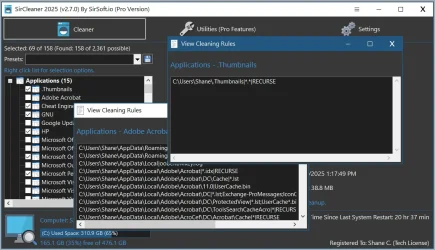
I could have a right click option too view what folders and files it is going to look at.

Which could be helpful if people notice something that its missing to scan or something that shouldn't be scanning.

I think I will test this idea out, could be helpful.

Little side note, I use a Razor keyboard and mouse. Every time the razor software updates it never gets rid of the old installers.
So I made sure to include that in the cleaner as well, one of the only cleaners to clean those up, on my system it freed up 20gb just from the razor installers alone.
 

My Computer My Computer

At a glance

Windows 11
OS
Windows 11
Computer type
PC/Desktop
@SirShane ,

Any explanation of what SirCleaner will delete, however presented, would be an improvement. I really like the idea of a right-click option to see what SirCleaner will target and identify as a junk file. That's a great idea!

Good luck. Have a great day.

Regards,
Phil
 

My Computers My Computers

  • At a glance

    Windows 11 Pro Version 25H2 (Build 26200.8894Intel i7-9700K 4700 MHz32 GB (4 x 8GB SK Hynix DDR4 @1333 MHz) (2666...NVIDIA GeForce RTX 2060 (6 GB) GDDR6 300 MHz
    OS
    Windows 11 Pro Version 25H2 (Build 26200.8894
    Computer type
    PC/Desktop
    Manufacturer/Model
    Dell XPS8930 SE
    CPU
    Intel i7-9700K 4700 MHz
    Motherboard
    Dell XPS 8930
    Memory
    32 GB (4 x 8GB SK Hynix DDR4 @1333 MHz) (2666 MHz)
    Graphics Card(s)
    NVIDIA GeForce RTX 2060 (6 GB) GDDR6 300 MHz
    Sound Card
    None
    Monitor(s) Displays
    Dell UltraSharp U2518D 25"
    Screen Resolution
    2560 x 1440
    Hard Drives
    NVMe Intel 1024 TB
    Seagate 2 TB, SATA-III
    Western Digital Black 4TB
    PSU
    850 W Gold Standard
    Case
    Dell XPS 8930 Base (Special Edition)
    Cooling
    Air
    Keyboard
    Dell 0G4D2W
    Mouse
    Dell MOCZUL
    Internet Speed
    Download 553 Mbps, Upload 686 Mbps
    Browser
    Google Chrome
    Antivirus
    ESET Smart Security Premium, plus Malwarebytes Premium
    Other Info
    BIOS Version 1.1.31
  • At a glance

    Windows 11 Pro Version 25H2 (Build 26200.8894)i7-9750H 4.5 GHz16 GB (2 x 8GB @ 1333 MHz) DDR4-2666 MHzNVIDIA GeForce 1650 4 GB GDDR5
    Operating System
    Windows 11 Pro Version 25H2 (Build 26200.8894)
    Computer type
    Laptop
    Manufacturer/Model
    Dell XPS 15 7590
    CPU
    i7-9750H 4.5 GHz
    Motherboard
    Dell XPS 15 7590
    Memory
    16 GB (2 x 8GB @ 1333 MHz) DDR4-2666 MHz
    Graphics card(s)
    NVIDIA GeForce 1650 4 GB GDDR5
    Sound Card
    None
    Monitor(s) Displays
    Dell XPS 15 7590, 15.6" InfinityEdge Anti-Glare, Non-Touch
    Screen Resolution
    1920 x 1080
    Hard Drives
    512 GB M.2 PCle NVMe SK Hynix
    PSU
    130W Power Adapter
    Case
    Dell XPS 15 7590
    Cooling
    Air
    Keyboard
    Laptop
    Mouse
    Logitech M510
    Internet Speed
    Download: 400 Mbps, Upload: 203 Mbps
    Browser
    Google Chrome
    Antivirus
    ESET Smart Security Premium, plus Malwarebytes Premium
    Other Info
    BIOS Version 1.35.0
Ok here is an update on my progress.
I got the right click option and view cleaner rules done, I'm curious if I should make this a pro feature.
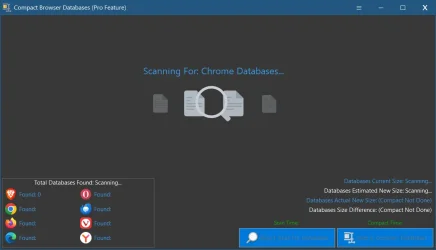
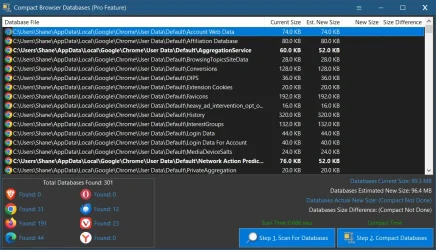
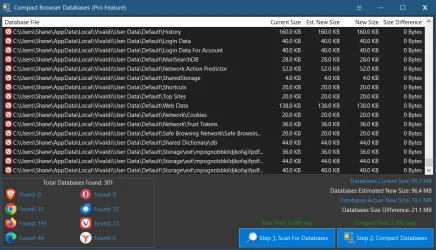
Then I just finished a new pro feature tool, Compact Browser Databases.
Whats cool about this is that it will check for every single database that can be compacted. It then reads how many free pages are in the database and give an estimate on what the new size will be.
But compacting makes it even smaller and faster because partial pages get redone, no way to read that unfortunately, so the amount of saved space is always more than the estimate.
You can see im the screenshot how much more was saved.
Not only does this save space but also helps speed up the browsers since the databases are small and clean and no more bloat.
I also have done a ton of other stuff , including a new pro feature to have SirCleaner work in PE and even scan other Windows drives. Now that this is all done the only thing left is the help file and then I will release.
Let me know your thoughts!right_click_view_clean_rules.webpview_clean_rules_multiple_windows.webpCompact_Browser_Databases_scanning.webpCompact_Browser_Databases_scan_results.webpCompact_Browser_Databases_after_compacting.webp
 

My Computer My Computer

At a glance

Windows 11
OS
Windows 11
Computer type
PC/Desktop
I wish you would release the latest version now, as most of us don't need help files. We just make a good image backup and then test a new utility. I think the new features should be reserved to the Pro version because I already have a pro license and i like to see authors get a reward.
 

My Computers My Computers

  • At a glance

    Windows 11 Pro 25H2 26200.8894AMD Ryzen 7 5825U with Radeon Graphics16GB
    OS
    Windows 11 Pro 25H2 26200.8894
    Computer type
    Laptop
    Manufacturer/Model
    Acemagic LX15PRO
    CPU
    AMD Ryzen 7 5825U with Radeon Graphics
    Motherboard
    BIOS CT_BI_AMI_LX15PRO_AB8139_A-004
    Memory
    16GB
    Screen Resolution
    1920 x 1080
    Hard Drives
    SSD 2TB
    Internet Speed
    30 Mbps
    Browser
    Brave
    Antivirus
    Webroot SecureAnywhere Complete beta
  • At a glance

    Windows 11 Pro 23H2 22631.2506Atom N450 1.66GHz2GB
    Operating System
    Windows 11 Pro 23H2 22631.2506
    Computer type
    Laptop
    Manufacturer/Model
    HP Mini 210-1090NR PC (bought in late 2009!)
    CPU
    Atom N450 1.66GHz
    Memory
    2GB
    Browser
    Brave
    Antivirus
    Webroot
  • Acer Swift SF114-34 laptop
    OS Windows 11 Pro 26200.8894
    CPU Pentium Silver N6000
    RAM 4GB
    BIOS v1.17
    SSD Samsung 970 EVO Plus SSD 2TB (an upgrade)
Interesting find using Sir Cleaner. The first few times I ran it the Brave Browser kept showing up with the options to clean. I haven't used that browser in 4 or 5 years and I'm guessing there were leftovers from the uninstall. I scoured my system and really could not find anything. Eventually, I used the uninstaller in Revo and now Brave no longer appears in the list.
 

My Computer My Computer

At a glance

Windows 11 ProAMD 9700X32 gb5050
OS
Windows 11 Pro
Computer type
PC/Desktop
CPU
AMD 9700X
Motherboard
ASUS B650E
Memory
32 gb
Graphics Card(s)
5050
Sound Card
On-board realtech
That shows you how good it is.
 

My Computers My Computers

  • At a glance

    Windows 11 Pro 25H2 26200.8894AMD Ryzen 7 5825U with Radeon Graphics16GB
    OS
    Windows 11 Pro 25H2 26200.8894
    Computer type
    Laptop
    Manufacturer/Model
    Acemagic LX15PRO
    CPU
    AMD Ryzen 7 5825U with Radeon Graphics
    Motherboard
    BIOS CT_BI_AMI_LX15PRO_AB8139_A-004
    Memory
    16GB
    Screen Resolution
    1920 x 1080
    Hard Drives
    SSD 2TB
    Internet Speed
    30 Mbps
    Browser
    Brave
    Antivirus
    Webroot SecureAnywhere Complete beta
  • At a glance

    Windows 11 Pro 23H2 22631.2506Atom N450 1.66GHz2GB
    Operating System
    Windows 11 Pro 23H2 22631.2506
    Computer type
    Laptop
    Manufacturer/Model
    HP Mini 210-1090NR PC (bought in late 2009!)
    CPU
    Atom N450 1.66GHz
    Memory
    2GB
    Browser
    Brave
    Antivirus
    Webroot
  • Acer Swift SF114-34 laptop
    OS Windows 11 Pro 26200.8894
    CPU Pentium Silver N6000
    RAM 4GB
    BIOS v1.17
    SSD Samsung 970 EVO Plus SSD 2TB (an upgrade)
I wish you would release the latest version now, as most of us don't need help files. We just make a good image backup and then test a new utility. I think the new features should be reserved to the Pro version because I already have a pro license and i like to see authors get a reward.
I could do that, release it then start working on the help file. I can just hide the help menu for now.
With the huge amount of changes I made it needs testing for anything I might of missed.
I'm going to upload a test version of the latest version of it today, I'll post the link to it for anyone who wants to try it out. I can delete the link after I release on my site.
 

My Computer My Computer

At a glance

Windows 11
OS
Windows 11
Computer type
PC/Desktop

Latest Support Threads

Back
Top Bottom