SirCleaner Released - New Powerful Junk File Cleaner


It has a ton of more options to remove even more, like 3 or 4 times more than CCleaner or WDC.
Thanks! I'll check it out. Love the look so far and that I can change the theme color
 

My Computer

System One

  • OS
    Windows 11
    Computer type
    PC/Desktop
    Manufacturer/Model
    Custom
    CPU
    Intel(R) Core(TM) i7-8700 CPU @ 3.20GHz
    Motherboard
    ROG Maximus X Code
    Memory
    G.Skill F4-3200C16D-16GTZR Trident Z RGB Series 16 GBx2 (32GB)
    Graphics Card(s)
    PowerColor Fighter AMD Radeon RX 6700 XT w/ 12GB GDDR6 Memory
    Monitor(s) Displays
    3x ASUS VP28UQG 28" 4K/UHD 3840x2160 1ms DP HDMI Adaptive Sync/FreeSync Eye Care Monitor
    Screen Resolution
    3840x2160 x3
    Hard Drives
    1x 1TB NVME SSD
    1x 1TB Sata SSD
    1x 1TB Hard Drive (7200rpm)
    Keyboard
    Razer Huntsman V2 TKL
    Mouse
    Razer Basilisk V3 Pro
    Internet Speed
    500 Up / 20 Down
    Browser
    Firefox Beta and Brave Beta
    Antivirus
    Defender / MB Firewall Control
That was my main Complaint about CCleaner , the user could not change the bright color. I got tired of contacting them about it. They have lost a customer.
 

My Computers

System One System Two

  • OS
    Windows11 Pro 26200.8524
    Computer type
    PC/Desktop
    Manufacturer/Model
    Dell Alienware Aurora R16
    CPU
    Intel Core i9 14900F (24 -Core, 68 MB Total Cache)
    Motherboard
    Dell Alienware
    Memory
    32GB DDR5
    Graphics Card(s)
    RTX 4080 Super w/581.95
    Sound Card
    Realtec
    Monitor(s) Displays
    Corsair XENEON 32QHD165
    Screen Resolution
    2560 X 1440
    Hard Drives
    1-2TB Samsung 990 Pro PCIe NVMe M2 SSD
    1-4TB Samsung 990 Pro PCIe NVMe M2 SSD
    PSU
    1000 Watt Platinum Dell
    Case
    Alienware
    Cooling
    Liquid Closed Loop
    Keyboard
    Logitech MK270 Wireless Keyboard
    Mouse
    Logitech MK270 Wireless
    Internet Speed
    100Gb's Down-20 Up
    Browser
    Firefox 151.0.2
    Antivirus
    Defender
    Other Info
    Very Quiet And Fast
    CyberPower UPS CP1500PFCLCD
  • Operating System
    PClinuxOS Mate (2025.7)
    Computer type
    PC/Desktop
    Manufacturer/Model
    Intel
    CPU
    13th Gen Inter(R) Core(TM) i3-1315U
    Motherboard
    Intel
    Memory
    64 GB DDR4 @3200 MHz.
    Graphics card(s)
    Internal
    Sound Card
    None
    Monitor(s) Displays
    Dell 2419HGCF
    Screen Resolution
    1920 X 1080
    Hard Drives
    SAMSUNG 980 PRO SSD 2TB, PCIe 4.0 M.2 2280
    PSU
    Chicony 30 Watt
    Case
    Small
    Keyboard
    Dell
    Mouse
    Razor
    Internet Speed
    1GB
    Browser
    Slimjet
Sorry there hasn't been an update yet! As you know I also run a computer repair business and all my customers have had me updating all the systems to Windows 11. So I have been SLAMMED. But I will have an update out in a week or two, with a first run window that will ask what colors, what cleaning options and such. My goal is to make it much easier for new users. So more changes and such. I appreciate all of you!
 

My Computer

System One

  • OS
    Windows 11
    Computer type
    PC/Desktop
@SirShane I’m getting ready to release a new version of an app I maintain. It’s been six years since the last version. So you’re good man. 😂😂
 

My Computer

System One

  • OS
    Windows 11 Pro 25H2
    Computer type
    PC/Desktop
    Manufacturer/Model
    Intel NUC12WSHi7
    CPU
    12th Gen Core i7-1260P
    Motherboard
    NUC12WSBi7
    Memory
    64 GB Micron PC4-25600
    Graphics Card(s)
    Intel Iris Xe Graphics
    Sound Card
    on-board Realtek HD Audio
    Monitor(s) Displays
    Dell U3219Q
    Screen Resolution
    3840 x 2160
    Hard Drives
    Samsung SSD 990 PRO 1TB
    Crucial MX500 2 TB
    Antivirus
    Microsoft Defender
V2.9.0
Fixed bug of Other user profiles unselected not saving.

Updated cleaner for PowerDirector

Added new command line options. Allowing the program to be ran from the task scheduler or batch files and so on. Allowing users to schedule auto cleanups. Future updates will include a built in tool making scheduling automatic cleanups easier.
Help and more information on the new command line options is located at Command Line Options

Added new option under Advanced settings "Always Load Default Cleaning Preset At Startup" Since the program detects any new programs it can clean at startup this option will insure that it gets selected automatically.

Added a First Run Wizard window, some quick steps to help get new users running. Such as choosing a cleaning preset, what colors to use and a few other options. This will only run once, if a user wants to open it again they can under the settings tab.

Updated help file both online and local to show the new changes and to give details on the new command line options.
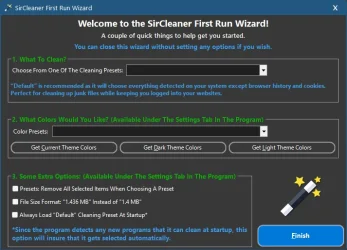
first_run_wizard.webp

Command (Only Forward Slash "/" Supported)Options (Note: There are no spaces between the commands and their options)
/Clean
With this command after the program is done cleaning it will close itself.
Auto -Auto scan and clean while showing the program window.
Example: /Clean=Auto

Silent - Auto scan and clean while hiding the window.
Example: /Clean=Silent
/CloseBrowsers
True - Auto close browsers when scanning. This will close any running browsers so they can be properly scanned and clean. This is useful with most browsers running in the background even though you don't have them open.
Example: /CloseBrowsers=True

False - Will not close any running browsers. This is useful if you have the program set to auto clean via the Windows task scheduler using these commands and don't want them being closed while you use them.
Example: /CloseBrowsers=False
/LoadPresetThis allows you to load a cleaning preset. Either the default ones or ones you create. If the preset name doesn't exist then the currently selected cleaning options will be ran.

Please note quotations only need to be used if there is spaces in the name.

Example: /LoadPreset="Default"
or
Example: /LoadPreset="Recycle Bin & Temporary Folders"
/LoadPresetClearTrue - Clear current cleaning choices when loading preset. This makes sure only the items in the preset are cleaned.
Example: /LoadPresetClear=True

False - This tells the program to not remove any previous selected items marked to be cleaned. When loading a preset the items in the preset will simply be included with the current ones.
Example: /LoadPresetClear=False
/SaveCleaningChoicesTrue - This is the default value if this command isn't used. When the program closes it will save and remember the cleaning options chosen.
Example: /SaveCleaningChoices=True

False - The program will not save any changes made to the cleaning options in the list. This is useful if you want to run a preset without undoing your selections you already have. Also allows you to open the program with this switch, make any changes you want for a one time run and have your original choices be chosen on the next program startup.
Example: /SaveCleaningChoices=False
/SelectEverythingThis command only has one option and can be used instead of /LoadPreset

True - Instead of loading a preset choose everything in the list to clean.
Example: /SelectEverything=True

Here are a number of examples on using these commands.

Note: When using the /Clean command the program will close when finished. Using any of the other commands without /Clean the program will remain open.

Example 1:
SirCleaner.exe /Clean=Silent /CloseBrowsers=True /LoadPreset="Default" /LoadPresetClear=True


Loading the "Default" preset, removing any selected items in case something excluded from the default preset is chosen, closing browsers and cleaning the system and doing so hidden. The program will remember the cleaning choices after this.
We use the default preset which selects everything in the list except browser history, cookies and site data. The program checks for any supported programs at startup, so if new ones show up this makes sure they get selected for cleaning.

Example 2:
SirCleaner.exe /Clean=Silent /CloseBrowsers=True /LoadPreset="Default" /LoadPresetClear=True /SaveCleaningChoices=False


Same as Example 1, but this time we don't want the program to remember the cleaning choices, that way any choices from before remain.

Example 3:
SirCleaner.exe /Clean=Auto /CloseBrowsers=True /LoadPreset="Default" /LoadPresetClear=True /SaveCleaningChoices=False


Same as Example 1 and 2 but instead of being hidden the program window and progress is shown.

Example 4:
SirCleaner.exe /LoadPreset="Default"

or
SirCleaner.exe /LoadPreset="Recycle Bin & Temporary Folders" /LoadPresetClear=True
or
SirCleaner.exe /LoadPreset="Default" /SaveCleaningChoices=False
or
SirCleaner.exe /LoadPreset="Recycle Bin & Temporary Folders" /LoadPresetClear=True /SaveCleaningChoices=False

We can use the other commands without the clean command to open the program and have presets selected. You can uses any of the other commands along with it.

 

My Computer

System One

  • OS
    Windows 11
    Computer type
    PC/Desktop
I've used this program every day since it's first announcement and have never had a problem. For some reason I don't understand neither PatchMyPc nor UniGetUI identified this program as having an update. So I used the program's internal update check to do the update and that worked fine.

I don't use command line options or make macros that use them, so this latest update will have minimal impact on me. But it remains my go-to cleaner-upper that I use every day.
 

My Computer

System One

  • OS
    Win11 Pro
    Computer type
    PC/Desktop
    Manufacturer/Model
    BeeLink SER Mini
    CPU
    AMD Ryzen 5 5500U
    Motherboard
    BeeLink SER
    Memory
    16 GB
    Graphics Card(s)
    Radeon 2100
    Sound Card
    none
    Monitor(s) Displays
    Primary: Phillips 4K; Secondary: LG 4K
    Screen Resolution
    Both 3860 x 2160
    Hard Drives
    C: NVme 500 GB Windows only
    D: 128 GB NVme User data + Windows Temp via Junction Link
    PSU
    External
    Case
    Mini
    Cooling
    Internal fan
    Keyboard
    Logitech Wireless Lighted
    Mouse
    Kensington ExpertMouse wireless trackball
    Internet Speed
    500/500
    Browser
    Brave
    Antivirus
    Windows Defender
For some reason I don't understand neither PatchMyPc nor UniGetUI identified this program as having an update.

It's not in the catalog for Patch My PC, nor do I see it in the chocolatey or winget repositories. I didn't check every repo that UniGetUI supports, but that's the long and short of it... an app has to be in the updating app's "catalog."
 

My Computer

System One

  • OS
    Windows 11 Pro 25H2
    Computer type
    PC/Desktop
    Manufacturer/Model
    Intel NUC12WSHi7
    CPU
    12th Gen Core i7-1260P
    Motherboard
    NUC12WSBi7
    Memory
    64 GB Micron PC4-25600
    Graphics Card(s)
    Intel Iris Xe Graphics
    Sound Card
    on-board Realtek HD Audio
    Monitor(s) Displays
    Dell U3219Q
    Screen Resolution
    3840 x 2160
    Hard Drives
    Samsung SSD 990 PRO 1TB
    Crucial MX500 2 TB
    Antivirus
    Microsoft Defender
It's not in the catalog for Patch My PC, nor do I see it in the chocolatey or winget repositories. I didn't check every repo that UniGetUI supports, but that's the long and short of it... an app has to be in the updating app's "catalog."
Aha! That'll do it for sure.

When the program first came out the author told me he's using an old version of Visual Basic to write it. My guess is that the old VB installer just doesn't do the hookups required for PatchMyPC or UnigetUI to see it.

"Life in the big city."
 

My Computer

System One

  • OS
    Win11 Pro
    Computer type
    PC/Desktop
    Manufacturer/Model
    BeeLink SER Mini
    CPU
    AMD Ryzen 5 5500U
    Motherboard
    BeeLink SER
    Memory
    16 GB
    Graphics Card(s)
    Radeon 2100
    Sound Card
    none
    Monitor(s) Displays
    Primary: Phillips 4K; Secondary: LG 4K
    Screen Resolution
    Both 3860 x 2160
    Hard Drives
    C: NVme 500 GB Windows only
    D: 128 GB NVme User data + Windows Temp via Junction Link
    PSU
    External
    Case
    Mini
    Cooling
    Internal fan
    Keyboard
    Logitech Wireless Lighted
    Mouse
    Kensington ExpertMouse wireless trackball
    Internet Speed
    500/500
    Browser
    Brave
    Antivirus
    Windows Defender
JUST found this thread---I too was a user of both CCleaner and WISECARE---started with CC when it was called Crap Cleaner and much later moved to WISECARE...
Nice utility
Found an additional 3GB of junk that WiseCare did not.
THANKS for sharing!!!!
 

My Computer

System One

  • OS
    WIN11 HOME Version 24H2
    Computer type
    PC/Desktop
    Manufacturer/Model
    DELL XPS 8940
    CPU
    11th Gen Intel(R) Core(TM) i7-11700 @ 2.50GHz 2.50 GH
    Motherboard
    Dell OE
    Memory
    32GB
    Graphics Card(s)
    NVIDIA GeForce GTX 1650 SUPER
    Sound Card
    Realtek Audio (on board)
    Monitor(s) Displays
    (2) DELL 2007FP
    Screen Resolution
    1600 X 1200
    Hard Drives
    C: (OS and APPS) 512GB SSD
    D: (data) 1TB SATA
    PSU
    360W
    Case
    DELL OE
    Cooling
    Noctua NF-A9 PWM 92mm case fan and NH-D9L CPU Cooler with 92mm fan
    Keyboard
    Dell
    Mouse
    Logitech M705
    Internet Speed
    1Gb DWN 1Gb UP
    Browser
    FIREFOX- once in a great while will use EDGE
    Antivirus
    MS
    Other Info
    The case fan and CPU cooler were after purchase upgrades...the i7 cpu runs hot and the OE solution can best be described as marginal when CPU intensive apps are used.
    ALSO added VRM and SSD passive heatsinks.

My Computer

System One

  • OS
    Win11 Pro
    Computer type
    PC/Desktop
    Manufacturer/Model
    BeeLink SER Mini
    CPU
    AMD Ryzen 5 5500U
    Motherboard
    BeeLink SER
    Memory
    16 GB
    Graphics Card(s)
    Radeon 2100
    Sound Card
    none
    Monitor(s) Displays
    Primary: Phillips 4K; Secondary: LG 4K
    Screen Resolution
    Both 3860 x 2160
    Hard Drives
    C: NVme 500 GB Windows only
    D: 128 GB NVme User data + Windows Temp via Junction Link
    PSU
    External
    Case
    Mini
    Cooling
    Internal fan
    Keyboard
    Logitech Wireless Lighted
    Mouse
    Kensington ExpertMouse wireless trackball
    Internet Speed
    500/500
    Browser
    Brave
    Antivirus
    Windows Defender
The installer is made with setup factory if that is any help.

Also the command lines will allow me to start making a built in scheduler tool in a future update as well!
 

My Computer

System One

  • OS
    Windows 11
    Computer type
    PC/Desktop
Currently working on the next update, having the program subtract the amount of data cleaned when it isn't able to delete a file because it is in use, this way a proper and truthful amount that is cleaned is shown.
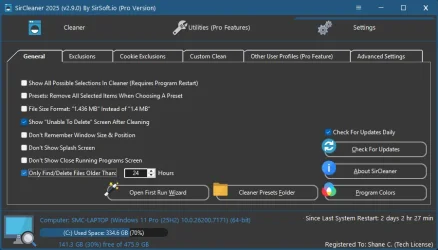
Also add an option in settings "Only Find/Delete Files Older Than" and the number of hours. What makes this better than other cleaners (I'm sure you can think of some lol) is they have theirs set at 24 hours and a user can't change it and is only for two folders. Mine will be done on the whole scan and you can set the number of hours.

Working on more changes as I go through emails and get caught up! So new update shouldn't be long as I am completing these as I go. Easier to knock them out as they come rather than have a big list and be overwhelmed :-).

new_setting.webp
 

My Computer

System One

  • OS
    Windows 11
    Computer type
    PC/Desktop
v2.9.1

Fixed bug where program was checking for updates every time it opened instead of just once a day if check for updates was enabled. This was due to a typo in the date format.

Actually fixed bug of Other user profiles unselected not saving. Spelling mistake was the issues. This time triple checked and tested.

Add new option in settings "Only Find/Delete Files Older Than" with the default of 24 hours. The hours can be set to anything you like. This allows any new created files to not be cleaned until they are a certain age.

Updated first time startup wizard to include the new "Only Find/Delete Files Older Than" option.

Last amount cleaned shown on the main screen will now show the number of items cleaned along with the amount.

Last amount cleaned will now save by computer name in the LastClean.ini file. So if using the portable version, instead of it showing the last clean from the last system it will remember the amount cleaned for the current system.

The program now subtracts the amount of data and items cleaned when it isn't able to delete a file because it is in use, this way a proper and truthful amount that is cleaned is shown.

Most of the web browsers "Web Storage" cleaning rules have been moved to "Cookies & Site Data".

Updated cleaning rules for ESET, Malwarebytes, Windows Security, EaseUS ToDo Backup, Macrium Reflect.

Added new submit program to SirCleaner option under the menu in the upper right, that opens the new submit form on the site at Submit Program/Cleaner Rules To SirCleaner - SirSoft.io

Multiple other small bug fixes, code changes and improvements.
 

My Computer

System One

  • OS
    Windows 11
    Computer type
    PC/Desktop
Thanks. The first run wizard did not run, I found it later and ran it manually. FYI.
 

My Computers

System One System Two

  • OS
    Windows 11 Pro 25H2 26200.8524
    Computer type
    Laptop
    Manufacturer/Model
    Acemagic LX15PRO
    CPU
    AMD Ryzen 7 5825U with Radeon Graphics
    Memory
    16GB
    Screen Resolution
    1920 x 1080
    Hard Drives
    SSD 2TB
    Internet Speed
    30 Mbps
    Browser
    Brave
    Antivirus
    Webroot Secure Anywhere
    Other Info
    System 3

    Acer Swift SF114-34 laptop
    OS Windows 11 Pro 26200.8524
    CPU Pentium Silver N6000
    RAM 4GB
    SSD Samsung 970 EVO Plus SSD 2TB (an upgrade)
  • Operating System
    Windows 11 Pro 23H2 22631.2506
    Computer type
    Laptop
    Manufacturer/Model
    HP Mini 210-1090NR PC (bought in late 2009!)
    CPU
    Atom N450 1.66GHz
    Memory
    2GB
    Browser
    Brave
    Antivirus
    Webroot
Thanks. The first run wizard did not run, I found it later and ran it manually. FYI.
Odd, the program looks at the settings.ini file for DontShowFirstRunWizard=1
If it is 1 it doesnt run.

I just a test and I know why it didn't run, if I set DontShowFirstRunWizard (Have to save the settings.ini file to the desktop first, change it and copy it back because notepad doesnt have admin rights) to 0 AND there is an update and I tell the update to run the first time window is closed because the programming is closing to update, and when the wizard closes its writes the 1 to the value and so it looks like it never ran.

If you click no on the update it comes up lol

I will put in variable in the program to know if it is closing for an update or not and not write to the settings file if it is and that should fix it.
 

My Computer

System One

  • OS
    Windows 11
    Computer type
    PC/Desktop
I was and still am to some degree a fan of CCleaner. With CCenhancer, it's given me everything I needed. With their version 7, they pretty much killed their product and it's become unusable. Just found this thread and am hooked. Tried the software and lot it. I do love the fact that this page contaims many feature requests, updates, etc. Coming from development background, I would highly recommend using GitHub at least from the Bugs/ feature requests, etc. It's easier to maintain and understand what's ebing done and what's not. Otherwise, reading 8 pages of a blog is kind of hard to see what's going on. Just my 2 cents but will definitely see how I can contribute.

On personal note, these are the top 3 features I'd want to see in the software: Startup list items, Scheduled Tasks and System Restore list.
 

My Computer

System One

  • OS
    Windows 10
    Computer type
    PC/Desktop
    Manufacturer/Model
    HP
I really enjoy using Sir Cleaner! The one addition I would like to see is a way to view cookies and select the ones to be protected. I know you can import a cookie list but I hate having to use Ccleaner just to be able to do that.
 

My Computer

System One

  • OS
    Windows 11 Pro
    Computer type
    PC/Desktop
    CPU
    AMD 9700X
    Motherboard
    ASUS B650E
    Memory
    32 gb
    Graphics Card(s)
    5050
    Sound Card
    On-board realtech
I was and still am to some degree a fan of CCleaner. With CCenhancer, it's given me everything I needed. With their version 7, they pretty much killed their product and it's become unusable. Just found this thread and am hooked. Tried the software and lot it. I do love the fact that this page contaims many feature requests, updates, etc. Coming from development background, I would highly recommend using GitHub at least from the Bugs/ feature requests, etc. It's easier to maintain and understand what's ebing done and what's not. Otherwise, reading 8 pages of a blog is kind of hard to see what's going on. Just my 2 cents but will definitely see how I can contribute.

On personal note, these are the top 3 features I'd want to see in the software: Startup list items, Scheduled Tasks and System Restore list.
I will see about getting something like that added! Also I do have a github page, on my site under the menu is a bug report option which goes to github. Although right now it just says bug report, I will reword it to say bug report / feature request.
 

My Computer

System One

  • OS
    Windows 11
    Computer type
    PC/Desktop
I really enjoy using Sir Cleaner! The one addition I would like to see is a way to view cookies and select the ones to be protected. I know you can import a cookie list but I hate having to use Ccleaner just to be able to do that.
Right now the way to view the cookies is to scan for them first (On the scan results you can right click on the results to view all items) and then you can select the cookies you want to exclude, select and right click on them.
 

My Computer

System One

  • OS
    Windows 11
    Computer type
    PC/Desktop
Thank you!
 

My Computer

System One

  • OS
    Windows 11 Pro
    Computer type
    PC/Desktop
    CPU
    AMD 9700X
    Motherboard
    ASUS B650E
    Memory
    32 gb
    Graphics Card(s)
    5050
    Sound Card
    On-board realtech

Latest Support Threads

Back
Top Bottom