Sleep Mode issues


idainc

Well-known member
Member
Local time
10:18 PM
Posts
237
OS
windows 11 64
W 11 / 64 HP all in one will turn off monitor after 5 minutes on its own but will not put PC into sleep mode either on its own or commanded. I've tried all googleable solutions. Any thoughts appreciated..
 

My Computer My Computer

At a glance

windows 11 64i7-12700T32 GBNvidia GeForce 1650 / Intel 770
OS
windows 11 64
Computer type
PC/Desktop
Manufacturer/Model
HP
CPU
i7-12700T
Memory
32 GB
Graphics Card(s)
Nvidia GeForce 1650 / Intel 770
Screen Resolution
1920 / 1080
Hard Drives
Samsubg 990 Pro 1TB
Case
All in One
Keyboard
USB
Mouse
USB
Internet Speed
600 MBS
Browser
Chrome
Antivirus
MS
Sorry to be boring but the first response to any post like this is to seek further information.
Please post the results of this command [which can be run in PowerShell & Cmd windows].
PowerCfg -a


All the best,
Denis
 

My Computer My Computer

At a glance

Windows 11 Home x64 Version 25H2 Build 26200....
OS
Windows 11 Home x64 Version 25H2 Build 26200.8037
Thanks:
 

Attachments

  • Screenshot 2023-04-10 045337.jpg
    Screenshot 2023-04-10 045337.jpg
    34.2 KB · Views: 4

My Computer My Computer

At a glance

windows 11 64i7-12700T32 GBNvidia GeForce 1650 / Intel 770
OS
windows 11 64
Computer type
PC/Desktop
Manufacturer/Model
HP
CPU
i7-12700T
Memory
32 GB
Graphics Card(s)
Nvidia GeForce 1650 / Intel 770
Screen Resolution
1920 / 1080
Hard Drives
Samsubg 990 Pro 1TB
Case
All in One
Keyboard
USB
Mouse
USB
Internet Speed
600 MBS
Browser
Chrome
Antivirus
MS
Happy to report this is fixed. I changed the timing to 3 minutes and alternated between Wi-Fi and hard wired and it seems to resolve itself. I saw the "network connected" after standby and essentially switched networks. Thanks again !
 

My Computer My Computer

At a glance

windows 11 64i7-12700T32 GBNvidia GeForce 1650 / Intel 770
OS
windows 11 64
Computer type
PC/Desktop
Manufacturer/Model
HP
CPU
i7-12700T
Memory
32 GB
Graphics Card(s)
Nvidia GeForce 1650 / Intel 770
Screen Resolution
1920 / 1080
Hard Drives
Samsubg 990 Pro 1TB
Case
All in One
Keyboard
USB
Mouse
USB
Internet Speed
600 MBS
Browser
Chrome
Antivirus
MS
You do not have sleep, the sleep that we have come to know over the past decade or so [S3 Sleep].
You have S0 Modern standby [aka S0 Low power idle]. It is not S3 Sleep, it is an idle condition.

There is further info in my post S0 - explanation and suggestions - post #6 - ElevenForum


All the best,
Denis
 

My Computer My Computer

At a glance

Windows 11 Home x64 Version 25H2 Build 26200....
OS
Windows 11 Home x64 Version 25H2 Build 26200.8037
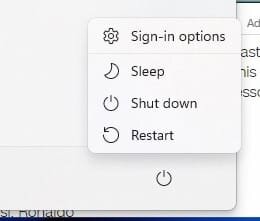
I was confused as Windows 11 call it "sleep".
 

Attachments

  • Untitled.jpg
    Untitled.jpg
    5.9 KB · Views: 1

My Computer My Computer

At a glance

windows 11 64i7-12700T32 GBNvidia GeForce 1650 / Intel 770
OS
windows 11 64
Computer type
PC/Desktop
Manufacturer/Model
HP
CPU
i7-12700T
Memory
32 GB
Graphics Card(s)
Nvidia GeForce 1650 / Intel 770
Screen Resolution
1920 / 1080
Hard Drives
Samsubg 990 Pro 1TB
Case
All in One
Keyboard
USB
Mouse
USB
Internet Speed
600 MBS
Browser
Chrome
Antivirus
MS
Yes, it uses that term despite it being entirely different.

It is powered on yet is idle.
User-desired tasks are prevented from running.
Windows-desired activities, such as email & Windows update, still run.
Your computer will keep running on battery for a bit longer than it would if it was in active use but it still uses up a lot of power because it is idle not sleep. It is way more than the 0.5%-1% an hour that S3 Sleep uses. I have just had an opportunity to experiment with an S0 Modern standby computer [HP Envy 17-cr0001na] and its rate of power use in S0 Modern standby was about 0.5WHr an hour which is the same as the results were the last time I measured S3 Sleep power consumption.

All the best,
Denis
 
Last edited:

My Computer My Computer

At a glance

Windows 11 Home x64 Version 25H2 Build 26200....
OS
Windows 11 Home x64 Version 25H2 Build 26200.8037
Interestingly enough this seems to be a transient issue and I cant reliably predict what is causing it.
 

My Computer My Computer

At a glance

windows 11 64i7-12700T32 GBNvidia GeForce 1650 / Intel 770
OS
windows 11 64
Computer type
PC/Desktop
Manufacturer/Model
HP
CPU
i7-12700T
Memory
32 GB
Graphics Card(s)
Nvidia GeForce 1650 / Intel 770
Screen Resolution
1920 / 1080
Hard Drives
Samsubg 990 Pro 1TB
Case
All in One
Keyboard
USB
Mouse
USB
Internet Speed
600 MBS
Browser
Chrome
Antivirus
MS
Since MS invented 'Sleep' a long time ago, there have been Thousands of complaints, reported on the Internet, about problems with it. And, MS does not seem to care anything about fixing it.
However there is ONE Sure Fire way to solve all those problems.....that is to permanently disable 'Sleep', and all that goes along with it, like Hibernate.

A standard part of My installing any version of Windows for the past two decades, has been to set sleep, hibernate, and the screen blanker to "NEVER". Then I permanently disable "Hibernate". Then I never have problems with any of those things.

Just a thought.....

:cool:
 
Last edited:
TM,

This OP does not have sleep [S3 Sleep].

And I am not alone in never having any problems with S3 Sleep. It is very useful.

Denis
 

My Computer My Computer

At a glance

Windows 11 Home x64 Version 25H2 Build 26200....
OS
Windows 11 Home x64 Version 25H2 Build 26200.8037
I have just had an opportunity to experiment with an S0 Modern standby computer [HP Envy 17-cr0001na] and its rate of power use in S0 Modern standby was about 0.5WHr an hour which is the same as the results were the last time I measured S3 Sleep power consumption.

idainc,

I've just corrected part of my post #7 above.

All the best,
Denis
 
Last edited:

My Computer My Computer

At a glance

Windows 11 Home x64 Version 25H2 Build 26200....
OS
Windows 11 Home x64 Version 25H2 Build 26200.8037
Back
Top Bottom