Slow boot and Internet connection problems


Tombar

Well-known member
Member
VIP
Local time
4:11 PM
Posts
200
OS
Windows 11
Hello

Recently, I've been experiencing slow boots and internet connection problems. To cut a long story short, the Internet connection problems were due to KB5030219, which I uninstalled, but this didn't affect the boot times.

By slow boot times, I mean about 30 sec till the light comes on on the USB keyboard, another 30 sec to get to the Del/F2 option and another 15 sec to get to Windows logon. This is slow, isn't it?

Things I've tried:
Run DISM and SFC
Virus scan and driver update scan
Turned off all startup programmes
Done clean boot, including uninstalling Bitdefender, which refuses to be turned off by the normal method for Clean Boot
Turned off/on Fastboot.
Installed a backup from 2 weeks ago
Checked boot order in BIOS
None have helped - any ideas? Or am I just imagining a problem and it really should be this slow?
 
Windows Build/Version
Version 22H2, build 22621.2215.

My Computer My Computer

At a glance

Windows 1112th Gen Intel Core i3-1210016 GbIntegrated Graphics 730
OS
Windows 11
Computer type
PC/Desktop
Manufacturer/Model
Mesh
CPU
12th Gen Intel Core i3-12100
Motherboard
Asus Prime H610M-D D4
Memory
16 Gb
Graphics Card(s)
Integrated Graphics 730
including uninstalling Bitdefender


Did you use the Bitdefender removal tool?
I had the August update break Bitdefender.
It completely erased all my firewall settings, and made every program take ages to start.

I had to uninstall BD and re-install it... twice, to get everything back to normal.
And that included many emails back and forth with BD tech support.


Another option is to uninstall BD (using the removal tool), and do an In-Place upgrade, then reinstall BD.


Here is the short version of the In-place upgrade tutorial...

DISABLE non-Microsoft:
a) antivirus software
b) firewall software
c) drive encryption software


Make a full OS backup with a program like Macrium Reflect or AOMEI Backupper Standard
Making a backup is optional, but always a smart move.
Macrium Reflect
AOMEI Backupper Standard (free)


Get the Windows 11 ISO (Option #2), and save it to your desktop...


Right click the ISO image and choose: MOUNT
Open File Explorer and you will see a new drive letter. It will "look" like a DVD optical drive.
Double click the new drive letter to open it.
Find setup.exe and double click it to start the in-place upgrade.

Choose the Keep personal files and apps option.

After it's all done... to UNmount the ISO image, right click the new drive letter and choose: EJECT.

The ONLY thing you will lose is some of your personalizations.
Your drivers, programs and data will be intact.
 

My Computers My Computers

  • At a glance

    Win 11 Home ♦♦♦26200.8655 ♦♦♦♦♦♦♦25H2AMD Ryzen 7 3700XG.Skill (F4-3200C14D-16GTZKW)EVGA RTX 2070 (08G-P4-2171-KR)
    OS
    Win 11 Home ♦♦♦26200.8655 ♦♦♦♦♦♦♦25H2
    Computer type
    PC/Desktop
    Manufacturer/Model
    Built by Ghot® [May 2020]
    CPU
    AMD Ryzen 7 3700X
    Motherboard
    Asus Pro WS X570-ACE (BIOS 5302)
    Memory
    G.Skill (F4-3200C14D-16GTZKW)
    Graphics Card(s)
    EVGA RTX 2070 (08G-P4-2171-KR)
    Sound Card
    Realtek ALC1220P / ALC S1220A
    Monitor(s) Displays
    Dell U3011 30"
    Screen Resolution
    2560 x 1600
    Hard Drives
    2x Samsung 860 EVO 500GB,
    WD 4TB Black FZBX - SATA III,
    WD 8TB Black FZBX - SATA III,
    DRW-24B1ST CD/DVD Burner
    PSU
    PC Power & Cooling 750W Quad EPS12V
    Case
    Cooler Master ATCS 840 Tower
    Cooling
    CM Hyper 212 EVO (push/pull)
    Keyboard
    Ducky DK9008 Shine II Blue LED
    Mouse
    Logitech Optical M-100
    Internet Speed
    300/300
    Browser
    Firefox (latest)
    Antivirus
    Bitdefender Total Security
    Other Info
    Speakers: Klipsch Pro Media 2.1
  • At a glance

    Windows XP Pro 32bit w/SP3AMD Athlon 64 X2 5000+ (OC'd @ 3.2Ghz)TWIN2X2048-6400C4DHX (2 x 1GB, DDR2 800)EVGA 256-P2-N758-TR GeForce 8600GT SSC
    Operating System
    Windows XP Pro 32bit w/SP3
    Computer type
    PC/Desktop
    Manufacturer/Model
    Built by Ghot® (not in use)
    CPU
    AMD Athlon 64 X2 5000+ (OC'd @ 3.2Ghz)
    Motherboard
    ASUS M2N32-SLI Deluxe Wireless Edition
    Memory
    TWIN2X2048-6400C4DHX (2 x 1GB, DDR2 800)
    Graphics card(s)
    EVGA 256-P2-N758-TR GeForce 8600GT SSC
    Sound Card
    Onboard
    Monitor(s) Displays
    ViewSonic G90FB Black 19" Professional (CRT)
    Screen Resolution
    up to 2048 x 1536
    Hard Drives
    WD 36GB 10,000rpm Raptor SATA
    Seagate 80GB 7200rpm SATA
    Lite-On LTR-52246S CD/RW
    Lite-On LH-18A1P CD/DVD Burner
    PSU
    PC Power & Cooling Silencer 750 Quad EPS12V
    Case
    Generic Beige case, 80mm fans
    Cooling
    ZALMAN 9500A 92mm CPU Cooler
    Keyboard
    Logitech Classic Keybooard 200
    Mouse
    Logitech Optical M-BT96a
    Internet Speed
    300/300
    Browser
    Firefox 3.x ??
    Antivirus
    Symantec (Norton)
    Other Info
    Still assembled, still runs. Haven't turned it on for 15 years?
Hi Ghot, Yes, I used the BD Uninstall Tool for the up to date version for BD Total Security - I've had a lot of practice at uninstalling BD! For one thing, it's Spam filter doesn't work on the latest Thunderbird.

Before doing anything drastic, do my boot times seem long to other people? Or am I just being stupid?
Is the ISO repair method (method 2 in the link) better than the update method (method 1 in the link).

Before I forget, Internet is working since I uninstalled KB5030219 and a later update. Can I update without installing KB5030219?
 
Last edited:

My Computer My Computer

At a glance

Windows 1112th Gen Intel Core i3-1210016 GbIntegrated Graphics 730
OS
Windows 11
Computer type
PC/Desktop
Manufacturer/Model
Mesh
CPU
12th Gen Intel Core i3-12100
Motherboard
Asus Prime H610M-D D4
Memory
16 Gb
Graphics Card(s)
Integrated Graphics 730
The boot time seems a bit slow, but not extremely slow.

Asus boards seem to do a lot of checks when booting. My primary system takes more than 40 seconds to boot from a fast M.2 NVME drive.

The Prime H610M-D D4 seems to lack the Q-LED diagnostic LEDs that are present on my two Asus boards, so you can't see where it's spending a lot of time.

The only extra long delay I've seen was on my Z690 board, when it was doing a memory check on first boot after changing settings (or updating the BIOS). That should only happen once, though.
 

My Computers My Computers

  • At a glance

    Windows 11 26200.8728Amd Threadripper 7970X128GB (4 X 32) G.Skill DDR5 6400 (RDIMM)Gigabyte RTX 4090 OC
    OS
    Windows 11 26200.8728
    Computer type
    PC/Desktop
    Manufacturer/Model
    homebuilt
    CPU
    Amd Threadripper 7970X
    Motherboard
    Gigabyte TRX50 Aero D Rev. 1.0
    Memory
    128GB (4 X 32) G.Skill DDR5 6400 (RDIMM)
    Graphics Card(s)
    Gigabyte RTX 4090 OC
    Sound Card
    none (USB to speakers), Realtek
    Monitor(s) Displays
    Innocn 32" OLED
    Screen Resolution
    3840 X 2160 @ 60Hz
    Hard Drives
    Crucial T700 2TB M.2 NVME SSD
    WD 4TB Blue SATA SSD
    Seagate 18TB IronWolf Pro
    PSU
    BeQuiet! Straight Power 12 1500W
    Case
    Lian Li 011 Dynamic Evo XL
    Cooling
    SilverStone Technology XE360-TR5, with 3 Phanteks T30 fans
    Keyboard
    Cherry KC 500 MX LP (mechanical)
    Mouse
    Logitech M500s (wired)
    Internet Speed
    2000/250 Mbps (down/up)
    Other Info
    xFinity gateway
  • At a glance

    windows 11 26200.8728Intel I9-13900K64GB G.Skill DDR5-6000Gigabyte RTX 3090 ti
    Operating System
    windows 11 26200.8728
    Computer type
    PC/Desktop
    Manufacturer/Model
    homebuilt
    CPU
    Intel I9-13900K
    Motherboard
    Asus RoG Strix Z690-E
    Memory
    64GB G.Skill DDR5-6000
    Graphics card(s)
    Gigabyte RTX 3090 ti
    Sound Card
    built in Realtek
    Monitor(s) Displays
    Philips 27E1N8900 27" OLED
    Screen Resolution
    3840 X 2160 @60Hz
    Hard Drives
    WDC SN850 1TB
    8TB Seagate Ironwolf
    4TB Seagate Ironwolf
    PSU
    eVGA SuperNOVA 1300 GT
    Case
    Lian Li 011 Dynamic Evo
    Cooling
    Corsair iCUE H150i ELITE CAPELLIX Liquid CPU Cooler
    Keyboard
    Cherry Streaming (wired)
    Mouse
    Logitech M500s (wired)
Hi bobkn, Mine is taking double that to get to Windows logon. I’m pretty sure it did not use to do this, in particular the whirling white thing between the F2/del option and log on.
if I do the repair suggested by Ghot,this will reinstall the KB5030219 that causes the problem with internet connection, won’t it? How are people getting round this, since it doesn’t seem to be getting resolved?
 

My Computer My Computer

At a glance

Windows 1112th Gen Intel Core i3-1210016 GbIntegrated Graphics 730
OS
Windows 11
Computer type
PC/Desktop
Manufacturer/Model
Mesh
CPU
12th Gen Intel Core i3-12100
Motherboard
Asus Prime H610M-D D4
Memory
16 Gb
Graphics Card(s)
Integrated Graphics 730
It also takes over 60 sec to go from first pressing F2 on boot before the BIOs appears
 

My Computer My Computer

At a glance

Windows 1112th Gen Intel Core i3-1210016 GbIntegrated Graphics 730
OS
Windows 11
Computer type
PC/Desktop
Manufacturer/Model
Mesh
CPU
12th Gen Intel Core i3-12100
Motherboard
Asus Prime H610M-D D4
Memory
16 Gb
Graphics Card(s)
Integrated Graphics 730
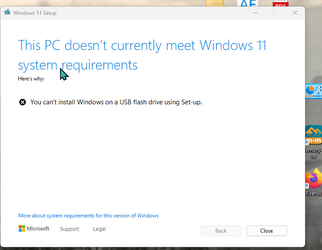
Hi Goht, I downloaded the Iso, mounted it and selected setup.exe and got the screen below
 

Attachments

  • cB5gWlbNyG.png
    cB5gWlbNyG.png
    22.3 KB · Views: 3

My Computer My Computer

At a glance

Windows 1112th Gen Intel Core i3-1210016 GbIntegrated Graphics 730
OS
Windows 11
Computer type
PC/Desktop
Manufacturer/Model
Mesh
CPU
12th Gen Intel Core i3-12100
Motherboard
Asus Prime H610M-D D4
Memory
16 Gb
Graphics Card(s)
Integrated Graphics 730
Your speed problem with a Windows 10/11 machine (2022 or later) is probably not your machine or your Operating System. It's your Internet Service Provider (looking at you, Verizon), which has poorly implemented / released IPV6. Good intentions, poor execution. Turn off IPV6 under your network settings and your machine will be instantly faster (no need to restart).
 

My Computer My Computer

At a glance

Windows 1112 Gen Intel i7
OS
Windows 11
Computer type
PC/Desktop
Manufacturer/Model
PowerSpec
CPU
12 Gen Intel i7
Hard Drives
SSD
Internet Speed
Verizon FIOS
Browser
Chrome
Installed a backup from 2 weeks ago
Meaning you reinstalled Win 11 from a backup ?

As mentioned above, check with your ISP and consider a Repair Install. ISP can check your connection. Also, check Event Viewer and Windows Reliability Monitor for possible error codes.
 

My Computer My Computer

At a glance

Win11 Ver 25H2 26200.6899Intel i58gb
OS
Win11 Ver 25H2 26200.6899
Computer type
Laptop
Manufacturer/Model
Dell
CPU
Intel i5
Memory
8gb
Screen Resolution
1920x1080
Hard Drives
256gb
Browser
Firefox
Antivirus
Windows Defender

Latest Support Threads

Back
Top Bottom