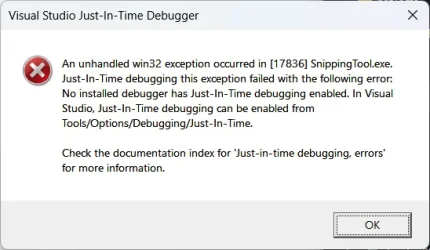
Snipping tool abends started recently :(


perdrix

Well-known member
Member
Local time
11:41 PM
Posts
110
OS
Windows 11 for Workstations
1760529641578.webp
 

My Computer

System One

  • OS
    Windows 11 for Workstations
    Computer type
    Laptop
    Manufacturer/Model
    Dell Precision 7750
    CPU
    Xeon W-11885M
    Motherboard
    Dell
    Memory
    128GB
Settings | Apps | Installed Apps. Search for or scroll down to Snipping Tool. Click the three dots, then Advanced Options. Try a Repair first, then a Reset if that fails.

Edit: Handy URI to get to Installed Apps: ms-settings:appsfeatures
 

My Computer

System One

  • OS
    Windows 11 Pro 25H2
    Computer type
    PC/Desktop
    Manufacturer/Model
    Intel NUC12WSHi7
    CPU
    12th Gen Core i7-1260P
    Motherboard
    NUC12WSBi7
    Memory
    64 GB Micron PC4-25600
    Graphics Card(s)
    Intel Iris Xe Graphics
    Sound Card
    on-board Realtek HD Audio
    Monitor(s) Displays
    Dell U3219Q
    Screen Resolution
    3840 x 2160
    Hard Drives
    Samsung SSD 990 PRO 1TB
    Crucial MX500 2 TB
    Antivirus
    Microsoft Defender
Already did a "Reset" and now uninstalled and reinstalled (from App Store). No change
 

My Computer

System One

  • OS
    Windows 11 for Workstations
    Computer type
    Laptop
    Manufacturer/Model
    Dell Precision 7750
    CPU
    Xeon W-11885M
    Motherboard
    Dell
    Memory
    128GB
Try removing and reinstalling it using PowerShell.

Use Search - and run PowerShell (as Admin). Then copy paste the following:

Get-AppxPackage *Microsoft.ScreenSketch* | Remove-AppxPackage

That will remove/uninstall it. Next, for reinstall:

Get-AppxPackage -AllUsers -Name *Microsoft.ScreenSketch* | Foreach {Add-AppxPackage -DisableDevelopmentMode -Register "$($_.InstallLocation)\AppXManifest.xml"}
 

My Computer

System One

  • OS
    WinDOS 25H2
    Computer type
    Laptop
    CPU
    Intel & AMD
    Memory
    SO-DIMM SK Hynix 15.8 GB Dual-Channel DDR4-2666 (2 x 8 GB) 1329MHz (19-19-19-43)
    Graphics Card(s)
    nVidia RTX 2060 6GB Mobile GPU (TU106M)
    Sound Card
    Onbord Realtek ALC1220
    Screen Resolution
    1920 x 1080
    Hard Drives
    1x Samsung PM981 NVMe PCIe M.2 512GB / 1x Seagate Expansion ST1000LM035 1TB
No change - still get the problem
 

My Computer

System One

  • OS
    Windows 11 for Workstations
    Computer type
    Laptop
    Manufacturer/Model
    Dell Precision 7750
    CPU
    Xeon W-11885M
    Motherboard
    Dell
    Memory
    128GB
Have you done the DISM/SFC dance already?
 

My Computer

System One

  • OS
    Windows 11 Pro 25H2
    Computer type
    PC/Desktop
    Manufacturer/Model
    Intel NUC12WSHi7
    CPU
    12th Gen Core i7-1260P
    Motherboard
    NUC12WSBi7
    Memory
    64 GB Micron PC4-25600
    Graphics Card(s)
    Intel Iris Xe Graphics
    Sound Card
    on-board Realtek HD Audio
    Monitor(s) Displays
    Dell U3219Q
    Screen Resolution
    3840 x 2160
    Hard Drives
    Samsung SSD 990 PRO 1TB
    Crucial MX500 2 TB
    Antivirus
    Microsoft Defender
Yes
 

My Computer

System One

  • OS
    Windows 11 for Workstations
    Computer type
    Laptop
    Manufacturer/Model
    Dell Precision 7750
    CPU
    Xeon W-11885M
    Motherboard
    Dell
    Memory
    128GB
Found this online. Do you have an HDR monitor?

An "unhandled win32 exception" with the Windows Snipping Tool can often be fixed by repairing or resetting the app, or by temporarily disabling HDR mode on an external monitor. If those don't work, a more complex issue might be present, such as a problem with the underlying system files or a software conflict.
 

My Computer

System One

  • OS
    Windows 11 Professional 25H2
    Computer type
    PC/Desktop
    Manufacturer/Model
    Digital Storm VELOX
    CPU
    Intel Core i9 11900K
    Motherboard
    ASUS PRIME Z590-P
    Memory
    64GB
    Graphics Card(s)
    NVIDIA GeForce GTX 1650
    Sound Card
    Realtek onboard
    Monitor(s) Displays
    Acer R221Q 21.5"
    Screen Resolution
    1920 x 1080
    Hard Drives
    2 x Samsung SSD 990 EVO Plus (1 TB)
    2 x Seagate ST4000NE001 (4 TB)
    PSU
    None
    Case
    VELOX
    Cooling
    Cooler Master
    Keyboard
    Logitech
    Mouse
    Kensington trackball
    Browser
    Firefox, Chrome
    Antivirus
    Windows Defender, Malwarebytes
It was about ten days ago I did an SFC scan - so to be sure I did it again. And guess what:
Windows Resource Protection found corrupt files and successfully repaired them.
For online repairs, details are included in the CBS log file located at
windir\Logs\CBS\CBS.log. For example C:\Windows\Logs\CBS\CBS.log. For offline
repairs, details are included in the log file provided by the /OFFLOGFILE flag.
I'll so how it goes for the next day or so. ...

D.
 

My Computer

System One

  • OS
    Windows 11 for Workstations
    Computer type
    Laptop
    Manufacturer/Model
    Dell Precision 7750
    CPU
    Xeon W-11885M
    Motherboard
    Dell
    Memory
    128GB

Latest Support Threads

Back
Top Bottom