Sort File Explorer>Home>Recent files date?


bob17821

Well-known member
Local time
11:02 PM
Posts
89
OS
Windows 11 25H2 26200.7462
Thanks to help I received here I can now again find and access Recent files. But a file which I just changed a few minutes ago does not show today's date. Is the date shown in Recent the date when file was created rather than the date it was last changed? I've always thought it is the date changed. But that is not what I am seeing.

Thanks, Bob
 
Windows Build/Version
Version 24H2 (0S Build 26100.3194)

My Computers My Computers

  • At a glance

    Windows 11 25H2 26200.746232GBNVIDIA GeForce RTX5060
    OS
    Windows 11 25H2 26200.7462
    Computer type
    Laptop
    Manufacturer/Model
    Alienware 16X Aurora
    Memory
    32GB
    Graphics Card(s)
    NVIDIA GeForce RTX5060
    Screen Resolution
    4K
  • At a glance

    Win11Intel Core i7-1270016GBGEFORCE RTX 3060Ti
    Operating System
    Win11
    Computer type
    PC/Desktop
    Manufacturer/Model
    Lenovo Legion
    CPU
    Intel Core i7-12700
    Motherboard
    No Idea
    Memory
    16GB
    Graphics card(s)
    GEFORCE RTX 3060Ti
    Monitor(s) Displays
    Samsung
    Screen Resolution
    4K
"Date Modified" is a sort order...

1741465451061.webp
 

My Computer My Computer

At a glance

Windows 11 Pro
OS
Windows 11 Pro
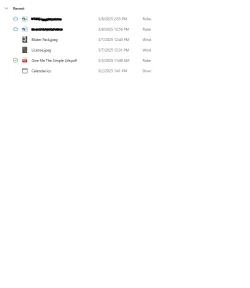
Thanks very much for responding dacrone. I generally know how to sort on various columns but I don't see a way to do that in Recent. The Recent section of my Home view is :

Recent.webp

How did you navigate to the dialog in your screen shot?

Thanks! Bob
 

Attachments

  • Recent.webp
    Recent.webp
    12 KB · Views: 1

My Computers My Computers

  • At a glance

    Windows 11 25H2 26200.746232GBNVIDIA GeForce RTX5060
    OS
    Windows 11 25H2 26200.7462
    Computer type
    Laptop
    Manufacturer/Model
    Alienware 16X Aurora
    Memory
    32GB
    Graphics Card(s)
    NVIDIA GeForce RTX5060
    Screen Resolution
    4K
  • At a glance

    Win11Intel Core i7-1270016GBGEFORCE RTX 3060Ti
    Operating System
    Win11
    Computer type
    PC/Desktop
    Manufacturer/Model
    Lenovo Legion
    CPU
    Intel Core i7-12700
    Motherboard
    No Idea
    Memory
    16GB
    Graphics card(s)
    GEFORCE RTX 3060Ti
    Monitor(s) Displays
    Samsung
    Screen Resolution
    4K
Thanks very much for responding dacrone. I generally know how to sort on various columns but I don't see a way to do that in Recent. The Recent section of my Home view is :

View attachment 127713

How did you navigate to the dialog in your screen shot?

Thanks! Bob
its just the top toolbar in explorer. what if you right click inside the recents directory... do you see View > Details (if you have the default windows 11 context menu in use, first click on "Show more options" at the bottom, then View > Details. once in details view you should see the column headings and be able to add/sort by date modified. then you can chang it back to tiles or icons view or whatever you like

you could also create a new folder and name it:

Recents.{22877a6d-37a1-461a-91b0-dbda5aaebc99}

that may give you the options you're missing for view layouts
 
Last edited:

My Computer My Computer

At a glance

Windows 11 Pro
OS
Windows 11 Pro
Recent Files is not File Explorer, it just shows you the files you were looking at recently.
For Sort order you have to go to File Explorer
 

My Computer My Computer

At a glance

Windows 11 Pro Insider 64 bit 25H2 26200.5742Intel Core i7 9700K 3.6016 GBnVidia GEForce RTX 2060 Super
OS
Windows 11 Pro Insider 64 bit 25H2 26200.5742
Computer type
PC/Desktop
Manufacturer/Model
Gigabyte Z390 UD
CPU
Intel Core i7 9700K 3.60
Motherboard
Gigabyte Z390 UD
Memory
16 GB
Graphics Card(s)
nVidia GEForce RTX 2060 Super
Sound Card
onboard
Monitor(s) Displays
Two 27" Dell 4K monitors
Screen Resolution
3840 x 2160
Hard Drives
M.2 NVME SSD, 500 GB; Two 2TB Mechanical HDD's
PSU
850w PSU
Case
Cyberpower PC
Cooling
Water cooled
Keyboard
Backlit Cyberpower gaming keyboard
Mouse
Backlit Cyberpower gaming mouse
Internet Speed
1 GB mbps
Browser
Brave
Antivirus
Windows Security
Thanks for the additional info! My File Explorer window looks like this:

FE Hpme Recent.webp

I don't see the "View More Options".

BTW I noticed that you run Pro. I think what I have is Home. Could that explain my less functional FIle Explorer. I have become quite dependent on Recent (despite not showing most recently files at the top of the list) so I much appreciate your help.

Bob
 

My Computers My Computers

  • At a glance

    Windows 11 25H2 26200.746232GBNVIDIA GeForce RTX5060
    OS
    Windows 11 25H2 26200.7462
    Computer type
    Laptop
    Manufacturer/Model
    Alienware 16X Aurora
    Memory
    32GB
    Graphics Card(s)
    NVIDIA GeForce RTX5060
    Screen Resolution
    4K
  • At a glance

    Win11Intel Core i7-1270016GBGEFORCE RTX 3060Ti
    Operating System
    Win11
    Computer type
    PC/Desktop
    Manufacturer/Model
    Lenovo Legion
    CPU
    Intel Core i7-12700
    Motherboard
    No Idea
    Memory
    16GB
    Graphics card(s)
    GEFORCE RTX 3060Ti
    Monitor(s) Displays
    Samsung
    Screen Resolution
    4K
Recent Files is not File Explorer, it just shows you the files you were looking at recently.
For Sort order you have to go to File Explorer
Thanks for chipping in Spunk. The only "Recent" I am aware of is the list of files under the "Recent" heading in FIle Explorer. See the screenshot I just posted in response to dacrone. My problem is that I do not see a way to sort the files listed under Recent.

Thanks, Bob
 

My Computers My Computers

  • At a glance

    Windows 11 25H2 26200.746232GBNVIDIA GeForce RTX5060
    OS
    Windows 11 25H2 26200.7462
    Computer type
    Laptop
    Manufacturer/Model
    Alienware 16X Aurora
    Memory
    32GB
    Graphics Card(s)
    NVIDIA GeForce RTX5060
    Screen Resolution
    4K
  • At a glance

    Win11Intel Core i7-1270016GBGEFORCE RTX 3060Ti
    Operating System
    Win11
    Computer type
    PC/Desktop
    Manufacturer/Model
    Lenovo Legion
    CPU
    Intel Core i7-12700
    Motherboard
    No Idea
    Memory
    16GB
    Graphics card(s)
    GEFORCE RTX 3060Ti
    Monitor(s) Displays
    Samsung
    Screen Resolution
    4K
Back
Top Bottom