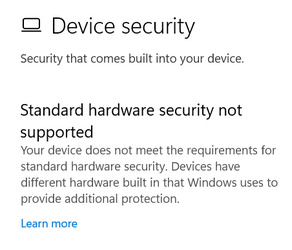
standard hardware security not supported in Microsoft Defender


ah damn... wrong Thread...
 

My Computer My Computer

At a glance

Windows 11Ryzen 7 5700X3D32GB DDR4 3600 Kingston RenegadePowercolor 7800XT
OS
Windows 11
Computer type
PC/Desktop
CPU
Ryzen 7 5700X3D
Motherboard
ASUS B550-A Gaming
Memory
32GB DDR4 3600 Kingston Renegade
Graphics Card(s)
Powercolor 7800XT
Sound Card
Onboard ALC1220 Realtek
Monitor(s) Displays
Dell S3220DGF
Screen Resolution
1440p
Hard Drives
Samsung 1TB 980Pro - NVME
Samsung 500GB 970 Evo - NVME
PSU
Corsair RM750
Case
Bequiet Pure Base
Cooling
Arctic Cooling Case Fans 140 x5 / Arctic Freezer 34 for CPU
Keyboard
Roccat Magma
Mouse
Roccat Burst Pro
Internet Speed
1gbit
Browser
Edge
Antivirus
Defender
Other Info
Windows 11 24H2 - 26100.2894
@Yosh79 Could you please add full system specs to your profile so we know what computer you are using. It is impossible to help if we don't know this crucial information.
 

My Computers My Computers

  • At a glance

    Win 11 Pro 25H2 26200.8894 / Linux Mint 22.3Ryzen 7 2700U Pro32GBiGPU Vega 10
    OS
    Win 11 Pro 25H2 26200.8894 / Linux Mint 22.3
    Computer type
    Laptop
    Manufacturer/Model
    Lenovo A485
    CPU
    Ryzen 7 2700U Pro
    Motherboard
    Lenovo (WiFi/BT module upgraded to Intel Wireless-AC-9260)
    Memory
    32GB
    Graphics Card(s)
    iGPU Vega 10
    Sound Card
    Realtek
    Monitor(s) Displays
    14" FHD (built-in) + 14" Lenovo Thinkvision M14t (touch+pen) + 32" Asus PB328
    Screen Resolution
    FHD + FHD + 1440p
    Hard Drives
    Intel 660p m.2 nVME PCIe3.0 x2 512GB
    PSU
    125W(Dock)/65W(Travel Adapter)
    Keyboard
    Thinkpad / Logitech MX Keys
    Mouse
    Logitech MX Master 2S
    Internet Speed
    1/1Gbit
    Browser
    Firefox
    Antivirus
    Windows Defender
    Other Info
    SecureBoot: Enabled
    TPM2.0: Enabled
    AMD-V: Enabled
  • At a glance

    Win 11 Pro 25H2 26200.8968(RP)i7-7700k @4.8GHz32GB 2x16GB 2133MHz CL15EVGA GTX1080Ti FTW 11GB
    Operating System
    Win 11 Pro 25H2 26200.8968(RP)
    Computer type
    PC/Desktop
    Manufacturer/Model
    Custom
    CPU
    i7-7700k @4.8GHz
    Motherboard
    Asus PRIME Z270-A
    Memory
    32GB 2x16GB 2133MHz CL15
    Graphics card(s)
    EVGA GTX1080Ti FTW 11GB
    Sound Card
    Integrated
    Monitor(s) Displays
    32" 10-bit Asus PB328Q
    Screen Resolution
    WQHD 2560x1440
    Hard Drives
    512GB ADATA SX8000NP NVMe PCIe Gen 3 x4
    PSU
    850W
    Case
    Fractal Design Define 7
    Cooling
    Noctua NH-D15 chromax.black
    Keyboard
    Logitech MX Keys
    Mouse
    Logitech MX Master 2S
    Internet Speed
    1/1Gbit
    Browser
    Firefox
    Antivirus
    Windows Defender
    Other Info
    AC WiFi Card
  • Asus U46SV (laptop), i5-2410M, 8GB RAM, 500GB SSD, 750GB HDD, Windows 10. (used as a local Minecraft server and data dump)
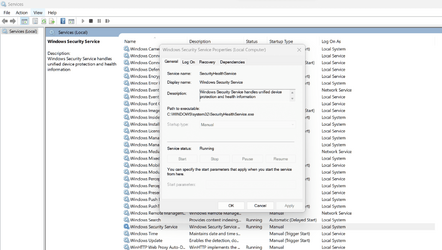
Issue started for me after the Oct Win11 update. I had so many issues with Wn11 that I did a factory reset. Then I saw no exclamation beside Device Security however when I clicked on it said not supported. No changes were made to my machine, but today after shutdown/restart the exclamation is back, and screen states not supported. Checked WSS as mentioned above. Cannot make changes.

Screenshot 2022-11-11 163110.png
 

My Computer My Computer

At a glance

Win11 22623.89111th Gen Intel R Core TM i7 - 1165G7 @ 2.80GHz16gbIntel R Iris R Xe Graphics
OS
Win11 22623.891
Computer type
Laptop
Manufacturer/Model
HP
CPU
11th Gen Intel R Core TM i7 - 1165G7 @ 2.80GHz
Memory
16gb
Graphics Card(s)
Intel R Iris R Xe Graphics
Sound Card
Realtek R Audio, Intel Smart Sound
Hard Drives
C
Browser
Google
Antivirus
Windows Security/Microsoft Defender
Other Info
Downloaded MSEdgeRedirect
@CharmaineK Please fill in your full system specs.

After the full reset, what changes have you made to Windows? Which security features does not work for you? Which security feature was Defender complaining about?
 

My Computers My Computers

  • At a glance

    Win 11 Pro 25H2 26200.8894 / Linux Mint 22.3Ryzen 7 2700U Pro32GBiGPU Vega 10
    OS
    Win 11 Pro 25H2 26200.8894 / Linux Mint 22.3
    Computer type
    Laptop
    Manufacturer/Model
    Lenovo A485
    CPU
    Ryzen 7 2700U Pro
    Motherboard
    Lenovo (WiFi/BT module upgraded to Intel Wireless-AC-9260)
    Memory
    32GB
    Graphics Card(s)
    iGPU Vega 10
    Sound Card
    Realtek
    Monitor(s) Displays
    14" FHD (built-in) + 14" Lenovo Thinkvision M14t (touch+pen) + 32" Asus PB328
    Screen Resolution
    FHD + FHD + 1440p
    Hard Drives
    Intel 660p m.2 nVME PCIe3.0 x2 512GB
    PSU
    125W(Dock)/65W(Travel Adapter)
    Keyboard
    Thinkpad / Logitech MX Keys
    Mouse
    Logitech MX Master 2S
    Internet Speed
    1/1Gbit
    Browser
    Firefox
    Antivirus
    Windows Defender
    Other Info
    SecureBoot: Enabled
    TPM2.0: Enabled
    AMD-V: Enabled
  • At a glance

    Win 11 Pro 25H2 26200.8968(RP)i7-7700k @4.8GHz32GB 2x16GB 2133MHz CL15EVGA GTX1080Ti FTW 11GB
    Operating System
    Win 11 Pro 25H2 26200.8968(RP)
    Computer type
    PC/Desktop
    Manufacturer/Model
    Custom
    CPU
    i7-7700k @4.8GHz
    Motherboard
    Asus PRIME Z270-A
    Memory
    32GB 2x16GB 2133MHz CL15
    Graphics card(s)
    EVGA GTX1080Ti FTW 11GB
    Sound Card
    Integrated
    Monitor(s) Displays
    32" 10-bit Asus PB328Q
    Screen Resolution
    WQHD 2560x1440
    Hard Drives
    512GB ADATA SX8000NP NVMe PCIe Gen 3 x4
    PSU
    850W
    Case
    Fractal Design Define 7
    Cooling
    Noctua NH-D15 chromax.black
    Keyboard
    Logitech MX Keys
    Mouse
    Logitech MX Master 2S
    Internet Speed
    1/1Gbit
    Browser
    Firefox
    Antivirus
    Windows Defender
    Other Info
    AC WiFi Card
  • Asus U46SV (laptop), i5-2410M, 8GB RAM, 500GB SSD, 750GB HDD, Windows 10. (used as a local Minecraft server and data dump)
@CharmaineK Please fill in your full system specs.

After the full reset, what changes have you made to Windows? Which security features does not work for you? Which security feature was Defender complaining about?
Some issues have been resolved over the past week after 2 resets reinstalling WIN11 and any other Windows Updates, and learning things look different, no longer needed, not for my build. Guess some are ID-10-IT issues.
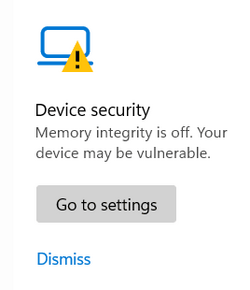
Defender is fine. Device Security has an exclamation and Smart App Control switched from Evaluation to Off. I installed, uninstalled and reinstalled WIN11 update that appeared in my Windows Updates. . I am up to date with the security updates for the last couple of days. I uninstalled to see if they were the issue but found they are not. My machine has been a little wonky since the WIN11 update I ran lastweek:
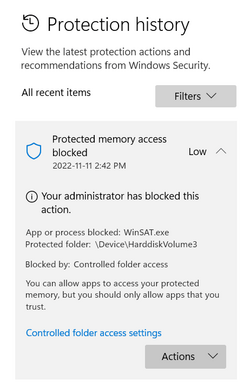
1. Windows Security - Protection History - Controlled Access Folder --> blocking files from being saved to some of my OneDrive document folders which I can set to allow (I read the recent items clears after a couple of weeks, but concerned about the blocked access - winsat.exe - isn't that a virus)
2. Windows Security - Device Security --> Not supported (I believe that is ok and it is determined by Microsoft that I don't need it)
3. Onedrive randomly stops syncing
4. File Explorer not responding - cursor not appearing to select folders however can select same folder if I access OneDrive from the system tray
5. File Explorer tabbed title bar is sometimes grey and sometimes my chosen accent color
6. This PC under C: users now has a Default user (can I delete it?)
7. This PC under Windows has a windows.old file (I read it automatically disappears after 10 days)

 

Attachments

  • Screenshot 2022-11-12 120821.png
    Screenshot 2022-11-12 120821.png
    3.5 KB · Views: 2
  • Screenshot 2022-11-12 120841.png
    Screenshot 2022-11-12 120841.png
    4.4 KB · Views: 3
  • Screenshot 2022-11-12 120919.png
    Screenshot 2022-11-12 120919.png
    8.8 KB · Views: 2
  • Screenshot 2022-11-12 120948.png
    Screenshot 2022-11-12 120948.png
    14.6 KB · Views: 2
  • Screenshot 2022-11-12 121025.png
    Screenshot 2022-11-12 121025.png
    6.4 KB · Views: 3
  • Screenshot 2022-11-12 123209.png
    Screenshot 2022-11-12 123209.png
    20.8 KB · Views: 2

My Computer My Computer

At a glance

Win11 22623.89111th Gen Intel R Core TM i7 - 1165G7 @ 2.80GHz16gbIntel R Iris R Xe Graphics
OS
Win11 22623.891
Computer type
Laptop
Manufacturer/Model
HP
CPU
11th Gen Intel R Core TM i7 - 1165G7 @ 2.80GHz
Memory
16gb
Graphics Card(s)
Intel R Iris R Xe Graphics
Sound Card
Realtek R Audio, Intel Smart Sound
Hard Drives
C
Browser
Google
Antivirus
Windows Security/Microsoft Defender
Other Info
Downloaded MSEdgeRedirect
Ok, WinSat.exe is a windows component...you may safely allow it. It is a Windows assessment tool.
For the rest...ignore memory integrity...you will only run into issues regarding drivers and compatibility. Unless you absolutely want to be paranoid about Windows security and know exactly how it works.

Disable Controlled folder access, it is more trouble than worth it, unless you know exactly what you are doing. Defaults will just screw up your system and annoy you during your workflow. While it will be a great security feature if you spend days configuring it...your choice...
 

My Computers My Computers

  • At a glance

    Win 11 Pro 25H2 26200.8894 / Linux Mint 22.3Ryzen 7 2700U Pro32GBiGPU Vega 10
    OS
    Win 11 Pro 25H2 26200.8894 / Linux Mint 22.3
    Computer type
    Laptop
    Manufacturer/Model
    Lenovo A485
    CPU
    Ryzen 7 2700U Pro
    Motherboard
    Lenovo (WiFi/BT module upgraded to Intel Wireless-AC-9260)
    Memory
    32GB
    Graphics Card(s)
    iGPU Vega 10
    Sound Card
    Realtek
    Monitor(s) Displays
    14" FHD (built-in) + 14" Lenovo Thinkvision M14t (touch+pen) + 32" Asus PB328
    Screen Resolution
    FHD + FHD + 1440p
    Hard Drives
    Intel 660p m.2 nVME PCIe3.0 x2 512GB
    PSU
    125W(Dock)/65W(Travel Adapter)
    Keyboard
    Thinkpad / Logitech MX Keys
    Mouse
    Logitech MX Master 2S
    Internet Speed
    1/1Gbit
    Browser
    Firefox
    Antivirus
    Windows Defender
    Other Info
    SecureBoot: Enabled
    TPM2.0: Enabled
    AMD-V: Enabled
  • At a glance

    Win 11 Pro 25H2 26200.8968(RP)i7-7700k @4.8GHz32GB 2x16GB 2133MHz CL15EVGA GTX1080Ti FTW 11GB
    Operating System
    Win 11 Pro 25H2 26200.8968(RP)
    Computer type
    PC/Desktop
    Manufacturer/Model
    Custom
    CPU
    i7-7700k @4.8GHz
    Motherboard
    Asus PRIME Z270-A
    Memory
    32GB 2x16GB 2133MHz CL15
    Graphics card(s)
    EVGA GTX1080Ti FTW 11GB
    Sound Card
    Integrated
    Monitor(s) Displays
    32" 10-bit Asus PB328Q
    Screen Resolution
    WQHD 2560x1440
    Hard Drives
    512GB ADATA SX8000NP NVMe PCIe Gen 3 x4
    PSU
    850W
    Case
    Fractal Design Define 7
    Cooling
    Noctua NH-D15 chromax.black
    Keyboard
    Logitech MX Keys
    Mouse
    Logitech MX Master 2S
    Internet Speed
    1/1Gbit
    Browser
    Firefox
    Antivirus
    Windows Defender
    Other Info
    AC WiFi Card
  • Asus U46SV (laptop), i5-2410M, 8GB RAM, 500GB SSD, 750GB HDD, Windows 10. (used as a local Minecraft server and data dump)
Ok, WinSat.exe is a windows component...you may safely allow it. It is a Windows assessment tool.
For the rest...ignore memory integrity...you will only run into issues regarding drivers and compatibility. Unless you absolutely want to be paranoid about Windows security and know exactly how it works.

Disable Controlled folder access, it is more trouble than worth it, unless you know exactly what you are doing. Defaults will just screw up your system and annoy you during your workflow. While it will be a great security feature if you spend days configuring it...your choice...
Thanks! I read CFA can be turned off and avoid many issues with my files and folders randomly being blocked. I can't see Memory Integrity as it's under the Device Security which I can't access as unsupported. I read WINSAT is a virus but also read it's a Windows tool. LOL. I used to know what I'm doing being a retired IT tech, however, we used images on USB and didn't need to do much when refreshing the companies' laptops. Plus, I built my first computer in 1996! I'm just digging deeper into my own system since the Win11 latest update. I used to have Mcafee and in the past mused Norton, now I'm just using Windows Security/Microsoft Defender so I'm getting familiar with what it offers. 2 resets has been time consuming and I'm no further ahead with the device security (so I guess the evaluation deems not needed), and protection history (it will clear when I do a reset)
 

My Computer My Computer

At a glance

Win11 22623.89111th Gen Intel R Core TM i7 - 1165G7 @ 2.80GHz16gbIntel R Iris R Xe Graphics
OS
Win11 22623.891
Computer type
Laptop
Manufacturer/Model
HP
CPU
11th Gen Intel R Core TM i7 - 1165G7 @ 2.80GHz
Memory
16gb
Graphics Card(s)
Intel R Iris R Xe Graphics
Sound Card
Realtek R Audio, Intel Smart Sound
Hard Drives
C
Browser
Google
Antivirus
Windows Security/Microsoft Defender
Other Info
Downloaded MSEdgeRedirect
Back
Top Bottom