- Local time
- 8:05 PM
- Posts
- 3,307
- OS
- Windows 11 Pro
There are two general WhatsApp settings.
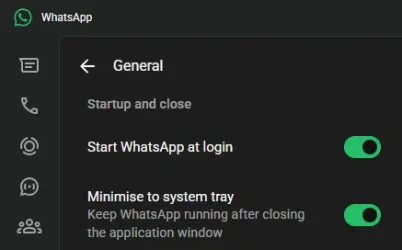
But when I start Windows, WhatsApp opens with the window open on my desktop. I want it to start minimized when Windows starts.
I'm using the Microsoft Store app. I think it's the only version available now.

Does anyone have any ideas how I could make WhatsApp start minimized when Windows starts?
- Start WhatsApp at Login.
- Minimize to System Tray (Keep WhatsApp running after closing the application window).
But when I start Windows, WhatsApp opens with the window open on my desktop. I want it to start minimized when Windows starts.
I'm using the Microsoft Store app. I think it's the only version available now.
WhatsApp - Free download and install on Windows | Microsoft Store
WhatsApp from Meta is a 100% free messaging app. It’s used by over 2B people in more than 180 countries. It’s simple, reliable, and private, so you can easily keep in touch with your friends and family. WhatsApp works across mobile and desktop even on slow connections, with no subscription...
apps.microsoft.com
Does anyone have any ideas how I could make WhatsApp start minimized when Windows starts?
My Computers
-
At a glance
Windows 11 ProIntel Core i9-10900XCorsair 64 GB (4 x 16 GB) CMW64GX4M4C3000C15 ...GIGABYTE GeForce GTX 1660 Super Mini ITX 6 GB OC- OS
- Windows 11 Pro
- Computer type
- PC/Desktop
- Manufacturer/Model
- Stigg's Build
- CPU
- Intel Core i9-10900X
- Motherboard
- GIGABYTE X299X DESIGNARE 10G
- Memory
- Corsair 64 GB (4 x 16 GB) CMW64GX4M4C3000C15 Vengeance RGB Pro 3000Mhz DDR4
- Graphics Card(s)
- GIGABYTE GeForce GTX 1660 Super Mini ITX 6 GB OC
- Sound Card
- Realtek ALC1220
- Monitor(s) Displays
- Samsung 27" FHD LED FreeSync Gaming Monitor (LS27F350FHEXXY)
- Screen Resolution
- 1920 x 1080
- Hard Drives
- Samsung 970 Pro Series 1TB M.2 2280 NVMe SSD
Western Digital Red Pro WD8003FFBX-68B9AN0 8 TB, 7200 RPM, SATA-III
Western Digital Red Pro WD8003FFBX-68B9AN0 8 TB, 7200 RPM, SATA-III
- PSU
- Corsair HX1200 1200W 80 Plus Platinum
- Case
- Fractal Design Define 7 Black Solid Case
- Cooling
- Noctua NH-D15 Chromax Black
- Keyboard
- Razer Ornata V2
- Mouse
- Razer DeathAdder Essential
- Internet Speed
- FTTN 100Mbps / 40Mbps
- Browser
- Mozilla Firefox
- Antivirus
- N/A
- Other Info
- Logitech BRIO 4k Ultra HD USB-C Webcam
-
At a glance
Windows 10 ProCore i7-8750HSK Hynix 32 GB (2 x 16 GB) HMA82GS6CJR8N-VK 1...NVIDIA GeForce GTX 1070- Operating System
- Windows 10 Pro
- Computer type
- Laptop
- Manufacturer/Model
- ASUS ROG Zephyrus M GM501GS
- CPU
- Core i7-8750H
- Motherboard
- Zephyrus M GM501GS
- Memory
- SK Hynix 32 GB (2 x 16 GB) HMA82GS6CJR8N-VK 16 GB DDR4-2666 DDR4 SDRAM
- Graphics card(s)
- NVIDIA GeForce GTX 1070
- Sound Card
- Realtek ALC294
- Monitor(s) Displays
- AU Optronics B156HAN07.1 [15.6" LCD]
- Screen Resolution
- 1920 x 1080
- Hard Drives
- Samsung MZVKW512HMJP-00000 512 GB, PCI-E 3.0 x4
Samsung SSD 860 QVO 4TB 4 TB, SATA-III
- PSU
- N/A
- Case
- N/A
- Cooling
- N/A
- Keyboard
- PC/AT Enhanced PS2 Keyboard (101/102-Key)
- Mouse
- Razer DeathAdder Essential
- Internet Speed
- FTTN 100Mbps / 40Mbps
- Browser
- Mozilla Firefox
- Antivirus
- N/A
- Other Info
- USB2.0 HD UVC Webcam