StartAllBack


StartAllBack: Windows 11 from better timeline​

Get the latest version here Download

Embrace, enhance, unsweep classic UI from under the rug​

Restore and improve taskbar​

  • Show labels on task icons
  • Adjust icon size and margins
  • Move taskbar to top, left or right edges
  • Drag and drop stuff onto taskbar
  • Center task icons but keep Start button on the left
  • Split into segments, use dynamic translucency
  • Separate corner icons with Windows 7/10 UI
  • Auto-hide when covered by maximized window

Restore and improve File Explorer and Control Panel​

  • Ribbon and Command Bar revamped with translucent effects
  • Details pane on bottom
  • Old search box (the one which works)
  • Dark mode support for more dialogs

Restore and improve context menus​

  • All new look with rounded acrylic menus
  • Fast and responsive taskbar menus
  • New fonts, better touch support

Restore and improve start menu​

  • Launch apps and go to system places in one click
  • Navigate dropdown menus like a boss
  • Enjoy fast and reliable search

Finally, lightweight styling and UI consistency​

  • Enjoy Windows 7, Windows 8 and third-party taskbar and start menu styles
  • Fix UI inconsistencies in Win32 apps
  • Don't be blue: recolor UI in all windows apps
  • Negative resource usage: fewer RAM used, fewer processes started, faster startup



StartAllBack For Windows 11 has been released.
It's an RC release. I haven't tested it yet as I have Start11 installed.

Edit: I have now tested it. It's working quite well.
Apart from a great start menu, you can also have the Enhanced Classic Taskbar back.
This means (for example) that you can have an uncombined and unlocked Taskbar.
You will now also be able to enhance the Taskbar clock using T-Clock Redux or similar.

T-Clock Redux Tray Clock_.png

You can also change Windows Explorer to Ribbon UI or Simple UI.

You can get it Download


01 - Welcome.png
02 - Start Menu.png
04 - Taskbar.png
05 - Explorer.png
06 - Advanced.png
Get
 
@Tihiy thanks for all of the effort. didnt mean to sound like i was complaining (if i did) about the win 10 calendar placement. works for the far right monitor if on multiple displays but won't show on the first or middle monitor.
can anyone else with multiple monitors verify that it is not just me (since i seem to be on a roll of rookie mistakes today 😂 )
 
Last edited:

My Computer My Computer

At a glance

Windows 11 Pro
OS
Windows 11 Pro
can anyone else with multiple monitors verify that it is not just me
Ctrl+Alt+D only opens on my Main monitor regardless where mouse focus is.
 

My Computers My Computers

  • At a glance

    Windows 11 Pro
    OS
    Windows 11 Pro
    Computer type
    PC/Desktop
    Manufacturer/Model
    ASUS ROG Strix
  • At a glance

    Windows 11 Pro
    Operating System
    Windows 11 Pro
    Computer type
    Laptop
    Manufacturer/Model
    ASUS VivoBook
  • ASUS VivoBook 'Lite' ~ Windows 11 Home
Ctrl+Alt+D only opens on my Main monitor regardless where mouse focus is.
hmm odd. win+alt+d only opens in the far right of my right-side monitor since the 3.7 update. went back 1 version of startallback and it opens dead center of the taskbar on my middle monitor. thoughts?
 
Last edited:

My Computer My Computer

At a glance

Windows 11 Pro
OS
Windows 11 Pro
@Tihiy
Hate to bug ya, but, I never did get the whole story on the DarkMagic thing!
Is it enabled by default, or, do you have to enable yourself, and if so, how?

Remember, I'm an idiot, I need explicit instructions! :cool:
 

My Computers My Computers

  • At a glance

    Windows 11 Pro
    OS
    Windows 11 Pro
    Computer type
    PC/Desktop
    Manufacturer/Model
    ASUS ROG Strix
  • At a glance

    Windows 11 Pro
    Operating System
    Windows 11 Pro
    Computer type
    Laptop
    Manufacturer/Model
    ASUS VivoBook
  • ASUS VivoBook 'Lite' ~ Windows 11 Home
Ctrl+Alt+D only opens on my Main monitor regardless where mouse focus is.
yep.. figures. one of those days. went back 1 version, then completely uninstalled with revo.. reinstalled 3.7 and now the calendar flyout is showing on my middle display (in the corner via tclock mod). something was glitched. @Tihiy @Edwin thanks for assisting me during my revertigo day (HIMYM reference for those who don't understand). should be back to normal critical thinking skills tomorrow haha.
 

My Computer My Computer

At a glance

Windows 11 Pro
OS
Windows 11 Pro
@Tihiy
Hate to bug ya, but, I never did get the whole story on the DarkMagic thing!
Is it enabled by default, or, do you have to enable yourself, and if so, how?

Remember, I'm an idiot, I need explicit instructions! :cool:
It is not enabled by default and I think development was halted, no improvements since the first 2-3 versions that came with it.
 

My Computer My Computer

At a glance

Windows 11
OS
Windows 11
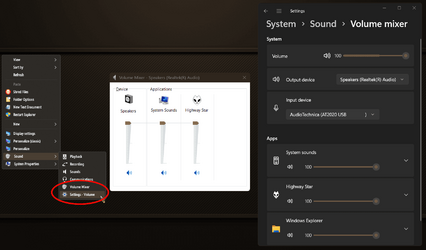
Is it a new windows update that did this, or SAB?
1701638390513.png
Open volume mixer used to open the mixer instantly, now it opens the Settings window on audio, THEN you have to click mixer! it's like 4 extra clicks.


1701638478882.png
 

My Computer My Computer

At a glance

Windows 11 [22H2] [22621.2428]Intel Core i9-14900K 3.2 GHz 24-Core ProcessorG.Skill Trident Z5 RGB 32 GB (2 x 16 GB) DDR5...AMD Radeon RX 6950 XT
OS
Windows 11 [22H2] [22621.2428]
Computer type
PC/Desktop
Manufacturer/Model
Culture-Virus v7.0
CPU
Intel Core i9-14900K 3.2 GHz 24-Core Processor
Motherboard
Asus ROG MAXIMUS Z790 APEX ENCORE ATX LGA1700 Motherboard
Memory
G.Skill Trident Z5 RGB 32 GB (2 x 16 GB) DDR5-7200 CL34 Memory
Graphics Card(s)
AMD Radeon RX 6950 XT
Monitor(s) Displays
AOC CQ27G2U/BK
Screen Resolution
2560x1440
Hard Drives
M.2 1: Samsung SSD 990 PRO 2TB
M.2 2: Samsung SSD 970 EVO Plus 2TB
PSU
Corsair RM1000X SHIFT
Case
Phanteks NV9
Cooling
Custom Water / Direct-Die Cooling
Keyboard
Corsair K95 RGB PLATINUM XT Wired Gaming Keyboard
Mouse
ROCCAT LEADR Optical
Internet Speed
500mb Direct Fiber
Browser
Chrome
It never did such a thing.
 

My Computer My Computer

At a glance

Windows 11
OS
Windows 11

My Computers My Computers

  • At a glance

    Windows 11 Pro
    OS
    Windows 11 Pro
    Computer type
    PC/Desktop
    Manufacturer/Model
    ASUS ROG Strix
  • At a glance

    Windows 11 Pro
    Operating System
    Windows 11 Pro
    Computer type
    Laptop
    Manufacturer/Model
    ASUS VivoBook
  • ASUS VivoBook 'Lite' ~ Windows 11 Home
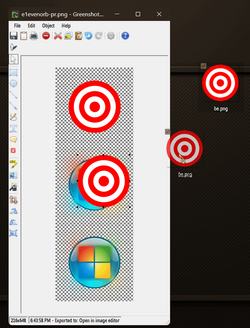
Here's a quick, easy way to create a custom SAB Start Orb:
Navigate to the SAB working folder: C:\Users\xxxxx\AppData\Local\StartAllBack\Orbs
grab a copy of the e1evenorb-pr.png
create or obtain a round 145x145 image of your liking, with a transparent background,
drag it onto the e1evenorb-pr.png 3 times, then put it in the Orbs folder with a new name...

0005820.png
(The glow you see around the 2 bottom orbs will show on mouse hover)

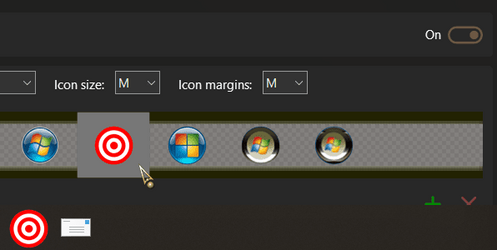
Open SAB Properties and choose it...

0005821.png (y)
 

My Computers My Computers

  • At a glance

    Windows 11 Pro
    OS
    Windows 11 Pro
    Computer type
    PC/Desktop
    Manufacturer/Model
    ASUS ROG Strix
  • At a glance

    Windows 11 Pro
    Operating System
    Windows 11 Pro
    Computer type
    Laptop
    Manufacturer/Model
    ASUS VivoBook
  • ASUS VivoBook 'Lite' ~ Windows 11 Home
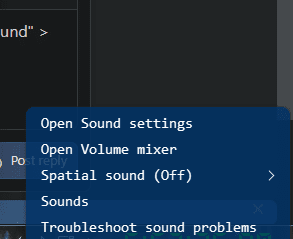
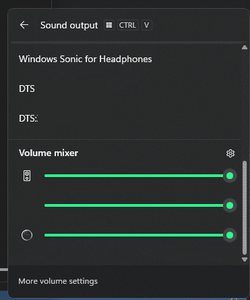
weird.. if i right click mine and choose "Open Volume Mixer", its a flyout menu that has "output device" > scroll down a little and "Spatial sound" > scroll down a bit more and "Volume Mixer"

1701651386016.png1701651392769.png
 

My Computer My Computer

At a glance

Windows 11 Pro
OS
Windows 11 Pro

My Computer My Computer

At a glance

Windows 11, Pro for Workstations, 22631.2861 ...Amd Ryzen 5 5500 ("Zen 3") (3.6GHz,45-65W,L3:...DDR4 OLOy Owl Black, 8GB, 3200MHZ, (x2)Colorful GeForce GTX 1650 Super
OS
Windows 11, Pro for Workstations, 22631.2861 (23H2)
Computer type
PC/Desktop
Manufacturer/Model
Custom
CPU
Amd Ryzen 5 5500 ("Zen 3") (3.6GHz,45-65W,L3:16M,6/12)
Motherboard
Asus Prime B450M Gaming/BR Chipset B450 AMD AM4 mATX DDR4 - BIOS 4002
Memory
DDR4 OLOy Owl Black, 8GB, 3200MHZ, (x2)
Graphics Card(s)
Colorful GeForce GTX 1650 Super
Sound Card
-
Monitor(s) Displays
Philips TV 43PFG5102/78
Screen Resolution
1920x1080
Hard Drives
SSD: 120GB, Sata III, Leitura 560MBs e Gravação 540MBs
HD: Seagate Barracuda 1TB, Sata III, 7200RPM, 64MB
PSU
Corsair ATX CV550 550W, 80 Plus Bronze, PFC Ativo
Case
Wheel Jack, Mid Tower, Vidro Temperado, Black
Cooling
default
Keyboard
common
Mouse
commom
Internet Speed
600mb
Browser
Opera
Antivirus
Windows Defender
i tried startallback again recently, but now even if i uninstall it, it won't revert the changes, is there literally any fix for this
 

My Computer My Computer

At a glance

Windows 11 CanaryRyzen 7 5800X32GB DDR4 3200RTX 3050
OS
Windows 11 Canary
Computer type
PC/Desktop
CPU
Ryzen 7 5800X
Motherboard
ASRock B450M ac/r2.0
Memory
32GB DDR4 3200
Graphics Card(s)
RTX 3050
i tried startallback again recently, but now even if i uninstall it, it won't revert the changes, is there literally any fix for this
what changes won't revert after uninstall?
*and you got the installer straight from the official website, right?
 

My Computer My Computer

At a glance

Windows 11 Pro
OS
Windows 11 Pro
what changes won't revert after uninstall?
*and you got the installer straight from the official website, right?
yes, i got it from the official installer, and the settings that won't change back are; windows 10 ribbon, classic context menus, ui font
 

My Computer My Computer

At a glance

Windows 11 CanaryRyzen 7 5800X32GB DDR4 3200RTX 3050
OS
Windows 11 Canary
Computer type
PC/Desktop
CPU
Ryzen 7 5800X
Motherboard
ASRock B450M ac/r2.0
Memory
32GB DDR4 3200
Graphics Card(s)
RTX 3050
install it, set the windows explorer type back to 11, disable classic context menu and then uninstall it with revo & scan/delete reg/leftovers then reboot. see if that brings back the normal explorer/context
 

My Computer My Computer

At a glance

Windows 11 Pro
OS
Windows 11 Pro
Is it a new windows update that did this, or SAB?

Open volume mixer used to open the mixer instantly, now it opens the Settings window on audio, THEN you have to click mixer! it's like 4 extra clicks.
3.7 will open Volume Mixer in Control Center, not on Settings. Isn't that better? They offer same functionality
 

My Computer My Computer

At a glance

macOS
OS
macOS
3.7 will open Volume Mixer in Control Center, not on Settings. Isn't that better? They offer same functionality
For me it opens good old Volume, not the Mixer. Same as always.
1701683955730.png
 

My Computer My Computer

At a glance

Windows 11
OS
Windows 11

My Computer My Computer

At a glance

Windows 11 [22H2] [22621.2428]Intel Core i9-14900K 3.2 GHz 24-Core ProcessorG.Skill Trident Z5 RGB 32 GB (2 x 16 GB) DDR5...AMD Radeon RX 6950 XT
OS
Windows 11 [22H2] [22621.2428]
Computer type
PC/Desktop
Manufacturer/Model
Culture-Virus v7.0
CPU
Intel Core i9-14900K 3.2 GHz 24-Core Processor
Motherboard
Asus ROG MAXIMUS Z790 APEX ENCORE ATX LGA1700 Motherboard
Memory
G.Skill Trident Z5 RGB 32 GB (2 x 16 GB) DDR5-7200 CL34 Memory
Graphics Card(s)
AMD Radeon RX 6950 XT
Monitor(s) Displays
AOC CQ27G2U/BK
Screen Resolution
2560x1440
Hard Drives
M.2 1: Samsung SSD 990 PRO 2TB
M.2 2: Samsung SSD 970 EVO Plus 2TB
PSU
Corsair RM1000X SHIFT
Case
Phanteks NV9
Cooling
Custom Water / Direct-Die Cooling
Keyboard
Corsair K95 RGB PLATINUM XT Wired Gaming Keyboard
Mouse
ROCCAT LEADR Optical
Internet Speed
500mb Direct Fiber
Browser
Chrome

My Computer My Computer

At a glance

Windows 11, Pro for Workstations, 22631.2861 ...Amd Ryzen 5 5500 ("Zen 3") (3.6GHz,45-65W,L3:...DDR4 OLOy Owl Black, 8GB, 3200MHZ, (x2)Colorful GeForce GTX 1650 Super
OS
Windows 11, Pro for Workstations, 22631.2861 (23H2)
Computer type
PC/Desktop
Manufacturer/Model
Custom
CPU
Amd Ryzen 5 5500 ("Zen 3") (3.6GHz,45-65W,L3:16M,6/12)
Motherboard
Asus Prime B450M Gaming/BR Chipset B450 AMD AM4 mATX DDR4 - BIOS 4002
Memory
DDR4 OLOy Owl Black, 8GB, 3200MHZ, (x2)
Graphics Card(s)
Colorful GeForce GTX 1650 Super
Sound Card
-
Monitor(s) Displays
Philips TV 43PFG5102/78
Screen Resolution
1920x1080
Hard Drives
SSD: 120GB, Sata III, Leitura 560MBs e Gravação 540MBs
HD: Seagate Barracuda 1TB, Sata III, 7200RPM, 64MB
PSU
Corsair ATX CV550 550W, 80 Plus Bronze, PFC Ativo
Case
Wheel Jack, Mid Tower, Vidro Temperado, Black
Cooling
default
Keyboard
common
Mouse
commom
Internet Speed
600mb
Browser
Opera
Antivirus
Windows Defender
Back
Top Bottom