StartAllBack


StartAllBack: Windows 11 from better timeline​

Get the latest version here Download

Embrace, enhance, unsweep classic UI from under the rug​

Restore and improve taskbar​

  • Show labels on task icons
  • Adjust icon size and margins
  • Move taskbar to top, left or right edges
  • Drag and drop stuff onto taskbar
  • Center task icons but keep Start button on the left
  • Split into segments, use dynamic translucency
  • Separate corner icons with Windows 7/10 UI
  • Auto-hide when covered by maximized window

Restore and improve File Explorer and Control Panel​

  • Ribbon and Command Bar revamped with translucent effects
  • Details pane on bottom
  • Old search box (the one which works)
  • Dark mode support for more dialogs

Restore and improve context menus​

  • All new look with rounded acrylic menus
  • Fast and responsive taskbar menus
  • New fonts, better touch support

Restore and improve start menu​

  • Launch apps and go to system places in one click
  • Navigate dropdown menus like a boss
  • Enjoy fast and reliable search

Finally, lightweight styling and UI consistency​

  • Enjoy Windows 7, Windows 8 and third-party taskbar and start menu styles
  • Fix UI inconsistencies in Win32 apps
  • Don't be blue: recolor UI in all windows apps
  • Negative resource usage: fewer RAM used, fewer processes started, faster startup



StartAllBack For Windows 11 has been released.
It's an RC release. I haven't tested it yet as I have Start11 installed.

Edit: I have now tested it. It's working quite well.
Apart from a great start menu, you can also have the Enhanced Classic Taskbar back.
This means (for example) that you can have an uncombined and unlocked Taskbar.
You will now also be able to enhance the Taskbar clock using T-Clock Redux or similar.

T-Clock Redux Tray Clock_.png

You can also change Windows Explorer to Ribbon UI or Simple UI.

You can get it Download


01 - Welcome.png
02 - Start Menu.png
04 - Taskbar.png
05 - Explorer.png
06 - Advanced.png
Get
 
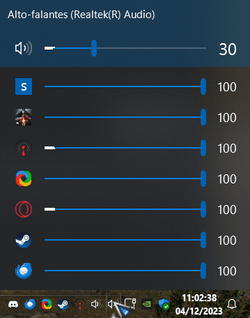
Doh, I know, and I do not need to. The point was it's not Mixer by default.
Sadly for me, only now I understand what @Tihiy means, my bad.
 

My Computer My Computer

At a glance

Windows 11
OS
Windows 11
Volume Control for Windows in store, its open Mixer by default.
1701698568806.png
 

My Computer My Computer

At a glance

Windows 11, Pro for Workstations, 22631.2861 ...Amd Ryzen 5 5500 ("Zen 3") (3.6GHz,45-65W,L3:...DDR4 OLOy Owl Black, 8GB, 3200MHZ, (x2)Colorful GeForce GTX 1650 Super
OS
Windows 11, Pro for Workstations, 22631.2861 (23H2)
Computer type
PC/Desktop
Manufacturer/Model
Custom
CPU
Amd Ryzen 5 5500 ("Zen 3") (3.6GHz,45-65W,L3:16M,6/12)
Motherboard
Asus Prime B450M Gaming/BR Chipset B450 AMD AM4 mATX DDR4 - BIOS 4002
Memory
DDR4 OLOy Owl Black, 8GB, 3200MHZ, (x2)
Graphics Card(s)
Colorful GeForce GTX 1650 Super
Sound Card
-
Monitor(s) Displays
Philips TV 43PFG5102/78
Screen Resolution
1920x1080
Hard Drives
SSD: 120GB, Sata III, Leitura 560MBs e Gravação 540MBs
HD: Seagate Barracuda 1TB, Sata III, 7200RPM, 64MB
PSU
Corsair ATX CV550 550W, 80 Plus Bronze, PFC Ativo
Case
Wheel Jack, Mid Tower, Vidro Temperado, Black
Cooling
default
Keyboard
common
Mouse
commom
Internet Speed
600mb
Browser
Opera
Antivirus
Windows Defender
Thank you, it was just a missunderstanding on my part, I do not need Mixer to open, I only have one sound source at the time, usually.
 

My Computer My Computer

At a glance

Windows 11
OS
Windows 11
StartAllBack 3.7.0.4844

https://startisback.com/StartAllBack_setup.exe
 
Last edited by a moderator:

My Computer My Computer

At a glance

Windows 11 ProIntel Core i9 12900KFCorsair 64GB DDR5 Vengeance C40 5200MhzASUS GeForce RTX 3090 ROG Strix OC 24GB
OS
Windows 11 Pro
Computer type
PC/Desktop
Manufacturer/Model
Custom Build
CPU
Intel Core i9 12900KF
Motherboard
ASUS ROG Maximus Z690 Hero
Memory
Corsair 64GB DDR5 Vengeance C40 5200Mhz
Graphics Card(s)
ASUS GeForce RTX 3090 ROG Strix OC 24GB
Sound Card
OnBoard
Monitor(s) Displays
Acer Predator XB323UGP 32" QHD G-SYNC-C 144Hz 1MS IPS LED
Screen Resolution
2560 x 1440
Hard Drives
1x Samsung 980 Pro Series Gen4 250GB M.2 NVMe
1x Samsung 980 Pro Series Gen4 500GB M.2 NVMe
2x Samsung 980 Pro Series Gen4 2TB M.2 NVMe
PSU
Corsair AX1200i 1200W 80PLUS Titanium Modular
Case
Corsair 4000D Black Case w/ Tempered Glass Side Panel
Cooling
Noctua NH-U12A Chromax Black CPU Cooler, 4x Noctua 120mm Fans
Keyboard
Logitech MK545
Mouse
Logitech MX Master 3
Internet Speed
Fixed Wireless 150mbps/75mbps
Browser
Firefox
Antivirus
Kaspersky
Other Info
Thrustmaster TS-PC RACER
Fanatec CSL Elite Pedals with the Load Cell Kit
Yamaha Amp with Bose Speakers
Tried , same problem as in previous ; left-taskbar icons impossible to get them more to the left , they change distance to the right , not stable ............!
It is stable and remembers icon-place in the 3.6.16.4729 , so I keep reverting to this version , untill its been fixed............. :wink:
 

My Computers My Computers

  • At a glance

    Windows11 Pro 25H2i732GBnVidia
    OS
    Windows11 Pro 25H2
    Computer type
    PC/Desktop
    Manufacturer/Model
    Asus
    CPU
    i7
    Motherboard
    z97k
    Memory
    32GB
    Graphics Card(s)
    nVidia
    Sound Card
    Realtek
    Hard Drives
    3
    Cooling
    air
    Browser
    Edge
    Antivirus
    ESET
  • At a glance

    Windows11 ProIntel i516GBIntel
    Operating System
    Windows11 Pro
    Computer type
    PC/Desktop
    Manufacturer/Model
    ASUS
    CPU
    Intel i5
    Motherboard
    ASUS Basic
    Memory
    16GB
    Graphics card(s)
    Intel
    Sound Card
    Realtek
    Monitor(s) Displays
    Samsung
    Hard Drives
    one intern , 0ne extern, OS on SSD
    Cooling
    air
    Keyboard
    wireless Logitech
    Mouse
    wireless Logitech
    Internet Speed
    1GB
    Browser
    Edge
    Antivirus
    ESET

My Computers My Computers

  • At a glance

    Windows 11 Pro
    OS
    Windows 11 Pro
    Computer type
    PC/Desktop
    Manufacturer/Model
    ASUS ROG Strix
  • At a glance

    Windows 11 Pro
    Operating System
    Windows 11 Pro
    Computer type
    Laptop
    Manufacturer/Model
    ASUS VivoBook
  • ASUS VivoBook 'Lite' ~ Windows 11 Home
Tried , same problem as in previous ; left-taskbar icons impossible to get them more to the left , they change distance to the right , not stable ............!
It is stable and remembers icon-place in the 3.6.16.4729 , so I keep reverting to this version , untill its been fixed............. :wink:
You don't make sense, please show screenshot
 

My Computer My Computer

At a glance

macOS
OS
macOS
You don't make sense, please show screenshot
You notice the distance between the left taskbar-icons , when installing later versions ( 3.7.0 ) , this distance will change and is not stable , the icons go to the right..........
I like it the way it is on this screenshot !
 

Attachments

  • good distance.jpg
    good distance.jpg
    381 KB · Views: 3

My Computers My Computers

  • At a glance

    Windows11 Pro 25H2i732GBnVidia
    OS
    Windows11 Pro 25H2
    Computer type
    PC/Desktop
    Manufacturer/Model
    Asus
    CPU
    i7
    Motherboard
    z97k
    Memory
    32GB
    Graphics Card(s)
    nVidia
    Sound Card
    Realtek
    Hard Drives
    3
    Cooling
    air
    Browser
    Edge
    Antivirus
    ESET
  • At a glance

    Windows11 ProIntel i516GBIntel
    Operating System
    Windows11 Pro
    Computer type
    PC/Desktop
    Manufacturer/Model
    ASUS
    CPU
    Intel i5
    Motherboard
    ASUS Basic
    Memory
    16GB
    Graphics card(s)
    Intel
    Sound Card
    Realtek
    Monitor(s) Displays
    Samsung
    Hard Drives
    one intern , 0ne extern, OS on SSD
    Cooling
    air
    Keyboard
    wireless Logitech
    Mouse
    wireless Logitech
    Internet Speed
    1GB
    Browser
    Edge
    Antivirus
    ESET
You don't make sense, please show screenshot
It made no sense since it was originally posted, still does not make sense even with screenshot, lol.

You notice the distance between the left taskbar-icons , when installing later versions ( 3.7.0 ) , this distance will change and is not stable , the icons go to the right..........
I like it the way it is on this screenshot !
That is called Quick Launch, not left taskbar icons, it's very vague, could mean you have the taskbar on the left, or the icons to the left of the taskbar, and so on.
And no, the distance is the same and can be set as previously shown.
 

My Computer My Computer

At a glance

Windows 11
OS
Windows 11
Sorry , yes icons right of the taskbar ( look at my screenshot ) , they are ok .
Problem is the left-site ( quick launch ) , they are too far from the start-button , tried several options , cant get it as it is in the 3.6.16-version..........
 

My Computers My Computers

  • At a glance

    Windows11 Pro 25H2i732GBnVidia
    OS
    Windows11 Pro 25H2
    Computer type
    PC/Desktop
    Manufacturer/Model
    Asus
    CPU
    i7
    Motherboard
    z97k
    Memory
    32GB
    Graphics Card(s)
    nVidia
    Sound Card
    Realtek
    Hard Drives
    3
    Cooling
    air
    Browser
    Edge
    Antivirus
    ESET
  • At a glance

    Windows11 ProIntel i516GBIntel
    Operating System
    Windows11 Pro
    Computer type
    PC/Desktop
    Manufacturer/Model
    ASUS
    CPU
    Intel i5
    Motherboard
    ASUS Basic
    Memory
    16GB
    Graphics card(s)
    Intel
    Sound Card
    Realtek
    Monitor(s) Displays
    Samsung
    Hard Drives
    one intern , 0ne extern, OS on SSD
    Cooling
    air
    Keyboard
    wireless Logitech
    Mouse
    wireless Logitech
    Internet Speed
    1GB
    Browser
    Edge
    Antivirus
    ESET
Maybe the issue is your custom start button and the fact that you use widgets.
I am too lazy to uninstall the current version and install the older one to verify, but I did not notice any difference.
 

My Computer My Computer

At a glance

Windows 11
OS
Windows 11
Maybe.............??
Will try next version(s) !
 

My Computers My Computers

  • At a glance

    Windows11 Pro 25H2i732GBnVidia
    OS
    Windows11 Pro 25H2
    Computer type
    PC/Desktop
    Manufacturer/Model
    Asus
    CPU
    i7
    Motherboard
    z97k
    Memory
    32GB
    Graphics Card(s)
    nVidia
    Sound Card
    Realtek
    Hard Drives
    3
    Cooling
    air
    Browser
    Edge
    Antivirus
    ESET
  • At a glance

    Windows11 ProIntel i516GBIntel
    Operating System
    Windows11 Pro
    Computer type
    PC/Desktop
    Manufacturer/Model
    ASUS
    CPU
    Intel i5
    Motherboard
    ASUS Basic
    Memory
    16GB
    Graphics card(s)
    Intel
    Sound Card
    Realtek
    Monitor(s) Displays
    Samsung
    Hard Drives
    one intern , 0ne extern, OS on SSD
    Cooling
    air
    Keyboard
    wireless Logitech
    Mouse
    wireless Logitech
    Internet Speed
    1GB
    Browser
    Edge
    Antivirus
    ESET
Problem is the left-side ( quick launch ) , they are too far from the start-button...
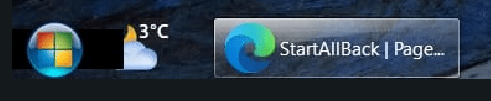
There's definitely something screwed up with your Start Button, (the black shadows),

5742.png

maybe it's the weather thing... 🤷‍♂️

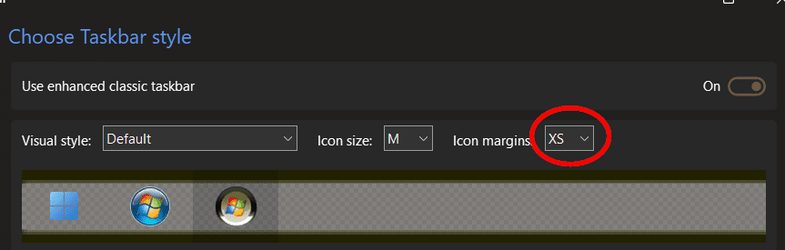
I'm using Extra Small margins...

0005829.png

... seems tight/clean enough! 🤷‍♂️

0005831.png

You gotta realize, the margin area includes the translucent placeholder as well...

0005832.png
 

My Computers My Computers

  • At a glance

    Windows 11 Pro
    OS
    Windows 11 Pro
    Computer type
    PC/Desktop
    Manufacturer/Model
    ASUS ROG Strix
  • At a glance

    Windows 11 Pro
    Operating System
    Windows 11 Pro
    Computer type
    Laptop
    Manufacturer/Model
    ASUS VivoBook
  • ASUS VivoBook 'Lite' ~ Windows 11 Home
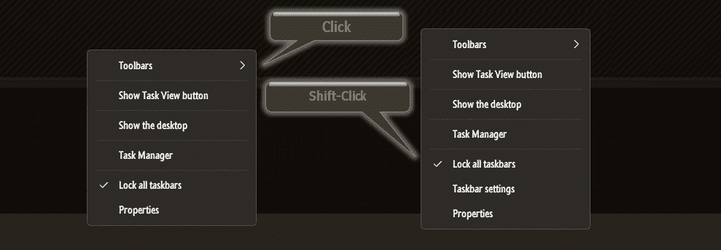
I did not know you could access Taskbar Settings with Shift/Click on the Taskbar! 🤷‍♂️

0005837.png
 

My Computers My Computers

  • At a glance

    Windows 11 Pro
    OS
    Windows 11 Pro
    Computer type
    PC/Desktop
    Manufacturer/Model
    ASUS ROG Strix
  • At a glance

    Windows 11 Pro
    Operating System
    Windows 11 Pro
    Computer type
    Laptop
    Manufacturer/Model
    ASUS VivoBook
  • ASUS VivoBook 'Lite' ~ Windows 11 Home
when sab is enabled, i cant get a taskbar context menu. when i disable it, i can. anyone else have that issue?
 

My Computer My Computer

At a glance

Windows 11 Pro
OS
Windows 11 Pro
when sab is enabled, i cant get a taskbar context menu. when i disable it, i can. anyone else have that issue?
Not here...
 

My Computers My Computers

  • At a glance

    Windows 11 Pro
    OS
    Windows 11 Pro
    Computer type
    PC/Desktop
    Manufacturer/Model
    ASUS ROG Strix
  • At a glance

    Windows 11 Pro
    Operating System
    Windows 11 Pro
    Computer type
    Laptop
    Manufacturer/Model
    ASUS VivoBook
  • ASUS VivoBook 'Lite' ~ Windows 11 Home
this has been bugging me and since your post ive been going nuts troubleshooting lol. its some conflict between nilesoft shell and sab. when i disable shell, taskbar context works on sab. @Tihiy do you know any way around this offhand? if not, its nbd

modified shell.nss and made it show the context menu while sab is activated. disregard original reply. thanks.
 
Last edited:

My Computer My Computer

At a glance

Windows 11 Pro
OS
Windows 11 Pro
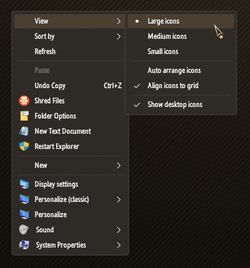
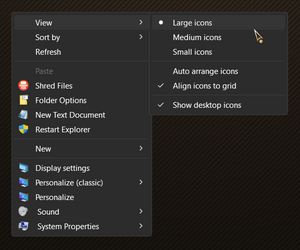
Weird stuff goin on, though..., on my machine anyway!
My Desktop right click with SAB enabled:
0005839.png

with SAB disabled: 🤷‍♂️
0005840.png
 

My Computers My Computers

  • At a glance

    Windows 11 Pro
    OS
    Windows 11 Pro
    Computer type
    PC/Desktop
    Manufacturer/Model
    ASUS ROG Strix
  • At a glance

    Windows 11 Pro
    Operating System
    Windows 11 Pro
    Computer type
    Laptop
    Manufacturer/Model
    ASUS VivoBook
  • ASUS VivoBook 'Lite' ~ Windows 11 Home
is sab the only 3rd party you use to enable the old context menu? i know by accident i had sab, winaero and nilesoft all enabling it and had glitches lol..
 

My Computer My Computer

At a glance

Windows 11 Pro
OS
Windows 11 Pro

My Computers My Computers

  • At a glance

    Windows 11 Pro
    OS
    Windows 11 Pro
    Computer type
    PC/Desktop
    Manufacturer/Model
    ASUS ROG Strix
  • At a glance

    Windows 11 Pro
    Operating System
    Windows 11 Pro
    Computer type
    Laptop
    Manufacturer/Model
    ASUS VivoBook
  • ASUS VivoBook 'Lite' ~ Windows 11 Home
Back
Top Bottom