StartAllBack


StartAllBack: Windows 11 from better timeline​

Get the latest version here Download

Embrace, enhance, unsweep classic UI from under the rug​

Restore and improve taskbar​

  • Show labels on task icons
  • Adjust icon size and margins
  • Move taskbar to top, left or right edges
  • Drag and drop stuff onto taskbar
  • Center task icons but keep Start button on the left
  • Split into segments, use dynamic translucency
  • Separate corner icons with Windows 7/10 UI
  • Auto-hide when covered by maximized window

Restore and improve File Explorer and Control Panel​

  • Ribbon and Command Bar revamped with translucent effects
  • Details pane on bottom
  • Old search box (the one which works)
  • Dark mode support for more dialogs

Restore and improve context menus​

  • All new look with rounded acrylic menus
  • Fast and responsive taskbar menus
  • New fonts, better touch support

Restore and improve start menu​

  • Launch apps and go to system places in one click
  • Navigate dropdown menus like a boss
  • Enjoy fast and reliable search

Finally, lightweight styling and UI consistency​

  • Enjoy Windows 7, Windows 8 and third-party taskbar and start menu styles
  • Fix UI inconsistencies in Win32 apps
  • Don't be blue: recolor UI in all windows apps
  • Negative resource usage: fewer RAM used, fewer processes started, faster startup



StartAllBack For Windows 11 has been released.
It's an RC release. I haven't tested it yet as I have Start11 installed.

Edit: I have now tested it. It's working quite well.
Apart from a great start menu, you can also have the Enhanced Classic Taskbar back.
This means (for example) that you can have an uncombined and unlocked Taskbar.
You will now also be able to enhance the Taskbar clock using T-Clock Redux or similar.

T-Clock Redux Tray Clock_.png

You can also change Windows Explorer to Ribbon UI or Simple UI.

You can get it Download


01 - Welcome.png
02 - Start Menu.png
04 - Taskbar.png
05 - Explorer.png
06 - Advanced.png
Get

 
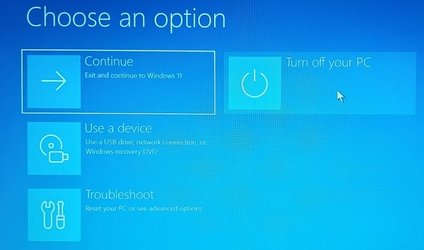
Yes , but only touching the shutdown button is enough ..........
Dont need the shift-button , at least on my rig ! :wink:
Whatever!


0002149.png

... which brings you to this stuff...

ABO.jpg
 

My Computers My Computers

  • At a glance

    Windows 11 Pro
    OS
    Windows 11 Pro
    Computer type
    PC/Desktop
    Manufacturer/Model
    ASUS ROG Strix
  • At a glance

    Windows 11 Pro
    Operating System
    Windows 11 Pro
    Computer type
    Laptop
    Manufacturer/Model
    ASUS VivoBook
  • ASUS VivoBook 'Lite' ~ Windows 11 Home
Ok ! ..............will remember , if needed !
Usefull !! (y)
 

My Computers My Computers

  • At a glance

    Windows11 Pro 25H2i732GBnVidia
    OS
    Windows11 Pro 25H2
    Computer type
    PC/Desktop
    Manufacturer/Model
    Asus
    CPU
    i7
    Motherboard
    z97k
    Memory
    32GB
    Graphics Card(s)
    nVidia
    Sound Card
    Realtek
    Hard Drives
    3
    Cooling
    air
    Browser
    Edge
    Antivirus
    ESET
  • At a glance

    Windows11 ProIntel i516GBIntel
    Operating System
    Windows11 Pro
    Computer type
    PC/Desktop
    Manufacturer/Model
    ASUS
    CPU
    Intel i5
    Motherboard
    ASUS Basic
    Memory
    16GB
    Graphics card(s)
    Intel
    Sound Card
    Realtek
    Monitor(s) Displays
    Samsung
    Hard Drives
    one intern , 0ne extern, OS on SSD
    Cooling
    air
    Keyboard
    wireless Logitech
    Mouse
    wireless Logitech
    Internet Speed
    1GB
    Browser
    Edge
    Antivirus
    ESET
Handy, thanks for the tip
 

My Computer My Computer

At a glance

Win11 Pro 23H2 (Canary on secondary boxes)
OS
Win11 Pro 23H2 (Canary on secondary boxes)
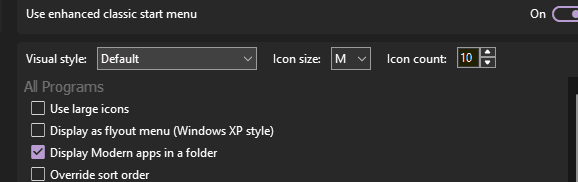
I suppose you have to be running the Windows 7 style Start Menu!

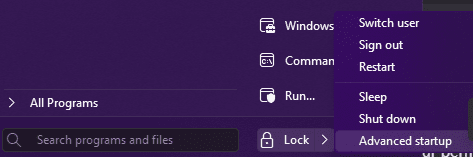
I have mine set to "Default" and I do have the advanced shutdown options when holding shift
1670861591036.png

1670861644967.png
 

My Computer My Computer

At a glance

Win11 Pro 23H2 (Canary on secondary boxes)
OS
Win11 Pro 23H2 (Canary on secondary boxes)
I have a "boot-option" in my desktop-contextmenu , when pushing this button you get the advanced start-up ............... :wink:
 

My Computers My Computers

  • At a glance

    Windows11 Pro 25H2i732GBnVidia
    OS
    Windows11 Pro 25H2
    Computer type
    PC/Desktop
    Manufacturer/Model
    Asus
    CPU
    i7
    Motherboard
    z97k
    Memory
    32GB
    Graphics Card(s)
    nVidia
    Sound Card
    Realtek
    Hard Drives
    3
    Cooling
    air
    Browser
    Edge
    Antivirus
    ESET
  • At a glance

    Windows11 ProIntel i516GBIntel
    Operating System
    Windows11 Pro
    Computer type
    PC/Desktop
    Manufacturer/Model
    ASUS
    CPU
    Intel i5
    Motherboard
    ASUS Basic
    Memory
    16GB
    Graphics card(s)
    Intel
    Sound Card
    Realtek
    Monitor(s) Displays
    Samsung
    Hard Drives
    one intern , 0ne extern, OS on SSD
    Cooling
    air
    Keyboard
    wireless Logitech
    Mouse
    wireless Logitech
    Internet Speed
    1GB
    Browser
    Edge
    Antivirus
    ESET
I use shift > restart to get the extra options.
 

My Computers My Computers

  • At a glance

    Windows 11 Pro 25H2Intel Core i7-10700K16GB (8GB PC4-19200 DDR4 SDRAM x2)NVIDIA GeForce GTX 1050 TI
    OS
    Windows 11 Pro 25H2
    Computer type
    PC/Desktop
    Manufacturer/Model
    PowerSpec B746
    CPU
    Intel Core i7-10700K
    Motherboard
    ASRock Z490 Phantom Gaming 4/ax
    Memory
    16GB (8GB PC4-19200 DDR4 SDRAM x2)
    Graphics Card(s)
    NVIDIA GeForce GTX 1050 TI
    Sound Card
    Realtek Audio
    Monitor(s) Displays
    #1. LG ULTRAWIDE 34" #2. AOC Q32G2WG3 32"
    Screen Resolution
    #1. 3440 X 1440 #2. 1920 x 1080
    Hard Drives
    NVMe WDC WDS100T2B0C-00PXH0 1TB
    Samsung SSD 860 EVO 1TB
    PSU
    750 Watts (62.5A)
    Case
    PowerSpec/Lian Li ATX 205
    Keyboard
    Logitech K270
    Mouse
    Logitech M185
    Browser
    Microsoft Edge and Firefox
    Antivirus
    Webroot SecureAnywhere CE 26.1
  • At a glance

    Windows 11 Canary ChannelIntel Core i5-8400 CPU @ 2.80GHz16 MB DDR 4-2666
    Operating System
    Windows 11 Canary Channel
    Computer type
    PC/Desktop
    Manufacturer/Model
    PowerSpec G156
    CPU
    Intel Core i5-8400 CPU @ 2.80GHz
    Motherboard
    AsusTeK Prime B360M-A
    Memory
    16 MB DDR 4-2666
    Monitor(s) Displays
    23" Speptre HDMI 75Hz
    Screen Resolution
    1920x1080
    Hard Drives
    Samsung 970 EVO 500GB NVMe
    Keyboard
    Logitek K270
    Mouse
    Logitek M185
    Browser
    Firefox, Edge and Edge Canary
    Antivirus
    Windows Defender
Hey Folks,

I am using Windows Beta 22623.1028 and 22623.1037 and on both the Hotkeys for the Actioncenter/Quicksettings and Notifications refuse to work
when Startallback is activated. With disabled Startallback the Hotkeys are functionally again. In Windows Versions <1028 it works. I think Microsoft
maybe changed something. Hope this will be fixed soon.
Greetings
 

My Computers My Computers

  • At a glance

    Windows 11 (Dev Channel)i7-12700KF32 GB Corsair LPX DDR4-3600mhzGigabyte RTX3070 Gaming OC
    OS
    Windows 11 (Dev Channel)
    Computer type
    PC/Desktop
    Manufacturer/Model
    Sananda
    CPU
    i7-12700KF
    Motherboard
    MSI Pro Z690-A
    Memory
    32 GB Corsair LPX DDR4-3600mhz
    Graphics Card(s)
    Gigabyte RTX3070 Gaming OC
    Sound Card
    onboard
    Monitor(s) Displays
    Samsung UE49MU8000TXZG
    Screen Resolution
    3840*2160
    Hard Drives
    Samsung 970 Evo Plus 512GB
    WD Blue SN570 1TB
    PSU
    MSI MPG A750GF
    Case
    Fractal Design Define R5
    Cooling
    ARCTIC Liquid Freezer II 360 A-RGB
    Keyboard
    Logitech K520
    Mouse
    Logitech MX Anywhere 2
    Internet Speed
    80 MBit
    Browser
    Firefox 102.01
    Antivirus
    Windows Defender
  • At a glance

    Windows 11 (Dev Channel)i7-7700HQ16GB DDR4-2400mhzNvidia GTX 1070 8GB
    Operating System
    Windows 11 (Dev Channel)
    Computer type
    Laptop
    Manufacturer/Model
    GE72MVR 7RG Apache Pro
    CPU
    i7-7700HQ
    Motherboard
    MSI 607-179C1-01S
    Memory
    16GB DDR4-2400mhz
    Graphics card(s)
    Nvidia GTX 1070 8GB
    Sound Card
    onboard
    Monitor(s) Displays
    17.3" FHD (1920x1080), IPS-Level
    Screen Resolution
    1920x1080
    Hard Drives
    1x M.2 SSD Combo (NVMe PCIe Gen3 / SATA )
    1x 2.5" SATA HDD
    PSU
    6-Cell 51
    Case
    MSI
    Cooling
    Klim Typhoon
    Keyboard
    Backlight Keyboard mechanical
    Mouse
    MX Anywhere 2
    Internet Speed
    80Mbit
    Browser
    Firefox
    Antivirus
    Defender
with the latest Version of StartAllBack hotkeys are working again :D
greets
 

My Computers My Computers

  • At a glance

    Windows 11 (Dev Channel)i7-12700KF32 GB Corsair LPX DDR4-3600mhzGigabyte RTX3070 Gaming OC
    OS
    Windows 11 (Dev Channel)
    Computer type
    PC/Desktop
    Manufacturer/Model
    Sananda
    CPU
    i7-12700KF
    Motherboard
    MSI Pro Z690-A
    Memory
    32 GB Corsair LPX DDR4-3600mhz
    Graphics Card(s)
    Gigabyte RTX3070 Gaming OC
    Sound Card
    onboard
    Monitor(s) Displays
    Samsung UE49MU8000TXZG
    Screen Resolution
    3840*2160
    Hard Drives
    Samsung 970 Evo Plus 512GB
    WD Blue SN570 1TB
    PSU
    MSI MPG A750GF
    Case
    Fractal Design Define R5
    Cooling
    ARCTIC Liquid Freezer II 360 A-RGB
    Keyboard
    Logitech K520
    Mouse
    Logitech MX Anywhere 2
    Internet Speed
    80 MBit
    Browser
    Firefox 102.01
    Antivirus
    Windows Defender
  • At a glance

    Windows 11 (Dev Channel)i7-7700HQ16GB DDR4-2400mhzNvidia GTX 1070 8GB
    Operating System
    Windows 11 (Dev Channel)
    Computer type
    Laptop
    Manufacturer/Model
    GE72MVR 7RG Apache Pro
    CPU
    i7-7700HQ
    Motherboard
    MSI 607-179C1-01S
    Memory
    16GB DDR4-2400mhz
    Graphics card(s)
    Nvidia GTX 1070 8GB
    Sound Card
    onboard
    Monitor(s) Displays
    17.3" FHD (1920x1080), IPS-Level
    Screen Resolution
    1920x1080
    Hard Drives
    1x M.2 SSD Combo (NVMe PCIe Gen3 / SATA )
    1x 2.5" SATA HDD
    PSU
    6-Cell 51
    Case
    MSI
    Cooling
    Klim Typhoon
    Keyboard
    Backlight Keyboard mechanical
    Mouse
    MX Anywhere 2
    Internet Speed
    80Mbit
    Browser
    Firefox
    Antivirus
    Defender
Latest ; 4.5.6 4572............?
 

My Computers My Computers

  • At a glance

    Windows11 Pro 25H2i732GBnVidia
    OS
    Windows11 Pro 25H2
    Computer type
    PC/Desktop
    Manufacturer/Model
    Asus
    CPU
    i7
    Motherboard
    z97k
    Memory
    32GB
    Graphics Card(s)
    nVidia
    Sound Card
    Realtek
    Hard Drives
    3
    Cooling
    air
    Browser
    Edge
    Antivirus
    ESET
  • At a glance

    Windows11 ProIntel i516GBIntel
    Operating System
    Windows11 Pro
    Computer type
    PC/Desktop
    Manufacturer/Model
    ASUS
    CPU
    Intel i5
    Motherboard
    ASUS Basic
    Memory
    16GB
    Graphics card(s)
    Intel
    Sound Card
    Realtek
    Monitor(s) Displays
    Samsung
    Hard Drives
    one intern , 0ne extern, OS on SSD
    Cooling
    air
    Keyboard
    wireless Logitech
    Mouse
    wireless Logitech
    Internet Speed
    1GB
    Browser
    Edge
    Antivirus
    ESET

My Computers My Computers

  • At a glance

    Windows 11 Pro
    OS
    Windows 11 Pro
    Computer type
    PC/Desktop
    Manufacturer/Model
    ASUS ROG Strix
  • At a glance

    Windows 11 Pro
    Operating System
    Windows 11 Pro
    Computer type
    Laptop
    Manufacturer/Model
    ASUS VivoBook
  • ASUS VivoBook 'Lite' ~ Windows 11 Home
Yes ! You are fast ............just wanted to correct version-number !
 

My Computers My Computers

  • At a glance

    Windows11 Pro 25H2i732GBnVidia
    OS
    Windows11 Pro 25H2
    Computer type
    PC/Desktop
    Manufacturer/Model
    Asus
    CPU
    i7
    Motherboard
    z97k
    Memory
    32GB
    Graphics Card(s)
    nVidia
    Sound Card
    Realtek
    Hard Drives
    3
    Cooling
    air
    Browser
    Edge
    Antivirus
    ESET
  • At a glance

    Windows11 ProIntel i516GBIntel
    Operating System
    Windows11 Pro
    Computer type
    PC/Desktop
    Manufacturer/Model
    ASUS
    CPU
    Intel i5
    Motherboard
    ASUS Basic
    Memory
    16GB
    Graphics card(s)
    Intel
    Sound Card
    Realtek
    Monitor(s) Displays
    Samsung
    Hard Drives
    one intern , 0ne extern, OS on SSD
    Cooling
    air
    Keyboard
    wireless Logitech
    Mouse
    wireless Logitech
    Internet Speed
    1GB
    Browser
    Edge
    Antivirus
    ESET
How do I turn off this annoyance? Every time I try to read text near the bottom of the screen, I end up with a preview window whatsit thingy popping up in the way of what I'm reading. I don't know what they're called so I can't search for them.
 

Attachments

  • popup.jpg
    popup.jpg
    14.1 KB · Views: 3

My Computer My Computer

At a glance

Windows 11 Professional (not the cut down rub...Ryzen 9 3900XT (on this one anyway, I have 8)72G and 72GB and 64GB and 32GB and 32GB and 8...Fury and 12 Tahitis
OS
Windows 11 Professional (not the cut down rubbish)
Computer type
PC/Desktop
Manufacturer/Model
Home built, of course
CPU
Ryzen 9 3900XT (on this one anyway, I have 8)
Motherboard
MSI X470 Gaming Plus Max
Memory
72G and 72GB and 64GB and 32GB and 32GB and 8GB and 8GB and 8GB
Graphics Card(s)
Fury and 12 Tahitis
Sound Card
People still use cards for those?
Monitor(s) Displays
7 of them.
Screen Resolution
All sorts.
Hard Drives
1TB NVME, 4TB rust spinner
PSU
Several kW
Case
Unimportant
Cooling
Big Zalman 6 inch thing
Keyboard
Really?
Mouse
Yes
Internet Speed
32Mbit/7Mbit
Browser
Opera
Antivirus
AVG
Other Info
[Crosses legs] Exactly what info are you looking for?
I don't know what they're called so I can't search for them.
They are called Taskbar Thumbnail Previews. They should only pop up if your mouse cursor is hovering on the thumbnail, keep the cursor away from the thumbnail and you should be okay.
 

My Computers My Computers

  • At a glance

    Windows 11 Pro
    OS
    Windows 11 Pro
    Computer type
    PC/Desktop
    Manufacturer/Model
    ASUS ROG Strix
  • At a glance

    Windows 11 Pro
    Operating System
    Windows 11 Pro
    Computer type
    Laptop
    Manufacturer/Model
    ASUS VivoBook
  • ASUS VivoBook 'Lite' ~ Windows 11 Home
They are called Taskbar Thumbnail Previews. They should only pop up if your mouse cursor is hovering on the thumbnail, keep the cursor away from the thumbnail and you should be okay.
There must be a way to turn this off. The mouse cursor has to be somewhere. I don't want it doing things unless I click. If it's not the thumbnail it's some text, usually repeating what's in the taskbar button anyway. I guess they're useful for those with little buttons, but I show the text in mine. All I can find in Windows is registry changes to lengthen the hover time to a large amount, which doesn't work, presumably because startallback is overriding it.

Do you know what these are called so I can look them up too? They happen more often:


minipopup.jpg
 

My Computer My Computer

At a glance

Windows 11 Professional (not the cut down rub...Ryzen 9 3900XT (on this one anyway, I have 8)72G and 72GB and 64GB and 32GB and 32GB and 8...Fury and 12 Tahitis
OS
Windows 11 Professional (not the cut down rubbish)
Computer type
PC/Desktop
Manufacturer/Model
Home built, of course
CPU
Ryzen 9 3900XT (on this one anyway, I have 8)
Motherboard
MSI X470 Gaming Plus Max
Memory
72G and 72GB and 64GB and 32GB and 32GB and 8GB and 8GB and 8GB
Graphics Card(s)
Fury and 12 Tahitis
Sound Card
People still use cards for those?
Monitor(s) Displays
7 of them.
Screen Resolution
All sorts.
Hard Drives
1TB NVME, 4TB rust spinner
PSU
Several kW
Case
Unimportant
Cooling
Big Zalman 6 inch thing
Keyboard
Really?
Mouse
Yes
Internet Speed
32Mbit/7Mbit
Browser
Opera
Antivirus
AVG
Other Info
[Crosses legs] Exactly what info are you looking for?
I found this program which works! As long as you have startallback making it Windows 10 style or earlier, this program allows you to turn off all hover crap. Unbelievable MS keeps adding stuff which millions complain about.


My Computer My Computer

At a glance

Windows 11 Professional (not the cut down rub...Ryzen 9 3900XT (on this one anyway, I have 8)72G and 72GB and 64GB and 32GB and 32GB and 8...Fury and 12 Tahitis
OS
Windows 11 Professional (not the cut down rubbish)
Computer type
PC/Desktop
Manufacturer/Model
Home built, of course
CPU
Ryzen 9 3900XT (on this one anyway, I have 8)
Motherboard
MSI X470 Gaming Plus Max
Memory
72G and 72GB and 64GB and 32GB and 32GB and 8GB and 8GB and 8GB
Graphics Card(s)
Fury and 12 Tahitis
Sound Card
People still use cards for those?
Monitor(s) Displays
7 of them.
Screen Resolution
All sorts.
Hard Drives
1TB NVME, 4TB rust spinner
PSU
Several kW
Case
Unimportant
Cooling
Big Zalman 6 inch thing
Keyboard
Really?
Mouse
Yes
Internet Speed
32Mbit/7Mbit
Browser
Opera
Antivirus
AVG
Other Info
[Crosses legs] Exactly what info are you looking for?
0003621.png
 

My Computers My Computers

  • At a glance

    Windows 11 Pro
    OS
    Windows 11 Pro
    Computer type
    PC/Desktop
    Manufacturer/Model
    ASUS ROG Strix
  • At a glance

    Windows 11 Pro
    Operating System
    Windows 11 Pro
    Computer type
    Laptop
    Manufacturer/Model
    ASUS VivoBook
  • ASUS VivoBook 'Lite' ~ Windows 11 Home

Latest Support Threads

Back
Top Bottom