StartAllBack


StartAllBack: Windows 11 from better timeline​

Get the latest version here Download

Embrace, enhance, unsweep classic UI from under the rug​

Restore and improve taskbar​

  • Show labels on task icons
  • Adjust icon size and margins
  • Move taskbar to top, left or right edges
  • Drag and drop stuff onto taskbar
  • Center task icons but keep Start button on the left
  • Split into segments, use dynamic translucency
  • Separate corner icons with Windows 7/10 UI
  • Auto-hide when covered by maximized window

Restore and improve File Explorer and Control Panel​

  • Ribbon and Command Bar revamped with translucent effects
  • Details pane on bottom
  • Old search box (the one which works)
  • Dark mode support for more dialogs

Restore and improve context menus​

  • All new look with rounded acrylic menus
  • Fast and responsive taskbar menus
  • New fonts, better touch support

Restore and improve start menu​

  • Launch apps and go to system places in one click
  • Navigate dropdown menus like a boss
  • Enjoy fast and reliable search

Finally, lightweight styling and UI consistency​

  • Enjoy Windows 7, Windows 8 and third-party taskbar and start menu styles
  • Fix UI inconsistencies in Win32 apps
  • Don't be blue: recolor UI in all windows apps
  • Negative resource usage: fewer RAM used, fewer processes started, faster startup



StartAllBack For Windows 11 has been released.
It's an RC release. I haven't tested it yet as I have Start11 installed.

Edit: I have now tested it. It's working quite well.
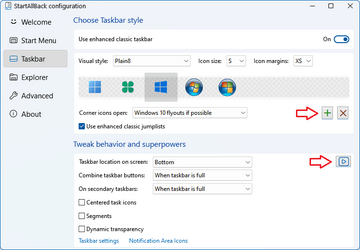
Apart from a great start menu, you can also have the Enhanced Classic Taskbar back.
This means (for example) that you can have an uncombined and unlocked Taskbar.
You will now also be able to enhance the Taskbar clock using T-Clock Redux or similar.

T-Clock Redux Tray Clock_.png

You can also change Windows Explorer to Ribbon UI or Simple UI.

You can get it Download


01 - Welcome.png
02 - Start Menu.png
04 - Taskbar.png
05 - Explorer.png
06 - Advanced.png
Get

 
Does SAB work on the latest Windows 11 beta 22624.1537? Currently the start menu doesn't work with the latest version and Qtranslate is also buggy.
I think some people don't notice any issues unless it's right in their face. I wouldn't use SAB. It's not worth the headache. Just my opinion.
 

My Computer My Computer

At a glance

Windows 11NVIDA 1650 Ti
OS
Windows 11
Computer type
Laptop
Manufacturer/Model
Lenovo
Graphics Card(s)
NVIDA 1650 Ti
Monitor(s) Displays
Lenovo C32q-20
Workin fine for me!

000378.png
 

My Computers My Computers

  • At a glance

    Windows 11 Pro
    OS
    Windows 11 Pro
    Computer type
    PC/Desktop
    Manufacturer/Model
    ASUS ROG Strix
  • At a glance

    Windows 11 Pro
    Operating System
    Windows 11 Pro
    Computer type
    Laptop
    Manufacturer/Model
    ASUS VivoBook
  • ASUS VivoBook 'Lite' ~ Windows 11 Home
" Is the taskbar still working ok for you? "..........yes , very nice !
Always disable SAB and OpenShell first , before updating Windows .
After the updates enable them both , so all keeps working fine ............. :wink:
 

My Computers My Computers

  • At a glance

    Windows11 Pro 25H2i732GBnVidia
    OS
    Windows11 Pro 25H2
    Computer type
    PC/Desktop
    Manufacturer/Model
    Asus
    CPU
    i7
    Motherboard
    z97k
    Memory
    32GB
    Graphics Card(s)
    nVidia
    Sound Card
    Realtek
    Hard Drives
    3
    Cooling
    air
    Browser
    Edge
    Antivirus
    ESET
  • At a glance

    Windows11 ProIntel i516GBIntel
    Operating System
    Windows11 Pro
    Computer type
    PC/Desktop
    Manufacturer/Model
    ASUS
    CPU
    Intel i5
    Motherboard
    ASUS Basic
    Memory
    16GB
    Graphics card(s)
    Intel
    Sound Card
    Realtek
    Monitor(s) Displays
    Samsung
    Hard Drives
    one intern , 0ne extern, OS on SSD
    Cooling
    air
    Keyboard
    wireless Logitech
    Mouse
    wireless Logitech
    Internet Speed
    1GB
    Browser
    Edge
    Antivirus
    ESET
Every time Opera updates, it disappears off the most recently used apps in the start menu. Is this controlled by startallback, windows, or opera? i don't know where to start to solve it. Takes me opening it 100 times before it gets back on. And strangely it pops straight into 1st place. I'd expect it to work it's way up like a new app. The program name doesn't change, the path doesn't change, but obviously the exe file will be replaced.
 

My Computer My Computer

At a glance

Windows 11 Professional (not the cut down rub...Ryzen 9 3900XT (on this one anyway, I have 8)72G and 72GB and 64GB and 32GB and 32GB and 8...Fury and 12 Tahitis
OS
Windows 11 Professional (not the cut down rubbish)
Computer type
PC/Desktop
Manufacturer/Model
Home built, of course
CPU
Ryzen 9 3900XT (on this one anyway, I have 8)
Motherboard
MSI X470 Gaming Plus Max
Memory
72G and 72GB and 64GB and 32GB and 32GB and 8GB and 8GB and 8GB
Graphics Card(s)
Fury and 12 Tahitis
Sound Card
People still use cards for those?
Monitor(s) Displays
7 of them.
Screen Resolution
All sorts.
Hard Drives
1TB NVME, 4TB rust spinner
PSU
Several kW
Case
Unimportant
Cooling
Big Zalman 6 inch thing
Keyboard
Really?
Mouse
Yes
Internet Speed
32Mbit/7Mbit
Browser
Opera
Antivirus
AVG
Other Info
[Crosses legs] Exactly what info are you looking for?
Don't know if anybody else experiences this, but...,
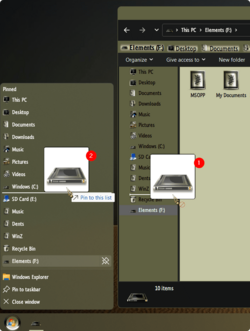
if you can't drag to re-order pinned items in the Navigation Pane(1), do it from within Explorer jump list(2), close and re-open Explorer! (y)

000394.png
 

My Computers My Computers

  • At a glance

    Windows 11 Pro
    OS
    Windows 11 Pro
    Computer type
    PC/Desktop
    Manufacturer/Model
    ASUS ROG Strix
  • At a glance

    Windows 11 Pro
    Operating System
    Windows 11 Pro
    Computer type
    Laptop
    Manufacturer/Model
    ASUS VivoBook
  • ASUS VivoBook 'Lite' ~ Windows 11 Home
" Is the taskbar still working ok for you? "..........yes , very nice !
Always disable SAB and OpenShell first , before updating Windows .
After the updates enable them both , so all keeps working fine ............. :wink:
Interesting solution, I tried it, but it didn't work unfortunately, but thanks a lot!

Has anyone else had similar problems with SIB?

Edit: only the start key has this problem, the click on start opens the SIB correctly
 
Last edited:

My Computer My Computer

At a glance

Windows 11i5-8265U12 GBNVIDIA GeForce MX150 2GB
OS
Windows 11
Computer type
Laptop
Manufacturer/Model
ASUS Vivobook S15
CPU
i5-8265U
Memory
12 GB
Graphics Card(s)
NVIDIA GeForce MX150 2GB
Antivirus
NOD32
By accident I found something interesting about StartAllBack tonight. I can have the Taskbar to separate locations on my dual monitor setup. I'm running build 3.6.3. I don't know when this option was first offered.
 

My Computers My Computers

  • At a glance

    Windows 11 Pro 25H2Intel Core i7-10700K16GB (8GB PC4-19200 DDR4 SDRAM x2)NVIDIA GeForce GTX 1050 TI
    OS
    Windows 11 Pro 25H2
    Computer type
    PC/Desktop
    Manufacturer/Model
    PowerSpec B746
    CPU
    Intel Core i7-10700K
    Motherboard
    ASRock Z490 Phantom Gaming 4/ax
    Memory
    16GB (8GB PC4-19200 DDR4 SDRAM x2)
    Graphics Card(s)
    NVIDIA GeForce GTX 1050 TI
    Sound Card
    Realtek Audio
    Monitor(s) Displays
    #1. LG ULTRAWIDE 34" #2. AOC Q32G2WG3 32"
    Screen Resolution
    #1. 3440 X 1440 #2. 1920 x 1080
    Hard Drives
    NVMe WDC WDS100T2B0C-00PXH0 1TB
    Samsung SSD 860 EVO 1TB
    PSU
    750 Watts (62.5A)
    Case
    PowerSpec/Lian Li ATX 205
    Keyboard
    Logitech K270
    Mouse
    Logitech M185
    Browser
    Microsoft Edge and Firefox
    Antivirus
    Webroot SecureAnywhere CE 26.1
  • At a glance

    Windows 11 Canary ChannelIntel Core i5-8400 CPU @ 2.80GHz16 MB DDR 4-2666
    Operating System
    Windows 11 Canary Channel
    Computer type
    PC/Desktop
    Manufacturer/Model
    PowerSpec G156
    CPU
    Intel Core i5-8400 CPU @ 2.80GHz
    Motherboard
    AsusTeK Prime B360M-A
    Memory
    16 MB DDR 4-2666
    Monitor(s) Displays
    23" Speptre HDMI 75Hz
    Screen Resolution
    1920x1080
    Hard Drives
    Samsung 970 EVO 500GB NVMe
    Keyboard
    Logitek K270
    Mouse
    Logitek M185
    Browser
    Firefox, Edge and Edge Canary
    Antivirus
    Windows Defender
Is there a way to get Widgets Weather showing on taskbar instead of the Widgets icon? :unsure:🤔 The weather display-by-default is the only thing I like about Widgets.
 

My Computer My Computer

At a glance

Windows 11 Pro 25H2 26200.7840Intel Core i3-8145U16GB
OS
Windows 11 Pro 25H2 26200.7840
Computer type
Laptop
Manufacturer/Model
Lenovo IdeaPad L340
CPU
Intel Core i3-8145U
Memory
16GB
Hard Drives
500 GB M2 1 TB HDD
Internet Speed
400 MB
Browser
Chrome | Edge
Antivirus
Microsoft Defender | Block unknown executables | Various ASR rules enabled | Smart App Control
StartAllBack 3.6.4

- Automatic updates

- Mute with middle-click on volume taskbar icon

- Replaced 'Connect To' with 'Network Connections'

- Dark mode Alt-F4 shutdown dialog

- Win-X menu won't show if 'Disable context menus for taskbar' GPO is on

- Changed settings search to prefer matching name

- Added quick setting to enable/disable alphabet separators in All Programs context menu

- Added cringe taskbar tutorial video

- [Beta/Dev] Fixed Win key not opening classic start menu

- Fixed crash when interacting with deleted modern app shortcuts
 

My Computer My Computer

At a glance

Windows 11 ProIntel Core i9 12900KFCorsair 64GB DDR5 Vengeance C40 5200MhzASUS GeForce RTX 3090 ROG Strix OC 24GB
OS
Windows 11 Pro
Computer type
PC/Desktop
Manufacturer/Model
Custom Build
CPU
Intel Core i9 12900KF
Motherboard
ASUS ROG Maximus Z690 Hero
Memory
Corsair 64GB DDR5 Vengeance C40 5200Mhz
Graphics Card(s)
ASUS GeForce RTX 3090 ROG Strix OC 24GB
Sound Card
OnBoard
Monitor(s) Displays
Acer Predator XB323UGP 32" QHD G-SYNC-C 144Hz 1MS IPS LED
Screen Resolution
2560 x 1440
Hard Drives
1x Samsung 980 Pro Series Gen4 250GB M.2 NVMe
1x Samsung 980 Pro Series Gen4 500GB M.2 NVMe
2x Samsung 980 Pro Series Gen4 2TB M.2 NVMe
PSU
Corsair AX1200i 1200W 80PLUS Titanium Modular
Case
Corsair 4000D Black Case w/ Tempered Glass Side Panel
Cooling
Noctua NH-U12A Chromax Black CPU Cooler, 4x Noctua 120mm Fans
Keyboard
Logitech MK545
Mouse
Logitech MX Master 3
Internet Speed
Fixed Wireless 150mbps/75mbps
Browser
Firefox
Antivirus
Kaspersky
Other Info
Thrustmaster TS-PC RACER
Fanatec CSL Elite Pedals with the Load Cell Kit
Yamaha Amp with Bose Speakers
Has anyone noticed when doing build upgrades that most tray icons are hidden again, even though you had some of them showing before the upgrade? That one's tricky to solve apparently. I tried restoring exports of these two areas (and rebooting) after the upgrade, but to no effect:

Code:
HKCU\Control Panel\NotifyIconSettings

HKCU\Software\Classes\Local Settings\Software\Microsoft\Windows\CurrentVersion\TrayNotify

Maybe it's not possible when changing builds, but more likely is that something else is involved.
 

My Computer My Computer

At a glance

Windows 11
OS
Windows 11
Is there a way to get Widgets Weather showing on taskbar instead of the Widgets icon? :unsure:🤔 The weather display-by-default is the only thing I like about Widgets.
Bumping this. Any help from anyone? :unsure:🙏
 

My Computer My Computer

At a glance

Windows 11 Pro 25H2 26200.7840Intel Core i3-8145U16GB
OS
Windows 11 Pro 25H2 26200.7840
Computer type
Laptop
Manufacturer/Model
Lenovo IdeaPad L340
CPU
Intel Core i3-8145U
Memory
16GB
Hard Drives
500 GB M2 1 TB HDD
Internet Speed
400 MB
Browser
Chrome | Edge
Antivirus
Microsoft Defender | Block unknown executables | Various ASR rules enabled | Smart App Control
Bumping this. Any help from anyone? :unsure:🙏
I'm not sure that you can. I tried widgets and didn't like it. I use the weather app in 8GadgetPack to show the weather in a sidebar.
 

My Computers My Computers

  • At a glance

    Windows 11 Pro 25H2Intel Core i7-10700K16GB (8GB PC4-19200 DDR4 SDRAM x2)NVIDIA GeForce GTX 1050 TI
    OS
    Windows 11 Pro 25H2
    Computer type
    PC/Desktop
    Manufacturer/Model
    PowerSpec B746
    CPU
    Intel Core i7-10700K
    Motherboard
    ASRock Z490 Phantom Gaming 4/ax
    Memory
    16GB (8GB PC4-19200 DDR4 SDRAM x2)
    Graphics Card(s)
    NVIDIA GeForce GTX 1050 TI
    Sound Card
    Realtek Audio
    Monitor(s) Displays
    #1. LG ULTRAWIDE 34" #2. AOC Q32G2WG3 32"
    Screen Resolution
    #1. 3440 X 1440 #2. 1920 x 1080
    Hard Drives
    NVMe WDC WDS100T2B0C-00PXH0 1TB
    Samsung SSD 860 EVO 1TB
    PSU
    750 Watts (62.5A)
    Case
    PowerSpec/Lian Li ATX 205
    Keyboard
    Logitech K270
    Mouse
    Logitech M185
    Browser
    Microsoft Edge and Firefox
    Antivirus
    Webroot SecureAnywhere CE 26.1
  • At a glance

    Windows 11 Canary ChannelIntel Core i5-8400 CPU @ 2.80GHz16 MB DDR 4-2666
    Operating System
    Windows 11 Canary Channel
    Computer type
    PC/Desktop
    Manufacturer/Model
    PowerSpec G156
    CPU
    Intel Core i5-8400 CPU @ 2.80GHz
    Motherboard
    AsusTeK Prime B360M-A
    Memory
    16 MB DDR 4-2666
    Monitor(s) Displays
    23" Speptre HDMI 75Hz
    Screen Resolution
    1920x1080
    Hard Drives
    Samsung 970 EVO 500GB NVMe
    Keyboard
    Logitek K270
    Mouse
    Logitek M185
    Browser
    Firefox, Edge and Edge Canary
    Antivirus
    Windows Defender
StartAllBack 3.6.4.4672 was released this past Wednesday.
 

My Computer My Computer

At a glance

Windows 11 25H2 Pro (RP Build 26200.8968)
OS
Windows 11 25H2 Pro (RP Build 26200.8968)
Computer type
PC/Desktop
Manufacturer/Model
Alienware
Is there a way to see what license was used to activate StartAllBack?
 

My Computers My Computers

  • At a glance

    Windows 11 Pro 25H2Intel Core i7-10700K16GB (8GB PC4-19200 DDR4 SDRAM x2)NVIDIA GeForce GTX 1050 TI
    OS
    Windows 11 Pro 25H2
    Computer type
    PC/Desktop
    Manufacturer/Model
    PowerSpec B746
    CPU
    Intel Core i7-10700K
    Motherboard
    ASRock Z490 Phantom Gaming 4/ax
    Memory
    16GB (8GB PC4-19200 DDR4 SDRAM x2)
    Graphics Card(s)
    NVIDIA GeForce GTX 1050 TI
    Sound Card
    Realtek Audio
    Monitor(s) Displays
    #1. LG ULTRAWIDE 34" #2. AOC Q32G2WG3 32"
    Screen Resolution
    #1. 3440 X 1440 #2. 1920 x 1080
    Hard Drives
    NVMe WDC WDS100T2B0C-00PXH0 1TB
    Samsung SSD 860 EVO 1TB
    PSU
    750 Watts (62.5A)
    Case
    PowerSpec/Lian Li ATX 205
    Keyboard
    Logitech K270
    Mouse
    Logitech M185
    Browser
    Microsoft Edge and Firefox
    Antivirus
    Webroot SecureAnywhere CE 26.1
  • At a glance

    Windows 11 Canary ChannelIntel Core i5-8400 CPU @ 2.80GHz16 MB DDR 4-2666
    Operating System
    Windows 11 Canary Channel
    Computer type
    PC/Desktop
    Manufacturer/Model
    PowerSpec G156
    CPU
    Intel Core i5-8400 CPU @ 2.80GHz
    Motherboard
    AsusTeK Prime B360M-A
    Memory
    16 MB DDR 4-2666
    Monitor(s) Displays
    23" Speptre HDMI 75Hz
    Screen Resolution
    1920x1080
    Hard Drives
    Samsung 970 EVO 500GB NVMe
    Keyboard
    Logitek K270
    Mouse
    Logitek M185
    Browser
    Firefox, Edge and Edge Canary
    Antivirus
    Windows Defender
Is there a way to see what license was used to activate StartAllBack?
None that I can see!
The info is probably buried in a dat file somewhere!
 

My Computers My Computers

  • At a glance

    Windows 11 Pro
    OS
    Windows 11 Pro
    Computer type
    PC/Desktop
    Manufacturer/Model
    ASUS ROG Strix
  • At a glance

    Windows 11 Pro
    Operating System
    Windows 11 Pro
    Computer type
    Laptop
    Manufacturer/Model
    ASUS VivoBook
  • ASUS VivoBook 'Lite' ~ Windows 11 Home
None that I can see!
The info is probably buried in a dat file somewhere!
I have 4 license but I only found by looking is that StartAllBack is activated. I do know that I didn't use all 4 license. I'll try the latest key to activate StartAllBack on my new mini pc and see what happens.
 

My Computers My Computers

  • At a glance

    Windows 11 Pro 25H2Intel Core i7-10700K16GB (8GB PC4-19200 DDR4 SDRAM x2)NVIDIA GeForce GTX 1050 TI
    OS
    Windows 11 Pro 25H2
    Computer type
    PC/Desktop
    Manufacturer/Model
    PowerSpec B746
    CPU
    Intel Core i7-10700K
    Motherboard
    ASRock Z490 Phantom Gaming 4/ax
    Memory
    16GB (8GB PC4-19200 DDR4 SDRAM x2)
    Graphics Card(s)
    NVIDIA GeForce GTX 1050 TI
    Sound Card
    Realtek Audio
    Monitor(s) Displays
    #1. LG ULTRAWIDE 34" #2. AOC Q32G2WG3 32"
    Screen Resolution
    #1. 3440 X 1440 #2. 1920 x 1080
    Hard Drives
    NVMe WDC WDS100T2B0C-00PXH0 1TB
    Samsung SSD 860 EVO 1TB
    PSU
    750 Watts (62.5A)
    Case
    PowerSpec/Lian Li ATX 205
    Keyboard
    Logitech K270
    Mouse
    Logitech M185
    Browser
    Microsoft Edge and Firefox
    Antivirus
    Webroot SecureAnywhere CE 26.1
  • At a glance

    Windows 11 Canary ChannelIntel Core i5-8400 CPU @ 2.80GHz16 MB DDR 4-2666
    Operating System
    Windows 11 Canary Channel
    Computer type
    PC/Desktop
    Manufacturer/Model
    PowerSpec G156
    CPU
    Intel Core i5-8400 CPU @ 2.80GHz
    Motherboard
    AsusTeK Prime B360M-A
    Memory
    16 MB DDR 4-2666
    Monitor(s) Displays
    23" Speptre HDMI 75Hz
    Screen Resolution
    1920x1080
    Hard Drives
    Samsung 970 EVO 500GB NVMe
    Keyboard
    Logitek K270
    Mouse
    Logitek M185
    Browser
    Firefox, Edge and Edge Canary
    Antivirus
    Windows Defender
Hi, I'm asking for someone's help, I don't know what was the cause (but probably because I experimented with System Font Size Changer - Increase Text Size in Windows 10) and now my system control buttons are disgusting (too enlarged and bordered - see the red arrows on my screenshot) and I can't get it back to its original state/look. Thank you very much for any help in advance.
 

Attachments

  • FalseButtons.png
    FalseButtons.png
    17.2 KB · Views: 4

My Computer My Computer

At a glance

Windows 11 ProIntel Core i7-10850H32 GBIntel UHD Graphics
OS
Windows 11 Pro
Computer type
Laptop
Manufacturer/Model
Dell Latitude 5411
CPU
Intel Core i7-10850H
Memory
32 GB
Graphics Card(s)
Intel UHD Graphics
Sound Card
Realtek Audio
Monitor(s) Displays
Dell U2412M
Screen Resolution
1920x1200
Hard Drives
NVMe Micron 2300
Samsung PSSD T7
Mouse
Logitech RX250
Internet Speed
16Mbps
Browser
Firefox
I have just downloaded some Windows updates and now explorer.exe crashes in a loop until I open a cmd window and type taskkill /im explorer.exe /f. Is there any way of getting StartAllBack working again without it buggering up explorer.exe?

Using StartAllBack 3.6.4
Windows 11 22H2 build 22621.1702
 

My Computer My Computer

At a glance

Windows 11 ProIntel Celeron N51058GBIntel UHD Graphics (integrated)
OS
Windows 11 Pro
Computer type
PC/Desktop
CPU
Intel Celeron N5105
Memory
8GB
Graphics Card(s)
Intel UHD Graphics (integrated)
I have just downloaded some Windows updates and now explorer.exe crashes in a loop until I open a cmd window and type taskkill /im explorer.exe /f. Is there any way of getting StartAllBack working again without it buggering up explorer.exe?

Using StartAllBack 3.6.4
Windows 11 22H2 build 22621.1702
Well, I'm glad I stuck with StartAllBack 3.6.1. Everything works perfectly with the latest Windows updates (Canary Build 25357.1).

bob
 
Last edited:

My Computers My Computers

  • At a glance

    Windows 11 Professional (x64)Intel Core i916 GBNVIDIA GeForce RTX
    OS
    Windows 11 Professional (x64)
    Computer type
    Laptop
    Manufacturer/Model
    Dell Inc. G16
    CPU
    Intel Core i9
    Motherboard
    Dell Inc. 0FDMYT A00
    Memory
    16 GB
    Graphics Card(s)
    NVIDIA GeForce RTX
    Sound Card
    Realtek(R) Audio
    Monitor(s) Displays
    Generic PnP Monitor (15.3"vis)
    Screen Resolution
    2560 x 1600
    Hard Drives
    4TB SSD
    PSU
    Dell
    Case
    Laptop
    Cooling
    Air
    Keyboard
    Dell
    Mouse
    Logitech
    Internet Speed
    10 Mbps (Dismal, slow DSL over phone line)
    Browser
    Google Chrome
    Antivirus
    Webroot SecureAnywhere
  • At a glance

    Windows 11 Pro
    Operating System
    Windows 11 Pro
    Computer type
    PC/Desktop
    Manufacturer/Model
    Dell
Hello, I've been using SIB/SAB for a while and I quite enjoyed how well it blends in together with Windows.

I would like to know if it was possible to add a new item to the power button default action in SAB, to open the classic shutdown dialog instead.
1684254257598.png
 

My Computer My Computer

At a glance

Windows 11
OS
Windows 11
Back
Top Bottom