StartAllBack


StartAllBack: Windows 11 from better timeline​

Get the latest version here Download

Embrace, enhance, unsweep classic UI from under the rug​

Restore and improve taskbar​

  • Show labels on task icons
  • Adjust icon size and margins
  • Move taskbar to top, left or right edges
  • Drag and drop stuff onto taskbar
  • Center task icons but keep Start button on the left
  • Split into segments, use dynamic translucency
  • Separate corner icons with Windows 7/10 UI
  • Auto-hide when covered by maximized window

Restore and improve File Explorer and Control Panel​

  • Ribbon and Command Bar revamped with translucent effects
  • Details pane on bottom
  • Old search box (the one which works)
  • Dark mode support for more dialogs

Restore and improve context menus​

  • All new look with rounded acrylic menus
  • Fast and responsive taskbar menus
  • New fonts, better touch support

Restore and improve start menu​

  • Launch apps and go to system places in one click
  • Navigate dropdown menus like a boss
  • Enjoy fast and reliable search

Finally, lightweight styling and UI consistency​

  • Enjoy Windows 7, Windows 8 and third-party taskbar and start menu styles
  • Fix UI inconsistencies in Win32 apps
  • Don't be blue: recolor UI in all windows apps
  • Negative resource usage: fewer RAM used, fewer processes started, faster startup



StartAllBack For Windows 11 has been released.
It's an RC release. I haven't tested it yet as I have Start11 installed.

Edit: I have now tested it. It's working quite well.
Apart from a great start menu, you can also have the Enhanced Classic Taskbar back.
This means (for example) that you can have an uncombined and unlocked Taskbar.
You will now also be able to enhance the Taskbar clock using T-Clock Redux or similar.

T-Clock Redux Tray Clock_.png

You can also change Windows Explorer to Ribbon UI or Simple UI.

You can get it Download


01 - Welcome.png
02 - Start Menu.png
04 - Taskbar.png
05 - Explorer.png
06 - Advanced.png
Get
 
What is the obsession with specifying systems in here? They said Windows 11.

Hi, Lamberto.

As I'm sure you know, people run different versions. Some of which may have an issue already identified and a solution found. Same for hardware configuration.

I believe the idea is to gather as much information as possible, in order to narrow down the known possibilities, and streamline the response time with a solution (hopefully). ;)

Best regards.
 

My Computer My Computer

At a glance

Windows 10 Pro 64-bit 22H2 19045.4046Intel i7-3770 @ 3.40GHz8 GBAMD 7500 Radeon HD Series
OS
Windows 10 Pro 64-bit 22H2 19045.4046
Computer type
PC/Desktop
Manufacturer/Model
Dell/Vostro 470 (Year 2012)
CPU
Intel i7-3770 @ 3.40GHz
Memory
8 GB
Graphics Card(s)
AMD 7500 Radeon HD Series
Sound Card
Realtek Hi-Def Audio
Monitor(s) Displays
Dell U2412M
Hard Drives
1 TB 7200 HDD
Keyboard
Dell/USB
Mouse
Dell/USB
Internet Speed
100/10
Browser
Edge
Antivirus
Windows Security/MalwareBytes Premium
No excuse for not running the latest version. In fact difficult not to! Hardware can be asked for if relevant. Bit of a palava to fill it all in for one question.

What are you doing in eleven forums with windows ten anyway?
 

My Computer My Computer

At a glance

Windows 11 Professional (not the cut down rub...Ryzen 9 3900XT (on this one anyway, I have 8)72G and 72GB and 64GB and 32GB and 32GB and 8...Fury and 12 Tahitis
OS
Windows 11 Professional (not the cut down rubbish)
Computer type
PC/Desktop
Manufacturer/Model
Home built, of course
CPU
Ryzen 9 3900XT (on this one anyway, I have 8)
Motherboard
MSI X470 Gaming Plus Max
Memory
72G and 72GB and 64GB and 32GB and 32GB and 8GB and 8GB and 8GB
Graphics Card(s)
Fury and 12 Tahitis
Sound Card
People still use cards for those?
Monitor(s) Displays
7 of them.
Screen Resolution
All sorts.
Hard Drives
1TB NVME, 4TB rust spinner
PSU
Several kW
Case
Unimportant
Cooling
Big Zalman 6 inch thing
Keyboard
Really?
Mouse
Yes
Internet Speed
32Mbit/7Mbit
Browser
Opera
Antivirus
AVG
Other Info
[Crosses legs] Exactly what info are you looking for?

My Computer My Computer

At a glance

Windows 11 Pro 25H2AMD Ryzen 7 5700GKingston FURY Beast 2x16GB DIMM DDR4 2666 CL16MSI GeForce GT 730 2GB LP V1
OS
Windows 11 Pro 25H2
Computer type
PC/Desktop
Manufacturer/Model
Build by vendor to my specs
CPU
AMD Ryzen 7 5700G
Motherboard
MSI PRO B550M-P Gen3
Memory
Kingston FURY Beast 2x16GB DIMM DDR4 2666 CL16
Graphics Card(s)
MSI GeForce GT 730 2GB LP V1
Sound Card
Creative Sound Blaster Audigy FX
Monitor(s) Displays
Samsung S24E450F 24"
Screen Resolution
1920 x 1080
Hard Drives
1. SSD Crucial P5 Plus 500GB PCIe M.2
2. SSD-SATA Crucial MX500-2TB
PSU
Corsair CV650W
Case
Cooler Master Silencio S400
Cooling
Cooler Master Hyper H412R with Be Quiet Pure Wings 2 PWM BL038 fan
Keyboard
Cherry Stream (wired, scissor keys)
Mouse
Asus WT465 (wireless)
Internet Speed
70 Mbps down / 80 Mbps up
Browser
Firefox 130.0
Antivirus
F-Secure (Internetprovider version)
Other Info
Router: FRITZBox 7490
Oracle VirtualBox 7 for testing software on Win 10 or 11
The crash dump should be sufficient. I'm quite sure he didn't mean to delete it, or maybe the problem is solved.

What would be more important in solving the problem is what other programs are running, which I assume is in the crash dump, but not the specs you're requesting.
 

My Computer My Computer

At a glance

Windows 11 Professional (not the cut down rub...Ryzen 9 3900XT (on this one anyway, I have 8)72G and 72GB and 64GB and 32GB and 32GB and 8...Fury and 12 Tahitis
OS
Windows 11 Professional (not the cut down rubbish)
Computer type
PC/Desktop
Manufacturer/Model
Home built, of course
CPU
Ryzen 9 3900XT (on this one anyway, I have 8)
Motherboard
MSI X470 Gaming Plus Max
Memory
72G and 72GB and 64GB and 32GB and 32GB and 8GB and 8GB and 8GB
Graphics Card(s)
Fury and 12 Tahitis
Sound Card
People still use cards for those?
Monitor(s) Displays
7 of them.
Screen Resolution
All sorts.
Hard Drives
1TB NVME, 4TB rust spinner
PSU
Several kW
Case
Unimportant
Cooling
Big Zalman 6 inch thing
Keyboard
Really?
Mouse
Yes
Internet Speed
32Mbit/7Mbit
Browser
Opera
Antivirus
AVG
Other Info
[Crosses legs] Exactly what info are you looking for?
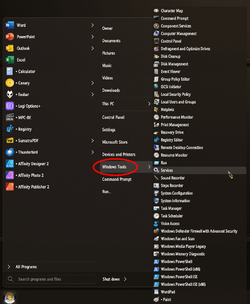
One of my favorite features of SAB is the unified actual Windows Tools folder...

000950.png
 

My Computers My Computers

  • At a glance

    Windows 11 Pro
    OS
    Windows 11 Pro
    Computer type
    PC/Desktop
    Manufacturer/Model
    ASUS ROG Strix
  • At a glance

    Windows 11 Pro
    Operating System
    Windows 11 Pro
    Computer type
    Laptop
    Manufacturer/Model
    ASUS VivoBook
  • ASUS VivoBook 'Lite' ~ Windows 11 Home
It's amazing how much mess MS makes to get tidied up. What were they thinking inventing "settings"? It's 10% of the control panel, converted to fluffy nonsense so nothing can be found. Maybe it makes sense to Mac users.

I think I'll turn on what you've got there, I didn't even know there was a windows memory diagnostics - is that like running memtest?
 

My Computer My Computer

At a glance

Windows 11 Professional (not the cut down rub...Ryzen 9 3900XT (on this one anyway, I have 8)72G and 72GB and 64GB and 32GB and 32GB and 8...Fury and 12 Tahitis
OS
Windows 11 Professional (not the cut down rubbish)
Computer type
PC/Desktop
Manufacturer/Model
Home built, of course
CPU
Ryzen 9 3900XT (on this one anyway, I have 8)
Motherboard
MSI X470 Gaming Plus Max
Memory
72G and 72GB and 64GB and 32GB and 32GB and 8GB and 8GB and 8GB
Graphics Card(s)
Fury and 12 Tahitis
Sound Card
People still use cards for those?
Monitor(s) Displays
7 of them.
Screen Resolution
All sorts.
Hard Drives
1TB NVME, 4TB rust spinner
PSU
Several kW
Case
Unimportant
Cooling
Big Zalman 6 inch thing
Keyboard
Really?
Mouse
Yes
Internet Speed
32Mbit/7Mbit
Browser
Opera
Antivirus
AVG
Other Info
[Crosses legs] Exactly what info are you looking for?
1692021294356.png1692021149882.png

Hello, I have a few problems while using a second monitor (the things that I will describe always happens on the second monitor):

1) As soon as I minimize all apps on the second monitor, the taskbar only shows me the windows button and, sometimes, the search button too, but I can't see any of the apps that I have open.
2) When I have many things open, I won't show all of them, they will get cut just like in image number 1
3) I have that wired space between Windows and the first app open. That doesn't happen on the primary monitor.
4) When I have an app open, and I right-click on the taskbar (on the second monitor), it shows me the options to personalize the screen, not the taskbar. But, as soon as I minimize the taskbar, it shows me the options to edit the taskbar.

I love StartAllBack, and I have recently bought the license. I hope to find a solution to these problems.
 

My Computer My Computer

At a glance

Windows 11I7 12700516 GB3070 Ti Laptop GPU
OS
Windows 11
Computer type
Laptop
Manufacturer/Model
Lenovo Legion 5
CPU
I7 127005
Memory
16 GB
Graphics Card(s)
3070 Ti Laptop GPU
StartAllBack 3.6.11.4709

https://startisback.com/StartAllBack_setup.exe
 
Last edited by a moderator:

My Computer My Computer

At a glance

Windows 11 ProIntel Core i9 12900KFCorsair 64GB DDR5 Vengeance C40 5200MhzASUS GeForce RTX 3090 ROG Strix OC 24GB
OS
Windows 11 Pro
Computer type
PC/Desktop
Manufacturer/Model
Custom Build
CPU
Intel Core i9 12900KF
Motherboard
ASUS ROG Maximus Z690 Hero
Memory
Corsair 64GB DDR5 Vengeance C40 5200Mhz
Graphics Card(s)
ASUS GeForce RTX 3090 ROG Strix OC 24GB
Sound Card
OnBoard
Monitor(s) Displays
Acer Predator XB323UGP 32" QHD G-SYNC-C 144Hz 1MS IPS LED
Screen Resolution
2560 x 1440
Hard Drives
1x Samsung 980 Pro Series Gen4 250GB M.2 NVMe
1x Samsung 980 Pro Series Gen4 500GB M.2 NVMe
2x Samsung 980 Pro Series Gen4 2TB M.2 NVMe
PSU
Corsair AX1200i 1200W 80PLUS Titanium Modular
Case
Corsair 4000D Black Case w/ Tempered Glass Side Panel
Cooling
Noctua NH-U12A Chromax Black CPU Cooler, 4x Noctua 120mm Fans
Keyboard
Logitech MK545
Mouse
Logitech MX Master 3
Internet Speed
Fixed Wireless 150mbps/75mbps
Browser
Firefox
Antivirus
Kaspersky
Other Info
Thrustmaster TS-PC RACER
Fanatec CSL Elite Pedals with the Load Cell Kit
Yamaha Amp with Bose Speakers

My Computers My Computers

  • At a glance

    Windows 11 Pro
    OS
    Windows 11 Pro
    Computer type
    PC/Desktop
    Manufacturer/Model
    ASUS ROG Strix
  • At a glance

    Windows 11 Pro
    Operating System
    Windows 11 Pro
    Computer type
    Laptop
    Manufacturer/Model
    ASUS VivoBook
  • ASUS VivoBook 'Lite' ~ Windows 11 Home
Any changes you know of?
I wanted to report the the test build was working on the Canary Build but I remembered that it's the icons on the right that don't show.
 

My Computers My Computers

  • At a glance

    Windows 11 Pro 25H2Intel Core i7-10700K16GB (8GB PC4-19200 DDR4 SDRAM x2)NVIDIA GeForce GTX 1050 TI
    OS
    Windows 11 Pro 25H2
    Computer type
    PC/Desktop
    Manufacturer/Model
    PowerSpec B746
    CPU
    Intel Core i7-10700K
    Motherboard
    ASRock Z490 Phantom Gaming 4/ax
    Memory
    16GB (8GB PC4-19200 DDR4 SDRAM x2)
    Graphics Card(s)
    NVIDIA GeForce GTX 1050 TI
    Sound Card
    Realtek Audio
    Monitor(s) Displays
    #1. LG ULTRAWIDE 34" #2. AOC Q32G2WG3 32"
    Screen Resolution
    #1. 3440 X 1440 #2. 1920 x 1080
    Hard Drives
    NVMe WDC WDS100T2B0C-00PXH0 1TB
    Samsung SSD 860 EVO 1TB
    PSU
    750 Watts (62.5A)
    Case
    PowerSpec/Lian Li ATX 205
    Keyboard
    Logitech K270
    Mouse
    Logitech M185
    Browser
    Microsoft Edge and Firefox
    Antivirus
    Webroot SecureAnywhere CE 26.1
  • At a glance

    Windows 11 Canary ChannelIntel Core i5-8400 CPU @ 2.80GHz16 MB DDR 4-2666
    Operating System
    Windows 11 Canary Channel
    Computer type
    PC/Desktop
    Manufacturer/Model
    PowerSpec G156
    CPU
    Intel Core i5-8400 CPU @ 2.80GHz
    Motherboard
    AsusTeK Prime B360M-A
    Memory
    16 MB DDR 4-2666
    Monitor(s) Displays
    23" Speptre HDMI 75Hz
    Screen Resolution
    1920x1080
    Hard Drives
    Samsung 970 EVO 500GB NVMe
    Keyboard
    Logitek K270
    Mouse
    Logitek M185
    Browser
    Firefox, Edge and Edge Canary
    Antivirus
    Windows Defender
What is the obsession with specifying systems in here? They said Windows 11.
Because each of us are most likely/possibly running a different version of Windows 11. I'm running Windows 11 version 22H2 (22621.2215) Preview while you may be running another version, such as Canary, DEV, etc. Canary and DEV are Previews of Windows 11 Microsoft is working on. IOW, it's not a given that we're all running Windows 11 final release.

Each of these versions will be somewhat different than the others; thus, possibly having a different workaround to a problem.

If I don't specify which version of Windows 11 (Release Version or one of the Preview Versions), I'm likely to get an "off the wall" solution to my issue.

So, in order for the gurus here to help me, they need to know the version I have.
 

My Computers My Computers

  • At a glance

    Windows 11 23H2 22631.2861Intel(R) Core(TM) i7-10700 CPU @ 2.90GHz 2.90...16384 MBytesIntel UHD Graphics 630
    OS
    Windows 11 23H2 22631.2861
    Computer type
    PC/Desktop
    Manufacturer/Model
    HP Envy TE01-1xxx
    CPU
    Intel(R) Core(TM) i7-10700 CPU @ 2.90GHz 2.90 GHz
    Motherboard
    16.0GB Dual-Channel Unknown @ 1463MHz (21-21-21-47)
    Memory
    16384 MBytes
    Graphics Card(s)
    Intel UHD Graphics 630
    Sound Card
    Realtek High Definition Audio
    Monitor(s) Displays
    Monitor 1 - Acer 27" Monitor 2 - Acer 27"
    Screen Resolution
    1920 x 1080
    Hard Drives
    WDC PC SN530 SDBPNPZ-512G-1006 (SSD)
    Seagate ST1000DM003-1SB102
    Seagate BUP Slim SCSI Disk Device (SSD)
    PSU
    HP
    Case
    HP
    Cooling
    Standard
    Keyboard
    Logitech Wave K350
    Mouse
    Logitech M705
    Internet Speed
    500 mbps
    Browser
    Firefox
    Antivirus
    Windows Defender
    Other Info
    That's all Folks!
  • At a glance

    Windows 11Intel Core i7 (10th gen) 1070016 GBIntel UHD Graphics 630
    Operating System
    Windows 11
    Computer type
    PC/Desktop
    Manufacturer/Model
    HP
    CPU
    Intel Core i7 (10th gen) 10700
    Motherboard
    Intel
    Memory
    16 GB
    Graphics card(s)
    Intel UHD Graphics 630
    Sound Card
    Built-in
    Monitor(s) Displays
    Acer 27" & Samsung 24"
    Screen Resolution
    1920 x
    Hard Drives
    SSD (512 GB)
    HDD (1 TB)
    Seagate
    PSU
    Intel i7 10th Generation
    Case
    HP
    Cooling
    HP/Intel?
    Keyboard
    Logitech Wave K350
    Mouse
    Logitech M705
    Internet Speed
    50 mbps
    Browser
    Firefox 90.2
    Antivirus
    Windows Defender
    Other Info
    Headphone/Microphone Combo
    SuperSpeed USB Type-A (4 on front)
    HP 3-in-One Card Readr
    SuperSpeed USB Type-C
    DVD Writer
No excuse for not running the latest version. In fact difficult not to! Hardware can be asked for if relevant. Bit of a palava to fill it all in for one question.

What are you doing in eleven forums with windows ten anyway?
Ummm, yes, there is . . . These forums cover all aspects of Windows 11, from Microsoft "alpha" software to the latest "general release".

Also, there are any number of reasons for one of us to be running Windows 10 at the moment. I dual boot this machine and have both the Windows 11 general release and one of the Preview releases on it.

At any given time, I may be running the general release or the Preview, and come to the forums to figure something out. I don't go to the trouble of shutting down the version of Windows I'm running, then rebooting into my other version; instead, I just jump into the forums to find what I need. Oh, and I have three computers at home and one at the Senior Center. So, I could be running any version of Windows 11 or 10 (which is seldom any more).
 

My Computers My Computers

  • At a glance

    Windows 11 23H2 22631.2861Intel(R) Core(TM) i7-10700 CPU @ 2.90GHz 2.90...16384 MBytesIntel UHD Graphics 630
    OS
    Windows 11 23H2 22631.2861
    Computer type
    PC/Desktop
    Manufacturer/Model
    HP Envy TE01-1xxx
    CPU
    Intel(R) Core(TM) i7-10700 CPU @ 2.90GHz 2.90 GHz
    Motherboard
    16.0GB Dual-Channel Unknown @ 1463MHz (21-21-21-47)
    Memory
    16384 MBytes
    Graphics Card(s)
    Intel UHD Graphics 630
    Sound Card
    Realtek High Definition Audio
    Monitor(s) Displays
    Monitor 1 - Acer 27" Monitor 2 - Acer 27"
    Screen Resolution
    1920 x 1080
    Hard Drives
    WDC PC SN530 SDBPNPZ-512G-1006 (SSD)
    Seagate ST1000DM003-1SB102
    Seagate BUP Slim SCSI Disk Device (SSD)
    PSU
    HP
    Case
    HP
    Cooling
    Standard
    Keyboard
    Logitech Wave K350
    Mouse
    Logitech M705
    Internet Speed
    500 mbps
    Browser
    Firefox
    Antivirus
    Windows Defender
    Other Info
    That's all Folks!
  • At a glance

    Windows 11Intel Core i7 (10th gen) 1070016 GBIntel UHD Graphics 630
    Operating System
    Windows 11
    Computer type
    PC/Desktop
    Manufacturer/Model
    HP
    CPU
    Intel Core i7 (10th gen) 10700
    Motherboard
    Intel
    Memory
    16 GB
    Graphics card(s)
    Intel UHD Graphics 630
    Sound Card
    Built-in
    Monitor(s) Displays
    Acer 27" & Samsung 24"
    Screen Resolution
    1920 x
    Hard Drives
    SSD (512 GB)
    HDD (1 TB)
    Seagate
    PSU
    Intel i7 10th Generation
    Case
    HP
    Cooling
    HP/Intel?
    Keyboard
    Logitech Wave K350
    Mouse
    Logitech M705
    Internet Speed
    50 mbps
    Browser
    Firefox 90.2
    Antivirus
    Windows Defender
    Other Info
    Headphone/Microphone Combo
    SuperSpeed USB Type-A (4 on front)
    HP 3-in-One Card Readr
    SuperSpeed USB Type-C
    DVD Writer
Last edited by a moderator:

My Computer My Computer

At a glance

Windows 11Intel® Xeon® X5690 3.47GHz Six-CoreG.Skill PC3-12800 1600MHz 24GBNVIDIA GeForce GTX 1050
OS
Windows 11
Computer type
PC/Desktop
Manufacturer/Model
Asus/Custom Build
CPU
Intel® Xeon® X5690 3.47GHz Six-Core
Motherboard
Asus P6T Deluxe v2
Memory
G.Skill PC3-12800 1600MHz 24GB
Graphics Card(s)
NVIDIA GeForce GTX 1050
Sound Card
SoundMAX ADI AD2000B HD Audio
Monitor(s) Displays
Acer T232HL Touch Screen
Screen Resolution
1920 x 1080 @ 60Hz
Hard Drives
6 Crucial MX500 SSD 1TB each.
PSU
Thermaltake Toughpower Gold 850W
Case
Thermaltake Armor VA8000SWA
Cooling
Thermaltake Air Cooling System
Keyboard
Illuminated Multimedia LED Keyboard
Mouse
M16 Dual Mode Illuminated Mouse - Bluetooth / 2.4 GHz Mode
Internet Speed
800 Mbps
Browser
Edge / Opera / Vivaldi / Chrome / Firefox / Brave
Antivirus
Windows Defender Security

My Computers My Computers

  • At a glance

    Windows 11 Pro
    OS
    Windows 11 Pro
    Computer type
    PC/Desktop
    Manufacturer/Model
    ASUS ROG Strix
  • At a glance

    Windows 11 Pro
    Operating System
    Windows 11 Pro
    Computer type
    Laptop
    Manufacturer/Model
    ASUS VivoBook
  • ASUS VivoBook 'Lite' ~ Windows 11 Home

My Computer My Computer

At a glance

Windows 11Intel® Xeon® X5690 3.47GHz Six-CoreG.Skill PC3-12800 1600MHz 24GBNVIDIA GeForce GTX 1050
OS
Windows 11
Computer type
PC/Desktop
Manufacturer/Model
Asus/Custom Build
CPU
Intel® Xeon® X5690 3.47GHz Six-Core
Motherboard
Asus P6T Deluxe v2
Memory
G.Skill PC3-12800 1600MHz 24GB
Graphics Card(s)
NVIDIA GeForce GTX 1050
Sound Card
SoundMAX ADI AD2000B HD Audio
Monitor(s) Displays
Acer T232HL Touch Screen
Screen Resolution
1920 x 1080 @ 60Hz
Hard Drives
6 Crucial MX500 SSD 1TB each.
PSU
Thermaltake Toughpower Gold 850W
Case
Thermaltake Armor VA8000SWA
Cooling
Thermaltake Air Cooling System
Keyboard
Illuminated Multimedia LED Keyboard
Mouse
M16 Dual Mode Illuminated Mouse - Bluetooth / 2.4 GHz Mode
Internet Speed
800 Mbps
Browser
Edge / Opera / Vivaldi / Chrome / Firefox / Brave
Antivirus
Windows Defender Security
I bookmarked that page, I didn't know it existed.
 

My Computer My Computer

At a glance

Windows 11Intel® Xeon® X5690 3.47GHz Six-CoreG.Skill PC3-12800 1600MHz 24GBNVIDIA GeForce GTX 1050
OS
Windows 11
Computer type
PC/Desktop
Manufacturer/Model
Asus/Custom Build
CPU
Intel® Xeon® X5690 3.47GHz Six-Core
Motherboard
Asus P6T Deluxe v2
Memory
G.Skill PC3-12800 1600MHz 24GB
Graphics Card(s)
NVIDIA GeForce GTX 1050
Sound Card
SoundMAX ADI AD2000B HD Audio
Monitor(s) Displays
Acer T232HL Touch Screen
Screen Resolution
1920 x 1080 @ 60Hz
Hard Drives
6 Crucial MX500 SSD 1TB each.
PSU
Thermaltake Toughpower Gold 850W
Case
Thermaltake Armor VA8000SWA
Cooling
Thermaltake Air Cooling System
Keyboard
Illuminated Multimedia LED Keyboard
Mouse
M16 Dual Mode Illuminated Mouse - Bluetooth / 2.4 GHz Mode
Internet Speed
800 Mbps
Browser
Edge / Opera / Vivaldi / Chrome / Firefox / Brave
Antivirus
Windows Defender Security
So, let's install then.
I installed it..., mind you, I'm still on Build 25915, but, everything is functioning properly.
 

My Computers My Computers

  • At a glance

    Windows 11 Pro
    OS
    Windows 11 Pro
    Computer type
    PC/Desktop
    Manufacturer/Model
    ASUS ROG Strix
  • At a glance

    Windows 11 Pro
    Operating System
    Windows 11 Pro
    Computer type
    Laptop
    Manufacturer/Model
    ASUS VivoBook
  • ASUS VivoBook 'Lite' ~ Windows 11 Home
I don't know if it is even possible but I still have hopes that StartAllBack will be able to work on the Canary Builds. On my two desktops I had to disable it. They are on the Canary Channel. It's still installed and working on my now retired laptop and the Mini PC outside in my shed (man cave).
 

My Computers My Computers

  • At a glance

    Windows 11 Pro 25H2Intel Core i7-10700K16GB (8GB PC4-19200 DDR4 SDRAM x2)NVIDIA GeForce GTX 1050 TI
    OS
    Windows 11 Pro 25H2
    Computer type
    PC/Desktop
    Manufacturer/Model
    PowerSpec B746
    CPU
    Intel Core i7-10700K
    Motherboard
    ASRock Z490 Phantom Gaming 4/ax
    Memory
    16GB (8GB PC4-19200 DDR4 SDRAM x2)
    Graphics Card(s)
    NVIDIA GeForce GTX 1050 TI
    Sound Card
    Realtek Audio
    Monitor(s) Displays
    #1. LG ULTRAWIDE 34" #2. AOC Q32G2WG3 32"
    Screen Resolution
    #1. 3440 X 1440 #2. 1920 x 1080
    Hard Drives
    NVMe WDC WDS100T2B0C-00PXH0 1TB
    Samsung SSD 860 EVO 1TB
    PSU
    750 Watts (62.5A)
    Case
    PowerSpec/Lian Li ATX 205
    Keyboard
    Logitech K270
    Mouse
    Logitech M185
    Browser
    Microsoft Edge and Firefox
    Antivirus
    Webroot SecureAnywhere CE 26.1
  • At a glance

    Windows 11 Canary ChannelIntel Core i5-8400 CPU @ 2.80GHz16 MB DDR 4-2666
    Operating System
    Windows 11 Canary Channel
    Computer type
    PC/Desktop
    Manufacturer/Model
    PowerSpec G156
    CPU
    Intel Core i5-8400 CPU @ 2.80GHz
    Motherboard
    AsusTeK Prime B360M-A
    Memory
    16 MB DDR 4-2666
    Monitor(s) Displays
    23" Speptre HDMI 75Hz
    Screen Resolution
    1920x1080
    Hard Drives
    Samsung 970 EVO 500GB NVMe
    Keyboard
    Logitek K270
    Mouse
    Logitek M185
    Browser
    Firefox, Edge and Edge Canary
    Antivirus
    Windows Defender
I don't know if it is even possible but I still have hopes that StartAllBack will be able to work on the Canary Builds.
I had it on the latest Build, for a few hours, (after I finally got that stupid Intelligence Update to install), but, there was too many glitches in the Build itself, not to mention the ever evolving Explorer and QTTabBar, etc. I think SAB was okay on it's own though, aside from the move Taskbar to top thing.
 

My Computers My Computers

  • At a glance

    Windows 11 Pro
    OS
    Windows 11 Pro
    Computer type
    PC/Desktop
    Manufacturer/Model
    ASUS ROG Strix
  • At a glance

    Windows 11 Pro
    Operating System
    Windows 11 Pro
    Computer type
    Laptop
    Manufacturer/Model
    ASUS VivoBook
  • ASUS VivoBook 'Lite' ~ Windows 11 Home
This is where I get my info from about new builds and issues


My Computer My Computer

At a glance

Windows 11 ProIntel Core i9 12900KFCorsair 64GB DDR5 Vengeance C40 5200MhzASUS GeForce RTX 3090 ROG Strix OC 24GB
OS
Windows 11 Pro
Computer type
PC/Desktop
Manufacturer/Model
Custom Build
CPU
Intel Core i9 12900KF
Motherboard
ASUS ROG Maximus Z690 Hero
Memory
Corsair 64GB DDR5 Vengeance C40 5200Mhz
Graphics Card(s)
ASUS GeForce RTX 3090 ROG Strix OC 24GB
Sound Card
OnBoard
Monitor(s) Displays
Acer Predator XB323UGP 32" QHD G-SYNC-C 144Hz 1MS IPS LED
Screen Resolution
2560 x 1440
Hard Drives
1x Samsung 980 Pro Series Gen4 250GB M.2 NVMe
1x Samsung 980 Pro Series Gen4 500GB M.2 NVMe
2x Samsung 980 Pro Series Gen4 2TB M.2 NVMe
PSU
Corsair AX1200i 1200W 80PLUS Titanium Modular
Case
Corsair 4000D Black Case w/ Tempered Glass Side Panel
Cooling
Noctua NH-U12A Chromax Black CPU Cooler, 4x Noctua 120mm Fans
Keyboard
Logitech MK545
Mouse
Logitech MX Master 3
Internet Speed
Fixed Wireless 150mbps/75mbps
Browser
Firefox
Antivirus
Kaspersky
Other Info
Thrustmaster TS-PC RACER
Fanatec CSL Elite Pedals with the Load Cell Kit
Yamaha Amp with Bose Speakers

Latest Support Threads

Back
Top Bottom