StartAllBack


StartAllBack: Windows 11 from better timeline​

Get the latest version here Download

Embrace, enhance, unsweep classic UI from under the rug​

Restore and improve taskbar​

  • Show labels on task icons
  • Adjust icon size and margins
  • Move taskbar to top, left or right edges
  • Drag and drop stuff onto taskbar
  • Center task icons but keep Start button on the left
  • Split into segments, use dynamic translucency
  • Separate corner icons with Windows 7/10 UI
  • Auto-hide when covered by maximized window

Restore and improve File Explorer and Control Panel​

  • Ribbon and Command Bar revamped with translucent effects
  • Details pane on bottom
  • Old search box (the one which works)
  • Dark mode support for more dialogs

Restore and improve context menus​

  • All new look with rounded acrylic menus
  • Fast and responsive taskbar menus
  • New fonts, better touch support

Restore and improve start menu​

  • Launch apps and go to system places in one click
  • Navigate dropdown menus like a boss
  • Enjoy fast and reliable search

Finally, lightweight styling and UI consistency​

  • Enjoy Windows 7, Windows 8 and third-party taskbar and start menu styles
  • Fix UI inconsistencies in Win32 apps
  • Don't be blue: recolor UI in all windows apps
  • Negative resource usage: fewer RAM used, fewer processes started, faster startup



StartAllBack For Windows 11 has been released.
It's an RC release. I haven't tested it yet as I have Start11 installed.

Edit: I have now tested it. It's working quite well.
Apart from a great start menu, you can also have the Enhanced Classic Taskbar back.
This means (for example) that you can have an uncombined and unlocked Taskbar.
You will now also be able to enhance the Taskbar clock using T-Clock Redux or similar.

T-Clock Redux Tray Clock_.png

You can also change Windows Explorer to Ribbon UI or Simple UI.

You can get it Download


01 - Welcome.png
02 - Start Menu.png
04 - Taskbar.png
05 - Explorer.png
06 - Advanced.png
Get
 
Wrong tray icon display
Hi, I apologise for my poor english.
In SAB newer version in tray icon, icon showed is not correct (SAB shows 256x256 icon instead 32x32 icon)
I attach two screenshot with SAB 3.7.5 (wrong icon showed) and SAB 3.6.13 (correct icon showed)

Any ideas?

Thank You

CORRECT ICON

Correct_Icon.png


WRONG ICON

Wrong_Icon.png
 

My Computer My Computer

At a glance

Windows 11Core i7-12700 2,1 Ghz32GB
OS
Windows 11
Computer type
PC/Desktop
Manufacturer/Model
Lenovo
CPU
Core i7-12700 2,1 Ghz
Memory
32GB
Screen Resolution
1920 x 1080
StartAllBack 3.7.5.4888

Check For Updates

https://startisback.com/StartAllBack_setup.exe
 
Last edited by a moderator:

My Computer My Computer

At a glance

Windows 11 ProIntel Core i9 12900KFCorsair 64GB DDR5 Vengeance C40 5200MhzASUS GeForce RTX 3090 ROG Strix OC 24GB
OS
Windows 11 Pro
Computer type
PC/Desktop
Manufacturer/Model
Custom Build
CPU
Intel Core i9 12900KF
Motherboard
ASUS ROG Maximus Z690 Hero
Memory
Corsair 64GB DDR5 Vengeance C40 5200Mhz
Graphics Card(s)
ASUS GeForce RTX 3090 ROG Strix OC 24GB
Sound Card
OnBoard
Monitor(s) Displays
Acer Predator XB323UGP 32" QHD G-SYNC-C 144Hz 1MS IPS LED
Screen Resolution
2560 x 1440
Hard Drives
1x Samsung 980 Pro Series Gen4 250GB M.2 NVMe
1x Samsung 980 Pro Series Gen4 500GB M.2 NVMe
2x Samsung 980 Pro Series Gen4 2TB M.2 NVMe
PSU
Corsair AX1200i 1200W 80PLUS Titanium Modular
Case
Corsair 4000D Black Case w/ Tempered Glass Side Panel
Cooling
Noctua NH-U12A Chromax Black CPU Cooler, 4x Noctua 120mm Fans
Keyboard
Logitech MK545
Mouse
Logitech MX Master 3
Internet Speed
Fixed Wireless 150mbps/75mbps
Browser
Firefox
Antivirus
Kaspersky
Other Info
Thrustmaster TS-PC RACER
Fanatec CSL Elite Pedals with the Load Cell Kit
Yamaha Amp with Bose Speakers
In februari I wrote about that site:
That is a http site, that's why most browsers will refuse to download from, because it is no protected transfer.
But then in the download window of the browser one should be able to instruct the browser, that the download could be completed anyway.
Maybe good to repeat the remark, because I myself was fooled again by a "not guilty" install file (the file simply was empty). :oops:

Edit: Changed the settings of Firefox (in about:config) now that http downloads are allowed:
dom.block_download_insecure = false
So I won't have anymore troubles with that.
But people who don't know may still be surprized...
 
Last edited:

My Computer My Computer

At a glance

Windows 11 Pro 25H2AMD Ryzen 7 5700GKingston FURY Beast 2x16GB DIMM DDR4 2666 CL16MSI GeForce GT 730 2GB LP V1
OS
Windows 11 Pro 25H2
Computer type
PC/Desktop
Manufacturer/Model
Build by vendor to my specs
CPU
AMD Ryzen 7 5700G
Motherboard
MSI PRO B550M-P Gen3
Memory
Kingston FURY Beast 2x16GB DIMM DDR4 2666 CL16
Graphics Card(s)
MSI GeForce GT 730 2GB LP V1
Sound Card
Creative Sound Blaster Audigy FX
Monitor(s) Displays
Samsung S24E450F 24"
Screen Resolution
1920 x 1080
Hard Drives
1. SSD Crucial P5 Plus 500GB PCIe M.2
2. SSD-SATA Crucial MX500-2TB
PSU
Corsair CV650W
Case
Cooler Master Silencio S400
Cooling
Cooler Master Hyper H412R with Be Quiet Pure Wings 2 PWM BL038 fan
Keyboard
Cherry Stream (wired, scissor keys)
Mouse
Asus WT465 (wireless)
Internet Speed
70 Mbps down / 80 Mbps up
Browser
Firefox 130.0
Antivirus
F-Secure (Internetprovider version)
Other Info
Router: FRITZBox 7490
Oracle VirtualBox 7 for testing software on Win 10 or 11
There is another forum you can check out

Recently I found out, that the Muut site will be shut down.
Service Shutdown Notice
Muut is Closing

As of March 31, 2024, Muut will no longer be available. This decision comes after much consideration and is due to circumstances beyond our control. We apologize for any inconvenience this may cause.
Key Points:
Data: Please ensure to download any necessary data before March 31, 2024.
No More Billing: All billing has been stopped as of this announcement.
Account Listing: You can list all your accounts by visiting Account | Muut.
Data Export: To export your data, please go to your settings at Settings | Muut, navigate to the "Integrations" section, and select the "JSON Export" option.
We appreciate your support throughout our journey. Thank you for being with us.
Already now it is not possible anymore to reach my account in order to change data into harmless data...
 

My Computer My Computer

At a glance

Windows 11 Pro 25H2AMD Ryzen 7 5700GKingston FURY Beast 2x16GB DIMM DDR4 2666 CL16MSI GeForce GT 730 2GB LP V1
OS
Windows 11 Pro 25H2
Computer type
PC/Desktop
Manufacturer/Model
Build by vendor to my specs
CPU
AMD Ryzen 7 5700G
Motherboard
MSI PRO B550M-P Gen3
Memory
Kingston FURY Beast 2x16GB DIMM DDR4 2666 CL16
Graphics Card(s)
MSI GeForce GT 730 2GB LP V1
Sound Card
Creative Sound Blaster Audigy FX
Monitor(s) Displays
Samsung S24E450F 24"
Screen Resolution
1920 x 1080
Hard Drives
1. SSD Crucial P5 Plus 500GB PCIe M.2
2. SSD-SATA Crucial MX500-2TB
PSU
Corsair CV650W
Case
Cooler Master Silencio S400
Cooling
Cooler Master Hyper H412R with Be Quiet Pure Wings 2 PWM BL038 fan
Keyboard
Cherry Stream (wired, scissor keys)
Mouse
Asus WT465 (wireless)
Internet Speed
70 Mbps down / 80 Mbps up
Browser
Firefox 130.0
Antivirus
F-Secure (Internetprovider version)
Other Info
Router: FRITZBox 7490
Oracle VirtualBox 7 for testing software on Win 10 or 11
StartAllBack 3.7.6.4894

- Rudimentary drag & drop for explorer tabs

- Drag over Copilot icon to open

- Restyled scrollbar on taskbar task list overflow

- Dark Magic extended

- Fixed ribbon artifacts 3.7.5 degradation

- Fixed Alt+D not working with 7/10 styles on newer 23H2

- Fixed tray button tooltips showing trash sometimes

- Fixed wrong icon graphics size extracted for sys tray icons
 
Last edited:

My Computer My Computer

At a glance

Windows 11 ProIntel Core i9 12900KFCorsair 64GB DDR5 Vengeance C40 5200MhzASUS GeForce RTX 3090 ROG Strix OC 24GB
OS
Windows 11 Pro
Computer type
PC/Desktop
Manufacturer/Model
Custom Build
CPU
Intel Core i9 12900KF
Motherboard
ASUS ROG Maximus Z690 Hero
Memory
Corsair 64GB DDR5 Vengeance C40 5200Mhz
Graphics Card(s)
ASUS GeForce RTX 3090 ROG Strix OC 24GB
Sound Card
OnBoard
Monitor(s) Displays
Acer Predator XB323UGP 32" QHD G-SYNC-C 144Hz 1MS IPS LED
Screen Resolution
2560 x 1440
Hard Drives
1x Samsung 980 Pro Series Gen4 250GB M.2 NVMe
1x Samsung 980 Pro Series Gen4 500GB M.2 NVMe
2x Samsung 980 Pro Series Gen4 2TB M.2 NVMe
PSU
Corsair AX1200i 1200W 80PLUS Titanium Modular
Case
Corsair 4000D Black Case w/ Tempered Glass Side Panel
Cooling
Noctua NH-U12A Chromax Black CPU Cooler, 4x Noctua 120mm Fans
Keyboard
Logitech MK545
Mouse
Logitech MX Master 3
Internet Speed
Fixed Wireless 150mbps/75mbps
Browser
Firefox
Antivirus
Kaspersky
Other Info
Thrustmaster TS-PC RACER
Fanatec CSL Elite Pedals with the Load Cell Kit
Yamaha Amp with Bose Speakers
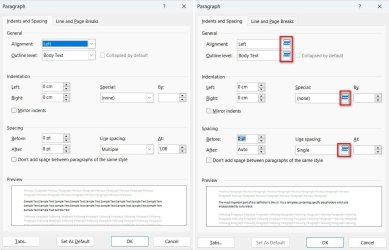
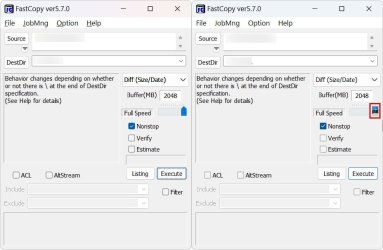
I'm on Win11 23H2 using StartAllBack 3.7.5 and I have all kind of ugly artifacts mainly on apps with light interface or not fully dark interface (see the attached screenshots). There is an exception though: the Windows Task Manager in the Performance tab.

It's obvious that SAB is causing this, because when I disable it and sign out / sign in, there are no artifacts at all. But then all the ugliness of the Start Menu and light run box are back.

I was wondering if, in a future version, the developer would make possible to have something like a WhiteList for these apps that are showing the ugly artifacts, so that SAB will leave them untouched.

Is anyone elese having this kind of problem?
 

Attachments

  • Word_Par_compar.jpg
    Word_Par_compar.jpg
    95.5 KB · Views: 2
  • Word_MdfStyle_compar.jpg
    Word_MdfStyle_compar.jpg
    108.2 KB · Views: 4
  • WinHex_compar.jpg
    WinHex_compar.jpg
    26.3 KB · Views: 3
  • TaskMan_compar.jpg
    TaskMan_compar.jpg
    49.7 KB · Views: 3
  • mp3Tag_compar.jpg
    mp3Tag_compar.jpg
    38.1 KB · Views: 3
  • FC_compar.jpg
    FC_compar.jpg
    56.7 KB · Views: 2
Last edited:

My Computer My Computer

At a glance

Windows 11i7-12700H
OS
Windows 11
Computer type
Laptop
Manufacturer/Model
Lenovo
CPU
i7-12700H
StartAllBack 3.7.7.4898

- Enabled deprecated taskbar on 26080

- Fixed bizzare toast crash

- Fixed scrollbars unexpectedly dark on 3.7.6

- Fixed stale taskbar tooltips on 3.7.6
 

My Computer My Computer

At a glance

Windows 11 ProIntel Core i9 12900KFCorsair 64GB DDR5 Vengeance C40 5200MhzASUS GeForce RTX 3090 ROG Strix OC 24GB
OS
Windows 11 Pro
Computer type
PC/Desktop
Manufacturer/Model
Custom Build
CPU
Intel Core i9 12900KF
Motherboard
ASUS ROG Maximus Z690 Hero
Memory
Corsair 64GB DDR5 Vengeance C40 5200Mhz
Graphics Card(s)
ASUS GeForce RTX 3090 ROG Strix OC 24GB
Sound Card
OnBoard
Monitor(s) Displays
Acer Predator XB323UGP 32" QHD G-SYNC-C 144Hz 1MS IPS LED
Screen Resolution
2560 x 1440
Hard Drives
1x Samsung 980 Pro Series Gen4 250GB M.2 NVMe
1x Samsung 980 Pro Series Gen4 500GB M.2 NVMe
2x Samsung 980 Pro Series Gen4 2TB M.2 NVMe
PSU
Corsair AX1200i 1200W 80PLUS Titanium Modular
Case
Corsair 4000D Black Case w/ Tempered Glass Side Panel
Cooling
Noctua NH-U12A Chromax Black CPU Cooler, 4x Noctua 120mm Fans
Keyboard
Logitech MK545
Mouse
Logitech MX Master 3
Internet Speed
Fixed Wireless 150mbps/75mbps
Browser
Firefox
Antivirus
Kaspersky
Other Info
Thrustmaster TS-PC RACER
Fanatec CSL Elite Pedals with the Load Cell Kit
Yamaha Amp with Bose Speakers
is there a plan to make dark mode for windows 7 style system tray? like the volume tray, battery and date&time?
i would love to see that because the tray is simple and responsive, i like the animation too,

and Wi-Fi tray menu is appearing from the bottom if i have my taskbar on top.
 

My Computers My Computers

  • At a glance

    Windows 11 22H2 Build 22621.4112 KB5041587Ryzen 7 4800H16GB DDR4 3200MHzRTX 3050 Ti Mobile
    OS
    Windows 11 22H2 Build 22621.4112 KB5041587
    Computer type
    Laptop
    Manufacturer/Model
    ASUS TUF GAMING A15
    CPU
    Ryzen 7 4800H
    Motherboard
    FA506IEB
    Memory
    16GB DDR4 3200MHz
    Graphics Card(s)
    RTX 3050 Ti Mobile
    Sound Card
    Realtek HD Audio 192000Hz
    Monitor(s) Displays
    Laptop Display 144Hz
    Screen Resolution
    1080p
    Hard Drives
    Samsung 970 Evo 512GB M.2 NVME
    Kioxia OEM 512GB M.2 NVME
  • At a glance

    Windows 11 23H2 Build 22631.4112 KB5041587Ryzen 5 3400GCrucial 16GB DDR4 3200MHzRTX 2060
    Operating System
    Windows 11 23H2 Build 22631.4112 KB5041587
    Computer type
    PC/Desktop
    Manufacturer/Model
    ASRock
    CPU
    Ryzen 5 3400G
    Motherboard
    ASRock A320M HDV R3
    Memory
    Crucial 16GB DDR4 3200MHz
    Graphics card(s)
    RTX 2060
    Monitor(s) Displays
    Samsung 24" S33GC 120Hz
    Screen Resolution
    1080P
    Hard Drives
    Samsung Evo 870 500GB Sata SSD
    WD Blue 3.5" HDD 1TB
Just bought this and wanted to say thanks.
 

My Computer My Computer

At a glance

11
OS
11
Computer type
PC/Desktop
Manufacturer/Model
Homebrew
Loving it so far, I also bought it to support. Is there a way to remove Properties from start winx context menu?
 

My Computers My Computers

  • At a glance

    Windows 11 Pro 25H2 (WinMac v1.4.0)Intel Core i5-12400F16 GB (DDR4, 3200 MHz)NVIDIA GeForce RTX 2070 Super
    OS
    Windows 11 Pro 25H2 (WinMac v1.4.0)
    Computer type
    PC/Desktop
    CPU
    Intel Core i5-12400F
    Motherboard
    B760 GAMING X DDR4
    Memory
    16 GB (DDR4, 3200 MHz)
    Graphics Card(s)
    NVIDIA GeForce RTX 2070 Super
    Screen Resolution
    2560x1440 @ 240Hz
    Other Info
    I loved modding and customizing operating systems since very young age, gaining experience from all important systems, including Windows, Ubuntu, MacOS and Android, which led to creation of Windows 11 mod called WinMac. Seamlessly blending the elegance of macOS with the versatility of Windows, my customized interface elevates user experience through meticulously crafted modifications and UI enhancements.

    With WinMac, every interaction with Windows 11 environment is imbued with a touch of sophistication, where the boundaries between the Windows and Mac universes blur, offering a sublime computing experience that transcends conventional limitations of Windows 11.
  • At a glance

    macOS SonomaApple M3 Pro18 GB
    Operating System
    macOS Sonoma
    Computer type
    Laptop
    Manufacturer/Model
    Apple MacBook Pro
    CPU
    Apple M3 Pro
    Memory
    18 GB
Is there a way to remove Properties from start winx context menu?
With WinX Menu Editor..., you might not get it back, though, unless you re-install StartAllBack.

0006715.jpg
 

My Computers My Computers

  • At a glance

    Windows 11 Pro
    OS
    Windows 11 Pro
    Computer type
    PC/Desktop
    Manufacturer/Model
    ASUS ROG Strix
  • At a glance

    Windows 11 Pro
    Operating System
    Windows 11 Pro
    Computer type
    Laptop
    Manufacturer/Model
    ASUS VivoBook
  • ASUS VivoBook 'Lite' ~ Windows 11 Home
With WinX Menu Editor..., you might not get it back, though, unless you re-install StartAllBack.

It doesn't show up on the list, maybe because I installed SAB before running WinX, I will check that.
 

My Computers My Computers

  • At a glance

    Windows 11 Pro 25H2 (WinMac v1.4.0)Intel Core i5-12400F16 GB (DDR4, 3200 MHz)NVIDIA GeForce RTX 2070 Super
    OS
    Windows 11 Pro 25H2 (WinMac v1.4.0)
    Computer type
    PC/Desktop
    CPU
    Intel Core i5-12400F
    Motherboard
    B760 GAMING X DDR4
    Memory
    16 GB (DDR4, 3200 MHz)
    Graphics Card(s)
    NVIDIA GeForce RTX 2070 Super
    Screen Resolution
    2560x1440 @ 240Hz
    Other Info
    I loved modding and customizing operating systems since very young age, gaining experience from all important systems, including Windows, Ubuntu, MacOS and Android, which led to creation of Windows 11 mod called WinMac. Seamlessly blending the elegance of macOS with the versatility of Windows, my customized interface elevates user experience through meticulously crafted modifications and UI enhancements.

    With WinMac, every interaction with Windows 11 environment is imbued with a touch of sophistication, where the boundaries between the Windows and Mac universes blur, offering a sublime computing experience that transcends conventional limitations of Windows 11.
  • At a glance

    macOS SonomaApple M3 Pro18 GB
    Operating System
    macOS Sonoma
    Computer type
    Laptop
    Manufacturer/Model
    Apple MacBook Pro
    CPU
    Apple M3 Pro
    Memory
    18 GB
It doesn't show up on the list, maybe because I installed SAB before running WinX, I will check that.
That shouldn't matter..., :unsure: ...
 

My Computers My Computers

  • At a glance

    Windows 11 Pro
    OS
    Windows 11 Pro
    Computer type
    PC/Desktop
    Manufacturer/Model
    ASUS ROG Strix
  • At a glance

    Windows 11 Pro
    Operating System
    Windows 11 Pro
    Computer type
    Laptop
    Manufacturer/Model
    ASUS VivoBook
  • ASUS VivoBook 'Lite' ~ Windows 11 Home

My Computers My Computers

  • At a glance

    Windows 11 Pro 25H2 (WinMac v1.4.0)Intel Core i5-12400F16 GB (DDR4, 3200 MHz)NVIDIA GeForce RTX 2070 Super
    OS
    Windows 11 Pro 25H2 (WinMac v1.4.0)
    Computer type
    PC/Desktop
    CPU
    Intel Core i5-12400F
    Motherboard
    B760 GAMING X DDR4
    Memory
    16 GB (DDR4, 3200 MHz)
    Graphics Card(s)
    NVIDIA GeForce RTX 2070 Super
    Screen Resolution
    2560x1440 @ 240Hz
    Other Info
    I loved modding and customizing operating systems since very young age, gaining experience from all important systems, including Windows, Ubuntu, MacOS and Android, which led to creation of Windows 11 mod called WinMac. Seamlessly blending the elegance of macOS with the versatility of Windows, my customized interface elevates user experience through meticulously crafted modifications and UI enhancements.

    With WinMac, every interaction with Windows 11 environment is imbued with a touch of sophistication, where the boundaries between the Windows and Mac universes blur, offering a sublime computing experience that transcends conventional limitations of Windows 11.
  • At a glance

    macOS SonomaApple M3 Pro18 GB
    Operating System
    macOS Sonoma
    Computer type
    Laptop
    Manufacturer/Model
    Apple MacBook Pro
    CPU
    Apple M3 Pro
    Memory
    18 GB
Here's something I just noticed....at boot up my notifications icon won't open the panel. If I change the taskbar from top to bottom, open the notifications, close it then change the taskbar to top the panel it works. Sometimes at boot the panel will show on the left side but most times it will be on the right.

Just a pic to show the area I'm referring to...

Untitled.jpg
 

My Computer My Computer

At a glance

Windows 11 Pro 23H2Intel(R) Core(TM) i9-12900HK32gbIntel(R) Iris(R) Xe Graphics
OS
Windows 11 Pro 23H2
Computer type
PC/Desktop
Manufacturer/Model
MinisForum
CPU
Intel(R) Core(TM) i9-12900HK
Memory
32gb
Graphics Card(s)
Intel(R) Iris(R) Xe Graphics
Sound Card
Realtek 888
Monitor(s) Displays
Acer
Screen Resolution
1920x1080
Hard Drives
1TB SSD
Keyboard
Logitech
Mouse
Logitech MX Master 2X
Internet Speed
1GB
Browser
Firefox
Antivirus
Windows Defender
Is there a way to remove Properties from start winx context menu?
You will get a better response if you start a new thread for WinX. This thread relates to SAB.
 

My Computers My Computers

  • At a glance

    Windows 11 ProAMD Ryzen 9 8945HS32GB DDR5 SO-DIMMIntegrated AMD Radeon 780M (4.00 GHz)
    OS
    Windows 11 Pro
    Computer type
    PC/Desktop
    Manufacturer/Model
    GMKtec K11
    CPU
    AMD Ryzen 9 8945HS
    Memory
    32GB DDR5 SO-DIMM
    Graphics Card(s)
    Integrated AMD Radeon 780M (4.00 GHz)
    Monitor(s) Displays
    Benq 2250HM
    Screen Resolution
    1920 x 1080
    Hard Drives
    1 TB PCIe 4.0 NVMe M.2 SSD
  • At a glance

    Windows 11 HomeIntel® Core™ Ultra 7 - 255H processor16 GB LPDDR5 SDRAMIntel Arc 140T onboard graphics
    Operating System
    Windows 11 Home
    Computer type
    Laptop
    Manufacturer/Model
    ASUS Zenbook 14 OLED 14" Laptop - UX3405CA-QL192W
    CPU
    Intel® Core™ Ultra 7 - 255H processor
    Memory
    16 GB LPDDR5 SDRAM
    Graphics card(s)
    Intel Arc 140T onboard graphics
    Screen Resolution
    1920 x 1200 (16:10 WUXGA resolution) OLED Touchscreen
    Hard Drives
    1TB SSD
Here's something I just noticed....at boot up my notifications icon won't open the panel. If I change the taskbar from top to bottom, open the notifications, close it then change the taskbar to top the panel it works. Sometimes at boot the panel will show on the left side but most times it will be on the right.

Just a pic to show the area I'm referring to...

View attachment 91323
When this happens, just restart Windows Explorer. Task Manager / scroll down to Windows Explorer / right click and restart.
 

My Computers My Computers

  • At a glance

    windows 11 22631.5039Core i9 12th gen 12900HK 2.9 MHz (overcloked:...32 Gigs DDR5-4800nVidia RTX 3070 Ti / 8 Gigs DDR6
    OS
    windows 11 22631.5039
    Computer type
    Laptop
    Manufacturer/Model
    MSI Raider GE76
    CPU
    Core i9 12th gen 12900HK 2.9 MHz (overcloked: 3890.48)
    Motherboard
    MSI
    Memory
    32 Gigs DDR5-4800
    Graphics Card(s)
    nVidia RTX 3070 Ti / 8 Gigs DDR6
    Sound Card
    DYNAUDIO - Steelsries Arena 7- Sound Effects by Nahimic 3
    Monitor(s) Displays
    17.3" 1920 x 1080 360 Hz 3 ms, IPS / Connected to MSI 32 inch curved @ 165 Hz
    Screen Resolution
    1920 x 1080 / Both
    Hard Drives
    Samsung 990 Pro 2TB (OS) - Solidigm P41 2TB (Storage)
    PSU
    280 watts
    Case
    MSI GE series
    Cooling
    internal
    Keyboard
    Steelseries
    Mouse
    G903 Lightspeed
    Internet Speed
    1000 Mbps
    Browser
    Firefox / Opera GX- Do not like Edge
    Antivirus
    Malwarebytes'
    Other Info
    just ask.
  • At a glance

    Windows 10 22H2Intel Core i7 7820HK 2.9 Ghz16 Gigs DDR4 2400 MhznVidia 1070 8GB RAM
    Operating System
    Windows 10 22H2
    Computer type
    Laptop
    Manufacturer/Model
    MSI GT73 7RE VR Titan
    CPU
    Intel Core i7 7820HK 2.9 Ghz
    Motherboard
    MSI
    Memory
    16 Gigs DDR4 2400 Mhz
    Graphics card(s)
    nVidia 1070 8GB RAM
    Sound Card
    DYNAUDIO / Nahimic 2
    Monitor(s) Displays
    IPS / 120HZ
    Screen Resolution
    1920x1080P
    Hard Drives
    Samsung NVME EVO 970 1TB / Samsung SSD (SATA) 1TB
    PSU
    240 watts
    Case
    MSI
    Cooling
    Internal
    Keyboard
    Steelseries
    Mouse
    Logitech G903 Lightspeed
    Internet Speed
    1 Gb/s
    Browser
    Firefox / Vivaldi
    Antivirus
    MalwareBytes'
    Other Info
    none.
When this happens, just restart Windows Explorer. Task Manager / scroll down to Windows Explorer / right click and restart.
Didn't work for me. So did the move to bottom back to top thing....works. Go figure..
 

My Computer My Computer

At a glance

Windows 11 Pro 23H2Intel(R) Core(TM) i9-12900HK32gbIntel(R) Iris(R) Xe Graphics
OS
Windows 11 Pro 23H2
Computer type
PC/Desktop
Manufacturer/Model
MinisForum
CPU
Intel(R) Core(TM) i9-12900HK
Memory
32gb
Graphics Card(s)
Intel(R) Iris(R) Xe Graphics
Sound Card
Realtek 888
Monitor(s) Displays
Acer
Screen Resolution
1920x1080
Hard Drives
1TB SSD
Keyboard
Logitech
Mouse
Logitech MX Master 2X
Internet Speed
1GB
Browser
Firefox
Antivirus
Windows Defender
Didn't work for me. So did the move to bottom back to top thing....works. Go figure..
Did this happen after the latest SAB update?
If so, try going back one version to see if it still
does it. If not, keep that version for now.
 

My Computers My Computers

  • At a glance

    windows 11 22631.5039Core i9 12th gen 12900HK 2.9 MHz (overcloked:...32 Gigs DDR5-4800nVidia RTX 3070 Ti / 8 Gigs DDR6
    OS
    windows 11 22631.5039
    Computer type
    Laptop
    Manufacturer/Model
    MSI Raider GE76
    CPU
    Core i9 12th gen 12900HK 2.9 MHz (overcloked: 3890.48)
    Motherboard
    MSI
    Memory
    32 Gigs DDR5-4800
    Graphics Card(s)
    nVidia RTX 3070 Ti / 8 Gigs DDR6
    Sound Card
    DYNAUDIO - Steelsries Arena 7- Sound Effects by Nahimic 3
    Monitor(s) Displays
    17.3" 1920 x 1080 360 Hz 3 ms, IPS / Connected to MSI 32 inch curved @ 165 Hz
    Screen Resolution
    1920 x 1080 / Both
    Hard Drives
    Samsung 990 Pro 2TB (OS) - Solidigm P41 2TB (Storage)
    PSU
    280 watts
    Case
    MSI GE series
    Cooling
    internal
    Keyboard
    Steelseries
    Mouse
    G903 Lightspeed
    Internet Speed
    1000 Mbps
    Browser
    Firefox / Opera GX- Do not like Edge
    Antivirus
    Malwarebytes'
    Other Info
    just ask.
  • At a glance

    Windows 10 22H2Intel Core i7 7820HK 2.9 Ghz16 Gigs DDR4 2400 MhznVidia 1070 8GB RAM
    Operating System
    Windows 10 22H2
    Computer type
    Laptop
    Manufacturer/Model
    MSI GT73 7RE VR Titan
    CPU
    Intel Core i7 7820HK 2.9 Ghz
    Motherboard
    MSI
    Memory
    16 Gigs DDR4 2400 Mhz
    Graphics card(s)
    nVidia 1070 8GB RAM
    Sound Card
    DYNAUDIO / Nahimic 2
    Monitor(s) Displays
    IPS / 120HZ
    Screen Resolution
    1920x1080P
    Hard Drives
    Samsung NVME EVO 970 1TB / Samsung SSD (SATA) 1TB
    PSU
    240 watts
    Case
    MSI
    Cooling
    Internal
    Keyboard
    Steelseries
    Mouse
    Logitech G903 Lightspeed
    Internet Speed
    1 Gb/s
    Browser
    Firefox / Vivaldi
    Antivirus
    MalwareBytes'
    Other Info
    none.
Did this happen after the latest SAB update?
If so, try going back one version to see if it still
does it. If not, keep that version for now.
I'm on 3.7.7 as I recall it was doing it on the last version too. It's not a big deal I just thought I might mention it as it may be a bug. Doesn't seem like others have the issue so....
 

My Computer My Computer

At a glance

Windows 11 Pro 23H2Intel(R) Core(TM) i9-12900HK32gbIntel(R) Iris(R) Xe Graphics
OS
Windows 11 Pro 23H2
Computer type
PC/Desktop
Manufacturer/Model
MinisForum
CPU
Intel(R) Core(TM) i9-12900HK
Memory
32gb
Graphics Card(s)
Intel(R) Iris(R) Xe Graphics
Sound Card
Realtek 888
Monitor(s) Displays
Acer
Screen Resolution
1920x1080
Hard Drives
1TB SSD
Keyboard
Logitech
Mouse
Logitech MX Master 2X
Internet Speed
1GB
Browser
Firefox
Antivirus
Windows Defender

Latest Support Threads

Back
Top Bottom