Taillandier
Member
- Local time
- 5:44 AM
- Posts
- 1
- OS
- Windows 11
Hello
I want to launch Windows 11 from an external key USB drive.
I've used Rufus to create a bootable key drive for installing Windows 11 to go.
When I insert tke key, it's recognized.
The problem is : Windows 11 doesn't start
In attached files :
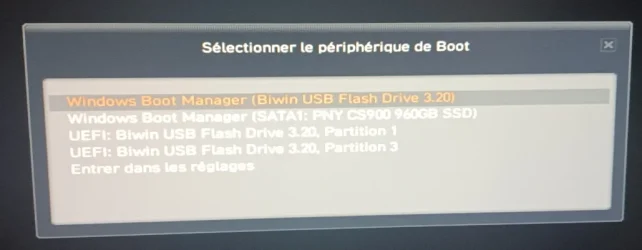
- Windows to go 1.jpg : information when my computer starts. The key is recognized
- Windows to go 2.jpg : screen after I've chosen to boot from my external USB key
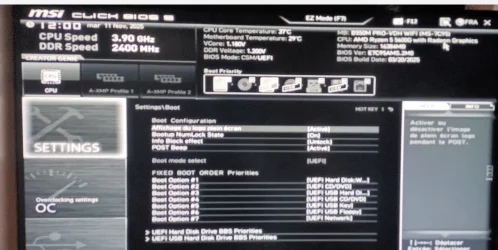
- Windows to go 3.jpg : BIOS configuration for boot mode
- Windows to go 4.jpg : description of my key using AOMEI partition assistant.
Can you help me ?
Thank you for you ansers.
I want to launch Windows 11 from an external key USB drive.
I've used Rufus to create a bootable key drive for installing Windows 11 to go.
When I insert tke key, it's recognized.
The problem is : Windows 11 doesn't start
In attached files :
- Windows to go 1.jpg : information when my computer starts. The key is recognized
- Windows to go 2.jpg : screen after I've chosen to boot from my external USB key
- Windows to go 3.jpg : BIOS configuration for boot mode
- Windows to go 4.jpg : description of my key using AOMEI partition assistant.
Can you help me ?
Thank you for you ansers.
Attachments


My Computer
At a glance
Windows 11AMD Ryzen 5 5600GDDR4 16384 MBytesAMD Radeon Graphics
- OS
- Windows 11
- Computer type
- PC/Desktop
- CPU
- AMD Ryzen 5 5600G
- Motherboard
- B550M PRO-VDH WIFI
- Memory
- DDR4 16384 MBytes
- Graphics Card(s)
- AMD Radeon Graphics
- Sound Card
- Realtek
- Hard Drives
- PNY CS900 960GB SSD
SPCC M.2 PCIe SSD
- Mouse
- bluetooth mouse
- Internet Speed
- 600 MB
- Browser
- Edge
- Antivirus
- Avast