Startup repair cannot repair your pc , the cause is System OS booted successfully


Interesting that discussion is on minute technical details. But When I entered , the command in x: bootrec /fixboot and it completed, does it not show that the command is executed correctly or only shows as executed . When I used this bootsect /nt60 sys. Does it not complete, the command by rightly doing the command to be accessible by fat32 system. Why microsoft is blocking the command of this type. fixmbr and fixboot are the essential commands to be used by users in any case of boot failures. Please say, if the command worked correctly or not. Moreover, what about system repair cannot repair my computer messages. If it shows, boot of OS successful as reason , it seems the log is not correct then
Why are you still using bootrec /fixboot command you already executed also why are you not creating EFI system partition?
 

My Computer My Computer

At a glance

Windows 11AMD Ryzen 7 5700GMicron Technology DDR4-3200 16GBNVIDIA GeForce RTX 3060
OS
Windows 11
Computer type
PC/Desktop
Manufacturer/Model
HP Pavilion
CPU
AMD Ryzen 7 5700G
Motherboard
Erica6
Memory
Micron Technology DDR4-3200 16GB
Graphics Card(s)
NVIDIA GeForce RTX 3060
Sound Card
Realtek ALC671
Monitor(s) Displays
Samsung SyncMaster U28E590
Screen Resolution
3840 x 2160
Hard Drives
SAMSUNG MZVLQ1T0HALB-000H1
This command has been blocked by Microsoft: "Access is denied" - Windows 10 version 1709 (October 17, 2017) and newer installation media. And Windows 11 installation media.
Please see this link, the command is still valid and it updates the boot sector
 

My Computer My Computer

At a glance

windows 11pro version 23H2i5 processor8 gb
OS
windows 11pro version 23H2
Computer type
PC/Desktop
Manufacturer/Model
Dell Inspiron 3910
CPU
i5 processor
Memory
8 gb
why are you not creating EFI system partition?
I think the ESP partition is the EFI . This is also marked yellow by a fellow member in his reply.
 

My Computer My Computer

At a glance

windows 11pro version 23H2i5 processor8 gb
OS
windows 11pro version 23H2
Computer type
PC/Desktop
Manufacturer/Model
Dell Inspiron 3910
CPU
i5 processor
Memory
8 gb

My Computer My Computer

At a glance

Windows 10Intel(R) Core(TM) i7-4800MQ CPU @ 2.70GHz16 GB Total: Manufacturer : Samsung MemoryTyp...NVIDIA Quadro K3100M; Intel(R) HD Graphics 4600
OS
Windows 10
Computer type
Laptop
Manufacturer/Model
HP
CPU
Intel(R) Core(TM) i7-4800MQ CPU @ 2.70GHz
Motherboard
Product : 190A Version : KBC Version 94.56
Memory
16 GB Total: Manufacturer : Samsung MemoryType : DDR3 FormFactor : SODIMM Capacity : 8GB Speed : 1600
Graphics Card(s)
NVIDIA Quadro K3100M; Intel(R) HD Graphics 4600
Sound Card
IDT High Definition Audio CODEC; PNP Device ID HDAUDIO\FUNC_01&VEN_111D&DEV_76E0
Hard Drives
Model Hitachi HTS727575A9E364
Antivirus
Microsoft Defender
Other Info
Mobile Workstation
why are you not creating EFI system partition?
I think the ESP partition is the EFI . This is also marked yellow by a fellow member in his reply.
Did you change the EFI System Partition name to ESP is this why you believe this ESP partition is EFI System partition?
 

My Computer My Computer

At a glance

Windows 11AMD Ryzen 7 5700GMicron Technology DDR4-3200 16GBNVIDIA GeForce RTX 3060
OS
Windows 11
Computer type
PC/Desktop
Manufacturer/Model
HP Pavilion
CPU
AMD Ryzen 7 5700G
Motherboard
Erica6
Memory
Micron Technology DDR4-3200 16GB
Graphics Card(s)
NVIDIA GeForce RTX 3060
Sound Card
Realtek ALC671
Monitor(s) Displays
Samsung SyncMaster U28E590
Screen Resolution
3840 x 2160
Hard Drives
SAMSUNG MZVLQ1T0HALB-000H1
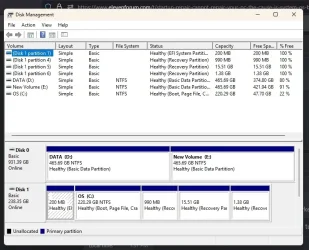
Hi, Freebooter, I have not made that partition . It is already in existence when I bought the pc, from Dell.
Please also see the disk management . It lists that but not showing as ESP. When you use list volume command, it shows as ESP.
 

Attachments

  • disk management.webp
    disk management.webp
    51.2 KB · Views: 1

My Computer My Computer

At a glance

windows 11pro version 23H2i5 processor8 gb
OS
windows 11pro version 23H2
Computer type
PC/Desktop
Manufacturer/Model
Dell Inspiron 3910
CPU
i5 processor
Memory
8 gb
Hi, Freebooter, I have not made that partition . It is already in existence when I bought the pc, from Dell.
Please also see the disk management . It lists that but not showing as ESP. When you use list volume command, it shows as ESP.
Have you repaired EFI system partition like i showed at video at Post #2?
 

My Computer My Computer

At a glance

Windows 11AMD Ryzen 7 5700GMicron Technology DDR4-3200 16GBNVIDIA GeForce RTX 3060
OS
Windows 11
Computer type
PC/Desktop
Manufacturer/Model
HP Pavilion
CPU
AMD Ryzen 7 5700G
Motherboard
Erica6
Memory
Micron Technology DDR4-3200 16GB
Graphics Card(s)
NVIDIA GeForce RTX 3060
Sound Card
Realtek ALC671
Monitor(s) Displays
Samsung SyncMaster U28E590
Screen Resolution
3840 x 2160
Hard Drives
SAMSUNG MZVLQ1T0HALB-000H1
Did you change the EFI System Partition name to ESP is this why you believe this ESP partition is EFI System partition?
ESP actually IS an EFI partition. Another way to put it: Disk management simply uses the EFI acronym.
 
Last edited:

My Computer My Computer

At a glance

WinDOS 25H2Intel & AMDSO-DIMM SK Hynix 15.8 GB Dual-Channel DDR4-26...nVidia RTX 2060 6GB Mobile GPU (TU106M)
OS
WinDOS 25H2
Computer type
Laptop
CPU
Intel & AMD
Memory
SO-DIMM SK Hynix 15.8 GB Dual-Channel DDR4-2666 (2 x 8 GB) 1329MHz (19-19-19-43)
Graphics Card(s)
nVidia RTX 2060 6GB Mobile GPU (TU106M)
Sound Card
Onbord Realtek ALC1220
Screen Resolution
1920 x 1080
Hard Drives
1x Samsung PM981 NVMe PCIe M.2 512GB / 1x Seagate Expansion ST1000LM035 1TB
fixmbr and fixboot are the essential commands to be used by users in any case of boot failures.

Please see this link, the command is still valid and it updates the boot sector


A GPT disk works significantly differently than an MBR disk.

You don't need to care about the boot sector (LBA 0) of an MBR disk because you have a GPT disk.

Below is the best guide I found.


MBR

MBR stands for Master Boot Record. This partitioning scheme is closely tied to the BIOS, and as such, also traces its history back to the IBM Personal Computer. The MBR saves all meta-data about the disk in a single data structure stored at the start of the disk. The name MBR is used exchangeable to refer to both this data structure and to the partitioning scheme as a whole.

GPT

GPT stands for GUID Partitioning Table. It was developed by Intel in the late 1990s, and ended up becoming part of the UEFI specification. GUID stands for Global Unique IDentifier, and refers to the unique strings that are used in this scheme in order to uniquely refer to the different partitions included in a disk.

The Protective MBR (LBA 0): This area is used to prevent disk utilities from mistaking the GPT disk for a MBR one. This sector is a fully pledged MBR on its own. However, it contains a single partition entry of type GPT (0xEE) which encompasses the whole disk (or 2 TiB, whichever is smaller). Legacy disk utilities which cannot read GPT tables and expect a MBR table, will read this protective MBR and realize the whole disk is used up by a partition of ‘unknown type’, thus avoiding an erroneous data overwrite. On the other hand, disk utilities that are only aware of GPT, can check this protective MBR and stop any further disk manipulation if the MBR does not contains the single entry of type GPT.

MBR+GPT.webp

boot.webp
 
Last edited:

My Computers My Computers

  • At a glance

    Windows 11 ProAMD Ryzen 9 9950X3DKingston FURY Beast 64GB (2x32GB) DDR5 6000MT/sASUS TUF Gaming Radeon RX 9070 OC Edition 16G...
    OS
    Windows 11 Pro
    Computer type
    PC/Desktop
    CPU
    AMD Ryzen 9 9950X3D
    Motherboard
    ASRock B650E Taichi Lite
    Memory
    Kingston FURY Beast 64GB (2x32GB) DDR5 6000MT/s
    Graphics Card(s)
    ASUS TUF Gaming Radeon RX 9070 OC Edition 16GB GDDR6
    Hard Drives
    Solidigm P44 Pro 2TB M.2 NVMe SSD
  • At a glance

    Windows 11 HomeIntel Core Ultra 9 275HX64GB (2x 32GB) DDR5-6400NVIDIA GeForce RTX 5080 16GB GDDR7 Laptop GPU
    Operating System
    Windows 11 Home
    Computer type
    Laptop
    Manufacturer/Model
    Lenovo Legion Pro 7i Gen 10 16"
    CPU
    Intel Core Ultra 9 275HX
    Memory
    64GB (2x 32GB) DDR5-6400
    Graphics card(s)
    NVIDIA GeForce RTX 5080 16GB GDDR7 Laptop GPU
    Hard Drives
    2x 1TB M.2 NVMe SSD (SK Hynix)
Back
Top Bottom