
Solved Strange message pop on windows defender


zooburner

I really don't burn zoos !
Member
Local time
11:14 AM
Posts
114
OS
Windows 11
Hi there

I keep getting this message after a quick scan using windows defender, It pops up with a message saying it has skipped a file, but when i click to see what it was, this is what i get I also use Bitdefender but have never seen this message before. Any idea's what it is, and how to get rid of it?
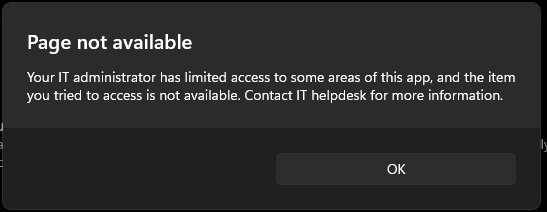
Screenshot 2023-08-10 030958.png
 

My Computer My Computer

At a glance

Windows 11Intel(R) Core(TM) i7-14700F (2.10 to 5.7 GHz)...32 GB Corsair Vengeance DDR5Nvidia 5060Ti 16GB
OS
Windows 11
Computer type
PC/Desktop
Manufacturer/Model
Scan
CPU
Intel(R) Core(TM) i7-14700F (2.10 to 5.7 GHz) 20 cores
Motherboard
ASUS Prime H610M-A WiFi D5
Memory
32 GB Corsair Vengeance DDR5
Graphics Card(s)
Nvidia 5060Ti 16GB
Sound Card
Onboard / Realtek
Monitor(s) Displays
Samsung 2K QHD
Screen Resolution
2560 × 1440
Hard Drives
1TB Crucial P310 (Heatsink) M.2
1TB Samsung 990Pro M.2
1 x Crucial SSD 480gb
1 x Crucial SSD 1TB
PSU
Corsair 650 w
Case
Coolmaster
Cooling
Scan Pro Glacier Liquid Cooling
Keyboard
HP keyboard and mouse combo
Mouse
HP keyboard and mouse combo
Internet Speed
900mbs
Browser
Vivaldi
Antivirus
Microsoft
Other Info
Using a WI-FI 7 Ugreen USB 3.2 Add-On Dongle, as the built in WiFi is a bit deaf.

My Computers My Computers

  • At a glance

    Windows 11 Pro 25H2 26200.9457i9-10900 10 core 20 threads32 gbnone-Intel UHD Graphics 630
    OS
    Windows 11 Pro 25H2 26200.9457
    Computer type
    PC/Desktop
    Manufacturer/Model
    Dell Optiplex 7080
    CPU
    i9-10900 10 core 20 threads
    Motherboard
    DELL 0J37VM
    Memory
    32 gb
    Graphics Card(s)
    none-Intel UHD Graphics 630
    Sound Card
    Integrated Realtek
    Monitor(s) Displays
    Benq 27
    Screen Resolution
    2560x1440
    Hard Drives
    2x1tb Solidigm m.2 nvme /External drives 512gb Samsung m.2 sata+2tb Kingston m2.nvme
    PSU
    500w
    Case
    MT
    Cooling
    Dell Premium
    Keyboard
    Logitech wired
    Mouse
    Logitech wireless
    Internet Speed
    so slow I'm too embarrassed to tell
    Browser
    #1 Edge #2 Firefox
    Antivirus
    Defender+MWB Premium
  • At a glance

    Windows 11 Pro 24H2 26200.9457AMD Ryzen 7 6800U32 gbintegrated
    Operating System
    Windows 11 Pro 24H2 26200.9457
    Computer type
    PC/Desktop
    Manufacturer/Model
    Beelink Mini PC SER5
    CPU
    AMD Ryzen 7 6800U
    Memory
    32 gb
    Graphics card(s)
    integrated
    Sound Card
    integrated
    Monitor(s) Displays
    Benq 27
    Screen Resolution
    2560x1440
    Hard Drives
    1TB Crucial nvme
    Keyboard
    Logitech wired
    Mouse
    Logitech wireless
    Internet Speed
    still too embarrassed to tell
    Browser
    Firefox
    Antivirus
    Defender
  • System 3 is non compliant Dell 9020 i7-4770/24gb ram Win11 PRO 26200.9457
Do you have an exceptions set?

Possibly skipping Bitdefender?

Best of luck.
 

My Computer My Computer

At a glance

Windows 10 Pro 64-bit 22H2 19045.4046Intel i7-3770 @ 3.40GHz8 GBAMD 7500 Radeon HD Series
OS
Windows 10 Pro 64-bit 22H2 19045.4046
Computer type
PC/Desktop
Manufacturer/Model
Dell/Vostro 470 (Year 2012)
CPU
Intel i7-3770 @ 3.40GHz
Memory
8 GB
Graphics Card(s)
AMD 7500 Radeon HD Series
Sound Card
Realtek Hi-Def Audio
Monitor(s) Displays
Dell U2412M
Hard Drives
1 TB 7200 HDD
Keyboard
Dell/USB
Mouse
Dell/USB
Internet Speed
100/10
Browser
Edge
Antivirus
Windows Security/MalwareBytes Premium
Thanks to you both for your suggestions, I followed the link you gave me @glasskuter , I was surprised to see Minitool, I forgot they existed! It was nice to run through the programs they had again, and it also provided the answer. it was Bitdefender interfering so @WXC you were spot on.

To be honest Bitdefender blocking it is no big deal, but knowing what a new message on your computer is, is a big deal if you get me :)

Thanks again :)
 

My Computer My Computer

At a glance

Windows 11Intel(R) Core(TM) i7-14700F (2.10 to 5.7 GHz)...32 GB Corsair Vengeance DDR5Nvidia 5060Ti 16GB
OS
Windows 11
Computer type
PC/Desktop
Manufacturer/Model
Scan
CPU
Intel(R) Core(TM) i7-14700F (2.10 to 5.7 GHz) 20 cores
Motherboard
ASUS Prime H610M-A WiFi D5
Memory
32 GB Corsair Vengeance DDR5
Graphics Card(s)
Nvidia 5060Ti 16GB
Sound Card
Onboard / Realtek
Monitor(s) Displays
Samsung 2K QHD
Screen Resolution
2560 × 1440
Hard Drives
1TB Crucial P310 (Heatsink) M.2
1TB Samsung 990Pro M.2
1 x Crucial SSD 480gb
1 x Crucial SSD 1TB
PSU
Corsair 650 w
Case
Coolmaster
Cooling
Scan Pro Glacier Liquid Cooling
Keyboard
HP keyboard and mouse combo
Mouse
HP keyboard and mouse combo
Internet Speed
900mbs
Browser
Vivaldi
Antivirus
Microsoft
Other Info
Using a WI-FI 7 Ugreen USB 3.2 Add-On Dongle, as the built in WiFi is a bit deaf.
it was Bitdefender interfering...

To be honest Bitdefender blocking it is no big deal, but knowing what a new message on your computer is, is a big deal if you get me :)

I understand completely, Zooburner.

I'm pleased you have it sorted. :-)
 

My Computer My Computer

At a glance

Windows 10 Pro 64-bit 22H2 19045.4046Intel i7-3770 @ 3.40GHz8 GBAMD 7500 Radeon HD Series
OS
Windows 10 Pro 64-bit 22H2 19045.4046
Computer type
PC/Desktop
Manufacturer/Model
Dell/Vostro 470 (Year 2012)
CPU
Intel i7-3770 @ 3.40GHz
Memory
8 GB
Graphics Card(s)
AMD 7500 Radeon HD Series
Sound Card
Realtek Hi-Def Audio
Monitor(s) Displays
Dell U2412M
Hard Drives
1 TB 7200 HDD
Keyboard
Dell/USB
Mouse
Dell/USB
Internet Speed
100/10
Browser
Edge
Antivirus
Windows Security/MalwareBytes Premium
Back
Top Bottom




