Solved Stuck on v 23h2 cant update.


ALM4S

Well-known member
Local time
3:09 AM
Posts
13
Location
Sana, Bosnia
OS
Windows 11 Home
Hi, I have been unable to perform a update from Win11 23h2 to 24h2 and every time i try to perform it I get the same error. Is there anything else I can do than a clean installation of Win 11 again. I mean this installation I have been running for two years now but still.

Ive tried some tutorials with run to stop some aplications restart them and rerun them again but nothing worked so far. Wumt also couldent help me.
 

Attachments
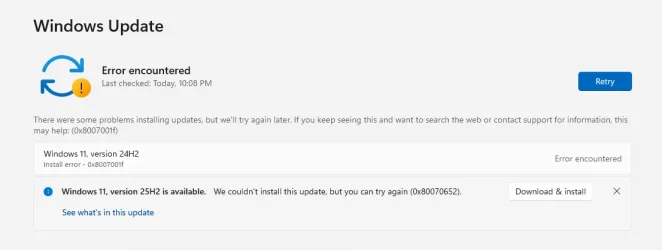
  • Screenshot 2025-12-03 235454.webp
    Screenshot 2025-12-03 235454.webp
    21.9 KB · Views: 3

My Computer

System One

  • OS
    Windows 11 Home
    Computer type
    PC/Desktop
    Manufacturer/Model
    Self Build
    CPU
    AMD Ryzen 5 3600
    Motherboard
    ASRock B450M Pro4 AM4
    Memory
    Kingston Fury Beast 32GB (2x16GB) DDR4 3200MHz
    Graphics Card(s)
    MSI GeForce RTX 3080 SUPRIM X 10G
    Monitor(s) Displays
    BENQ XL2546K (main), BENQ XL2411Z (secondary)
    Screen Resolution
    1080p
    Hard Drives
    Silicon Power Slim S55 SSD 240GB, Intenso High Performance SSD 480GB, CRUCIAL MX500 SSD 1TB
    PSU
    Corsair RM750x (2021)
    Case
    Fractal Design Meshify 2 Black TG Dark
    Cooling
    Wraith Stealth Cooler
    Keyboard
    Lenovo
    Mouse
    Razer Deathadder v2
    Internet Speed
    25 down / 6 up
    Browser
    Brave
    Antivirus
    Windows Security
 

My Computers

System One System Two

  • OS
    Windows 11 Pro 25H2 Build 26200.8524
    Computer type
    PC/Desktop
    Manufacturer/Model
    Sin-built 2013
    CPU
    Intel(R) Core(TM) i7-4770K CPU @ 3.50GHz
    Motherboard
    ASUS ROG Maximus VI Formula
    Memory
    32.0 GB of I forget and the box is in storage.
    Graphics Card(s)
    Gigabyte nVidia GeForce GTX 1660 Super OC 6GB
    Sound Card
    Onboard thingy
    Monitor(s) Displays
    5 x LG 25MS500-B - 1 x 24MK430H-B - 1 x Wacom Pro 22" Touch Screen Tablet
    Screen Resolution
    All over the place
    Hard Drives
    Too many to list.
    OS on Samsung 1TB 870 QVO SATA
    PSU
    Silverstone 1500
    Case
    NZXT Phantom 820 Full-Tower Case
    Cooling
    Noctua NH-D15 Elite Class Dual Tower CPU Cooler / 6 x EziDIY 120mm / 2 x Corsair 140mm somethings / 1 x 140mm Thermaltake something / 2 x 200mm Corsair.
    Keyboard
    Corsair K95 / Logitech diNovo Edge Wireless
    Mouse
    Logitech: G402 / G502 / Mx Masters / Mx Air Cordless
    Internet Speed
    2000/500Mbps
    Browser
    All sorts
    Antivirus
    Kaspersky Premium
    Other Info
    ㅤㅤㅤㅤㅤㅤㅤㅤㅤㅤㅤㅤㅤㅤㅤㅤㅤㅤㅤㅤㅤㅤㅤㅤㅤㅤㅤㅤㅤㅤㅤㅤㅤㅤㅤㅤㅤㅤㅤㅤ⠀⠀⠀⠀⠀⠀⠀⠀⠀⠀
    TP-Link BE9300 WiFi 7 Bluetooth 5.4 (Archer TBE550E)
    TP-Link TX201 V1 2.5GB Lan

    Grandstream HT812 - VoIP
    ASUS DSL-AX82U - Mesh
    ASUS RT-AC68U - Mesh
    ASUS RT-BE88U Router

    Brother MFC-L2880DW Printer

    I’m on a horse.
  • Operating System
    Windows 11 Pro 25H2 Build 26200.8524
    Computer type
    Laptop
    Manufacturer/Model
    LENOVO Yoga 7 14IRL8 - 7i EVO OLED 14" Touchscreen i5 12 Core 16GB/512GB
    CPU
    Intel Core 12th Gen i5-1240P Processor (1.7 - 4.4GHz)
    Memory
    16GB LPDDR5 RAM
    Graphics card(s)
    Intel Iris Xe Graphics Processor
    Sound Card
    Optimized with Dolby Atmos®
    Screen Resolution
    QHD 2880 x 1800 OLED
    Hard Drives
    M.2 512GB
    Antivirus
    Defender / Malwarebytes
    Other Info
    …still on a horse.
Don't forget to disable the internet before doing the In Place Upgrade.
 

My Computers

System One System Two

  • OS
    Windows 11 Pro - Windows 7 HP 64 - Lubuntu
    Computer type
    PC/Desktop
    Manufacturer/Model
    custom build
    CPU
    i5 6600K - 800MHz to 4400MHz
    Motherboard
    GA-Z170-HD3P
    Memory
    4+4G GSkill DDR4 3000
    Graphics Card(s)
    IG - Intel 530
    Monitor(s) Displays
    Samsung 226BW
    Screen Resolution
    1680x1050
    Hard Drives
    (1) -1 SM951 – 128GB M.2 AHCI PCIe SSD drive for Win 11
    (2) -1 WD SATA 3 - 1T for Data
    (3) -1 WD SATA 3 - 1T for backup
    (4) -1 BX500 SSD - 256G for Windows 7 and Lubuntu
    PSU
    Thermaltake 450W TR2 gold
    Keyboard
    Old and good Chicony mechanical keyboard
    Mouse
    Logitech mX performance - 9 buttons (had to disable some)
    Internet Speed
    500 Mb/s
    Browser
    Firefox 64
  • Operating System
    Windows 11 Pro
    Computer type
    Laptop
    Manufacturer/Model
    Asus Q550LF
    CPU
    i7-4500U 800- 3000MHz
    Motherboard
    Asus Q550LF
    Memory
    (4+4)G DDR3 1600
    Graphics card(s)
    IG intel 4400 + NVIDIA GeForce GT 745M
    Sound Card
    Realtek
    Monitor(s) Displays
    LG Display LP156WF4-SPH1
    Screen Resolution
    1920 x 1080
    Hard Drives
    BX500 120G SSD for Windows and programs
    & 1T HDD for data
    Internet Speed
    500 Mb/s
    Browser
    Firefox 64
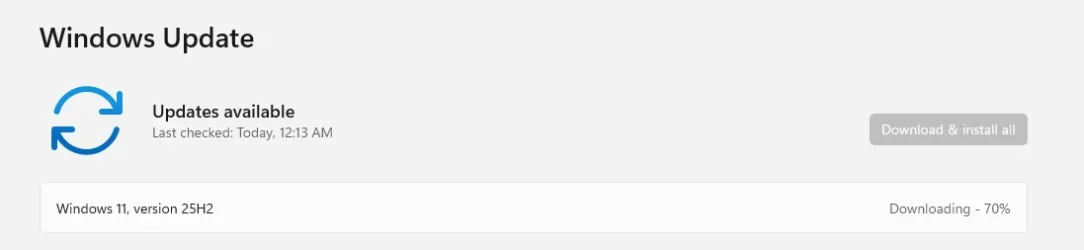
thank you I went with option 1 now Ill tell you how it went.

It almost downloaded it.
 

Attachments

  • Screenshot 2025-12-04 001356.webp
    Screenshot 2025-12-04 001356.webp
    8.2 KB · Views: 1

My Computer

System One

  • OS
    Windows 11 Home
    Computer type
    PC/Desktop
    Manufacturer/Model
    Self Build
    CPU
    AMD Ryzen 5 3600
    Motherboard
    ASRock B450M Pro4 AM4
    Memory
    Kingston Fury Beast 32GB (2x16GB) DDR4 3200MHz
    Graphics Card(s)
    MSI GeForce RTX 3080 SUPRIM X 10G
    Monitor(s) Displays
    BENQ XL2546K (main), BENQ XL2411Z (secondary)
    Screen Resolution
    1080p
    Hard Drives
    Silicon Power Slim S55 SSD 240GB, Intenso High Performance SSD 480GB, CRUCIAL MX500 SSD 1TB
    PSU
    Corsair RM750x (2021)
    Case
    Fractal Design Meshify 2 Black TG Dark
    Cooling
    Wraith Stealth Cooler
    Keyboard
    Lenovo
    Mouse
    Razer Deathadder v2
    Internet Speed
    25 down / 6 up
    Browser
    Brave
    Antivirus
    Windows Security
Don't forget to disable the internet before doing the In Place Upgrade.
why do you need to disable the internet if I might ask ?
 

My Computer

System One

  • OS
    Windows 11 Home
    Computer type
    PC/Desktop
    Manufacturer/Model
    Self Build
    CPU
    AMD Ryzen 5 3600
    Motherboard
    ASRock B450M Pro4 AM4
    Memory
    Kingston Fury Beast 32GB (2x16GB) DDR4 3200MHz
    Graphics Card(s)
    MSI GeForce RTX 3080 SUPRIM X 10G
    Monitor(s) Displays
    BENQ XL2546K (main), BENQ XL2411Z (secondary)
    Screen Resolution
    1080p
    Hard Drives
    Silicon Power Slim S55 SSD 240GB, Intenso High Performance SSD 480GB, CRUCIAL MX500 SSD 1TB
    PSU
    Corsair RM750x (2021)
    Case
    Fractal Design Meshify 2 Black TG Dark
    Cooling
    Wraith Stealth Cooler
    Keyboard
    Lenovo
    Mouse
    Razer Deathadder v2
    Internet Speed
    25 down / 6 up
    Browser
    Brave
    Antivirus
    Windows Security
I don’t believe you do.
Just uncheck the updates part, but you’re doing fine.

Option One requires the internet.
 

My Computers

System One System Two

  • OS
    Windows 11 Pro 25H2 Build 26200.8524
    Computer type
    PC/Desktop
    Manufacturer/Model
    Sin-built 2013
    CPU
    Intel(R) Core(TM) i7-4770K CPU @ 3.50GHz
    Motherboard
    ASUS ROG Maximus VI Formula
    Memory
    32.0 GB of I forget and the box is in storage.
    Graphics Card(s)
    Gigabyte nVidia GeForce GTX 1660 Super OC 6GB
    Sound Card
    Onboard thingy
    Monitor(s) Displays
    5 x LG 25MS500-B - 1 x 24MK430H-B - 1 x Wacom Pro 22" Touch Screen Tablet
    Screen Resolution
    All over the place
    Hard Drives
    Too many to list.
    OS on Samsung 1TB 870 QVO SATA
    PSU
    Silverstone 1500
    Case
    NZXT Phantom 820 Full-Tower Case
    Cooling
    Noctua NH-D15 Elite Class Dual Tower CPU Cooler / 6 x EziDIY 120mm / 2 x Corsair 140mm somethings / 1 x 140mm Thermaltake something / 2 x 200mm Corsair.
    Keyboard
    Corsair K95 / Logitech diNovo Edge Wireless
    Mouse
    Logitech: G402 / G502 / Mx Masters / Mx Air Cordless
    Internet Speed
    2000/500Mbps
    Browser
    All sorts
    Antivirus
    Kaspersky Premium
    Other Info
    ㅤㅤㅤㅤㅤㅤㅤㅤㅤㅤㅤㅤㅤㅤㅤㅤㅤㅤㅤㅤㅤㅤㅤㅤㅤㅤㅤㅤㅤㅤㅤㅤㅤㅤㅤㅤㅤㅤㅤㅤ⠀⠀⠀⠀⠀⠀⠀⠀⠀⠀
    TP-Link BE9300 WiFi 7 Bluetooth 5.4 (Archer TBE550E)
    TP-Link TX201 V1 2.5GB Lan

    Grandstream HT812 - VoIP
    ASUS DSL-AX82U - Mesh
    ASUS RT-AC68U - Mesh
    ASUS RT-BE88U Router

    Brother MFC-L2880DW Printer

    I’m on a horse.
  • Operating System
    Windows 11 Pro 25H2 Build 26200.8524
    Computer type
    Laptop
    Manufacturer/Model
    LENOVO Yoga 7 14IRL8 - 7i EVO OLED 14" Touchscreen i5 12 Core 16GB/512GB
    CPU
    Intel Core 12th Gen i5-1240P Processor (1.7 - 4.4GHz)
    Memory
    16GB LPDDR5 RAM
    Graphics card(s)
    Intel Iris Xe Graphics Processor
    Sound Card
    Optimized with Dolby Atmos®
    Screen Resolution
    QHD 2880 x 1800 OLED
    Hard Drives
    M.2 512GB
    Antivirus
    Defender / Malwarebytes
    Other Info
    …still on a horse.
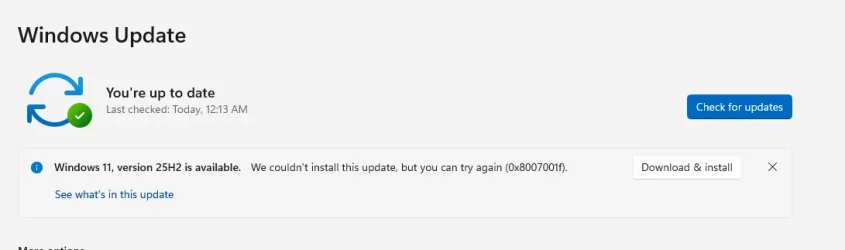
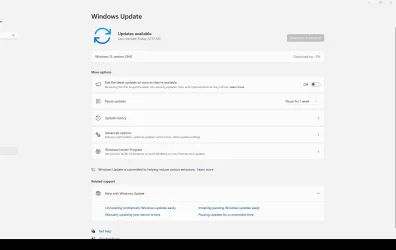
went thro the whole update it updated but when i did winver it shows still win 23h2 and I got this in windows update.

what now should I go with option 2 which is putting new installation on usb key?

also my toolbar on the bottom is black ..
 

Attachments

  • Screenshot 2025-12-04 015527.webp
    Screenshot 2025-12-04 015527.webp
    14.4 KB · Views: 2
  • Screenshot 2025-12-04 020056.webp
    Screenshot 2025-12-04 020056.webp
    40.1 KB · Views: 1

My Computer

System One

  • OS
    Windows 11 Home
    Computer type
    PC/Desktop
    Manufacturer/Model
    Self Build
    CPU
    AMD Ryzen 5 3600
    Motherboard
    ASRock B450M Pro4 AM4
    Memory
    Kingston Fury Beast 32GB (2x16GB) DDR4 3200MHz
    Graphics Card(s)
    MSI GeForce RTX 3080 SUPRIM X 10G
    Monitor(s) Displays
    BENQ XL2546K (main), BENQ XL2411Z (secondary)
    Screen Resolution
    1080p
    Hard Drives
    Silicon Power Slim S55 SSD 240GB, Intenso High Performance SSD 480GB, CRUCIAL MX500 SSD 1TB
    PSU
    Corsair RM750x (2021)
    Case
    Fractal Design Meshify 2 Black TG Dark
    Cooling
    Wraith Stealth Cooler
    Keyboard
    Lenovo
    Mouse
    Razer Deathadder v2
    Internet Speed
    25 down / 6 up
    Browser
    Brave
    Antivirus
    Windows Security
@ALM4S

Try the In-Place Upgrade, Option Two (the ISO method), and use the 24H2 ISO from UUP Dump...
I explained it in this post, the other day...


If you can get to 24H2, then you can just use the Enablement Package to get to 25H2...
The EP takes 3 seconds and a reboot, but you need to be on 24H2 to use it.


My Computers

System One System Two

  • OS
    Win 11 Home ♦♦♦26200.8655 ♦♦♦♦♦♦♦25H2
    Computer type
    PC/Desktop
    Manufacturer/Model
    Built by Ghot® [May 2020]
    CPU
    AMD Ryzen 7 3700X
    Motherboard
    Asus Pro WS X570-ACE (BIOS 5302)
    Memory
    G.Skill (F4-3200C14D-16GTZKW)
    Graphics Card(s)
    EVGA RTX 2070 (08G-P4-2171-KR)
    Sound Card
    Realtek ALC1220P / ALC S1220A
    Monitor(s) Displays
    Dell U3011 30"
    Screen Resolution
    2560 x 1600
    Hard Drives
    2x Samsung 860 EVO 500GB,
    WD 4TB Black FZBX - SATA III,
    WD 8TB Black FZBX - SATA III,
    DRW-24B1ST CD/DVD Burner
    PSU
    PC Power & Cooling 750W Quad EPS12V
    Case
    Cooler Master ATCS 840 Tower
    Cooling
    CM Hyper 212 EVO (push/pull)
    Keyboard
    Ducky DK9008 Shine II Blue LED
    Mouse
    Logitech Optical M-100
    Internet Speed
    300/300
    Browser
    Firefox (latest)
    Antivirus
    Bitdefender Total Security
    Other Info
    Speakers: Klipsch Pro Media 2.1
  • Operating System
    Windows XP Pro 32bit w/SP3
    Computer type
    PC/Desktop
    Manufacturer/Model
    Built by Ghot® (not in use)
    CPU
    AMD Athlon 64 X2 5000+ (OC'd @ 3.2Ghz)
    Motherboard
    ASUS M2N32-SLI Deluxe Wireless Edition
    Memory
    TWIN2X2048-6400C4DHX (2 x 1GB, DDR2 800)
    Graphics card(s)
    EVGA 256-P2-N758-TR GeForce 8600GT SSC
    Sound Card
    Onboard
    Monitor(s) Displays
    ViewSonic G90FB Black 19" Professional (CRT)
    Screen Resolution
    up to 2048 x 1536
    Hard Drives
    WD 36GB 10,000rpm Raptor SATA
    Seagate 80GB 7200rpm SATA
    Lite-On LTR-52246S CD/RW
    Lite-On LH-18A1P CD/DVD Burner
    PSU
    PC Power & Cooling Silencer 750 Quad EPS12V
    Case
    Generic Beige case, 80mm fans
    Cooling
    ZALMAN 9500A 92mm CPU Cooler
    Keyboard
    Logitech Classic Keybooard 200
    Mouse
    Logitech Optical M-BT96a
    Internet Speed
    300/300
    Browser
    Firefox 3.x ??
    Antivirus
    Symantec (Norton)
    Other Info
    Still assembled, still runs. Haven't turned it on for 15 years?
This MS article shows the meaning of this group of error codes
[Error codes are not a subject I know about. I just had a link to that page.]

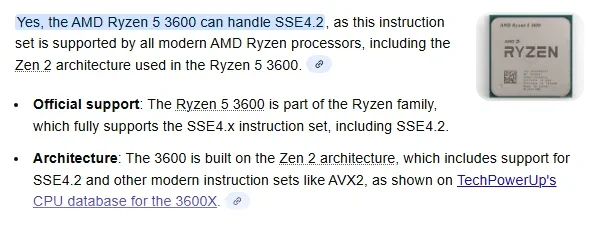
Have you checked that your CPU can handle the SSE4.2 instruction set that is necessary for 24H2 & 25H2?
The CPU-Z utility can tell you the answer.
Downloading & running CPU-Z - my post #8 - ElevenForum


Best of luck,
Denis
 

My Computer

System One

  • OS
    Windows 11 Home x64 Version 25H2 Build 26200.8037
If you're trying to upgrade the computer with the AMD 3600, it has the proper instruction sets.


My Computers

System One System Two

  • OS
    Win 11 Home ♦♦♦26200.8655 ♦♦♦♦♦♦♦25H2
    Computer type
    PC/Desktop
    Manufacturer/Model
    Built by Ghot® [May 2020]
    CPU
    AMD Ryzen 7 3700X
    Motherboard
    Asus Pro WS X570-ACE (BIOS 5302)
    Memory
    G.Skill (F4-3200C14D-16GTZKW)
    Graphics Card(s)
    EVGA RTX 2070 (08G-P4-2171-KR)
    Sound Card
    Realtek ALC1220P / ALC S1220A
    Monitor(s) Displays
    Dell U3011 30"
    Screen Resolution
    2560 x 1600
    Hard Drives
    2x Samsung 860 EVO 500GB,
    WD 4TB Black FZBX - SATA III,
    WD 8TB Black FZBX - SATA III,
    DRW-24B1ST CD/DVD Burner
    PSU
    PC Power & Cooling 750W Quad EPS12V
    Case
    Cooler Master ATCS 840 Tower
    Cooling
    CM Hyper 212 EVO (push/pull)
    Keyboard
    Ducky DK9008 Shine II Blue LED
    Mouse
    Logitech Optical M-100
    Internet Speed
    300/300
    Browser
    Firefox (latest)
    Antivirus
    Bitdefender Total Security
    Other Info
    Speakers: Klipsch Pro Media 2.1
  • Operating System
    Windows XP Pro 32bit w/SP3
    Computer type
    PC/Desktop
    Manufacturer/Model
    Built by Ghot® (not in use)
    CPU
    AMD Athlon 64 X2 5000+ (OC'd @ 3.2Ghz)
    Motherboard
    ASUS M2N32-SLI Deluxe Wireless Edition
    Memory
    TWIN2X2048-6400C4DHX (2 x 1GB, DDR2 800)
    Graphics card(s)
    EVGA 256-P2-N758-TR GeForce 8600GT SSC
    Sound Card
    Onboard
    Monitor(s) Displays
    ViewSonic G90FB Black 19" Professional (CRT)
    Screen Resolution
    up to 2048 x 1536
    Hard Drives
    WD 36GB 10,000rpm Raptor SATA
    Seagate 80GB 7200rpm SATA
    Lite-On LTR-52246S CD/RW
    Lite-On LH-18A1P CD/DVD Burner
    PSU
    PC Power & Cooling Silencer 750 Quad EPS12V
    Case
    Generic Beige case, 80mm fans
    Cooling
    ZALMAN 9500A 92mm CPU Cooler
    Keyboard
    Logitech Classic Keybooard 200
    Mouse
    Logitech Optical M-BT96a
    Internet Speed
    300/300
    Browser
    Firefox 3.x ??
    Antivirus
    Symantec (Norton)
    Other Info
    Still assembled, still runs. Haven't turned it on for 15 years?
1) Please run the V2 log collector > post a share link


2) Run upgrade_failure_info > post a share link


My Computer

System One

  • OS
    Windows 10
    Computer type
    Laptop
    Manufacturer/Model
    HP
    CPU
    Intel(R) Core(TM) i7-4800MQ CPU @ 2.70GHz
    Motherboard
    Product : 190A Version : KBC Version 94.56
    Memory
    16 GB Total: Manufacturer : Samsung MemoryType : DDR3 FormFactor : SODIMM Capacity : 8GB Speed : 1600
    Graphics Card(s)
    NVIDIA Quadro K3100M; Intel(R) HD Graphics 4600
    Sound Card
    IDT High Definition Audio CODEC; PNP Device ID HDAUDIO\FUNC_01&VEN_111D&DEV_76E0
    Hard Drives
    Model Hitachi HTS727575A9E364
    Antivirus
    Microsoft Defender
    Other Info
    Mobile Workstation
This MS article shows the meaning of this group of error codes
[Error codes are not a subject I know about. I just had a link to that page.]

Have you checked that your CPU can handle the SSE4.2 instruction set that is necessary for 24H2 & 25H2?
The CPU-Z utility can tell you the answer.
Downloading & running CPU-Z - my post #8 - ElevenForum


Best of luck,
Denis
1764814050510.webp
 

My Computer

System One

  • OS
    Windows 11 Home
    Computer type
    PC/Desktop
    Manufacturer/Model
    Self Build
    CPU
    AMD Ryzen 5 3600
    Motherboard
    ASRock B450M Pro4 AM4
    Memory
    Kingston Fury Beast 32GB (2x16GB) DDR4 3200MHz
    Graphics Card(s)
    MSI GeForce RTX 3080 SUPRIM X 10G
    Monitor(s) Displays
    BENQ XL2546K (main), BENQ XL2411Z (secondary)
    Screen Resolution
    1080p
    Hard Drives
    Silicon Power Slim S55 SSD 240GB, Intenso High Performance SSD 480GB, CRUCIAL MX500 SSD 1TB
    PSU
    Corsair RM750x (2021)
    Case
    Fractal Design Meshify 2 Black TG Dark
    Cooling
    Wraith Stealth Cooler
    Keyboard
    Lenovo
    Mouse
    Razer Deathadder v2
    Internet Speed
    25 down / 6 up
    Browser
    Brave
    Antivirus
    Windows Security
@ALM4S

Try the In-Place Upgrade, Option Two (the ISO method), and use the 24H2 ISO from UUP Dump...
I explained it in this post, the other day...


If you can get to 24H2, then you can just use the Enablement Package to get to 25H2...
The EP takes 3 seconds and a reboot, but you need to be on 24H2 to use it.

Im trying now over the UUP. Do I need to put it on usb or i have to mount it as iso or just run it from the pc ?
 

My Computer

System One

  • OS
    Windows 11 Home
    Computer type
    PC/Desktop
    Manufacturer/Model
    Self Build
    CPU
    AMD Ryzen 5 3600
    Motherboard
    ASRock B450M Pro4 AM4
    Memory
    Kingston Fury Beast 32GB (2x16GB) DDR4 3200MHz
    Graphics Card(s)
    MSI GeForce RTX 3080 SUPRIM X 10G
    Monitor(s) Displays
    BENQ XL2546K (main), BENQ XL2411Z (secondary)
    Screen Resolution
    1080p
    Hard Drives
    Silicon Power Slim S55 SSD 240GB, Intenso High Performance SSD 480GB, CRUCIAL MX500 SSD 1TB
    PSU
    Corsair RM750x (2021)
    Case
    Fractal Design Meshify 2 Black TG Dark
    Cooling
    Wraith Stealth Cooler
    Keyboard
    Lenovo
    Mouse
    Razer Deathadder v2
    Internet Speed
    25 down / 6 up
    Browser
    Brave
    Antivirus
    Windows Security

If possible, please perform the steps in post #11 so that the existing files can be scanned and read.


My Computer

System One

  • OS
    Windows 10
    Computer type
    Laptop
    Manufacturer/Model
    HP
    CPU
    Intel(R) Core(TM) i7-4800MQ CPU @ 2.70GHz
    Motherboard
    Product : 190A Version : KBC Version 94.56
    Memory
    16 GB Total: Manufacturer : Samsung MemoryType : DDR3 FormFactor : SODIMM Capacity : 8GB Speed : 1600
    Graphics Card(s)
    NVIDIA Quadro K3100M; Intel(R) HD Graphics 4600
    Sound Card
    IDT High Definition Audio CODEC; PNP Device ID HDAUDIO\FUNC_01&VEN_111D&DEV_76E0
    Hard Drives
    Model Hitachi HTS727575A9E364
    Antivirus
    Microsoft Defender
    Other Info
    Mobile Workstation
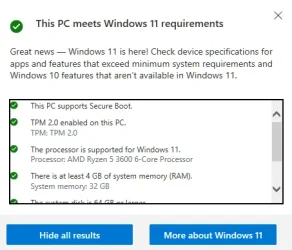
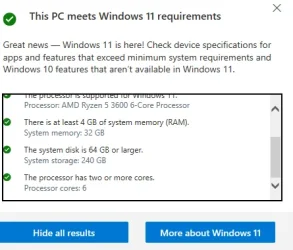
Make sure everything is compatible by running PC Health check. Check if a device meets Windows 11 system requirements after changing device hardware - Microsoft Support

Make sure you are running the latest bios.

Then, You can chase your tail if you want to but my advice is to back up your data and clean install 25h2.
 

My Computers

System One System Two

  • OS
    Windows 11 Pro 25H2
    Computer type
    PC/Desktop
    Manufacturer/Model
    Dell Optiplex 7080
    CPU
    i9-10900 10 core 20 threads
    Motherboard
    DELL 0J37VM
    Memory
    32 gb
    Graphics Card(s)
    none-Intel UHD Graphics 630
    Sound Card
    Integrated Realtek
    Monitor(s) Displays
    Benq 27
    Screen Resolution
    2560x1440
    Hard Drives
    2x1tb Solidigm m.2 nvme /External drives 512gb Samsung m.2 sata+2tb Kingston m2.nvme
    PSU
    500w
    Case
    MT
    Cooling
    Dell Premium
    Keyboard
    Logitech wired
    Mouse
    Logitech wireless
    Internet Speed
    so slow I'm too embarrassed to tell
    Browser
    #1 Edge #2 Firefox
    Antivirus
    Defender+MWB Premium
  • Operating System
    Windows 11 Pro 24H2 26200.8457
    Computer type
    PC/Desktop
    Manufacturer/Model
    Beelink Mini PC SER5
    CPU
    AMD Ryzen 7 6800U
    Memory
    32 gb
    Graphics card(s)
    integrated
    Sound Card
    integrated
    Monitor(s) Displays
    Benq 27
    Screen Resolution
    2560x1440
    Hard Drives
    1TB Crucial nvme
    Keyboard
    Logitech wired
    Mouse
    Logitech wireless
    Internet Speed
    still too embarrassed to tell
    Browser
    Firefox
    Antivirus
    Defender
    Other Info
    System 3 is non compliant Dell 9020 i7-4770/24gb ram Win11 PRO 26200.8457
Im trying now over the UUP. Do I need to put it on usb or i have to mount it as iso or just run it from the pc ?


Mount it as ISO.
 

My Computers

System One System Two

  • OS
    Win 11 Home ♦♦♦26200.8655 ♦♦♦♦♦♦♦25H2
    Computer type
    PC/Desktop
    Manufacturer/Model
    Built by Ghot® [May 2020]
    CPU
    AMD Ryzen 7 3700X
    Motherboard
    Asus Pro WS X570-ACE (BIOS 5302)
    Memory
    G.Skill (F4-3200C14D-16GTZKW)
    Graphics Card(s)
    EVGA RTX 2070 (08G-P4-2171-KR)
    Sound Card
    Realtek ALC1220P / ALC S1220A
    Monitor(s) Displays
    Dell U3011 30"
    Screen Resolution
    2560 x 1600
    Hard Drives
    2x Samsung 860 EVO 500GB,
    WD 4TB Black FZBX - SATA III,
    WD 8TB Black FZBX - SATA III,
    DRW-24B1ST CD/DVD Burner
    PSU
    PC Power & Cooling 750W Quad EPS12V
    Case
    Cooler Master ATCS 840 Tower
    Cooling
    CM Hyper 212 EVO (push/pull)
    Keyboard
    Ducky DK9008 Shine II Blue LED
    Mouse
    Logitech Optical M-100
    Internet Speed
    300/300
    Browser
    Firefox (latest)
    Antivirus
    Bitdefender Total Security
    Other Info
    Speakers: Klipsch Pro Media 2.1
  • Operating System
    Windows XP Pro 32bit w/SP3
    Computer type
    PC/Desktop
    Manufacturer/Model
    Built by Ghot® (not in use)
    CPU
    AMD Athlon 64 X2 5000+ (OC'd @ 3.2Ghz)
    Motherboard
    ASUS M2N32-SLI Deluxe Wireless Edition
    Memory
    TWIN2X2048-6400C4DHX (2 x 1GB, DDR2 800)
    Graphics card(s)
    EVGA 256-P2-N758-TR GeForce 8600GT SSC
    Sound Card
    Onboard
    Monitor(s) Displays
    ViewSonic G90FB Black 19" Professional (CRT)
    Screen Resolution
    up to 2048 x 1536
    Hard Drives
    WD 36GB 10,000rpm Raptor SATA
    Seagate 80GB 7200rpm SATA
    Lite-On LTR-52246S CD/RW
    Lite-On LH-18A1P CD/DVD Burner
    PSU
    PC Power & Cooling Silencer 750 Quad EPS12V
    Case
    Generic Beige case, 80mm fans
    Cooling
    ZALMAN 9500A 92mm CPU Cooler
    Keyboard
    Logitech Classic Keybooard 200
    Mouse
    Logitech Optical M-BT96a
    Internet Speed
    300/300
    Browser
    Firefox 3.x ??
    Antivirus
    Symantec (Norton)
    Other Info
    Still assembled, still runs. Haven't turned it on for 15 years?
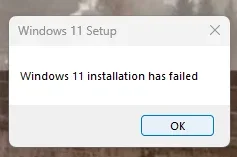
tried the uup and its not working. i got this after windows came
Try the In-Place Upgrade, Option Two (the ISO method), and use the 24H2 ISO from UUP Dump...
I explained it in this post, the other day...


If you can get to 24H2, then you can just use the Enablement Package to get to 25H2...
The EP takes 3 seconds and a reboot, but you need to be on 24H2 to use it.


Screenshot 2025-12-04 061302.webp
 

My Computer

System One

  • OS
    Windows 11 Home
    Computer type
    PC/Desktop
    Manufacturer/Model
    Self Build
    CPU
    AMD Ryzen 5 3600
    Motherboard
    ASRock B450M Pro4 AM4
    Memory
    Kingston Fury Beast 32GB (2x16GB) DDR4 3200MHz
    Graphics Card(s)
    MSI GeForce RTX 3080 SUPRIM X 10G
    Monitor(s) Displays
    BENQ XL2546K (main), BENQ XL2411Z (secondary)
    Screen Resolution
    1080p
    Hard Drives
    Silicon Power Slim S55 SSD 240GB, Intenso High Performance SSD 480GB, CRUCIAL MX500 SSD 1TB
    PSU
    Corsair RM750x (2021)
    Case
    Fractal Design Meshify 2 Black TG Dark
    Cooling
    Wraith Stealth Cooler
    Keyboard
    Lenovo
    Mouse
    Razer Deathadder v2
    Internet Speed
    25 down / 6 up
    Browser
    Brave
    Antivirus
    Windows Security

Make sure everything is compatible by running PC Health check. Check if a device meets Windows 11 system requirements after changing device hardware - Microsoft Support

Make sure you are running the latest bios.

Then, You can chase your tail if you want to but my advice is to back up your data and clean install 25h2.
i passed. I think a clean install will be the only option to go :(
 

Attachments

  • Screenshot 2025-12-04 065734.webp
    Screenshot 2025-12-04 065734.webp
    25.1 KB · Views: 1
  • Screenshot 2025-12-04 065742.webp
    Screenshot 2025-12-04 065742.webp
    24.4 KB · Views: 1

My Computer

System One

  • OS
    Windows 11 Home
    Computer type
    PC/Desktop
    Manufacturer/Model
    Self Build
    CPU
    AMD Ryzen 5 3600
    Motherboard
    ASRock B450M Pro4 AM4
    Memory
    Kingston Fury Beast 32GB (2x16GB) DDR4 3200MHz
    Graphics Card(s)
    MSI GeForce RTX 3080 SUPRIM X 10G
    Monitor(s) Displays
    BENQ XL2546K (main), BENQ XL2411Z (secondary)
    Screen Resolution
    1080p
    Hard Drives
    Silicon Power Slim S55 SSD 240GB, Intenso High Performance SSD 480GB, CRUCIAL MX500 SSD 1TB
    PSU
    Corsair RM750x (2021)
    Case
    Fractal Design Meshify 2 Black TG Dark
    Cooling
    Wraith Stealth Cooler
    Keyboard
    Lenovo
    Mouse
    Razer Deathadder v2
    Internet Speed
    25 down / 6 up
    Browser
    Brave
    Antivirus
    Windows Security

If you want a potential fix then post log files for troubleshooting.

If you want to custom or clean install then plan to reinstall drivers and applications and restore backed up files.
 

My Computer

System One

  • OS
    Windows 10
    Computer type
    Laptop
    Manufacturer/Model
    HP
    CPU
    Intel(R) Core(TM) i7-4800MQ CPU @ 2.70GHz
    Motherboard
    Product : 190A Version : KBC Version 94.56
    Memory
    16 GB Total: Manufacturer : Samsung MemoryType : DDR3 FormFactor : SODIMM Capacity : 8GB Speed : 1600
    Graphics Card(s)
    NVIDIA Quadro K3100M; Intel(R) HD Graphics 4600
    Sound Card
    IDT High Definition Audio CODEC; PNP Device ID HDAUDIO\FUNC_01&VEN_111D&DEV_76E0
    Hard Drives
    Model Hitachi HTS727575A9E364
    Antivirus
    Microsoft Defender
    Other Info
    Mobile Workstation
try what I did, use RUFUS, disable checks. Run the install inside currently working windows.
I downloaded the 25H2 ISO and used RUFUS on a usb drive. I was able to keep all programs and files.

My PC does not meet windows 11 requirements, but win 11 pro runs great
 

My Computer

System One

  • OS
    windows 11
    Computer type
    PC/Desktop
    Manufacturer/Model
    some kind of old ASUS MB
    CPU
    old AMD B95
    Motherboard
    ASUS
    Memory
    8gb
    Hard Drives
    ssd WD 500 gb

Latest Support Threads

Back
Top Bottom