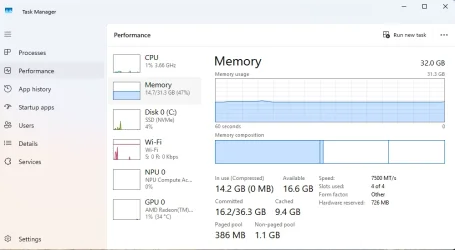
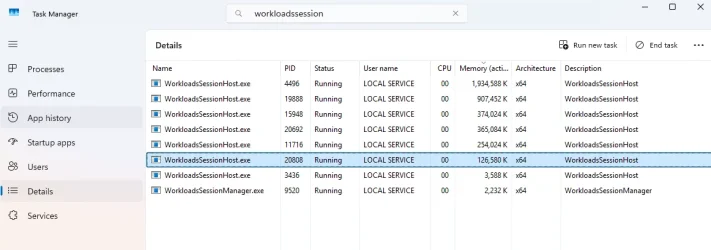
I have noticed lately that the Dell 16 Plus DB16255 laptop has been running slower lately. Memory usage after a restart shows around ~16GB of out 32GB, with no programs/apps running at the time. I found the WorkloadsSessionHost processes causing these problems. Here is the Task Manager after restarting Windows 11 Pro on the laptop:
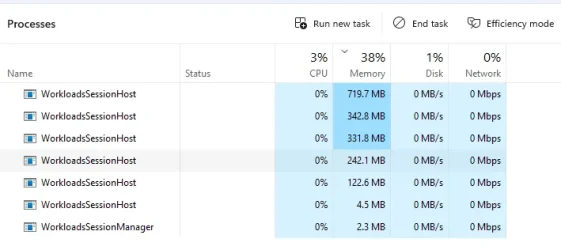
Note that I use a local account in Windows 11 Pro. A Microsoft account is logged in to Microsoft 365 (activation/apps), Microsoft Edge (sync data), and in Outlook Classic (email).
I used Google's to find out about the WorkloadsSessionHost processes:
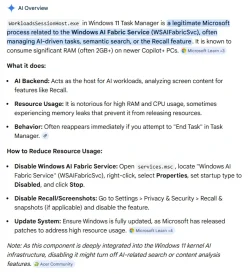
Windows Recall is not enabled in Windows 11 Pro. Recall would not be abled because the requirements are not met on the system.
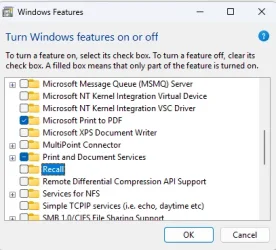
I was curious about the Recall app, so when I ran it to make sure it is not saving anything, it shows that is is not setup:

There are many WorkloadsSessionHost processes at times running with Recall showing CPU being used and much more memory in use at times, but it is not enable in Windows 11 Pro.
I am trying to figure out why this laptop keeps having high memory usage on a 32GB system; meaning in Task Manager - Performance - Memory is always over 22GB in use. Makes me wonder how these other laptops that have 16GB memory handle running many programs/apps. I just have Google Chrome running when memory is high, no other apps. I just reinstalled Windows 11 Pro on the laptop. Microsoft 365 apps and Google Chrome is it on this system.
Note: when I look in the %LocalAppData%\CoreAIPlatform.00\UKP folder location for Recall, the ImageStore and ukg.db file exists with current date-time on these files. Now I am puzzled on how Recall data exists.
Anyone else seeing this in Windows 11 Pro?
Note that I use a local account in Windows 11 Pro. A Microsoft account is logged in to Microsoft 365 (activation/apps), Microsoft Edge (sync data), and in Outlook Classic (email).
I used Google's to find out about the WorkloadsSessionHost processes:
Windows Recall is not enabled in Windows 11 Pro. Recall would not be abled because the requirements are not met on the system.
I was curious about the Recall app, so when I ran it to make sure it is not saving anything, it shows that is is not setup:
There are many WorkloadsSessionHost processes at times running with Recall showing CPU being used and much more memory in use at times, but it is not enable in Windows 11 Pro.
I am trying to figure out why this laptop keeps having high memory usage on a 32GB system; meaning in Task Manager - Performance - Memory is always over 22GB in use. Makes me wonder how these other laptops that have 16GB memory handle running many programs/apps. I just have Google Chrome running when memory is high, no other apps. I just reinstalled Windows 11 Pro on the laptop. Microsoft 365 apps and Google Chrome is it on this system.
Note: when I look in the %LocalAppData%\CoreAIPlatform.00\UKP folder location for Recall, the ImageStore and ukg.db file exists with current date-time on these files. Now I am puzzled on how Recall data exists.
Anyone else seeing this in Windows 11 Pro?
- Windows Build/Version
- Windows 11 Pro 26200.8039
My Computer
System One
-
- OS
- Windows 11 Pro
- Computer type
- Laptop
- Manufacturer/Model
- Dell 16 Plus DB16255
- CPU
- AMD Ryzen AI 7 350 w/ Radeon 860M 50 TOPS
- Motherboard
- Dell 0PKMHG
- Memory
- 32GB LPDDR5X 7500 MT/s
- Graphics Card(s)
- AMD Radeon 860M integrated (shared memory)
- Sound Card
- Stereo speakers (2.5 W x 2 = 5 W total peak)/Realtek SounzReal/Dolby Atmos
- Monitor(s) Displays
- Displays: 16" 1920 x 1200 (Full HD+/WUXGA) 300 nits 60Hz *** Samsung - 27” Odyssey FHD IPS 240Hz G-Sync Gaming Monitor
- Screen Resolution
- 1920x1080 @ 60Hz
- Hard Drives
- EG6 KIOXIA 1TB NVME
- Case
- Ice Blue
- Cooling
- "dual-fan" or "enhanced" air-cooling system
- Mouse
- Logitech M650 Wireless/Bluetooth
- Internet Speed
- 800/600 Fiber

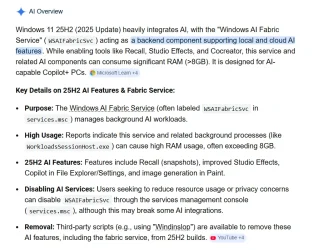









 Your system does which is why it is enabling those features and using more resources.