

- Local time
- 1:36 PM
- Posts
- 61
- OS
- Windows 11 Pro
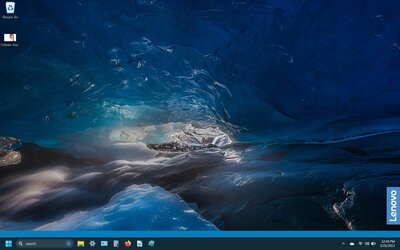
The taskbar on my daughters Yoga 7i computer does not display properly. In the screenshot you can see the taskbar has a blue section above the black section. The taskbar is set to be the blue color not the black. In addition the taskbar should only be the size of the black part of the taskbar. Also, I tried to change the size of the taskbar through the Setting app but it is stuck on it's current size.
Computer: Yoga 7i
Win ver: Windows 11 22H2
OS Build 19045.2788
Computer: Yoga 7i
Win ver: Windows 11 22H2
OS Build 19045.2788
Attachments
My Computer
At a glance
Windows 11 ProIntel 285H32 GB
- OS
- Windows 11 Pro
- Computer type
- PC/Desktop
- Manufacturer/Model
- ASUS NUC 15 Pro+
- CPU
- Intel 285H
- Memory
- 32 GB
- Monitor(s) Displays
- Dell U2723QE
- Cooling
- Air
- Browser
- FireFox






