
Time warp


Pablo56

Well-known member
Member
Local time
8:04 AM
Posts
100
OS
Windows 11
Hi. Today my computer is one hour ahead. I am forced to change it to manualy change time. Every time I click on AUTOMATIC it goes one hour ahead. Here in the UK it is 7:58 now. It was fine last night before went to bed.
 

Attachments

  • Time.webp
    Time.webp
    41.4 KB · Views: 1

My Computer My Computer

At a glance

Windows 11Intel i3 12100 CPU2x 8GB Team DDR4On Board Intel UHD Graphics 730?
OS
Windows 11
Computer type
PC/Desktop
Manufacturer/Model
N/A
CPU
Intel i3 12100 CPU
Motherboard
ASRock H610-M-HVS/M.2 (rev 2.0)
Memory
2x 8GB Team DDR4
Graphics Card(s)
On Board Intel UHD Graphics 730?
Sound Card
On Board Realtek
Monitor(s) Displays
LG
Screen Resolution
1920 * 1080
Hard Drives
500GB Team NVMe drive + 2x 500GB Team GX2 SATA SSD
Windows uses time.windows.com as the default time server. If that time server is not working for you or if you want to use some other custom time server, you can do that too.


Open the command prompt as admin and execute the following command.


Code:
w32tm /config /update /manualpeerlist:time.server.url.com


Don't forget to replace time.server.url.com with the actual time server URL. You can use the pool.ntp.org: NTP Servers in Global, pool.ntp.org to find the time server addresses of different countries and places.


As soon as you execute the command, Windows will access that time server, gets the time and syncs it with your system.
 

My Computer My Computer

At a glance

Windows 11AMD Ryzen 7 5700GMicron Technology DDR4-3200 16GBNVIDIA GeForce RTX 3060
OS
Windows 11
Computer type
PC/Desktop
Manufacturer/Model
HP Pavilion
CPU
AMD Ryzen 7 5700G
Motherboard
Erica6
Memory
Micron Technology DDR4-3200 16GB
Graphics Card(s)
NVIDIA GeForce RTX 3060
Sound Card
Realtek ALC671
Monitor(s) Displays
Samsung SyncMaster U28E590
Screen Resolution
3840 x 2160
Hard Drives
SAMSUNG MZVLQ1T0HALB-000H1
please try.
settings > time and language > date and time

in this window
set time zone auto is 'off'
time zone 'London'
adjust for daylight saving auto is 'enabled'

see if that displays the correct time.
best of luck, Steve ..
 

My Computers My Computers

  • At a glance

    Debian 13 KDE .. Windows 11 HomeRyzen 7 5825u64GB DDR4 3200Ryzen 7 5825u
    OS
    Debian 13 KDE .. Windows 11 Home
    Computer type
    PC/Desktop
    Manufacturer/Model
    HP 24" AiO
    CPU
    Ryzen 7 5825u
    Motherboard
    HP
    Memory
    64GB DDR4 3200
    Graphics Card(s)
    Ryzen 7 5825u
    Sound Card
    RealTek
    Monitor(s) Displays
    24" HP AiO
    Screen Resolution
    1920 x 1080 @60 Hz
    Hard Drives
    1TB WD Blue SN580 M2 SSD Partitioned.
    2x 1TB USB HDD External Backup/Storage.
    PSU
    90W external power brick
    Case
    24" All in One
    Cooling
    Default Air Cooling
    Keyboard
    HP WiFi UK extended
    Mouse
    HP WiFi 3 Button
    Internet Speed
    1GB full fibre
    Browser
    Edge & Firefox
    Antivirus
    AVG Internet Security/Windows Defender
    Other Info
    Mainly Open Source Software
  • At a glance

    Ubuntu 22.04.5 LTSi5 7200u16GB DDR4Intel
    Operating System
    Ubuntu 22.04.5 LTS
    Computer type
    Laptop
    Manufacturer/Model
    Dell 13" Latitude 2017
    CPU
    i5 7200u
    Motherboard
    Dell
    Memory
    16GB DDR4
    Graphics card(s)
    Intel
    Sound Card
    Intel
    Monitor(s) Displays
    13" Dell Laptop
    Hard Drives
    250GB Crucial 2.5" SSD
    Mouse
    Generic WiFi 3 button
    Internet Speed
    WiFi only
    Browser
    Firefox
    Antivirus
    ClamAV TK
    Other Info
    Mainly Open Source Software
set time zone auto is 'off'
time zone 'London'
adjust for daylight saving auto is 'enabled'

I don't have Time zone auto just set the time zone automaticaly.

Acording to my attachment I have Region UK but also have Time zone europe which is 1 hour ahead. These are conflicting as the UK is not on the same time zone as europe. How can I set Time ZONE to UK as well as region?

Strange this. Turning time zone automaticaly off, allows me to change it to UK. switching it on changes it back to Brussels time zone.

I have now set the time zone automaticaly [Off}
Time zone set to London.
Adjust for daylight [On]
Set time automaticaly [On]

Now it works. Bill Gates got into my computer during the night maybe. HA!
 

My Computer My Computer

At a glance

Windows 11Intel i3 12100 CPU2x 8GB Team DDR4On Board Intel UHD Graphics 730?
OS
Windows 11
Computer type
PC/Desktop
Manufacturer/Model
N/A
CPU
Intel i3 12100 CPU
Motherboard
ASRock H610-M-HVS/M.2 (rev 2.0)
Memory
2x 8GB Team DDR4
Graphics Card(s)
On Board Intel UHD Graphics 730?
Sound Card
On Board Realtek
Monitor(s) Displays
LG
Screen Resolution
1920 * 1080
Hard Drives
500GB Team NVMe drive + 2x 500GB Team GX2 SATA SSD
SORRY. This problem is still here. At the moment my time is correct but I have to set time zone automaticaly to off. If it is on it goes one hour ahead to europe time. However, I have software (TV digiguide television schedule stuff) which is showing one hour ahead. It seems to be getting it's time from the true time zone setting. I need help with this
w32tm /config /update /manualpeerlist:time.server.url.com

So I can put it back to automatic. This only happend today. Everything was fine before so there must have been a windows update.
 

My Computer My Computer

At a glance

Windows 11Intel i3 12100 CPU2x 8GB Team DDR4On Board Intel UHD Graphics 730?
OS
Windows 11
Computer type
PC/Desktop
Manufacturer/Model
N/A
CPU
Intel i3 12100 CPU
Motherboard
ASRock H610-M-HVS/M.2 (rev 2.0)
Memory
2x 8GB Team DDR4
Graphics Card(s)
On Board Intel UHD Graphics 730?
Sound Card
On Board Realtek
Monitor(s) Displays
LG
Screen Resolution
1920 * 1080
Hard Drives
500GB Team NVMe drive + 2x 500GB Team GX2 SATA SSD
You can reset the Windows Time service configurations using Command Prompt.


Open the Command Prompt by typing cmd.exe into Start Menu, right-click on Cmd.exe, and open it as an administrator.


Execute below commands one at a time:


Code:
net stop w32time


w32tm /unregister


w32tm /register


net start w32time


w32tm /resync /nowait


Once you completed the steps, your device should now synchronize with its clock over the internet.
 

My Computer My Computer

At a glance

Windows 11AMD Ryzen 7 5700GMicron Technology DDR4-3200 16GBNVIDIA GeForce RTX 3060
OS
Windows 11
Computer type
PC/Desktop
Manufacturer/Model
HP Pavilion
CPU
AMD Ryzen 7 5700G
Motherboard
Erica6
Memory
Micron Technology DDR4-3200 16GB
Graphics Card(s)
NVIDIA GeForce RTX 3060
Sound Card
Realtek ALC671
Monitor(s) Displays
Samsung SyncMaster U28E590
Screen Resolution
3840 x 2160
Hard Drives
SAMSUNG MZVLQ1T0HALB-000H1
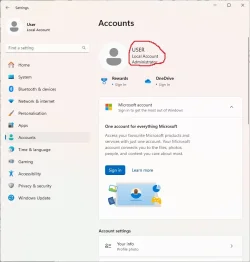
Is this information stored in the registry? I understand that. Also I am already administrator so it should not need that but it does. However you fix has worked.

When you install windows in your country then it should be taking timings from that or allowing you to do an offset from a drop down box. That only works if you have automatic off.
 

Attachments

  • Administrator2.webp
    Administrator2.webp
    35.2 KB · Views: 1
Last edited:

My Computer My Computer

At a glance

Windows 11Intel i3 12100 CPU2x 8GB Team DDR4On Board Intel UHD Graphics 730?
OS
Windows 11
Computer type
PC/Desktop
Manufacturer/Model
N/A
CPU
Intel i3 12100 CPU
Motherboard
ASRock H610-M-HVS/M.2 (rev 2.0)
Memory
2x 8GB Team DDR4
Graphics Card(s)
On Board Intel UHD Graphics 730?
Sound Card
On Board Realtek
Monitor(s) Displays
LG
Screen Resolution
1920 * 1080
Hard Drives
500GB Team NVMe drive + 2x 500GB Team GX2 SATA SSD
I'm glad to hear your issue has been resolved, thank you for letting us know that all is now well!
 

My Computer My Computer

At a glance

Windows 11AMD Ryzen 7 5700GMicron Technology DDR4-3200 16GBNVIDIA GeForce RTX 3060
OS
Windows 11
Computer type
PC/Desktop
Manufacturer/Model
HP Pavilion
CPU
AMD Ryzen 7 5700G
Motherboard
Erica6
Memory
Micron Technology DDR4-3200 16GB
Graphics Card(s)
NVIDIA GeForce RTX 3060
Sound Card
Realtek ALC671
Monitor(s) Displays
Samsung SyncMaster U28E590
Screen Resolution
3840 x 2160
Hard Drives
SAMSUNG MZVLQ1T0HALB-000H1
Shouldn't MS change the window to say "British Summer Time" when you are in a UK time zone?
 

My Computer My Computer

At a glance

Windows 11 Pro 24H2Intel Ultra 7 155H16gbIntel Arc integrated
OS
Windows 11 Pro 24H2
Computer type
Laptop
Manufacturer/Model
HP
CPU
Intel Ultra 7 155H
Memory
16gb
Graphics Card(s)
Intel Arc integrated
Hard Drives
SSD
When you install windows in your country then it should be taking timings from that or allowing you to do an offset from a drop down box. That only works if you have automatic off.
When I install Windows my time zone is always set to the MS time zone on the west coast. I have to manually set the time zone to (UTC-05:00) Eastern Time (US & Canada). I also found that I need to keep the Set time zone automatically to off.
 

My Computers My Computers

  • At a glance

    Windows 11 Pro 25H2Intel Core i7-10700K16GB (8GB PC4-19200 DDR4 SDRAM x2)NVIDIA GeForce GTX 1050 TI
    OS
    Windows 11 Pro 25H2
    Computer type
    PC/Desktop
    Manufacturer/Model
    PowerSpec B746
    CPU
    Intel Core i7-10700K
    Motherboard
    ASRock Z490 Phantom Gaming 4/ax
    Memory
    16GB (8GB PC4-19200 DDR4 SDRAM x2)
    Graphics Card(s)
    NVIDIA GeForce GTX 1050 TI
    Sound Card
    Realtek Audio
    Monitor(s) Displays
    #1. LG ULTRAWIDE 34" #2. AOC Q32G2WG3 32"
    Screen Resolution
    #1. 3440 X 1440 #2. 1920 x 1080
    Hard Drives
    NVMe WDC WDS100T2B0C-00PXH0 1TB
    Samsung SSD 860 EVO 1TB
    PSU
    750 Watts (62.5A)
    Case
    PowerSpec/Lian Li ATX 205
    Keyboard
    Logitech K270
    Mouse
    Logitech M185
    Browser
    Microsoft Edge and Firefox
    Antivirus
    Webroot SecureAnywhere CE 26.1
  • At a glance

    Windows 11 Canary ChannelIntel Core i5-8400 CPU @ 2.80GHz16 MB DDR 4-2666
    Operating System
    Windows 11 Canary Channel
    Computer type
    PC/Desktop
    Manufacturer/Model
    PowerSpec G156
    CPU
    Intel Core i5-8400 CPU @ 2.80GHz
    Motherboard
    AsusTeK Prime B360M-A
    Memory
    16 MB DDR 4-2666
    Monitor(s) Displays
    23" Speptre HDMI 75Hz
    Screen Resolution
    1920x1080
    Hard Drives
    Samsung 970 EVO 500GB NVMe
    Keyboard
    Logitek K270
    Mouse
    Logitek M185
    Browser
    Firefox, Edge and Edge Canary
    Antivirus
    Windows Defender
Shouldn't MS change the window to say "British Summer Time" when you are in a UK time zone?
No it doesn't but it showed that I was on EU time not UK time as a default.

When I install Windows my time zone is always set to the MS time zone on the west coast. I have to manually set the time zone to (UTC-05:00) Eastern Time (US & Canada). I also found that I need to keep the Set time zone automatically to off.
Yes my computer gave me the option. I changed it to UK time and for over 3 years it was correct. 2 days ago my computer decided to go European on me.
 

My Computer My Computer

At a glance

Windows 11Intel i3 12100 CPU2x 8GB Team DDR4On Board Intel UHD Graphics 730?
OS
Windows 11
Computer type
PC/Desktop
Manufacturer/Model
N/A
CPU
Intel i3 12100 CPU
Motherboard
ASRock H610-M-HVS/M.2 (rev 2.0)
Memory
2x 8GB Team DDR4
Graphics Card(s)
On Board Intel UHD Graphics 730?
Sound Card
On Board Realtek
Monitor(s) Displays
LG
Screen Resolution
1920 * 1080
Hard Drives
500GB Team NVMe drive + 2x 500GB Team GX2 SATA SSD
Yes, I've found that a default install of WIndows sets the time zone to Pacific Standard Time or -8 hours from UTC/GMT, that's where the Microsoft headquarters are, Redmond, Washington. I'm in the MST/MDT [Mountain time] -7/-6 hours from UTC/GMT. Sometimes the BIOS has a setting for time, might check that as Windows or other OS reads the BIOS during bootup to know what resources it has to work with and load appropriate drivers. I keep 2 time zones on my Notification area, daily worked with time zones for over 30 years.

1750942215960.webp
 

My Computers My Computers

  • At a glance

    Win11 Pro RTM Version 24H2 Build 26100.4202Intel Core i5 11th Gen. 2.40GHz12GB
    OS
    Win11 Pro RTM Version 24H2 Build 26100.4202
    Computer type
    Laptop
    Manufacturer/Model
    Dell Vostro 3400
    CPU
    Intel Core i5 11th Gen. 2.40GHz
    Memory
    12GB
    Hard Drives
    256GB SSD NVMe M.2
  • At a glance

    Win11 Pro RTM Version 24H2 Build 26100.4202Intel Core i5 10th Gen. 2.90GHz16GBOnboard, no VGA, using a DisplayPort-to-VGA a...
    Operating System
    Win11 Pro RTM Version 24H2 Build 26100.4202
    Computer type
    PC/Desktop
    Manufacturer/Model
    Dell Vostro 5890
    CPU
    Intel Core i5 10th Gen. 2.90GHz
    Memory
    16GB
    Graphics card(s)
    Onboard, no VGA, using a DisplayPort-to-VGA adapter
    Monitor(s) Displays
    24" Dell
    Hard Drives
    512GB SSD NVMe, 4TB Seagate HDD
    Browser
    Firefox, Edge
    Antivirus
    Windows Defender/Microsoft Security
Sorry FreeBooter. Just booted my home computer today and it has gone back from UK time to Brussels [EU] time.
Even after your quick fix.

Looking at your first post. The only time server I can find is for europe Europe — europe.pool.ntp.org (3436)
But I am in that one. There is no time server for the UK.

This only started happening a few days ago now so this has to be something that MS has caused.
 
Last edited:

My Computer My Computer

At a glance

Windows 11Intel i3 12100 CPU2x 8GB Team DDR4On Board Intel UHD Graphics 730?
OS
Windows 11
Computer type
PC/Desktop
Manufacturer/Model
N/A
CPU
Intel i3 12100 CPU
Motherboard
ASRock H610-M-HVS/M.2 (rev 2.0)
Memory
2x 8GB Team DDR4
Graphics Card(s)
On Board Intel UHD Graphics 730?
Sound Card
On Board Realtek
Monitor(s) Displays
LG
Screen Resolution
1920 * 1080
Hard Drives
500GB Team NVMe drive + 2x 500GB Team GX2 SATA SSD

My Computers My Computers

  • At a glance

    Win 11 Pro 25H2 26200.8655Intel® Core™ i7-14700KG.SKILL Ripjaws S5 Series 64GB (2 x 32GB) DDR5ASUS GeForce RTX 4070 Super 12GB
    OS
    Win 11 Pro 25H2 26200.8655
    Computer type
    PC/Desktop
    Manufacturer/Model
    Self Built
    CPU
    Intel® Core™ i7-14700K
    Motherboard
    ASUS TUF Z690-PLUS WIFI BIOS 4505 11/29/25
    Memory
    G.SKILL Ripjaws S5 Series 64GB (2 x 32GB) DDR5
    Graphics Card(s)
    ASUS GeForce RTX 4070 Super 12GB
    Sound Card
    Sound Blaster AE-5 Plus
    Monitor(s) Displays
    ASUS TUF Gaming 27" 2K HDR Gaming
    Screen Resolution
    2560 x 1440
    Hard Drives
    Samsung 990 Pro 1TB NVMe (Win 11 25H2)
    SK hynix P41 500GB NVMe 25H2 DEV/Games
    SK hynix P41 2TB NVMe (x3)
    Crucial P3 Plus 4TB
    PSU
    Corsair RM850x Shift
    Case
    Antec Dark Phantom DP502 FLUX
    Cooling
    Corsair Nautilus 360 RS AIO
    Keyboard
    Logitech MK 320
    Mouse
    Razer Basilisk V3
    Internet Speed
    750Mbs
    Browser
    Firefox
    Antivirus
    Winows Security
    Other Info
    MR 8.1 Home
  • At a glance

    Win 11 Pro 25H2 26200.8655Intel Core i7-11700F64 GB DDR4MSI GeForce RTX 3060 Ventus 2X 12GB
    Operating System
    Win 11 Pro 25H2 26200.8655
    Computer type
    PC/Desktop
    Manufacturer/Model
    Self Built
    CPU
    Intel Core i7-11700F
    Motherboard
    Asus TUF Gaming Z590 Plus WiFi (BIOS 2803)
    Memory
    64 GB DDR4
    Graphics card(s)
    MSI GeForce RTX 3060 Ventus 2X 12GB
    Sound Card
    SoundBlaster Audigy Fx V2
    Monitor(s) Displays
    Samsung F27T350
    Screen Resolution
    1920x1080
    Hard Drives
    Samsung 980 Pro 1TB
    Samsung 970 EVO Plus 2TB
    Samsung 870 EVO 500GB SSD
    PSU
    Corsair HX750
    Case
    Cougar MX330-G Window
    Cooling
    Thermalright Frozen Edge 240 Black AIO
    Internet Speed
    350Mbps
    Browser
    Firefox
    Antivirus
    Windows Security
  • System Three
    Win 11 Pro 25H2 26200.8655
    ASUS PRIME Z370-P II BIOS 3004 7/12/21
    Intel Core i7-8700 CPU @ 3.20GHz
    32GB DDR4 RAM (4x8)
    iGPU Intel UHD Graphics 630
    Mid-Tower Desktop
Seems your OS is confused. Try running this batch file to fix things. You'll have to extract the files first.
It runs SFC, DISM and CHKDSK commands and it can take a long time to run so be patient. For me it usually takes 15 minutes but once it took about 1 1/2 hours.
 

Attachments

My Computers My Computers

  • At a glance

    Windows 11 ProAMD Ryzen 9 8945HS32GB DDR5 SO-DIMMIntegrated AMD Radeon 780M (4.00 GHz)
    OS
    Windows 11 Pro
    Computer type
    PC/Desktop
    Manufacturer/Model
    GMKtec K11
    CPU
    AMD Ryzen 9 8945HS
    Memory
    32GB DDR5 SO-DIMM
    Graphics Card(s)
    Integrated AMD Radeon 780M (4.00 GHz)
    Monitor(s) Displays
    Benq 2250HM
    Screen Resolution
    1920 x 1080
    Hard Drives
    1 TB PCIe 4.0 NVMe M.2 SSD
  • At a glance

    Windows 11 HomeIntel® Core™ Ultra 7 - 255H processor16 GB LPDDR5 SDRAMIntel Arc 140T onboard graphics
    Operating System
    Windows 11 Home
    Computer type
    Laptop
    Manufacturer/Model
    ASUS Zenbook 14 OLED 14" Laptop - UX3405CA-QL192W
    CPU
    Intel® Core™ Ultra 7 - 255H processor
    Memory
    16 GB LPDDR5 SDRAM
    Graphics card(s)
    Intel Arc 140T onboard graphics
    Screen Resolution
    1920 x 1200 (16:10 WUXGA resolution) OLED Touchscreen
    Hard Drives
    1TB SSD
Looks like MS has changed things and automatic defaults to the country the server is in and ignores where you are. Now I have to set it manualy. What has MS done in the last few days to screw this up.
 

My Computer My Computer

At a glance

Windows 11Intel i3 12100 CPU2x 8GB Team DDR4On Board Intel UHD Graphics 730?
OS
Windows 11
Computer type
PC/Desktop
Manufacturer/Model
N/A
CPU
Intel i3 12100 CPU
Motherboard
ASRock H610-M-HVS/M.2 (rev 2.0)
Memory
2x 8GB Team DDR4
Graphics Card(s)
On Board Intel UHD Graphics 730?
Sound Card
On Board Realtek
Monitor(s) Displays
LG
Screen Resolution
1920 * 1080
Hard Drives
500GB Team NVMe drive + 2x 500GB Team GX2 SATA SSD
Check yuour bios time settings - these should align with your time zone. Some pcs override Windows with bios setting
 

My Computer My Computer

At a glance

Windows 11 Pro + Win11 Canary VM.I9 13th gen i9-13900H 2.60 GHZ16 GB solderedIntegrated Intel Iris XE
OS
Windows 11 Pro + Win11 Canary VM.
Computer type
Laptop
Manufacturer/Model
ASUS Zenbook 14
CPU
I9 13th gen i9-13900H 2.60 GHZ
Motherboard
Yep, Laptop has one.
Memory
16 GB soldered
Graphics Card(s)
Integrated Intel Iris XE
Sound Card
Realtek built in
Monitor(s) Displays
laptop OLED screen
Screen Resolution
2880x1800 touchscreen
Hard Drives
1 TB NVME SSD (only weakness is only one slot)
PSU
Internal + 65W thunderbolt USB4 charger
Case
Yep, got one
Cooling
Stella Artois (UK pint cans - 568 ml) - extra cost.
Keyboard
Built in UK keybd
Mouse
Bluetooth , wireless dongled, wired
Internet Speed
900 mbs (ethernet), wifi 6 typical 350-450 mb/s both up and down
Browser
Edge
Antivirus
Defender
Other Info
TPM 2.0, 2xUSB4 thunderbolt, 1xUsb3 (usb a), 1xUsb-c, hdmi out, 3.5 mm audio out/in combo, ASUS backlit trackpad (inc. switchable number pad)

Macrium Reflect Home V8
Office 365 Family (6 users each 1TB onedrive space)
Hyper-V (a vm runs almost as fast as my older laptop)
Back
Top Bottom




