HP EliteBook 840 14 inch G10 Notebook (BIOS HP V70 Ver. 01.11.00, 11/6/202)5
CPU
i7-1360p 2.20 GHz
Motherboard
HP Model 8B41 KBC Version 51.40.00
Memory
32 GB
Graphics Card(s)
Intel® Iris® Xe Graphics
Sound Card
Realtek High Definition Audio; Intel® Smart Sound Technology for Bluetooth® Audio; Intel® Smart Sound Technology for USB Audio Intel® Smart Sound Technology for Digital Microphones
Monitor(s) Displays
as outfitted
Screen Resolution
1920 x 1200 (as recommended)
Hard Drives
(1) Samsung SSD 990 EVO Plus 2TB; (2) external Samsung Portable SSD T5 Shield 8TB
Case
N/A
Cooling
as outfitted
Keyboard
integrated
Mouse
integrated touchpad
Internet Speed
800MB/sec up & down
Browser
Chrome
Antivirus
Malwarebytes
Other Info
Device name AWC-840
Processor 13th Gen Intel(R) Core(TM) i7-1360P 2.20 GHz
Installed RAM 32.0 GB (31.6 GB usable)
Product ID 00355-61334-62672-AAOEM
System type 64-bit operating system, x64-based processor
Pen and touch Touch support with 10 touch points
5 x LG 25MS500-B - 1 x 24MK430H-B - 1 x Wacom Pro 22" Touch Screen Tablet
Screen Resolution
All over the place
Hard Drives
Too many to list.
OS on Samsung 1TB 870 QVO SATA
PSU
Silverstone 1500
Case
NZXT Phantom 820 Full-Tower Case
Cooling
Noctua NH-D15 Elite Class Dual Tower CPU Cooler / 6 x EziDIY 120mm / 2 x Corsair 140mm somethings / 1 x 140mm Thermaltake something / 2 x 200mm Corsair.
HP EliteBook 840 14 inch G10 Notebook (BIOS HP V70 Ver. 01.11.00, 11/6/202)5
CPU
i7-1360p 2.20 GHz
Motherboard
HP Model 8B41 KBC Version 51.40.00
Memory
32 GB
Graphics Card(s)
Intel® Iris® Xe Graphics
Sound Card
Realtek High Definition Audio; Intel® Smart Sound Technology for Bluetooth® Audio; Intel® Smart Sound Technology for USB Audio Intel® Smart Sound Technology for Digital Microphones
Monitor(s) Displays
as outfitted
Screen Resolution
1920 x 1200 (as recommended)
Hard Drives
(1) Samsung SSD 990 EVO Plus 2TB; (2) external Samsung Portable SSD T5 Shield 8TB
Case
N/A
Cooling
as outfitted
Keyboard
integrated
Mouse
integrated touchpad
Internet Speed
800MB/sec up & down
Browser
Chrome
Antivirus
Malwarebytes
Other Info
Device name AWC-840
Processor 13th Gen Intel(R) Core(TM) i7-1360P 2.20 GHz
Installed RAM 32.0 GB (31.6 GB usable)
Product ID 00355-61334-62672-AAOEM
System type 64-bit operating system, x64-based processor
Pen and touch Touch support with 10 touch points
5 x LG 25MS500-B - 1 x 24MK430H-B - 1 x Wacom Pro 22" Touch Screen Tablet
Screen Resolution
All over the place
Hard Drives
Too many to list.
OS on Samsung 1TB 870 QVO SATA
PSU
Silverstone 1500
Case
NZXT Phantom 820 Full-Tower Case
Cooling
Noctua NH-D15 Elite Class Dual Tower CPU Cooler / 6 x EziDIY 120mm / 2 x Corsair 140mm somethings / 1 x 140mm Thermaltake something / 2 x 200mm Corsair.
Yes. The arrow/cursor of my laptop- controlled with the touchpad- sometimes jumps around, which makes operation difficult. Often, if I just let the laptop sit awhile, it becomes stable again. My wife has an identical laptop that is not showing this issue. From past experience this 'feels' like a conflict of some kind, and I don't know how to track down such a problem if that is indeed the root of the problem.
HP EliteBook 840 14 inch G10 Notebook (BIOS HP V70 Ver. 01.11.00, 11/6/202)5
CPU
i7-1360p 2.20 GHz
Motherboard
HP Model 8B41 KBC Version 51.40.00
Memory
32 GB
Graphics Card(s)
Intel® Iris® Xe Graphics
Sound Card
Realtek High Definition Audio; Intel® Smart Sound Technology for Bluetooth® Audio; Intel® Smart Sound Technology for USB Audio Intel® Smart Sound Technology for Digital Microphones
Monitor(s) Displays
as outfitted
Screen Resolution
1920 x 1200 (as recommended)
Hard Drives
(1) Samsung SSD 990 EVO Plus 2TB; (2) external Samsung Portable SSD T5 Shield 8TB
Case
N/A
Cooling
as outfitted
Keyboard
integrated
Mouse
integrated touchpad
Internet Speed
800MB/sec up & down
Browser
Chrome
Antivirus
Malwarebytes
Other Info
Device name AWC-840
Processor 13th Gen Intel(R) Core(TM) i7-1360P 2.20 GHz
Installed RAM 32.0 GB (31.6 GB usable)
Product ID 00355-61334-62672-AAOEM
System type 64-bit operating system, x64-based processor
Pen and touch Touch support with 10 touch points
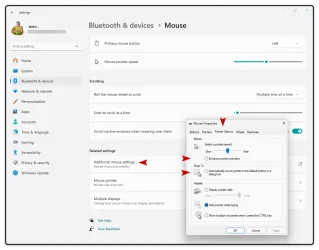
Tony, try this just to see if it makes a difference:
Open Windows Settings. Type in "Mouse" Select "Mouse settings" Select "Additional mouse settings" Select the "Pointer options" tab Disable"Enhance pointer precision"
Also disable"Automatically move pointer to the default button in a dialog box"
5 x LG 25MS500-B - 1 x 24MK430H-B - 1 x Wacom Pro 22" Touch Screen Tablet
Screen Resolution
All over the place
Hard Drives
Too many to list.
OS on Samsung 1TB 870 QVO SATA
PSU
Silverstone 1500
Case
NZXT Phantom 820 Full-Tower Case
Cooling
Noctua NH-D15 Elite Class Dual Tower CPU Cooler / 6 x EziDIY 120mm / 2 x Corsair 140mm somethings / 1 x 140mm Thermaltake something / 2 x 200mm Corsair.
HP EliteBook 840 14 inch G10 Notebook (BIOS HP V70 Ver. 01.11.00, 11/6/202)5
CPU
i7-1360p 2.20 GHz
Motherboard
HP Model 8B41 KBC Version 51.40.00
Memory
32 GB
Graphics Card(s)
Intel® Iris® Xe Graphics
Sound Card
Realtek High Definition Audio; Intel® Smart Sound Technology for Bluetooth® Audio; Intel® Smart Sound Technology for USB Audio Intel® Smart Sound Technology for Digital Microphones
Monitor(s) Displays
as outfitted
Screen Resolution
1920 x 1200 (as recommended)
Hard Drives
(1) Samsung SSD 990 EVO Plus 2TB; (2) external Samsung Portable SSD T5 Shield 8TB
Case
N/A
Cooling
as outfitted
Keyboard
integrated
Mouse
integrated touchpad
Internet Speed
800MB/sec up & down
Browser
Chrome
Antivirus
Malwarebytes
Other Info
Device name AWC-840
Processor 13th Gen Intel(R) Core(TM) i7-1360P 2.20 GHz
Installed RAM 32.0 GB (31.6 GB usable)
Product ID 00355-61334-62672-AAOEM
System type 64-bit operating system, x64-based processor
Pen and touch Touch support with 10 touch points