Solved Turning Off Memory Integrity HELP!!!


Local time
6:04 PM
Posts
2
Location
Cape Town
OS
Windows 11 25H2
Hello Windows 11 Lovers & Forumites.

I Am A PC Gamer I Have a Hewlett Packard OMEN 15 Gaming Laptop from 2018. I Went to Files RG AdGuard Last Night to Download & Install The September 2026 Release of Windows 11

I Have Updated Windows Defender Through Windows Update. However I Can't see an option in Windows Defender Core isolation to turn off Memory Integrity. I've Tried Using a Powershell Command as an Admin but it gives me error saying Registry entry NOT Found. I Did a Clean Install of Windows 11 Last Night.

Please!! Help. I am using Windows 11 Home so i can't Open Group Policy Editor.

I Am South African.
 
Windows Build/Version
Windows 11 25H2

My Computer My Computer

At a glance

Windows 11 25H2Intel Core i5 7300HQ 2.5 Ghz32 GB DDR4 2400MhzNVIDIA GeForce GTX 1050 4GB
OS
Windows 11 25H2
Computer type
Laptop
Manufacturer/Model
Hewlett Packard OMEN 15
CPU
Intel Core i5 7300HQ 2.5 Ghz
Motherboard
HP OMEN 15 Laptop
Memory
32 GB DDR4 2400Mhz
Graphics Card(s)
NVIDIA GeForce GTX 1050 4GB
Monitor(s) Displays
1080p HD Laptop Screen
Screen Resolution
1920 x 1080p HD
Hard Drives
1TB SSD NVME
Internet Speed
Octotel 300 Mbps Down / 200 Mbps Upload.

This link may be useful:


My Computer My Computer

At a glance

Windows 10Intel(R) Core(TM) i7-4800MQ CPU @ 2.70GHz16 GB Total: Manufacturer : Samsung MemoryTyp...NVIDIA Quadro K3100M; Intel(R) HD Graphics 4600
OS
Windows 10
Computer type
Laptop
Manufacturer/Model
HP
CPU
Intel(R) Core(TM) i7-4800MQ CPU @ 2.70GHz
Motherboard
Product : 190A Version : KBC Version 94.56
Memory
16 GB Total: Manufacturer : Samsung MemoryType : DDR3 FormFactor : SODIMM Capacity : 8GB Speed : 1600
Graphics Card(s)
NVIDIA Quadro K3100M; Intel(R) HD Graphics 4600
Sound Card
IDT High Definition Audio CODEC; PNP Device ID HDAUDIO\FUNC_01&VEN_111D&DEV_76E0
Hard Drives
Model Hitachi HTS727575A9E364
Antivirus
Microsoft Defender
Other Info
Mobile Workstation
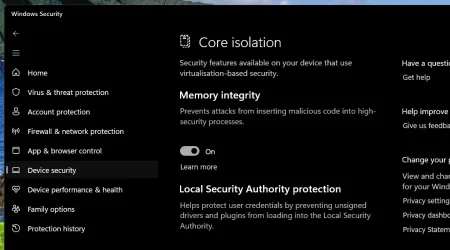
Please open Windows Security -> Device Security -> Core Isolation Details

There you have Memory Integrity ON, OFF button.

You can turn it off from there.

mem-integ.webp

It should be easy to turn it off. It is difficult to turn it on. I tried hard to turn it on because I had an incompatible driver in my system that prevented me from turning it on. I uninstalled the driver first, turned mem integrity on and then re-installed that driver.

This memory Integrity thing is useful. You must have good reasons to disable it.

Hope this helps.
 

My Computers My Computers

  • At a glance

    Windows 11 Pro build 26200.8524Intel i7-4790Teams DDR3-1600 4x4 GBMSI Nvidia GeForce GTX 1050Ti
    OS
    Windows 11 Pro build 26200.8524
    Computer type
    PC/Desktop
    Manufacturer/Model
    Home Built
    CPU
    Intel i7-4790
    Motherboard
    Asus H97 Pro Gamer with add-on TPM1.2 module
    Memory
    Teams DDR3-1600 4x4 GB
    Graphics Card(s)
    MSI Nvidia GeForce GTX 1050Ti
    Sound Card
    Realtek ALC1150
    Monitor(s) Displays
    Dell P2425D
    Screen Resolution
    2560 by 1440 pixels
    Hard Drives
    Corsair NVMe M.2 Core XT 1000 GB (Windows 11 v.25H2); Samsung SATA Evo 870 500 GB (Windows 11 v.25H2);
    PSU
    Corsair HX850
    Case
    Gigabyte Solo 210
    Cooling
    Zalman CNPS7X Tower
    Keyboard
    Microsoft AIO Wireless (includes touchpad)
    Mouse
    HP S1000 Plus Wireless
    Internet Speed
    500 Mb fiber optic
    Browser
    Chrome; MS Edge
    Antivirus
    Windows Defender
  • At a glance

    MacOS 12 MontereyIntel Core i58 GBIntel integrated
    Operating System
    MacOS 12 Monterey
    Computer type
    Laptop
    Manufacturer/Model
    Apple Macbook Air
    CPU
    Intel Core i5
    Memory
    8 GB
    Graphics card(s)
    Intel integrated
    Screen Resolution
    1440 by 900 pixels
    Hard Drives
    128 GB
    Keyboard
    Built-in
    Mouse
    Microsoft Wireless
    Internet Speed
    802.11 ac
    Browser
    Chrome; Safari
    Antivirus
    N/A
You have to have hardware virtualization enabled in BIOS for memory integrity. In fact, virtualization comes at a performance cost, so if you don't need it, leave it disabled.
 

My Computers My Computers

  • At a glance

    Windows 11 ProIntel Core i9 14900K 5800/4500 P/E96GB (2x48) G.skill Ripjaws 6800Asus ROG Strix 4070 Ti OC
    OS
    Windows 11 Pro
    Computer type
    PC/Desktop
    Manufacturer/Model
    DIY Photoshop/Audio/Game/tinker
    CPU
    Intel Core i9 14900K 5800/4500 P/E
    Motherboard
    Asus ROG Maximus Z790 Dark Hero
    Memory
    96GB (2x48) G.skill Ripjaws 6800
    Graphics Card(s)
    Asus ROG Strix 4070 Ti OC
    Sound Card
    B&W 606 S3 speakers; Audiolabs 7000a integrated amp; RSL 10S Mk2 sub
    Monitor(s) Displays
    Eizo CG2730 ColorEdge, ViewSonic VP2768
    Screen Resolution
    2560 x 1440 x 2
    Hard Drives
    nvme: 4TB WDC SN850X, 1TB SN850, 2TB SK-Hynix P41
    Spinners: Sabrent USB-C DS-SC5B 5-bay docking station, 6TB WDC Black, 6TB Ironwolf Pro 2x 2TB WDC Black
    PSU
    850W Seasonic Vertex PX-850
    Case
    FD North XL Mesh, Black Walnut
    Cooling
    EK Nucleus black 360 AIO w/Phanteks T30 fans; 2 Noctua NF-A14 Chromax ; T30 for memory
    Keyboard
    Keychron Q3 Max TKL w/GMK Redsuns Red Samuri keycaps
    Mouse
    Logitech G305 wireless gaming
    Internet Speed
    575 Mb/s down | 25 Mb/s up
    Browser
    Firefox
    Antivirus
    Defender, Macrium Reflect X
    Other Info
    Phangkey Amaterasu V2 Desk Mat
  • At a glance

    Apple M1
    Computer type
    Laptop
    Manufacturer/Model
    💻 Apple 13" Macbook Pro 2020 (m1)
    CPU
    Apple M1
    Screen Resolution
    2560x1600
    Browser
    Firefox
You have to have hardware virtualization enabled in BIOS for memory integrity. In fact, virtualization comes at a performance cost, so if you don't need it, leave it disabled.
For newer multi-player games, it's a mandatory security requirement in order to block cheating apps. Today's gamer is more likely to ask how to enable it, rather than turning it off for performance. They don't like it, but it's the rules now.
 

My Computer My Computer

At a glance

Windows 7
OS
Windows 7
However I Can't see an option in Windows Defender Core isolation to turn off Memory Integrity.

Is the memory integrity button greyed out? Does it say 'managed by administrator'? Please post a screenshot of what you're seeing.
 

My Computers My Computers

  • At a glance

    Win 11 Pro 26H2 26300.9550Intel® Core™ i7-14700KG.SKILL Ripjaws S5 Series 64GB (2 x 32GB) DDR5ASUS GeForce RTX 4070 Super 12GB
    OS
    Win 11 Pro 26H2 26300.9550
    Computer type
    PC/Desktop
    Manufacturer/Model
    Self Built
    CPU
    Intel® Core™ i7-14700K
    Motherboard
    ASUS TUF Z690-PLUS WIFI (BIOS 4505)
    Memory
    G.SKILL Ripjaws S5 Series 64GB (2 x 32GB) DDR5
    Graphics Card(s)
    ASUS GeForce RTX 4070 Super 12GB
    Sound Card
    Sound Blaster AE-5 Plus
    Monitor(s) Displays
    ASUS TUF Gaming 27" 2K HDR Gaming
    Screen Resolution
    2560 x 1440
    Hard Drives
    Samsung 990 Pro 1TB NVMe (Win 11 25H2)
    SK hynix P41 500GB NVMe
    SK hynix P41 2TB NVMe (x3)
    Crucial P3 Plus 4TB
    PSU
    Corsair RM850x Shift
    Case
    Antec Dark Phantom DP502 FLUX
    Cooling
    Corsair Nautilus 360 RS AIO
    Keyboard
    Logitech MK 320
    Mouse
    Razer Basilisk V3
    Internet Speed
    750Mbs
    Browser
    Firefox
    Antivirus
    Winows Security
    Other Info
    MR 8.1 Home
  • At a glance

    Win 11 Pro 25H2 26200.9550Intel Core i5-1140064 GB DDR4MSI GeForce RTX 3060 Ventus 2X 12GB
    Operating System
    Win 11 Pro 25H2 26200.9550
    Computer type
    PC/Desktop
    Manufacturer/Model
    Self Built
    CPU
    Intel Core i5-11400
    Motherboard
    Asus TUF Gaming Z590 Plus WiFi (BIOS 2803)
    Memory
    64 GB DDR4
    Graphics card(s)
    MSI GeForce RTX 3060 Ventus 2X 12GB
    Sound Card
    SoundBlaster Audigy Fx V2
    Monitor(s) Displays
    Samsung F27T350
    Screen Resolution
    1920x1080
    Hard Drives
    Samsung 980 Pro 1TB
    Samsung 970 EVO Plus 2TB
    Samsung 870 EVO 500GB SSD
    PSU
    Corsair HX750
    Case
    Cougar MX330-G Window
    Cooling
    Thermalright Frozen Edge 240 Black AIO
    Internet Speed
    350Mbps
    Browser
    Firefox
    Antivirus
    Windows Security
  • System Three
    Win 11 Pro 25H2 26200.9550
    ASUS PRIME Z370-P II BIOS 3004 7/12/21
    Intel Core i7-8700 CPU @ 3.20GHz
    32GB DDR4 RAM (4x8)
    EVGA RTX 2060 (used)
    iGPU Intel UHD Graphics 630 (backup)
    Cooler Master Hyper 212
    Mid-Tower Desktop
For newer multi-player games, it's a mandatory security requirement in order to block cheating apps. Today's gamer is more likely to ask how to enable it, rather than turning it off for performance. They don't like it, but it's the rules now.
I know. Thanks for bringing it up.
 

My Computers My Computers

  • At a glance

    Windows 11 ProIntel Core i9 14900K 5800/4500 P/E96GB (2x48) G.skill Ripjaws 6800Asus ROG Strix 4070 Ti OC
    OS
    Windows 11 Pro
    Computer type
    PC/Desktop
    Manufacturer/Model
    DIY Photoshop/Audio/Game/tinker
    CPU
    Intel Core i9 14900K 5800/4500 P/E
    Motherboard
    Asus ROG Maximus Z790 Dark Hero
    Memory
    96GB (2x48) G.skill Ripjaws 6800
    Graphics Card(s)
    Asus ROG Strix 4070 Ti OC
    Sound Card
    B&W 606 S3 speakers; Audiolabs 7000a integrated amp; RSL 10S Mk2 sub
    Monitor(s) Displays
    Eizo CG2730 ColorEdge, ViewSonic VP2768
    Screen Resolution
    2560 x 1440 x 2
    Hard Drives
    nvme: 4TB WDC SN850X, 1TB SN850, 2TB SK-Hynix P41
    Spinners: Sabrent USB-C DS-SC5B 5-bay docking station, 6TB WDC Black, 6TB Ironwolf Pro 2x 2TB WDC Black
    PSU
    850W Seasonic Vertex PX-850
    Case
    FD North XL Mesh, Black Walnut
    Cooling
    EK Nucleus black 360 AIO w/Phanteks T30 fans; 2 Noctua NF-A14 Chromax ; T30 for memory
    Keyboard
    Keychron Q3 Max TKL w/GMK Redsuns Red Samuri keycaps
    Mouse
    Logitech G305 wireless gaming
    Internet Speed
    575 Mb/s down | 25 Mb/s up
    Browser
    Firefox
    Antivirus
    Defender, Macrium Reflect X
    Other Info
    Phangkey Amaterasu V2 Desk Mat
  • At a glance

    Apple M1
    Computer type
    Laptop
    Manufacturer/Model
    💻 Apple 13" Macbook Pro 2020 (m1)
    CPU
    Apple M1
    Screen Resolution
    2560x1600
    Browser
    Firefox
Yeah i eventually Found out i have to enable Virtualization Technology in The BIOS.
 

My Computer My Computer

At a glance

Windows 11 25H2Intel Core i5 7300HQ 2.5 Ghz32 GB DDR4 2400MhzNVIDIA GeForce GTX 1050 4GB
OS
Windows 11 25H2
Computer type
Laptop
Manufacturer/Model
Hewlett Packard OMEN 15
CPU
Intel Core i5 7300HQ 2.5 Ghz
Motherboard
HP OMEN 15 Laptop
Memory
32 GB DDR4 2400Mhz
Graphics Card(s)
NVIDIA GeForce GTX 1050 4GB
Monitor(s) Displays
1080p HD Laptop Screen
Screen Resolution
1920 x 1080p HD
Hard Drives
1TB SSD NVME
Internet Speed
Octotel 300 Mbps Down / 200 Mbps Upload.
Back
Top Bottom