Two Screenshots folders in OneDrive ?


Basa

Member
Local time
7:27 PM
Posts
17
OS
Windows 11
Recently I realized this problem. I have one desktop PC (Win 11 25H2 26200.6901) and two laptops (Windows 10 22H2 19045.6456).
All three machines are connected via same OneDrive account and same Microsoft account. Each machine has Pictures folder and within it one Screenshots folder both in:

OneDrive-Personal\Pictures\Screenshots\
C:\Users\<My Name>\OneDrive\Pictures\Screenshots\

The content of Pictures and Screenshots are normally synced among all three machines via One Drive. Until recently every screenshot I took via Prnt Scrn key was made only on desktop PC while the option: "Save screenshots I capture to OneDrive" in OneDrive settings was off on both laptops. Yesterday I wanted to make a screenshot on a laptop. I switched on the option: "Save screenshots I capture to OneDrive" and made a screenshot. However, to my surprise, another Screenshot folder was made only containing this screenshot. Instead of going to existing and preferred folder every screenshot I take on laptops from now on are going to new Screenshots folder rather than in preferred previously existing one.
To cut a long story short, now I have two Screenshots folders. I would like to have only one which would be shared and synced among all three machines just like Pictures folder.
Just to mention that screenshots made on desktop are still going to preferred, previously existing folder.
Is this possible to fix ?


and is synced among desktop and both laptops.
 

My Computer

System One

  • OS
    Windows 11
    Computer type
    PC/Desktop
    Manufacturer/Model
    Custom
    CPU
    i7-9700k
    Motherboard
    Asus ROG Maximus X hero
    Memory
    32 GB
    Graphics Card(s)
    Asus 660 Ti
Try this:

On all 3 PCs turn off screenshot sync

In Onedrive (go to the webpage), delete the screenshot folder

Turn the Onedrive screenshot sync back on for all PCs

Take a screenshot on one pc to create the Onedrive folder automatically

Take a screenshot on a second pc and let me know if it worked or creates a second folder still
 

My Computer

System One

  • OS
    Windows 11 Pro
Thank You very much for Your response. English is not my native language, and I was not sure if I made myself clear trying to explain the problem.
Before I proceed with your instructions I would like to present some facts about this problem that I discovered in the meantime. On the basis of these findings may be you change your proposed actions?

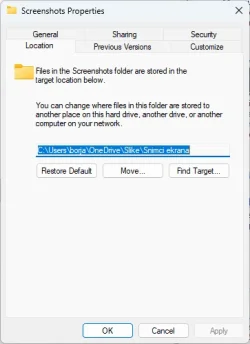
1. When I right click on each of two Screenshots folders and select Properties only one of them has Location tab an that is the previously existing and preferred one;

2. When I open run dialogue (Win + R) and type shell:Screenshots, Explorer opens one which has Location tab. As mentioned above the other Screenshots folder does not have Location tab;

3. The location of Screenshots folder on each of three PCs is as follows:
desktop: C:\Users\borja\OneDrive\slike\snimci ekrana
laptop 1: C:\Users\borja\OneDrive\slike\snimci ekrana
laptop 2: C:\Users\Basa\OneDrive\slike\snimci ekrana

I don't know why Windows or Microsoft 365 used Serbian (Latin) in this field instead of English (US): slike = pictures, snimci ekrana = screenshots ?

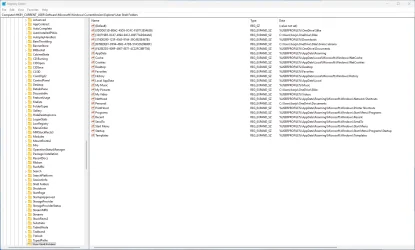
4. The same as above is the content of Screenshots GUID in registry for each of the three PCs respectively:
HKEY_CURRENT_USER\SOFTWARE\Microsoft\Windows\CurrentVersion\Explorer\User Shell Folders\{B7BEDE81-DF94-4682-A7D8-57A52620B86F}

5. It is obvious that <user name> "borja" (first five characters of my last name) is different from user name "Basa" on laptop 2. However the same is true for Pictures folder and it does not make problems as there is only one Pictures folder on all three PCs;

6. How is it possible to store two folders with the same name (Screenshots) as subfolders of one parent folder (Pictures)?
 

My Computer

System One

  • OS
    Windows 11
    Computer type
    PC/Desktop
    Manufacturer/Model
    Custom
    CPU
    i7-9700k
    Motherboard
    Asus ROG Maximus X hero
    Memory
    32 GB
    Graphics Card(s)
    Asus 660 Ti
Here are some screenshots I made on desktop PC.
 

Attachments

  • Screenshot 2025-10-28 110603.webp
    Screenshot 2025-10-28 110603.webp
    16.6 KB · Views: 1
  • Screenshot 2025-10-28 110744.webp
    Screenshot 2025-10-28 110744.webp
    157.9 KB · Views: 2

My Computer

System One

  • OS
    Windows 11
    Computer type
    PC/Desktop
    Manufacturer/Model
    Custom
    CPU
    i7-9700k
    Motherboard
    Asus ROG Maximus X hero
    Memory
    32 GB
    Graphics Card(s)
    Asus 660 Ti
3. The location of Screenshots folder on each of three PCs is as follows:
desktop: C:\Users\borja\OneDrive\slike\snimci ekrana
laptop 1: C:\Users\borja\OneDrive\slike\snimci ekrana
laptop 2: C:\Users\Basa\OneDrive\slike\snimci ekrana

5. It is obvious that <user name> "borja" (first five characters of my last name) is different from user name "Basa" on laptop 2. However the same is true for Pictures folder and it does not make problems as there is only one Pictures folder on all three PCs;
ok, so is the one with Basa using a Microsoft account and the other two are using Local accounts? just determining the paths there
 

My Computer

System One

  • OS
    Windows 11 Pro
ok, so is the one with Basa using a Microsoft account and the other two are using Local accounts? just determining the paths there
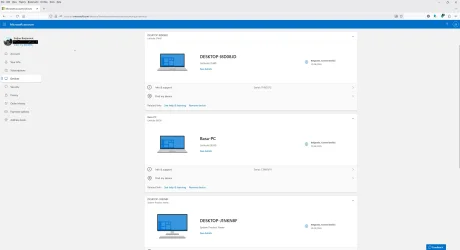
No, all three PCs are tied via Microsoft account (attachment). Documents and Pictures are syncing properly. It is only when I take a screenshot on the laptop it goes to a new Screenshot folder (without location in properties) instead of preferred and previously existing Screenshot folder. FYI on the attached screenshot of MS account (from top to bottom):

Dell Latitude E7440 (laptop 1): C:\Users\borja\OneDrive\slike\snimci ekrana
Dell Latitude E6530 (laptop 2): C:\Users\Basa\OneDrive\slike\snimci ekrana
Desktop-J1NKN8F: C:\Users\borja\OneDrive\slike\snimci ekrana

I don't know why the laptop 2 has different <user name> "Basa" instead of borja - first five characters from last name? It is the oldest one which originally came with Windows 7 factory installed. It is possible that there were an installation of Office prior to Microsoft 365.
 

Attachments

  • Screenshot 2025-10-28 162338.webp
    Screenshot 2025-10-28 162338.webp
    58.5 KB · Views: 1

My Computer

System One

  • OS
    Windows 11
    Computer type
    PC/Desktop
    Manufacturer/Model
    Custom
    CPU
    i7-9700k
    Motherboard
    Asus ROG Maximus X hero
    Memory
    32 GB
    Graphics Card(s)
    Asus 660 Ti
so that screenshot shows the PC names, not user names, but you've also listed the C:\Users paths and that one still shows the username is different as well. its hard telling. when signing into a Microsoft account, it will typically create a user profile folder with the first 5 characters of the email address, but that shouldnt alter the onedrive path. nevertheless, now that its becoming more clear, what the issue is, it is only 1 laptop (the one with username Basa) that is creating the new folder, correct? the other two are saving to the same synced folder?
 

My Computer

System One

  • OS
    Windows 11 Pro
To determine which one of the two laptops creates additional Screenshot folder (one without location tab) I did the following:

1. removed and backed up screenshots from that folder,
2. disabled (set to Off) the option: "Save screenshots I capture to OneDrive" in OneDrive settings - sync and backup tab on both laptops,
3. deleted additional Screenshots folder (both local folder and in cloud),
4. enabled the option from step 2 on a laptop (one by one, followed with a screenshot) to see which one creates additional Screenshots folder,
5. when I take a screenshot on either of the two laptops, an additional screenshot folder is created and synced among both laptops and desktop,
6. whenever I take a screenshot on either of the two laptops it goes to that additional screenshots folder. However, when I take a screenshot on a desktop it goes to previously existing screenshots folder,
7. So only screenshots I take on either of the two laptops go into that new Screenshots folder.
8. Could this be normal?
 

My Computer

System One

  • OS
    Windows 11
    Computer type
    PC/Desktop
    Manufacturer/Model
    Custom
    CPU
    i7-9700k
    Motherboard
    Asus ROG Maximus X hero
    Memory
    32 GB
    Graphics Card(s)
    Asus 660 Ti
on the desktop

1) is the screenshots folder still set to the default location or did you move it?
if needed:

2) if it is still default, or after you restore the default location - Right-click the OneDrive tray icon > Click on Settings > Account tab > Unlink this PC > Re-linking the pc to the correct OneDrive folder location
 

My Computer

System One

  • OS
    Windows 11 Pro
Answer to 1) and 2)

1) No, I have neither changed the default location nor moved it to another place,

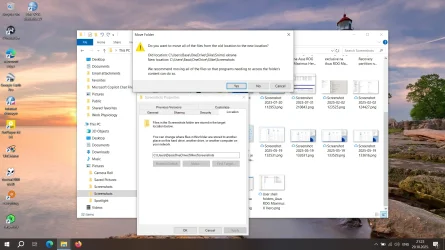
2) However, Microsoft made a mess with a mixture of Serbian and English in folder names. Please see the attachment. If I click on Restore defaults for location of Screenshots folder on laptop 2 (with Basa as user name) and click Apply, a warning pops up that it is recommended to move all the files from
old location: C:\Users\Basa\OneDrive\slike\snimci ekrana
to new location: C:\Users\Basa\OneDrive\slike\Screenshots
In Serbian "snimci ekrana" = Screenshots (English). In Serbian "slike" = "pictures" (English).
If I accept and click Yes, then command shell:screenshots returns the error about unknown command what is nonsense as I did not make typo ???
I suppose that User shell folders in registry need to be changed also to reflect new folder location name ?
I reverted back by merging previously exported reg key. Thanks God that I had done that on time and before the problem arose.
 

Attachments

  • 2025-10-29 (15).webp
    2025-10-29 (15).webp
    209.2 KB · Views: 1

My Computer

System One

  • OS
    Windows 11
    Computer type
    PC/Desktop
    Manufacturer/Model
    Custom
    CPU
    i7-9700k
    Motherboard
    Asus ROG Maximus X hero
    Memory
    32 GB
    Graphics Card(s)
    Asus 660 Ti
keep your backups.

after changing the location to default, reboot and try shell:screenshots again

if that doesnt work, run command prompt as admin:

Code:
reg add "HKCU\Software\Microsoft\Windows\CurrentVersion\Explorer\User Shell Folders" /v "My Pictures" /t REG_EXPAND_SZ /d "%USERPROFILE%\OneDrive\slike\Screenshots" /f

reboot and try shell:screenshots again
 

My Computer

System One

  • OS
    Windows 11 Pro

Latest Support Threads

Back
Top Bottom