Recently I realized this problem. I have one desktop PC (Win 11 25H2 26200.6901) and two laptops (Windows 10 22H2 19045.6456).
All three machines are connected via same OneDrive account and same Microsoft account. Each machine has Pictures folder and within it one Screenshots folder both in:
OneDrive-Personal\Pictures\Screenshots\
C:\Users\<My Name>\OneDrive\Pictures\Screenshots\
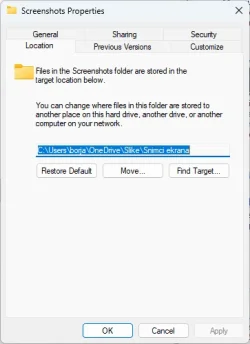
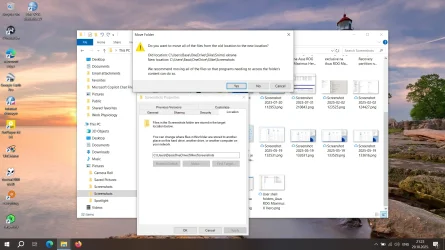
The content of Pictures and Screenshots are normally synced among all three machines via One Drive. Until recently every screenshot I took via Prnt Scrn key was made only on desktop PC while the option: "Save screenshots I capture to OneDrive" in OneDrive settings was off on both laptops. Yesterday I wanted to make a screenshot on a laptop. I switched on the option: "Save screenshots I capture to OneDrive" and made a screenshot. However, to my surprise, another Screenshot folder was made only containing this screenshot. Instead of going to existing and preferred folder every screenshot I take on laptops from now on are going to new Screenshots folder rather than in preferred previously existing one.
To cut a long story short, now I have two Screenshots folders. I would like to have only one which would be shared and synced among all three machines just like Pictures folder.
Just to mention that screenshots made on desktop are still going to preferred, previously existing folder.
Is this possible to fix ?
and is synced among desktop and both laptops.
All three machines are connected via same OneDrive account and same Microsoft account. Each machine has Pictures folder and within it one Screenshots folder both in:
OneDrive-Personal\Pictures\Screenshots\
C:\Users\<My Name>\OneDrive\Pictures\Screenshots\
The content of Pictures and Screenshots are normally synced among all three machines via One Drive. Until recently every screenshot I took via Prnt Scrn key was made only on desktop PC while the option: "Save screenshots I capture to OneDrive" in OneDrive settings was off on both laptops. Yesterday I wanted to make a screenshot on a laptop. I switched on the option: "Save screenshots I capture to OneDrive" and made a screenshot. However, to my surprise, another Screenshot folder was made only containing this screenshot. Instead of going to existing and preferred folder every screenshot I take on laptops from now on are going to new Screenshots folder rather than in preferred previously existing one.
To cut a long story short, now I have two Screenshots folders. I would like to have only one which would be shared and synced among all three machines just like Pictures folder.
Just to mention that screenshots made on desktop are still going to preferred, previously existing folder.
Is this possible to fix ?
and is synced among desktop and both laptops.
My Computer
At a glance
Windows 11i7-9700k32 GBAsus 660 Ti
- OS
- Windows 11
- Computer type
- PC/Desktop
- Manufacturer/Model
- Custom
- CPU
- i7-9700k
- Motherboard
- Asus ROG Maximus X hero
- Memory
- 32 GB
- Graphics Card(s)
- Asus 660 Ti