- Local time
- 9:15 PM
- Posts
- 109
- OS
- windows 11 home 23H2 22631.6199
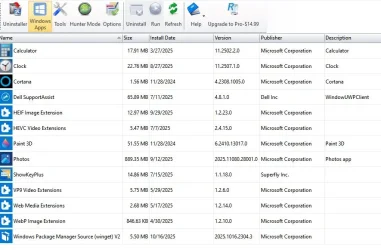
I didn't install anything special on mine. I just followed what he was saying and the uninstall option just appeared when I right-clicked. But it looks like that's not the way to do it permanently after all.
FWIW, I did a Google search about this and came across a Reddit thread about it. Someone there posted something for a solution. I don't understand it, but replies seem to indicate that it was a success. Here's what they said:
FYI, if you do the following (including the wildcard) in a Powershell prompt, you'll remove all versions of the product installed for all users and it won't reprovision.
Get-appxprovisionedpackage –online | where-object {$_.packagename –like '*Microsoft3DViewer*'} | remove-appxprovisionedpackage –online
Get-appxpackage -allusers *Microsoft3DViewer* | Remove-AppxPackage -allusers
 i have no idea what op talking about i will make deeper research.
@idgat hi i have used Revo uninstaller in past, i find that programme really useful. I kinda know how to use, can it remove phone link in 25h2 version? u know new update just introduced new phone feature in start menu.
My Computers
-
At a glance
windows 11 home 23H2 22631.6199Intel core i7 (2nd gen) Turbo 3.10 ghz6gbAmd Radeon HD 7400m 1GB & Intel hd graphics- OS
- windows 11 home 23H2 22631.6199
- Computer type
- Laptop
- Manufacturer/Model
- HP
- CPU
- Intel core i7 (2nd gen) Turbo 3.10 ghz
- Memory
- 6gb
- Graphics Card(s)
- Amd Radeon HD 7400m 1GB & Intel hd graphics
- Sound Card
- BeatsAudio
- Hard Drives
- 128gb SSD
-
At a glance
macOS SequoiaM1 3.2 ghz8gb onboardigpu- Operating System
- macOS Sequoia
- Computer type
- PC/Desktop
- Manufacturer/Model
- iMac 24"
- CPU
- M1 3.2 ghz
- Memory
- 8gb onboard
- Graphics card(s)
- igpu
- Monitor(s) Displays
- Retina 4.5K
- Screen Resolution
- 4480x2520
- Hard Drives
- 512gb SSD