Unsupported processor - Intel i7 7700HQ


Arpeggio Phil

New member
Local time
3:27 PM
Posts
2
OS
Windows 11
I have just upgraded my desktop to Windows 11 and would like to upgrade my laptop so I am not using different OS. It is a Dell XPS15 with Windows 10 Pro 21H2
PC Health check says:
- PC supports Secure Boot
- TPM 2.0 enabled
- 16GB of memory installed
- 512 GB of storage (SSD)
- Processor has 4 cores

All good but it also says the processor is unsupported
I have an Intel Core i7-7700HQ CPU @ 2.8 GHz

According to the "supported processors" list the nearest seems to be:
i7-7800X
i7-7820HQ[1]
i7-7820X

I would have thought that the machine is quite powerful enough to run Windows 11 but can I make the upgrade with an unsupported processor?
 
Windows Build/Version
Windows 10 Pro 21H2

My Computer My Computer

At a glance

Windows 1111th Gen Intel(R) Core(TM) i5-11400 @ 2.60GHz16.0 GB
OS
Windows 11
Computer type
PC/Desktop
Manufacturer/Model
Bespoke
CPU
11th Gen Intel(R) Core(TM) i5-11400 @ 2.60GHz
Motherboard
AS-Rok B560M-HDV
Memory
16.0 GB
Monitor(s) Displays
Dell U2715H
Screen Resolution
2560 x 1440
Hard Drives
500 GB SSD
1 TB SSD
Keyboard
Logitech Wireless Combo
Mouse
Logitech Wireless Combo
Internet Speed
150 M/bit
Antivirus
ESET Internet Security
I managed to get my i7-7700K to run Windows 11 - it took a bit of work searching various sites but it ended up using a new Windows 11 USB and replacing a single file with a previous version which prevented the system check. Sadly, I can't remember all of the details, now, of course but do a search and you should be lucky!
 

My Computer My Computer

At a glance

Windows 11Intel i7-7700K32GBNVIDIA GTX 1070
OS
Windows 11
Computer type
PC/Desktop
Manufacturer/Model
ViBox
CPU
Intel i7-7700K
Motherboard
Gigabyte Z270-Gaming K3
Memory
32GB
Graphics Card(s)
NVIDIA GTX 1070
Sound Card
On-board Realtek
Monitor(s) Displays
Dell
Screen Resolution
1920*1080
Hard Drives
1 Kingston 240GB SSD
2 * Seagate 2TB
1 * Toshiba 2TB
PSU
EVGA 750
Cooling
Air
Keyboard
Cherry Stream
Mouse
Cherry Stream
Internet Speed
250Mbps
Browser
Edge
Antivirus
ZoneAlarm
Welcome to the forum. It's not the power of the machine that determines whether the hardware is on Microsoft's supported processor list. Many older machines have hardware that runs more powerful than some of the ones MS considers supported. With the exception of the 3 7th generation core processors you listed, MS considers 8th generation CPU and above as supported.
You can use find several methods across the web how to install Windows 11 on your 7th generation CPU. One can alter the registry during install or use Rufus to make bootable media that bypasses the restrictions. Do a web search for "How to install Windows 11 on unsupported hardware" or "Install Windows 11 on unsupported hardware using Rufus".
I have found the Rufus method the easiest and most straightforward.

Another method is using the Github tool.

EDIT to add @Ghot instructions got using Github tool
 
Last edited:

My Computers My Computers

  • At a glance

    Windows 11 Pro 25H2 26200.8655i9-10900 10 core 20 threads32 gbnone-Intel UHD Graphics 630
    OS
    Windows 11 Pro 25H2 26200.8655
    Computer type
    PC/Desktop
    Manufacturer/Model
    Dell Optiplex 7080
    CPU
    i9-10900 10 core 20 threads
    Motherboard
    DELL 0J37VM
    Memory
    32 gb
    Graphics Card(s)
    none-Intel UHD Graphics 630
    Sound Card
    Integrated Realtek
    Monitor(s) Displays
    Benq 27
    Screen Resolution
    2560x1440
    Hard Drives
    2x1tb Solidigm m.2 nvme /External drives 512gb Samsung m.2 sata+2tb Kingston m2.nvme
    PSU
    500w
    Case
    MT
    Cooling
    Dell Premium
    Keyboard
    Logitech wired
    Mouse
    Logitech wireless
    Internet Speed
    so slow I'm too embarrassed to tell
    Browser
    #1 Edge #2 Firefox
    Antivirus
    Defender+MWB Premium
  • At a glance

    Windows 11 Pro 24H2 26200.8457AMD Ryzen 7 6800U32 gbintegrated
    Operating System
    Windows 11 Pro 24H2 26200.8457
    Computer type
    PC/Desktop
    Manufacturer/Model
    Beelink Mini PC SER5
    CPU
    AMD Ryzen 7 6800U
    Memory
    32 gb
    Graphics card(s)
    integrated
    Sound Card
    integrated
    Monitor(s) Displays
    Benq 27
    Screen Resolution
    2560x1440
    Hard Drives
    1TB Crucial nvme
    Keyboard
    Logitech wired
    Mouse
    Logitech wireless
    Internet Speed
    still too embarrassed to tell
    Browser
    Firefox
    Antivirus
    Defender
    Other Info
    System 3 is non compliant Dell 9020 i7-4770/24gb ram Win11 PRO 26200.8457
I had an i7-7700k running Win11. It's relativity easy with a simple reg hack - plenty of info on the web about bypassing TPM and CPU checks. It ran well although MSoft have mentioned or threatened on more than one occasion they will get round to 'outlawing' the bypass hack. So far though nothing's materialized so probably just more hot air coming from MS Towers.

Downloaded the Win 11 ISO using the media creation tool - mounted the ISO in explorer and ran the set up file.

It's crazy in my book to bin a perfectly good CPU which is still a great processor in 2023.
 

My Computers My Computers

  • At a glance

    Win11 Pro 24H2i5 1250032GBIntel CPU integrated
    OS
    Win11 Pro 24H2
    Computer type
    PC/Desktop
    Manufacturer/Model
    Lenovo M90q
    CPU
    i5 12500
    Motherboard
    Lenovo
    Memory
    32GB
    Graphics Card(s)
    Intel CPU integrated
    Sound Card
    Intel MB intergrated
    Monitor(s) Displays
    Dell 4k IPS
    Screen Resolution
    3840 x 2160
    Hard Drives
    500GB NVMe Samsung 980 Pro
    2 TB NVMe Samsung 990 Pro
    1 TB Crucial MX500
    PSU
    Lenovo
    Case
    Lenovo
    Cooling
    Air
    Keyboard
    Logitech BT
    Mouse
    Logitech BT
    Internet Speed
    FTTP
    Browser
    Firefox
    Antivirus
    MS Defender and Malwarebytes
  • At a glance

    Win 11 Proi5-1135G716GBIntel Iris XE
    Operating System
    Win 11 Pro
    Computer type
    Laptop
    Manufacturer/Model
    Surface Pro 8
    CPU
    i5-1135G7
    Motherboard
    MS
    Memory
    16GB
    Graphics card(s)
    Intel Iris XE
    Sound Card
    ATI/AMD Renoir
    Monitor(s) Displays
    UHD
    Screen Resolution
    2880 x 1920
    Hard Drives
    2TB NVMe
    PSU
    MS
    Case
    Microsoft
    Cooling
    Air
    Keyboard
    Built In
    Mouse
    Touchpad
    Internet Speed
    FTTP
    Browser
    Firefox
    Antivirus
    MS Defender and Malwarebytes
All good but it also says the processor is unsupported
I have an Intel Core i7-7700HQ CPU @ 2.8 GHz

According to the "supported processors" list the nearest seems to be:
i7-7800X
i7-7820HQ[1]
i7-7820X

I would have thought that the machine is quite powerful enough to run Windows 11 but can I make the upgrade with an unsupported processor?
Welcome to Eleven Forum.

There are only a very few 7th gen Intel processors on the supported list, but yours isn't one of them. Almost all 7th gen, and all 6th gen or earlier are unsupported.

It is quite possible to upgrade an unsupported device to windows 11 but you'll need to employ one of the workaraounds you'll find elsewhere on this site. There's always a small risk that MS may one day stop providing updates to unsupported devices, but that hasn't happened yet. My System Two in My Computers below is running 11 on a 1st gen Intel i5 and continues to get all cumulative updates through windows Update.
 

My Computers My Computers

  • At a glance

    Windows 11 HomeAMD Athlon Silver 3050U8GBRadeon Graphics
    OS
    Windows 11 Home
    Computer type
    Laptop
    Manufacturer/Model
    Acer Aspire 3 A315-23-R9VY
    CPU
    AMD Athlon Silver 3050U
    Memory
    8GB
    Graphics Card(s)
    Radeon Graphics
    Monitor(s) Displays
    laptop screen
    Screen Resolution
    1366x768 native resolution, up to 2560x1440 with Radeon Virtual Super Resolution
    Hard Drives
    1TB Samsung EVO 870 SSD (from April 2026: 250GB EVO 850)
    Internet Speed
    150 Mbps
    Browser
    Edge, Firefox
    Antivirus
    Defender
    Other Info
    fully 'Windows 11 ready' laptop. Windows 10 C: partition migrated from my old unsupported 'main machine' then upgraded to 11. A test migration ran Insider builds for 2 months. When 11 was released on 5th October 2021 it was re-imaged back to 10 and was offered the upgrade in Windows Update on 20th October. Windows Update offered the 22H2 Feature Update on 20th September 2022. It got the 23H2 Feature Update on 4th November 2023 through Windows Update, 24H2 on 3rd October 2024 through Windows Update by setting the Target Release Version for 24H2, and 25H2 on 30th September 2025 through Windows Update by setting the Target Release Version for 25H2.

    UPDATE - 11 April 2026: due to mechanical deterioration this PC has been retired from active duty. The OS with all software and files has been migrated to my System Seven in 'Other systems' to carry on as my general purpose 'main machine'.
  • At a glance

    Windows 11 ProIntel® Core™ i5-520M8GB(integrated graphics) Intel HD Graphics
    Operating System
    Windows 11 Pro
    Computer type
    Laptop
    Manufacturer/Model
    Dell Latitude E4310
    CPU
    Intel® Core™ i5-520M
    Motherboard
    0T6M8G
    Memory
    8GB
    Graphics card(s)
    (integrated graphics) Intel HD Graphics
    Screen Resolution
    1366x768
    Hard Drives
    500GB Crucial MX500 SSD
    Browser
    Firefox, Edge
    Antivirus
    Defender
    Other Info
    unsupported machine: Legacy bios, MBR, TPM 1.2, upgraded from W10 to W11 using W10/W11 hybrid install media workaround.

    In-place upgrade to 22H2 using ISO and a workaround.
    Feature Update to 23H2 by manually installing the Enablement Package.
    In-place upgrade to 24H2 using hybrid 23H2/24H2 install media.
    Upgraded to 25H2 by Enablement Package.

    Also running Insider Dev, and Canary builds and Windows 10 as native boot .vhdx.
  • My SYSTEM THREE is a Dell Latitude 5410, i7-10610U, 32GB RAM, 512GB NVMe ssd, supported device running Windows 11 Pro.

    My SYSTEM FOUR is a 2-in-1 convertible Lenovo Yoga 11e 20DA, Celeron N2930, 8GB RAM, 256GB ssd. Unsupported device: currently running Win10 Pro, plus Win11 Pro RTM and Insider Dev, Beta, and RP 24H2 as native boot vhdx.

    My SYSTEM FIVE is a Dell Latitude 3190 2-in-1, Pentium Silver N5030, 8GB RAM, 1TB NVMe ssd, supported device running Windows 11 Pro, plus Insider Beta, Dev, and Canary builds (and a few others) as a native boot .vhdx.

    My SYSTEM SIX is a Dell Latitude 5550, Core Ultra 7 165H, 64GB RAM, 1TB NVMe SSD, supported device, Windows 11 Pro 24H2, Hyper-V host machine. Updated to 25H2 on 30th September 2025.

    My SYSTEM SEVEN is a Lenovo Thinkpad T580, Intel Core i7-8650U, 16GB RAM, 512GB NVMe SSD + 2nd 512GB NVMe SSD, a supported device for Windows 11. This is my current general purpose 'main machine'. The installed Windows 11 Home from my System One has been migrated to this machine.

My Computer My Computer

At a glance

Windows 11 Pro 25H2AMD Ryzen™ 7 6800H 3.2-4.7 GHz32 GB DDR5 4800MHz Dual Channel CrucialNVIDIA GeForce RTX™ 3050
OS
Windows 11 Pro 25H2
Computer type
Laptop
Manufacturer/Model
ASUS ROG STRIX G513RC
CPU
AMD Ryzen™ 7 6800H 3.2-4.7 GHz
Memory
32 GB DDR5 4800MHz Dual Channel Crucial
Graphics Card(s)
NVIDIA GeForce RTX™ 3050
Monitor(s) Displays
15.6 inches FHD (1920 x 1080) IPS Display
Hard Drives
Crucial T500 2TB
Western Digital Black SN770 2TB
Keyboard
RGB Keyboard
Many thanks for all your responses. I will do some research on these and give it a try.
Cheers, Phil
 

My Computer My Computer

At a glance

Windows 1111th Gen Intel(R) Core(TM) i5-11400 @ 2.60GHz16.0 GB
OS
Windows 11
Computer type
PC/Desktop
Manufacturer/Model
Bespoke
CPU
11th Gen Intel(R) Core(TM) i5-11400 @ 2.60GHz
Motherboard
AS-Rok B560M-HDV
Memory
16.0 GB
Monitor(s) Displays
Dell U2715H
Screen Resolution
2560 x 1440
Hard Drives
500 GB SSD
1 TB SSD
Keyboard
Logitech Wireless Combo
Mouse
Logitech Wireless Combo
Internet Speed
150 M/bit
Antivirus
ESET Internet Security
Many thanks for all your responses. I will do some research on these and give it a try.
Cheers, Phil
If you do proceed please remember to report back as it may be of assistance to other forum members.
 

My Computers My Computers

  • At a glance

    Win11 Pro 24H2i5 1250032GBIntel CPU integrated
    OS
    Win11 Pro 24H2
    Computer type
    PC/Desktop
    Manufacturer/Model
    Lenovo M90q
    CPU
    i5 12500
    Motherboard
    Lenovo
    Memory
    32GB
    Graphics Card(s)
    Intel CPU integrated
    Sound Card
    Intel MB intergrated
    Monitor(s) Displays
    Dell 4k IPS
    Screen Resolution
    3840 x 2160
    Hard Drives
    500GB NVMe Samsung 980 Pro
    2 TB NVMe Samsung 990 Pro
    1 TB Crucial MX500
    PSU
    Lenovo
    Case
    Lenovo
    Cooling
    Air
    Keyboard
    Logitech BT
    Mouse
    Logitech BT
    Internet Speed
    FTTP
    Browser
    Firefox
    Antivirus
    MS Defender and Malwarebytes
  • At a glance

    Win 11 Proi5-1135G716GBIntel Iris XE
    Operating System
    Win 11 Pro
    Computer type
    Laptop
    Manufacturer/Model
    Surface Pro 8
    CPU
    i5-1135G7
    Motherboard
    MS
    Memory
    16GB
    Graphics card(s)
    Intel Iris XE
    Sound Card
    ATI/AMD Renoir
    Monitor(s) Displays
    UHD
    Screen Resolution
    2880 x 1920
    Hard Drives
    2TB NVMe
    PSU
    MS
    Case
    Microsoft
    Cooling
    Air
    Keyboard
    Built In
    Mouse
    Touchpad
    Internet Speed
    FTTP
    Browser
    Firefox
    Antivirus
    MS Defender and Malwarebytes

My Computers My Computers

  • At a glance

    Windows 11 Pro 23H2 (5699), 25H2 (8655)Mobile DualCore Intel Core 2 Duo T7250, 2000 MHz4GBMobile Intel(R) GMA 4500M (Mobile 4 series)
    OS
    Windows 11 Pro 23H2 (5699), 25H2 (8655)
    Computer type
    Laptop
    Manufacturer/Model
    Acer Extensa 5630EZ
    CPU
    Mobile DualCore Intel Core 2 Duo T7250, 2000 MHz
    Motherboard
    Acer Extensa 5630
    Memory
    4GB
    Graphics Card(s)
    Mobile Intel(R) GMA 4500M (Mobile 4 series)
    Sound Card
    Realtek ALC268 @ Intel 82801IB ICH9 - High Definition Audio Controller
    Monitor(s) Displays
    1
    Screen Resolution
    1280x800
    Hard Drives
    Samsung SSD 850 EVO 250GB SATA Device (250 GB, SATA-III)
    Internet Speed
    VDSL 50 Mbps
    Browser
    MICROSOFT EDGE
    Antivirus
    WINDOWS DEFENDER
    Other Info
    Legacy MBR installation, no TPM, no Secure Boot, no WDDM 2.0 graphics drivers, no SSE4.2, cannot get more unsupported ;) This is only my test laptop. I had installed Windows 11 here before upgrading my main PC. For my main PC I use everyday see my 2nd system specs.
  • At a glance

    Windows 11 Pro v25H2 (build 26200.8655)Intel Core-i7 3770 3.40GHz s1155 (3rd generat...2x Kingston Hyper-X Blu 8GB DDR3-1600GIGABYTE GeForce RTX 3050 WINDFORCE OC V2 6GB...
    Operating System
    Windows 11 Pro v25H2 (build 26200.8655)
    Computer type
    PC/Desktop
    Manufacturer/Model
    Custom-built PC
    CPU
    Intel Core-i7 3770 3.40GHz s1155 (3rd generation)
    Motherboard
    Asus P8H61 s1155 ATX
    Memory
    2x Kingston Hyper-X Blu 8GB DDR3-1600
    Graphics card(s)
    GIGABYTE GeForce RTX 3050 WINDFORCE OC V2 6GB (GV-N3050WF2OCV2-6GD)
    Sound Card
    Realtek HD audio (ALC887)
    Monitor(s) Displays
    Sony Bravia KDL-19L4000 19" LCD TV via VGA
    Screen Resolution
    1440x900 32-bit 60Hz
    Hard Drives
    WD Blue SA510 2.5 1000GB SSD as system disk, Western Digital Caviar Purple 4TB SATA III (WD40PURZ) as second
    PSU
    Thermaltake Litepower RGB 550W Full Wired
    Case
    SUPERCASE MIDI-TOWER
    Cooling
    Deepcool Gamma Archer CPU cooler, 1x 8cm fan at the back
    Keyboard
    Mitsumi 101-key PS/2
    Mouse
    Sunnyline OptiEye PS/2
    Internet Speed
    100Mbps
    Browser
    Microsoft Edge, Mozilla Firefox
    Antivirus
    Microsoft Windows Defender
    Other Info
    Legacy BIOS (MBR) installation, no TPM, no Secure Boot, WDDM 3.0 graphics drivers, WEI score 7.4
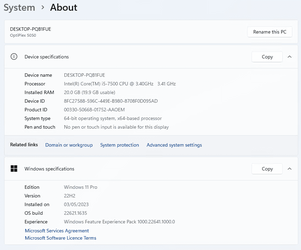
I recently "deliberately" bought very, very cheap DELL Optiplex 5050 (7th Gen Internals), purely for Windows 11 tinkering.

Bought this box, as it had TPM2.0, original CPU was i3-7100.
I addedd 16gb mem, then installed Win 11 via downloaded iso/Rufus.

Disabled all Rufus Win 11 patching.
Windows 11 installed without hitch, then performed updates, and upgraded CPU to i5-7500, still no problem.
If this machine still updates as normal within 1x months time, I'll start selling 7th Gen Dell machines, with Win 11. :LOL:
 

Attachments

  • Screenshot 2023-05-04 at 10.34.47.png
    Screenshot 2023-05-04 at 10.34.47.png
    79 KB · Views: 4
Last edited:

My Computers My Computers

  • At a glance

    Fedora/KDE Plasma F43Xeon 2667 v448GB ECC DDR4nVidia GTX 1650
    OS
    Fedora/KDE Plasma F43
    Computer type
    PC/Desktop
    Manufacturer/Model
    HP Z640
    CPU
    Xeon 2667 v4
    Motherboard
    Xeon V4 Motherboard
    Memory
    48GB ECC DDR4
    Graphics Card(s)
    nVidia GTX 1650
    Monitor(s) Displays
    LG 27"
    Screen Resolution
    1920x1080@144hz
    Hard Drives
    NVME, SSD
    PSU
    850W
  • At a glance

    Windows 11 IOT Enterprise LTSC/RHEL 10.1 KDE ...Intel Xeom 2680 V464gb DDR4 ECCAMD RX560
    Operating System
    Windows 11 IOT Enterprise LTSC/RHEL 10.1 KDE Plasma
    Computer type
    PC/Desktop
    Manufacturer/Model
    HP Z440
    CPU
    Intel Xeom 2680 V4
    Motherboard
    HP Z440
    Memory
    64gb DDR4 ECC
    Graphics card(s)
    AMD RX560
    Monitor(s) Displays
    LG Gsync 27" 144hz
    Screen Resolution
    1920x1080@144hz
    Hard Drives
    SSD/nVme/HDD
    PSU
    standard 700W
    Case
    standard
    Cooling
    Standard
    Browser
    MS Edge
    Antivirus
    BitDefender
If this machine still updates as normal within 1x months time, I'll start selling 7th Gen Dell machines, with Win 11. :LOL:
Welcome to Eleven Forum.

I have had both supported and unsupported devices running Windows 11 since version 21H2 was launched. Unsupported devices got all the same cumulative updates as the supported ones did.

What you need to know is that an unsupported device will never be offered the Feature Update to the next version of Windows 11 through Windows Update. When version 22H2 was released all my supported devices got upgraded through Windows Update. None of the unsupported devices were offered it, I had to download the ISO and manually upgrade them myself.
 

My Computers My Computers

  • At a glance

    Windows 11 HomeAMD Athlon Silver 3050U8GBRadeon Graphics
    OS
    Windows 11 Home
    Computer type
    Laptop
    Manufacturer/Model
    Acer Aspire 3 A315-23-R9VY
    CPU
    AMD Athlon Silver 3050U
    Memory
    8GB
    Graphics Card(s)
    Radeon Graphics
    Monitor(s) Displays
    laptop screen
    Screen Resolution
    1366x768 native resolution, up to 2560x1440 with Radeon Virtual Super Resolution
    Hard Drives
    1TB Samsung EVO 870 SSD (from April 2026: 250GB EVO 850)
    Internet Speed
    150 Mbps
    Browser
    Edge, Firefox
    Antivirus
    Defender
    Other Info
    fully 'Windows 11 ready' laptop. Windows 10 C: partition migrated from my old unsupported 'main machine' then upgraded to 11. A test migration ran Insider builds for 2 months. When 11 was released on 5th October 2021 it was re-imaged back to 10 and was offered the upgrade in Windows Update on 20th October. Windows Update offered the 22H2 Feature Update on 20th September 2022. It got the 23H2 Feature Update on 4th November 2023 through Windows Update, 24H2 on 3rd October 2024 through Windows Update by setting the Target Release Version for 24H2, and 25H2 on 30th September 2025 through Windows Update by setting the Target Release Version for 25H2.

    UPDATE - 11 April 2026: due to mechanical deterioration this PC has been retired from active duty. The OS with all software and files has been migrated to my System Seven in 'Other systems' to carry on as my general purpose 'main machine'.
  • At a glance

    Windows 11 ProIntel® Core™ i5-520M8GB(integrated graphics) Intel HD Graphics
    Operating System
    Windows 11 Pro
    Computer type
    Laptop
    Manufacturer/Model
    Dell Latitude E4310
    CPU
    Intel® Core™ i5-520M
    Motherboard
    0T6M8G
    Memory
    8GB
    Graphics card(s)
    (integrated graphics) Intel HD Graphics
    Screen Resolution
    1366x768
    Hard Drives
    500GB Crucial MX500 SSD
    Browser
    Firefox, Edge
    Antivirus
    Defender
    Other Info
    unsupported machine: Legacy bios, MBR, TPM 1.2, upgraded from W10 to W11 using W10/W11 hybrid install media workaround.

    In-place upgrade to 22H2 using ISO and a workaround.
    Feature Update to 23H2 by manually installing the Enablement Package.
    In-place upgrade to 24H2 using hybrid 23H2/24H2 install media.
    Upgraded to 25H2 by Enablement Package.

    Also running Insider Dev, and Canary builds and Windows 10 as native boot .vhdx.
  • My SYSTEM THREE is a Dell Latitude 5410, i7-10610U, 32GB RAM, 512GB NVMe ssd, supported device running Windows 11 Pro.

    My SYSTEM FOUR is a 2-in-1 convertible Lenovo Yoga 11e 20DA, Celeron N2930, 8GB RAM, 256GB ssd. Unsupported device: currently running Win10 Pro, plus Win11 Pro RTM and Insider Dev, Beta, and RP 24H2 as native boot vhdx.

    My SYSTEM FIVE is a Dell Latitude 3190 2-in-1, Pentium Silver N5030, 8GB RAM, 1TB NVMe ssd, supported device running Windows 11 Pro, plus Insider Beta, Dev, and Canary builds (and a few others) as a native boot .vhdx.

    My SYSTEM SIX is a Dell Latitude 5550, Core Ultra 7 165H, 64GB RAM, 1TB NVMe SSD, supported device, Windows 11 Pro 24H2, Hyper-V host machine. Updated to 25H2 on 30th September 2025.

    My SYSTEM SEVEN is a Lenovo Thinkpad T580, Intel Core i7-8650U, 16GB RAM, 512GB NVMe SSD + 2nd 512GB NVMe SSD, a supported device for Windows 11. This is my current general purpose 'main machine'. The installed Windows 11 Home from my System One has been migrated to this machine.
What you need to know is that an unsupported device will never be offered the Feature Update to the next version of Windows 11 through Windows Update. When version 22H2 was released all my supported devices got upgraded through Windows Update. None of the unsupported devices were offered it, I had to download the ISO and manually upgrade them myself.

Ah, great to know..
So for me, question about 7th Gen and Windows 11 is over, just about if possible to patch registry, on unsupported install, to receive "Feature Updates".

Being a "bit of a hardware geek", I also purchased Dell Optiplex box with 8th/9th Gen support, for real work on Win11, as opposed to tinkering platform.. 🥸
 

My Computers My Computers

  • At a glance

    Fedora/KDE Plasma F43Xeon 2667 v448GB ECC DDR4nVidia GTX 1650
    OS
    Fedora/KDE Plasma F43
    Computer type
    PC/Desktop
    Manufacturer/Model
    HP Z640
    CPU
    Xeon 2667 v4
    Motherboard
    Xeon V4 Motherboard
    Memory
    48GB ECC DDR4
    Graphics Card(s)
    nVidia GTX 1650
    Monitor(s) Displays
    LG 27"
    Screen Resolution
    1920x1080@144hz
    Hard Drives
    NVME, SSD
    PSU
    850W
  • At a glance

    Windows 11 IOT Enterprise LTSC/RHEL 10.1 KDE ...Intel Xeom 2680 V464gb DDR4 ECCAMD RX560
    Operating System
    Windows 11 IOT Enterprise LTSC/RHEL 10.1 KDE Plasma
    Computer type
    PC/Desktop
    Manufacturer/Model
    HP Z440
    CPU
    Intel Xeom 2680 V4
    Motherboard
    HP Z440
    Memory
    64gb DDR4 ECC
    Graphics card(s)
    AMD RX560
    Monitor(s) Displays
    LG Gsync 27" 144hz
    Screen Resolution
    1920x1080@144hz
    Hard Drives
    SSD/nVme/HDD
    PSU
    standard 700W
    Case
    standard
    Cooling
    Standard
    Browser
    MS Edge
    Antivirus
    BitDefender
An unsupported computer is not offered upgrade to the new version, but you can keep using the current version with all its updates as long as there is no application that demands a higher version. Or you can charge the new owners to upgrade the system for them 😁
 

My Computers My Computers

  • At a glance

    Windows 11 Pro 23H2 (5699), 25H2 (8655)Mobile DualCore Intel Core 2 Duo T7250, 2000 MHz4GBMobile Intel(R) GMA 4500M (Mobile 4 series)
    OS
    Windows 11 Pro 23H2 (5699), 25H2 (8655)
    Computer type
    Laptop
    Manufacturer/Model
    Acer Extensa 5630EZ
    CPU
    Mobile DualCore Intel Core 2 Duo T7250, 2000 MHz
    Motherboard
    Acer Extensa 5630
    Memory
    4GB
    Graphics Card(s)
    Mobile Intel(R) GMA 4500M (Mobile 4 series)
    Sound Card
    Realtek ALC268 @ Intel 82801IB ICH9 - High Definition Audio Controller
    Monitor(s) Displays
    1
    Screen Resolution
    1280x800
    Hard Drives
    Samsung SSD 850 EVO 250GB SATA Device (250 GB, SATA-III)
    Internet Speed
    VDSL 50 Mbps
    Browser
    MICROSOFT EDGE
    Antivirus
    WINDOWS DEFENDER
    Other Info
    Legacy MBR installation, no TPM, no Secure Boot, no WDDM 2.0 graphics drivers, no SSE4.2, cannot get more unsupported ;) This is only my test laptop. I had installed Windows 11 here before upgrading my main PC. For my main PC I use everyday see my 2nd system specs.
  • At a glance

    Windows 11 Pro v25H2 (build 26200.8655)Intel Core-i7 3770 3.40GHz s1155 (3rd generat...2x Kingston Hyper-X Blu 8GB DDR3-1600GIGABYTE GeForce RTX 3050 WINDFORCE OC V2 6GB...
    Operating System
    Windows 11 Pro v25H2 (build 26200.8655)
    Computer type
    PC/Desktop
    Manufacturer/Model
    Custom-built PC
    CPU
    Intel Core-i7 3770 3.40GHz s1155 (3rd generation)
    Motherboard
    Asus P8H61 s1155 ATX
    Memory
    2x Kingston Hyper-X Blu 8GB DDR3-1600
    Graphics card(s)
    GIGABYTE GeForce RTX 3050 WINDFORCE OC V2 6GB (GV-N3050WF2OCV2-6GD)
    Sound Card
    Realtek HD audio (ALC887)
    Monitor(s) Displays
    Sony Bravia KDL-19L4000 19" LCD TV via VGA
    Screen Resolution
    1440x900 32-bit 60Hz
    Hard Drives
    WD Blue SA510 2.5 1000GB SSD as system disk, Western Digital Caviar Purple 4TB SATA III (WD40PURZ) as second
    PSU
    Thermaltake Litepower RGB 550W Full Wired
    Case
    SUPERCASE MIDI-TOWER
    Cooling
    Deepcool Gamma Archer CPU cooler, 1x 8cm fan at the back
    Keyboard
    Mitsumi 101-key PS/2
    Mouse
    Sunnyline OptiEye PS/2
    Internet Speed
    100Mbps
    Browser
    Microsoft Edge, Mozilla Firefox
    Antivirus
    Microsoft Windows Defender
    Other Info
    Legacy BIOS (MBR) installation, no TPM, no Secure Boot, WDDM 3.0 graphics drivers, WEI score 7.4
So for me, question about 7th Gen and Windows 11 is over, just about if possible to patch registry, on unsupported install, to receive "Feature Updates".
I doubt it is possible, or if it was it would be a very complex patch.

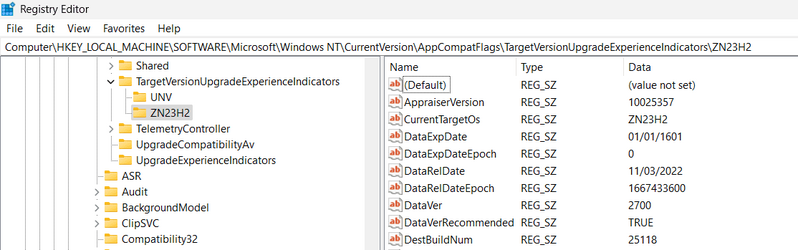
When a new version is about to be released Windows runs a hardware appraisal of the machine and stores its results in:
HKEY_LOCAL_MACHINE\SOFTWARE\Microsoft\Windows NT\CurrentVersion\AppCompatFlags\TargetVersionUpgradeExperienceIndicators

There is a separate key holding the results for each new version's test, and each key holds over 40 different values. The keys for W11 versions 21H2 and 22H2 were named CO21H2 and NI22H2, for example. Their development code names were Copper and Nickel, 23H2 is expected to be Zinc (ZN23H2) and can already be seen being used for the Insider Canary build.

1683892001454.png
 
Last edited:

My Computers My Computers

  • At a glance

    Windows 11 HomeAMD Athlon Silver 3050U8GBRadeon Graphics
    OS
    Windows 11 Home
    Computer type
    Laptop
    Manufacturer/Model
    Acer Aspire 3 A315-23-R9VY
    CPU
    AMD Athlon Silver 3050U
    Memory
    8GB
    Graphics Card(s)
    Radeon Graphics
    Monitor(s) Displays
    laptop screen
    Screen Resolution
    1366x768 native resolution, up to 2560x1440 with Radeon Virtual Super Resolution
    Hard Drives
    1TB Samsung EVO 870 SSD (from April 2026: 250GB EVO 850)
    Internet Speed
    150 Mbps
    Browser
    Edge, Firefox
    Antivirus
    Defender
    Other Info
    fully 'Windows 11 ready' laptop. Windows 10 C: partition migrated from my old unsupported 'main machine' then upgraded to 11. A test migration ran Insider builds for 2 months. When 11 was released on 5th October 2021 it was re-imaged back to 10 and was offered the upgrade in Windows Update on 20th October. Windows Update offered the 22H2 Feature Update on 20th September 2022. It got the 23H2 Feature Update on 4th November 2023 through Windows Update, 24H2 on 3rd October 2024 through Windows Update by setting the Target Release Version for 24H2, and 25H2 on 30th September 2025 through Windows Update by setting the Target Release Version for 25H2.

    UPDATE - 11 April 2026: due to mechanical deterioration this PC has been retired from active duty. The OS with all software and files has been migrated to my System Seven in 'Other systems' to carry on as my general purpose 'main machine'.
  • At a glance

    Windows 11 ProIntel® Core™ i5-520M8GB(integrated graphics) Intel HD Graphics
    Operating System
    Windows 11 Pro
    Computer type
    Laptop
    Manufacturer/Model
    Dell Latitude E4310
    CPU
    Intel® Core™ i5-520M
    Motherboard
    0T6M8G
    Memory
    8GB
    Graphics card(s)
    (integrated graphics) Intel HD Graphics
    Screen Resolution
    1366x768
    Hard Drives
    500GB Crucial MX500 SSD
    Browser
    Firefox, Edge
    Antivirus
    Defender
    Other Info
    unsupported machine: Legacy bios, MBR, TPM 1.2, upgraded from W10 to W11 using W10/W11 hybrid install media workaround.

    In-place upgrade to 22H2 using ISO and a workaround.
    Feature Update to 23H2 by manually installing the Enablement Package.
    In-place upgrade to 24H2 using hybrid 23H2/24H2 install media.
    Upgraded to 25H2 by Enablement Package.

    Also running Insider Dev, and Canary builds and Windows 10 as native boot .vhdx.
  • My SYSTEM THREE is a Dell Latitude 5410, i7-10610U, 32GB RAM, 512GB NVMe ssd, supported device running Windows 11 Pro.

    My SYSTEM FOUR is a 2-in-1 convertible Lenovo Yoga 11e 20DA, Celeron N2930, 8GB RAM, 256GB ssd. Unsupported device: currently running Win10 Pro, plus Win11 Pro RTM and Insider Dev, Beta, and RP 24H2 as native boot vhdx.

    My SYSTEM FIVE is a Dell Latitude 3190 2-in-1, Pentium Silver N5030, 8GB RAM, 1TB NVMe ssd, supported device running Windows 11 Pro, plus Insider Beta, Dev, and Canary builds (and a few others) as a native boot .vhdx.

    My SYSTEM SIX is a Dell Latitude 5550, Core Ultra 7 165H, 64GB RAM, 1TB NVMe SSD, supported device, Windows 11 Pro 24H2, Hyper-V host machine. Updated to 25H2 on 30th September 2025.

    My SYSTEM SEVEN is a Lenovo Thinkpad T580, Intel Core i7-8650U, 16GB RAM, 512GB NVMe SSD + 2nd 512GB NVMe SSD, a supported device for Windows 11. This is my current general purpose 'main machine'. The installed Windows 11 Home from my System One has been migrated to this machine.
Why automate it? Each new official release is once a year. Just download the new ISO, mount it, run Setup and replace the file appraiserres.dll with an empty dummy before proceeding. Keep disconnected from the internet during the upgrade.
 

My Computers My Computers

  • At a glance

    Windows 11 Pro 23H2 (5699), 25H2 (8655)Mobile DualCore Intel Core 2 Duo T7250, 2000 MHz4GBMobile Intel(R) GMA 4500M (Mobile 4 series)
    OS
    Windows 11 Pro 23H2 (5699), 25H2 (8655)
    Computer type
    Laptop
    Manufacturer/Model
    Acer Extensa 5630EZ
    CPU
    Mobile DualCore Intel Core 2 Duo T7250, 2000 MHz
    Motherboard
    Acer Extensa 5630
    Memory
    4GB
    Graphics Card(s)
    Mobile Intel(R) GMA 4500M (Mobile 4 series)
    Sound Card
    Realtek ALC268 @ Intel 82801IB ICH9 - High Definition Audio Controller
    Monitor(s) Displays
    1
    Screen Resolution
    1280x800
    Hard Drives
    Samsung SSD 850 EVO 250GB SATA Device (250 GB, SATA-III)
    Internet Speed
    VDSL 50 Mbps
    Browser
    MICROSOFT EDGE
    Antivirus
    WINDOWS DEFENDER
    Other Info
    Legacy MBR installation, no TPM, no Secure Boot, no WDDM 2.0 graphics drivers, no SSE4.2, cannot get more unsupported ;) This is only my test laptop. I had installed Windows 11 here before upgrading my main PC. For my main PC I use everyday see my 2nd system specs.
  • At a glance

    Windows 11 Pro v25H2 (build 26200.8655)Intel Core-i7 3770 3.40GHz s1155 (3rd generat...2x Kingston Hyper-X Blu 8GB DDR3-1600GIGABYTE GeForce RTX 3050 WINDFORCE OC V2 6GB...
    Operating System
    Windows 11 Pro v25H2 (build 26200.8655)
    Computer type
    PC/Desktop
    Manufacturer/Model
    Custom-built PC
    CPU
    Intel Core-i7 3770 3.40GHz s1155 (3rd generation)
    Motherboard
    Asus P8H61 s1155 ATX
    Memory
    2x Kingston Hyper-X Blu 8GB DDR3-1600
    Graphics card(s)
    GIGABYTE GeForce RTX 3050 WINDFORCE OC V2 6GB (GV-N3050WF2OCV2-6GD)
    Sound Card
    Realtek HD audio (ALC887)
    Monitor(s) Displays
    Sony Bravia KDL-19L4000 19" LCD TV via VGA
    Screen Resolution
    1440x900 32-bit 60Hz
    Hard Drives
    WD Blue SA510 2.5 1000GB SSD as system disk, Western Digital Caviar Purple 4TB SATA III (WD40PURZ) as second
    PSU
    Thermaltake Litepower RGB 550W Full Wired
    Case
    SUPERCASE MIDI-TOWER
    Cooling
    Deepcool Gamma Archer CPU cooler, 1x 8cm fan at the back
    Keyboard
    Mitsumi 101-key PS/2
    Mouse
    Sunnyline OptiEye PS/2
    Internet Speed
    100Mbps
    Browser
    Microsoft Edge, Mozilla Firefox
    Antivirus
    Microsoft Windows Defender
    Other Info
    Legacy BIOS (MBR) installation, no TPM, no Secure Boot, WDDM 3.0 graphics drivers, WEI score 7.4
Why automate it? Each new official release is once a year. Just download the new ISO, mount it, run Setup and replace the file appraiserres.dll with an empty dummy before proceeding. Keep disconnected from the internet during the upgrade.

Thanks for info.

Reverted to previous Win11 version on the tinkerbox, to see if it would update by default to 21H22, didn't.


So will try this.

But automated process, would be good.
 

My Computers My Computers

  • At a glance

    Fedora/KDE Plasma F43Xeon 2667 v448GB ECC DDR4nVidia GTX 1650
    OS
    Fedora/KDE Plasma F43
    Computer type
    PC/Desktop
    Manufacturer/Model
    HP Z640
    CPU
    Xeon 2667 v4
    Motherboard
    Xeon V4 Motherboard
    Memory
    48GB ECC DDR4
    Graphics Card(s)
    nVidia GTX 1650
    Monitor(s) Displays
    LG 27"
    Screen Resolution
    1920x1080@144hz
    Hard Drives
    NVME, SSD
    PSU
    850W
  • At a glance

    Windows 11 IOT Enterprise LTSC/RHEL 10.1 KDE ...Intel Xeom 2680 V464gb DDR4 ECCAMD RX560
    Operating System
    Windows 11 IOT Enterprise LTSC/RHEL 10.1 KDE Plasma
    Computer type
    PC/Desktop
    Manufacturer/Model
    HP Z440
    CPU
    Intel Xeom 2680 V4
    Motherboard
    HP Z440
    Memory
    64gb DDR4 ECC
    Graphics card(s)
    AMD RX560
    Monitor(s) Displays
    LG Gsync 27" 144hz
    Screen Resolution
    1920x1080@144hz
    Hard Drives
    SSD/nVme/HDD
    PSU
    standard 700W
    Case
    standard
    Cooling
    Standard
    Browser
    MS Edge
    Antivirus
    BitDefender
Why automate it? Each new official release is once a year. Just download the new ISO, mount it, run Setup and replace the file appraiserres.dll with an empty dummy before proceeding. Keep disconnected from the internet during the upgrade.
Doesn't even need to be disconnected, I've done upgrades using the Appraiser trick without disconnecting
 

My Computer My Computer

At a glance

Windows 11 Pro 25H2 (RP channel)AMD Ryzen 7 9800X3D 8-core64GB Corsair Titanium 6000/CL30MSI Suprim 5080 SOC
OS
Windows 11 Pro 25H2 (RP channel)
Computer type
PC/Desktop
Manufacturer/Model
MSI
CPU
AMD Ryzen 7 9800X3D 8-core
Motherboard
MEG X870E Godlike
Memory
64GB Corsair Titanium 6000/CL30
Graphics Card(s)
MSI Suprim 5080 SOC
Sound Card
Soundblaster AE-9
Monitor(s) Displays
ASUS TUF Gaming VG289Q
Screen Resolution
3840x2160
Hard Drives
Samsung 9100 Pro 4TB (gen 5 x4, system drive/games)
Samsung 990 Pro 2TB
Samsung 980 Pro 2TB
Samsung 870 Evo 4TB
Samsung 870 Evo 2TB
Samsung T9 4TB
PSU
Seasonic PX-2200
Case
Bequiet! Dark Base Pro 901
Cooling
Noctua NH-D15S Chromax black
Keyboard
Logitech G915 X (wired)
Mouse
Logitech G903 with PowerPlay charger
Internet Speed
900Mb/sec
Browser
Microsoft Edge
Antivirus
Windows Defender
Doesn't even need to be disconnected, I've done upgrades using the Appraiser trick without disconnecting
I've just tried this "technique", and it worked fine.
Just remember to download iso with same language as your install, or you won't be given option to keep data and apps.
I disabled updates during upgrade, worked fine.
 

My Computers My Computers

  • At a glance

    Fedora/KDE Plasma F43Xeon 2667 v448GB ECC DDR4nVidia GTX 1650
    OS
    Fedora/KDE Plasma F43
    Computer type
    PC/Desktop
    Manufacturer/Model
    HP Z640
    CPU
    Xeon 2667 v4
    Motherboard
    Xeon V4 Motherboard
    Memory
    48GB ECC DDR4
    Graphics Card(s)
    nVidia GTX 1650
    Monitor(s) Displays
    LG 27"
    Screen Resolution
    1920x1080@144hz
    Hard Drives
    NVME, SSD
    PSU
    850W
  • At a glance

    Windows 11 IOT Enterprise LTSC/RHEL 10.1 KDE ...Intel Xeom 2680 V464gb DDR4 ECCAMD RX560
    Operating System
    Windows 11 IOT Enterprise LTSC/RHEL 10.1 KDE Plasma
    Computer type
    PC/Desktop
    Manufacturer/Model
    HP Z440
    CPU
    Intel Xeom 2680 V4
    Motherboard
    HP Z440
    Memory
    64gb DDR4 ECC
    Graphics card(s)
    AMD RX560
    Monitor(s) Displays
    LG Gsync 27" 144hz
    Screen Resolution
    1920x1080@144hz
    Hard Drives
    SSD/nVme/HDD
    PSU
    standard 700W
    Case
    standard
    Cooling
    Standard
    Browser
    MS Edge
    Antivirus
    BitDefender
I have confirmed with at least four unsupported computers, if you don't disconnect from the internet during the upgrade, it will fail before reaching 50% due to some hidden online compatibility check or because Windows Update messing with the drivers, even if you select not to use it. So I always disconnect to be on the safe side.
 

My Computers My Computers

  • At a glance

    Windows 11 Pro 23H2 (5699), 25H2 (8655)Mobile DualCore Intel Core 2 Duo T7250, 2000 MHz4GBMobile Intel(R) GMA 4500M (Mobile 4 series)
    OS
    Windows 11 Pro 23H2 (5699), 25H2 (8655)
    Computer type
    Laptop
    Manufacturer/Model
    Acer Extensa 5630EZ
    CPU
    Mobile DualCore Intel Core 2 Duo T7250, 2000 MHz
    Motherboard
    Acer Extensa 5630
    Memory
    4GB
    Graphics Card(s)
    Mobile Intel(R) GMA 4500M (Mobile 4 series)
    Sound Card
    Realtek ALC268 @ Intel 82801IB ICH9 - High Definition Audio Controller
    Monitor(s) Displays
    1
    Screen Resolution
    1280x800
    Hard Drives
    Samsung SSD 850 EVO 250GB SATA Device (250 GB, SATA-III)
    Internet Speed
    VDSL 50 Mbps
    Browser
    MICROSOFT EDGE
    Antivirus
    WINDOWS DEFENDER
    Other Info
    Legacy MBR installation, no TPM, no Secure Boot, no WDDM 2.0 graphics drivers, no SSE4.2, cannot get more unsupported ;) This is only my test laptop. I had installed Windows 11 here before upgrading my main PC. For my main PC I use everyday see my 2nd system specs.
  • At a glance

    Windows 11 Pro v25H2 (build 26200.8655)Intel Core-i7 3770 3.40GHz s1155 (3rd generat...2x Kingston Hyper-X Blu 8GB DDR3-1600GIGABYTE GeForce RTX 3050 WINDFORCE OC V2 6GB...
    Operating System
    Windows 11 Pro v25H2 (build 26200.8655)
    Computer type
    PC/Desktop
    Manufacturer/Model
    Custom-built PC
    CPU
    Intel Core-i7 3770 3.40GHz s1155 (3rd generation)
    Motherboard
    Asus P8H61 s1155 ATX
    Memory
    2x Kingston Hyper-X Blu 8GB DDR3-1600
    Graphics card(s)
    GIGABYTE GeForce RTX 3050 WINDFORCE OC V2 6GB (GV-N3050WF2OCV2-6GD)
    Sound Card
    Realtek HD audio (ALC887)
    Monitor(s) Displays
    Sony Bravia KDL-19L4000 19" LCD TV via VGA
    Screen Resolution
    1440x900 32-bit 60Hz
    Hard Drives
    WD Blue SA510 2.5 1000GB SSD as system disk, Western Digital Caviar Purple 4TB SATA III (WD40PURZ) as second
    PSU
    Thermaltake Litepower RGB 550W Full Wired
    Case
    SUPERCASE MIDI-TOWER
    Cooling
    Deepcool Gamma Archer CPU cooler, 1x 8cm fan at the back
    Keyboard
    Mitsumi 101-key PS/2
    Mouse
    Sunnyline OptiEye PS/2
    Internet Speed
    100Mbps
    Browser
    Microsoft Edge, Mozilla Firefox
    Antivirus
    Microsoft Windows Defender
    Other Info
    Legacy BIOS (MBR) installation, no TPM, no Secure Boot, WDDM 3.0 graphics drivers, WEI score 7.4

Latest Support Threads

Back
Top Bottom