Solved Update Won't Install


MourningStar

(-(-_(-_-)_-)-)
Member
VIP
Local time
12:50 AM
Posts
40
Location
USA
OS
System 1-W10/System 2-W11
on Version 25H2 (OS Build 2600.6899)

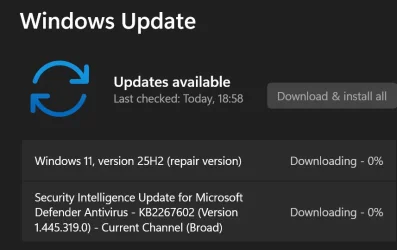
This update is not installing. It goes from pending download, then completes download, then to installing and at around 30-40 % installed it reverts to pending download.

Clues, thoughts, help? -thx


2026-02-28_113113.webp
 

My Computers

System One System Two

  • OS
    System 1-W10/System 2-W11
    Computer type
    PC/Desktop
    Manufacturer/Model
    Predator Orion 9000
    CPU
    Intel® Processor Core™ i7 4.70 GHz
    Motherboard
    American Megatrends Inc.
    Memory
    32 GB DDR4 SDRAM
    Graphics Card(s)
    NVIDIA® GeForce® RTX™ 2080 Ti 11 GB GDDR6
    Sound Card
    Sound Blaster X Pro
    Monitor(s) Displays
    Predator X32X3
    Screen Resolution
    3840 x 2160
    Hard Drives
    SSD 256 GB / HDD 2 TB
    PSU
    1000W Modular
    Case
    Metal
    Cooling
    Liquid / Fans - Cooler Master® CPU Liquid Cooler* / IceTunnel® Airflow Management
    Keyboard
    Logitech G510s
    Mouse
    MA M1Pro Trackball M570
    Internet Speed
    500/500
    Browser
    Edge / Moon / Fox
    Antivirus
    Windows Security / Malwarebytes
    Other Info
    Optical Drive - DVD Writer

    Bose Companion 5 2.1 Multimedia Speaker System
  • Operating System
    Windows 11 Pro
    Computer type
    PC/Desktop
    Manufacturer/Model
    BMAX B4 Turbo
    CPU
    Intel N150
    Motherboard
    AMI
    Memory
    16GB DDR4
    Hard Drives
    512GB SSD
Try to reset the WU components:


My Computers

System One System Two

  • OS
    All Branches but Release
    Computer type
    Laptop
    Manufacturer/Model
    Acer Nitro ANV15-51
    CPU
    AMD Ryzen 7 7735HS 3200-4500 Mhz 8 cores x 2
    Motherboard
    Sportage_RBH
    Memory
    32 GB DDR5
    Graphics Card(s)
    Radeon Graphic / NVIDIA GeForce RTX 4060 8 GB GDDR6
    Sound Card
    AMD/Realtek(R) Audio
    Monitor(s) Displays
    Integrated Monitor (15.3"vis)
    Screen Resolution
    FHD 1920X1080 16:9 144Hz
    Hard Drives
    KINGSTON OM8SEP4512Q-AA 1TB
    Western Digital 256GB
    PSU
    19V DC 6.32 A 120 W
    Cooling
    Dual Fans
    Mouse
    MS Bluetooth
    Internet Speed
    Fiber 1GB Cox -us & 1GB Orange-fr
    Browser
    Edge Canary- Firefox Nightly-Chrome Dev-Chrome Dev
    Antivirus
    Windows Defender
  • Operating System
    Windows 11 Beta
    Computer type
    Laptop
    Manufacturer/Model
    Asus X751BP
    CPU
    AMD A9-9420
    Memory
    8 GB of DDR4
    Graphics card(s)
    AMD Radeon R5
    Screen Resolution
    1600x900
    Hard Drives
    Seagate 1 TB
WINDOWS UPDATE PROBLEMS things to try

1. Run troubleshooter-settings-system-troubleshoot-other troubleshooters-windows update-RUN.

2. Reset Windows update using Brink's tutorial Reset Windows Update in Windows 11 Tutorial

3. Open command prompt as administrator. Enter this command.
dism /online /cleanup-image /restorehealth
When complete, Restart computer

Then open command prompt as admin again and run sfc /scannow
Pay attention to the scan results to see if SFC found anything it could not repair

4. CLEAN UP COMPONENT STORE - dism /online /cleanup-image /startcomponentcleanup
Analyze and Clean Up Component Store (WinSxS folder) in Windows 11 Tutorial

5. Do a repair install. This usually works when nothing else will. Repair Install Windows 11 with an In-place Upgrade Tutorial


My Computers

System One System Two

  • OS
    Windows 11 Pro 25H2
    Computer type
    PC/Desktop
    Manufacturer/Model
    Dell Optiplex 7080
    CPU
    i9-10900 10 core 20 threads
    Motherboard
    DELL 0J37VM
    Memory
    32 gb
    Graphics Card(s)
    none-Intel UHD Graphics 630
    Sound Card
    Integrated Realtek
    Monitor(s) Displays
    Benq 27
    Screen Resolution
    2560x1440
    Hard Drives
    2x1tb Solidigm m.2 nvme /External drives 512gb Samsung m.2 sata+2tb Kingston m2.nvme
    PSU
    500w
    Case
    MT
    Cooling
    Dell Premium
    Keyboard
    Logitech wired
    Mouse
    Logitech wireless
    Internet Speed
    so slow I'm too embarrassed to tell
    Browser
    #1 Edge #2 Firefox
    Antivirus
    Defender+MWB Premium
  • Operating System
    Windows 11 Pro 24H2 26200.8457
    Computer type
    PC/Desktop
    Manufacturer/Model
    Beelink Mini PC SER5
    CPU
    AMD Ryzen 7 6800U
    Memory
    32 gb
    Graphics card(s)
    integrated
    Sound Card
    integrated
    Monitor(s) Displays
    Benq 27
    Screen Resolution
    2560x1440
    Hard Drives
    1TB Crucial nvme
    Keyboard
    Logitech wired
    Mouse
    Logitech wireless
    Internet Speed
    still too embarrassed to tell
    Browser
    Firefox
    Antivirus
    Defender
    Other Info
    System 3 is non compliant Dell 9020 i7-4770/24gb ram Win11 PRO 26200.8457
Have you tried waiting to see if the update would continue? I have had similar problems like that in the past.
 

My Computers

System One System Two

  • OS
    Windows 11 Pro 25H2
    Computer type
    PC/Desktop
    Manufacturer/Model
    PowerSpec B746
    CPU
    Intel Core i7-10700K
    Motherboard
    ASRock Z490 Phantom Gaming 4/ax
    Memory
    16GB (8GB PC4-19200 DDR4 SDRAM x2)
    Graphics Card(s)
    NVIDIA GeForce GTX 1050 TI
    Sound Card
    Realtek Audio
    Monitor(s) Displays
    #1. LG ULTRAWIDE 34" #2. AOC Q32G2WG3 32"
    Screen Resolution
    #1. 3440 X 1440 #2. 1920 x 1080
    Hard Drives
    NVMe WDC WDS100T2B0C-00PXH0 1TB
    Samsung SSD 860 EVO 1TB
    PSU
    750 Watts (62.5A)
    Case
    PowerSpec/Lian Li ATX 205
    Keyboard
    Logitech K270
    Mouse
    Logitech M185
    Browser
    Microsoft Edge and Firefox
    Antivirus
    Webroot SecureAnywhere CE 26.1
  • Operating System
    Windows 11 Canary Channel
    Computer type
    PC/Desktop
    Manufacturer/Model
    PowerSpec G156
    CPU
    Intel Core i5-8400 CPU @ 2.80GHz
    Motherboard
    AsusTeK Prime B360M-A
    Memory
    16 MB DDR 4-2666
    Monitor(s) Displays
    23" Speptre HDMI 75Hz
    Screen Resolution
    1920x1080
    Hard Drives
    Samsung 970 EVO 500GB NVMe
    Keyboard
    Logitek K270
    Mouse
    Logitek M185
    Browser
    Firefox, Edge and Edge Canary
    Antivirus
    Windows Defender
Thank you all for your replies. This specific update always reappears and I always give it several chances to install. All other updates install and continue to install with no issues. It's only this one.
 

My Computers

System One System Two

  • OS
    System 1-W10/System 2-W11
    Computer type
    PC/Desktop
    Manufacturer/Model
    Predator Orion 9000
    CPU
    Intel® Processor Core™ i7 4.70 GHz
    Motherboard
    American Megatrends Inc.
    Memory
    32 GB DDR4 SDRAM
    Graphics Card(s)
    NVIDIA® GeForce® RTX™ 2080 Ti 11 GB GDDR6
    Sound Card
    Sound Blaster X Pro
    Monitor(s) Displays
    Predator X32X3
    Screen Resolution
    3840 x 2160
    Hard Drives
    SSD 256 GB / HDD 2 TB
    PSU
    1000W Modular
    Case
    Metal
    Cooling
    Liquid / Fans - Cooler Master® CPU Liquid Cooler* / IceTunnel® Airflow Management
    Keyboard
    Logitech G510s
    Mouse
    MA M1Pro Trackball M570
    Internet Speed
    500/500
    Browser
    Edge / Moon / Fox
    Antivirus
    Windows Security / Malwarebytes
    Other Info
    Optical Drive - DVD Writer

    Bose Companion 5 2.1 Multimedia Speaker System
  • Operating System
    Windows 11 Pro
    Computer type
    PC/Desktop
    Manufacturer/Model
    BMAX B4 Turbo
    CPU
    Intel N150
    Motherboard
    AMI
    Memory
    16GB DDR4
    Hard Drives
    512GB SSD
1) Please reboot.


2) Open administrator command prompt and type or copy and paste:

net stop wuauserv
net stop cryptSvc
net stop bits
net stop msiserver
ren C:\Windows\SoftwareDistribution SoftwareDistribution.old
ren C:\Windows\System32\catroot2 catroot2.old
net start wuauserv
net start cryptSvc
net start bits
net start msiserver

Reboot > perform updates


3) Open administrator command prompt and type or copy and paste:

dism /online /cleanup-image /startcomponentcleanup

dism /online /cleanup-image /restorehealth

sfc /scannow


4) Search for: c:\windows\logs\cbs > zip > post a share link
 

My Computer

System One

  • OS
    Windows 10
    Computer type
    Laptop
    Manufacturer/Model
    HP
    CPU
    Intel(R) Core(TM) i7-4800MQ CPU @ 2.70GHz
    Motherboard
    Product : 190A Version : KBC Version 94.56
    Memory
    16 GB Total: Manufacturer : Samsung MemoryType : DDR3 FormFactor : SODIMM Capacity : 8GB Speed : 1600
    Graphics Card(s)
    NVIDIA Quadro K3100M; Intel(R) HD Graphics 4600
    Sound Card
    IDT High Definition Audio CODEC; PNP Device ID HDAUDIO\FUNC_01&VEN_111D&DEV_76E0
    Hard Drives
    Model Hitachi HTS727575A9E364
    Antivirus
    Microsoft Defender
    Other Info
    Mobile Workstation
KB5077181 is the February 2026 cumulative update. If it is failing to install chances are so will the March cumulative in the same way.
 

My Computers

System One System Two

  • OS
    Windows 11 Pro 25H2
    Computer type
    PC/Desktop
    Manufacturer/Model
    Dell Optiplex 7080
    CPU
    i9-10900 10 core 20 threads
    Motherboard
    DELL 0J37VM
    Memory
    32 gb
    Graphics Card(s)
    none-Intel UHD Graphics 630
    Sound Card
    Integrated Realtek
    Monitor(s) Displays
    Benq 27
    Screen Resolution
    2560x1440
    Hard Drives
    2x1tb Solidigm m.2 nvme /External drives 512gb Samsung m.2 sata+2tb Kingston m2.nvme
    PSU
    500w
    Case
    MT
    Cooling
    Dell Premium
    Keyboard
    Logitech wired
    Mouse
    Logitech wireless
    Internet Speed
    so slow I'm too embarrassed to tell
    Browser
    #1 Edge #2 Firefox
    Antivirus
    Defender+MWB Premium
  • Operating System
    Windows 11 Pro 24H2 26200.8457
    Computer type
    PC/Desktop
    Manufacturer/Model
    Beelink Mini PC SER5
    CPU
    AMD Ryzen 7 6800U
    Memory
    32 gb
    Graphics card(s)
    integrated
    Sound Card
    integrated
    Monitor(s) Displays
    Benq 27
    Screen Resolution
    2560x1440
    Hard Drives
    1TB Crucial nvme
    Keyboard
    Logitech wired
    Mouse
    Logitech wireless
    Internet Speed
    still too embarrassed to tell
    Browser
    Firefox
    Antivirus
    Defender
    Other Info
    System 3 is non compliant Dell 9020 i7-4770/24gb ram Win11 PRO 26200.8457
KB5077181 is the February 2026 cumulative update. If it is failing to install chances are so will the March cumulative in the same way.
If the March update is successful can I forget about this one?
 

My Computers

System One System Two

  • OS
    System 1-W10/System 2-W11
    Computer type
    PC/Desktop
    Manufacturer/Model
    Predator Orion 9000
    CPU
    Intel® Processor Core™ i7 4.70 GHz
    Motherboard
    American Megatrends Inc.
    Memory
    32 GB DDR4 SDRAM
    Graphics Card(s)
    NVIDIA® GeForce® RTX™ 2080 Ti 11 GB GDDR6
    Sound Card
    Sound Blaster X Pro
    Monitor(s) Displays
    Predator X32X3
    Screen Resolution
    3840 x 2160
    Hard Drives
    SSD 256 GB / HDD 2 TB
    PSU
    1000W Modular
    Case
    Metal
    Cooling
    Liquid / Fans - Cooler Master® CPU Liquid Cooler* / IceTunnel® Airflow Management
    Keyboard
    Logitech G510s
    Mouse
    MA M1Pro Trackball M570
    Internet Speed
    500/500
    Browser
    Edge / Moon / Fox
    Antivirus
    Windows Security / Malwarebytes
    Other Info
    Optical Drive - DVD Writer

    Bose Companion 5 2.1 Multimedia Speaker System
  • Operating System
    Windows 11 Pro
    Computer type
    PC/Desktop
    Manufacturer/Model
    BMAX B4 Turbo
    CPU
    Intel N150
    Motherboard
    AMI
    Memory
    16GB DDR4
    Hard Drives
    512GB SSD

My Computers

System One System Two

  • OS
    Win 11 Home ♦♦♦26200.8457 ♦♦♦♦♦♦♦25H2
    Computer type
    PC/Desktop
    Manufacturer/Model
    Built by Ghot® [May 2020]
    CPU
    AMD Ryzen 7 3700X
    Motherboard
    Asus Pro WS X570-ACE (BIOS 5302)
    Memory
    G.Skill (F4-3200C14D-16GTZKW)
    Graphics Card(s)
    EVGA RTX 2070 (08G-P4-2171-KR)
    Sound Card
    Realtek ALC1220P / ALC S1220A
    Monitor(s) Displays
    Dell U3011 30"
    Screen Resolution
    2560 x 1600
    Hard Drives
    2x Samsung 860 EVO 500GB,
    WD 4TB Black FZBX - SATA III,
    WD 8TB Black FZBX - SATA III,
    DRW-24B1ST CD/DVD Burner
    PSU
    PC Power & Cooling 750W Quad EPS12V
    Case
    Cooler Master ATCS 840 Tower
    Cooling
    CM Hyper 212 EVO (push/pull)
    Keyboard
    Ducky DK9008 Shine II Blue LED
    Mouse
    Logitech Optical M-100
    Internet Speed
    300/300
    Browser
    Firefox (latest)
    Antivirus
    Bitdefender Total Security
    Other Info
    Speakers: Klipsch Pro Media 2.1
  • Operating System
    Windows XP Pro 32bit w/SP3
    Computer type
    PC/Desktop
    Manufacturer/Model
    Built by Ghot® (not in use)
    CPU
    AMD Athlon 64 X2 5000+ (OC'd @ 3.2Ghz)
    Motherboard
    ASUS M2N32-SLI Deluxe Wireless Edition
    Memory
    TWIN2X2048-6400C4DHX (2 x 1GB, DDR2 800)
    Graphics card(s)
    EVGA 256-P2-N758-TR GeForce 8600GT SSC
    Sound Card
    Onboard
    Monitor(s) Displays
    ViewSonic G90FB Black 19" Professional (CRT)
    Screen Resolution
    up to 2048 x 1536
    Hard Drives
    WD 36GB 10,000rpm Raptor SATA
    Seagate 80GB 7200rpm SATA
    Lite-On LTR-52246S CD/RW
    Lite-On LH-18A1P CD/DVD Burner
    PSU
    PC Power & Cooling Silencer 750 Quad EPS12V
    Case
    Generic Beige case, 80mm fans
    Cooling
    ZALMAN 9500A 92mm CPU Cooler
    Keyboard
    Logitech Classic Keybooard 200
    Mouse
    Logitech Optical M-BT96a
    Internet Speed
    300/300
    Browser
    Firefox 3.x ??
    Antivirus
    Symantec (Norton)
    Other Info
    Still assembled, still runs. Haven't turned it on for 15 years?
Thank you Ghot.

After reviewing the recommended actions to this issue, I hesitate. Afterall, and please correct me as needed, I would expect these steps necessary if all my updates were failing but, after looking at the update histories, this is the only one with the issue. Additionally, my most recent 'Check For Updates' action resulted in a 'You're Up To Date!' result. So, being just a non-techie type user I'm a little perplexed with it all.
 

My Computers

System One System Two

  • OS
    System 1-W10/System 2-W11
    Computer type
    PC/Desktop
    Manufacturer/Model
    Predator Orion 9000
    CPU
    Intel® Processor Core™ i7 4.70 GHz
    Motherboard
    American Megatrends Inc.
    Memory
    32 GB DDR4 SDRAM
    Graphics Card(s)
    NVIDIA® GeForce® RTX™ 2080 Ti 11 GB GDDR6
    Sound Card
    Sound Blaster X Pro
    Monitor(s) Displays
    Predator X32X3
    Screen Resolution
    3840 x 2160
    Hard Drives
    SSD 256 GB / HDD 2 TB
    PSU
    1000W Modular
    Case
    Metal
    Cooling
    Liquid / Fans - Cooler Master® CPU Liquid Cooler* / IceTunnel® Airflow Management
    Keyboard
    Logitech G510s
    Mouse
    MA M1Pro Trackball M570
    Internet Speed
    500/500
    Browser
    Edge / Moon / Fox
    Antivirus
    Windows Security / Malwarebytes
    Other Info
    Optical Drive - DVD Writer

    Bose Companion 5 2.1 Multimedia Speaker System
  • Operating System
    Windows 11 Pro
    Computer type
    PC/Desktop
    Manufacturer/Model
    BMAX B4 Turbo
    CPU
    Intel N150
    Motherboard
    AMI
    Memory
    16GB DDR4
    Hard Drives
    512GB SSD
This update is not installing. It goes from pending download, then completes download, then to installing and at around 30-40 % installed it reverts to pending download.
There are things that do not make your situation clear and can be interpreted in several ways. In fact it makes no sense at all with the info given. That's why I gave you general windows update troubleshooting steps.

1. You say "this update" with no KB listed. All cumulatives have a KB#

2. You say "on version 25H2 OS Build 2600.6899". Does that mean your computer is running that build or is that the build that is trying and failing to install. Build 26200.6899 was installed by the Oct, 2025 update KB5066835.

If you are indeed RUNNING that build, then you are definitely NOT getting your cumulative or security updates installed each month because the current release build is 26200.7840.There have been 11 builds since 6899.

However, you probably are receiving your Defender definition updates without issue. They are handled differently by Windows and not included in a Windows build number.

To find build that you are running settings>system>about toward the bottom
 

My Computers

System One System Two

  • OS
    Windows 11 Pro 25H2
    Computer type
    PC/Desktop
    Manufacturer/Model
    Dell Optiplex 7080
    CPU
    i9-10900 10 core 20 threads
    Motherboard
    DELL 0J37VM
    Memory
    32 gb
    Graphics Card(s)
    none-Intel UHD Graphics 630
    Sound Card
    Integrated Realtek
    Monitor(s) Displays
    Benq 27
    Screen Resolution
    2560x1440
    Hard Drives
    2x1tb Solidigm m.2 nvme /External drives 512gb Samsung m.2 sata+2tb Kingston m2.nvme
    PSU
    500w
    Case
    MT
    Cooling
    Dell Premium
    Keyboard
    Logitech wired
    Mouse
    Logitech wireless
    Internet Speed
    so slow I'm too embarrassed to tell
    Browser
    #1 Edge #2 Firefox
    Antivirus
    Defender+MWB Premium
  • Operating System
    Windows 11 Pro 24H2 26200.8457
    Computer type
    PC/Desktop
    Manufacturer/Model
    Beelink Mini PC SER5
    CPU
    AMD Ryzen 7 6800U
    Memory
    32 gb
    Graphics card(s)
    integrated
    Sound Card
    integrated
    Monitor(s) Displays
    Benq 27
    Screen Resolution
    2560x1440
    Hard Drives
    1TB Crucial nvme
    Keyboard
    Logitech wired
    Mouse
    Logitech wireless
    Internet Speed
    still too embarrassed to tell
    Browser
    Firefox
    Antivirus
    Defender
    Other Info
    System 3 is non compliant Dell 9020 i7-4770/24gb ram Win11 PRO 26200.8457
There are things that do not make your situation clear and can be interpreted in several ways. In fact it makes no sense at all with the info given. That's why I gave you general windows update troubleshooting steps.

1. You say "this update" with no KB listed. All cumulatives have a KB#

2. You say "on version 25H2 OS Build 2600.6899". Does that mean your computer is running that build or is that the build that is trying and failing to install. Build 26200.6899 was installed by the Oct, 2025 update KB5066835.

If you are indeed RUNNING that build, then you are definitely NOT getting your cumulative or security updates installed each month because the current release build is 26200.7840.There have been 11 builds since 6899.

However, you probably are receiving your Defender definition updates without issue. They are handled differently by Windows and not included in a Windows build number.

To find build that you are running settings>system>about toward the bottom
reply to point 1 - the info is clearly shown (at least it is on my monitor) in the attached image of the OP.

reply to point 2 - the version listed was what it showed when the OP was posted on Saturday. Today it shows thus :

OS build : 26200.7922
 

My Computers

System One System Two

  • OS
    System 1-W10/System 2-W11
    Computer type
    PC/Desktop
    Manufacturer/Model
    Predator Orion 9000
    CPU
    Intel® Processor Core™ i7 4.70 GHz
    Motherboard
    American Megatrends Inc.
    Memory
    32 GB DDR4 SDRAM
    Graphics Card(s)
    NVIDIA® GeForce® RTX™ 2080 Ti 11 GB GDDR6
    Sound Card
    Sound Blaster X Pro
    Monitor(s) Displays
    Predator X32X3
    Screen Resolution
    3840 x 2160
    Hard Drives
    SSD 256 GB / HDD 2 TB
    PSU
    1000W Modular
    Case
    Metal
    Cooling
    Liquid / Fans - Cooler Master® CPU Liquid Cooler* / IceTunnel® Airflow Management
    Keyboard
    Logitech G510s
    Mouse
    MA M1Pro Trackball M570
    Internet Speed
    500/500
    Browser
    Edge / Moon / Fox
    Antivirus
    Windows Security / Malwarebytes
    Other Info
    Optical Drive - DVD Writer

    Bose Companion 5 2.1 Multimedia Speaker System
  • Operating System
    Windows 11 Pro
    Computer type
    PC/Desktop
    Manufacturer/Model
    BMAX B4 Turbo
    CPU
    Intel N150
    Motherboard
    AMI
    Memory
    16GB DDR4
    Hard Drives
    512GB SSD
If indeed you were on 26200.6899 on Sat, you were running off the the Oct. update, no ifs, ands, or buts about it.

KB5077241 is the PREVIEW update released Feb. 24 on the release channel. It has downloaded and applied sometime between Sat. and today to bring your build to 26200.7922. Your update history will tell you. (you have your options set so that you receive preview updates) The changes in that LCU will automatically go out to everyone on March 10 (you too) and the build may or may not stay the same.
That is the latest update you can be on as of today.

Therefore, we have no idea what update it is you are referring to when you say "this update is not installing" or what triggers it. What do you see when you go to windows update and select "Check for updates"? Does anything show up? If so what? See if it will install.

If you went all the way from 6899 to 7922 maybe the problem resolved itself.
 
Last edited:

My Computers

System One System Two

  • OS
    Windows 11 Pro 25H2
    Computer type
    PC/Desktop
    Manufacturer/Model
    Dell Optiplex 7080
    CPU
    i9-10900 10 core 20 threads
    Motherboard
    DELL 0J37VM
    Memory
    32 gb
    Graphics Card(s)
    none-Intel UHD Graphics 630
    Sound Card
    Integrated Realtek
    Monitor(s) Displays
    Benq 27
    Screen Resolution
    2560x1440
    Hard Drives
    2x1tb Solidigm m.2 nvme /External drives 512gb Samsung m.2 sata+2tb Kingston m2.nvme
    PSU
    500w
    Case
    MT
    Cooling
    Dell Premium
    Keyboard
    Logitech wired
    Mouse
    Logitech wireless
    Internet Speed
    so slow I'm too embarrassed to tell
    Browser
    #1 Edge #2 Firefox
    Antivirus
    Defender+MWB Premium
  • Operating System
    Windows 11 Pro 24H2 26200.8457
    Computer type
    PC/Desktop
    Manufacturer/Model
    Beelink Mini PC SER5
    CPU
    AMD Ryzen 7 6800U
    Memory
    32 gb
    Graphics card(s)
    integrated
    Sound Card
    integrated
    Monitor(s) Displays
    Benq 27
    Screen Resolution
    2560x1440
    Hard Drives
    1TB Crucial nvme
    Keyboard
    Logitech wired
    Mouse
    Logitech wireless
    Internet Speed
    still too embarrassed to tell
    Browser
    Firefox
    Antivirus
    Defender
    Other Info
    System 3 is non compliant Dell 9020 i7-4770/24gb ram Win11 PRO 26200.8457
If you went all the way from 6899 to 7922 maybe the problem resolved itself.
yes, - good point.

(quoting from my post #10 above : "my most recent 'Check For Updates' action resulted in a 'You're Up To Date!' result.")
 

My Computers

System One System Two

  • OS
    System 1-W10/System 2-W11
    Computer type
    PC/Desktop
    Manufacturer/Model
    Predator Orion 9000
    CPU
    Intel® Processor Core™ i7 4.70 GHz
    Motherboard
    American Megatrends Inc.
    Memory
    32 GB DDR4 SDRAM
    Graphics Card(s)
    NVIDIA® GeForce® RTX™ 2080 Ti 11 GB GDDR6
    Sound Card
    Sound Blaster X Pro
    Monitor(s) Displays
    Predator X32X3
    Screen Resolution
    3840 x 2160
    Hard Drives
    SSD 256 GB / HDD 2 TB
    PSU
    1000W Modular
    Case
    Metal
    Cooling
    Liquid / Fans - Cooler Master® CPU Liquid Cooler* / IceTunnel® Airflow Management
    Keyboard
    Logitech G510s
    Mouse
    MA M1Pro Trackball M570
    Internet Speed
    500/500
    Browser
    Edge / Moon / Fox
    Antivirus
    Windows Security / Malwarebytes
    Other Info
    Optical Drive - DVD Writer

    Bose Companion 5 2.1 Multimedia Speaker System
  • Operating System
    Windows 11 Pro
    Computer type
    PC/Desktop
    Manufacturer/Model
    BMAX B4 Turbo
    CPU
    Intel N150
    Motherboard
    AMI
    Memory
    16GB DDR4
    Hard Drives
    512GB SSD

My Computers

System One System Two

  • OS
    Win 11 Home ♦♦♦26200.8457 ♦♦♦♦♦♦♦25H2
    Computer type
    PC/Desktop
    Manufacturer/Model
    Built by Ghot® [May 2020]
    CPU
    AMD Ryzen 7 3700X
    Motherboard
    Asus Pro WS X570-ACE (BIOS 5302)
    Memory
    G.Skill (F4-3200C14D-16GTZKW)
    Graphics Card(s)
    EVGA RTX 2070 (08G-P4-2171-KR)
    Sound Card
    Realtek ALC1220P / ALC S1220A
    Monitor(s) Displays
    Dell U3011 30"
    Screen Resolution
    2560 x 1600
    Hard Drives
    2x Samsung 860 EVO 500GB,
    WD 4TB Black FZBX - SATA III,
    WD 8TB Black FZBX - SATA III,
    DRW-24B1ST CD/DVD Burner
    PSU
    PC Power & Cooling 750W Quad EPS12V
    Case
    Cooler Master ATCS 840 Tower
    Cooling
    CM Hyper 212 EVO (push/pull)
    Keyboard
    Ducky DK9008 Shine II Blue LED
    Mouse
    Logitech Optical M-100
    Internet Speed
    300/300
    Browser
    Firefox (latest)
    Antivirus
    Bitdefender Total Security
    Other Info
    Speakers: Klipsch Pro Media 2.1
  • Operating System
    Windows XP Pro 32bit w/SP3
    Computer type
    PC/Desktop
    Manufacturer/Model
    Built by Ghot® (not in use)
    CPU
    AMD Athlon 64 X2 5000+ (OC'd @ 3.2Ghz)
    Motherboard
    ASUS M2N32-SLI Deluxe Wireless Edition
    Memory
    TWIN2X2048-6400C4DHX (2 x 1GB, DDR2 800)
    Graphics card(s)
    EVGA 256-P2-N758-TR GeForce 8600GT SSC
    Sound Card
    Onboard
    Monitor(s) Displays
    ViewSonic G90FB Black 19" Professional (CRT)
    Screen Resolution
    up to 2048 x 1536
    Hard Drives
    WD 36GB 10,000rpm Raptor SATA
    Seagate 80GB 7200rpm SATA
    Lite-On LTR-52246S CD/RW
    Lite-On LH-18A1P CD/DVD Burner
    PSU
    PC Power & Cooling Silencer 750 Quad EPS12V
    Case
    Generic Beige case, 80mm fans
    Cooling
    ZALMAN 9500A 92mm CPU Cooler
    Keyboard
    Logitech Classic Keybooard 200
    Mouse
    Logitech Optical M-BT96a
    Internet Speed
    300/300
    Browser
    Firefox 3.x ??
    Antivirus
    Symantec (Norton)
    Other Info
    Still assembled, still runs. Haven't turned it on for 15 years?

My Computers

System One System Two

  • OS
    System 1-W10/System 2-W11
    Computer type
    PC/Desktop
    Manufacturer/Model
    Predator Orion 9000
    CPU
    Intel® Processor Core™ i7 4.70 GHz
    Motherboard
    American Megatrends Inc.
    Memory
    32 GB DDR4 SDRAM
    Graphics Card(s)
    NVIDIA® GeForce® RTX™ 2080 Ti 11 GB GDDR6
    Sound Card
    Sound Blaster X Pro
    Monitor(s) Displays
    Predator X32X3
    Screen Resolution
    3840 x 2160
    Hard Drives
    SSD 256 GB / HDD 2 TB
    PSU
    1000W Modular
    Case
    Metal
    Cooling
    Liquid / Fans - Cooler Master® CPU Liquid Cooler* / IceTunnel® Airflow Management
    Keyboard
    Logitech G510s
    Mouse
    MA M1Pro Trackball M570
    Internet Speed
    500/500
    Browser
    Edge / Moon / Fox
    Antivirus
    Windows Security / Malwarebytes
    Other Info
    Optical Drive - DVD Writer

    Bose Companion 5 2.1 Multimedia Speaker System
  • Operating System
    Windows 11 Pro
    Computer type
    PC/Desktop
    Manufacturer/Model
    BMAX B4 Turbo
    CPU
    Intel N150
    Motherboard
    AMI
    Memory
    16GB DDR4
    Hard Drives
    512GB SSD
Please run as needed:

DISM /Online /Get-Packages /Format:table >c:\packages.txt
 

My Computer

System One

  • OS
    Windows 10
    Computer type
    Laptop
    Manufacturer/Model
    HP
    CPU
    Intel(R) Core(TM) i7-4800MQ CPU @ 2.70GHz
    Motherboard
    Product : 190A Version : KBC Version 94.56
    Memory
    16 GB Total: Manufacturer : Samsung MemoryType : DDR3 FormFactor : SODIMM Capacity : 8GB Speed : 1600
    Graphics Card(s)
    NVIDIA Quadro K3100M; Intel(R) HD Graphics 4600
    Sound Card
    IDT High Definition Audio CODEC; PNP Device ID HDAUDIO\FUNC_01&VEN_111D&DEV_76E0
    Hard Drives
    Model Hitachi HTS727575A9E364
    Antivirus
    Microsoft Defender
    Other Info
    Mobile Workstation
Yesterday I got a message in Windows update asking to repair to fix update not installing and this came up. took a while but fixed it
 

Attachments

  • Screenshot 2026-03-02 185950.webp
    Screenshot 2026-03-02 185950.webp
    27.4 KB · Views: 2

My Computer

System One

  • OS
    Windows 11 25H2 26200.8457
    Computer type
    Laptop
    Manufacturer/Model
    ASUS Vivobook S 15 OLED-K5504V
    CPU
    i5-13500H
    Screen Resolution
    2880 x 1620
Back
Top Bottom