Updates not working


PennsyNut

Active member
Local time
2:53 PM
Posts
65
Location
Midlothian TX
OS
Windows 11 Home 64-bit
When I open the start menu, and click the on/off button, it comes up with "update and shut down" or "update and restart".
I have repeatedly tried both. And the PC will not update. I simply goes off/restart or off/reboot, etc. I've tried this numerous times now and get no changes. What is wrong?
 

My Computer My Computer

At a glance

Windows 11 Home 64-bitAMD K19 12 core2TB HDD + 238 SSDAMD Radeon
OS
Windows 11 Home 64-bit
Computer type
PC/Desktop
Manufacturer/Model
HP
CPU
AMD K19 12 core
Motherboard
HP 8906
Memory
2TB HDD + 238 SSD
Graphics Card(s)
AMD Radeon
Sound Card
Realtrek HD Audio
Monitor(s) Displays
Sceptre
Screen Resolution
1920x1080
Hard Drives
WDC WS20EZ..... & KBG50ZNV.....
Cooling
? has a fan!
Keyboard
Lenovo
Mouse
onn optical
Internet Speed
15
Browser
default Firefox back up Edge/instead of chrome
Antivirus
ESET
When I open the start menu, and click the on/off button, it comes up with "update and shut down" or "update and restart".
I have repeatedly tried both. And the PC will not update. I simply goes off/restart or off/reboot, etc. I've tried this numerous times now and get no changes. What is wrong?


Welcome to ElevenForum. :-)

Go here: C:\Users\<user name>\AppData\Roaming\Microsoft\Windows\Start Menu\Programs\Windows Update
...and right click on Windows Update and choose: Send to > Desktop (create shortcut)

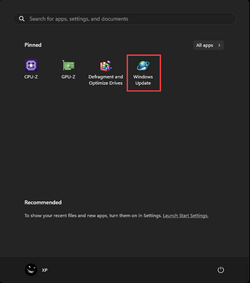
That is Windows Update. You can then right click that shortcut on the desktop and choose: Pin to Start or Pin to Taskbar.
Then when you want to check for updates... just click the icon (where ever you put it).

I pinned mine to the Start Menu...

Image1.png


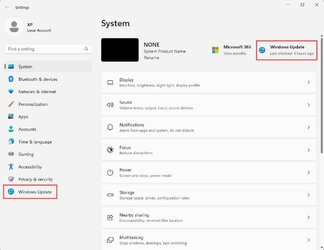
It's also on the Settings menu in two places. Right click the Start Menu and choose Settings...

Image1.jpg


In Control Panel, too...

Image1.png
 
Last edited:

My Computers My Computers

  • At a glance

    Win 11 Home ♦♦♦26300.9457 ♦♦♦♦♦♦♦26H2AMD Ryzen 7 3700XG.Skill (F4-3200C14D-16GTZKW)EVGA RTX 2070 (08G-P4-2171-KR)
    OS
    Win 11 Home ♦♦♦26300.9457 ♦♦♦♦♦♦♦26H2
    Computer type
    PC/Desktop
    Manufacturer/Model
    Built by Ghot® [May 2020]
    CPU
    AMD Ryzen 7 3700X
    Motherboard
    Asus Pro WS X570-ACE (BIOS 5302)
    Memory
    G.Skill (F4-3200C14D-16GTZKW)
    Graphics Card(s)
    EVGA RTX 2070 (08G-P4-2171-KR)
    Sound Card
    Realtek ALC1220P / ALC S1220A
    Monitor(s) Displays
    Dell U3011 30"
    Screen Resolution
    2560 x 1600
    Hard Drives
    2x Samsung 860 EVO 500GB,
    WD 4TB Black FZBX - SATA III,
    WD 8TB Black FZBX - SATA III,
    DRW-24B1ST CD/DVD Burner
    PSU
    PC Power & Cooling 750W Quad EPS12V
    Case
    Cooler Master ATCS 840 Tower
    Cooling
    CM Hyper 212 EVO (push/pull)
    Keyboard
    Ducky DK9008 Shine II Blue LED
    Mouse
    Logitech Optical M-100
    Internet Speed
    300/300
    Browser
    Firefox (latest)
    Antivirus
    Bitdefender Total Security
    Other Info
    Speakers: Klipsch Pro Media 2.1
  • At a glance

    Windows XP Pro 32bit w/SP3AMD Athlon 64 X2 5000+ (OC'd @ 3.2Ghz)TWIN2X2048-6400C4DHX (2 x 1GB, DDR2 800)EVGA 256-P2-N758-TR GeForce 8600GT SSC
    Operating System
    Windows XP Pro 32bit w/SP3
    Computer type
    PC/Desktop
    Manufacturer/Model
    Built by Ghot® (not in use)
    CPU
    AMD Athlon 64 X2 5000+ (OC'd @ 3.2Ghz)
    Motherboard
    ASUS M2N32-SLI Deluxe Wireless Edition
    Memory
    TWIN2X2048-6400C4DHX (2 x 1GB, DDR2 800)
    Graphics card(s)
    EVGA 256-P2-N758-TR GeForce 8600GT SSC
    Sound Card
    Onboard
    Monitor(s) Displays
    ViewSonic G90FB Black 19" Professional (CRT)
    Screen Resolution
    up to 2048 x 1536
    Hard Drives
    WD 36GB 10,000rpm Raptor SATA
    Seagate 80GB 7200rpm SATA
    Lite-On LTR-52246S CD/RW
    Lite-On LH-18A1P CD/DVD Burner
    PSU
    PC Power & Cooling Silencer 750 Quad EPS12V
    Case
    Generic Beige case, 80mm fans
    Cooling
    ZALMAN 9500A 92mm CPU Cooler
    Keyboard
    Logitech Classic Keybooard 200
    Mouse
    Logitech Optical M-BT96a
    Internet Speed
    300/300
    Browser
    Firefox 3.x ??
    Antivirus
    Symantec (Norton)
    Other Info
    Still assembled, still runs. Haven't turned it on for 15 years?
Welcome to the forum. Things to try:
1. Windows update troubleshooter Settings>system.>troubleshoot>other troubleshooters>Windows Update>Run

2. Make sure you have no corrupt system files that is causing this problem. Open a command prompt as administrator and type sfc /scannow
Pay attention to the scan results to see if SFC found anything it could not repair. If it found corruption it could not fix followup with this command (note the spaces)
dism /online /cleanup-image /restorehealth
Restart computer

3. Reset windows update components Reset Windows Update in Windows 11 Tutorial

4. Do a repair install Repair Install Windows 11 with an In-place Upgrade Tutorial
 

My Computers My Computers

  • At a glance

    Windows 11 Pro 25H2 26200.9445i9-10900 10 core 20 threads32 gbnone-Intel UHD Graphics 630
    OS
    Windows 11 Pro 25H2 26200.9445
    Computer type
    PC/Desktop
    Manufacturer/Model
    Dell Optiplex 7080
    CPU
    i9-10900 10 core 20 threads
    Motherboard
    DELL 0J37VM
    Memory
    32 gb
    Graphics Card(s)
    none-Intel UHD Graphics 630
    Sound Card
    Integrated Realtek
    Monitor(s) Displays
    Benq 27
    Screen Resolution
    2560x1440
    Hard Drives
    2x1tb Solidigm m.2 nvme /External drives 512gb Samsung m.2 sata+2tb Kingston m2.nvme
    PSU
    500w
    Case
    MT
    Cooling
    Dell Premium
    Keyboard
    Logitech wired
    Mouse
    Logitech wireless
    Internet Speed
    so slow I'm too embarrassed to tell
    Browser
    #1 Edge #2 Firefox
    Antivirus
    Defender+MWB Premium
  • At a glance

    Windows 11 Pro 24H2 26200.9445AMD Ryzen 7 6800U32 gbintegrated
    Operating System
    Windows 11 Pro 24H2 26200.9445
    Computer type
    PC/Desktop
    Manufacturer/Model
    Beelink Mini PC SER5
    CPU
    AMD Ryzen 7 6800U
    Memory
    32 gb
    Graphics card(s)
    integrated
    Sound Card
    integrated
    Monitor(s) Displays
    Benq 27
    Screen Resolution
    2560x1440
    Hard Drives
    1TB Crucial nvme
    Keyboard
    Logitech wired
    Mouse
    Logitech wireless
    Internet Speed
    still too embarrassed to tell
    Browser
    Firefox
    Antivirus
    Defender
  • System 3 is non compliant Dell 9020 i7-4770/24gb ram Win11 PRO 26200.9445
When I go to C drive, and click users, and then me, it comes up with minimum files: Desktop, OneDrive, Saved Games & Sti-Trace.log. NO appdata or anything like it. I did a "search" on the Desktop for appdata and came up with nothing called Windows Update. I am an 84 yr old man that knows nothing about computers. I do see another message here and will have to look at it.
 

My Computer My Computer

At a glance

Windows 11 Home 64-bitAMD K19 12 core2TB HDD + 238 SSDAMD Radeon
OS
Windows 11 Home 64-bit
Computer type
PC/Desktop
Manufacturer/Model
HP
CPU
AMD K19 12 core
Motherboard
HP 8906
Memory
2TB HDD + 238 SSD
Graphics Card(s)
AMD Radeon
Sound Card
Realtrek HD Audio
Monitor(s) Displays
Sceptre
Screen Resolution
1920x1080
Hard Drives
WDC WS20EZ..... & KBG50ZNV.....
Cooling
? has a fan!
Keyboard
Lenovo
Mouse
onn optical
Internet Speed
15
Browser
default Firefox back up Edge/instead of chrome
Antivirus
ESET
When I go to C drive, and click users, and then me, it comes up with minimum files: Desktop, OneDrive, Saved Games & Sti-Trace.log. NO appdata or anything like it. I did a "search" on the Desktop for appdata and came up with nothing called Windows Update. I am an 84 yr old man that knows nothing about computers. I do see another message here and will have to look at it.


In File Explorer, click on the three dots and choose: Options
Then, on the View Tab... set yours like mine...

Image1.jpg


Then you'll "see" all the files and folders.
 

My Computers My Computers

  • At a glance

    Win 11 Home ♦♦♦26300.9457 ♦♦♦♦♦♦♦26H2AMD Ryzen 7 3700XG.Skill (F4-3200C14D-16GTZKW)EVGA RTX 2070 (08G-P4-2171-KR)
    OS
    Win 11 Home ♦♦♦26300.9457 ♦♦♦♦♦♦♦26H2
    Computer type
    PC/Desktop
    Manufacturer/Model
    Built by Ghot® [May 2020]
    CPU
    AMD Ryzen 7 3700X
    Motherboard
    Asus Pro WS X570-ACE (BIOS 5302)
    Memory
    G.Skill (F4-3200C14D-16GTZKW)
    Graphics Card(s)
    EVGA RTX 2070 (08G-P4-2171-KR)
    Sound Card
    Realtek ALC1220P / ALC S1220A
    Monitor(s) Displays
    Dell U3011 30"
    Screen Resolution
    2560 x 1600
    Hard Drives
    2x Samsung 860 EVO 500GB,
    WD 4TB Black FZBX - SATA III,
    WD 8TB Black FZBX - SATA III,
    DRW-24B1ST CD/DVD Burner
    PSU
    PC Power & Cooling 750W Quad EPS12V
    Case
    Cooler Master ATCS 840 Tower
    Cooling
    CM Hyper 212 EVO (push/pull)
    Keyboard
    Ducky DK9008 Shine II Blue LED
    Mouse
    Logitech Optical M-100
    Internet Speed
    300/300
    Browser
    Firefox (latest)
    Antivirus
    Bitdefender Total Security
    Other Info
    Speakers: Klipsch Pro Media 2.1
  • At a glance

    Windows XP Pro 32bit w/SP3AMD Athlon 64 X2 5000+ (OC'd @ 3.2Ghz)TWIN2X2048-6400C4DHX (2 x 1GB, DDR2 800)EVGA 256-P2-N758-TR GeForce 8600GT SSC
    Operating System
    Windows XP Pro 32bit w/SP3
    Computer type
    PC/Desktop
    Manufacturer/Model
    Built by Ghot® (not in use)
    CPU
    AMD Athlon 64 X2 5000+ (OC'd @ 3.2Ghz)
    Motherboard
    ASUS M2N32-SLI Deluxe Wireless Edition
    Memory
    TWIN2X2048-6400C4DHX (2 x 1GB, DDR2 800)
    Graphics card(s)
    EVGA 256-P2-N758-TR GeForce 8600GT SSC
    Sound Card
    Onboard
    Monitor(s) Displays
    ViewSonic G90FB Black 19" Professional (CRT)
    Screen Resolution
    up to 2048 x 1536
    Hard Drives
    WD 36GB 10,000rpm Raptor SATA
    Seagate 80GB 7200rpm SATA
    Lite-On LTR-52246S CD/RW
    Lite-On LH-18A1P CD/DVD Burner
    PSU
    PC Power & Cooling Silencer 750 Quad EPS12V
    Case
    Generic Beige case, 80mm fans
    Cooling
    ZALMAN 9500A 92mm CPU Cooler
    Keyboard
    Logitech Classic Keybooard 200
    Mouse
    Logitech Optical M-BT96a
    Internet Speed
    300/300
    Browser
    Firefox 3.x ??
    Antivirus
    Symantec (Norton)
    Other Info
    Still assembled, still runs. Haven't turned it on for 15 years?
I did all that. And found everything all the way to Programs. But there is NO Windows Update under that heading. There's Windows PowerShell, Windows System, Windows Tools, But NO UPDATE.
I did try the Other Troubleshooter and let it "run". It then simply states that to restart. I did, and the whole shebang is still the same.
So I shut down the computer for a half hour or longer. This time, when I started up, there was no updates listed. So I typed Windows Update in the search bar and that showed the update needed. So I let it download and install, just as though it was a new one. And that worked. So now the PC is normal.
But I never did find that in the "start menu/Programs" etc.
So, there must still be a problem. But since my PC seems to work, I'm going to forget this.
But the solution was not here. ??
 

My Computer My Computer

At a glance

Windows 11 Home 64-bitAMD K19 12 core2TB HDD + 238 SSDAMD Radeon
OS
Windows 11 Home 64-bit
Computer type
PC/Desktop
Manufacturer/Model
HP
CPU
AMD K19 12 core
Motherboard
HP 8906
Memory
2TB HDD + 238 SSD
Graphics Card(s)
AMD Radeon
Sound Card
Realtrek HD Audio
Monitor(s) Displays
Sceptre
Screen Resolution
1920x1080
Hard Drives
WDC WS20EZ..... & KBG50ZNV.....
Cooling
? has a fan!
Keyboard
Lenovo
Mouse
onn optical
Internet Speed
15
Browser
default Firefox back up Edge/instead of chrome
Antivirus
ESET
I did all that. And found everything all the way to Programs. But there is NO Windows Update under that heading. There's Windows PowerShell, Windows System, Windows Tools, But NO UPDATE.
I did try the Other Troubleshooter and let it "run". It then simply states that to restart. I did, and the whole shebang is still the same.
So I shut down the computer for a half hour or longer. This time, when I started up, there was no updates listed. So I typed Windows Update in the search bar and that showed the update needed. So I let it download and install, just as though it was a new one. And that worked. So now the PC is normal.
But I never did find that in the "start menu/Programs" etc.
So, there must still be a problem. But since my PC seems to work, I'm going to forget this.
But the solution was not here. ??


Generally, when Windows starts to get weird, we do an In-Place Upgrade. It fixes Windows problems.
It's a lot easier than re-installing Windows. :-)


Here is the short version of the In-place upgrade tutorial...

DISABLE non-Microsoft:
a) antivirus software
b) firewall software
c) drive encryption software

Make a full OS backup with a program like Macrium Reflect or AOMEI Backupper Standard
Making a backup is optional, but always a smart move.
If you had a backup from before this problem occurred, you wouldn't be reading this. :-)
Macrium Reflect
AOMEI Backupper Standard (free)

Get the Windows 11 ISO image and save it to your desktop...

Right click the ISO image and choose: MOUNT
Open File Explorer and you will see a new drive letter. It will "look" like a DVD optical drive.
Double click the new drive letter to open it.
Find setup.exe and double click it to start the in-place upgrade.

Choose the Keep personal files and apps option.

After it's all done... to UNmount the ISO image, right click the new drive letter and choose: EJECT.

The ONLY thing you will lose is some of your personalizations.
Your drivers, programs and data will be intact.
 

My Computers My Computers

  • At a glance

    Win 11 Home ♦♦♦26300.9457 ♦♦♦♦♦♦♦26H2AMD Ryzen 7 3700XG.Skill (F4-3200C14D-16GTZKW)EVGA RTX 2070 (08G-P4-2171-KR)
    OS
    Win 11 Home ♦♦♦26300.9457 ♦♦♦♦♦♦♦26H2
    Computer type
    PC/Desktop
    Manufacturer/Model
    Built by Ghot® [May 2020]
    CPU
    AMD Ryzen 7 3700X
    Motherboard
    Asus Pro WS X570-ACE (BIOS 5302)
    Memory
    G.Skill (F4-3200C14D-16GTZKW)
    Graphics Card(s)
    EVGA RTX 2070 (08G-P4-2171-KR)
    Sound Card
    Realtek ALC1220P / ALC S1220A
    Monitor(s) Displays
    Dell U3011 30"
    Screen Resolution
    2560 x 1600
    Hard Drives
    2x Samsung 860 EVO 500GB,
    WD 4TB Black FZBX - SATA III,
    WD 8TB Black FZBX - SATA III,
    DRW-24B1ST CD/DVD Burner
    PSU
    PC Power & Cooling 750W Quad EPS12V
    Case
    Cooler Master ATCS 840 Tower
    Cooling
    CM Hyper 212 EVO (push/pull)
    Keyboard
    Ducky DK9008 Shine II Blue LED
    Mouse
    Logitech Optical M-100
    Internet Speed
    300/300
    Browser
    Firefox (latest)
    Antivirus
    Bitdefender Total Security
    Other Info
    Speakers: Klipsch Pro Media 2.1
  • At a glance

    Windows XP Pro 32bit w/SP3AMD Athlon 64 X2 5000+ (OC'd @ 3.2Ghz)TWIN2X2048-6400C4DHX (2 x 1GB, DDR2 800)EVGA 256-P2-N758-TR GeForce 8600GT SSC
    Operating System
    Windows XP Pro 32bit w/SP3
    Computer type
    PC/Desktop
    Manufacturer/Model
    Built by Ghot® (not in use)
    CPU
    AMD Athlon 64 X2 5000+ (OC'd @ 3.2Ghz)
    Motherboard
    ASUS M2N32-SLI Deluxe Wireless Edition
    Memory
    TWIN2X2048-6400C4DHX (2 x 1GB, DDR2 800)
    Graphics card(s)
    EVGA 256-P2-N758-TR GeForce 8600GT SSC
    Sound Card
    Onboard
    Monitor(s) Displays
    ViewSonic G90FB Black 19" Professional (CRT)
    Screen Resolution
    up to 2048 x 1536
    Hard Drives
    WD 36GB 10,000rpm Raptor SATA
    Seagate 80GB 7200rpm SATA
    Lite-On LTR-52246S CD/RW
    Lite-On LH-18A1P CD/DVD Burner
    PSU
    PC Power & Cooling Silencer 750 Quad EPS12V
    Case
    Generic Beige case, 80mm fans
    Cooling
    ZALMAN 9500A 92mm CPU Cooler
    Keyboard
    Logitech Classic Keybooard 200
    Mouse
    Logitech Optical M-BT96a
    Internet Speed
    300/300
    Browser
    Firefox 3.x ??
    Antivirus
    Symantec (Norton)
    Other Info
    Still assembled, still runs. Haven't turned it on for 15 years?
LOL You say that if I had a backup before this occurred. LOL I have everything on back up flash drives. Every little thing you can think of. So if I really need to do all this you mention above, I don't think so. I will definitely keep this on a text and retain it for future. i.e. I have to retype it all in simple steps for me. Trying to wade through all that above will take me months. I'm too old to be having to do all this. A dang PC isn't worth all this trouble. Windows is pathetic. 11 is worse than 10. And they talk about a 12. ?? What the heck for? Just so Bill Gates and Microsoft can make more and more money!
 

My Computer My Computer

At a glance

Windows 11 Home 64-bitAMD K19 12 core2TB HDD + 238 SSDAMD Radeon
OS
Windows 11 Home 64-bit
Computer type
PC/Desktop
Manufacturer/Model
HP
CPU
AMD K19 12 core
Motherboard
HP 8906
Memory
2TB HDD + 238 SSD
Graphics Card(s)
AMD Radeon
Sound Card
Realtrek HD Audio
Monitor(s) Displays
Sceptre
Screen Resolution
1920x1080
Hard Drives
WDC WS20EZ..... & KBG50ZNV.....
Cooling
? has a fan!
Keyboard
Lenovo
Mouse
onn optical
Internet Speed
15
Browser
default Firefox back up Edge/instead of chrome
Antivirus
ESET
You say " But there is NO Windows Update under that heading." That's not where you find it.
To find windows update you click settings>then Windows Update in left pane.
 

My Computers My Computers

  • At a glance

    Windows 11 Pro 25H2 26200.9445i9-10900 10 core 20 threads32 gbnone-Intel UHD Graphics 630
    OS
    Windows 11 Pro 25H2 26200.9445
    Computer type
    PC/Desktop
    Manufacturer/Model
    Dell Optiplex 7080
    CPU
    i9-10900 10 core 20 threads
    Motherboard
    DELL 0J37VM
    Memory
    32 gb
    Graphics Card(s)
    none-Intel UHD Graphics 630
    Sound Card
    Integrated Realtek
    Monitor(s) Displays
    Benq 27
    Screen Resolution
    2560x1440
    Hard Drives
    2x1tb Solidigm m.2 nvme /External drives 512gb Samsung m.2 sata+2tb Kingston m2.nvme
    PSU
    500w
    Case
    MT
    Cooling
    Dell Premium
    Keyboard
    Logitech wired
    Mouse
    Logitech wireless
    Internet Speed
    so slow I'm too embarrassed to tell
    Browser
    #1 Edge #2 Firefox
    Antivirus
    Defender+MWB Premium
  • At a glance

    Windows 11 Pro 24H2 26200.9445AMD Ryzen 7 6800U32 gbintegrated
    Operating System
    Windows 11 Pro 24H2 26200.9445
    Computer type
    PC/Desktop
    Manufacturer/Model
    Beelink Mini PC SER5
    CPU
    AMD Ryzen 7 6800U
    Memory
    32 gb
    Graphics card(s)
    integrated
    Sound Card
    integrated
    Monitor(s) Displays
    Benq 27
    Screen Resolution
    2560x1440
    Hard Drives
    1TB Crucial nvme
    Keyboard
    Logitech wired
    Mouse
    Logitech wireless
    Internet Speed
    still too embarrassed to tell
    Browser
    Firefox
    Antivirus
    Defender
  • System 3 is non compliant Dell 9020 i7-4770/24gb ram Win11 PRO 26200.9445
Back
Top Bottom