Solved Updating Secure Boot on Alienware Aurora R7


Ghiandoni

New member
Local time
6:54 AM
Posts
3
OS
Windows 11 Pro
Hi
I am a newcomer to Powershell and have run the suggested Check_UEFI-CA2023.ps1 with the attached result. My machine is a Dell Aurora R7 and I understand Dell no longer supports this pc. Do the check results look as though I can now run the Update UEFI file? It says Bitlocker OFF and Boot file is BANNED. Also, to finish the UEFI steps to manually add the KEK CA 2023 certificate. Will it give instructions on how to do this in the next step?
Help and advice appreciated, thank you.
 

Attachments
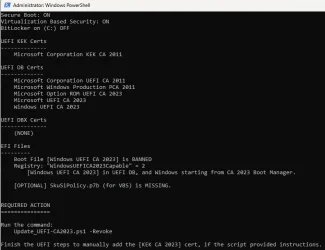
  • Check CA2023 result.webp
    Check CA2023 result.webp
    37.3 KB · Views: 2

My Computer

System One

  • OS
    Windows 11 Pro
    Computer type
    PC/Desktop
    Manufacturer/Model
    Dell Aurora R7
The last BIOS update for Aurora R7 was Feb 2022. I reviewed the Confidence Bucket data, and it doesn't appear there's a submitted KEK CA 2023 for this model.

Which means you should proceed:

1. Confirm Windows Hello PIN isn't enabled. Because if we clear the Secure Boot keys, you can't use PIN to logon.

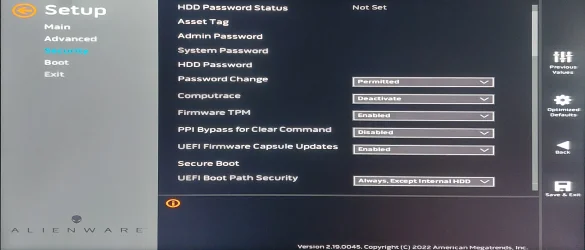
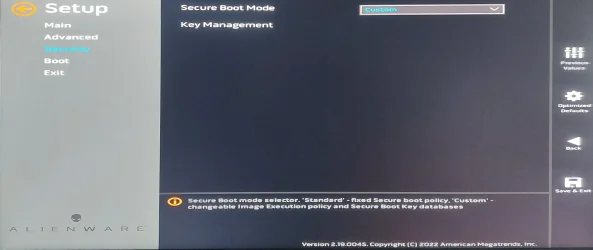
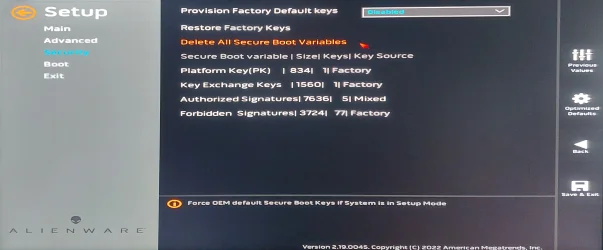
2. Under the Secure Boot menu, look for the setting to change from Standard to Custom Mode.

3. Look for the setting to Delete All Keys.

4. Restart Windows. Run the update script, it should install a set of replacement certs from MS (including the missing KEK CA 2023).

5. Re-run the check script.
 

My Computer

System One

  • OS
    Windows 7
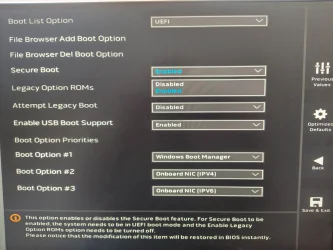
Thank you for the guidance. However, the only two options under the Secure Boot menu either seem to be "Enabled" or "Disabled". I can't see "Custom" unless I am looking in the wrong place?
 

Attachments

  • Secure Boot options.webp
    Secure Boot options.webp
    260.3 KB · Views: 1

My Computer

System One

  • OS
    Windows 11 Pro
    Computer type
    PC/Desktop
    Manufacturer/Model
    Dell Aurora R7
Unfortunately, it looks like the R7 BIOS doesn't allow you to modify any real Secure Boot settings:

Aurora R7 Service Manual | Dell US
Boot List OptionDisplays the available boot devices.
File Browser Add Boot OptionAllows you to set the boot path in the boot option list.
File Browser Del Boot OptionAllows you to delete the boot path in the boot option list.
Secure Boot ControlAllows you to enable or disable the secure boot control.
Load Legacy OPROM Allows you to enable or disable the Legacy Option ROM.
Boot Option PrioritiesDisplays the available boot devices.
Boot Option #1Displays the first boot device. Default: UEFI: Windows Boot Manager.
Boot Option #2Displays the second boot device. Default: Onboard NIC Device.
Boot Option #3Displays the third boot device. Default: Onboard NIC Device.

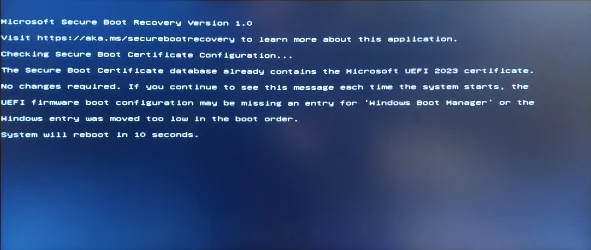
Because Windows can't update your BIOS, it will continue to throw Secure Boot update errors in the event logs. But your Windows will still work. I'm afraid there's not much you can do without an UEFI feature to manually change the keys.
 

My Computer

System One

  • OS
    Windows 7
Most grateful for your clear answer. At least I am now aware of how things stand :cool:
 

My Computer

System One

  • OS
    Windows 11 Pro
    Computer type
    PC/Desktop
    Manufacturer/Model
    Dell Aurora R7
I have two Acer laptops running 25H2 and with the InsydeH20 UEFI BIOS. Windows update did a partial certificate update but failed as the new KEK has not been provided by the OEM. Using garlin's manual suggestion I copied "microsoft corporation kek 2k ca 2023.der" to the EFI folder. The BIOS appears to have the option to add it but I cannot see the file to select it.

Will running garlin's update script perform the update using the Microsoft KEK?
If I wait is it likely that Windows will retry and eventually succeed using either an OEM or Microsoft KEK?
 

My Computer

System One

  • OS
    Windows 11
    Computer type
    Laptop
    Manufacturer/Model
    Acer
I have two Acer laptops running 25H2 and with the InsydeH20 UEFI BIOS. Windows update did a partial certificate update but failed as the new KEK has not been provided by the OEM. Using garlin's manual suggestion I copied "microsoft corporation kek 2k ca 2023.der" to the EFI folder. The BIOS appears to have the option to add it but I cannot see the file to select it.

Will running garlin's update script perform the update using the Microsoft KEK?
If I wait is it likely that Windows will retry and eventually succeed using either an OEM or Microsoft KEK?
You should probably ask on the main thread:
garlin's PowerShell scripts for updating Secure Boot CA 2023

In order to see the file, you should browse the listed disk devices for the cert file. If it's under a subfolder, you will have to change folders to find it.
 

My Computer

System One

  • OS
    Windows 7
Thanks for the very quick reply. I have reposted as suggested.

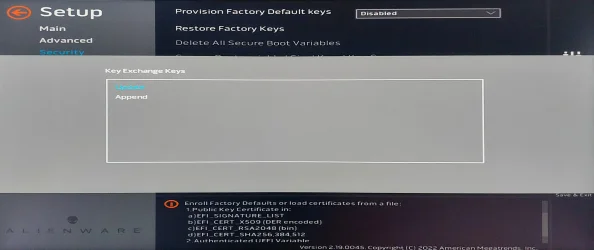
Re the folder, the option is "Select an UEFI file as trusted for executing". When I do that it lists HDD0 and hitting enter again appears to select <EFI>. That has a list of folders but no files.
 

My Computer

System One

  • OS
    Windows 11
    Computer type
    Laptop
    Manufacturer/Model
    Acer
Maybe "Updating Secure Boot on Alienware Aurora R7"?

Sometimes the answer is highly dependent on your PC model (as much of the Secure Boot update process). Includingg the model in the thread's name makes it easier to know if the discussion may not apply to other PC models.
 

My Computer

System One

  • OS
    Windows 7

Latest Support Threads

Back
Top Bottom