Solved Updating Secure Boot on Alienware Aurora R7


Ghiandoni

New member
Local time
5:08 PM
Posts
3
OS
Windows 11 Pro
Hi
I am a newcomer to Powershell and have run the suggested Check_UEFI-CA2023.ps1 with the attached result. My machine is a Dell Aurora R7 and I understand Dell no longer supports this pc. Do the check results look as though I can now run the Update UEFI file? It says Bitlocker OFF and Boot file is BANNED. Also, to finish the UEFI steps to manually add the KEK CA 2023 certificate. Will it give instructions on how to do this in the next step?
Help and advice appreciated, thank you.
 

Attachments
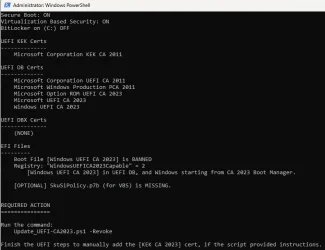
  • Check CA2023 result.webp
    Check CA2023 result.webp
    37.3 KB · Views: 3

My Computer

System One

  • OS
    Windows 11 Pro
    Computer type
    PC/Desktop
    Manufacturer/Model
    Dell Aurora R7
The last BIOS update for Aurora R7 was Feb 2022. I reviewed the Confidence Bucket data, and it doesn't appear there's a submitted KEK CA 2023 for this model.

Which means you should proceed:

1. Confirm Windows Hello PIN isn't enabled. Because if we clear the Secure Boot keys, you can't use PIN to logon.

2. Under the Secure Boot menu, look for the setting to change from Standard to Custom Mode.

3. Look for the setting to Delete All Keys.

4. Restart Windows. Run the update script, it should install a set of replacement certs from MS (including the missing KEK CA 2023).

5. Re-run the check script.
 

My Computer

System One

  • OS
    Windows 7
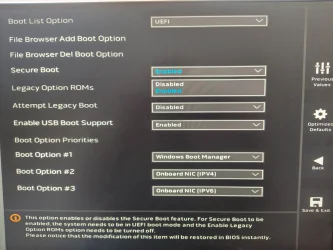
Thank you for the guidance. However, the only two options under the Secure Boot menu either seem to be "Enabled" or "Disabled". I can't see "Custom" unless I am looking in the wrong place?
 

Attachments

  • Secure Boot options.webp
    Secure Boot options.webp
    260.3 KB · Views: 1

My Computer

System One

  • OS
    Windows 11 Pro
    Computer type
    PC/Desktop
    Manufacturer/Model
    Dell Aurora R7
Unfortunately, it looks like the R7 BIOS doesn't allow you to modify any real Secure Boot settings:

Aurora R7 Service Manual | Dell US
Boot List OptionDisplays the available boot devices.
File Browser Add Boot OptionAllows you to set the boot path in the boot option list.
File Browser Del Boot OptionAllows you to delete the boot path in the boot option list.
Secure Boot ControlAllows you to enable or disable the secure boot control.
Load Legacy OPROM Allows you to enable or disable the Legacy Option ROM.
Boot Option PrioritiesDisplays the available boot devices.
Boot Option #1Displays the first boot device. Default: UEFI: Windows Boot Manager.
Boot Option #2Displays the second boot device. Default: Onboard NIC Device.
Boot Option #3Displays the third boot device. Default: Onboard NIC Device.

Because Windows can't update your BIOS, it will continue to throw Secure Boot update errors in the event logs. But your Windows will still work. I'm afraid there's not much you can do without an UEFI feature to manually change the keys.
 

My Computer

System One

  • OS
    Windows 7
Most grateful for your clear answer. At least I am now aware of how things stand :cool:
 

My Computer

System One

  • OS
    Windows 11 Pro
    Computer type
    PC/Desktop
    Manufacturer/Model
    Dell Aurora R7
I have two Acer laptops running 25H2 and with the InsydeH20 UEFI BIOS. Windows update did a partial certificate update but failed as the new KEK has not been provided by the OEM. Using garlin's manual suggestion I copied "microsoft corporation kek 2k ca 2023.der" to the EFI folder. The BIOS appears to have the option to add it but I cannot see the file to select it.

Will running garlin's update script perform the update using the Microsoft KEK?
If I wait is it likely that Windows will retry and eventually succeed using either an OEM or Microsoft KEK?
 

My Computer

System One

  • OS
    Windows 11
    Computer type
    Laptop
    Manufacturer/Model
    Acer
I have two Acer laptops running 25H2 and with the InsydeH20 UEFI BIOS. Windows update did a partial certificate update but failed as the new KEK has not been provided by the OEM. Using garlin's manual suggestion I copied "microsoft corporation kek 2k ca 2023.der" to the EFI folder. The BIOS appears to have the option to add it but I cannot see the file to select it.

Will running garlin's update script perform the update using the Microsoft KEK?
If I wait is it likely that Windows will retry and eventually succeed using either an OEM or Microsoft KEK?
You should probably ask on the main thread:
garlin's PowerShell scripts for updating Secure Boot CA 2023

In order to see the file, you should browse the listed disk devices for the cert file. If it's under a subfolder, you will have to change folders to find it.
 

My Computer

System One

  • OS
    Windows 7
Thanks for the very quick reply. I have reposted as suggested.

Re the folder, the option is "Select an UEFI file as trusted for executing". When I do that it lists HDD0 and hitting enter again appears to select <EFI>. That has a list of folders but no files.
 

My Computer

System One

  • OS
    Windows 11
    Computer type
    Laptop
    Manufacturer/Model
    Acer
Maybe "Updating Secure Boot on Alienware Aurora R7"?

Sometimes the answer is highly dependent on your PC model (as much of the Secure Boot update process). Includingg the model in the thread's name makes it easier to know if the discussion may not apply to other PC models.
 

My Computer

System One

  • OS
    Windows 7
Unfortunately, it looks like the R7 BIOS doesn't allow you to modify any real Secure Boot settings:

Aurora R7 Service Manual | Dell US
Boot List OptionDisplays the available boot devices.
File Browser Add Boot OptionAllows you to set the boot path in the boot option list.
File Browser Del Boot OptionAllows you to delete the boot path in the boot option list.
Secure Boot ControlAllows you to enable or disable the secure boot control.
Load Legacy OPROM Allows you to enable or disable the Legacy Option ROM.
Boot Option PrioritiesDisplays the available boot devices.
Boot Option #1Displays the first boot device. Default: UEFI: Windows Boot Manager.
Boot Option #2Displays the second boot device. Default: Onboard NIC Device.
Boot Option #3Displays the third boot device. Default: Onboard NIC Device.

Because Windows can't update your BIOS, it will continue to throw Secure Boot update errors in the event logs. But your Windows will still work. I'm afraid there's not much you can do without an UEFI feature to manually change the keys.

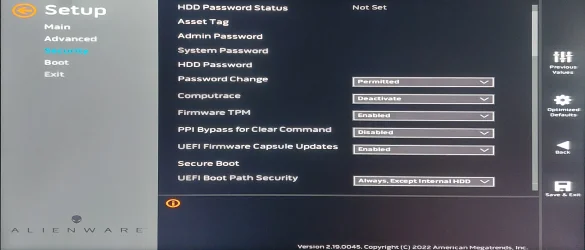
Two other menus may be of interest in addition to the "Boot" menu. These are "Advanced" (which doesn't seem to have anything useful) and, on my Aurora R7 at least, "Security" which up until half an hour ago seemed to have a subset of the Key management settings. I have, however, seemingly lost those menu entries now.

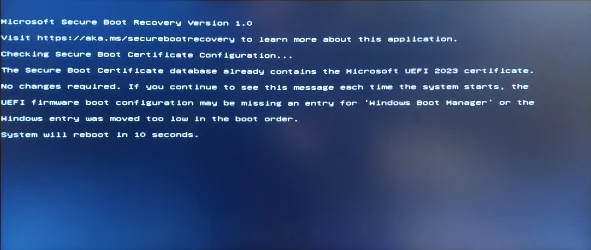
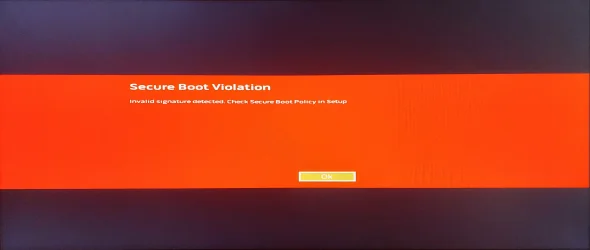
If I try to booth from a USB drive with a EFI\BOOT\Bootx64.efi on it (copied from C:\Windows\Boot\EFI\SecureBootRecovery.efi) I get the attached screen - however, Windows Security is still complaining that my R7 "does not support the automated Secure Boot certificate update due to hardware or firmware limitations" :(

Any ideas?

Oh yeah - I have 3 boot partitions (Win11 Work, Win10, Win10 Games)

If I run:

([System.Text.Encoding]::ASCII.GetString((Get-SecureBootUEFI db).bytes) -match 'Windows UEFI CA 2023')

In Terminal (Admin) I get the response "True"
 

Attachments

  • AuroraR72023SecureBootIssue.webp
    AuroraR72023SecureBootIssue.webp
    533.3 KB · Views: 1
Last edited:

My Computer

System One

  • OS
    Windows 11 Pro
    Computer type
    PC/Desktop
    Manufacturer/Model
    Alienware Aurora R7
Have you tried adding a BIOS Admin password? Sometimes you can't access the advanced Secure Boot options without one.
 

My Computer

System One

  • OS
    Windows 7
Have you tried adding a BIOS Admin password? Sometimes you can't access the advanced Secure Boot options without one.

Thanks for that idea - I turned my Aurora R7 on today and found that the Security settings I couldn't find last night are back. <shrug>

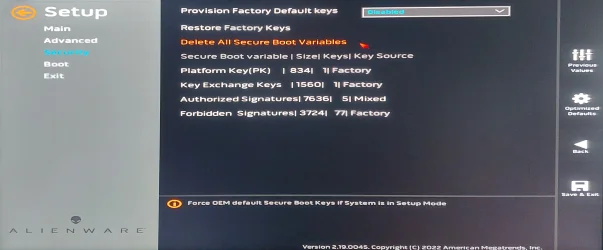
So, anyway, if I select the "Security" menu and scroll down I can see a "Secure Boot" item that separate from the one in the "Boot" menu.

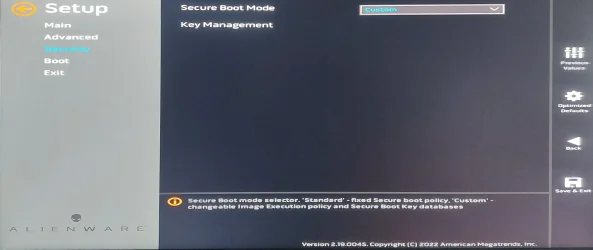
You can't select the"Key Management" button until you change the "Secure Boot Mode" to "Custom"

Selecting "Key Management" brings up a whole new menu... which is about where I'm stuck, having seen my final screen capture too often today! But I shall press on...
 

Attachments

  • 01SecurityMenu.webp
    01SecurityMenu.webp
    554.4 KB · Views: 1
  • 02SetSecureBootModeToCustom.webp
    02SetSecureBootModeToCustom.webp
    454.6 KB · Views: 1
  • 03KeyManagementMenu.webp
    03KeyManagementMenu.webp
    631.9 KB · Views: 1
  • 04QuickPanic.webp
    04QuickPanic.webp
    415.2 KB · Views: 1
Last edited:

My Computer

System One

  • OS
    Windows 11 Pro
    Computer type
    PC/Desktop
    Manufacturer/Model
    Alienware Aurora R7
1. Disable Secure Boot mode for now.
2. Under "Key Exchange Keys", is that a line for reporting or does it expand into a sub-menu? Load the cert file.
3. Or if you don't have a sub-menu, then select "Delete All Secure Boot Variables".
 

My Computer

System One

  • OS
    Windows 7
Thanks for that idea - I turned my Aurora R7 on today and found that the Security settings I couldn't find last night are back. <shrug>

So, anyway, if I select the "Security" menu and scroll down I can see a "Secure Boot" item that separate from the one in the "Boot" menu.

You can't select the"Key Management" button until you change the "Secure Boot Mode" to "Custom"

Selecting "Key Management" brings up a whole new menu... which is about where I'm stuck, having seen my final screen capture too often today! But I shall press on...
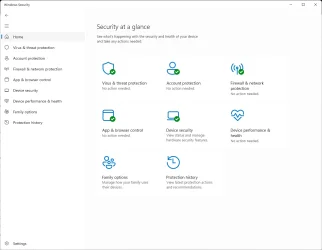
So far as I can see, if I leave the "Secure Boot Mode" setting in the "Security" menu set to "Custom", Windows Security is happy. If I change it back to "Standard" then Windows Security becomes unhappy again - so it looks like "Standard" resets the keys back to factory settings? Do we think it's correct to leave it on "Custom" because the new keys ARE my "Custom" setup?

I'm afraid I have messed around and tried too many combinations to be sure enough to write a list of steps to go through to reach my current semi-happy state.

Cheers,

Cliff
 

Attachments

  • 05WindowsSecuritySeemsHappy.webp
    05WindowsSecuritySeemsHappy.webp
    36.7 KB · Views: 1

My Computer

System One

  • OS
    Windows 11 Pro
    Computer type
    PC/Desktop
    Manufacturer/Model
    Alienware Aurora R7
1. Disable Secure Boot mode for now.
2. Under "Key Exchange Keys", is that a line for reporting or does it expand into a sub-menu? Load the cert file.
3. Or if you don't have a sub-menu, then select "Delete All Secure Boot Variables".

If I disable Secure Boot, the Security menu hides the Secure Boot menu so I can't make other changes.

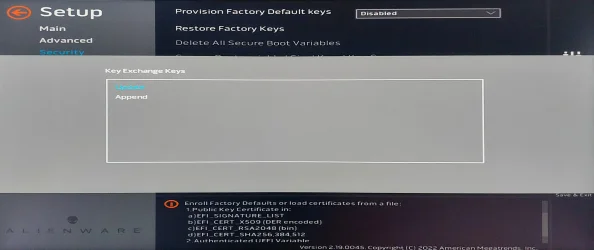
"Key Exchange Keys" does indeed throw up a new menu, which I'm less familiar with (having not seen it before just now) as attached.

Cheers,

Cliff
 

Attachments

  • 06KeyExchangeKey.webp
    06KeyExchangeKey.webp
    553.1 KB · Views: 1

My Computer

System One

  • OS
    Windows 11 Pro
    Computer type
    PC/Desktop
    Manufacturer/Model
    Alienware Aurora R7
You want Append, and look for the .der or .crt file.
On some motherboards, Append has two meanings: If choose Yes, it lets you append a certificate from among the current certs. If choose No, it redirects you to choose certs from a usb flash disk or from internal disk drive. USB is preferable as it is easy to locate by the phrase USB. USB disk must be fat32 formatted, preferably.
 

My Computers

System One System Two

  • OS
    Windows 11 Pro build 26200.8524
    Computer type
    PC/Desktop
    Manufacturer/Model
    Home Built
    CPU
    Intel i7-4790
    Motherboard
    Asus H97 Pro Gamer with add-on TPM1.2 module
    Memory
    Teams DDR3-1600 4x4 GB
    Graphics Card(s)
    MSI Nvidia GeForce GTX 1050Ti
    Sound Card
    Realtek ALC1150
    Monitor(s) Displays
    Dell P2425D
    Screen Resolution
    2560 by 1440 pixels
    Hard Drives
    Corsair NVMe M.2 Core XT 1000 GB (Windows 11 v.25H2); Samsung SATA Evo 870 500 GB (Windows 11 v.25H2);
    PSU
    Corsair HX850
    Case
    Gigabyte Solo 210
    Cooling
    Zalman CNPS7X Tower
    Keyboard
    Microsoft AIO Wireless (includes touchpad)
    Mouse
    HP S1000 Plus Wireless
    Internet Speed
    500 Mb fiber optic
    Browser
    Chrome; MS Edge
    Antivirus
    Windows Defender
  • Operating System
    MacOS 12 Monterey
    Computer type
    Laptop
    Manufacturer/Model
    Apple Macbook Air
    CPU
    Intel Core i5
    Memory
    8 GB
    Graphics card(s)
    Intel integrated
    Screen Resolution
    1440 by 900 pixels
    Hard Drives
    128 GB
    Keyboard
    Built-in
    Mouse
    Microsoft Wireless
    Internet Speed
    802.11 ac
    Browser
    Chrome; Safari
    Antivirus
    N/A
On some motherboards, Append has two meanings: If choose Yes, it lets you append a certificate from among the current certs. If choose No, it redirects you to choose certs from a usb flash disk or from internal disk drive. USB is preferable as it is easy to locate by the phrase USB. USB disk must be fat32 formatted, preferably.
On my Alienware Aurora R7 it asks me to find a file. I'm searching my SSD for a .der or .crt now, but it's taking ages :(

I suspect I need to download it from somewhere....


Like possibly "microsoft corporation kek 2k ca 2023.der" from "GitHub - microsoft/secureboot_objects: Secure boot objects recommended by Microsoft." ?
 

My Computer

System One

  • OS
    Windows 11 Pro
    Computer type
    PC/Desktop
    Manufacturer/Model
    Alienware Aurora R7

My Computers

System One System Two

  • OS
    Windows 11 Pro build 26200.8524
    Computer type
    PC/Desktop
    Manufacturer/Model
    Home Built
    CPU
    Intel i7-4790
    Motherboard
    Asus H97 Pro Gamer with add-on TPM1.2 module
    Memory
    Teams DDR3-1600 4x4 GB
    Graphics Card(s)
    MSI Nvidia GeForce GTX 1050Ti
    Sound Card
    Realtek ALC1150
    Monitor(s) Displays
    Dell P2425D
    Screen Resolution
    2560 by 1440 pixels
    Hard Drives
    Corsair NVMe M.2 Core XT 1000 GB (Windows 11 v.25H2); Samsung SATA Evo 870 500 GB (Windows 11 v.25H2);
    PSU
    Corsair HX850
    Case
    Gigabyte Solo 210
    Cooling
    Zalman CNPS7X Tower
    Keyboard
    Microsoft AIO Wireless (includes touchpad)
    Mouse
    HP S1000 Plus Wireless
    Internet Speed
    500 Mb fiber optic
    Browser
    Chrome; MS Edge
    Antivirus
    Windows Defender
  • Operating System
    MacOS 12 Monterey
    Computer type
    Laptop
    Manufacturer/Model
    Apple Macbook Air
    CPU
    Intel Core i5
    Memory
    8 GB
    Graphics card(s)
    Intel integrated
    Screen Resolution
    1440 by 900 pixels
    Hard Drives
    128 GB
    Keyboard
    Built-in
    Mouse
    Microsoft Wireless
    Internet Speed
    802.11 ac
    Browser
    Chrome; Safari
    Antivirus
    N/A
If you have not downloaded the certificate file, it will not be on your disk drives.
That would account for my not being able to find either file. I guess I'll try with the "microsoft corporation kek 2k ca 2023.der" and see if that blows my PC up.
 

My Computer

System One

  • OS
    Windows 11 Pro
    Computer type
    PC/Desktop
    Manufacturer/Model
    Alienware Aurora R7

Latest Support Threads

Back
Top Bottom