Installation and Upgrade Upgrade Windows 11 Home to Windows 11 Pro

  • Thread starter Thread starter Brink
  • Start date Published: Start date Updated Updated:

Windows_11_upgrade_banner.png

This tutorial will show you how to upgrade from Windows 11 Home to Windows 11 Pro without losing anything.

You can directly upgrade your device from Windows 11 Home to the Windows 11 Pro edition without losing anything.

Upgrading to Windows 11 Pro will include features only in the Pro edition.

Reference:


You must be signed in as an administrator to upgrade your edition of Windows 11.


Contents

  • Option One: Upgrade Windows 11 Home to Windows 11 Pro from Microsoft Store
  • Option Two: Upgrade Windows 11 Home to Windows 11 Pro by Changing Product Key


Option One

Upgrade Windows 11 Home to Windows 11 Pro from Microsoft Store


This option is for when you do not have a Windows 11 Pro product key, and need to purchase one in the Microsoft Store.


1 Open Settings (Win+I).

2 Click/tap on System on the left side, and click/tap on Activation on the right side. (see screenshot below)


Upgrade_from_Windows11_from_Home_to_Pro-1.png

3 Click/tap on Upgrade your edition of Windows to expand it open. (see screenshot below step 4)

4 Click/tap on Open Store next to Upgrade in the Microsoft app. (see screenshot below)

Upgrade_from_Windows11_from_Home_to_Pro_Store-2.png

5 You can now Buy Windows 11 Pro from the Microsoft Store. (see screenshot below)

You will need to be signed in to the Microsoft Store app with your Microsoft account to purchase Windows 11 Pro.


Upgrade_from_Windows11_from_Home_to_Pro_Store-3.png

6 After you confirm your purchase, you’ll be prompted to install Windows 11 Pro and restart your PC. You’ll then be running Windows 11 Pro.

7 Continue at step6 in option 2.


Option Two

Upgrade Windows 11 Home to Windows 11 Pro by Changing Product Key


This option is for when you have a Windows 11 Pro product key.


1 Open Settings (Win+I).

2 Click/tap on System on the left side, and click/tap on Activation on the right side. (see screenshot below)


Upgrade_from_Windows11_from_Home_to_Pro-1.png

3 Click/tap on Upgrade your edition of Windows to expand it open. (see screenshot below step 4)

4 Click/tap on Change next to Change product key. (see screenshot below)

Upgrade_from_Windows11_from_Home_to_Pro-2.png

5 Enter your 25-character Windows 10/11 Pro product key, and click/tap on Next. (see screenshot below)

If needed, you can enter the generic key below to upgrade to Pro, but it will not activate Windows 11.

VK7JG-NPHTM-C97JM-9MPGT-3V66T


Upgrade_from_Windows11_from_Home_to_Pro-3.png

6 Click/tap on Start when ready to upgrade to Windows 11 Pro. (see screenshot below)

Upgrade_from_Windows11_from_Home_to_Pro-4.png

7 Windows will now start Preparing for upgrade. (see screenshot below)

Upgrade_from_Windows11_from_Home_to_Pro-5.png

8 When finished preparing, your Windows will automatically restart and start upgrading to Windows 11 Pro. (see screenshots below)

Upgrade_from_Windows11_from_Home_to_Pro-6.png
Upgrade_from_Windows11_from_Home_to_Pro-7.png
Upgrade_from_Windows11_from_Home_to_Pro-8.png

9 When the upgrade to Windows 11 Pro has successfully finished, you will need to sign in to your account.

10 You will now be running Windows 11 Pro. (see screenshots below)

Upgrade_from_Windows11_from_Home_to_Pro-9.png

Upgrade_from_Windows11_from_Home_to_Pro-10.png


That's it,
Shawn Brink


Last edited:

My Computers

System One System Two

  • OS
    Win7,Win11
    Computer type
    PC/Desktop
    CPU
    i7-9700
    Motherboard
    gigabyte b365m ds3h
    Memory
    2x16gb 3600mhz
    Monitor(s) Displays
    benq gw2480
    PSU
    bequiet pure power 11 400CM
    Cooling
    cryorig m9i
  • Operating System
    win7,win11
    Computer type
    PC/Desktop
    CPU
    i5-8400
    Motherboard
    gigabyte b365m ds3h
    Memory
    2x8gb 3200
    PSU
    xfx pro 450
Hi @Brink

I just bought a new laptop and want to upgrade to Pro for Workstation (acquired a long time ago) using the Microsoft Store. A direct upgrade from Home to Pro for Workstation should be fine, right?

1765808625780.webp
 

My Computer

System One

  • OS
    Windows 11
    Computer type
    Laptop
    Manufacturer/Model
    Lenovo XiaoXin Pro 14APH8
    CPU
    Ryzen 7 7840H (same as 7840HS)
    Memory
    32GB
    Graphics Card(s)
    Radeon 780M
Hi @Brink

I just bought a new laptop and want to upgrade to Pro for Workstation (acquired a long time ago) using the Microsoft Store. A direct upgrade from Home to Pro for Workstation should be fine, right?

View attachment 157012

Hello, :alien:

Yes, you should be able to upgrade by just changing the product key, or the method in your screenshot.
 

My Computers

System One System Two

  • OS
    Windows 11 Pro for Workstations
    Computer type
    PC/Desktop
    Manufacturer/Model
    Custom self build
    CPU
    Intel i7-8700K 5 GHz
    Motherboard
    ASUS ROG Maximus XI Formula Z390
    Memory
    64 GB (4x16GB) G.SKILL TridentZ RGB DDR4 3600 MHz (F4-3600C18D-32GTZR)
    Graphics Card(s)
    ASUS ROG-STRIX-GTX1080TI-O11G-GAMING (11GB GDDR5X)
    Sound Card
    Integrated Digital Audio (S/PDIF)
    Monitor(s) Displays
    2 x Samsung Odyssey G75 27"
    Screen Resolution
    2560x1440
    Hard Drives
    1TB Samsung 990 PRO M.2,
    4TB Samsung 990 PRO M.2,
    TerraMaster F8 SSD Plus NAS
    PSU
    Seasonic Prime Titanium 850W
    Case
    Thermaltake Core P3 wall mounted
    Cooling
    Corsair Hydro H115i
    Keyboard
    Amazon Basics Wired Full Keyboard MD005
    Mouse
    Logitech MX Master 4
    Internet Speed
    2 Gbps Download and 100 Mbps Upload
    Browser
    Chrome and Edge
    Antivirus
    Microsoft Defender
    Other Info
    Logitech Z625 speaker system,
    Logitech BRIO 4K Pro webcam,
    HP Color LaserJet Pro MFP M477fdn,
    CyberPower CP1500PFCLCD
    Galaxy S23 Plus phone
  • Operating System
    Windows 11 Pro
    Computer type
    Laptop
    Manufacturer/Model
    Surface Laptop 7 Copilot+ PC
    CPU
    Snapdragon X Elite (12 core) 3.42 GHz
    Memory
    16 GB LPDDR5x-7467 MHz
    Monitor(s) Displays
    15" HDR
    Screen Resolution
    2496 x 1664
    Hard Drives
    1 TB SSD
    Internet Speed
    Wi-Fi 7 and Bluetooth 5.4
    Browser
    Chrome and Edge
    Antivirus
    Microsoft Defender
  • Like
Reactions: _K2
I'm experiencing a similar issue.

I have a brand new Dell 16 DC16255 laptop that came with Win11 Home. I'm trying to upgrade to Pro. I have two legit keys from sealed Microsoft Win11 Pro CD-ROM installation packages. One was for my old laptop and the other for my desktop.

When I try to use the "change product key" option on the new laptop, I get an error saying "That product key you entered didn't work" and ending in "0xc004f050". I've tried both keys. Same result.

I've tried using the generic key. That doesn't seem to work either. I get a message about upgrading, I select "Start" and I get a message stating "We can't activate Windows on this device because you don't have a valid digital license or product key." I've also tried going the cmd route with no luck.

I used one of the new keys on my old laptop to do a hardware override install which killed it a week later. It's now completely bricked. I used the other on my Win10 desktop temporarily to fix an activation issue there. I switched back to the old desktop key later.

I understand that a key can only be used on one machine, but as it's been explained to me in a tenforums thread, if you enter a key already in use, it will work but deactivate on the other PC. If that's true, then either of the keys should work.

Any thoughts, tips or suggestions would be greatly appreciated. Thank you.
 

My Computer

System One

  • OS
    Windows 11 Pro, 64 bit
    Computer type
    Laptop
    Manufacturer/Model
    Dell DC16255
    CPU
    AMD Ryzen™ 7 250 Processor (8 cores, up to 5.1Ghz)
    Memory
    32 GB DDR5, 1 x 32 GB, 5600 MT/s
    Graphics Card(s)
    AMD Radeon Graphics
    Monitor(s) Displays
    16.0" 16:10 FHD+ (1920x1200) Touch 300nits WVA/IPS Display with ComfortView
    Hard Drives
    2TB M.2 PCIe NVMe SSD
    Mouse
    Logitech wireless
    Browser
    Edge
    Antivirus
    MalwareBytes
I'm experiencing a similar issue.

I have a brand new Dell 16 DC16255 laptop that came with Win11 Home. I'm trying to upgrade to Pro. I have two legit keys from sealed Microsoft Win11 Pro CD-ROM installation packages. One was for my old laptop and the other for my desktop.

When I try to use the "change product key" option on the new laptop, I get an error saying "That product key you entered didn't work" and ending in "0xc004f050". I've tried both keys. Same result.

I've tried using the generic key. That doesn't seem to work either. I get a message about upgrading, I select "Start" and I get a message stating "We can't activate Windows on this device because you don't have a valid digital license or product key." I've also tried going the cmd route with no luck.

I used one of the new keys on my old laptop to do a hardware override install which killed it a week later. It's now completely bricked. I used the other on my Win10 desktop temporarily to fix an activation issue there. I switched back to the old desktop key later.

I understand that a key can only be used on one machine, but as it's been explained to me in a tenforums thread, if you enter a key already in use, it will work but deactivate on the other PC. If that's true, then the key used on my old laptop should work.

Any thoughts, tips or suggestions would be greatly appreciated. Thank you.

Hello, :alien:

It depends on if it's a retail or OEM key. Only a retail key can be transferred to another device to activate. An OEM key can only be used on the original device it was first activated on.


My Computers

System One System Two

  • OS
    Windows 11 Pro for Workstations
    Computer type
    PC/Desktop
    Manufacturer/Model
    Custom self build
    CPU
    Intel i7-8700K 5 GHz
    Motherboard
    ASUS ROG Maximus XI Formula Z390
    Memory
    64 GB (4x16GB) G.SKILL TridentZ RGB DDR4 3600 MHz (F4-3600C18D-32GTZR)
    Graphics Card(s)
    ASUS ROG-STRIX-GTX1080TI-O11G-GAMING (11GB GDDR5X)
    Sound Card
    Integrated Digital Audio (S/PDIF)
    Monitor(s) Displays
    2 x Samsung Odyssey G75 27"
    Screen Resolution
    2560x1440
    Hard Drives
    1TB Samsung 990 PRO M.2,
    4TB Samsung 990 PRO M.2,
    TerraMaster F8 SSD Plus NAS
    PSU
    Seasonic Prime Titanium 850W
    Case
    Thermaltake Core P3 wall mounted
    Cooling
    Corsair Hydro H115i
    Keyboard
    Amazon Basics Wired Full Keyboard MD005
    Mouse
    Logitech MX Master 4
    Internet Speed
    2 Gbps Download and 100 Mbps Upload
    Browser
    Chrome and Edge
    Antivirus
    Microsoft Defender
    Other Info
    Logitech Z625 speaker system,
    Logitech BRIO 4K Pro webcam,
    HP Color LaserJet Pro MFP M477fdn,
    CyberPower CP1500PFCLCD
    Galaxy S23 Plus phone
  • Operating System
    Windows 11 Pro
    Computer type
    Laptop
    Manufacturer/Model
    Surface Laptop 7 Copilot+ PC
    CPU
    Snapdragon X Elite (12 core) 3.42 GHz
    Memory
    16 GB LPDDR5x-7467 MHz
    Monitor(s) Displays
    15" HDR
    Screen Resolution
    2496 x 1664
    Hard Drives
    1 TB SSD
    Internet Speed
    Wi-Fi 7 and Bluetooth 5.4
    Browser
    Chrome and Edge
    Antivirus
    Microsoft Defender
Hello, :alien:

It depends on if it's a retail or OEM key. Only a retail key can be transferred to another device to activate. An OEM key can only be used on the original device it was first activated on.


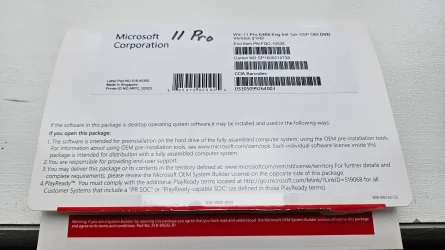
This is what I have. They key is on a label like the kind you see on the side of a PC tower. I believe I had to scratch off a layer to reveal the entire key,


1772817996867.webp
 

My Computer

System One

  • OS
    Windows 11 Pro, 64 bit
    Computer type
    Laptop
    Manufacturer/Model
    Dell DC16255
    CPU
    AMD Ryzen™ 7 250 Processor (8 cores, up to 5.1Ghz)
    Memory
    32 GB DDR5, 1 x 32 GB, 5600 MT/s
    Graphics Card(s)
    AMD Radeon Graphics
    Monitor(s) Displays
    16.0" 16:10 FHD+ (1920x1200) Touch 300nits WVA/IPS Display with ComfortView
    Hard Drives
    2TB M.2 PCIe NVMe SSD
    Mouse
    Logitech wireless
    Browser
    Edge
    Antivirus
    MalwareBytes
This is what I have. They key is on a label like the kind you see on the side of a PC tower. I believe I had to scratch off a layer to reveal the entire key,

View attachment 165078

I can't tell if it's OEM or retail from the screenshot.

Double check to make sure you have entered the product key correctly. For example, the number 0 can be mistaken for the letter O, or vice versa.
 

My Computers

System One System Two

  • OS
    Windows 11 Pro for Workstations
    Computer type
    PC/Desktop
    Manufacturer/Model
    Custom self build
    CPU
    Intel i7-8700K 5 GHz
    Motherboard
    ASUS ROG Maximus XI Formula Z390
    Memory
    64 GB (4x16GB) G.SKILL TridentZ RGB DDR4 3600 MHz (F4-3600C18D-32GTZR)
    Graphics Card(s)
    ASUS ROG-STRIX-GTX1080TI-O11G-GAMING (11GB GDDR5X)
    Sound Card
    Integrated Digital Audio (S/PDIF)
    Monitor(s) Displays
    2 x Samsung Odyssey G75 27"
    Screen Resolution
    2560x1440
    Hard Drives
    1TB Samsung 990 PRO M.2,
    4TB Samsung 990 PRO M.2,
    TerraMaster F8 SSD Plus NAS
    PSU
    Seasonic Prime Titanium 850W
    Case
    Thermaltake Core P3 wall mounted
    Cooling
    Corsair Hydro H115i
    Keyboard
    Amazon Basics Wired Full Keyboard MD005
    Mouse
    Logitech MX Master 4
    Internet Speed
    2 Gbps Download and 100 Mbps Upload
    Browser
    Chrome and Edge
    Antivirus
    Microsoft Defender
    Other Info
    Logitech Z625 speaker system,
    Logitech BRIO 4K Pro webcam,
    HP Color LaserJet Pro MFP M477fdn,
    CyberPower CP1500PFCLCD
    Galaxy S23 Plus phone
  • Operating System
    Windows 11 Pro
    Computer type
    Laptop
    Manufacturer/Model
    Surface Laptop 7 Copilot+ PC
    CPU
    Snapdragon X Elite (12 core) 3.42 GHz
    Memory
    16 GB LPDDR5x-7467 MHz
    Monitor(s) Displays
    15" HDR
    Screen Resolution
    2496 x 1664
    Hard Drives
    1 TB SSD
    Internet Speed
    Wi-Fi 7 and Bluetooth 5.4
    Browser
    Chrome and Edge
    Antivirus
    Microsoft Defender
I can't tell if it's OEM or retail from the screenshot.

Double check to make sure you have entered the product key correctly. For example, the number 0 can be mistaken for the letter O, or vice versa.

I am definitely typing it correctly. Triple-checked multiple times.

So, what would be the indicator that it's OEM, besides being in sealed Microsoft factory packaging?
 

Attachments

  • 20260306_134856.webp
    20260306_134856.webp
    759.4 KB · Views: 7

My Computer

System One

  • OS
    Windows 11 Pro, 64 bit
    Computer type
    Laptop
    Manufacturer/Model
    Dell DC16255
    CPU
    AMD Ryzen™ 7 250 Processor (8 cores, up to 5.1Ghz)
    Memory
    32 GB DDR5, 1 x 32 GB, 5600 MT/s
    Graphics Card(s)
    AMD Radeon Graphics
    Monitor(s) Displays
    16.0" 16:10 FHD+ (1920x1200) Touch 300nits WVA/IPS Display with ComfortView
    Hard Drives
    2TB M.2 PCIe NVMe SSD
    Mouse
    Logitech wireless
    Browser
    Edge
    Antivirus
    MalwareBytes
I am definitely typing it correctly. Triple-checked multiple times.

So, what would be the indicator that it's OEM, besides being in sealed Microsoft factory packaging?

The screenshot shows OEI DVD which is the same as OEM. Most likely OEM key then. :(
 

My Computers

System One System Two

  • OS
    Windows 11 Pro for Workstations
    Computer type
    PC/Desktop
    Manufacturer/Model
    Custom self build
    CPU
    Intel i7-8700K 5 GHz
    Motherboard
    ASUS ROG Maximus XI Formula Z390
    Memory
    64 GB (4x16GB) G.SKILL TridentZ RGB DDR4 3600 MHz (F4-3600C18D-32GTZR)
    Graphics Card(s)
    ASUS ROG-STRIX-GTX1080TI-O11G-GAMING (11GB GDDR5X)
    Sound Card
    Integrated Digital Audio (S/PDIF)
    Monitor(s) Displays
    2 x Samsung Odyssey G75 27"
    Screen Resolution
    2560x1440
    Hard Drives
    1TB Samsung 990 PRO M.2,
    4TB Samsung 990 PRO M.2,
    TerraMaster F8 SSD Plus NAS
    PSU
    Seasonic Prime Titanium 850W
    Case
    Thermaltake Core P3 wall mounted
    Cooling
    Corsair Hydro H115i
    Keyboard
    Amazon Basics Wired Full Keyboard MD005
    Mouse
    Logitech MX Master 4
    Internet Speed
    2 Gbps Download and 100 Mbps Upload
    Browser
    Chrome and Edge
    Antivirus
    Microsoft Defender
    Other Info
    Logitech Z625 speaker system,
    Logitech BRIO 4K Pro webcam,
    HP Color LaserJet Pro MFP M477fdn,
    CyberPower CP1500PFCLCD
    Galaxy S23 Plus phone
  • Operating System
    Windows 11 Pro
    Computer type
    Laptop
    Manufacturer/Model
    Surface Laptop 7 Copilot+ PC
    CPU
    Snapdragon X Elite (12 core) 3.42 GHz
    Memory
    16 GB LPDDR5x-7467 MHz
    Monitor(s) Displays
    15" HDR
    Screen Resolution
    2496 x 1664
    Hard Drives
    1 TB SSD
    Internet Speed
    Wi-Fi 7 and Bluetooth 5.4
    Browser
    Chrome and Edge
    Antivirus
    Microsoft Defender
I purchased a new key and it worked. Successfully upgraded to Pro now.

Thank you all for your assistance. (y)
 

My Computer

System One

  • OS
    Windows 11 Pro, 64 bit
    Computer type
    Laptop
    Manufacturer/Model
    Dell DC16255
    CPU
    AMD Ryzen™ 7 250 Processor (8 cores, up to 5.1Ghz)
    Memory
    32 GB DDR5, 1 x 32 GB, 5600 MT/s
    Graphics Card(s)
    AMD Radeon Graphics
    Monitor(s) Displays
    16.0" 16:10 FHD+ (1920x1200) Touch 300nits WVA/IPS Display with ComfortView
    Hard Drives
    2TB M.2 PCIe NVMe SSD
    Mouse
    Logitech wireless
    Browser
    Edge
    Antivirus
    MalwareBytes
I purchased a new key and it worked. Successfully upgraded to Pro now.

Thank you all for your assistance. (y)

Great news. :party:
 

My Computers

System One System Two

  • OS
    Windows 11 Pro for Workstations
    Computer type
    PC/Desktop
    Manufacturer/Model
    Custom self build
    CPU
    Intel i7-8700K 5 GHz
    Motherboard
    ASUS ROG Maximus XI Formula Z390
    Memory
    64 GB (4x16GB) G.SKILL TridentZ RGB DDR4 3600 MHz (F4-3600C18D-32GTZR)
    Graphics Card(s)
    ASUS ROG-STRIX-GTX1080TI-O11G-GAMING (11GB GDDR5X)
    Sound Card
    Integrated Digital Audio (S/PDIF)
    Monitor(s) Displays
    2 x Samsung Odyssey G75 27"
    Screen Resolution
    2560x1440
    Hard Drives
    1TB Samsung 990 PRO M.2,
    4TB Samsung 990 PRO M.2,
    TerraMaster F8 SSD Plus NAS
    PSU
    Seasonic Prime Titanium 850W
    Case
    Thermaltake Core P3 wall mounted
    Cooling
    Corsair Hydro H115i
    Keyboard
    Amazon Basics Wired Full Keyboard MD005
    Mouse
    Logitech MX Master 4
    Internet Speed
    2 Gbps Download and 100 Mbps Upload
    Browser
    Chrome and Edge
    Antivirus
    Microsoft Defender
    Other Info
    Logitech Z625 speaker system,
    Logitech BRIO 4K Pro webcam,
    HP Color LaserJet Pro MFP M477fdn,
    CyberPower CP1500PFCLCD
    Galaxy S23 Plus phone
  • Operating System
    Windows 11 Pro
    Computer type
    Laptop
    Manufacturer/Model
    Surface Laptop 7 Copilot+ PC
    CPU
    Snapdragon X Elite (12 core) 3.42 GHz
    Memory
    16 GB LPDDR5x-7467 MHz
    Monitor(s) Displays
    15" HDR
    Screen Resolution
    2496 x 1664
    Hard Drives
    1 TB SSD
    Internet Speed
    Wi-Fi 7 and Bluetooth 5.4
    Browser
    Chrome and Edge
    Antivirus
    Microsoft Defender

Latest Support Threads

Back
Top Bottom