
Solved USB card reader suddenly stopped working - your advice?


Snail

New member
Local time
8:13 AM
Posts
6
OS
Windows 11
I have a USB card reader to transfer pictures from my camera to my laptop (see photo). The last time I used it, the transfer speed was a very satisfying 600-700 MB/second. When I plug it in today, my laptop is not able to access any photos, I just get a message saying "Insert disk in USB device D".

I have not made any changes to the card, the reader or my laptop. My laptop is able to access the photos on the card through an USB cable to my camera, but this is a much slower method.

Do you have any advice?

I run Windows 11 Pro, 25H2.
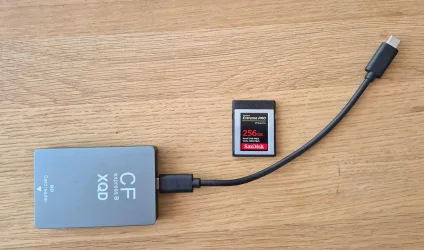
Usb-läsare.webp
 

My Computer

System One

  • OS
    Windows 11
    Computer type
    Laptop
    Manufacturer/Model
    HP
Have you confirmed the reader works on another pc?

If not, the reader probably needs replacing.
 

My Computer

System One

  • OS
    Windows 11 Pro + Win11 Canary VM.
    Computer type
    Laptop
    Manufacturer/Model
    ASUS Zenbook 14
    CPU
    I9 13th gen i9-13900H 2.60 GHZ
    Motherboard
    Yep, Laptop has one.
    Memory
    16 GB soldered
    Graphics Card(s)
    Integrated Intel Iris XE
    Sound Card
    Realtek built in
    Monitor(s) Displays
    laptop OLED screen
    Screen Resolution
    2880x1800 touchscreen
    Hard Drives
    1 TB NVME SSD (only weakness is only one slot)
    PSU
    Internal + 65W thunderbolt USB4 charger
    Case
    Yep, got one
    Cooling
    Stella Artois (UK pint cans - 568 ml) - extra cost.
    Keyboard
    Built in UK keybd
    Mouse
    Bluetooth , wireless dongled, wired
    Internet Speed
    900 mbs (ethernet), wifi 6 typical 350-450 mb/s both up and down
    Browser
    Edge
    Antivirus
    Defender
    Other Info
    TPM 2.0, 2xUSB4 thunderbolt, 1xUsb3 (usb a), 1xUsb-c, hdmi out, 3.5 mm audio out/in combo, ASUS backlit trackpad (inc. switchable number pad)

    Macrium Reflect Home V8
    Office 365 Family (6 users each 1TB onedrive space)
    Hyper-V (a vm runs almost as fast as my older laptop)
I've tried it right now, and it works perfectly with another PC.

Can I restart/reconfigure my USB settings somehow?
 

My Computer

System One

  • OS
    Windows 11
    Computer type
    Laptop
    Manufacturer/Model
    HP
Physically examine CF Card reader contacts for damage, misplacements. Clean the contacts very carefully.
Likewise with the USB-C plugs/sockets.
Rotate USB-C plugs 180 deg. they should work both orientations but sometimes not. Use another USB port if you have one.

Device Manager > Uninstall device. Restart, plug in again and it should install driver again, maybe Device Manager > scan for hardware changes.

If that lot fails then maybe you need a new Card Reader, although that seems unlikely as it works on another PC.
 

My Computer

System One

  • OS
    Windows 11
Since the reader worked fine with another laptop (same card, same cables) I'll try the Device manager.

I will be back soon!
 

My Computer

System One

  • OS
    Windows 11
    Computer type
    Laptop
    Manufacturer/Model
    HP
Did you try a simple restart of your pc?

Restart not shutdown and back on.
 

My Computers

System One System Two

  • OS
    Windows 11 Pro
    Computer type
    PC/Desktop
    Manufacturer/Model
    Custom Built
    CPU
    Ryzen 7 5700 X3D
    Motherboard
    MSI MPG B550 GAMING PLUS
    Memory
    64 GB DDR4 3600mhz Gskill Ripjaws V
    Graphics Card(s)
    RTX 4070 Super , 12GB VRAM Asus EVO Overclock
    Monitor(s) Displays
    Gigabyte M27Q (rev. 2.0) 2560 x 1440 @ 170hz HDR
    Hard Drives
    2TB Samsung nvme ssd
    4TB Western Digital nvme ssd
    PSU
    CORSAIR RMx SHIFT Series™ RM750x 80 PLUS Gold Fully Modular ATX Power Supply
    Case
    CORSAIR 3500X ARGB Mid-Tower ATX PC Case – Black
    Cooling
    ID-COOLING FROSTFLOW X 240 CPU Water Cooler
    Keyboard
    Logitech G213
    Mouse
    Logitech G203
    Internet Speed
    1.2gbps Fiber 😎
  • Operating System
    Chrome OS
    Computer type
    Laptop
    Manufacturer/Model
    HP Chromebook
    CPU
    Intel Pentium Quad Core
    Memory
    4GB LPDDR4
    Monitor(s) Displays
    14 Inch HD SVA anti glare micro edge display
    Hard Drives
    64 GB emmc
Restart didn't help - and neither did uninstalling anything USB-related from the Device manager.

Do you have any further advice ? The card reader is brand new, it worked fine just a few days ago, and works with another laptop.
 

My Computer

System One

  • OS
    Windows 11
    Computer type
    Laptop
    Manufacturer/Model
    HP
Well, now it works! After reinstalling the USB drivers, I tried flipping the USB cable 180 degrees, and this time I can access the photos. Shouldn't these things be a little more simple to use?

Thanks for all the answers; I'll mark this discussion as solved.
 

My Computer

System One

  • OS
    Windows 11
    Computer type
    Laptop
    Manufacturer/Model
    HP
And now the same thing happened again! Do I really need to uninstall all USB drivers every day?
 

My Computer

System One

  • OS
    Windows 11
    Computer type
    Laptop
    Manufacturer/Model
    HP
Back
Top Bottom


