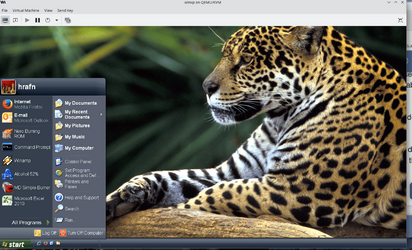
User Interface (two years later)


Always Why

Well-known member
Member
VIP
Local time
6:27 PM
Posts
114
OS
W11 Home
In the beginning I did not like W11, now I do.

After several reinstalls since 2021 and practicing with W11 features, I have come to the conclusion that it's - simply nice!

How do people feel two-three years later about Windows 11?
 

Attachments
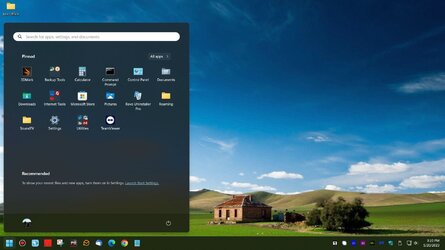
  • W11 UI.jpg
    W11 UI.jpg
    139.9 KB · Views: 4
Last edited:

My Computer My Computer

At a glance

W11 HomeIntel Core i9-13900KFDDR5 32GB (2x16GB) DDR5 4600RTX 4080 12GB
OS
W11 Home
Computer type
PC/Desktop
Manufacturer/Model
Build Date: March 2022
CPU
Intel Core i9-13900KF
Motherboard
ASUS Prime 690-P
Memory
DDR5 32GB (2x16GB) DDR5 4600
Graphics Card(s)
RTX 4080 12GB
Screen Resolution
1920 x 1080 (scaled 125%) (144Mhz Refresh Rate)
PSU
1000 Watt
Cooling
AIO
Internet Speed
1GB
Browser
Chrome and Edge
Antivirus
Malwarebytes Premium
I like it, and I'm optimistic about its future development. It is, after all, a work in progress.
 

My Computers My Computers

  • At a glance

    11 Pro 24H2 26100.2454i7-9700 @ 3.00GHz32GBDDR4 @ 2666MHzIntel HD 630 Graphics onboard
    OS
    11 Pro 24H2 26100.2454
    Computer type
    PC/Desktop
    Manufacturer/Model
    Lenovo ThinkCentre M920S SFF
    CPU
    i7-9700 @ 3.00GHz
    Motherboard
    Lenovo 3132
    Memory
    32GBDDR4 @ 2666MHz
    Graphics Card(s)
    Intel HD 630 Graphics onboard
    Sound Card
    Realtek HD Audio
    Monitor(s) Displays
    LG E2442
    Screen Resolution
    1920x1080
    Hard Drives
    1 x Samsung 970 EVO PLUS 500GB NVMe SSD, 1 x WD_BLACK SN770
    250GB NVMe SSD (OS and programs), 1 x WD_BLACK SN770
    500GB NVMe SSD (Data)
    Case
    Lenovo SFF
    Keyboard
    Cherry Stream TKL JK-8600US-2 Wired
    Mouse
    LogiTech M510 wireless
    Internet Speed
    Fast (for fixed wireless!)
    Browser
    Chrome, sometimes Firefox
    Antivirus
    Malwarebytes Premium & Defender (working together beautifully!)
  • At a glance

    11 Pro 24H2 26100.2454i5-8400 @ 2.80GHz32GB DDR4 @ 2600MHzIntel HD 630 Graphics onboard
    Operating System
    11 Pro 24H2 26100.2454
    Computer type
    PC/Desktop
    Manufacturer/Model
    Lenovo ThinkCentre M920S SFF
    CPU
    i5-8400 @ 2.80GHz
    Motherboard
    Lenovo 3132
    Memory
    32GB DDR4 @ 2600MHz
    Graphics card(s)
    Intel HD 630 Graphics onboard
    Sound Card
    Realtek High Definition Audio onboard
    Monitor(s) Displays
    LG FULL HD (1920x1080@59Hz)
    Screen Resolution
    1920 x 1080
    Hard Drives
    1 x Samsung 970 EVO PLUS NVMe; 1 x Samsung 980 NVMe SSD
    Case
    Lenovo Think Centre SFF
    Keyboard
    Cherry Stream TKL JK-8600US-2 Wired
    Mouse
    LogiTech M510 wireless
    Internet Speed
    Fast (for fixed wireless!)
    Browser
    Chrome
    Antivirus
    Malwarebytes Premium and MS Defender, beautiful together
It's fine, then again I liked it from the first Insider release.
 

My Computers My Computers

  • At a glance

    Win 11 ProAMD Ryzen™ 7 7730U24GB Dual-Channel DDR4 @ 1596MHz (22-22-22-52)512MB ATI AMD Radeon Graphics (ASUStek Comput...
    OS
    Win 11 Pro
    Computer type
    Laptop
    Manufacturer/Model
    ASUS Vivobook
    CPU
    AMD Ryzen™ 7 7730U
    Motherboard
    M1605YA
    Memory
    24GB Dual-Channel DDR4 @ 1596MHz (22-22-22-52)
    Graphics Card(s)
    512MB ATI AMD Radeon Graphics (ASUStek Computer Inc)
    Monitor(s) Displays
    Generic PnP Monitor (1920x1200@60Hz) - P1 PLUS (1920x1080@59Hz)
    Screen Resolution
    1920 X 1200
    Hard Drives
    953GB Western Digital WD
    PSU
    45 Watts
    Mouse
    Lenovo Bluetooth.
    Internet Speed
    500 Mbps
    Browser
    Edge
    Antivirus
    Defender
  • At a glance

    Windows 11AMD Ryzen 7 5800H / 3.2 GHz32 GB DDR4 SDRAM 3200 MHzNVIDIA GeForce RTX 3060 6 GB GDDR6 SDRAM
    Operating System
    Windows 11
    Computer type
    Laptop
    Manufacturer/Model
    ACER NITRO
    CPU
    AMD Ryzen 7 5800H / 3.2 GHz
    Motherboard
    CZ Scala_CAS (FP6)
    Memory
    32 GB DDR4 SDRAM 3200 MHz
    Graphics card(s)
    NVIDIA GeForce RTX 3060 6 GB GDDR6 SDRAM
    Sound Card
    Realtek Audio. NVIDIA High Definition Audio
    Monitor(s) Displays
    15.6" LED backlight 1920 x 1080 (Full HD) 144 Hz
    Screen Resolution
    1920 x 1080 (Full HD)
    Hard Drives
    Samsung 970 Evo Plus 2TB NVMe M.2
    PSU
    180 Watt, 19.5 V
    Mouse
    Lenovo Bluetooth
    Internet Speed
    500 Mbps
    Browser
    Edge
    Antivirus
    Defender
I also like Windows 11. I never did feel the need to run any of the apps and hacks you see folks using to try to make Windows 11 look and act like previous versions of Windows.
 

My Computers My Computers

  • At a glance

    Windows 11 ProIntel Series 3 Core Ultra X9 388H64GB LPDDR5x 9600 MT/sIntel Arc graphics B390 Panther Lake
    OS
    Windows 11 Pro
    Computer type
    Laptop
    Manufacturer/Model
    Dell XPS 16 DA16260
    CPU
    Intel Series 3 Core Ultra X9 388H
    Memory
    64GB LPDDR5x 9600 MT/s
    Graphics Card(s)
    Intel Arc graphics B390 Panther Lake
    Monitor(s) Displays
    16" 3.2K Tandem OLED Infinity Edge
    Screen Resolution
    3200 x 2000 16:10 236 PPI
    Hard Drives
    1 Terabyte M.2 PCIe NVMe SSD
    Case
    Black Anodized Aluminum
    Cooling
    Vapor Chamber Cooling
    Mouse
    None
    Internet Speed
    942 Mbps Netgear Mesh + 2 Satellites
    Browser
    Microsoft Edge (Chromium)
    Antivirus
    Windows Security (Defender)
    Other Info
    NPU delivering 67 TOPS
    Microsoft 365 subscription
    Microsoft Office 365
    Microsoft OneDrive 1TB Cloud
    Microsoft Visual Studio
    Microsoft Visual Studio Code
    Microsoft Sysinternals Suite
    Microsoft BitLocker
    Microsoft Copilot
    Dell Support Assist
    Dell Command | Update
    Macrium Reflect X subscription
    1Password Password Manager
    Amazon Kindle for PC
    Lightroom/Photoshop subscription
    Interactive Brokers Trader Workstation
  • At a glance

    Windows 11 ProSnapdragon® X Elite (12 Core) with Hexagon NP...32GB LPDDR5x 8448 MT/sIntegrated Adreno GPU
    Operating System
    Windows 11 Pro
    Computer type
    Laptop
    Manufacturer/Model
    Microsoft Surface Laptop 7
    CPU
    Snapdragon® X Elite (12 Core) with Hexagon NPU delivering 45 TOPS
    Memory
    32GB LPDDR5x 8448 MT/s
    Graphics card(s)
    Integrated Adreno GPU
    Sound Card
    Omnisonic speakers with Dolby Atmos spatial sound
    Monitor(s) Displays
    13.8″ PixelSense Flow touchscreen 120 Hz 600 NIT
    Screen Resolution
    2304 × 1536 (201 PPI), 3:2 aspect ratio
    Hard Drives
    1 TB PCIe NVMe Gen 4 SSD
    Case
    Black Anodized Aluminum
    Cooling
    Vapor Chamber Cooling
    Mouse
    None
    Internet Speed
    942 Mbps Netgear Mesh + 2 Satellites
    Browser
    Microsoft Edge (Chromium)
    Antivirus
    Windows Security (Defender)
    Other Info
    Microsoft 365 subscription (Office)
    Microsoft Office 365
    Microsoft OneDrive 1TB Cloud
    Microsoft Visual Studio 2026
    Microsoft Visual Studio Code
    Interactive Brokers Trader Workstation
    Lightroom/Photoshop subscription
    1Password Password Manager
    Microsoft Sysinternals
    Amazon Kindle for PC
    Microsoft BitLocker
    Microsoft Copilot
its good but so so so so much inconsistencies at UI elements still, the account borders of account icon on apps from exaple sucks take at clock app for example.... the weather app has a blue titlebar that others looks the same....and etc... needs so much work and care windows 11 are good but so much rushed....
 

My Computer My Computer

At a glance

Windows 11 22H2Intel 10900K64GB CORSAIR VENGEANCE PRO RGBEVGA 3080 FTW3 ULTRA GAMING
OS
Windows 11 22H2
Computer type
PC/Desktop
Manufacturer/Model
IM A PC TECHNICIAN SO... YEAH...
CPU
Intel 10900K
Motherboard
ASUS Z490 MAXIMUS XI HERO
Memory
64GB CORSAIR VENGEANCE PRO RGB
Graphics Card(s)
EVGA 3080 FTW3 ULTRA GAMING
Sound Card
TOPPING D90SE - TOPPING A90
Monitor(s) Displays
HP OMEN X 27 - LG 55CX
Screen Resolution
2K - 4K
Hard Drives
NVME CORSAIR MP600 Pro XT 1TB
PSU
CORSAIR HX 850W
Case
CORSAIR Crystal Series Black 680X RGB
Cooling
CORSAIR iCUE H100i Elite Capellix
Keyboard
STEELSERIES APEX 7 TKL
Mouse
STEELSERIES RIVAL 710
Internet Speed
200 MBPS
Browser
MS EDGE
Antivirus
NONE -NEVER NEEDED-
It is, after all, a work in progress.
That can be said about all operating systems. Tech doesn't sit by idly. :-) As for the user interface, I have to admit that I wasn't completely satisfied with it until I started using StartAllBack to make a few minor changes.
 

My Computers My Computers

  • At a glance

    Windows 11 Pro 25H2Intel Core i7-10700K16GB (8GB PC4-19200 DDR4 SDRAM x2)NVIDIA GeForce GTX 1050 TI
    OS
    Windows 11 Pro 25H2
    Computer type
    PC/Desktop
    Manufacturer/Model
    PowerSpec B746
    CPU
    Intel Core i7-10700K
    Motherboard
    ASRock Z490 Phantom Gaming 4/ax
    Memory
    16GB (8GB PC4-19200 DDR4 SDRAM x2)
    Graphics Card(s)
    NVIDIA GeForce GTX 1050 TI
    Sound Card
    Realtek Audio
    Monitor(s) Displays
    #1. LG ULTRAWIDE 34" #2. AOC Q32G2WG3 32"
    Screen Resolution
    #1. 3440 X 1440 #2. 1920 x 1080
    Hard Drives
    NVMe WDC WDS100T2B0C-00PXH0 1TB
    Samsung SSD 860 EVO 1TB
    PSU
    750 Watts (62.5A)
    Case
    PowerSpec/Lian Li ATX 205
    Keyboard
    Logitech K270
    Mouse
    Logitech M185
    Browser
    Microsoft Edge and Firefox
    Antivirus
    Webroot SecureAnywhere CE 26.1
  • At a glance

    Windows 11 Canary ChannelIntel Core i5-8400 CPU @ 2.80GHz16 MB DDR 4-2666
    Operating System
    Windows 11 Canary Channel
    Computer type
    PC/Desktop
    Manufacturer/Model
    PowerSpec G156
    CPU
    Intel Core i5-8400 CPU @ 2.80GHz
    Motherboard
    AsusTeK Prime B360M-A
    Memory
    16 MB DDR 4-2666
    Monitor(s) Displays
    23" Speptre HDMI 75Hz
    Screen Resolution
    1920x1080
    Hard Drives
    Samsung 970 EVO 500GB NVMe
    Keyboard
    Logitek K270
    Mouse
    Logitek M185
    Browser
    Firefox, Edge and Edge Canary
    Antivirus
    Windows Defender
In the beginning I did not like W11, now I do.

After several reinstalls since 2021 and practicing with W11 features, I have come to the conclusion that it's - simply nice!

How do feel two-three years later about Windows 11?
In October 2021 I upgraded my desktop's hardware so it was fully supported by Windows 11. I then upgraded Windows 10 Pro to Windows 11 Pro. I tried it but didn't like it. On the 10th day I knew time had run out so I made the decision to roll it back to Windows 10 Pro.

Two things happened since then:
  1. I created a Windows 11 virtual machine on my Windows 10 Pro desktop. Doing this allowed me to play around with Windows 11 without having the time pressure to make a decision whether to keep it or not.
  2. I bought a new laptop in October 2022. Since it came with Windows 11 Home I was forced to deal with it learn how to use it. I still like Windows 10 better but I have learned to live with Windows 11. I recently upgraded it to Windows 11 Pro. BTW, The first thing I did was move the Start button over to the left. I found the default center position annoying.
Just because I learned how to use Windows 11 doesn't mean I like it. I still haven't decided whether to try to upgrade the desktop to Windows 11 again.

Note that when I upgraded from Windows 7 to Windows 10 there was some of the same uncertainties. However, the changes were not so drastic as they were with Windows 11. Windows 10 had changes but I soon liked these changes. For this and other reasons I never went back to Windows 7 on any of these computers. BTW, I have a dual-boot of Windows 10 and 7 on a couple computer. Booting to Windows 7 seems strange now because I have learned to like Windows 10 better. Whether I will ever learn to feel that way about Windows 11 is still unknown.

The only thing I liked about Windows 7 are Gadgets. I use desktop gadgets on all my Windows 10 and 11 computers.
 

My Computers My Computers

  • At a glance

    Windows 11 Pro 25H2 (26200.6901)AMD Ryzen 7 6800H with Radeon 680M GPU (486MB...Crucial DDR5-4800 (2400MHz) 32GB (2 x 16GB)NVIDIA RTX 3060 Laptop (6GB RAM)
    OS
    Windows 11 Pro 25H2 (26200.6901)
    Computer type
    Laptop
    Manufacturer/Model
    ASUS TUF Gaming A15 (2022)
    CPU
    AMD Ryzen 7 6800H with Radeon 680M GPU (486MB RAM)
    Memory
    Crucial DDR5-4800 (2400MHz) 32GB (2 x 16GB)
    Graphics Card(s)
    NVIDIA RTX 3060 Laptop (6GB RAM)
    Sound Card
    n/a
    Monitor(s) Displays
    15.6-inch
    Screen Resolution
    1920x1080 300Hz
    Hard Drives
    2 x Samsung 990 Evo Plus (2TB M.2 NVME SSD)
    PSU
    n/a
    Mouse
    Wireless Mouse M510
    Internet Speed
    2100Mbps/300Mbps
    Browser
    Firefox
    Antivirus
    Malwarebytes
  • At a glance

    Windows 11 Pro 25H2 (26200.8246)AMD Ryzen 7 5700X3DG.SKILL Flare X 32GB (2x16GB) DDR4ASUS ROG-STRIX-RTX3060TI-08G-V2-GAMING (RTX 3...
    Operating System
    Windows 11 Pro 25H2 (26200.8246)
    Computer type
    PC/Desktop
    Manufacturer/Model
    Custom build
    CPU
    AMD Ryzen 7 5700X3D
    Motherboard
    ASUS ROG Strix B550-F Gaming WiFi II
    Memory
    G.SKILL Flare X 32GB (2x16GB) DDR4
    Graphics card(s)
    ASUS ROG-STRIX-RTX3060TI-08G-V2-GAMING (RTX 3060-Ti, 8GB RAM)
    Monitor(s) Displays
    Samsung G50D IPS 27"
    Screen Resolution
    1440p/180Hz
    Hard Drives
    SAMSUNG 990 EVO Plus (2TB] M.2 NVME SSD
    SAMSUNG 990 EVO Plus (4TB) M.2 NVME SSD
    PSU
    Corsair RM750x (750 watts)
    Case
    Cooler Master MasterCase 5
    Cooling
    Scythe Mugen 6
    Keyboard
    Logitech K520 (MK540 keyboard/mouse combo)
    Mouse
    Logitech M310 (MK540 keyboard/mouse combo)
    Internet Speed
    2100 Mbps down / 300 Mbps up
    Browser
    Firefox, Edge, Chrome
    Antivirus
    Malwarebytes (Premium)
    Other Info
    ASUS Blu-ray Burner BW-16D1HT (SATA) || Western Digital Easystore 20TB USB 3.0 external hard drive used with Acronis True Image 2025 backup software || HP OfficeJet Pro 6975 Printer/Scanner
I run Windows 11 on an unsupported pc which can also boot into Windows 10 and Linux Mint. I like it for its performance on my pc which I would describe as Silky Smooth. Windows 10 is also great and gets my Smooth rating, as does Linux Mint. I think MS has been smart in allowing unsupported pc’s to run Windows 11 because it allows people all over the world to get a taste of and become familiar with Windows 11. When we consider that there are still many users running much earlier versions of Windows around the world, I don’t think they will be pulling that plug anytime soon. But that’s just a thought, not anything I can say that I know for a fact. But be that as it may, I am just a very basic user of Windows 11 on this pc, and I am amazed at some of the things I read others doing with it on the forum.
 

My Computer My Computer

At a glance

Windows 11/Linux MintIntel Core 2 Duo CPU E8400 @ 3.00 GHz x 28 GBIntel 4 Series Chipset Integrated Graphics Co...
OS
Windows 11/Linux Mint
Computer type
PC/Desktop
Manufacturer/Model
Dell Optiplex 960
CPU
Intel Core 2 Duo CPU E8400 @ 3.00 GHz x 2
Memory
8 GB
Graphics Card(s)
Intel 4 Series Chipset Integrated Graphics Controller
Monitor(s) Displays
HP x22LED
Hard Drives
Crucial 250 GB SSD, HD 1Tb
its good but so so so so much inconsistencies at UI elements still, the account borders of account icon on apps from exaple sucks take at clock app for example.... the weather app has a blue titlebar that others looks the same....and etc... needs so much work and care windows 11 are good but so much rushed....

Understood. I once had several apps early on to make the UI look and behave better. However after my most recent PC Reset I left all other UI-apps out of the equation and made myself research the internet and find all answers I could. The Taskbar color being black but not using a dark theme was important to me. No registry edits needed, just instructions I found online.

And lots of feedback to the devs! ;-)
 

My Computer My Computer

At a glance

W11 HomeIntel Core i9-13900KFDDR5 32GB (2x16GB) DDR5 4600RTX 4080 12GB
OS
W11 Home
Computer type
PC/Desktop
Manufacturer/Model
Build Date: March 2022
CPU
Intel Core i9-13900KF
Motherboard
ASUS Prime 690-P
Memory
DDR5 32GB (2x16GB) DDR5 4600
Graphics Card(s)
RTX 4080 12GB
Screen Resolution
1920 x 1080 (scaled 125%) (144Mhz Refresh Rate)
PSU
1000 Watt
Cooling
AIO
Internet Speed
1GB
Browser
Chrome and Edge
Antivirus
Malwarebytes Premium
Two steps forward, one step back. It's the things I don't notice that I appreciate the most. Mostly I want an OS that works reliably, which W11 does. I upgraded machines so W11 came with the new machine. Some of the sporadic freezes on my old machine, partly narrowed down to flaky Spotify software, are not an issue on the new machine with W11.

On the other hand, the things I do notice I find very annoying. 1) I want my task bar on the left. 2) I want to cluster pinned icons on the start menu (I'm using Start11 now). 3) I don't want File Explorer Groups. 4) File Explorer top-left has two sets of duplicate pinned folders (?). 5) I don't want all the apps and File Explorer remembering everything I did. 6) Don't want MS OneDrive (I think I managed to disable it). 7) I don't want ads.

I assume I just haven't found the config settings to fix some of these but I appear to be stuck with others.
 

My Computer My Computer

At a glance

Windows 11 ProIntel Core i9-13900KS (6.0 GHz Turbo)64GB DDR5 5200MHz Kingston FURY BeastMSI GeForce RTX 3070 8GB
OS
Windows 11 Pro
Computer type
PC/Desktop
Manufacturer/Model
Digital Storm - custom
CPU
Intel Core i9-13900KS (6.0 GHz Turbo)
Motherboard
ASUS ROG Maximus Z790 Hero
Memory
64GB DDR5 5200MHz Kingston FURY Beast
Graphics Card(s)
MSI GeForce RTX 3070 8GB
Sound Card
Integrated
Monitor(s) Displays
1 (Dell)
Screen Resolution
43" 4K 100% scale
Hard Drives
1TB SSD m.2 / 12TB HDD 3.5" / 2TB SSD m.2 / 4TB SSD 2.5"
PSU
850W Corsair RMx Series (Modular) (80 Plus Gold)
Case
Velox
Cooling
liquid AIO triple fan
Keyboard
Corsair K70 MX-Blue
Mouse
Razer V2 20Kdpi gaming
Internet Speed
1.2Gbps
Browser
Firefox
Antivirus
Defender
I still prefer any way you cut it is that in Linux is that the GUI and video driver(s) are independent from the base kernel-- as well as the whole thing being open source so no problem for people who know what they are doing to be able to customise the GUI etc.

Linux Mint in some ways looks more "Windows than Windows" and anybody running whatever flavour of Windows could run almost any distro of Linux with a KDE desktop without noticing too much change.

My aggro with windows is that some of the GUI now looks really ancient e.g the whole menu system and that dreadful file explorer - and there's not a lot people can do to change it. Just look at XP -- infinitely better with Lunar black theme.

Screenshot_20230520_230243.png
cheers

jimbo
 

My Computer My Computer

At a glance

Windows XP,11 Linux Fedora Rawhide pre-releas...2 X Intel i7
OS
Windows XP,11 Linux Fedora Rawhide pre-release 45
Computer type
PC/Desktop
CPU
2 X Intel i7
Screen Resolution
4KUHD X 2
I'm getting along with W11, but I'll never understand nor appreciate Microsoft's fascination with the concept of "change just for the sake of change". It would be nice if they allowed some choice with some of those "changes for the sake of change" but MS doesn't see it that way.
 

My Computer My Computer

At a glance

Windows 11 Pro 64 bitIntel 12th Gen I7 - 12700H16G RamNVIDIA RTX A1000
OS
Windows 11 Pro 64 bit
Computer type
Laptop
Manufacturer/Model
HP Zbook Power 15.6 G9
CPU
Intel 12th Gen I7 - 12700H
Memory
16G Ram
Graphics Card(s)
NVIDIA RTX A1000
Screen Resolution
1920x1080
Hard Drives
Samsung SSD 512G
Browser
Chrome
Other Info
Kensington SD5700T Thunderbolt Dock
I think my laptop doesn't like me complaining about Windows 11. My mouse had been working fine since I bought it three years ago but it started going haywire during my last post. At first the cursor flickered but then it started jumping all over the screen. The text in the post changed in size as it zoomed in and out. :eek1:

I had to shake the mouse a few times before it came to its senses. :-)
 

My Computers My Computers

  • At a glance

    Windows 11 Pro 25H2 (26200.6901)AMD Ryzen 7 6800H with Radeon 680M GPU (486MB...Crucial DDR5-4800 (2400MHz) 32GB (2 x 16GB)NVIDIA RTX 3060 Laptop (6GB RAM)
    OS
    Windows 11 Pro 25H2 (26200.6901)
    Computer type
    Laptop
    Manufacturer/Model
    ASUS TUF Gaming A15 (2022)
    CPU
    AMD Ryzen 7 6800H with Radeon 680M GPU (486MB RAM)
    Memory
    Crucial DDR5-4800 (2400MHz) 32GB (2 x 16GB)
    Graphics Card(s)
    NVIDIA RTX 3060 Laptop (6GB RAM)
    Sound Card
    n/a
    Monitor(s) Displays
    15.6-inch
    Screen Resolution
    1920x1080 300Hz
    Hard Drives
    2 x Samsung 990 Evo Plus (2TB M.2 NVME SSD)
    PSU
    n/a
    Mouse
    Wireless Mouse M510
    Internet Speed
    2100Mbps/300Mbps
    Browser
    Firefox
    Antivirus
    Malwarebytes
  • At a glance

    Windows 11 Pro 25H2 (26200.8246)AMD Ryzen 7 5700X3DG.SKILL Flare X 32GB (2x16GB) DDR4ASUS ROG-STRIX-RTX3060TI-08G-V2-GAMING (RTX 3...
    Operating System
    Windows 11 Pro 25H2 (26200.8246)
    Computer type
    PC/Desktop
    Manufacturer/Model
    Custom build
    CPU
    AMD Ryzen 7 5700X3D
    Motherboard
    ASUS ROG Strix B550-F Gaming WiFi II
    Memory
    G.SKILL Flare X 32GB (2x16GB) DDR4
    Graphics card(s)
    ASUS ROG-STRIX-RTX3060TI-08G-V2-GAMING (RTX 3060-Ti, 8GB RAM)
    Monitor(s) Displays
    Samsung G50D IPS 27"
    Screen Resolution
    1440p/180Hz
    Hard Drives
    SAMSUNG 990 EVO Plus (2TB] M.2 NVME SSD
    SAMSUNG 990 EVO Plus (4TB) M.2 NVME SSD
    PSU
    Corsair RM750x (750 watts)
    Case
    Cooler Master MasterCase 5
    Cooling
    Scythe Mugen 6
    Keyboard
    Logitech K520 (MK540 keyboard/mouse combo)
    Mouse
    Logitech M310 (MK540 keyboard/mouse combo)
    Internet Speed
    2100 Mbps down / 300 Mbps up
    Browser
    Firefox, Edge, Chrome
    Antivirus
    Malwarebytes (Premium)
    Other Info
    ASUS Blu-ray Burner BW-16D1HT (SATA) || Western Digital Easystore 20TB USB 3.0 external hard drive used with Acronis True Image 2025 backup software || HP OfficeJet Pro 6975 Printer/Scanner
A couple changes just for the sake of change that I dislike is the right click menu changes and the task bar changes. In some cases they actually added a step instead of getting easier or quicker. Just MS nonsense. Change just for the sake of change, but not for the better.
 
Last edited:

My Computer My Computer

At a glance

Windows 11 Pro 64 bitIntel 12th Gen I7 - 12700H16G RamNVIDIA RTX A1000
OS
Windows 11 Pro 64 bit
Computer type
Laptop
Manufacturer/Model
HP Zbook Power 15.6 G9
CPU
Intel 12th Gen I7 - 12700H
Memory
16G Ram
Graphics Card(s)
NVIDIA RTX A1000
Screen Resolution
1920x1080
Hard Drives
Samsung SSD 512G
Browser
Chrome
Other Info
Kensington SD5700T Thunderbolt Dock
How do feel two-three years later about Windows 11?
For the most part, it's okay..., there's still a few things I don't care for, but..., it's growin on me! :cool:
 

My Computers My Computers

  • At a glance

    Windows 11 Pro
    OS
    Windows 11 Pro
    Computer type
    PC/Desktop
    Manufacturer/Model
    ASUS ROG Strix
  • At a glance

    Windows 11 Pro
    Operating System
    Windows 11 Pro
    Computer type
    Laptop
    Manufacturer/Model
    ASUS VivoBook
  • ASUS VivoBook 'Lite' ~ Windows 11 Home
I enjoyed it from the first ever dev build launch, Some issues along the way ofc but in general i like it as much as i liked 10 and 7 if not more
 

My Computer My Computer

At a glance

11[email protected]Viper Steelseries 32gb@ 3600mhzGigabyte 2070 Super 8GB, +200 core + 600 memory
OS
11
Computer type
PC/Desktop
Manufacturer/Model
Custom
CPU
[email protected]
Motherboard
Gigabyte Gaming X Z490
Memory
Viper Steelseries 32gb@ 3600mhz
Graphics Card(s)
Gigabyte 2070 Super 8GB, +200 core + 600 memory
Monitor(s) Displays
ASUS 4k HDR, Two 1080p Benq and Samsung
Screen Resolution
3840x2160/2560x1440/1920x1080
Hard Drives
Adata XPG SX8200 PRO 1tb
Samsung EVO 870 500GB
PSU
Corsair RX 650
Case
NZXT h510
Cooling
CM HYPER 212 RGB
Keyboard
Razer Ornata Chroma
Mouse
Steelseries Rival 710
I see very little difference between 11 an 10
 

My Computers My Computers

  • At a glance

    Windows 11 25H2 26200.7705Intel core I7 670032gbytes DDR4 1066mhz dualnvidia GT730
    OS
    Windows 11 25H2 26200.7705
    Computer type
    PC/Desktop
    Manufacturer/Model
    Dell xps8910
    CPU
    Intel core I7 6700
    Motherboard
    OWPMFG Z170 Skylake
    Memory
    32gbytes DDR4 1066mhz dual
    Graphics Card(s)
    nvidia GT730
    Sound Card
    Nvidia GK 208
    Monitor(s) Displays
    Dell del40e8
    Screen Resolution
    1920X1080
    Hard Drives
    Intel M.2 512G NVME / Samsung SSD 850 250G / Toshiba 1TB / WD 1TB
    PSU
    450W
    Case
    Mid
    Cooling
    Standard
    Keyboard
    Wired Perixx
    Mouse
    Logitech wireless MX Master
    Internet Speed
    150 Mbs Starlink
    Browser
    Firefox and Edge
    Antivirus
    Windows defender
  • At a glance

    Windows 11 Pro 25H2 26200.6584Intel Celeron N4500 @ 1.10 GHz4.00 GBOn board
    Operating System
    Windows 11 Pro 25H2 26200.6584
    Computer type
    Laptop
    Manufacturer/Model
    Asus BR1100CKA
    CPU
    Intel Celeron N4500 @ 1.10 GHz
    Motherboard
    Asustek
    Memory
    4.00 GB
    Graphics card(s)
    On board
    Sound Card
    On board
    Monitor(s) Displays
    standard
    Screen Resolution
    1366x768
    Hard Drives
    Crucial 500Gb NVME M.2 SSD / 58GB Factory SSD
    Case
    Laptop
    Cooling
    Heatsink
    Keyboard
    Builtin
    Mouse
    Touchpad
    Internet Speed
    25mbs/Viasat
    Browser
    Edge/Firefox
    Antivirus
    Windows
I have been using W11 since December 2021, when it was offered to me. For the most part, it seems to work just fine. A little bit different than W10, but mostly the same. All of the software that I have brought up through the years, still operates. There are, however, some changes that I find annoying.

For example the clock that sits in the lower right of my screen. The time/date display is fine. The issue is when you click on it. I get a calendar and an empty Notification window. Once every couple of days I get an actual notice, but until then, why am I seeing a empty window? Then there is the calendar itself. It doesn't seem to matter the actual date, but it highlights the next month. My concern is my position in the current month, not next month. And, I feel that that "Focus" thing should be removable. I don't need it but it's in my face all the time.

Of course, there are thing that I really like. Like the tabbed Explorer window. I always have 3 or 4 file systems opened and the new Explorer helps keep the number of windows to a minimum.
 

My Computers My Computers

  • At a glance

    Windows 11 Home, 25H2, Latest OS BuildIntel(R) Core(TM) i3-8145U CPU @ 2.10GHz 2.30...8GB
    OS
    Windows 11 Home, 25H2, Latest OS Build
    Computer type
    Laptop
    Manufacturer/Model
    HP 15-dw0xx
    CPU
    Intel(R) Core(TM) i3-8145U CPU @ 2.10GHz 2.30 GHz
    Memory
    8GB
    Screen Resolution
    1366 x 768
    Hard Drives
    930 GB
    Keyboard
    Built In
    Mouse
    Wireless Logitech M325S
    Browser
    Chrome 139.0.7258.128
    Antivirus
    Windows Defender
    Other Info
    Cygwin64
  • At a glance

    Windows 10 Home, Version 22H2, Build19045.3693AMD E-300 with Radeon HD Graphics 1.30 GHz10GBRadeon HD Graphics 1.30 GHz
    Operating System
    Windows 10 Home, Version 22H2, Build19045.3693
    Computer type
    PC/Desktop
    Manufacturer/Model
    HP Pavilion
    CPU
    AMD E-300 with Radeon HD Graphics 1.30 GHz
    Memory
    10GB
    Graphics card(s)
    Radeon HD Graphics 1.30 GHz
    Sound Card
    Realtek
    Monitor(s) Displays
    15"
    Screen Resolution
    1280 x 1024
    Hard Drives
    700 GB
    Keyboard
    Wireless
    Mouse
    Wireless
    Browser
    Chrome
    Antivirus
    Windows Defender
    Other Info
    This computer is connected to my IC-735 radio.
I think my laptop doesn't like me complaining about Windows 11.
I'm glad my computers don't have a problem with me complaining about the Dev builds. I have complained so much that they probably would refuse to boot. :-)
 
Last edited:

My Computers My Computers

  • At a glance

    Windows 11 Pro 25H2Intel Core i7-10700K16GB (8GB PC4-19200 DDR4 SDRAM x2)NVIDIA GeForce GTX 1050 TI
    OS
    Windows 11 Pro 25H2
    Computer type
    PC/Desktop
    Manufacturer/Model
    PowerSpec B746
    CPU
    Intel Core i7-10700K
    Motherboard
    ASRock Z490 Phantom Gaming 4/ax
    Memory
    16GB (8GB PC4-19200 DDR4 SDRAM x2)
    Graphics Card(s)
    NVIDIA GeForce GTX 1050 TI
    Sound Card
    Realtek Audio
    Monitor(s) Displays
    #1. LG ULTRAWIDE 34" #2. AOC Q32G2WG3 32"
    Screen Resolution
    #1. 3440 X 1440 #2. 1920 x 1080
    Hard Drives
    NVMe WDC WDS100T2B0C-00PXH0 1TB
    Samsung SSD 860 EVO 1TB
    PSU
    750 Watts (62.5A)
    Case
    PowerSpec/Lian Li ATX 205
    Keyboard
    Logitech K270
    Mouse
    Logitech M185
    Browser
    Microsoft Edge and Firefox
    Antivirus
    Webroot SecureAnywhere CE 26.1
  • At a glance

    Windows 11 Canary ChannelIntel Core i5-8400 CPU @ 2.80GHz16 MB DDR 4-2666
    Operating System
    Windows 11 Canary Channel
    Computer type
    PC/Desktop
    Manufacturer/Model
    PowerSpec G156
    CPU
    Intel Core i5-8400 CPU @ 2.80GHz
    Motherboard
    AsusTeK Prime B360M-A
    Memory
    16 MB DDR 4-2666
    Monitor(s) Displays
    23" Speptre HDMI 75Hz
    Screen Resolution
    1920x1080
    Hard Drives
    Samsung 970 EVO 500GB NVMe
    Keyboard
    Logitek K270
    Mouse
    Logitek M185
    Browser
    Firefox, Edge and Edge Canary
    Antivirus
    Windows Defender
For example the clock that sits in the lower right of my screen. The time/date display is fine. The issue is when you click on it. I get a calendar and an empty Notification window.

I consider that annoying as well. When we left-click the date and time it should show us settings for each. Yes we can right-click it and make changes but one left click giving us nothing is silly. :geek:

I should point out that I have all notifications turned off.
 

Attachments

  • clicking time.jpg
    clicking time.jpg
    16.6 KB · Views: 4
Last edited:

My Computer My Computer

At a glance

W11 HomeIntel Core i9-13900KFDDR5 32GB (2x16GB) DDR5 4600RTX 4080 12GB
OS
W11 Home
Computer type
PC/Desktop
Manufacturer/Model
Build Date: March 2022
CPU
Intel Core i9-13900KF
Motherboard
ASUS Prime 690-P
Memory
DDR5 32GB (2x16GB) DDR5 4600
Graphics Card(s)
RTX 4080 12GB
Screen Resolution
1920 x 1080 (scaled 125%) (144Mhz Refresh Rate)
PSU
1000 Watt
Cooling
AIO
Internet Speed
1GB
Browser
Chrome and Edge
Antivirus
Malwarebytes Premium
Back
Top Bottom